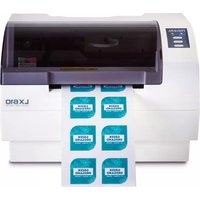
LX610 - Label printer PRIMERA - Free user manual and instructions
Find the device manual for free LX610 PRIMERA in PDF.


Pick your language and provide your email: we'll send you a specifically translated version.
| Product Type | Label Printer |
| Brand | Primera |
| Model | LX610 |
| Dimensions (W x D x H) | 200 x 200 x 200 mm |
| Weight | 4 kg |
| Power Supply | AC adapter, 100-240 V, 50/60 Hz |
| Print Technology | Thermal Transfer |
| Resolution | 203 dpi |
| Print Speed | Up to 4 inches per second |
| Max Label Width | 4 inches (108 mm) |
| Connectivity | USB 2.0 |
| Suitable Media | Roll-fed labels, continuous media, fanfold |
| Media Thickness | 0.08 to 0.25 mm |
| Cleaning | Clean exterior with dry cloth; use cleaning card for printhead |
| Safety | Do not expose to moisture; use only supplied power adapter |
| Spare Parts | Printhead, rollers, power adapter available from Primera |
| Reparability | Replaceable printhead and rollers; user-replaceable parts |
Frequently Asked Questions - LX610 PRIMERA
How do I load labels into the Primera LX610?
Open the top cover, insert the label roll onto the media holder, and feed the label through the guide until it reaches the printhead. Then close the cover.
What type of labels can I use with this printer?
The LX610 supports thermal transfer labels, including paper, polyester, and polypropylene, in widths up to 4 inches.
How do I install the ribbon?
Open the top cover, place the ribbon roll on the supply spindle, route it through the printhead, and attach it to the take-up spindle.
Why is my printer not printing?
Check that the printer is powered on, the USB cable is connected, and the label and ribbon are correctly installed. Also verify that the printer driver is installed.
How do I clean the printhead?
Use a cleaning card or a lint-free cloth with isopropyl alcohol. Gently wipe the printhead from left to right.
What software is compatible with the LX610?
The printer works with most label design software, including Primera's own LabelMark and NiceLabel. It is also compatible with Windows and macOS.
Can I print without a ribbon?
No, the LX610 is a thermal transfer printer and requires a ribbon for printing. Direct thermal is not supported.
How do I adjust the label gap sensor?
The sensor automatically detects gaps between labels. If issues occur, you can recalibrate via the printer driver or use the Gap calibration in the software.
What is the maximum print speed?
The maximum print speed is 4 inches per second at 203 dpi resolution.
Where can I find the user manual?
The user manual can be downloaded for free from the Primera website or from notice-facile.com in PDF format.
User questions about LX610 PRIMERA
0 question about this device. Answer the ones you know or ask your own.
Ask a new question about this device
No questions yet. Be the first to ask one.
Download the instructions for your Label printer in PDF format for free! Find your manual LX610 - PRIMERA and take your electronic device back in hand. On this page are published all the documents necessary for the use of your device. LX610 by PRIMERA.
USER MANUAL LX610 PRIMERA
Manual assistant
Powered by Anthropic
Waiting for your message
Product information
Brand : PRIMERA
Model : LX610
Category : Label printer