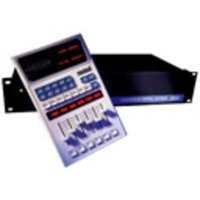
300L - Effets audio numériques LEXICON - Free user manual and instructions
Find the device manual for free 300L LEXICON in PDF.


Pick your language and provide your email: we'll send you a specifically translated version.
| Product Type | Audio Processor / Effects Unit |
| Brand | Lexicon |
| Model | 300L |
| Form Factor | Rack-mountable, 1U |
| Dimensions (H x W x D) | 44 x 483 x 305 mm (1.73 x 19.0 x 12.0 in) |
| Weight | 4.5 kg (9.9 lbs) |
| Power Supply | 100-240 V AC, 50-60 Hz, 30 W |
| Audio Inputs | 2 x XLR balanced, 2 x 1/4" TRS balanced/unbalanced |
| Audio Outputs | 2 x XLR balanced, 2 x 1/4" TRS balanced |
| Digital I/O | 1 x AES/EBU XLR, 1 x S/PDIF coaxial |
| MIDI I/O | 5-pin DIN input / output / thru |
| Sample Rate | 44.1 kHz, 48 kHz, 96 kHz |
| Bit Depth | 24-bit A/D and D/A conversion |
| Effects Processors | Reverb, delay, chorus, flanger, and more |
| Display | 2-line x 20-character backlit LCD |
| Remote Control | Optional footswitch or MIDI controller |
| Cleaning | Use a dry soft cloth; avoid solvents |
| Safety | Do not expose to rain or moisture; use grounded outlet |
| Spare Parts / Repairability | Contact authorized service center for parts |
| General Info | Designed for studio and live sound applications |
Frequently Asked Questions - 300L LEXICON
How do I reset the Lexicon 300L to factory settings?
To reset to factory defaults, press and hold the BYPASS button while powering on the unit. Continue holding until the display shows "Factory Reset". Confirm by pressing STORE.
Can I use the 300L with a guitar?
Yes, you can connect a guitar using a DI box or a direct input. The 300L accepts line-level signals, so an instrument-level signal may need preamplification.
What is the maximum input level?
The maximum input level is +24 dBu for balanced inputs. For unbalanced inputs, it is +18 dBu. Exceeding these levels may cause clipping.
How do I update the firmware?
Firmware updates are performed via MIDI SysEx. Connect a MIDI interface to your computer and use dedicated software from the Lexicon website. Follow the instructions provided with the update file.
Can I control the 300L remotely via MIDI?
Yes, the 300L responds to MIDI continuous controllers and program change messages. You can map parameters to MIDI CC numbers. Refer to the MIDI implementation chart in the manual.
What are the dimensions and weight?
The Lexicon 300L is 1U rack-mountable: 44 mm high, 483 mm wide, 305 mm deep. It weighs approximately 4.5 kg (9.9 lbs).
Is there a way to bypass the effects without muting the audio?
Yes, press the BYPASS button on the front panel. This will route the input directly to the output, bypassing the effects while maintaining audio continuity.
How do I clean the front panel and display?
Use a soft, dry microfiber cloth to gently wipe the front panel and display. Do not use any liquids, abrasives, or solvents as they may damage the surface.
What is the warranty period?
The Lexicon 300L comes with a standard 2-year limited warranty covering defects in materials and workmanship. Register your product online to activate warranty.
Can I use two 300L units together?
Yes, you can chain two units via analog or digital connections. For stereo operation, set one as left and the other as right. MIDI can sync parameters across units.
User questions about 300L LEXICON
0 question about this device. Answer the ones you know or ask your own.
Ask a new question about this device
No questions yet. Be the first to ask one.
Download the instructions for your Effets audio numériques in PDF format for free! Find your manual 300L - LEXICON and take your electronic device back in hand. On this page are published all the documents necessary for the use of your device. 300L by LEXICON.
USER MANUAL 300L LEXICON

Manual assistant
Powered by Anthropic
Waiting for your message
Product information
Brand : LEXICON
Model : 300L
Category : Effets audio numériques