PCM80 - Effect machine LEXICON - Free user manual and instructions
Find the device manual for free PCM80 LEXICON in PDF.


| Product Type | Digital Multi-Effects Processor |
| Brand | Lexicon |
| Model | PCM80 |
| Form Factor | 1U Rackmount |
| Dimensions (HxWxD) | 1.75 x 19 x 12 inches (44 x 483 x 305 mm) |
| Weight | Approx. 5.5 kg (12 lbs) |
| Power Supply | 100-240V AC, 50/60 Hz, 30W |
| Audio Channels | Stereo In/Out (balanced XLR and 1/4" TRS) |
| Digital I/O | S/PDIF Coaxial and AES/EBU (optional card) |
| Sample Rate | 44.1 kHz / 48 kHz |
| Bit Depth | 24-bit internal processing |
| Effects Algorithms | Reverb, Chorus, Flange, Delay, Pitch, Phase, Tremolo, Rotary, etc. |
| Preset Memory | 200+ factory presets, 128 user presets |
| Control Interface | Front panel with knobs, buttons, and LCD display |
| MIDI | In/Out/Thru, program change and continuous control |
| Bypass | True bypass via relay switching |
| Maintenance | Clean with a dry soft cloth; avoid solvents |
| Safety | Use grounded outlet; do not expose to moisture |
| Spare Parts & Repairability | Contact Lexicon or authorized service centers |
| General Information | Professional-grade effect processor for studio and live use |
Frequently Asked Questions - PCM80 LEXICON
User questions about PCM80 LEXICON
0 question about this device. Answer the ones you know or ask your own.
Ask a new question about this device
Download the instructions for your Effect machine in PDF format for free! Find your manual PCM80 - LEXICON and take your electronic device back in hand. On this page are published all the documents necessary for the use of your device. PCM80 by LEXICON.
USER MANUAL PCM80 LEXICON
Unpacking and Inspection
After unpacking the Dual FX Algorithm Card, save all packing materials in case you ever need to ship the card. Thoroughly inspect the card and packing materials for signs of damage. Report any shipment damage to the carrier at once; report equipment malfunction to your dealer.
Precautions
This is a read only card.
Use only with the Lexicon PCM 80.
To avoid damage to the card, do not expose to rain or moisture, extreme temperatures, direct sunlight, or extreme shock.
In the event the card is dropped, damaged, or exposed to liquids, do not insert it into the PCM 80.
Copyright 1997
All Rights Reserved.
Lexicon Part # 070-11143 Rev 1
Lexicon Inc.
3 Oak Park
Bedford MA 01730-1441
Telephone 781-280-0300
Fax 781-280-0490
www.lexicon.com
PCM 80
Dual FX
Algorithm Card
User Guide
lexicon
Contents
Introduction
1. Dual FX Card Operation
Handling the Algorithm Card.... 1-1
Loading the Dual FX Algorithms 1-3
Loading the Dual FX Presets 1-4
Using the Submixer 1-5
Sends 1-6
Returns.... 1-6
Routing 1-7
Useful Configurations 1-7
Rvb and FX Block Controls.... 1-13
2. The Dual FX Blocks and the Algorithms
Overview 2-1
The Reverb Blocks 2-2
Concert Hall 2-2
Plate 2-2
Chamber 2-3
Inverse 2-3
Infinite.... 2-4
The FX Blocks 2-5
Glide 2-5
Chorus....2-6
M-Band 2-7
The Resonant Chord Algorithms Res1 and Res2 2-8
The Algorithms.... 2-9
Gld-Hall 2-9
Band-Hall 2-10
Chrs-Hall 2-11
Res1-Hall 2-12
Res2-Hall 2-13
Gld-Chmb 2-14
Band-Chmb 2-15
Chrs-Chmb 2-16
Res1-Chmb 2-17
Res2-Chmb 2-18
Gld-Plt 2-19
Band-Plt 2-20
Chrs-Plt 2-21
Res1-Plt 2-22
Res2-Plt 2-23
Gld-Inv 2-24
Band-Inv 2-25
Chrs-Inv 2-26
Res1-Inv 2-27
Res2-Inv 2-28
Gld-Inf 2-29
Band-Inf.... 2-30
Chrs-Inf 2-31
Res1-Inf.... 2-32
Res2-Inf.... 2-33
Contents, cont'd. 3. The Presets
Program Bank X0 3-2
Stereo (0.0-4.9)
Program Bank X1 3-6
Stereo (0.0-4.9) 3-6
Program Bank X2 3-10
Stereo (0.0-2.9) 3-10
Mono In/Stereo Out (3.0-4.9) 3-13
Program Bank X3 3-15
Dual Mono In/Stereo Out (0.0-2.9) 3-15
Dual Mono In/Dual Mono Out (3.0-4.9) 3-18
Program Bank X4 3-20
"Clean Slate" Algorithms (0.0-2.4) 3-20
Dual Mono In/Dual Mono Out 3-20
Alphabetical Index of Presets 3-23
Thank you for your purchase of the PCM 80 Dual FX Algorithm Card. Dual FX processing brings even greater control capabilities to the PCM 80, along with the sonic clarity you expect from Lexicon.
The Dual FX algorithms offer uncompromised stereo multi-effects combined with unparalleled flexibility and ease of use. Twenty-five new algorithms are provided on the PC card, along with 250 exciting new presets.
Each Dual FX algorithm contains two independent effect blocks — one of five stereo reverbs and one of five different stereo multi-effects blocks with four voices of delay, panning, feedback, etc. Each algorithm also has the full set of modulation and patch features introduced in V1.00 of the PCM 80.
Introduction

Configuration and routing control is provided by a dedicated Submixer incorporated into each algorithm. Any combination of reverb and effects blocks can be arranged in any configuration simply by changing the Submixer's controls. As the Submixer has continuously variable controls, you can alter the configurations on the fly — changing, for example, from reverb-into-effects to effects-into-reverb.
The Submixer appears as a new row on the otherwise familiar PCM 80 parameter matrix. Three basic Submixer controls are provided: Sends, Returns, and Routing. Any configuration can be achieved by simply adjusting these three parameters.
The Submixer
Sends control the eight levels feeding into the reverb and effect blocks.
Returns control the eight levels feeding from the reverb and effect blocks.
Routing controls the configuration of all inputs and outputs to allow the two effects blocks to be placed in series, parallel, or reverse series.
The Submixer row also contains controls for each block: Input Level, Input Width, Output Width, Output Level, High Cut and Low Cut filters, and Wet/Dry Mix. All of the Submixer parameters are continuously variable and can be controlled in real-time by any PCM 80 patch source.
The 25 Dual FX algorithms are made up of combinations of the following 4-voiceRvb and FX Blocks Effect and Reverb blocks.
| FX Rvb |
| Glide (glide/ 4-voice delay) Concert HallM-Band (4-band EQ/ 4-voice delay) ChamberChorus (4-voice chorus/ 4-voice delay) PlateRes1 (4-voice res1/4-voice delay) InverseRes2 (4-voice res2/4-voice delay) Infinite |
These effects and their associated parameters will all be familiar to PCM 80 users. The 4-voice effects are slightly pared down versions of the PCM 80 6-voice effects, and the Rvb effects are identical to those in the PCM 80.
The Algorithms
The 25 algorithms on the Dual FX card represent all of the possible combinations of these effect blocks:
Gld-Hall Gld-Chmb Gld-Plt Gld-Inv Gld-Inf
Each algorithm has a different combination of FX and Rvb types, but the basic functionality of each is the same. Controls for each algorithm are arranged in a PCM 80-type matrix. The audio parameters are identical to those in the PCM 80. New control parameters are found in the Control row and a new Submixer row.
The Presets
The PCM 80 Dual FX card contains a built-in library of 250 preset programs that provide not only a comprehensive array of effects configurations, but a whole new assortment of exciting and useful sounds. As in the PCM 80, the presets are organized into banks of 50, and functionally grouped for a wide range of applications. Be sure to experiment with all 250 presets to get a feel for the full range of the Dual FX capabilities. As in the PCM 80, each preset (except for the bank X4 "Clean Slate" presets) has one or more parameters patched to the front panel ADJUST knob, giving you instant control over the primary aspect of the effect — without going into Edit mode.
Dual FX Card Banks
| Bank X0 | |
| 0.0 - 4.9 | Stereo |
| Bank X1 | |
| 0.0 - 4.9 | Stereo |
| Bank X2 | |
| 0.0 - 2.9 | Stereo |
| 3.0 - 4.9 | Mono In/ Stereo Out |
| Bank X3 | |
| 0.0 - 2.9 | Dual Mono In/ Stereo Out |
| 3.0 - 4.9 | Dual Mono In/ Mono Out |
| Bank X4 | |
| 0.0 - 2.4 | "Clean Slate" versions of the algorithms |
| 2.5 - 4.9 | Dual Mono In/ Mono Out |
The stereo presets in banks X0, X1 and X2 are designed to process stereo input material. Many of these presets will maintain the stereo image of the source while adding reverb, delay, eq, (etc.) processing. These provide particularly powerful options for such applications as: re-mix processing, processing stereo submixes, processing material with sources that “move” within the stereo field and, of course, processing instruments or samples that have been recorded with stereo miking techniques. To get the most from these presets, both inputs should be used. (To process a mono source, send the same signal to each input).
The Mono In/Stereo Out presets in bank X2 create a stereo image from a mono source. They can be used with only one input connected. If both inputs are connected, you can send the signal to be processed to either input.
The Dual Mono In/Stereo Out presets in bank X3 can be used either to process one mono source with two independent stereo effects, or to process two mono sources—each with independent stereo effects. In general, the left input feeds a stereo 4 voice effect (echo, chorus, flange, eq, etc.) and the right input feeds a stereo reverb (plate, chamber, hall, etc.)
The Dual Mono In/Mono Out presets in banks X3 and X4 provide two completely independent mono effects. The left in/out is routed through a mono 4 voice effect. The right in/out is routed through a mono reverb. These are useful when working with material intended for a mono mix, or for "in-line" processing with the PCM 80 connected to channel inserts. The "Clean Slate" presets in bank X4 are provided as a convenient starting place when you want to create a new program from scratch. There is one clean slate preset for each of the 25 algorithms.
We hope you will find the Dual FX card easy to use, and a great extension of the power of your PCM 80. To get the most out of the card, we suggest that you invest the time to explore this manual. We think you'll agree that the time spent investigating will reward you with enjoyment of the full capabilities of the card.
Dual FX Card Operation
The Dual FX Algorithm Card is a standard PC card designed to be used with the Handling the Lexicon PCM 80 (version 1.10 or higher). Care and handling of the card, as well as some routine precautions are noted here. Please review these before using the card to avoid damage to the card, as well as error states in the PCM 80. Refer to your PCM 80 User Guide for information on troubleshooting the PCM 80 itself.
The Dual FX Algorithm Card is designed for use ONLY with the PCM 80. Care and Handling The Dual FX card is a Read Only Memory Card which cannot be overwritten.
Handle cards with care.
Do not bend the card, or subject it to moisture, extreme temperature, direct sunlight, or extreme shock.
Insert card completely before attempting card operations. Card Insertion Incomplete card insertion can cause abnormal behavior.
Do not press EJECT while loading the card.
If the card is inserted before the PCM 80 is powered on, wait for the completion of Power On Diagnostics and the loading of the first program before attempting to use or remove the card. Operational Behavior
Card algorithms will be loaded automatically into the PCM 80 on power on. Removing the card before the completion of the normal PCM 80 power on cycle may cause abnormal behavior.
Once the algorithms have been loaded from the card, you can either remove the card, or leave it in the PC card slot. In the PCM 80 Version 1.00, problems can occur if you load the card, remove it, and then reinsert it without power-cycling the unit.
While the PCM 80 is running an extension card algorithm, it will not load a second algorithm card.
Recognition of a second algorithm card requires returning to the PCM 80's internal memory by loading a preset or register from one of the internal algorithms before loading the new algorithm card.
MIDI SysEx register dumps require that the algorithm card used to create the effect(s) be loaded.
Be aware that, if you create a bank of registers with effects created from more than one algorithm card, you will need to perform separate SysEx dumps for each card used.
The algorithm used to create an effect must be loaded into the PCM 80 for a SysEx dump to occur. If you do not have the appropriate algorithm card loaded into the transmitting PCM 80, the data for the effect is not transmitted and the following message is displayed:
Can't dump effect Need algorithm card
If you do not have the appropriate algorithm card loaded into the receiving PCM 80 when a valid SysEx for an effect created from a card algorithm is received, the following message is displayed:
Effect unchanged Need algorithm card
A placeholder is transmitted for any register which cannot be dumped due to the absence of an algorithm card. This placeholder contains the program name and algorithm number, but no effect parameter data. This allows an editor to identify registers which were not sent, and the algorithm card which must be loaded to complete the dump. The PCM 80 will always ignore the placeholder, and will display the following message when a placeholder is received:
Effect unchanged No data in dump
Note that registers made from algorithm cards can be freely copied between the PCM 80's internal register bank (R0) and RAM card banks (C0, C1, etc.) without loading the algorithm card.
Loading the Dual FX Algorithms
In order to run the Dual FX algorithms, the software must be loaded into the PCM 80's "extension" memory. To do this:
If the PCM 80 is turned off:
- Insert the Dual FX algorithm card into the PC card slot.
- Power up the PCM 80. The software will be loaded automatically.
If the PCM 80 is already running:
- Insert the Dual FX algorithm card into the PC card slot.
- Press Control and use SELECT and Up and Down to go to Control 2.1. The following message should appear:
Card Load: Dual FX 1.0 2.1 (Press LOAD)
- Press Load/*. The following message will appear briefly to indicate the load was completed:
Extensions now available
If the PCM 80 is running an algorithm from a different extension card:
Loading a different algorithm card requires returning to the PCM 80's internal memory by loading a preset or register from one of the internal banks. Otherwise, the following error message will be displayed when you press Load/*:
Cannot load while running extension
To load a different algorithm card :
- Press Program Banks and select an internal preset bank (P0 - P3).
- Turn SELECT to display any preset in any of these banks, then press Load/*.
- The new algorithm card can now be loaded as described above.
Once extension card software is loaded, you can remove the card from the slot. The algorithms will remain in the PCM 80 until the unit is turned off, or a new algorithm card is loaded. This makes the PC card slot available for loading and storing registers on RAM cards.
Loading the Dual FX Presets
Once the software is loaded, the PCM 80 will have access to the additional program banks available on the algorithm card. These extension memory banks are labeled with an X.
- Press Program Banks repeatedly until the X banks are displayed. These will follow all of the PCM 80's internal Program banks.
- Use SELECT, Up and Down and Load/* to view and load the Dual FX presets.
You can edit these presets and save the changed version into the PCM 80's internal registers, or you can save them into RAM card register banks. If the Dual FX algorithms are loaded, recalling programs created with the algorithms is as simple as selecting and loading any PCM 80 program.
If the Dual FX algorithms are not loaded when you attempt to load a program created with them, the display will indicate that the selected register requires extension memory (in this case, the Dual FX card).
Extension
R 1.1 DualStereoFX
Complete descriptions of all of the Dual FX presets are given in Chapter 3.
New configuration control is added to basic PCM 80 functionality with the Dual FX Card. The most significant aspect of this expanded control is the addition of a Submixer which is incorporated into each algorithm. This Submixer lets you arrange any combination of reverb and effects blocks in any configuration simply by changing the three main Submixer controls: Sends, Returns and Routing. Additional controls are provided for each block: Input Level, Input Width, Output Width, Output Level, High Cut and Low Cut filters, and Wet/Dry Mix.
Using the Submixer

flowchart
graph TD
    A["INPUTS"] --> B["PAN"]
    B --> C["Speaks"]
    C --> D["1"]
    C --> E["2"]
    C --> F["3"]
    C --> G["4"]
    D --> H["Stereo Reverb"]
    E --> I["Stereo 4-Vc Effect and Delay"]
    F --> J["Stereo 4-Vc Effect and Delay"]
    H --> K["High Cut Low Cut"]
    I --> L["High Cut Low Cut"]
    K --> M["Routing"]
    L --> M
    M --> N["Rvb into FX"]
    M --> O["Rvb into Rvb"]
    N --> P["Returns"]
    O --> P
    P --> Q["OUTPUTS"]
    Q --> R["Stereo Reverb"]
    R --> S["Rvb Input Level"]
    R --> T["Rvb Input Width"]
    R --> U["Rvb Time & Design"]
    R --> V["Rvb Output Level"]
    R --> W["Rvb Output Width"]
    R --> X["Rvb Dry/Wet Mix"]
    R --> Y["High Cut Low Cut"]
    S --> Z["Stereo 4-Vc Effect and Delay"]
    T --> Z
    U --> Z
    V --> Z
    W --> Z
    X --> Z
    Y --> Z
The Dual FX Card contains a complete dual-channel effects mixer.
The Submixer appears as row 1 on the parameter matrix of each of the 25 Dual FX algorithms. The first three parameters in the row are the basic Submixer controls: Sends, Returns, and Routing. Any configuration can be achieved by simply adjusting these three parameters.

These parameters provide complete configuration and routing control of the effects.
The key to using the Sub Mixer parameters is understanding what the Sends and Returns parameters do, and how they interact with the Routing Parameters.
Sends
The Sends parameter routes the PCM 80's two panned input signals to the four effect inputs (the Rvb and FX blocks). This parameter has a range of 0–300. The value of this parameter determines what mix of the left and right input signals is fed to the stereo inputs of the Rvb and FX blocks. The values 0, 100, 150, 200, 300 correspond to specific configurations and are labeled with text instead of numbers.
| Stereo (0) L to left Rvb In L to left FX In |
| R to right Rvb In R to right FX In |
| L=Rvb, R=FX (100) L to left Rvb In R to left FX In |
| L to right Rvb In R to right FX In |
| Mono (150) L+R to left Rvb In L+R to left FX In |
| L+R to right Rvb In L+R to right FX In |
| L=FX, R=Rvb (200) R to left Rvb In L to left FX In |
| R to right Rvb In L to right FX In |
| Stereo (300) L to left Rvb In L to left FX In |
| R to right Rvb In R to right FX In |
Returns
The Returns parameter routes the four effects outputs to the PCM 80's stereo outputs. This parameter has a range of 0–300. The value of this parameter determines what mix of the stereo Rvb and FX outputs is fed to the PCM 80's stereo outputs. The values 0, 100, 200, 300 correspond to specific configurations and are labeled with text instead of numbers.
| Returns Value | Rvb Returns | FX Returns |
| Stereo (0) left Rvb Out to L left FX Out to L right Rvb Out to R | right FX Out to R | |
| L=Rvb, R=FX (100) left Rvb Out to L left FX Out to R right Rvb Out to L | right FX Out to R | |
| Mono (150) left + right Rvb Out to L left + right Rvb Out to R | left + right FX Out to L left + right FX Out to R | |
| L=FX, R=Rvb (200) left Rvb Out to R right Rvb Out to R | left FX Out to L right FX Out to L | |
| Stereo (300) left Rvb Out to L left FX Out to L right Rvb Out to R | right FX Out to R | |
The Routing parameter provides continuously variable control of the FX and Rvb routing effect routing: Rvb and FX in parallel, Rvb into Fx (series) and FX into Rvb (reverse series). This parameter has a range of 0–400. The value of this parameter determines the routing/ordering of the stereo Rvb and FX effects. The values 0, 100, 200, 300, 400 correspond to specific configurations and are labeled with text instead of numbers.
| Routing Value Effects Routing |
| Parallel (0) Rvb and FX are parallelRvb into FX (100) Rvb outputs into FX inputs (series 1)Parallel (200) Rvb and FX are parallelFX into Rvb (300) FX outputs into Rvb inputs (series 2)Parallel (400) Rvb and FX are parallel |
Note that the routing value takes precedence over the Sends and Returns values. For example, if Routing is set to Rvb into FX (100), no input signal is routed directly to the FX inputs — and the Rvb outputs aren't sent directly to the PCM 80's main outputs.
It is possible to arrange the stereo Rvb and FX inputs and outputs into a variety of useful configurations by simply adjusting the Sends, Returns and Routing parameters. The following illustrations show several of these configurations. Each illustration contains a block diagram showing signal flow through the Submixer, as well as the displayed values for the Sends, Returns, and Routing parameters that will produce the configuration.
Stereo Series 1
- The main stereo inputs are sent into the Rvb block.
- The stereo output of the Rvb block is sent into the stereo inputs of the FX block.
- The stereo output of the FX block is sent to the main left and right outputs.
Submixer Routing
Rvb into FX

flowchart
graph LR
    subgraph "Submixer Sends Stereo"
        L1 --> X1["×"] --> Rvb1["Rvb Mix"]
        R1 --> X2["×"] --> Rvb2["Rvb Mix"]
        Rvb1 --> Add1["⊕"]
        Rvb2 --> Add2["⊕"]
        Add1 --> FX1["FX Mix"]
        Add2 --> FX2["FX Mix"]
        FX1 --> Add3["⊕"]
        FX2 --> Add4["⊕"]
        Add3 --> LOut["L Out"]
        Add4 --> ROut["R Out"]
    end

    subgraph "Submixer Returns Stereo"
        LIn --> X3["×"] --> Rvb3["Rvb Mix"]
        RIn --> X4["×"] --> Rvb4["Rvb Mix"]
        Rvb3 --> Add2
        Rvb4 --> Add3
        Add2 --> FX3["FX Mix"]
        Add3 --> FX4["FX Mix"]
        FX3 --> Add4
        FX4 --> Add5["⊕"]
        Add5 --> LOut
    end
Submixer Sends
1.0 0 Stereo
Submixer Returns
1.1 0 Stereo
Submixer Routing
1.2 100 Rvb into FX
Stereo Series 2
- The main stereo inputs are sent into the FX block.
- The stereo output of the FX block is sent into the stereo inputs of the Rvb block.
- The stereo output of the Rvb block is sent to the main left and right outputs.

flowchart
graph LR
    subgraph "Submixer Sends Stereo"
        L1 --> X1["×"]
        R1 --> X2["×"]
    end

    subgraph "Submixer Returns Stereo"
        LOut --> X3["×"]
        ROut --> X4["×"]
    end

    X1 --> FX1["FX Mix"]
    X2 --> FX2["FX Mix"]
    FX1 --> Add1["⊕"]
    FX2 --> Add2["⊕"]
    Add1 --> Rvb1["Rvb Mix"]
    Add2 --> Rvb2["Rvb Mix"]
    Rvb1 --> Add3["⊕"]
    Rvb2 --> Add4["⊕"]
    Add3 --> SubmixerReturns["Submixer Returns Stereo"]
    Add4 --> SubmixerReturns
    SubmixerReturns --> LOut
    SubmixerReturns --> ROut
Submixer Sends
1.0 0 Stereo
Submixer Returns
1.1 0 Stereo
Submixer Routing
1.2 300 FX into Rvb
Mono In/Stereo Out Series 1
- A mono mix of the left and right inputs is sent into the Rvb block.
- The stereo output of the Rvb block is sent into the stereo inputs of the FX block.
- The stereo output of the FX block is sent to the main left and right outputs.
Submixer Routing
Rvb into FX

flowchart
graph LR
    subgraph "Submixer Sends Mono"
        LIn --> X1["×"]
        LIn --> X2["×"]
        LIn --> X3["×"]
        RIn --> X4["×"]
        RIn --> X5["×"]
    end

    subgraph "Submixer Returns Stereo"
        Rvb --> X6["×"]
        FX --> X7["×"]
        RvbMix --> X8["×"]
        FXMix --> X9["×"]
    end

    X6 --> Y1["L Out"]
    X7 --> Y2["R Out"]
    X8 --> Y3["L Out"]
    X9 --> Y4["R Out"]

    style X1 fill:#ccc,stroke:#333
    style X2 fill:#ccc,stroke:#333
    style X3 fill:#ccc,stroke:#333
    style X4 fill:#ccc,stroke:#333
    style X5 fill:#ccc,stroke:#333
    style Y1 fill:#ccc,stroke:#333
    style Y2 fill:#ccc,stroke:#333
    style Y3 fill:#ccc,stroke:#333
    style Y4 fill:#ccc,stroke:#333
Submixer Sends
1.0 150 Mono
Submixer Returns
1.1 0 Stereo
Submixer Routing
1.2 100 Rvb into FX
Mono In/Stereo Out Series 2
- A mono mix of the left and right inputs is sent into the FX block.
- The stereo output of the FX block is sent into the stereo inputs of the Rvb block.
- The stereo output of the Rvb block is sent to the main left and right outputs.
Submixer Routing
FX into Rvb

flowchart
graph LR
    subgraph "Submixer Sends Mono"
        LIn --> X1["×"]
        LIn --> X2["×"]
        LIn --> X3["×"]
        RIn --> X4["×"]
        RIn --> X5["×"]
    end

    subgraph "Submixer Returns Stereo"
        RvbMix1["Rvb Mix"] --> X6["×"]
        RvbMix2["Rvb Mix"] --> X7["×"]
        RvbMix3["Rvb Mix"] --> X8["×"]
        RvbMix4["Rvb Mix"] --> X9["×"]
    end

    subgraph "Submixer Returns Stereo" with stereo input
        LOut --> X10["×"]
        LOut --> X11["×"]
        FOut --> X12["×"]
    end

    X1 --> FX1["FX"]
    X2 --> FX1
    X3 --> FX1
    X4 --> FX1
    X5 --> FX1
    X6 --> FX1
    X7 --> FX1
    X8 --> FX1
    X9 --> FX1
    X10 --> FX1
    X11 --> FX1
    X12 --> FX1
    X13 --> FX1
    X14 --> FX1
    X15 --> FX1
    X16 --> FX1
    X17 --> FX1
    X18 --> FX1
    X19 --> FX1
    X20 --> FX1
    FX1 --> RvbMix2["Rvb Mix"]
    FX1 --> RvbMix3["Rvb Mix"]
    FX1 --> RvbMix4["Rvb Mix"]
    RvbMix2 --> FX2["Rvb Mix"]
    RvbMix3 --> FX2
    RvbMix4 --> FX2
    RvbMix5["Rvb Mix"]
    RvbMix6["Rvb Mix"]
    RvbMix7["Rvb Mix"]
    RvbMix8["Rvb Mix"]
    RvbMix9["Rvb Mix"]
    RvbMix10["Rvb Mix"]
    RvbMix11["Rvb Mix"]
    RvbMix12["Rvb Mix"]
    RvbMix13["Rvb Mix"]
    RvbMix14["Rvb Mix"]
    RvbMix15["Rvb Mix"]
    RvbMix16["Rvb Mix"]
    RvbMix17["Rvb Mix"]
    RvbMix18["Rvb Mix"]
    RvbMix19["Rvb Mix"]
    RvbMix20["Rvb Mix"]
Submixer Sends 1.0 150 Mono
Submixer Returns 1.10 Stereo
Submixer Routing 1.2 300 FX into Rvb
Stereo Parallel
- The Rvb and FX blocks process the left and right inputs independently.
- The stereo outputs of both the Rvb and FX blocks are combined at the main outputs.

flowchart
graph TD
    subgraph "Submixer Sends Stereo"
        A1["×"] --> B1["Rvb Mix"]
        A2["×"] --> B2["Rvb Mix"]
        B1 --> C1["⊕"]
        B2 --> C2["⊕"]
    end
    subgraph "Submixer Returns Stereo"
        D1["×"] --> E1["⊕"]
        D2["×"] --> E2["⊕"]
        E1 --> F1["L Out"]
        E2 --> G1["R Out"]
    end
    subgraph "Submixer Routing Parallel"
        H1["×"] --> I1["FX Mix"]
        H2["×"] --> I2["FX Mix"]
        I1 --> J1["⊕"]
        I2 --> J2["⊕"]
    end
    L1 --> M1["L In"]
    R1 --> M2["R In"]
    M1 --> B1
    M2 --> B2
    style A1 fill:#f9f,stroke:#333
    style A2 fill:#f9f,stroke:#333
    style B1 fill:#ccf,stroke:#333
    style B2 fill:#ccf,stroke:#333
    style C1 fill:#cfc,stroke:#333
    style C2 fill:#cfc,stroke:#333
    style E1 fill:#fcc,stroke:#333
    style E2 fill:#fcc,stroke:#333
    style F1 fill:#cff,stroke:#333
    style G1 fill:#cff,stroke:#333
Submixer Sends 1.00 Stereo
Submixer Returns 1.10 Stereo
Submixer Routing 1.2 0 Parallel
Mono In/Stereo Out Parallel
- The Rvb and FX blocks each independently process a mono mix of the left and right inputs.
- The stereo outputs of both the Rvb and FX blocks are combined at the main outputs.
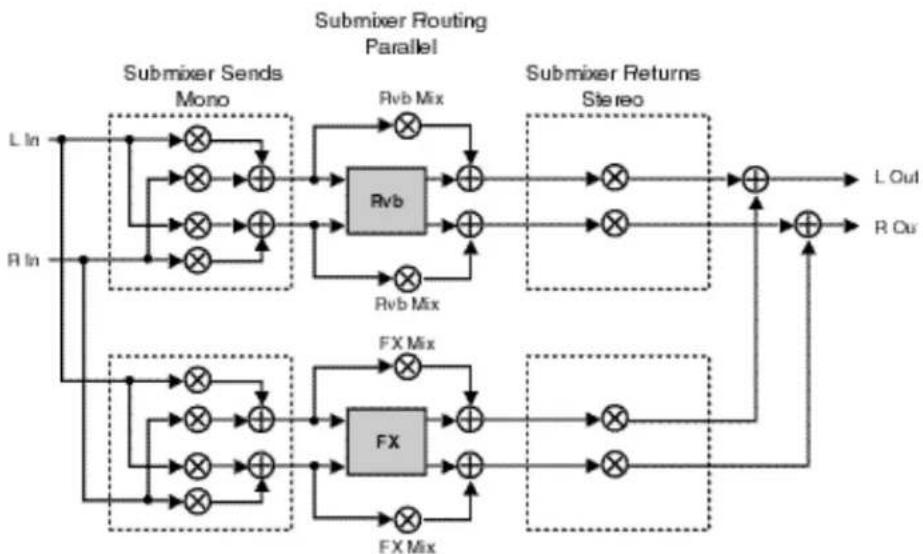
flowchart
graph TD
    subgraph "Submixer Sends Mono"
        LIn["L In"] --> X1["×"]
        RIn["R In"] --> X2["×"]
        X1 --> Add1["⊕"]
        X2 --> Add2["⊕"]
    end

    subgraph "Submixer Returns Stereo"
        Rvb["Rvb"] --> Add3["⊕"]
        RvbMix["Rvb Mix"] --> Add4["⊕"]
        Add3 --> Add5["⊕"]
        Add4 --> Add6["⊕"]
        Add5 --> Add7["⊕"]
        Add6 --> Add8["⊕"]
        Add7 --> Add9["⊕"]
        Add8 --> Add10["⊕"]
        Add9 --> Add11["⊕"]
        Add10 --> LOut["L Out"]
        Add11 --> ROut["R Out"]

    subgraph "Submixer Routing Parallel"
        Rvb --> X3["×"]
        RvbMix --> X4["×"]
        X3 --> Add5
        X4 --> Add6
        X5 --> Add7
        X6 --> Add8
        X7 --> Add9
        X8 --> Add10
        X9 --> Add11
        X10 --> Add12
        Rvb --> Add1
        RvbMix --> Add1
        Add1 --> Add5
        Add2 --> Add6
        Add3 --> Add7
        Add4 --> Add8
        Add5 --> Add9
        Add6 --> Add10
        Add7 --> Add11
        Add8 --> Add12
        Add9 --> Add13
        Add10 --> LOut
        Add11 --> ROut
    end

    subgraph "Submixer Returns FX"
        FX1["FX Mix"] --> Add7
        FX2["FX"] --> Add8
        FX3["FX"] --> Add9
        FX4["FX"] --> Add10
        FX5["FX"] --> Add11
        FX6["FX"] --> Add12
    end

    style X1 fill:#f9f,stroke:#333
    style X2 fill:#f9f,stroke:#333
    style X3 fill:#f9f,stroke:#333
    style X4 fill:#f9f,stroke:#333
    style X5 fill:#f9f,stroke:#333
    style X6 fill:#f9f,stroke:#333
    style X7 fill:#f9f,stroke:#333
    style X8 fill:#f9f,stroke:#333
    style X9 fill:#f9f,stroke:#333
    style X10 fill:#f9f,stroke:#333
    style_Y1["Submixer Sends Mono"] --> X1
    style_Y2["Submixer Sends Mono"] --> X2
    style_Y3["Submixer Sends Mono"] --> X3
    style_Y4["Submixer Sends Mono"] --> X4
    style_Y5["Submixer Sends Mono"] --> X5
    style_Y6["Submixer Sends Mono"] --> X6
    style_Y7["Submixer Sends Mono"] --> X7
    style_Y8["Submixer Sends Mono"] --> X8
    style_Y9["Submixer Sends Mono"] --> X9
    style_Y10["Submixer Sends Mono"] --> Y0["Submixer Returns Stereo"]
    Y10 --> LOut
    Y20["Submixer Returns Stereo"] --> LOut
    Y30["Submixer Returns Stereo"] --> LOut
    Y40["Submixer Returns Stereo"] --> LOut
    Y50["Submixer Returns Stereo"] --> LOut
    Y60["Submixer Returns Stereo"] --> LOut
    Y70["Submixer Returns Stereo"] --> LOut
    Y80["Submixer Returns Stereo"] --> LOut
    Y90["Submixer Returns Stereo"] --> LOut
Submixer Sends 1.0 150 Mono
Submixer Returns 1.10 Stereo
Submixer Routing 1.2 0 Parallel
Dual Mono In/Stereo Out
- The Rvb block processes only the left input as a mono signal, and the FX block processes only the right input as a mono signal.
- A mono mix of the Rvb block output is sent to the left main output. A mono mix of the FX output is sent to the right main output.

flowchart
graph TD
    subgraph "Submixer Sends Mono"
        LIn["L In"] --> Mux1["×"]
        RIn["R In"] --> Mux2["×"]
    end
    subgraph "Submixer Returns Stereo"
        Rvb["Rvb"] --> Add1["⊕"]
        Rvb --> Add2["⊕"]
        Rvb --> Add3["⊕"]
        Rvb --> Add4["⊕"]
        Rvb --> Add5["⊕"]
        Rvb --> Add6["⊕"]
    end
    subgraph "Submixer Returns FX" --> FXMix1["FX Mix"]
        FXMix2["FX Mix"]
        FXMix3["FX Mix"]
    end
    LOut["L Out"] --> Add1
    ROut["R Out"] --> Add2
    LIn --> Mux1
    RIn --> Mux2
    LIn --> Mux3
    Mux1 --> Add1
    Mux2 --> Add2
    Mux3 --> Add3
    Mux3 --> Add4
    Mux3 --> Add5
    Mux3 --> Add6
    Mux4 --> Add1
    Mux4 --> Add2
    Mux4 --> Add3
    Mux4 --> Add4
    Mux4 --> Add5
    Mux4 --> Add6
Submixer Sends 1.0 200 L=FX, R=Rvb
Submixer Returns 1.10 Stereo
Submixer Routing 1.20 Parallel
Dual Mono In/Mono Out
- The Rvb block processes only the right input as a mono signal, and the FX block processes only the left input as a mono signal.
- A mono mix of the Rvb block output is sent to the right main output. A mono mix of the FX output is sent to the left main output.

flowchart
graph TD
    subgraph "Submixer Routing Parallel"
        direction LR
        A1["×"] --> B1["Rvb"]
        A2["×"] --> B1
        B1 --> C1["⊕"]
        B1 --> C2["⊕"]
        B2["×"] --> C2
        C2 --> D1["⊕"]
        C2 --> D2["⊕"]
        C3["×"] --> D3["⊕"]
        D3 --> E1["L Out"]
        D3 --> F1["R Out"]
    end
    subgraph "Submixer Returns Parallel"
        direction LR
        G1["×"] --> H1["Rvb"]
        G2["×"] --> H1
        H1 --> I1["⊕"]
        H1 --> I2["⊕"]
        H2["×"] --> I2
        I2 --> J1["L Out"]
        I2 --> K1["R Out"]
    end
    L1 --> A1
    R1 --> A2
    A1 --> B1
    A2 --> B2
    B1 --> C1
    B2 --> C2
    C1 --> D1
    C2 --> D2
    D1 --> E1
    D2 --> F1
    G1 --> G2
    G2 --> H1
    H1 --> I1
    I1 --> J1
    J1 --> K1
Submixer Sends 1.0 200 L=FX, R=Rvb
Submixer Returns 1.1 200 FX=L, Rvb=R
Submixer Routing 1.20 Parallel
The Rvb and FX blocks shown in the previous configurations represent the Stereo Reverb and 4-Voice Effects. Each of these blocks has its own set of controls, shown in the diagrams below.
Rvb and FX Block Controls

flowchart
graph LR
    A["Rvb Block"] --> B["Rvb In Level"]
    B --> C["Rvb In Width"]
    C --> D["Stereo Reverb"]
    D --> E["High Out Filter"]
    E --> F["Low Out Filter"]
    F --> G["Rvb Out Level"]
    G --> H["Rvb Out Width"]
    H --> I["+"]
    I --> J["Rvb Mix"]
    J --> K["+"]
    K --> L["Rvb Mix"]
    L --> M["+"]
    M --> N["Rvb Mix"]
    N --> O["+"]
    O --> P["Rvb Mix"]
    P --> Q["+"]
    Q --> R["Rvb Mix"]
    R --> S["+"]
    S --> T["Rvb Mix"]
    T --> U["+"]
    U --> V["Rvb Mix"]
    V --> W["+"]
    W --> X["Rvb Mix"]
    X --> Y["+"]
    Y --> Z["Rvb Mix"]
    Z --> AA["+"]
    AA --> AB["Rvb Mix"]
    AB --> AC["+"]
    AC --> AD["Rvb Mix"]
    AD --> AE["+"]
    AE --> AF["Rvb Mix"]
    AF --> AG["+"]
    AG --> AH["Rvb Mix"]
    AH --> AI["+"]
    AI --> AJ["Rvb Mix"]
    AJ --> AK["+"]
    AK --> AL["Rvb Mix"]
    AL --> AM["+"]
    AM --> AN["Rvb Mix"]
    AN --> AO["+"]
    AO --> AP["Rvb Mix"]
    AP --> AQ["+"]
    AQ --> AR["Rvb Mix"]
    AR --> AS["+"]
    AS --> AT["Rvb Mix"]
    AT --> AU["+"]
    AU --> AV["Rvb Mix"]
    AV --> AW["+"]
    AW --> AX["Rvb Mix"]
    AX --> AY["+"]
    AY --> AZ["Rvb Mix"]
    AZ --> BA["+"]
    BA --> BB["Rvb Mix"]
    BB --> BC["+"]
    BC --> BD["Rvb Mix"]
    BD --> BE["+"]
    BE --> BF["Rvb Mix"]
    BF --> BG["+"]
    BG --> BH["Rvb Mix"]
    BH --> BI["+"]
    BI --> BJ["Rvb Mix"]
    BJ --> BK["+"]
    BK --> BL["Rvb Mix"]
    BL --> BM["+"]
    BM --> BN["Rvb Mix"]
    BN --> BO["+"]
    BO --> BP["Rvb Mix"]
    BP --> BQ["+"]
    BQ --> BR["Rvb Mix"]
    BR --> BS["+"]
    BS --> BT["Rvb Mix"]
    BT --> BU["+"]
    BU --> BV["Rvb Mix"]
    BV --> BW["+"]
    BW --> BX["Rvb Mix"]
    BX --> BY["+"]
    BY --> BZ["Rvb Mix"]
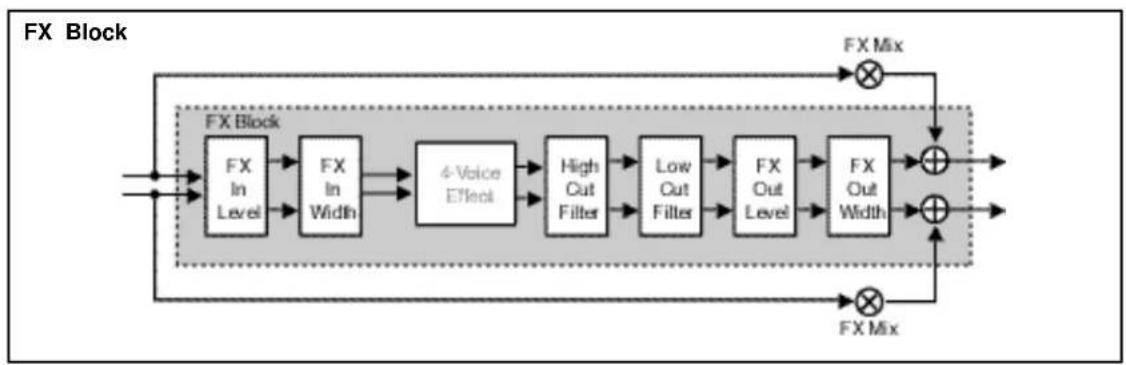
flowchart
graph LR
    A["Input"] --> B["FX In Level"]
    B --> C["FX In Width"]
    C --> D["4-Voice Effect"]
    D --> E["High Out Filter"]
    E --> F["Low Out Filter"]
    F --> G["FX Out Level"]
    G --> H["FX Out Width"]
    H --> I["FX Mix"]
    I --> J["Output"]
    K["FX Mix"] --> L["Output"]
    M["FX Mix"] --> N["Output"]
    style A fill:#f9f,stroke:#333
    style K fill:#f9f,stroke:#333
    style M fill:#f9f,stroke:#333
These effect block controls are also found in the Submixer row of each parameter matrix.
| Submiser | 1.4 Sands | 1.1 Returns | 1.2 Routing | 1.3 *Mix | 1.4 *Intvl | 1.5 *InW | 1.6 *HiOut | 1.7 *LoOut | 1.8 *OutOut | 1.9 *OutW |
These parameters provide independent control of input and output level and width, as well as high out and low out parameters for each FX and Ryb block.
Press Load/* to toggle between Rvb and FX parameters.
These parameters are described below, in the order in which they appear in the Submixer row. (All other effect parameters are identical to those in the PCM 80, and are described in the PCM 80 User Guide.)
RvbMix, FX Mix
These are independent wet/dry mix controls for the Rvb and FX effect blocks.
RvblnLvl, FX InLvl
These are independent input level controls for the Rvb and FX blocks.
Rvb In W, FX In W
These are input width controls for the Rvb and FX blocks. These are essentially the same as the PCM 80 FX Width and Rvb Width parameters. The difference is that the width control in the Dual FX algorithms is located at the input to the effect. This makes it possible to independently alter the stereo image of material feeding the two effect blocks.
RvbOutLvl, FX OutLvl
These are independent output level controls for the Rvb and FX blocks.
Rvb Out W, FX Out W
Like Rvb In W and FX In W, these parameters allow independent control of the stereo image of the output of each effect block.
RvbHiCut, FX HiCut
These parameters provide independent 6dB per octave, stereo high-cut filters on the outputs of the Rvb and FX blocks.
RvbLoCut, FX LoCut
These parameters provide independent 6dB per octave, stereo low-cut filters on the outputs of the Rvb and FX blocks.
The Dual FX Blocks and the Algorithms
The Dual FX Card uses five Reverb blocks and five Multi-Effect blocks to produce 25 Dual FX algorithms. The five reverb blocks and the five multi-effect blocks are described on the following pages. Each of the 25 algorithms which can be configured from these blocks is presented on a separate page, following the block descriptions. These pages give you easy reference to the diagram of the specific reverb and effect blocks used in the algorithm, as well as the complete parameter matrix for that algorithm. The control and submixer parameters which allow configuration and routing of the effect blocks are described in the preceding chapter. Refer to the PCM 80 User Guide for detailed descriptions of all other effect parameters.
The Reverb Blocks
Concert Hall
This algorithm is identical to the Concert Hall algorithm in the PCM 80. It emulates a real concert hall. The reverberation is very clean, and designed to remain behind the direct sound — adding ambience, but leaving the source unchanged. This effect has a relatively low initial echo density which builds up gradually over time.

flowchart
graph TD
    A["PreDelay"] --> B["Low RI"]
    A --> C["RiHC"]
    A --> D["Spin"]
    E["ReDlyL"] --> F["Crossover"]
    G["ReDlyR"] --> H["Depth"]
    I["ReDlyL"] --> J["Crossover"]
    K["ReDlyR"] --> L["Depth"]
    M["Diffusion"] --> N["Depth"]
    O["Size"] --> P["Crossover"]
    Q["Definition"] --> R["Crossover"]
    S["Link"] --> T["Crossover"]
    U["Spin"] --> V["Crossover"]
    W["Crossover"] --> X["Diffusion"]
    Y["RefDy1"] --> Z["Depth"]
    AA["RefDy2"] --> AB["Depth"]
    AC["RefDy3"] --> AD["Depth"]
    AE["RefDy4"] --> AF["Depth"]
    AG["RefDy5"] --> AH["Depth"]
    AI["RefDy6"] --> AJ["Depth"]
    AK["RefDy7"] --> AL["Depth"]
    AM["RefDy8"] --> AN["Depth"]
    AO["RefDy9"] --> AP["Depth"]
    AQ["RefDy10"] --> AR["Depth"]
    AS["RefDy11"] --> AT["Depth"]
    AU["RefDy12"] --> AV["Depth"]
    AW["RefDy13"] --> AX["Depth"]
    AY["ReDlyL"] --> AZ["×"]
    BA["ReDlyR"] --> BB["×"]
    BC["ReDlyL"] --> BD["×"]
    BE["ReDlyR"] --> BF["×"]
    BG["ReDlyL"] --> BH["×"]
    BI["ReDlyR"] --> BJ["×"]
    BK["ReDlyL"] --> BL["×"]
    BM["ReDlyR"] --> BN["×"]
    BO["ReDlyL"] --> BP["×"]
    BQ["ReDlyR"] --> BR["×"]
    BS["ReDlyL"] --> BT["×"]
    BU["ReDlyR"] --> BV["×"]
    BW["ReDlyL"] --> BX["×"]
    BY["ReDlyR"] --> BZ["×"]
    CA["ReDlyL"] --> CB["×"]
    CC["ReDlyR"] --> CD["×"]
    CE["ReDlyL"] --> CF["×"]
    CG["ReDlyR"] --> CH["×"]
    CI["ReDlyL"] --> CJ["×"]
    CK["ReDlyR"] --> CL["×"]
    CM["ReDlyL"] --> CN["×"]
    CO["ReDlyR"] --> CP["×"]
    CE --> CR["×"]
    CS --> CS["×"]
    CT --> CT1["×"]
    CU --> CU1["×"]
    CV --> CV1["×"]
    CW --> CW1["×"]
    CX --> CX1["×"]
    CY --> CY1["×"]
    CZ --> CZ1["×"]
    DA --> DA1["×"]
    DB --> DB1["×"]
    DC --> DC1["×"]
    DV --> DV1["×"]
    DW --> DW1["×"]
    DX --> DX1["×"]
    DX1 --> DX2["×"]
Plate This algorithm is identical to the Plate algorithm in the PCM 80. It mimics the sound of metal plates, with high initial diffusion and a relatively bright sound. This makes them a good choice for enhancing any type of percussion.

flowchart
graph TD
    A["Input"] --> B["+"]
    B --> C["Dimersion"]
    C --> D["PreDelay"]
    D --> E["Low Ri"]
    D --> F["RiHC"]
    D --> G["Spin"]
    E --> H["Crossover"]
    F --> H
    G --> I["Attack"]
    H --> J["Ro Out"]
    I --> J
    J --> K["+"]
    K --> L["BioRdL"]
    L --> M["BioDlyL"]
    M --> N["ReLvl L"]
    N --> O["+"]
    O --> P["BioRdL R"]
    P --> Q["+"]
    Q --> R["BioDly R"]
    R --> S["ReLvl R"]
    S --> T["+"]
    T --> U["BioRdL R"]
    U --> V["+"]
    V --> W["BioDly R"]
    W --> X["ReLvl R"]
    X --> Y["BioRdL R"]
    Y --> Z["+"]
    Z --> AA["BioRdL R"]
    AA --> AB["+"]
    AB --> AC["BioRdL R"]
    AC --> AD["+"]
    AD --> AE["BioRdL R"]
    AE --> AF["+"]
    AF --> AG["BioRdL R"]
    AG --> AH["+"]
    AH --> AI["BioRdL R"]
    AI --> AJ["+"]
    AJ --> AK["BioRdL R"]
    AK --> AL["+"]
    AL --> AM["BioRdL R"]
    AM --> AN["+"]
    AN --> AO["BioRdL R"]
    AO --> AP["+"]
    AP --> AQ["BioRdL R"]
    AQ --> AR["+"]
    AR --> AS["BioRdL R"]
    AS --> AT["+"]
    AT --> AU["BioRdL R"]
    AU --> AV["+"]
    AV --> AW["BioRdL R"]
    AW --> AX["+"]
    AX --> AY["BioRdL R"]
This algorithm is identical to the Chamber algorithm in the PCM 80. It produces an even, relatively dimensionless reverberation, with little change in color as the sound decays. The initial diffusion is similar to the Concert Hall algorithm, but the sense of space and size is much less obvious. This characteristic, along with the low color in the decay tail, makes Chamber useful on a wide range of material. It is especially useful on spoken voice, giving a noticeable increase in loudness with very low color.

flowchart
graph TD
    A["Input"] --> B["+"]
    B --> C["Diffusion"]
    C --> D["PreDelay"]
    D --> E["Low RI"]
    D --> F["RIHC"]
    D --> G["Split"]
    D --> H["ReDly R"]
    D --> I["ReDly R"]
    E --> J["Crossover"]
    F --> J
    G --> J
    H --> J
    I --> K["Run Out"]
    J --> L["Output"]
    K --> M["+"]
    L --> N["+"]
    M --> O["BioRx L"]
    N --> P["BioRx R"]
    O --> Q["BioRx L"]
    P --> R["BioRx R"]
    Q --> S["BioRx L"]
    R --> T["BioRx R"]
    S --> U["BioRx L"]
    T --> V["BioRx L"]
    U --> W["BioRx L"]
    V --> X["BioRx L"]
    W --> Y["BioRx L"]
    X --> Z["BioRx L"]
    Y --> AA["BioRx L"]
    Z --> AB["BioRx L"]
This algorithm is identical to the Inverse algorithm in the PCM 80. It allows you to vary the slope of the initial portion of the reverb envelope. The slope can decay, remain level, or rise over a variable time interval. When the time interval is up, the reverberation cuts off abruptly. The resulting effect is similar to a gate, but is not at all dependent on the level or complexity of the input signal. Slopes are adjustable over a negative, even, or positive slope. Positive slopes create inverse effects, while more even slopes create gated effects. Negative slope values have rather natural reverb tails.

flowchart
graph TD
    A["Diffusion"] --> B["PreDelay"]
    B --> C["Low Slope"]
    B --> D["Mid Slope"]
    B --> E["Crossover"]
    B --> F["RHC"]
    B --> G["Duration"]
    B --> H["Shape"]
    C --> I["ReDlyL"]
    D --> J["ReLvl L"]
    E --> K["+"]
    F --> L["+"]
    G --> M["+"]
    H --> N["+"]
    I --> O["×"]
    J --> P["×"]
    K --> Q["×"]
    L --> R["×"]
    M --> S["×"]
    N --> T["×"]
    O --> U["×"]
    P --> V["×"]
    Q --> W["×"]
    R --> X["×"]
    S --> Y["×"]
    T --> Z["×"]
    U --> AA["×"]
    V --> AB["×"]
    W --> AC["×"]
    X --> AD["×"]
    Y --> AE["×"]
    Z --> AF["×"]
Infinite
This algorithm is identical to the Infinite algorithm in the PCM 80. It is acoustically similar to the Chamber algorithm, with the addition of an Infinite parameter. When this parameter is turned on, the input to the reverberator ramps off. With Infinite on, the reverb tail remains constant, creating strange and useful reverb effects. When Infinite is switched off, input to the reverberator is restored, and the current running reverb time is utilized.

flowchart
graph TD
    A["Input"] --> B["+"]
    B --> C["Diffusion"]
    C --> D["PreDelay"]
    D --> E["Low Ri"]
    D --> F["Mid Ri"]
    D --> G["Crossover"]
    D --> H["In InIe"]
    E --> I["RiHC"]
    F --> J["Size"]
    G --> K["Shape"]
    H --> L["Spin"]
    H --> M["Spread"]
    H --> N["Unk"]
    I --> O["Rub Out1"]
    J --> O
    K --> O
    L --> O
    M --> O
    N --> O
    O --> P["+"]
    P --> Q["BioRxL"]
    P --> R["BioRxR"]
    Q --> S["+"]
    R --> T["+"]
    S --> U["BioRxL"]
    T --> V["BioRxR"]
    U --> W["+"]
    V --> X["+"]
    W --> Y["BioRxL"]
    X --> Z["BioRxR"]
The FX Blocks
A stereo pair of 2-tap gliding delays feeds four individually adjustable delay voices. Each voice has its own level, feedback, delay, cross-feedback, and pan parameters. Glide is useful for creating such effects as stereo flangers, loop samplers, pitch modulation, etc.
Glide
This algorithm can address up to 4 Meg of delay memory (with optional SIMMs added to the PCM 80), providing 42 seconds of stereo delay.

flowchart
graph TD
    A["L In"] --> B["+"]
    B --> C["A/B DlyL A B"]
    C --> D["×"]
    D --> E["+"]
    E --> F["V2 X-Rb"]
    E --> G["V1 X-Rb"]
    E --> H["V2 Rb"]
    H --> I["1 2 Delay"]
    I --> J["V2 Lvl"]
    I --> K["V1 Lvl"]
    J --> L["V2 Pan"]
    K --> M["V1 Pan"]
    L --> N["+"]
    M --> O["+"]
    N --> P["Delay 3 4"]
    O --> Q["Delay 3 4"]
    P --> R["10 Rb"]
    Q --> S["10 Rb"]
    R --> T["10 X-Rb"]
    S --> U["10 X-Rb"]
    T --> V["+"]
    U --> W["+"]
    V --> X["+"]
    W --> Y["+"]
    X --> Z["+"]
    Y --> AA["+"]
    Z --> AB["+"]
    AA --> AC["+"]
    AB --> AD["+"]
    AC --> AE["+"]
    AD --> AF["+"]
    AE --> AG["+"]
    AF --> AH["+"]
    AG --> AI["+"]
    AH --> AJ["+"]
    AI --> AK["+"]
    AJ --> AL["+"]
    AK --> AM["+"]
    AL --> AN["+"]
    AM --> AO["+"]
    AN --> AP["+"]
    AO --> AQ["+"]
    AP --> AR["+"]
    AQ --> AS["+"]
Chorus The Chorus effect has four separately adjustable voices — allowing the PCM 80 to sound like a rack of four digital delay boxes. Each voice has its own independently adjustable chorus depth and rate, level control, delay time, feedback and panning control.

flowchart
graph TD
    A["+"] --> B["Delay 1 2"]
    B --> C["V1 Chorus"]
    C --> D["×"]
    D --> E["V1 Lvl"]
    E --> F["V1 Pan"]
    F --> G["+"]
    G --> H["V6 Pan"]
    H --> I["×"]
    I --> J["V5 Lvl"]
    J --> K["V4 Pan"]
    K --> L["+"]
    L --> M["V6 Pan"]
    M --> N["×"]
    N --> O["V5 Lvl"]
    O --> P["V4 Pan"]
    P --> Q["+"]
    Q --> R["V6 Pan"]
    R --> S["×"]
    S --> T["V5 Lvl"]
    T --> U["V4 Pan"]
    U --> V["+"]
    V --> W["V6 Pan"]
    W --> X["×"]
    X --> Y["V5 Lvl"]
    Y --> Z["V4 Pan"]
    Z --> AA["+"]
    AA --> AB["V6 Pan"]
    AB --> AC["×"]
    AC --> AD["V5 Lvl"]
    AD --> AE["V4 Pan"]
    AE --> AF["+"]
    AF --> AG["V6 Pan"]
    AG --> AH["×"]
    AH --> AI["V5 Lvl"]
    AI --> AJ["V4 Pan"]
    AJ --> AK["+"]
    AK --> AL["V6 Pan"]
    AL --> AM["×"]
    AM --> AN["V5 Lvl"]
    AN --> AO["V4 Pan"]
    AO --> AP["+"]
    AP --> AQ["V6 Pan"]
    AQ --> AR["×"]
    AR --> AS["V5 Lvl"]
    AS --> AT["V4 Pan"]
    AT --> AU["+"]
    AU --> AV["V6 Pan"]
    AV --> AW["×"]
    AW --> AX["V5 Lvl"]
    AX --> AY["V4 Pan"]
    AY --> AZ["+"]
This effect features four separately adjustable voices, each with its own level control, delay time, low and high frequency filters, feedback and pan controls. Note also that, in this particular algorithm, the filters are within the feedback paths of the multi-band voices. This allows you to create echoes that change timbre with each repeat. Among other things, this is very useful for simulating the sound of analog tape echo.
This algorithm can address up to 4 Meg of delay memory (with optional SIMMs added to the PCM 80), providing 42 seconds of stereo delay.

flowchart
graph TD
    A["+"] --> B["Delay 1 2"]
    B --> C["V1 Lw"]
    C --> D["V1 HiCu1"]
    D --> E["V1 LoCu1"]
    E --> F["V1 Pan"]
    F --> G["+"]
    G --> H["V6 Pan"]
    H --> I["+"]
    I --> J["V3 Pan"]
    J --> K["V4 Pan"]
    K --> L["V5 LoCu1"]
    L --> M["V6 LoCu1"]
    M --> N["V7 LoCu1"]
    N --> O["V8 LoCu1"]
    O --> P["V9 LoCu1"]
    P --> Q["V10 LoCu1"]
    Q --> R["V11 LoCu1"]
    R --> S["V12 LoCu1"]
    S --> T["V13 LoCu1"]
    T --> U["V14 LoCu1"]
    U --> V["V15 LoCu1"]
    V --> W["V16 LoCu1"]
    W --> X["V17 LoCu1"]
    X --> Y["V18 LoCu1"]
    Y --> Z["V19 LoCu1"]
    Z --> AA["V20 LoCu1"]
    AA --> AB["V21 LoCu1"]
    AB --> AC["V22 LoCu1"]
    AC --> AD["V23 LoCu1"]
    AD --> AE["V24 LoCu1"]
    AE --> AF["V25 LoCu1"]
    AF --> AG["V26 LoCu1"]
    AG --> AH["V27 LoCu1"]
    AH --> AI["V28 LoCu1"]
    AI --> AJ["V29 LoCu1"]
    AJ --> AK["V30 LoCu1"]
    AK --> AL["V31 LoCu1"]
    AL --> AM["V32 LoCu1"]
    AM --> AN["V33 LoCu1"]
    AN --> AO["V34 LoCu1"]
    AO --> AP["V35 LoCu1"]
    AP --> AQ["V36 LoCu1"]
    AQ --> AR["V37 LoCu1"]
    AR --> AS["V38 LoCu1"]
    AS --> AT["V39 LoCu1"]
    AT --> AU["V40 LoCu1"]
    AU --> AV["V41 LoCu1"]
    AV --> AW["V42 LoCu1"]
    AW --> AX["V43 LoCu1"]
    AX --> AY["V44 LoCu1"]
    AY --> AZ["V45 LoCu1"]
    AZ --> BA["V46 LoCu1"]
    BA --> BB["V47 LoCu1"]
    BB --> BC["V48 LoCu1"]
    BC --> BD["V49 LoCu1"]
    BD --> BE["V50 LoCu1"]
    BE --> BF["V51 LoCu1"]
    BF --> BG["V52 LoCu1"]
    BG --> BH["V53 LoCu1"]
    BH --> BI["V54 LoCu1"]
    BI --> BJ["V55 LoCu1"]
    BJ --> BK["V56 LoCu1"]
The Resonant Chord Algorithms: Res1 and Res2
The Resonant Chord effects use impulsive energy at the inputs to excite four resonant voices (notes). The level, pitch, duration, and high-frequency cutoff of the overtones for each voice are separately controllable. Each voice can be panned independently. The voices resonate to some degree with any input, but the most effective excitation contains all frequencies, like percussion. Other instruments may give a quality of tonal ambience in which certain notes rise ethereally from the background.
The two algorithms differ in the way pitches are assigned to the resonators. In Res1, pitches are assigned to the four voices chromatically, in a round-robin. If, for example, MIDI note numbers are used to assign pitch, the resonators will constantly be re-tuned to the pitches of the last four MIDI notes received. (This can produce an effect similar to playing a piano with the sustain pedal depressed.) In Res2, pitches are assigned to the four resonators diatonically — harmonized with the key, scale, and root of your choice. If MIDI note numbers are used to assign pitch, the resonators will constantly be re-tuned to harmonize with the incoming notes.
These algorithms can address up to 4 Meg of delay memory (with optional SIMMs added to the PCM 80), providing 38 seconds of stereo delay.

flowchart
graph TD
    A["V1 Rpt"] --> B["+"]
    C["V2 Rpt"] --> D["+"]
    E["1 2 Delay"] --> F["+"]
    G["V3 Rpt"] --> H["+"]
    I["V4 Rpt"] --> J["+"]
    K["V5 Rpt"] --> L["+"]
    M["V6 Rpt"] --> N["+"]
    O["V7 Rpt"] --> P["+"]
    Q["V8 Rpt"] --> R["+"]
    S["V9 Rpt"] --> T["+"]
    U["V10 Rpt"] --> V["+"]
    W["V11 HICU1"] --> X["V1 Delay"]
    Y["V12 HICU1"] --> Z["V2 Delay"]
    AA["V13 HICU1"] --> AB["V3 Delay"]
    AC["V14 HICU1"] --> AD["V4 Delay"]
    AE["V15 HICU1"] --> AF["V5 Delay"]
    AG["V16 HICU1"] --> AH["V6 Delay"]
    AI["V17 HICU1"] --> AJ["V7 Delay"]
    AK["V18 HICU1"] --> AL["V8 Delay"]
    AM["V19 HICU1"] --> AN["V9 Delay"]
    AO["V20 HICU1"] --> AP["V10 Delay"]
    AQ["V21 HICU1"] --> AR["V20 Delay"]
    AS["V22 HICU1"] --> AT["V21 Delay"]
    AU["V23 HICU1"] --> AV["V22 Delay"]
    AW["V24 HICU1"] --> AX["V23 Delay"]
    AY["V3 Rpt"] --> Z
    AZ["V4 Rpt"] --> BA["+"]
    BB["+"] --> BC["+"]
    BD["+"] --> BE["+"]
    BF["+"] --> BG["+"]
    BH["+"] --> BI["+"]
    BJ["+"] --> BK["+"]
    BL["+"] --> BM["+"]
    BN["+"] --> BO["+"]
    BP["+"] --> BQ["+"]
    BR["+"] --> BS["+"]
    BT["+"] --> BU["+"]
    BV["+"] --> BW["+"]
    BX["+"] --> BY["+"]
    BZ["+"] --> CA["+"]
    CBZ["+"] --> DA["+"]
    DBZ["+"] --> DB["+"]
    DC["+"] --> DD["+"]
    DV["+"] --> DV["+"]
    DW["+"] --> DW["+"]
    DX["+"] --> DX["+"]
The Algorithms
Gld-Hall

flowchart
graph TD
    A["L In"] --> B["+"]
    B --> C["A/B DlyL A"]
    C --> D["A/B Lvl L"]
    D --> E["Rvl L"]
    E --> F["X-Pvl L"]
    F --> G["Glc Lvl"]
    G --> H["+"]
    H --> I["V2 X-Rvl"]
    I --> J["V1 X-Rvl"]
    J --> K["V2 Rvl"]
    K --> L["V1 Rvl"]
    L --> M["Delay 1 2 Delay"]
    M --> N["V2 Pan"]
    N --> O["V1 Pan"]
    O --> P["+"]
    P --> Q["Delay 3 4"]
    Q --> R["V3 Lvl"]
    R --> S["V4 Lvl"]
    S --> T["V3 Pan"]
    T --> U["V4 Pan"]
    U --> V["+"]
    V --> W["Delay 3 4"]
    W --> X["V3 X-Rvl"]
    X --> Y["V4 X-Rvl"]
    Y --> Z["+"]
    Z --> AA["Delay 3 4"]
    AA --> AB["V3 Pan"]
    AB --> AC["V4 Pan"]
    AC --> AD["+"]
    AD --> AE["Delay 3 4"]
    AE --> AF["V3 Pan"]
    AF --> AG["V4 Pan"]
    AG --> AH["+"]
    AH --> AI["Delay 3 4"]
    AI --> AJ["V3 Pan"]
    AJ --> AK["V4 Pan"]
    AK --> AL["+"]
    AL --> AM["Delay 3 4"]
    AM --> AN["V3 Pan"]
    AN --> AO["V4 Pan"]
    AO --> AP["+"]
    AP --> AQ["Delay 3 4"]
    AQ --> AR["V3 Pan"]
    AR --> AS["V4 Pan"]
    AS --> AT["+"]
    AT --> AU["Delay 3 4"]
    AU --> AV["V3 Pan"]
    AV --> AW["V4 Pan"]
    AW --> AX["+"]
    AX --> AY["Delay 3 4"]
    AY --> AZ["V3 Pan"]
    AZ --> BA["V4 Pan"]
    BA --> BB["+"]
    BB --> BC["Delay 3 4"]
    BC --> BD["V3 Pan"]
    BD --> BE["V4 Pan"]
    BE --> BF["+"]
    BF --> BG["Delay 3 4"]
    BG --> BH["V3 Pan"]
    BH --> BI["V4 Pan"]
    BI --> BJ["+"]
    BJ --> BK["Delay 3 4"]
    BK --> BL["V3 Pan"]
    BL --> BM["V4 Pan"]
    BM --> BN["+"]
    BN --> BO["Delay 3 4"]
    BO --> BP["V3 Pan"]
    BP --> BQ["V4 Pan"]
    BQ --> BR["+"]
    BR --> BS["Delay 3 4"]
    BS --> BT["V3 Pan"]
    BT --> BU["V4 Pan"]
    BU --> BV["+"]
    BV --> BW["Delay 3 4"]
    BW --> BX["V3 Pan"]
    BX --> BY["V4 Pan"]
    BY --> BZ["+"]
    BZ --> CA["Delay 3 4"]
    CA --> CB["V3 Pan"]
    CB --> CC["V4 Pan"]
    CC --> CD["+"]
    CD --> CE["Delay 3 4"]
    CE --> CF["V3 Pan"]
    CF --> CG["V4 Pan"]
    CG --> CH["+"]
    CH --> CI["Delay 3 4"]
    CI --> CJ["V3 Pan"]
    CJ --> CK["V4 Pan"]
    CK --> CL["+"]
    CL --> CM["Delay 3 4"]
    CM --> CN["V3 Pan"]
    CN --> CO["V4 Pan"]
    CO --> CP["+"]
    CP --> CQ["Delay 3 4"]
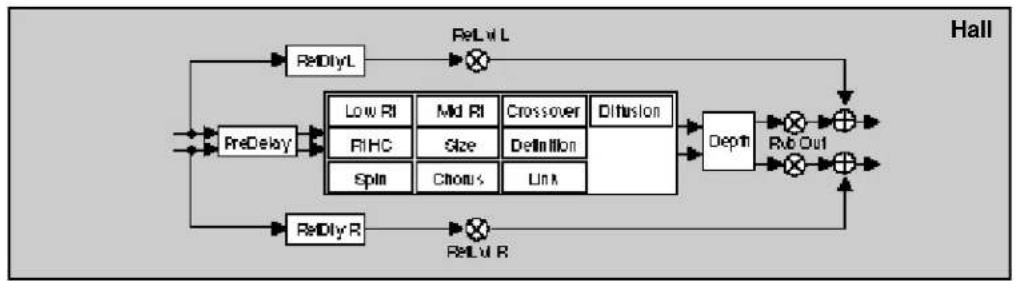
flowchart
graph TD
    A["ReDlyL"] --> B["×"]
    C["ReDlyR"] --> D["×"]
    B --> E["Crossover"]
    D --> F["RcOut"]
    E --> G["Diffusion"]
    F --> G
    G --> H["Depth"]
    H --> I["×"]
    I --> J["+"]
    J --> K["Hall"]
    L["PreDelay"] --> M["Low RI"]
    L --> N["Md RI"]
    L --> O["Crossover"]
    L --> P["Definition"]
    L --> Q["Spin"]
    L --> R["Chroms"]
    L --> S["Link"]
    M --> T["Relvl R"]
    N --> U["Relvl R"]
    O --> V["Relvl R"]
    P --> W["Relvl R"]
    Q --> X["Relvl R"]
    R --> Y["Relvl R"]
| 0Controls | 0.0Mix | 0.1Lvl Adjust | 0.2*Invl/Pan | 0.3FXWidth | 0.4*ADJUST | |||||
| 1Submixer | 1.0Sends | 1.1Returns | 1.2Routing | 1.3*Mix | 1.4*Invl | 1.5*InW | 1.6*H/Cu | 1.7*Lo/Cu | 1.8*Out/Li | 1.9*Out/W |
| 2Rvb Time | 2.0Los Rf | 2.1Mid Rt | 2.2Crossover | 2.3Pt HC | 2.4Pre Delay | 2.5*Ref Lvl/Dly | ||||
| 3Rvb Design | 3.0Size | 3.1Diffusion | 3.2Olf | 3.3Depth | 3.4Spin | 3.5Chorus | 3.6Link | 3.7Rvb Out | ||
| 4Glide FX | 4.0Old Lvl | 4.1*A.Lvl*Dly L | 4.2*A.Lvl*Dly Rt | 4.3*B.Lvl/Dly L | 4.4*B.Lvl*Dly R | 4.5*Fbk | 4.6*X-Fbk | |||
| 5Levels | 5.0Master | 5.1Voice 1 | 5.2Voice 2 | 5.3Voice 2 | 5.4Voice 4 | |||||
| 6Delay Time | 6.0*Mater | 6.1Voice 1 | 6.2Voice 2 | 6.3Voice 3 | 6.4Voice 4 | |||||
| 7Feedback | 7.0*Mtr Fbk | 7.1*Voice 1 | 7.2*Voice 2 | 7.3*Voice 3 | 7.4*Voice 4 | |||||
| 8Panning | 8.0Master | 8.1Voice 1 | 8.2Voice 2 | 8.3Voice 3 | 8.4Voice 4 | |||||
| 9Modulation | 9.0*Mod LFO | 9.1*Mod AR Env | 9.2Mod Env L | 9.3Mod Env R | 9.4*Mod Latch | 9.5*Mod Ser 1 | 9.6*Mod Ser 2 | |||
| Patches | Patch 0 | Patch 1 | Patch 2 | Patch 3 | Patch 4 | Patch 5 | Patch 6 | Patch 7 | Patch 8 | Patch 9 |
Band-Hall
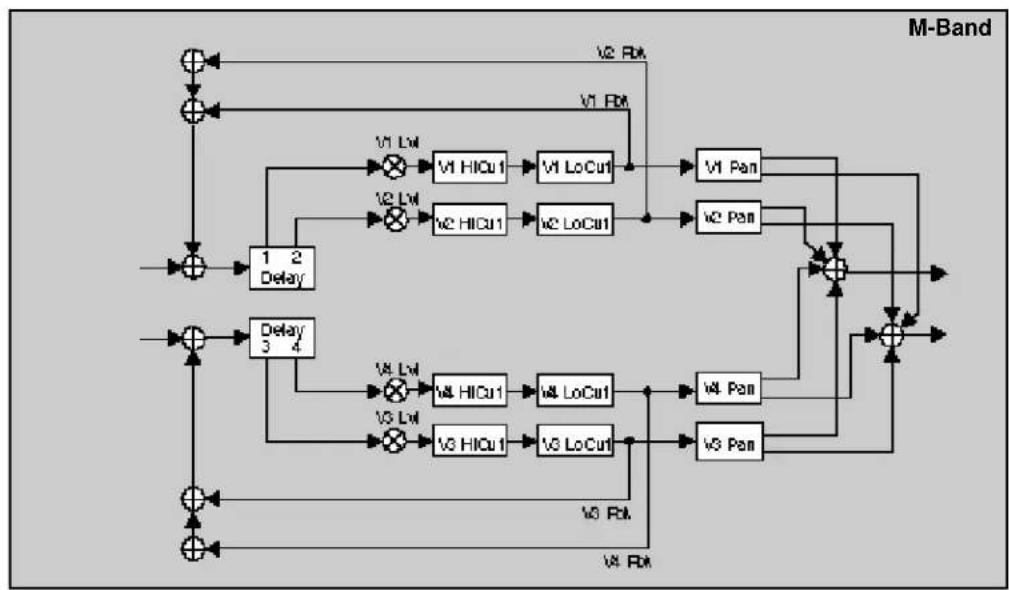
flowchart
graph TD
    A["Input"] --> B["Sum"]
    B --> C["Delay 1 2"]
    C --> D["Sum"]
    D --> E["Delay 3 4"]
    E --> F["Sum"]
    F --> G["Output"]

    subgraph M-Band
        H["V1 Lw"] --> I["V1 HiCu1"] --> J["V1 LoCu1"] --> K["V1 Pan"]
        L["V2 Lw"] --> M["V2 HiCu1"] --> N["V2 LoCu1"] --> O["V2 Pan"]
        P["V3 Lw"] --> Q["V3 HiCu1"] --> R["V3 LoCu1"] --> S["V3 Pan"]
        T["V4 Lw"] --> U["V4 HiCu1"] --> V["V4 LoCu1"] --> W["V4 Pan"]
        X["V5 Lw"] --> Y["V5 HiCu1"] --> Z["V5 LoCu1"] --> AA["V5 Pan"]
        AB["V6 Rb"] --> AC["V6 LoCu1"] --> AD["V6 Pan"]
        AE["V7 Rb"] --> AF["V7 LoCu1"] --> AG["V7 Pan"]
    end

    H --> H
    I --> I
    J --> J
    K --> K
    L --> L
    M --> M
    N --> N
    O --> O
    P --> P
    Q --> Q
    R --> R
    S --> S
    T --> T
    U --> U
    V --> V
    W --> W
    X --> X
    Y --> Y
    Z --> Z
    AA --> AA
    AB --> AB
    AC --> AC
    AD --> AD
    AE --> AE
    AF --> AF

flowchart
graph TD
    A["PreDelay"] --> B["Low RI"]
    A --> C["High CI"]
    A --> D["Spin"]
    A --> E["ReDly R"]
    B --> F["Crossover"]
    C --> G["Definition"]
    D --> H["Link"]
    E --> I["ReDly L"]
    F --> J["Depth"]
    G --> J
    H --> J
    I --> J
    J --> K["ReDly Out"]
    K --> L["+"]
    L --> M["ReLvl R"]
    M --> A
    style A fill:#f9f,stroke:#333
    style B fill:#ccf,stroke:#333
    style C fill:#ccf,stroke:#333
    style D fill:#ccf,stroke:#333
    style E fill:#ccf,stroke:#333
    style F fill:#cfc,stroke:#333
    style G fill:#cfc,stroke:#333
    style H fill:#cfc,stroke:#333
    style I fill:#cfc,stroke:#333
    style J fill:#fcc,stroke:#333
    style K fill:#fcc,stroke:#333
    style L fill:#fcc,stroke:#333
    style M fill:#fcc,stroke:#333
| 0 Controls | 0.0 Mix | 0.1 Lat Adjust | 0.2 *InlvFPan | 0.3 FXWidth | 0.4 *ADJUST | |||||
| 1 Submixer | 1.0 Sends | 1.1 Returns | 1.2 Floating | 1.3 *Max | 1.4 *InlvI | 1.5 *InW | 1.6 *HCoI | 1.7 *LoCuI | 1.8 *OutLiI | 1.9 *OutW |
| 2 Rvb Time | 2.0 Low Rt | 2.1 Mid Rt | 2.2 Crossover | 2.3 Pt HC | 2.4 Pre Delay | 2.5 *Ref LndDly | ||||
| 3 Rvb Design | 3.0 Size | 3.1 Diffusion | 3.2 Doff | 3.3 Depth | 3.4 Spin | 3.5 Chorus | 3.6 Link | 3.7 Rvb Out | ||
| 4 Levels | 4.0 Master | 4.1 Voice 1 | 4.2 Voice 2 | 4.3 Voice 3 | 4.4 Voice 4 | |||||
| 5 Delay Time | 5.0 *Master | 5.1 Voice 1 | 5.2 Voice 2 | 5.3 Voice 3 | 5.4 Voice 4 | |||||
| 6 Filters | 6.0 *Mat HO/LO | 6.1 *V1 Hi/Lo | 6.2 *V2 Hi/Lo | 6.3 *V3 Hi/Lo | 6.4 *V4 Hi/Lo | |||||
| 7 Feedback | 7.0 Matr Fbk | 7.1 Voice 1 | 7.2 Voice 2 | 7.3 Voice 3 | 7.4 Voice 4 | |||||
| 8 Planning | 8.0 Master | 8.1 Voice 1 | 8.2 Voice 2 | 8.3 Voice 3 | 8.4 Voice 4 | |||||
| 9 Modulation | 9.0 *MostLFO | 9.1 *Most AP Env | 9.2 ModEnv L | 9.3 ModEnv R | 9.4 *Most Latch | 9.5 *Most Sw 1 | 9.6 *Most Sw 2 | |||
| Patches | Patch 0 | Patch 1 | Patch 2 | Patch 3 | Patch 4 | Patch 5 | Patch 6 | Patch 7 | Patch 8 | Patch 9 |
Chrs-Hall

flowchart
graph TD
    A["Chorus"] --> B["V1 Rbk"]
    A --> C["V1 Chorus"]
    A --> D["V2 Chorus"]
    A --> E["V3 Chorus"]
    B --> F["V1 Lvl"]
    C --> G["V2 Lvl"]
    D --> H["V3 Pan"]
    E --> I["V4 Pan"]
    F --> J["+"]
    G --> J
    H --> J
    I --> J
    J --> K["Output"]
    L["Delay 1 2 Delay"] --> M["+"]
    N["Delay 3 4"] --> O["+"]
    P["+"] --> Q["Output"]
    R["+"] --> S["Output"]
    T["+"] --> U["Output"]
    V["+"] --> W["Output"]
    X["+"] --> Y["Output"]
    Z["+"] --> AA["Output"]
    AB["+"] --> AC["Output"]
    AD["+"] --> AE["Output"]

flowchart
graph TD
    A["PreDelay"] --> B["Low PI"]
    A --> C["High PI"]
    A --> D["Mid PI"]
    A --> E["Max PI"]
    A --> F["Minimum PI"]
    A --> G["Maximum PI"]
    B --> H["Crossover"]
    C --> I["Crossover"]
    D --> J["Crossover"]
    E --> K["Crossover"]
    F --> L["Crossover"]
    G --> M["Crossover"]
    H --> N["Diffusion"]
    I --> N
    J --> N
    K --> N
    L --> N
    M --> N
    N --> O["Depth"]
    O --> P["Rub Out"]
    P --> Q["+"]
    Q --> R["Hall"]
    S["ReDlyL"] --> T["×"]
    U["ReDlyR"] --> V["×"]
    W["ReLvl R"] --> X["×"]
| 0 Controls | 0.0 Mix | 0.1 Lat Adjust | 0.2 *Int/FPan | 0.3 FXWidth | 0.4 *ADJUST | |||||
| 1 Submitter | 1.0 Sends | 1.1 Returns | 1.2 Routing | 1.3 *Mix | 1.4 *Intul | 1.5 *In W | 1.6 *HOut | 1.7 *LoOut | 1.8 *OutUl | 1.9 *Out W |
| 2 Rub Time | 2.0 Los Rt | 2.1 Mid Rt | 2.2 Croscoe | 2.3 Pt HC | 2.4 Pre Delay | 2.5 *Ref LxVDly | ||||
| 3 Rub Design | 3.0 Size | 3.1 Diffusion | 3.2 Off | 3.3 Depth | 3.4 Spin | 3.5 Chorus | 3.6 Link | 3.7 Rvb Out | ||
| 4 Levels | 4.0 Master | 4.1 Voice 1 | 4.2 Voice 2 | 4.3 Voice 3 | 4.4 Voice 4 | |||||
| 5 Delay Time | 5.0 *Matter | 5.1 Voice 1 | 5.2 Voice 2 | 5.3 Voice 3 | 5.4 Voice 4 | |||||
| 6 Chorus | 6.0 *Matter | 6.1 *Voice 1 | 6.2 *Voice 2 | 6.3 *Voice 3 | 6.4 *Voice 4 | |||||
| 7 Feedback | 7.0 Matr Fbk | 7.1 Voice 1 | 7.2 Voice 2 | 7.3 Voice 3 | 7.4 Voice 4 | |||||
| 8 Planning | 8.0 Master | 8.1 Voice 1 | 8.2 Voice 2 | 8.3 Voice 3 | 8.4 Voice 4 | |||||
| 9 Modulation | 9.0 *Mod LFO | 9.1 *Mod AR Env | 9.2 ModEnv L | 9.3 ModEnv R | 9.4 *Mod Latch | 9.5 *Mod Bar 1 | 9.6 *Mod Bar 2 | |||
| Patches | Patch 0 | Patch 1 | Patch 2 | Patch 3 | Patch 4 | Patch 5 | Patch 6 | Patch 7 | Patch 8 | Patch 9 |
Res1-Hall

flowchart
graph TD
    A["+"] --> B["+"]
    B --> C["V1 HiCu1"]
    C --> D["V1 Delay"]
    D --> E["V1 Res"]
    E --> F["×"]
    F --> G["V1 Lul"]
    G --> H["V1 Pan"]
    H --> I["+"]
    I --> J["Output"]
    K["+"] --> L["+"]
    L --> M["V2 HiCu1"]
    M --> N["V2 Delay"]
    N --> O["V2 Res"]
    O --> P["×"]
    P --> Q["V2 Lul"]
    Q --> R["V2 Pan"]
    R --> S["+"]
    S --> T["Output"]
    U["+"] --> V["+"]
    V --> W["V3 HiCu1"]
    W --> X["V3 Delay"]
    X --> Y["V3 Res"]
    Y --> Z["×"]
    Z --> AA["V3 Lul"]
    AA --> AB["V3 Pan"]
    AB --> AC["+"]
    AC --> AD["Output"]
    AE["+"] --> AF["+"]
    AF --> AG["V3 HiCu1"]
    AG --> AH["V3 Delay"]
    AH --> AI["V3 Res"]
    AI --> AJ["×"]
    AJ --> AK["V3 Lul"]
    AK --> AL["V3 Pan"]
    AL --> AM["+"]
    AM --> AN["Output"]
    AO["+"] --> AP["+"]
    AP --> AQ["V3 HiCu1"]
    AQ --> AR["V3 Delay"]
    AR --> AS["V3 Res"]
    AS --> AT["×"]
    AT --> AU["V3 Lul"]
    AU --> AV["V3 Pan"]
    AV --> AW["+"]
    AW --> AX["Output"]

flowchart
graph TD
    A["PreDelay"] --> B["Low RI"]
    A --> C["High RI"]
    D["ReDlyL"] --> E["Crossover"]
    F["ReDlyR"] --> G["ReDly R"]
    B --> H["Diffusion"]
    C --> H
    D --> I["Spin"]
    D --> J["Chorus"]
    D --> K["Link"]
    H --> L["Depth"]
    I --> L
    J --> L
    K --> L
    L --> M["RerOut"]
    M --> N["+"]
    N --> O["Output"]
    style A fill:#f9f,stroke:#333
    style D fill:#f9f,stroke:#333
    style F fill:#f9f,stroke:#333
    style B fill:#ccf,stroke:#333
    style C fill:#ccf,stroke:#333
    style H fill:#cfc,stroke:#333
    style I fill:#cfc,stroke:#333
    style L fill:#fcc,stroke:#333
    style M fill:#fcc,stroke:#333
    style N fill:#fcc,stroke:#333
| 0Controls | 0.0Mix | 0.1Lift Adjust | 0.2*Inv/FPan | 0.3FXWidth | 0.4*ADJUST | |||||
| 1Submixer | 1.0Sends | 1.1Returns | 1.2Racing | 1.3*Mix | 1.4*Inv/I | 1.5*In/W | 1.6*Hi/Cu | 1.7*Lo/Cu | 1.8*Out/BI | 1.9*Out/W |
| 2Rab Time | 2.0Low Rt | 2.1Mid Rt | 2.2Crossover | 2.3Pt HC | 2.4Pre Delay | 2.5*Ref Lnt/Dly | ||||
| 3Rab Design | 3.0Star | 3.1Diffusion | 3.2Dif | 3.3Depth | 3.4Spin | 3.5Chorus | 3.6Link | 3.7Rab Out | ||
| 4Levels | 4.0*Matter | 4.1*Voice 1 | 4.2*Voice 2 | 4.3*Voice 3 | 4.4*Voice 4 | |||||
| 5Delay Time | 5.0*Matter | 5.1Voice 1 | 5.2Voice 2 | 5.3Voice 3 | 5.4Voice 4 | |||||
| 6Resonance | 6.0*Matter | 6.1*Voice 1 | 6.2*Voice 2 | 6.3*Voice 3 | 6.4*Voice 4 | |||||
| 7Pitch | 7.0Assign | 7.1Tuning | 7.2Advice | 7.3Unison | ||||||
| 8Panning | 8.0Master | 8.1Voice 1 | 8.2Voice 2 | 8.3Voice 3 | 8.4Voice 4 | |||||
| 9Modulation | 9.0*Mod LFO | 9.1*Mod AR Env | 9.2Mod Env L | 9.3Mod Env R | 9.4*Mod Latch | 9.5*Mod Bar 1 | 9.6*Mod Bar 2 | |||
| Patches | Patch 6 | Patch 1 | Patch 2 | Patch 3 | Patch 4 | Patch 5 | Patch 6 | Patch 7 | Patch 8 | Patch 9 |
Res2-Hall

flowchart
graph TD
    A["+"] --> B["+"]
    B --> C["V1 HiCu1"]
    C --> D["V1 Delay"]
    D --> E["V1 Lvl"]
    E --> F["×"]
    F --> G["W1 Pan"]
    G --> H["+"]
    H --> I["Output"]
    J["+"] --> K["+"]
    K --> L["V2 HiCu1"]
    L --> M["V2 Delay"]
    M --> N["V2 Lvl"]
    N --> O["×"]
    O --> P["W2 Pan"]
    P --> Q["+"]
    Q --> R["Output"]
    S["+"] --> T["+"]
    T --> U["V3 HiCu1"]
    U --> V["V3 Delay"]
    V --> W["V3 Lvl"]
    W --> X["×"]
    X --> Y["W3 Pan"]
    Y --> Z["+"]
    Z --> AA["Output"]
    AB["+"] --> AC["+"]
    AC --> AD["V4 HiCu1"]
    AD --> AE["V4 Delay"]
    AE --> AF["V4 Lvl"]
    AF --> AG["×"]
    AG --> AH["W4 Pan"]
    AH --> AI["+"]
    AI --> AJ["Output"]
    AK["+"] --> AL["+"]
    AL --> AM["V5 HiCu1"]
    AM --> AN["V5 Delay"]
    AN --> AO["V5 Lvl"]
    AO --> AP["×"]
    AP --> AQ["W5 Pan"]
    AQ --> AR["+"]
    AR --> AS["Output"]
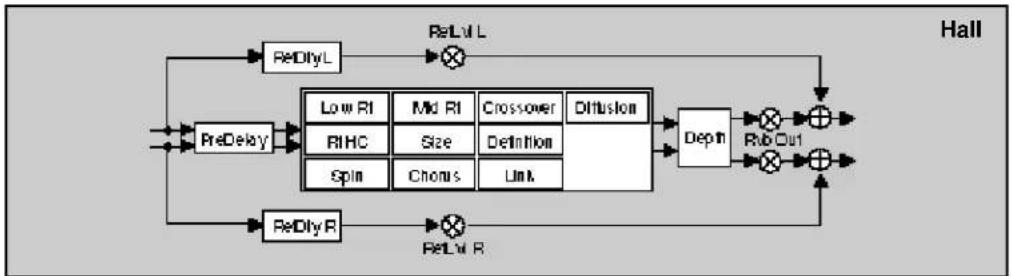
flowchart
graph TD
    A["PreDelay"] --> B["ReDlyL"]
    A --> C["ReDlyR"]
    B --> D["Low RI"]
    B --> E["Mid RI"]
    B --> F["Crossover"]
    B --> G["Diffusion"]
    C --> H["ReDlyR"]
    C --> I["ReDlyL"]
    D --> J["RIHC"]
    E --> K["Size"]
    F --> L["Definition"]
    G --> M["Spin"]
    G --> N["Chroms"]
    G --> O["Link"]
    H --> P["Depth"]
    I --> P
    J --> P
    K --> P
    L --> P
    M --> P
    N --> P
    O --> P
    P --> Q["Rer Out"]
    Q --> R["+"]
    R --> S["Hall"]
| Controls | 0.0Mix | 0.1Lvl Adjust | 0.2*InvIFPan | 0.3FXWidth | 0.4*ADJUST | |||||
| Submaxer | 1.0Sends | 1.1Returns | 1.2Routing | 1.3*Mix | 1.4*InvI | 1.5*In W | 1.6*HiOut | 1.7*LoOut | 1.8*OutInt | 1.9*OutW |
| Rvb Time | 2.0Los Rt | 2.1Mid Rt | 2.2Crosser | 2.3Pt HC | 2.4Pre Delay | 2.5*Ref LstDly | ||||
| Rvb Design | 3.0Size | 3.1Diffusion | 3.2Def | 3.3Depth | 3.4Spin | 3.5Chorus | 3.6Link | 3.7Rvb Out | ||
| Levels | 4.0*Matter | 4.1*Voice 1 | 4.2*Voice 2 | 4.3*Voice 3 | 4.4*Voice 4 | |||||
| Delay Time | 5.0*Matter | 5.1Voice 1 | 5.2Voice 2 | 5.3Voice 3 | 5.4Voice 4 | |||||
| Resonance | 6.0*Matter | 6.1*Voice 1 | 6.2*Voice 2 | 6.3*Voice 3 | 6.4*Voice 4 | |||||
| Pitch | 7.0*Assign | 7.1Voice 1 | 7.2Voice 2 | 7.3Voice 3 | 7.4Voice 4 | |||||
| Panning | 8.0Master | 8.1Voice 1 | 8.2Voice 2 | 8.3Voice 3 | 8.4Voice 4 | |||||
| Modulation | 9.0*Mod LFO | 9.1*Mod AR Eni | 9.2Mod Env L | 9.3Mod Env R | 9.4*Mod Latch | 9.5*Mod Bar 1 | 9.6*Mod Bar 2 | |||
| Patches | Patch 0 | Patch 1 | Patch 2 | Patch 3 | Patch 4 | Patch 5 | Patch 6 | Patch 7 | Patch 8 | Patch 9 |
Gld-Chmb

flowchart
graph TD
    A["L In"] --> B["+"]
    B --> C["A & B DivyL A"]
    C --> D["A & B Lvl L"]
    D --> E["Rx L"]
    E --> F["+"]
    F --> G["+"]
    G --> H["V1 X-Rk"]
    H --> I["+"]
    I --> J["V2 Pan"]
    J --> K["V2 Lvl"]
    K --> L["V1 Lvl"]
    L --> M["+"]
    M --> N["V1 Pan"]
    N --> O["+"]
    O --> P["Delay 3 4"]
    P --> Q["V3 Pan"]
    Q --> R["V3 Lvl"]
    R --> S["V4 Pan"]
    S --> T["+"]
    T --> U["V3 X-Rk"]
    U --> V["V4 X-Rk"]
    V --> W["+"]
    W --> X["V3 X-Rk"]
    X --> Y["V4 X-Rk"]
    Y --> Z["Delay 3 4"]
    Z --> AA["V3 Pan"]
    AA --> AB["V3 Lvl"]
    AB --> AC["V4 Pan"]
    AC --> AD["+"]
    AD --> AE["V3 X-Rk"]
    AE --> AF["V4 X-Rk"]
    AF --> AG["V3 X-Rk"]
    AG --> AH["V4 X-Rk"]
    AH --> AI["+"]
    AI --> AJ["V3 X-Rk"]
    AJ --> AK["V4 X-Rk"]
    AK --> AL["Delay 3 4"]
    AL --> AM["V3 Pan"]
    AM --> AN["V3 Lvl"]
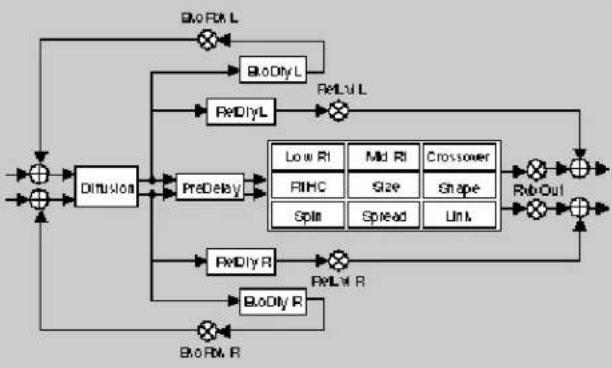
flowchart
graph TD
    A["Input"] --> B["+"]
    B --> C["Dimusion"]
    C --> D["PreDelay"]
    D --> E["PreDly R"]
    D --> F["PreDly R"]
    E --> G["Output"]
    F --> H["Output"]
    I["BLO/RX L"] --> J["BLO/Dry L"]
    J --> K["RelU/L"]
    K --> L["Low RI"]
    K --> M["Mid RI"]
    K --> N["Crossover"]
    K --> O["FIHC"]
    K --> P["Size"]
    K --> Q["Shape"]
    K --> R["Spin"]
    K --> S["Spread"]
    K --> T["Unit"]
    U["BLO/Dry R"] --> V["BLO/Dry R"]
    V --> W["RelU/R"]
    W --> X["Output"]
    Y["BLO/Dry R"] --> Z["BLO/Dry R"]
    Z --> AA["RelU/R"]
    AA --> AB["Output"]
| Controls | 0.0Mix | 0.1Lat Adjust | 0.2*Inv/FPan | 0.3FXWidth | 0.4*ADJUST | |||||
| 1 Submixer | 1.0Sends | 1.1Returns | 1.2Routing | 1.3*Max | 1.4*Inv/I | 1.5*In/W | 1.6*H/Cu | 1.7*Lo/Cu | 1.8*Out/Bi | 1.9*Out/W |
| 2 Rvb Time | 2.0Lat Rt | 2.1Mid Rt | 2.2Crossover | 2.3Pt HC | 2.4Pre Delay | 2.5*Ref Lx/Dly | 2.6*Eke Fbk/Dly | |||
| 3 Rvb Design | 3.0Size | 3.1Diffusion | 3.2Shape | 3.3Spread | 3.4Spin | 3.5Link | 3.6Rvb-Cut | |||
| 4 Glide FX | 4.0Old/LyI | 4.1*A.Lv/DlyL | 4.2*A.Lv/DlyR | 4.3*B.Lx/DlyL | 4.4*B.Lx/DlyR | 4.5*Fbk | 4.6*X-Fbk | |||
| 5 Levels | 5.0Master | 5.1Voice 1 | 5.2Voice 2 | 5.3Voice 3 | 5.4Voice 4 | |||||
| 6 Delay Time | 6.0*Master | 6.1Voice 1 | 6.2Voice 2 | 6.3Voice 3 | 6.4Voice 4 | |||||
| 7 Feedback | 7.0*Mcr Fbk | 7.1*Voice 1 | 7.2*Voice 2 | 7.3*Voice 3 | 7.4*Voice 4 | |||||
| 8 Planning | 8.0Master | 8.1Voice 1 | 8.2Voice 2 | 8.3Voice 3 | 8.4Voice 4 | |||||
| 9 Modulation | 9.0*Most LFO | 9.1*Most AP Ene | 9.2Mod Env L | 9.3Mod Env R | 9.4*Most Lrach | 9.5*Mod Star 1 | 9.6*Mod Star 2 | |||
| Patches | Patch 0 | Patch 1 | Patch 2 | Patch 3 | Patch 4 | Patch 5 | Patch 6 | Patch 7 | Patch 8 | Patch 9 |
Band-Chmb
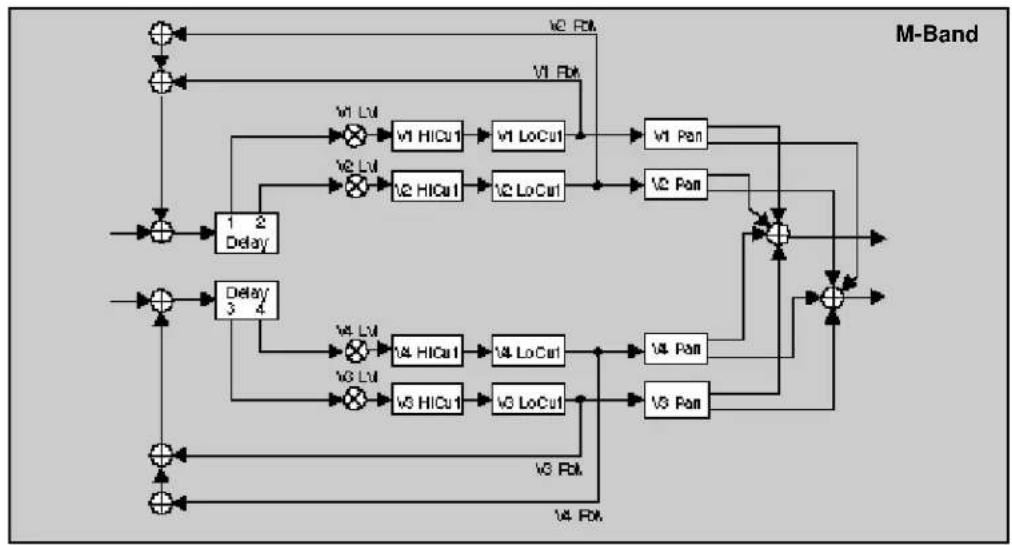
flowchart
graph TD
    A["Input"] --> B["Delay 1"]
    B --> C["Delay 2"]
    C --> D["Delay 3"]
    D --> E["Output"]
    F["Input"] --> G["Delay 4"]
    G --> H["Delay 5"]
    H --> I["Output"]
    J["Input"] --> K["Delay 6"]
    K --> L["Delay 7"]
    L --> M["Output"]
    N["Input"] --> O["Delay 8"]
    O --> P["Delay 9"]
    P --> Q["Output"]
    R["Input"] --> S["Delay 9"]
    S --> T["Delay 10"]
    T --> U["Output"]
    V["Input"] --> W["Delay 11"]
    W --> X["Delay 12"]
    X --> Y["Output"]
    Z["Input"] --> AA["Delay 13"]
    AA --> AB["Delay 14"]
    AB --> AC["Output"]
    AD["Input"] --> AE["Delay 15"]
    AE --> AF["Delay 16"]
    AF --> AG["Output"]
    AH["Input"] --> AI["Delay 17"]
    AI --> AJ["Delay 18"]
    AJ --> AK["Output"]
    AL["Input"] --> AM["Delay 19"]
    AM --> AN["Delay 20"]
    AN --> AO["Output"]
    AP["Input"] --> AQ["Delay 21"]
    AQ --> AR["Delay 22"]
    AR --> AS["Output"]
    AT["Input"] --> AU["Delay 23"]
    AU --> AV["Delay 24"]
    AV --> AW["Output"]
    AX["Input"] --> AY["Delay 25"]
    AY --> AZ["Delay 26"]
    AZ --> BA["Output"]
    BB["Input"] --> BC["Delay 27"]
    BC --> BD["Delay 28"]
    BD --> BE["Output"]
    BF["Input"] --> BG["Delay 29"]
    BG --> BH["Delay 30"]
    BH --> BI["Output"]
    BJ["Input"] --> BK["Delay 31"]
    BK --> BL["Delay 32"]
    BL --> BM["Output"]
    BN["Input"] --> BO["Delay 33"]
    BO --> BP["Delay 34"]
    BP --> BQ["Output"]
    BR["Input"] --> BS["Delay 35"]
    BS --> BT["Delay 36"]
    BT --> BU["Output"]
    BV["Input"] --> BW["Delay 37"]
    BW --> BX["Delay 38"]
    BX --> BY["Output"]
    BZ["Input"] --> CA["Delay 39"]
    CA --> CB["Delay 40"]
    CB --> CC["Output"]
    CD["V0 Bit"] --> DD["V1 Bit"]
    DD --> DE["V2 Bit"]
    DE --> DF["V3 Bit"]
    DF --> DG["V4 Bit"]

flowchart
graph TD
    A["+"] --> B["Diffusion"]
    B --> C["PreDelay"]
    C --> D["Low Ri"]
    C --> E["Mid Ri"]
    C --> F["Crossover"]
    D --> G["BitHC"]
    E --> H["Size"]
    F --> I["Shape"]
    G --> J["Spin"]
    H --> K["Spread"]
    I --> L["Unit"]
    J --> M["Rab Out"]
    K --> N["Rab Out"]
    L --> O["+"]
    M --> P["+"]
    N --> Q["+"]
    O --> R["+"]
    P --> S["+"]
    Q --> T["+"]
    R --> U["BioRxL"]
    S --> V["BioDlyL"]
    T --> W["BioDlyR"]
    U --> X["BioRxR"]
    V --> Y["BioDlyR"]
    W --> Z["BioRxR"]
    X --> AA["BioRxR"]
    Y --> AB["BioRxR"]
    Z --> AC["BioRxR"]
    AA --> AD["BioRxR"]
    AB --> AE["BioRxR"]
| 9Controls | 0.0Mix | 0.1Lvl Adjust | 0.2*IntvFPan | 0.3FXWidth | 0.4*ADJUST | |||||
| 1 Submiser | 1.0Sends | 1.1Returns | 1.2Routing | 1.3*Mix | 1.4*Intul | 1.5*In W | 1.6*HCl | 1.7*LoCul | 1.8*OutLvl | 1.9*Out W |
| 2 Feb Time | 2.0Low Rt | 2.1Mid Rt | 2.2Crossover | 2.3Pt HC | 2.4Pre Delay | 2.5*Ref LvlDly | 2.6*Eko Fbk'Dly | |||
| 3 Feb Design | 3.0Size | 3.1Diffusion | 3.2Shape | 3.3Spread | 3.4Spin | 3.5Link | 3.6Feb Cut | |||
| 4 Levels | 4.0Master | 4.1Voice 1 | 4.2Voice 2 | 4.3Voice 3 | 4.4Voice 4 | |||||
| 5 Delay Time | 5.0*Master | 5.1Voice 1 | 5.2Voice 2 | 5.3Voice 3 | 5.4Voice 4 | |||||
| 6 Filters | 6.0*Mar HC/LC | 6.1*V1 Hi/Lo | 6.2*V2 Hi/Lo | 6.3*V3 Hi/Lo | 6.4*V4 Hi/Lo | |||||
| 7 Feedback | 7.0Mstr Fbk | 7.1Voice 1 | 7.2Voice 2 | 7.3Voice 3 | 7.4Voice 4 | |||||
| 8 Panning | 8.0Master | 8.1Voice 1 | 8.2Voice 2 | 8.3Voice 3 | 8.4Voice 4 | |||||
| 9 Modulation | 9.0*Mod LFO | 9.1*Mod AR Env | 9.2Mod Env L | 9.3ModEnv R | 9.4*Mod Letch | 9.5*Mod Str 1 | 9.6*Mod Str 2 | |||
| Patches | Patch 0 | Patch 1 | Patch 2 | Patch 3 | Patch 4 | Patch 5 | Patch 6 | Patch 7 | Patch 8 | Patch 9 |
Chrs-Chmb

flowchart
graph TD
    A["Chorus"] --> B["Delay 1 2"]
    A --> C["Delay 3 4"]
    B --> D["V1 Chorus"]
    C --> E["V3 Chorus"]
    D --> F["V1 Lw"]
    E --> G["V2 Lw"]
    F --> H["V1 Pan"]
    G --> I["V2 Pan"]
    H --> J["+"]
    I --> J
    J --> K["Output"]
    D --> L["V3 Chorus"]
    E --> M["V4 Chorus"]
    F --> N["V1 Lw"]
    G --> O["V2 Lw"]
    H --> P["V3 Pan"]
    I --> Q["V4 Pan"]
    J --> R["+"]
    K --> S["Output"]
    L --> T["V3 Chorus"]
    M --> U["V4 Chorus"]
    N --> V["V1 Lw"]
    O --> W["V2 Lw"]
    P --> X["V3 Pan"]
    Q --> Y["+"]
    R --> Z["Output"]
    S --> AA["Output"]
    T --> AB["+"]
    U --> AC["Output"]
    V --> AD["+"]
    W --> AE["Output"]
    X --> AF["+"]
    Y --> AG["Output"]
    Z --> AH["Output"]
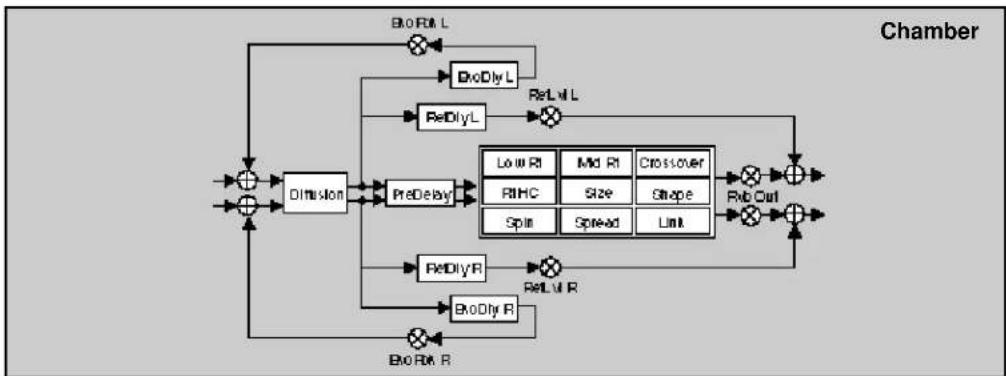
flowchart
graph TD
    A["Input"] --> B["+"]
    B --> C["Dimension"]
    C --> D["PreDelay"]
    D --> E["ReDlyL"]
    E --> F["ReLvl L"]
    F --> G["Output"]
    C --> H["+"]
    H --> I["ReDlyR"]
    I --> J["ReLvl R"]
    J --> K["Output"]
    G --> L["Low Rt"]
    G --> M["Mid Rt"]
    G --> N["Crossover"]
    G --> O["RBHC"]
    G --> P["Size"]
    G --> Q["Shape"]
    G --> R["Spin"]
    G --> S["Spread"]
    G --> T["Link"]
    L --> U["Rmb Out"]
    M --> U
    N --> U
    O --> U
    P --> U
    Q --> U
    R --> U
    S --> U
    T --> U
    U --> V["Output"]
    W["BioRvl L"] --> X["×"]
    X --> Y["×"]
    Y --> Z["×"]
    Z --> AA["×"]
    AA --> AB["×"]
    AB --> AC["×"]
    AC --> AD["×"]
    AD --> AE["×"]
    AE --> AF["×"]
    AF --> AG["×"]
    AG --> AH["×"]
    AH --> AI["×"]
    AI --> AJ["×"]
    AJ --> AK["×"]
    AK --> AL["×"]
    AL --> AM["×"]
    AM --> AN["×"]
    AN --> AO["×"]
    AO --> AP["×"]
    AP --> AQ["×"]
    AQ --> AR["×"]
    AR --> AS["×"]
    AS --> AT["×"]
    AT --> AU["×"]
    AU --> AV["×"]
    AV --> AW["×"]
    AW --> AX["×"]
    AX --> AY["×"]
| 9 Controls | 0.0 Mix | 0.1 Lst Adjust | 0.2 *IntvFPan | 0.3 FXWidth | 0.4 *ADJUST | |||||
| 1 Submaker | 1.0 Sends | 1.1 Returns | 1.2 Routing | 1.3 *Mix | 1.4 *IntvI | 1.5 *In W | 1.6 *HiOut | 1.7 *LoOut | 1.8 *OutRt | 1.9 *OutW |
| 2 Rvb Time | 2.0 Lst Rt | 2.1 Mid Rt | 2.2 Crossover | 2.3 Pt HC | 2.4 Pre Delay | 2.5 *Ref LstDly | ||||
| 3 Rvb Design | 3.0 Size | 3.1 Diffusion | 3.2 Shape | 3.3 Spread | 3.4 Spin | 3.5 Link | 3.6 Rvb Out | |||
| 4 Levels | 4.0 Master | 4.1 Voice 1 | 4.2 Voice 2 | 4.3 Voice 3 | 4.4 Voice 4 | |||||
| 5 Delay Time | 5.0 *Master | 5.1 Voice 1 | 5.2 Voice 2 | 5.3 Voice 3 | 5.4 Voice 4 | |||||
| 6 Chorus | 6.0 *Master | 6.1 *Voice 1 | 6.2 *Voice 2 | 6.3 *Voice 3 | 6.4 *Voice 4 | |||||
| 7 Feedback | 7.0 Master Fbk | 7.1 Voice 1 | 7.2 Voice 2 | 7.3 Voice 3 | 7.4 Voice 4 | |||||
| 8 Panning | 8.0 Master | 8.1 Voice 1 | 8.2 Voice 2 | 8.3 Voice 3 | 8.4 Voice 4 | |||||
| 9 Modulation | 9.0 *ModLFO | 9.1 *Mod AR Env | 9.2 ModEnv L | 9.3 ModEnv R | 9.4 *Mod Lrach | 9.5 *Mod Star 1 | 9.6 *Mod Star 2 | |||
| Patches | Patch 0 | Patch 1 | Patch 2 | Patch 3 | Patch 4 | Patch 5 | Patch 6 | Patch 7 | Patch 8 | Patch 9 |
Res1-Chmb

flowchart
graph TD
    A["+"] --> B["+"]
    B --> C["+"]
    C --> D["+"]
    D --> E["+"]
    E --> F["+"]
    F --> G["+"]
    G --> H["+"]
    H --> I["+"]
    I --> J["+"]
    J --> K["+"]
    K --> L["+"]
    L --> M["+"]
    M --> N["+"]
    N --> O["+"]
    O --> P["+"]
    P --> Q["+"]
    Q --> R["+"]
    R --> S["+"]
    S --> T["+"]
    T --> U["+"]
    U --> V["+"]
    V --> W["+"]
    W --> X["+"]
    X --> Y["+"]
    Y --> Z["+"]
    Z --> A
    A --> C
    C --> D
    D --> E
    E --> F
    F --> G
    G --> H
    H --> I
    I --> J
    J --> K
    K --> L
    L --> M
    M --> N
    N --> O
    O --> P
    P --> Q
    Q --> R
    R --> S
    S --> T
    T --> U
    U --> V
    V --> W
    W --> X
    X --> Y
    Y --> Z

flowchart
graph TD
    A["Input"] --> B["+"]
    B --> C["Diffusion"]
    C --> D["PreDelay"]
    D --> E["Low RI"]
    D --> F["Mid RI"]
    D --> G["Crossover"]
    E --> H["RIHC"]
    F --> I["Size"]
    G --> J["Shape"]
    H --> K["Gpin"]
    I --> L["Spread"]
    J --> M["Link"]
    K --> N["+"]
    L --> N
    M --> N
    N --> O["Rub Out"]
    O --> P["+"]
    P --> Q["Output"]
    Q --> R["+"]
    R --> S["Output"]
    S --> T["Output"]
    T --> U["+"]
    U --> V["Output"]
    V --> W["Output"]
    W --> X["Output"]
    X --> Y["Output"]
    Y --> Z["Output"]
    Z --> A
| Controls | 0.0Mix | 0.1Lvl Adjust | 0.2*Intv/FPan | 0.3FXWidth | 0.4*ADJUST | |||||
| Submiser | 1.0Sends | 1.1Returns | 1.2Routing | 1.3*Mix | 1.4*Intul | 1.5*In W | 1.6*HCut | 1.7*LoCut | 1.8*OutLvl | 1.9*Out W |
| Reb Time | 2.0Lwl Rt | 2.1Mid Rt | 2.2Crossover | 2.3Rt HC | 2.4Pre Delay | 2.5*Ret Lwl/Dly | 2.6*Echo Fbk'Dly | |||
| Reb Design | 3.0Star | 3.1Diffusion | 3.2Shape | 3.3Spread | 3.4Spin | 3.5Link | 3.6Pivb Cut | |||
| Levels | 4.0*Master | 4.1*Voice 1 | 4.2*Voice 2 | 4.3*Voice 3 | 4.4*Voice 4 | |||||
| Delay Time | 5.0*Master | 5.1Voice 1 | 5.2Voice 2 | 5.3Voice 3 | 5.4Voice 4 | |||||
| Resonance | 6.0*Master | 6.1*Voice 1 | 6.2*Voice 2 | 6.3*Voice 3 | 6.4*Voice 4 | |||||
| Pitch | 7.0Assign | 7.1Tuning | 7.2Adams | 7.3Unison | ||||||
| Panning | 8.0Master | 8.1Voice 1 | 8.2Voice 2 | 8.3Voice 3 | 8.4Voice 4 | |||||
| Modulation | 9.0*Mod LFO | 9.1*Mod AR Env | 9.2Mod Env L | 9.3Mod Env R | 9.4*Mod Latch | 9.5*Mod Str 1 | 9.6*Mod Str 2 | |||
| Patches | Patch 0 | Patch 1 | Patch 2 | Patch 3 | Patch 4 | Patch 5 | Patch 6 | Patch 7 | Patch 8 | Patch 9 |
Res2-Chmb
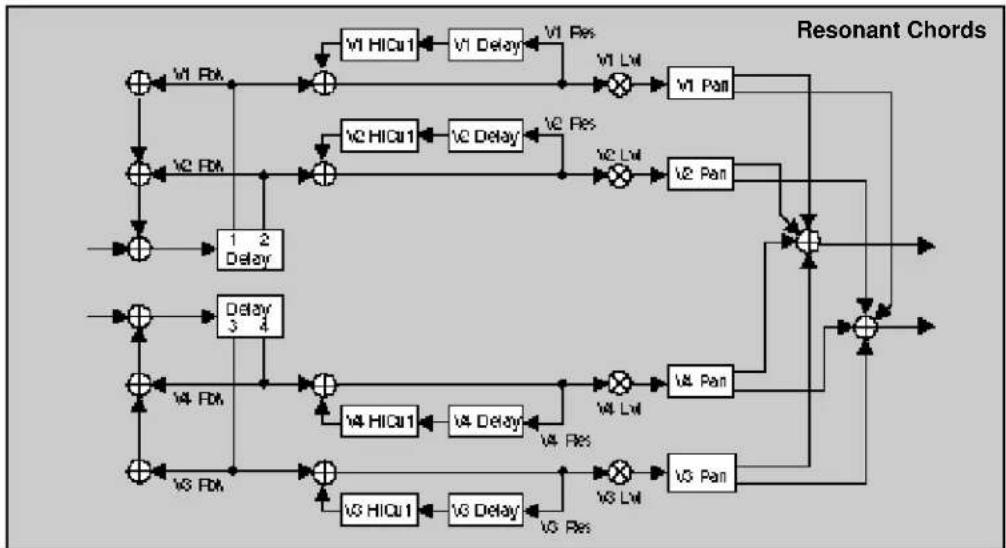
flowchart
graph TD
    A["+"] --> B["+"]
    B --> C["+"]
    C --> D["+"]
    D --> E["+"]
    E --> F["+"]
    F --> G["+"]
    G --> H["+"]
    H --> I["+"]
    I --> J["+"]
    J --> K["+"]
    K --> L["+"]
    L --> M["+"]
    M --> N["+"]
    N --> O["+"]
    O --> P["+"]
    P --> Q["+"]
    Q --> R["+"]
    R --> S["+"]
    S --> T["+"]
    T --> U["+"]
    U --> V["+"]
    V --> W["+"]
    W --> X["+"]
    X --> Y["+"]
    Y --> Z["+"]
    Z --> A
    style A fill:#f9f,stroke:#333
    style B fill:#ccf,stroke:#333
    style C fill:#cfc,stroke:#333
    style D fill:#fcc,stroke:#333
    style E fill:#cff,stroke:#333
    style F fill:#ffc,stroke:#333
    style G fill:#cfc,stroke:#333
    style H fill:#fcc,stroke:#333
    style I fill:#cfc,stroke:#333
    style J fill:#fcc,stroke:#333
    style K fill:#cfc,stroke:#333
    style L fill:#fcc,stroke:#333
    style M fill:#cfc,stroke:#333
    style N fill:#fcc,stroke:#333
    style O fill:#cfc,stroke:#333
    style P fill:#fcc,stroke:#333
    style Q fill:#cfc,stroke:#333
    style R fill:#fcc,stroke:#333
    style S fill:#cfc,stroke:#333
    style T fill:#fcc,stroke:#333
    style U fill:#cfc,stroke:#333
    style V fill:#fcc,stroke:#333
    style W fill:#cfc,stroke:#333
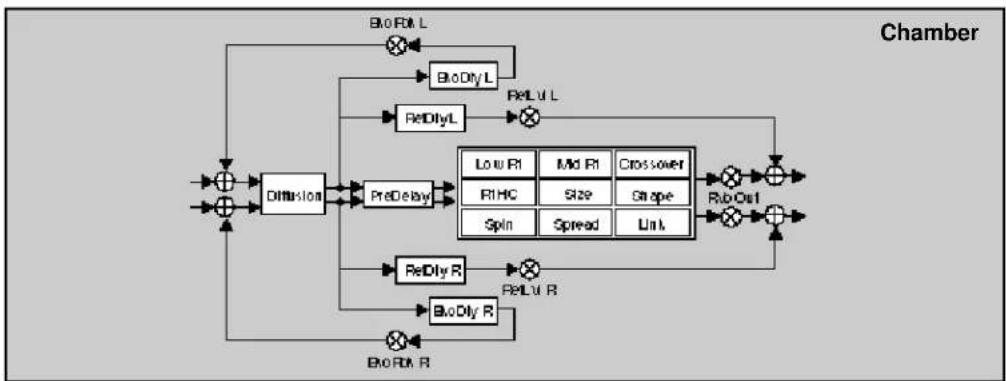
flowchart
graph TD
    A["+"] --> B["Diffusion"]
    B --> C["PreDelay"]
    C --> D["Low R1"]
    C --> E["Mid R1"]
    C --> F["Crossover"]
    D --> G["RIO Out"]
    E --> H["Spin"]
    E --> I["Spread"]
    E --> J["Link"]
    F --> K["RIO Out"]
    G --> L["ReDly R"]
    H --> M["ReDly R"]
    I --> N["ReDly R"]
    J --> O["ReDly R"]
    K --> P["BioDly R"]
    L --> Q["BioDly R"]
    M --> R["BioDly R"]
    N --> S["BioDly R"]
    O --> T["BioDly R"]
    P --> U["BioDly L"]
    Q --> V["BioDly L"]
    R --> W["BioDly L"]
    S --> X["BioDly L"]
    T --> Y["BioDly L"]
    U --> Z["BioDly L"]
    V --> AA["BioDly L"]
    W --> AB["BioDly L"]
    X --> AC["BioDly L"]
    Y --> AD["BioDly L"]
    Z --> AE["BioDly L"]
    AA --> AF["BioDly L"]
    AB --> AG["BioDly L"]
    AC --> AH["BioDly L"]
    AD --> AI["BioDly L"]
    AE --> AJ["BioDly L"]
    AF --> AK["BioDly L"]
    AG --> AL["BioDly L"]
    AH --> AM["BioDly L"]
    AI --> AN["BioDly L"]
    AJ --> AO["BioDly L"]
    AK --> AP["BioDly L"]
    AL --> AQ["BioDly L"]
    AM --> AR["BioDly L"]
    AN --> AS["BioDly L"]
    AO --> AT["BioDly L"]
    AP --> AU["BioDly L"]
    AQ --> AV["BioDly L"]
    AR --> AW["BioDly L"]
    AS --> AX["BioDly L"]
    AT --> AY["BioDly L"]
    AU --> AZ["BioDly L"]
    AV --> BA["BioDly L"]
    AW --> BB["BioDly L"]
    AX --> BC["BioDly L"]
    AY --> BD["BioDly L"]
    AZ --> BE["BioDly L"]
    BA --> BF["BioDly L"]
    BB --> BG["BioDly L"]
    AC --> BH["BioDly L"]
    AD --> BI["BioDly L"]
    AE --> BJ["BioDly L"]
    AF --> BK["BioDly L"]
    AG --> BL["BioDly L"]
    AH --> BM["BioDly L"]
    AI --> BN["BioDly L"]
| 0 Controls | 0.0 Mix | 0.1 Lst Adjust | 0.2 *Intv/FPan | 0.3 FXWidth | 0.4 *ADJUST | |||||
| 1 Submisser | 1.0 Sends | 1.1 Returns | 1.2 Routing | 1.3 *Mix | 1.4 *Intv1 | 1.5 *In W | 1.6 *H/Cut | 1.7 *Lo/Cut | 1.8 *Cout/Li | 1.9 *Cui W |
| 2 Reb Time | 2.0 Lat Rt | 2.1 Mid Rt | 2.2 Crossover | 2.3 Pit HC | 2.4 Pre Delay | 2.5 *Ref Lnt/Dly | 2.6 *Exo Fbk*Dly | |||
| 3 Reb Design | 3.0 Size | 3.1 Diffusion | 3.2 Shape | 3.3 Spread | 3.4 Spin | 3.5 Link | 3.6 Rvb Cut | |||
| 4 Levels | 4.0 *Matter | 4.1 *Voice 1 | 4.2 *Voice 2 | 4.3 *Voice 3 | 4.4 *Voice 4 | |||||
| 5 Delay Time | 5.0 *Matter | 5.1 Voice 1 | 5.2 Voice 2 | 5.3 Voice 3 | 5.4 Voice 4 | |||||
| 6 Resonance | 6.0 *Matter | 6.1 *Voice 1 | 6.2 *Voice 2 | 6.3 *Voice 3 | 6.4 *Voice 4 | |||||
| 7 Pitch | 7.0 *Assign | 7.1 Voice 1 | 7.2 Voice 2 | 7.3 Voice 3 | 7.4 Voice 4 | |||||
| 8 Panning | 8.0 Master | 8.1 Voice 1 | 8.2 Voice 2 | 8.3 Voice 3 | 8.4 Voice 4 | |||||
| 9 Modulation | 9.0 *Mod LFO | 9.1 *Mod AR Env | 9.2 Mod Env L | 9.3 Mod Env R | 9.4 *Mod Latch | 9.5 *Mod Sw 1 | 9.6 *Mod Sw 2 | |||
| Patches | Patch 0 | Patch 1 | Patch 2 | Patch 3 | Patch 4 | Patch 5 | Patch 6 | Patch 7 | Patch 8 | Patch 9 |
Gld-Plt

flowchart
graph TD
    A["L In"] --> B["+"]
    B --> C["A/B DiyL A"]
    C --> D["×"]
    D --> E["+"]
    E --> F["V2 X-Rik"]
    F --> G["Delay 1"]
    G --> H["V2 Pan"]
    H --> I["+"]
    I --> J["Delay 2"]
    J --> K["V3 Pan"]
    K --> L["+"]
    L --> M["Delay 3"]
    M --> N["V3 Pan"]
    N --> O["+"]
    O --> P["Delay 4"]
    P --> Q["V3 Pan"]
    Q --> R["+"]
    R --> S["Delay 5"]
    S --> T["V3 Pan"]
    T --> U["+"]
    U --> V["Delay 6"]
    V --> W["V3 Pan"]
    W --> X["+"]
    X --> Y["Delay 7"]
    Y --> Z["V3 Pan"]
    Z --> AA["+"]
    AA --> AB["Delay 8"]
    AB --> AC["V3 Pan"]
    AC --> AD["+"]
    AD --> AE["Delay 9"]
    AE --> AF["V3 Pan"]
    AF --> AG["+"]
    AG --> AH["Delay 10"]
    AH --> AI["V3 Pan"]
    AI --> AJ["+"]
    AJ --> AK["Delay 11"]
    AK --> AL["V3 Pan"]
    AL --> AM["+"]
    AM --> AN["Delay 12"]
    AN --> AO["V3 Pan"]
    AO --> AP["+"]
    AP --> AQ["Delay 13"]
    AQ --> AR["V3 Pan"]
    AR --> AS["+"]
    AS --> AT["Delay 14"]
    AT --> AU["V3 Pan"]
    AU --> AV["+"]
    AV --> AW["Delay 15"]
    AW --> AX["V3 Pan"]
    AX --> AY["+"]
    AY --> AZ["Delay 16"]
    AZ --> BA["V3 Pan"]
    BA --> BB["+"]
    BB --> BC["Delay 17"]
    BC --> BD["V3 Pan"]
    BD --> BE["+"]
    BE --> BF["Delay 18"]
    BF --> BG["V3 Pan"]
    BG --> BH["+"]
    BH --> BI["Delay 19"]
    BI --> BJ["V3 Pan"]
    BJ --> BK["+"]
    BK --> BL["Delay 20"]
    BL --> BM["V3 Pan"]
    BM --> BN["+"]
    BN --> BO["Delay 21"]
    BO --> BP["V3 Pan"]
    BP --> BQ["+"]
    BQ --> BR["Delay 22"]
    BR --> BS["V3 Pan"]
    BS --> BT["+"]
    BT --> BU["Delay 23"]
    BU --> BV["V3 Pan"]
    BV --> BW["+"]
    BW --> BX["Delay 24"]
    BX --> BY["V3 Pan"]
    BY --> BZ["+"]
    BZ --> CA["Delay 25"]
    CA --> CB["V3 Pan"]
    CB --> CC["+"]
    CC --> CD["Delay 26"]
    CD --> CE["V3 Pan"]
    CE --> CF["+"]
    CF --> CG["Delay 27"]
    CG --> CH["V3 Pan"]
    CH --> CI["+"]
    CI --> CJ["Delay 28"]
    CJ --> CK["V3 Pan"]
    CK --> CL["+"]
    CL --> CM["Delay 29"]
    CM --> CN["V3 Pan"]
    CN --> CO["+"]
    CO --> CP["Delay 30"]
    CP --> CQ["V3 Pan"]
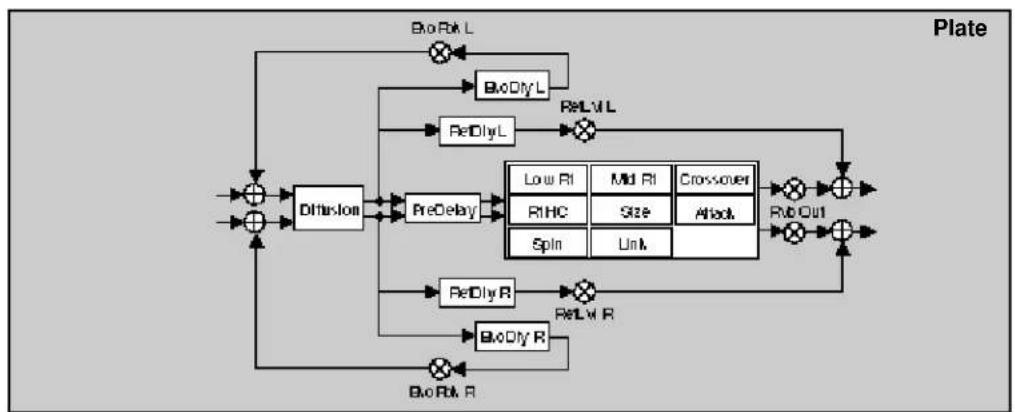
flowchart
graph TD
    A["Input"] --> B["+"]
    B --> C["Diffusion"]
    C --> D["PreDelay"]
    D --> E["Low RI"]
    D --> F["Mid RI"]
    D --> G["Crossover"]
    D --> H["ReDly L"]
    D --> I["ReDly R"]
    D --> J["ReDly R"]
    E --> K["RHC"]
    F --> L["Size"]
    G --> M["Attack"]
    H --> N["Spin"]
    I --> O["Unk."]
    J --> P["Rb Out"]
    K --> Q["Output"]
    L --> Q
    M --> Q
    N --> Q
    O --> Q
    P --> Q
    Q --> R["BioRx L"]
    Q --> S["BioRx R"]
    R --> T["Output"]
    S --> U["Output"]
| 6 Controls | 0.0 Mix | 0.1 Lvl Adjust | 0.2 *IntvlFPan | 0.3 FXWidth | 0.4 *ADJUST | |||||
| 1 Submitter | 1.0 Sends | 1.1 Returns | 1.2 Routing | 1.3 *Mix | 1.4 *Intvl | 1.5 *In W | 1.6 *HOut | 1.7 *LoOut | 1.8 *OutVal | 1.9 *OutW |
| 2 Rab Time | 2.0 Lwl Rt | 2.1 Mid Rt | 2.2 Crossbar | 2.3 Pt HC | 2.4 Pre Delay | 2.5 *Ref LwlDly | 2.6 *Eko Fbk*Dly | |||
| 3 Rab Design | 3.0 Size | 3.1 Diffusion | 3.2 Attack | 3.3 Spin | 3.4 Link | 3.5 Rab-Out | ||||
| 4 Glide FX | 4.0 GlstLvl | 4.1 *A.Lvl*DlyL | 4.2 *A.Lvl*DlyR | 4.3 *B.Lvl*DlyL | 4.4 *B.Lvl*DlyR | 4.5 *Fbk | 4.6 *X.Fbk | |||
| 5 Levels | 5.0 Master | 5.1 Voice 1 | 5.2 Voice 2 | 5.3 Voice 2 | 5.4 Voice 4 | |||||
| 6 Delay Time | 6.0 *Matter | 6.1 Voice 1 | 6.2 Voice 2 | 6.3 Voice 3 | 6.4 Voice 4 | |||||
| 7 Feedback | 7.0 *Mnr Fbk | 7.1 *Voice 1 | 7.2 *Voice 2 | 7.3 *Voice 3 | 7.4 *Voice 4 | |||||
| 8 Panning | 8.0 Master | 8.1 Voice 1 | 8.2 Voice 2 | 8.3 Voice 3 | 8.4 Voice 4 | |||||
| 9 Modulation | 9.0 *ModLFO | 9.1 *ModAR Ers | 9.2 ModEnv L | 9.3 ModEnv R | 9.4 *ModLatch | 9.5 *Mod Str 1 | 9.6 *Mod Str 2 | |||
| Patches | Patch 0 | Patch 1 | Patch 2 | Patch 3 | Patch 4 | Patch 5 | Patch 6 | Patch 7 | Patch 8 | Patch 9 |
Band-Plt

flowchart
graph TD
    A["Input"] --> B["1"]
    B --> C["2"]
    C --> D["Delay 3"]
    D --> E["Output"]
    F["Input"] --> G["3"]
    G --> H["4"]
    H --> I["Output"]
    J["1"] --> K["2"]
    K --> L["3"]
    L --> M["Output"]
    N["2"] --> O["4"]
    O --> P["5"]
    P --> Q["Output"]
    R["3"] --> S["5"]
    S --> T["6"]
    T --> U["Output"]
    V["4"] --> W["6"]
    W --> X["7"]
    X --> Y["Output"]
    Z["5"] --> AA["7"]
    AA --> AB["8"]
    AB --> AC["Output"]
    AD["6"] --> AE["8"]
    AE --> AF["9"]
    AF --> AG["Output"]
    AH["7"] --> AI["9"]
    AI --> AJ["10"]
    AJ --> AK["Output"]
    AL["8"] --> AM["10"]
    AM --> AN["11"]
    AN --> AO["Output"]
    AP["9"] --> AQ["11"]
    AQ --> AR["12"]
    AR --> AS["Output"]
    AT["10"] --> AU["12"]
    AU --> AV["13"]
    AV --> AW["Output"]
    AX["11"] --> AY["13"]
    AY --> AZ["14"]
    AZ --> BA["Output"]
    BB["12"] --> BC["14"]
    BC --> BD["15"]
    BD --> BE["Output"]
    BF["13"] --> BG["15"]
    BG --> BH["16"]
    BH --> BI["Output"]
    BJ["14"] --> BK["16"]
    BK --> BL["17"]
    BL --> BM["Output"]
    BN["15"] --> BO["17"]
    BO --> BP["18"]
    BP --> BQ["Output"]
    BR["16"] --> BS["18"]
    BS --> BT["19"]
    BT --> BU["Output"]
    BV["17"] --> BW["19"]
    BW --> BX["20"]
    BX --> BY["Output"]
    BZ["18"] --> CA["20"]
    CA --> CB["21"]
    CB --> CC["Output"]

flowchart
graph TD
    A["Input"] --> B["+"]
    B --> C["Dimulus"]
    C --> D["PreDelay"]
    D --> E["Low R1"]
    D --> F["Mid R1"]
    D --> G["Crossover"]
    D --> H["Spin"]
    D --> I["Link"]
    E --> J["BxO_RxL"]
    F --> K["BxO_RxL"]
    G --> L["BxO_RxL"]
    H --> M["BxO_RxL"]
    I --> N["BxO_RxL"]
    J --> O["ReLvl L"]
    K --> P["ReLvl L"]
    L --> Q["ReLvl L"]
    M --> R["ReLvl L"]
    N --> S["ReLvl L"]
    O --> T["ReLvl R"]
    P --> U["ReLvl R"]
    Q --> V["BxO_RxR"]
    R --> W["BxO_RxR"]
    S --> X["BxO_RxR"]
    T --> Y["BxO_RxR"]
    U --> Z["BxO_RxR"]
    V --> AA["BxO_RxR"]
    W --> AB["BxO_RxR"]
    X --> AC["BxO_RxR"]
    Y --> AD["BxO_RxR"]
    Z --> AE["BxO_RxR"]
| 0 Controls | 0.0 Mix | 0.1 Lat Adjust | 0.2 *InvlFPan | 0.3 FXWidth | 0.4 *ADJUST | |||||
| 1 Submixer | 1.0 Sends | 1.1 Returns | 1.2 Floating | 1.3 *Max | 1.4 *Invl | 1.5 *InW | 1.6 *HOut | 1.7 *LoOut | 1.8 *OutLvl | 1.9 *OutW |
| 2 Rab Time | 2.0 Low Rt | 2.1 Mid Rt | 2.2 Crossover | 2.3 Pt HC | 2.4 Pre Delay | 2.5 *Ref LvlDly | 2.6 *Eke Fbk'Dly | |||
| 3 Rab Design | 3.0 Size | 3.1 Diffusion | 3.2 Attack | 3.3 Spin | 3.4 Link | 3.5 Rab Out | ||||
| 4 Levels | 4.0 Master | 4.1 Voice 1 | 4.2 Voice 2 | 4.3 Voice 3 | 4.4 Voice 4 | |||||
| 5 Delay Time | 5.0 *Master | 5.1 Voice 1 | 5.2 Voice 2 | 5.3 Voice 3 | 5.4 Voice 4 | |||||
| 6 Filters | 6.0 *Mat HC/LC | 6.1 *V1 HFLc | 6.2 *V2 HFLc | 6.3 *V3 HFLc | 6.4 *V4 HFLc | |||||
| 7 Feedback | 7.0 Mat Fbk | 7.1 Voice 1 | 7.2 Voice 2 | 7.3 Voice 3 | 7.4 Voice 4 | |||||
| 8 Panning | 8.0 Master | 8.1 Voice 1 | 8.2 Voice 2 | 8.3 Voice 3 | 8.4 Voice 4 | |||||
| 9 Modulation | 9.0 *Mod LFO | 9.1 *Mod AP Enr | 9.2 Mod Ery L | 9.3 Mod Ery R | 9.4 *Mod Latch | 9.5 *Mod Sw 1 | 9.6 *Mod Sw 2 | |||
| Patches | Patch 0 | Patch 1 | Patch 2 | Patch 3 | Patch 4 | Patch 5 | Patch 6 | Patch 7 | Patch 8 | Patch 9 |
Chrs-Plt

flowchart
graph TD
    A["+"] --> B["Delay 1 2"]
    B --> C["V1 Chorus"]
    C --> D["+"]
    D --> E["V1 Lvl"]
    E --> F["Pan"]
    F --> G["+"]
    G --> H["V3 Lvl"]
    H --> I["Pan"]
    I --> J["+"]
    J --> K["V3 Pan"]
    K --> L["+"]
    L --> M["V4 Lvl"]
    M --> N["Pan"]
    N --> O["+"]
    O --> P["V4 Depth, V1 Rate"]
    P --> Q["+"]
    Q --> R["V3 Chorus"]
    R --> S["+"]
    S --> T["V3 Lvl"]
    T --> U["Pan"]
    U --> V["+"]
    V --> W["V3 Pan"]
    W --> X["+"]
    X --> Y["V4 Depth, V2 Rate"]
    Y --> Z["+"]
    Z --> AA["V3 Chorus"]
    AA --> AB["+"]
    AB --> AC["V3 Lvl"]
    AC --> AD["Pan"]
    AD --> AE["+"]
    AE --> AF["V3 Pan"]
    AF --> AG["+"]
    AG --> AH["V4 Depth, V3 Rate"]
    AH --> AI["+"]
    AI --> AJ["V3 Chorus"]
    AJ --> AK["+"]
    AK --> AL["V3 Lvl"]
    AL --> AM["Pan"]
    AM --> AN["+"]
    AN --> AO["V3 Pan"]
    AO --> AP["+"]
    AP --> AQ["V4 Depth, V4 Rate"]
    AQ --> AR["+"]
    AR --> AS["V3 Chorus"]
    AS --> AT["+"]
    AT --> AU["V3 Lvl"]
    AU --> AV["Pan"]
    AV --> AW["+"]
    AW --> AX["V3 Pan"]
    AX --> AY["+"]
    AY --> AZ["V4 Depth, V5 Rate"]
    AZ --> BA["+"]
    BA --> BB["V3 Chorus"]
    BB --> BC["+"]
    BC --> BD["V3 Lvl"]
    BD --> BE["Pan"]
    BE --> BF["+"]
    BF --> BG["V3 Pan"]
    BG --> BH["+"]
    BH --> BI["V4 Depth, V6 Rate"]
    BI --> BJ["+"]
    BJ --> BK["V3 Chorus"]
    BK --> BL["+"]
    BL --> BM["V3 Lvl"]
    BM --> BN["Pan"]
    BN --> BO["+"]
    BO --> BP["V4 Depth, V7 Rate"]
    BP --> BQ["+"]
    BQ --> BR["V3 Chorus"]
    BR --> BS["+"]
    BS --> BT["V3 Lvl"]
    BT --> BU["Pan"]
    BU --> BV["+"]
    BV --> BW["V4 Depth, V8 Rate"]
    BW --> BX["+"]
    BX --> BY["V3 Chorus"]
    BY --> BZ["+"]
    BZ --> CA["V3 Lvl"]
    CA --> CB["Pan"]
    CB --> CC["+"]
    CC --> CD["V4 Depth, V9 Rate"]
    CD --> CE["+"]
    CE --> CF["V3 Chorus"]
    CF --> CG["+"]
    CG --> CH["V3 Lvl"]
    CH --> CI["Pan"]
    CI --> CJ["+"]
    CJ --> CK["V4 Depth, V10 Rate"]
    CK --> CL["+"]
    CL --> CM["V3 Chorus"]

flowchart
graph TD
    A["Input"] --> B["Diffusion"]
    B --> C["PreDelay"]
    C --> D["Low Rf"]
    C --> E["Mid Rf"]
    C --> F["Crossover"]
    D --> G["RfHC"]
    E --> H["Size"]
    E --> I["Attack"]
    F --> J["Spin"]
    F --> K["Link"]
    G --> L["Rd Out"]
    H --> L
    I --> L
    J --> L
    K --> L
    L --> M["Output"]
    N["Input"] --> O["Diffusion"]
    O --> P["PreDelay"]
    P --> Q["RdRlyL"]
    Q --> R["ReLwl L"]
    R --> S["ReDlyL"]
    S --> T["ReDlyL"]
    T --> U["ReDlyR"]
    U --> V["ReDlyR"]
    V --> W["Output"]
    X["Plate"] --> Y["Output"]
| 9Controls | 0.0Mix | 0.1Lvl Adjust | 0.2*IntuFPan | 0.3FXWidth | 0.4*ADJUST | |||||
| 1 Submixer | 1.0Sends | 1.1Returns | 1.2Routing | 1.3*Mix | 1.4*Intul | 1.5*In W | 1.6*HiCut | 1.7*LoCut | 1.8*OutLvl | 1.9*Out W |
| 2 Rvb Time | 2.0Los Rt | 2.1Mid Rt | 2.2Crossover | 2.3Rt HC | 2.4Pre Delay | 2.5*Ref LntDly | 2.6*Exo Fbk'Dly | |||
| 3 Rvb Design | 3.0Star | 3.1Diffusion | 3.2Attack | 3.3Spin | 3.4Link | 3.5Rvb Out | ||||
| 4 Levels | 4.0Master | 4.1Voice 1 | 4.2Voice 2 | 4.3Voice 3 | 4.4Voice 4 | |||||
| 5 Delay Time | 5.0*Matter | 5.1Voice 1 | 5.2Voice 2 | 5.3Voice 3 | 5.4Voice 4 | |||||
| 6 Chorus | 6.0*Matter | 6.1*Voice 1 | 6.2*Voice 2 | 6.3*Voice 3 | 6.4*Voice 4 | |||||
| 7 Feedback | 7.0Mstr Fbk | 7.1Voice 1 | 7.2Voice 2 | 7.3Voice 3 | 7.4Voice 4 | |||||
| 8 Panning | 8.0Master | 8.1Voice 1 | 8.2Voice 2 | 8.3Voice 3 | 8.4Voice 4 | |||||
| 9 Modulation | 9.0*Mod LFO | 9.1*Mod AR Env | 9.2Mod Env L | 9.3Mod Env R | 9.4*Mod Letch | 9.5*Mod Bsr 1 | 9.6*Mod Bsr 2 | |||
| Patches | Patch 0 | Patch 1 | Patch 2 | Patch 3 | Patch 4 | Patch 5 | Patch 6 | Patch 7 | Patch 8 | Patch 9 |
Res1-Plt
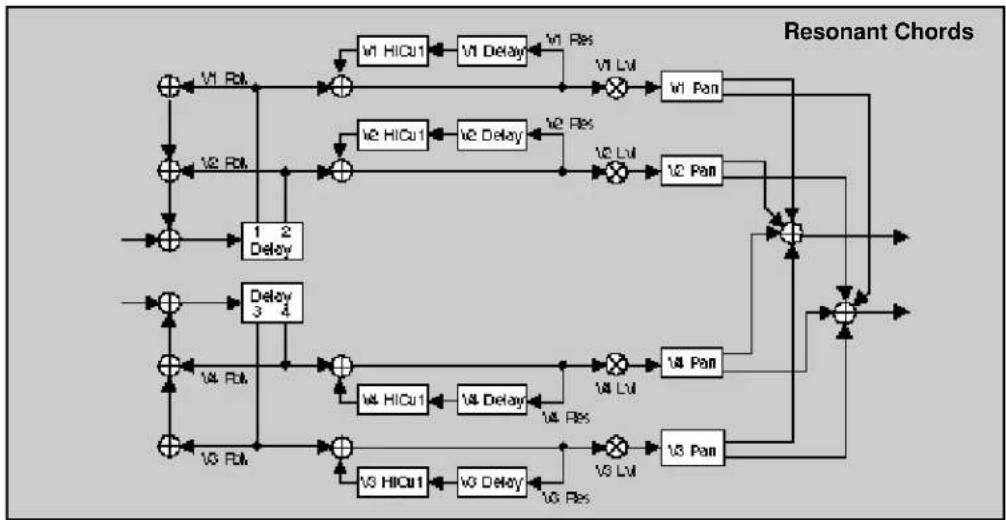
flowchart
graph TD
    A["+"] --> B["+"]
    B --> C["+"]
    C --> D["+"]
    D --> E["+"]
    E --> F["+"]
    F --> G["+"]
    G --> H["+"]
    H --> I["+"]
    I --> J["+"]
    J --> K["+"]
    K --> L["+"]
    L --> M["+"]
    M --> N["+"]
    N --> O["+"]
    O --> P["+"]
    P --> Q["+"]
    Q --> R["+"]
    R --> S["+"]
    S --> T["+"]
    T --> U["+"]
    U --> V["+"]
    V --> W["+"]
    W --> X["+"]
    X --> Y["+"]
    Y --> Z["+"]
    Z --> A
    style A fill:#f9f,stroke:#333
    style B fill:#ccf,stroke:#333
    style C fill:#ccf,stroke:#333
    style D fill:#ccf,stroke:#333
    style E fill:#ccf,stroke:#333
    style F fill:#ccf,stroke:#333
    style G fill:#ccf,stroke:#333
    style H fill:#ccf,stroke:#333
    style I fill:#ccf,stroke:#333
    style J fill:#ccf,stroke:#333
    style K fill:#ccf,stroke:#333
    style L fill:#ccf,stroke:#333
    style M fill:#ccf,stroke:#333
    style N fill:#ccf,stroke:#333
    style O fill:#ccf,stroke:#333
    style P fill:#ccf,stroke:#333
    style Q fill:#ccf,stroke:#333
    style R fill:#ccf,stroke:#333
    style S fill:#ccf,stroke:#333
    style T fill:#ccf,stroke:#333
    style U fill:#ccf,stroke:#333
    style V fill:#ccf,stroke:#333
    style W fill:#ccf,stroke:#333

flowchart
graph TD
    A["Input"] --> B["Dimulus"]
    B --> C["PreDelay"]
    C --> D{Low R1}
    C --> E{Mid R1}
    C --> F{Crossover}
    D --> G["ReDly L"]
    E --> H["ReDly L"]
    F --> I["Crossover"]
    G --> J["ReDly R"]
    H --> K["ReDly R"]
    I --> L["ReDly R"]
    J --> M["ReDly R"]
    K --> N["ReDly R"]
    L --> O["ReDly R"]
    M --> P["ReDly R"]
    N --> Q["ReDly R"]
    O --> R["ReDly R"]
    P --> S["ReDly R"]
    Q --> T["ReDly R"]
    R --> U["Plate"]
    S --> U
    T --> U
| 0Controls | 0.0Mix | 0.1Lvl Adjust | 0.2*Invl/Plan | 0.3FXWidth | 0.4*ADJUST | |||||
| 1 Submitter | 1.0Sends | 1.1Returns | 1.2Routing | 1.3*Mix | 1.4*Invl | 1.5*In W | 1.6*H/Cut | 1.7*Lo/Cut | 1.8*Out/Li | 1.9*Out W |
| 2 Rvb Time | 2.0Los Rt | 2.1Mid Rt | 2.2Crossover | 2.3Rt HC | 2.4Pre Delay | 2.5*Ref Lvl/Dly | 2.6*Exo Fbk/Dly | |||
| 3 Rvb Design | 3.0Size | 3.1Diffusion | 3.2Attack | 3.3Spin | 3.4Link | 3.5Rvb Out | ||||
| 4 Levels | 4.0*Matter | 4.1*Voice 1 | 4.2*Voice 2 | 4.3*Voice 3 | 4.4*Voice 4 | |||||
| 5 Delay Time | 5.0*Matter | 5.1Voice 1 | 5.2Voice 2 | 5.3Voice 3 | 5.4Voice 4 | |||||
| 6 Resonance | 6.0*Matter | 6.1*Voice 1 | 6.2*Voice 2 | 6.3*Voice 3 | 6.4*Voice 4 | |||||
| 7 Pitch | 7.0Assign | 7.1Tuning | 7.2Advice | 7.3Union | ||||||
| 8 Panning | 8.0Master | 8.1Voice 1 | 8.2Voice 2 | 8.3Voice 3 | 8.4Voice 4 | |||||
| 9 Modulation | 9.0*Mod LFO | 9.1*Mod AR Env | 9.2Mod Env L | 9.3Mod Env R | 9.4*Mod Latch | 9.5*Mod Str 1 | 9.6*Mod Str 2 | |||
| Patches | Patch 0 | Patch 1 | Patch 2 | Patch 3 | Patch 4 | Patch 5 | Patch 6 | Patch 7 | Patch 8 | Patch 9 |
Res2-Plt

flowchart
graph TD
    A["+"] --> B["+"]
    B --> C["+"]
    C --> D["+"]
    D --> E["+"]
    E --> F["+"]
    F --> G["+"]
    G --> H["+"]
    H --> I["+"]
    I --> J["+"]
    J --> K["+"]
    K --> L["+"]
    L --> M["+"]
    M --> N["+"]
    N --> O["+"]
    O --> P["+"]
    P --> Q["+"]
    Q --> R["+"]
    R --> S["+"]
    S --> T["+"]
    T --> U["+"]
    U --> V["+"]
    V --> W["+"]
    W --> X["+"]
    X --> Y["+"]
    Y --> Z["+"]
    Z --> A
    A --> C
    C --> D
    D --> E
    E --> F
    F --> G
    G --> H
    H --> I
    I --> J
    J --> K
    K --> L
    L --> M
    M --> N
    N --> O
    O --> P
    P --> Q
    Q --> R
    R --> S
    S --> T
    T --> U
    U --> V
    V --> W
    W --> X
    X --> Y
    Y --> Z
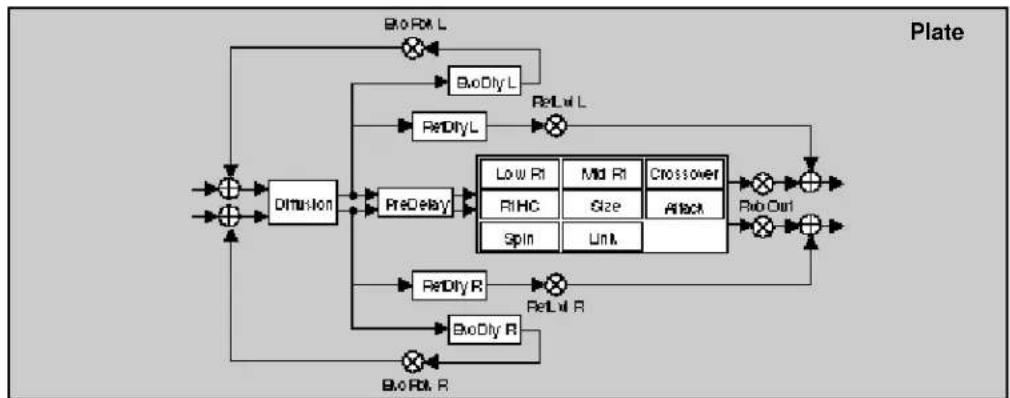
flowchart
graph TD
    A["Input"] --> B["Diminion"]
    B --> C["PreDelay"]
    C --> D["ReDly L"]
    C --> E["ReDly R"]
    D --> F["Low R1"]
    D --> G["Mid R1"]
    D --> H["Crossover"]
    E --> I["ReDly R"]
    E --> J["ReDly R"]
    F --> K["RHC"]
    G --> L["Size"]
    H --> M["Attack"]
    I --> N["Spin"]
    J --> O["Unit"]
    K --> P["Rio Out"]
    L --> Q["Rio Out"]
    M --> R["Rio Out"]
    P --> S["Output"]
    Q --> T["Output"]
    R --> U["Output"]
    S --> V["Plate"]
    T --> V
    U --> V
    V --> W["Output"]
| 0 Controls | 0.0 Mix | 0.1 Lst Adjust | 0.2 *Int/FPan | 0.3 FXWidth | 0.4 *ADJUST | |||||
| 1 Submixer | 1.0 Sends | 1.1 Returns | 1.2 Routing | 1.3 *Mix | 1.4 *Intul | 1.5 *In W | 1.6 *HiOut | 1.7 *LoOut | 1.8 *OutLal | 1.9 *OutW |
| 2 Feb Time | 2.0 Low Rt | 2.1 Mid Rt | 2.2 Crossover | 2.3 Pt HC | 2.4 Pre Delay | 2.5 *Ref LntDly | 2.6 *Eko Fbk Dly | |||
| 3 Feb Design | 3.0 Size | 3.1 Diffusion | 3.2 Attack | 3.3 Spin | 3.4 Link | 3.5 Rvb Out | ||||
| 4 Levels | 4.0 *Matter | 4.1 *Voice 1 | 4.2 *Voice 2 | 4.3 *Voice 3 | 4.4 *Voice 4 | |||||
| 5 Delay Time | 5.0 *Matter | 5.1 Voice 1 | 5.2 Voice 2 | 5.3 Voice 3 | 5.4 Voice 4 | |||||
| 6 Resonance | 6.0 *Matter | 6.1 *Voice 1 | 6.2 *Voice 2 | 6.3 *Voice 3 | 6.4 *Voice 4 | |||||
| 7 Pitch | 7.0 *Assign | 7.1 Voice 1 | 7.2 Voice 2 | 7.3 Voice 3 | 7.4 Voice 4 | |||||
| 8 Panning | 8.0 Master | 8.1 Voice 1 | 8.2 Voice 2 | 8.3 Voice 3 | 8.4 Voice 4 | |||||
| 9 Modulation | 9.0 *Mod LFO | 9.1 *Mod AP Env | 9.2 Mod Env L | 9.3 Mod Env R | 9.4 *Mod Latch | 9.5 *Mod 9x 1 | 9.6 *Mod 9x 2 | |||
| Patches | Patch 6 | Patch 1 | Patch 2 | Patch 3 | Patch 4 | Patch 5 | Patch 6 | Patch 7 | Patch 8 | Patch 9 |
Gld-Inv
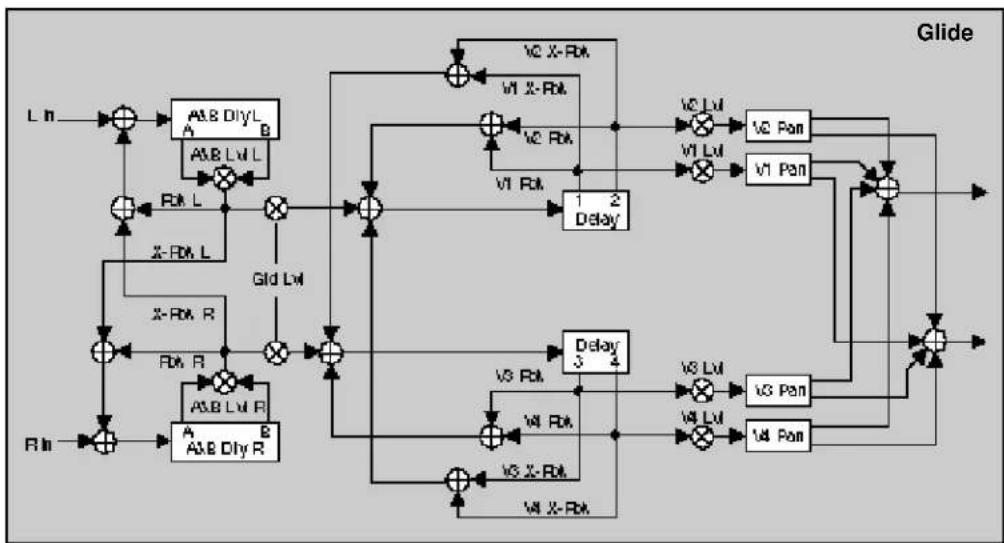
flowchart
graph TD
    L1["Input L"] --> A1["A/B DiyL"]
    A1 --> B1["A/B Lvl L"]
    B1 --> C1["×"]
    C1 --> D1["+"]
    D1 --> E1["VC X-Rak"]
    E1 --> F1["VI X-Rak"]
    F1 --> G1["+"]
    G1 --> H1["VC Lvl"]
    H1 --> I1["+"]
    I1 --> J1["VC Pan"]
    J1 --> K1["+"]
    K1 --> L1["+"]
    L1 --> M1["+"]
    M1 --> N1["+"]
    N1 --> O1["+"]
    O1 --> P1["+"]
    P1 --> Q1["+"]
    Q1 --> R1["+"]
    R1 --> S1["+"]
    S1 --> T1["+"]
    T1 --> U1["+"]
    U1 --> V1["+"]
    V1 --> W1["+"]
    W1 --> X1["+"]
    X1 --> Y1["+"]
    Y1 --> Z1["+"]
    Z1 --> AA["+"]
    AA --> AB["+"]
    AB --> AC["+"]
    AC --> AD["+"]
    AD --> AE["+"]
    AE --> AF["+"]
    AF --> AG["+"]
    AG --> AH["+"]
    AH --> AI["+"]
    AI --> AJ["+"]
    AJ --> AK["+"]
    AK --> AL["+"]
    AL --> AM["+"]
    AM --> AN["+"]
    AN --> AO["+"]
    AO --> AP["+"]
    AP --> AQ["+"]
    AQ --> AR["+"]
    AR --> AS["+"]
    AS --> AT["+"]
    AT --> AU["+"]
    AU --> AV["+"]
    AV --> AW["+"]
    AW --> AX["+"]
    AX --> AY["+"]
    AY --> AZ["+"]
    AZ --> BA["+"]
    BA --> BB["+"]
    BB --> BC["+"]
    BC --> BD["+"]
    BD --> BE["+"]
    BE --> BF["+"]
    BF --> BG["+"]
    BG --> BH["+"]
    BH --> BI["+"]
    BI --> BJ["+"]
    BJ --> BK["+"]
    BK --> BL["+"]
    BL --> BM["+"]
    BM --> BN["+"]
    BN --> BO["+"]
    BO --> BP["+"]
    BP --> BQ["+"]
    BQ --> BR["+"]
    BR --> BS["+"]
    BS --> BT["+"]
    BT --> BU["+"]
    BU --> BV["+"]
    BV --> BW["+"]
    BW --> BX["+"]
    BX --> BY["+"]
    BY --> BZ["+"]

flowchart
graph TD
    A["Diffusion"] --> B["PreDelay"]
    B --> C["Low Slope"]
    B --> D["Mid Slope"]
    B --> E["Crossover"]
    B --> F["RtHC"]
    B --> G["Duration"]
    B --> H["Shape"]
    C --> I["ReDlyL"]
    D --> I
    E --> J["⊕"]
    F --> K["⊕"]
    G --> L["⊕"]
    H --> M["⊕"]
    I --> N["×"]
    J --> O["×"]
    K --> P["×"]
    L --> Q["×"]
    M --> R["×"]
    N --> S["RelM L"]
    O --> T["RelM R"]
    P --> U["RelM L"]
    Q --> V["RelM R"]
    R --> W["RelM L"]
| 0 Controls | 0.0 Mix | 0.1 Lat Adjust | 0.2 *InlvFPan | 0.3 FXWidth | 0.4 *ADJUST | |||||
| 1 Submixer | 1.0 Sends | 1.1 Returns | 1.2 Routing | 1.3 *Mix | 1.4 *InlvI | 1.5 *InW | 1.6 *HiCu | 1.7 *LoCu | 1.8 *OutLvl | 1.9 *OutW |
| 2 Reb Time | 2.0 Lat Slope | 2.1 Mid Slope | 2.2 Crossover | 2.3 Pt HC | 2.4 Pre Delay | 2.5 *Ref LxIDly | ||||
| 3 Reb Design | 3.0 Duration | 3.1 Diffusion | 3.2 Shape | |||||||
| 4 Glide FX | 4.0 <LatLvl | 4.1 *Al LvIDlyL | 4.2 *Al LvIDlyR | 4.3 *B LxIDlyL | 4.4 *B LxIDlyR | 4.5 *Fbk | 4.6 *X-Fbk | |||
| 5 Levels | 5.0 Master | 5.1 Voice 1 | 5.2 Voice 2 | 5.3 Voice 3 | 5.4 Voice 4 | |||||
| 6 Delay Time | 6.0 *Matter | 6.1 Voice 1 | 6.2 Voice 2 | 6.3 Voice 3 | 6.4 Voice 4 | |||||
| 7 Feedback | 7.0 *Mat Fbk | 7.1 *Voice 1 | 7.2 *Voice 2 | 7.3 *Voice 3 | 7.4 *Voice 4 | |||||
| 8 Planning | 8.0 Master | 8.1 Voice 1 | 8.2 Voice 2 | 8.3 Voice 3 | 8.4 Voice 4 | |||||
| 9 Modulation | 9.0 *ModLFO | 9.1 *Mod AR Env | 9.2 ModEnv L | 9.3 ModEnv R | 9.4 *Mod Latch | 9.5 *Mod Sw 1 | 9.6 *Mod Sw 2 | |||
| Patches | Patch 0 | Patch 1 | Patch 2 | Patch 3 | Patch 4 | Patch 5 | Patch 6 | Patch 7 | Patch 8 | Patch 9 |
Band-Inv

flowchart
M-Band signal processing flowchart with delay and gain blocks, including HICU1, LoCU1, and Pan components
flowchart
graph TD
    A["Diffusion"] --> B["PreDelay"]
    B --> C["Low Slope"]
    B --> D["Mid Slope"]
    B --> E["Crossover"]
    B --> F["R1HC"]
    B --> G["Duration"]
    B --> H["Shape"]
    C --> I["ReDIyL"]
    D --> J["ReLIyL"]
    E --> K["+"]
    F --> L["+"]
    G --> M["+"]
    H --> N["+"]
    I --> O["×"]
    J --> P["×"]
    K --> Q["×"]
    L --> R["×"]
    M --> S["×"]
    N --> T["×"]
    O --> U["×"]
    P --> V["×"]
    Q --> W["×"]
    R --> X["Inverse"]
    S --> X
    T --> X
    U --> X
    V --> X
    W --> X
| Controls | 0.0Mix | 0.1Lvl Adjust | 0.2*IntvlFPan | 0.3FXWidth | 0.4*ADJUST | |||||
| 1 Submixer | 1.0Sends | 1.1Returns | 1.2Routing | 1.3*Mix | 1.4*Intvl | 1.5*In W | 1.6*H/Cul | 1.7*Lo/Cul | 1.8*Out/Li | 1.9*Out W |
| 2 Rvb Time | 2.0Lat Slope | 2.1Mid Slope | 2.2Crossover | 2.3Pt HC | 2.4Pre Delay | 2.5*Ref Lvl/Dly | ||||
| 3 Rvb Design | 3.0Duration | 3.1Diffusion | 3.2Shape | |||||||
| 4 Levels | 4.0Master | 4.1Voice 1 | 4.2Voice 2 | 4.3Voice 3 | 4.4Voice 4 | |||||
| 5 Delay Time | 5.0*Master | 5.1Voice 1 | 5.2Voice 2 | 5.3Voice 3 | 5.4Voice 4 | |||||
| 6 Filters | 6.0*Mar HC/LC | 6.1*V1 Hi/Lo | 6.2*V2 Hi/Lo | 6.3*V3 Hi/Lo | 6.4*V4 Hi/Lo | |||||
| 7 Feedback | 7.0Mstr Fbk | 7.1Voice 1 | 7.2Voice 2 | 7.3Voice 3 | 7.4Voice 4 | |||||
| 8 Panning | 8.0Master | 8.1Voice 1 | 8.2Voice 2 | 8.3Voice 3 | 8.4Voice 4 | |||||
| 9 Modulation | 9.0*Mod LFO | 9.1*Mod AR Env | 9.2Mod Env L | 9.3Mod Env R | 9.4*Mod Latch | 9.5*Mod Ser 1 | 9.6*Mod Ser 2 | |||
| Patches | Patch 0 | Patch 1 | Patch 2 | Patch 3 | Patch 4 | Patch 5 | Patch 6 | Patch 7 | Patch 8 | Patch 9 |
Chrs-Inv

flowchart
graph TD
    A["Chorus"] --> B["Delay 1"]
    A --> C["Delay 2"]
    B --> D["VI Chorus"]
    C --> E["VI Chorus"]
    D --> F["V1 Lvl"]
    E --> G["V2 Lvl"]
    F --> H["V1 Pan"]
    G --> I["V2 Pan"]
    H --> J["+"]
    I --> J
    J --> K["Output"]
    D --> L["V3 Chorus"]
    E --> M["V3 Chorus"]
    L --> N["+"]
    M --> O["+"]
    N --> P["V4 Lvl"]
    O --> Q["V5 Lvl"]
    P --> R["+"]
    Q --> S["+"]
    R --> T["Output"]
    S --> U["Output"]
    style A fill:#f9f,stroke:#333
    style B fill:#ccf,stroke:#333
    style C fill:#ccf,stroke:#333
    style D fill:#cfc,stroke:#333
    style E fill:#cfc,stroke:#333
    style F fill:#fcc,stroke:#333
    style G fill:#fcc,stroke:#333
    style H fill:#fcc,stroke:#333
    style I fill:#fcc,stroke:#333
    style J fill:#fcc,stroke:#333
    style K fill:#fff,stroke:#333
    style L fill:#fff,stroke:#333
    style M fill:#fff,stroke:#333
    style N fill:#fff,stroke:#333
    style O fill:#fff,stroke:#333
    style P fill:#fff,stroke:#333
    style Q fill:#fff,stroke:#333
    style R fill:#fff,stroke:#333
    style S fill:#fff,stroke:#333
    style T fill:#fff,stroke:#333

flowchart
graph TD
    A["Diffusion"] --> B["PreDelay"]
    B --> C["Low Slope"]
    B --> D["Mid Slope"]
    B --> E["Crossover"]
    B --> F["R1HC"]
    B --> G["Duration"]
    B --> H["Shape"]
    C --> I["ReDIyL"]
    D --> J["ReLIyL"]
    E --> K["+"]
    F --> L["+"]
    G --> M["+"]
    H --> N["+"]
    I --> O["ReDIyR"]
    J --> P["ReLIyR"]
    K --> Q["+"]
    L --> R["+"]
    M --> S["+"]
    N --> T["+"]
| 0Controls | 0.0Mis | 0.1Lvl Adjust | 0.2*InLvlPan | 0.3FXWidth | 0.4*ADJUST | |||||
| 1Submixer | 1.0Bends | 1.1Returns | 1.2Routing | 1.3*Mir | 1.4*InLvl | 1.5*InW | 1.6*HiCut | 1.7*LeCut | 1.8*OutLvl | 1.9*OutW |
| 2Rvb Time | 2.0Low Slope | 2.1Mid Slope | 2.2Crossover | 2.3Rt HG | 2.4Pre Delay | 2.5*Rel Lvl IDly | ||||
| 3Rvb Design | 3.0Duration | 3.1Diffusion | 3.2Shape | |||||||
| 4Levels | 4.0Master | 4.1Voice 1 | 4.2Voice 2 | 4.3Voice 3 | 4.4Voice 4 | |||||
| 5Delay Time | 5.0*Master | 5.1Voice 1 | 5.2Voice 2 | 5.3Voice 3 | 5.4Voice 4 | |||||
| 6Chorus | 6.0*Master | 6.1*Voice 1 | 6.2*Voice 2 | 6.3*Voice 3 | 6.4*Voice 4 | |||||
| 7Feedback | 7.0Mstr Fbk | 7.1Voice 1 | 7.2Voice 2 | 7.3Voice 3 | 7.4Voice 4 | |||||
| 8Panning | 8.0Master | 8.1Voice 1 | 8.2Voice 2 | 8.3Voice 3 | 8.4Voice 4 | |||||
| 9Modulation | 9.0*ModLFO | 9.1*ModAR Env | 9.2ModEnv L | 9.3ModEnv R | 9.4*ModLatch | 9.5*ModSw 1 | 9.6*ModSw 2 | |||
| Patches | Patch 0 | Patch 1 | Patch 2 | Patch 3 | Patch 4 | Patch 5 | Patch 6 | Patch 7 | Patch 8 | Patch 9 |
Res1-Inv

flowchart
graph TD
    A["+"] --> B["+"]
    B --> C["+"]
    C --> D["+"]
    D --> E["+"]
    E --> F["+"]
    F --> G["+"]
    G --> H["+"]
    H --> I["+"]
    I --> J["+"]
    J --> K["+"]
    K --> L["+"]
    L --> M["+"]
    M --> N["+"]
    N --> O["+"]
    O --> P["+"]
    P --> Q["+"]
    Q --> R["+"]
    R --> S["+"]
    S --> T["+"]
    T --> U["+"]
    U --> V["+"]
    V --> W["+"]
    W --> X["+"]
    X --> Y["+"]
    Y --> Z["+"]
    Z --> A
    style A fill:#f9f,stroke:#333
    style B fill:#ccf,stroke:#333
    style C fill:#cfc,stroke:#333
    style D fill:#fcc,stroke:#333
    style E fill:#cff,stroke:#333
    style F fill:#ffc,stroke:#333
    style G fill:#cfc,stroke:#333
    style H fill:#fcc,stroke:#333
    style I fill:#cfc,stroke:#333
    style J fill:#fcc,stroke:#333
    style K fill:#cfc,stroke:#333
    style L fill:#fcc,stroke:#333
    style M fill:#cfc,stroke:#333
    style N fill:#fcc,stroke:#333
    style O fill:#cfc,stroke:#333
    style P fill:#fcc,stroke:#333
    style Q fill:#cfc,stroke:#333
    style R fill:#fcc,stroke:#333
    style S fill:#cfc,stroke:#333
    style T fill:#fcc,stroke:#333
    style U fill:#cfc,stroke:#333
    style V fill:#fcc,stroke:#333
    style W fill:#cfc,stroke:#333

flowchart
graph TD
    A["Diffusion"] --> B["PreDelay"]
    B --> C["Low-Slope"]
    B --> D["Mid-Slope"]
    B --> E["Crossover"]
    B --> F["Duration"]
    B --> G["Shape"]
    C --> H["ReDlyL"]
    D --> I["ReDlyL"]
    E --> J["ReDlyL"]
    F --> K["ReDlyR"]
    G --> L["ReDlyR"]
    H --> M["×"]
    I --> N["×"]
    J --> O["×"]
    K --> P["×"]
    L --> Q["×"]
    M --> R["+"]
    N --> S["+"]
    O --> T["+"]
    P --> U["+"]
    Q --> V["+"]
    R --> W["Inverse"]
    S --> W
    T --> W
    U --> W
    V --> W
    W --> X["Inverse"]
| 0Controls | 0.0Mix | 0.1Lat Adjust | 0.2*IntvFPan | 0.3FXWidth | 0.4*ADJUST | |||||
| 1Submixer | 1.0Sends | 1.1Returns | 1.2Raising | 1.3*Mix | 1.4*Intvl | 1.5*In W | 1.6*HiCul | 1.7LoCul | 1.8*OutLvl | 1.9*Out W |
| 2Rmb Time | 2.0Low Slope | 2.1Mid Slope | 2.2Cressee | 2.3Pt HC | 2.4Pre Delay | 2.5*Ref LrlDly | ||||
| 3Rmb Design | 3.0Duration | 3.1Diffusion | 3.2Shape | |||||||
| 4Levels | 4.0*Matter | 4.1*Voice 1 | 4.2*Voice 2 | 4.3*Voice 3 | 4.4*Voice 4 | |||||
| 5Delay Time | 5.0*Matter | 5.1Voice 1 | 5.2Voice 2 | 5.3Voice 3 | 5.4Voice 4 | |||||
| 6Resonance | 6.0*Matter | 6.1*Voice 1 | 6.2*Voice 2 | 6.3*Voice 3 | 6.4*Voice 4 | |||||
| 7Pitch | 7.0Assign | 7.1Tuning | 7.2Advice | 7.3Unison | ||||||
| 8Panning | 8.0Master | 8.1Voice 1 | 8.2Voice 2 | 8.3Voice 3 | 8.4Voice 4 | |||||
| 9Modulation | 9.0*Mod LFO | 9.1*Mod AR Env | 9.2ModEnv L | 9.3ModEnv R | 9.4*Mod Latch | 9.5*Mod Sel 1 | 9.6*Mod Sel 2 | |||
| Patches | Patch 0 | Patch 1 | Patch 2 | Patch 3 | Patch 4 | Patch 5 | Patch 6 | Patch 7 | Patch 8 | Patch 9 |
Res2-Inv
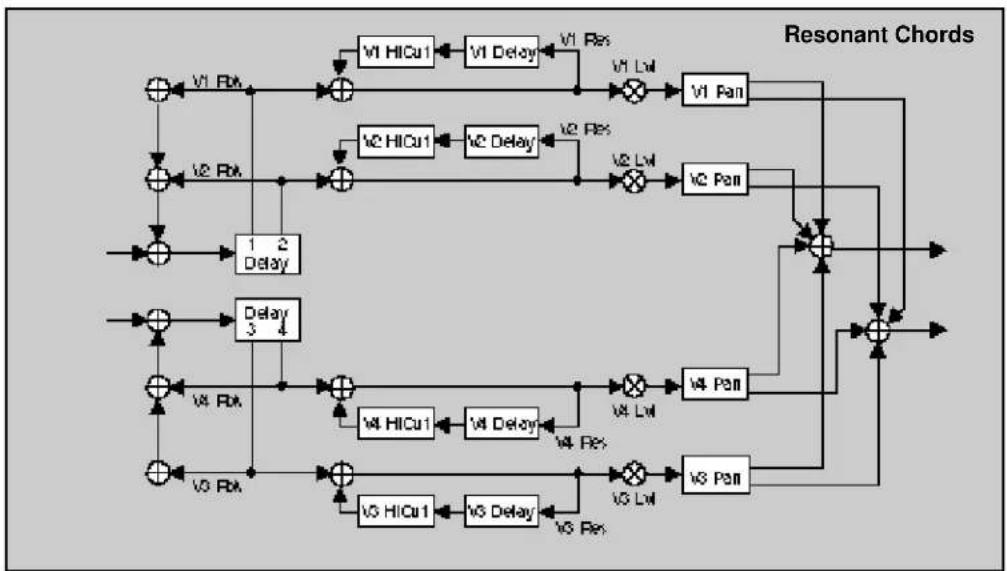
flowchart
graph TD
    A["+"] --> B["+"]
    B --> C["V1 HICu1"]
    C --> D["V1 Delay"]
    D --> E["V1 Lwl"]
    E --> F["V1 Pan"]
    F --> G["+"]
    G --> H["Output"]
    I["+"] --> J["+"]
    J --> K["V2 HICu1"]
    K --> L["V2 Delay"]
    L --> M["V2 Lwl"]
    M --> N["V2 Pan"]
    N --> O["+"]
    O --> P["Output"]
    Q["+"] --> R["+"]
    R --> S["V3 HICu1"]
    S --> T["V3 Delay"]
    T --> U["V3 Lwl"]
    U --> V["V3 Pan"]
    V --> W["+"]
    W --> X["Output"]
    Y["+"] --> Z["+"]
    Z --> AA["V4 HICu1"]
    AA --> AB["V4 Delay"]
    AB --> AC["V4 Lwl"]
    AC --> AD["V4 Pan"]
    AD --> AE["+"]
    AE --> AF["Output"]
    AG["+"] --> AH["+"]
    AH --> AI["V5 HICu1"]
    AI --> AJ["V5 Delay"]
    AJ --> AK["V5 Lwl"]
    AK --> AL["V5 Pan"]
    AL --> AM["+"]
    AM --> AN["Output"]

flowchart
graph TD
    A["Diffusion"] --> B["PreDelay"]
    B --> C["Low Slope"]
    B --> D["Mid Slope"]
    B --> E["Crossover"]
    B --> F["Duration"]
    B --> G["Shape"]
    C --> H["ReDIyL"]
    D --> I["ReDIyR"]
    E --> J["ReDIyL"]
    F --> K["ReDIyR"]
    G --> L["ReDIyL"]
    H --> M["×"]
    I --> N["×"]
    J --> O["+"]
    K --> P["+"]
    L --> Q["+"]
    M --> R["Inverse"]
    N --> R
    O --> R
    P --> R
    Q --> R
    R --> S["×"]
| 0 Controls | 0.0 Mix | 0.1 Lvl Adjust | 0.2 *IntvlFPan | 0.3 FXWidth | 0.4 *ADJUST | |||||
| 1 Submitter | 1.0 Sends | 1.1 Returns | 1.2 Routing | 1.3 *Mix | 1.4 *Intvl | 1.5 *In W | 1.6 *HOut | 1.7 *LoOut | 1.8 *OutLvl | 1.9 *Out W |
| 2 Reb Time | 2.0 Low Slope | 2.1 Mid Slope | 2.2 Crossover | 2.3 Pt HC | 2.4 Pre Delay | 2.5 *Ref LvlDly | ||||
| 3 Reb Design | 3.0 Duration | 3.1 Diffusion | 3.2 Shape | |||||||
| 4 Levels | 4.0 *Matter | 4.1 *Voice 1 | 4.2 *Voice 2 | 4.3 *Voice 3 | 4.4 *Voice 4 | |||||
| 5 Delay Time | 5.0 *Matter | 5.1 Voice 1 | 5.2 Voice 2 | 5.3 Voice 3 | 5.4 Voice 4 | |||||
| 6 Resonance | 6.0 *Matter | 6.1 *Voice 1 | 6.2 *Voice 2 | 6.3 *Voice 3 | 6.4 *Voice 4 | |||||
| 7 Pitch | 7.0 *Assign | 7.1 Voice 1 | 7.2 Voice 2 | 7.3 Voice 3 | 7.4 Voice 4 | |||||
| 8 Panning | 8.0 Master | 8.1 Voice 1 | 8.2 Voice 2 | 8.3 Voice 3 | 8.4 Voice 4 | |||||
| 9 Modulation | 9.0 *Mod LFO | 9.1 *Mod ARI Env | 9.2 Mod Env L | 9.3 Mod Env R | 9.4 *Mod Latch | 9.5 *Mod Ser 1 | 9.6 *Mod Ser 2 | |||
| Patches | Patch 0 | Patch 1 | Patch 2 | Patch 3 | Patch 4 | Patch 5 | Patch 6 | Patch 7 | Patch 8 | Patch 9 |
Gld-Inf
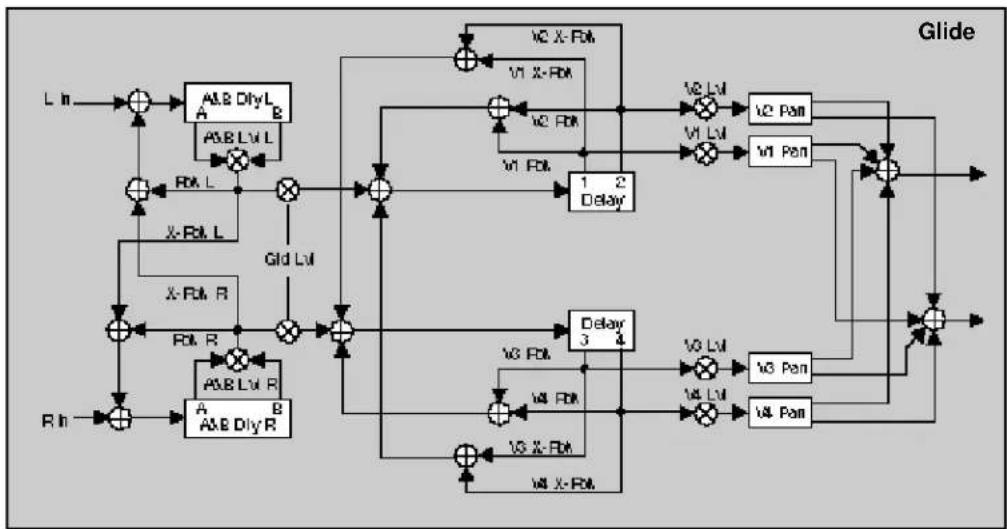
flowchart
graph TD
    A["L In"] --> B["+"]
    B --> C["A&E Diy L A"]
    C --> D["×"]
    D --> E["+"]
    E --> F["1 2 Delay"]
    F --> G["V2 Lvl"]
    G --> H["V2 Pan"]
    H --> I["+"]
    I --> J["Delay 3 4"]
    J --> K["V3 Lvl"]
    K --> L["V3 Pan"]
    L --> M["+"]
    M --> N["V4 Lvl"]
    N --> O["V4 Pan"]
    O --> P["+"]
    P --> Q["V5 Lvl"]
    Q --> R["V5 Pan"]
    R --> S["+"]
    S --> T["V6 Lvl"]
    T --> U["V6 Pan"]
    U --> V["+"]
    V --> W["V7 Lvl"]
    W --> X["V7 Pan"]
    X --> Y["+"]
    Y --> Z["V8 Lvl"]
    Z --> AA["V8 Pan"]
    AA --> AB["+"]
    AB --> AC["V9 Lvl"]
    AC --> AD["V9 Pan"]
    AD --> AE["+"]
    AE --> AF["V10 Lvl"]
    AF --> AG["V10 Pan"]
    AG --> AH["+"]
    AH --> AI["V11 Lvl"]
    AI --> AJ["V11 Pan"]
    AJ --> AK["+"]
    AK --> AL["V12 Lvl"]
    AL --> AM["V12 Pan"]
    AM --> AN["+"]
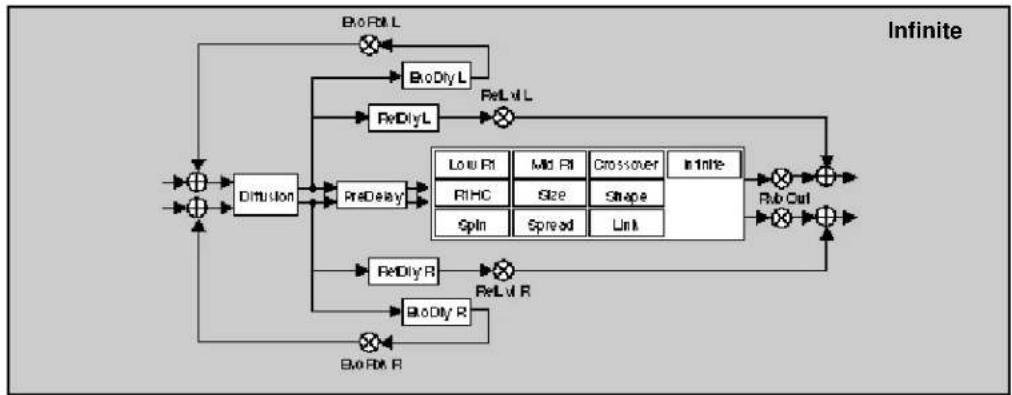
flowchart
graph TD
    A["Input"] --> B["+"]
    B --> C["Dimulsion"]
    C --> D["PreDelay"]
    D --> E["Low R1"]
    D --> F["Mid R1"]
    D --> G["Crossover"]
    D --> H["Infty"]
    E --> I["RtHC"]
    F --> J["Size"]
    G --> K["Shape"]
    H --> L["Spin"]
    H --> M["Spread"]
    H --> N["Link"]
    I --> O["ReDlyR"]
    J --> P["ReDlyR"]
    K --> Q["ReLvlR"]
    L --> R["ReLvlR"]
    M --> S["ReLvlR"]
    N --> T["ReLvlR"]
    O --> U["+"]
    P --> V["+"]
    Q --> W["+"]
    R --> X["+"]
    S --> Y["+"]
    T --> Z["+"]
    U --> AA["+"]
    V --> AB["+"]
    W --> AC["+"]
    X --> AD["+"]
    Y --> AE["+"]
    Z --> AF["+"]
    AA --> AG["+"]
    AB --> AH["+"]
    AC --> AI["+"]
    AD --> AJ["+"]
    AE --> AK["+"]
    AF --> AL["+"]
    AG --> AM["+"]
    AH --> AN["+"]
    AI --> AO["+"]
    AJ --> AP["+"]
    AK --> AQ["+"]
    AL --> AR["+"]
    AM --> AS["+"]
    AN --> AT["+"]
    AO --> AU["+"]
    AP --> AV["+"]
    AQ --> AW["+"]
    AR --> AX["+"]
    AS --> AY["+"]
    AT --> AZ["+"]
    AU --> BA["+"]
    AV --> BB["+"]
    AW --> BC["+"]
    AX --> BD["+"]
    AY --> BE["+"]
    AZ --> BF["+"]
| 0Controls | 0.0Mix | 0.1Lat Adjust | 0.2*Inv/FPan | 0.3FXWidth | 0.4*ADJUST | |||||
| 1Submixer | 1.0Samba | 1.1Returns | 1.2Routing | 1.3*Mix | 1.4*Inv/I | 1.5*In/W | 1.6*HiCul | 1.7*LoCul | 1.8*Outcui | 1.9*OutW |
| 2Rab Time | 2.0Lat Rt | 2.1Mid Rt | 2.2Crossover | 2.3Pt HC | 2.4Pre Delay | 2.5Infinite | 2.6*Rel Lat/Dly | 2.7*Elco Fbk/Dly | ||
| 3Rab Design | 3.0Star | 3.1Diffusion | 3.2Shape | 3.3Spread | 3.4Spin | 3.5Link | 3.6Rvb Out | |||
| 4Glide FX | 4.0Old/Lvl | 4.1*A.Lvl*Dly L | 4.2*A.Lvl*Dly R | 4.3*B.Lvl*Dly L | 4.4*B.Lvl*Dly R | 4.5*Flbk | 4.6*X-Fbk | |||
| 5Levels | 5.0Master | 5.1Voice 1 | 5.2Voice 2 | 5.3Voice 3 | 5.4Voice 4 | |||||
| 6Delay Time | 6.0*Mater | 6.1Voice 1 | 6.2Voice 2 | 6.3Voice 3 | 6.4Voice 4 | |||||
| 7Feedback | 7.0*Mtr Fbk | 7.1*Voice 1 | 7.2*Voice 2 | 7.3*Voice 3 | 7.4*Voice 4 | |||||
| 8Panning | 8.0Master | 8.1Voice 1 | 8.2Voice 2 | 8.3Voice 3 | 8.4Voice 4 | |||||
| 9Modulation | 9.0*ModLFO | 9.1*Mod AP Ene | 9.2Mod Env L | 9.3Mod Env R | 9.4*Mod Latch | 9.5*Mod Ser 1 | 9.6*Mod Ser 2 | |||
| Patches | Patch 0 | Patch 1 | Patch 2 | Patch 3 | Patch 4 | Patch 5 | Patch 6 | Patch 7 | Patch 8 | Patch 9 |
Band-Inf

flowchart
graph TD
    A["Input"] --> B["Sum"]
    B --> C["Delay 1/2"]
    C --> D["Sum"]
    D --> E["V1 Lvl"]
    E --> F["M1 HiCul1"]
    F --> G["V1 LoCul1"]
    G --> H["V1 Pan"]
    H --> I["Sum"]
    I --> J["V2 Pan"]
    J --> K["Output"]
    B --> L["Sum"]
    L --> M["V3 LoL"]
    M --> N["V3 HiCul1"]
    N --> O["V4 LoCul1"]
    O --> P["V4 Pan"]
    P --> Q["Sum"]
    Q --> R["V5 Pan"]
    R --> S["Output"]
    style A fill:#f9f,stroke:#333
    style B fill:#f9f,stroke:#333
    style C fill:#ccf,stroke:#333
    style D fill:#ccf,stroke:#333
    style E fill:#cfc,stroke:#333
    style F fill:#cfc,stroke:#333
    style G fill:#cfc,stroke:#333
    style H fill:#cfc,stroke:#333
    style I fill:#fcc,stroke:#333
    style J fill:#fcc,stroke:#333
    style K fill:#fcc,stroke:#333
    style L fill:#fcc,stroke:#333
    style M fill:#fcc,stroke:#333
    style N fill:#fcc,stroke:#333
    style O fill:#fcc,stroke:#333
    style P fill:#fcc,stroke:#333
    style Q fill:#fcc,stroke:#333
    style R fill:#fcc,stroke:#333
    style S fill:#fcc,stroke:#333

flowchart
graph TD
    A["Input"] --> B["+"]
    B --> C["Diffusion"]
    C --> D["PreDelay"]
    D --> E["Loa R1"]
    D --> F["Mid R1"]
    D --> G["Crossover"]
    D --> H["In Time"]
    E --> I["RhC"]
    E --> J["Slope"]
    E --> K["Shape"]
    E --> L["Spin"]
    F --> M["Size"]
    F --> N["Link"]
    G --> O["In Time"]
    H --> P["Spin"]
    I --> Q["Rb Out"]
    J --> Q
    K --> Q
    L --> Q
    M --> Q
    N --> Q
    O --> Q
    P --> Q
    Q --> R["+"]
    R --> S["Output"]
    T["+"] --> U["BioRik L"]
    U --> V["BioDry L"]
    V --> W["ReDly L"]
    W --> X["×"]
    X --> Y["BioRik R"]
    Y --> Z["BioDry R"]
    Z --> AA["×"]
    AA --> AB["BioRik R"]
| 0Controls | 0.0Mix | 0.1Lvl Adjust | 0.2*IntvFPan | 0.3FXWidth | 0.4*ADJUST | |||||
| 1Submaxer | 1.0Sends | 1.1Returns | 1.2Routing | 1.3*Mix | 1.4*Intvl | 1.5*In W | 1.6*HiCul | 1.7*LoCul | 1.8*Outurl | 1.9*Out W |
| 2Rvb Time | 2.0Los Rf | 2.1Mid Rt | 2.2Crossover | 2.3Pt HC | 2.4Pre Delay | 2.5Infinite | 2.6*Rel tufDIy | 2.7*Echo Fbk DIy | ||
| 3Rvb Design | 3.0Size | 3.1Diffusion | 3.2Shape | 3.3Spread | 3.4Spin | 3.5Link | 3.6Rvb Out | |||
| 4Levels | 4.0Master | 4.1Voice 1 | 4.2Voice 2 | 4.3Voice 3 | 4.4Voice 4 | |||||
| 5Delay Time | 5.0*Master | 5.1Voice 1 | 5.2Voice 2 | 5.3Voice 3 | 5.4Voice 4 | |||||
| 6Filters | 6.0*Mar HCLC | 6.1*V1 HiLo | 6.2*V2 HiLo | 6.3*V3 HiLo | 6.4*V4 HiLo | |||||
| 7Feedback | 7.0Mstr Fbk | 7.1Voice 1 | 7.2Voice 2 | 7.3Voice 3 | 7.4Voice 4 | |||||
| 8Panning | 8.0Master | 8.1Voice 1 | 8.2Voice 2 | 8.3Voice 3 | 8.4Voice 4 | |||||
| 9Modulation | 9.0*Mod LFO | 9.1*Mod AR Env | 9.2ModEnv L | 9.3ModEnv R | 9.4*Mod Latch | 9.5*Mod Str 1 | 9.6*Mod Str 2 | |||
| Patches | Patch 0 | Patch 1 | Patch 2 | Patch 3 | Patch 4 | Patch 5 | Patch 6 | Patch 7 | Patch 8 | Patch 9 |
Chrs-Inf

flowchart
graph TD
    A["Chorus"] --> B["V1 Chorus"]
    A --> C["V2 Chorus"]
    A --> D["V3 Chorus"]
    B --> E["V1 Lvl"]
    B --> F["V2 Lvl"]
    C --> G["V3 Pan"]
    C --> H["V4 Pan"]
    D --> I["V5 Lvl"]
    D --> J["V6 Pan"]
    E --> K["+"]
    F --> K
    G --> K
    H --> K
    I --> K
    J --> K
    K --> L["Output"]
    M["Delay 1"] --> N["Delay 2"]
    O["Delay 3"] --> P["Delay 4"]
    Q["Delay 5"] --> R["Delay 6"]
    S["Delay 7"] --> T["Delay 8"]
    U["Delay 9"] --> V["Delay 10"]
    W["Delay 11"] --> X["Delay 12"]
    Y["Delay 13"] --> Z["Delay 14"]
    AA["Delay 15"] --> AB["Delay 16"]
    AC["Delay 17"] --> AD["Delay 18"]
    AE["Delay 19"] --> AF["Delay 20"]
    AG["Delay 21"] --> AH["Delay 22"]
    AI["Delay 23"] --> AJ["Delay 24"]
    AK["Delay 25"] --> AL["Delay 26"]
    AM["Delay 27"] --> AN["Delay 28"]
    AO["Delay 29"] --> AP["Delay 30"]
    AQ["Delay 31"] --> AR["Delay 32"]
    AS["Delay 33"] --> AT["Delay 34"]
    AU["Delay 35"] --> AV["Delay 36"]
    AW["Delay 37"] --> AX["Delay 38"]
    AY["V1 Rvl"] --> AZ["V1 Lvl"]
    BA["V2 Rvl"] --> BB["V2 Lvl"]
    BC["V3 Rvl"] --> BD["V3 Lvl"]
    BE["V4 Rvl"] --> BF["V4 Lvl"]

flowchart
graph TD
    A["Input"] --> B["Diffusion"]
    B --> C["ReDelay"]
    C --> D["Low R1"]
    C --> E["Mid R1"]
    C --> F["Crossover"]
    C --> G["Infinite"]
    D --> H["RHC"]
    E --> I["Size"]
    E --> J["Shape"]
    F --> K["Spin"]
    F --> L["Spread"]
    F --> M["Link"]
    G --> N["Rel Out"]
    H --> O["Rel Out L"]
    I --> P["Rel Out R"]
    J --> Q["Rel Out R"]
    K --> R["Rel Out R"]
    L --> S["Rel Out R"]
    M --> T["Rel Out R"]
    U["Input"] --> V["BioRik L"]
    V --> W["BioDly L"]
    W --> X["ReLuf L"]
    X --> Y["BioDly L"]
    Y --> Z["ReDly L"]
    Z --> AA["Diffusion"]
    AA --> AB["ReDelay"]
    AB --> AC["ReDelay R"]
    AC --> AD["BioDly R"]
    AD --> AE["BioRik R"]
    AE --> AF["Output"]
    style A fill:#f9f,stroke:#333
    style V fill:#ccf,stroke:#333
    style U fill:#cfc,stroke:#333
| 0Controls | 0.0Mix | 0.1Lvl Ajust | 0.2*Int'l/FPan | 0.3FXWidth | 0.4*ADJUST | |||||
| 1Submiser | 1.0Sends | 1.1Returns | 1.2Routing | 1.3*Mix | 1.4*Int'l | 1.5*In W | 1.6*H/Cu | 1.7*Lo/Cu | 1.8*Out/Li | 1.9*Out/W |
| 2Feb Time | 2.0Losr Rt | 2.1Mid Rt | 2.2Crossover | 2.3Pt HC | 2.4Pre Delay | 2.5Infinite | 2.6*Ref Lnt/Dly | 2.7*Exo Fbk'Dly | ||
| 3Feb Design | 3.0Star | 3.1Diffusion | 3.2Shape | 3.3Spread | 3.4Spin | 3.5Link | 3.6Feb-Cu | |||
| 4Levels | 4.0Matter | 4.1Voice 1 | 4.2Voice 2 | 4.3Voice 3 | 4.4Voice 4 | |||||
| 5Delay Time | 5.0*Matter | 5.1Voice 1 | 5.2Voice 2 | 5.3Voice 3 | 5.4Voice 4 | |||||
| 6Chorus | 6.0*Matter | 6.1*Voice 1 | 6.2*Voice 2 | 6.3*Voice 3 | 6.4*Voice 4 | |||||
| 7Feedback | 7.0Mstr Fbk | 7.1Voice 1 | 7.2Voice 2 | 7.3Voice 3 | 7.4Voice 4 | |||||
| 8Panning | 8.0Mather | 8.1Voice 1 | 8.2Voice 2 | 8.3Voice 3 | 8.4Voice 4 | |||||
| 9Modulation | 9.0*Mod LFO | 9.1*Mod AR Env | 9.2Mod Env L | 9.3Mod Env R | 9.4*Mod Latch | 9.5*Mod Bkr 1 | 9.6*Mod Bkr 2 | |||
| Patches | Patch 0 | Patch 1 | Patch 2 | Patch 3 | Patch 4 | Patch 5 | Patch 6 | Patch 7 | Patch 8 | Patch 9 |
Res1-Inf
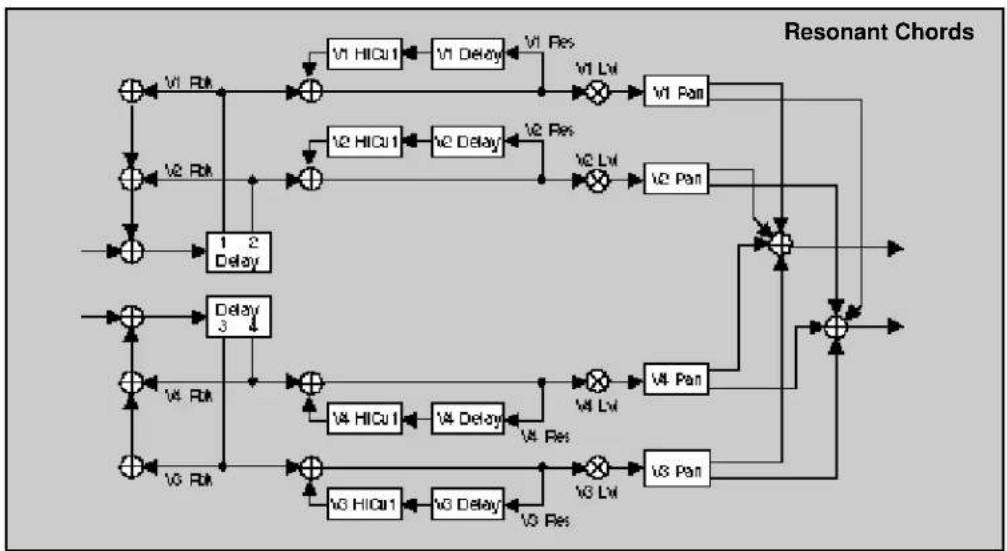
flowchart
graph TD
    A["+"] --> B["+"]
    B --> C["V1 HICU1"]
    C --> D["V1 Delay"]
    D --> E["V1 Lvl"]
    E --> F["V1 Pan"]
    F --> G["+"]
    G --> H["+"]
    H --> I["V2 HICU1"]
    I --> J["V2 Delay"]
    J --> K["V2 Lvl"]
    K --> L["V2 Pan"]
    L --> M["+"]
    M --> N["+"]
    N --> O["V3 HICU1"]
    O --> P["V3 Delay"]
    P --> Q["V3 Lvl"]
    Q --> R["V3 Pan"]
    R --> S["+"]
    S --> T["+"]
    T --> U["+"]
    U --> V["+"]
    V --> W["+"]
    W --> X["+"]
    X --> Y["+"]
    Y --> Z["+"]
    Z --> A
    style A fill:#f9f,stroke:#333
    style B fill:#ccf,stroke:#333
    style C fill:#cfc,stroke:#333
    style D fill:#fcc,stroke:#333
    style E fill:#cff,stroke:#333
    style F fill:#ffc,stroke:#333
    style G fill:#fcf,stroke:#333
    style H fill:#cff,stroke:#333
    style I fill:#cfc,stroke:#333
    style J fill:#cfc,stroke:#333
    style K fill:#cfc,stroke:#333
    style L fill:#cfc,stroke:#333
    style M fill:#ffc,stroke:#333
    style N fill:#cfc,stroke:#333
    style O fill:#cfc,stroke:#333
    style P fill:#cfc,stroke:#333
    style Q fill:#cfc,stroke:#333
    style R fill:#cfc,stroke:#333
    style S fill:#cfc,stroke:#333
    style T fill:#cfc,stroke:#333
    style U fill:#cfc,stroke:#333
    style V fill:#cfc,stroke:#333
    style W fill:#cfc,stroke:#333

flowchart
graph TD
    A["Input"] --> B["+"]
    B --> C["Diffusion"]
    C --> D["ReDelay"]
    D --> E["Low R1"]
    D --> F["M2 R1"]
    D --> G["Crossover"]
    D --> H["In line"]
    E --> I["RtR1"]
    F --> J["Size"]
    G --> K["Shape"]
    H --> L["Spin"]
    H --> M["Spread"]
    H --> N["Link"]
    I --> O["+"]
    J --> P["+"]
    K --> Q["+"]
    L --> R["+"]
    M --> S["+"]
    N --> T["+"]
    O --> U["+"]
    P --> V["+"]
    Q --> W["+"]
    R --> X["+"]
    S --> Y["+"]
    T --> Z["+"]
    U --> AA["+"]
    V --> AB["+"]
    W --> AC["+"]
    X --> AD["+"]
    Y --> AE["+"]
    Z --> AF["+"]
    AA --> AG["+"]
    AB --> AH["+"]
    AC --> AI["+"]
    AD --> AJ["+"]
    AE --> AK["+"]
    AF --> AL["+"]
    AG --> AM["+"]
    AH --> AN["+"]
    AI --> AO["+"]
    AJ --> AP["+"]
    AK --> AQ["+"]
    AL --> AR["+"]
    AM --> AS["+"]
    AN --> AT["+"]
    AO --> AU["+"]
    AP --> AV["+"]
    AQ --> AW["+"]
    AR --> AX["+"]
    AS --> AY["+"]
    AT --> AZ["+"]
    AU --> BA["+"]
    AV --> BB["+"]
    AW --> BC["+"]
    AX --> BD["+"]
    AY --> BE["+"]
    AZ --> BF["+"]
| 0Controls | 0.0Mix | 0.1Lvl Adjust | 0.2*Int/FPan | 0.3FXWidth | 0.4*ADJUST | |||||
| 1Submaxer | 1.0Sends | 1.1Returns | 1.2Routing | 1.3*Max | 1.4*Intvl | 1.5*In W | 1.6*H Cut | 1.7*Lo Cut | 1.8*Outut | 1.9*Out W |
| 2Feb Time | 2.0Los Rt | 2.1Mid Rt | 2.2Crossover | 2.3Pt HC | 2.4Pre Delay | 2.5Infinite | 2.6*Ref Lnt/Dly | 2.7*Exo Fok'Dly | ||
| 3Feb Design | 3.0Size | 3.1Diffusion | 3.2Shape | 3.3Spread | 3.4Spin | 3.5Link | 3.6Feb Cut | |||
| 4Levels | 4.0*Master | 4.1*Voice 1 | 4.2*Voice 2 | 4.3*Voice 3 | 4.4*Voice 4 | |||||
| 5Delay Times | 5.0*Master | 5.1Voice 1 | 5.2Voice 2 | 5.3Voice 3 | 5.4Voice 4 | |||||
| 6Ressources | 6.0*Master | 6.1*Voice 1 | 6.2*Voice 2 | 6.3*Voice 3 | 6.4*Voice 4 | |||||
| 7Pitch | 7.0Assign | 7.1Tuning | 7.2Advice | 7.3Unison | ||||||
| 8Panning | 8.0Master | 8.1Voice 1 | 8.2Voice 2 | 8.3Voice 3 | 8.4Voice 4 | |||||
| 9Modulation | 9.0*Mod LFO | 9.1*Mod AR Ene | 9.2Mod Env L | 9.3Mod Env R | 9.4*Mod Letch | 9.5*Mod Str 1 | 9.6*Mod Str 2 | |||
| Patches | Patch 0 | Patch 1 | Patch 2 | Patch 3 | Patch 4 | Patch 5 | Patch 6 | Patch 7 | Patch 8 | Patch 9 |
Res2-Inf

flowchart
graph TD
    A["Input"] --> B["+"]
    B --> C["+"]
    C --> D["V1 HICu1"]
    D --> E["V1 Delay"]
    E --> F["V1 Lvl"]
    F --> G["V1 Pan"]
    G --> H["Output"]
    I["Input"] --> J["+"]
    J --> K["+"]
    K --> L["V2 HICu1"]
    L --> M["V2 Delay"]
    M --> N["V2 Lvl"]
    N --> O["V2 Pan"]
    O --> P["Output"]
    Q["Input"] --> R["+"]
    R --> S["+"]
    S --> T["V3 HICu1"]
    T --> U["V3 Delay"]
    U --> V["V3 Lvl"]
    V --> W["V3 Pan"]
    W --> X["Output"]
    Y["Input"] --> Z["+"]
    Z --> AA["+"]
    AA --> AB["V4 HICu1"]
    AB --> AC["V4 Delay"]
    AC --> AD["V4 Lvl"]
    AD --> AE["V4 Pan"]
    AE --> AF["Output"]
    AG["Input"] --> AH["+"]
    AH --> AI["+"]
    AI --> AJ["V5 HICu1"]
    AJ --> AK["V5 Delay"]
    AK --> AL["V5 Lvl"]
    AL --> AM["V5 Pan"]
    AM --> AN["Output"]
    AO["Input"] --> AP["+"]
    AP --> AQ["+"]
    AQ --> AR["V6 HICu1"]
    AR --> AS["V6 Delay"]
    AS --> AT["V6 Lvl"]
    AT --> AU["V6 Pan"]
    AU --> AV["Output"]

flowchart
graph TD
    A["Input"] --> B["+"]
    B --> C["Dimulus"]
    C --> D["PreDelay"]
    D --> E["Low RI"]
    D --> F["Mid RI"]
    D --> G["Crossover"]
    D --> H["Infinite"]
    E --> I["RMC"]
    F --> J["Size"]
    G --> K["Shape"]
    H --> L["Spin"]
    I --> M["Spread"]
    J --> N["Link"]
    K --> O["RelOut"]
    L --> P["RelR"]
    M --> Q["RelR"]
    N --> R["RelR"]
    O --> S["RelR"]
    P --> T["BioRik R"]
    Q --> U["BioRik R"]
    R --> V["BioRik L"]
    S --> W["BioRik L"]
    T --> X["BioRik L"]
    U --> Y["BioRik L"]
    V --> Z["BioRik L"]
    W --> AA["BioRik L"]
    X --> AB["BioRik L"]
    Y --> AC["BioRik L"]
    Z --> AD["BioRik L"]
    AA --> AE["BioRik L"]
    AB --> AF["BioRik L"]
    AC --> AG["BioRik L"]
    AD --> AH["BioRik L"]
    AE --> AI["BioRik L"]
    AF --> AJ["BioRik L"]
    AG --> AK["BioRik L"]
    AH --> AL["BioRik L"]
    AI --> AM["BioRik L"]
    AJ --> AN["BioRik L"]
    AK --> AO["BioRik L"]
    AL --> AP["BioRik L"]
    AM --> AQ["BioRik L"]
    AN --> AR["BioRik L"]
    AO --> AS["BioRik L"]
    AP --> AT["BioRik L"]
    AQ --> AU["BioRik L"]
    AR --> AV["BioRik L"]
    AS --> AW["BioRik L"]
    AT --> AX["BioRik L"]
    AU --> AY["BioRik L"]
    AV --> AZ["BioRik L"]
    AW --> BA["BioRik L"]
    AX --> BB["BioRik L"]
    AY --> BC["BioRik L"]
    AZ --> BD["BioRik L"]
    BA --> BE["BioRik L"]
    BB --> BF["BioRik L"]
    AC --> BG["BioRik L"]
    AD --> BH["BioRik L"]
    AE --> BI["BioRik L"]
    AF --> BJ["BioRik L"]
    AG --> BK["BioRik L"]
    AH --> BL["BioRik L"]
    AI --> BM["BioRik L"]
| 6 Controls | 0.0 Mix | 0.1 Lst Adjust | 0.2 *Int/FPan | 0.3 FXWidth | 0.4 *ADJUST | |||||
| 1 Submiser | 1.0 Sends | 1.1 Returns | 1.2 Roating | 1.3 *Mix | 1.4 *Intul | 1.5 *In W | 1.6 *H/Cu | 1.7 *Lo/Cu | 1.8 *Out/L | 1.9 *Out W |
| 2 Rxb Time | 2.0 Los Rt | 2.1 Mid Rt | 2.2 Crossover | 2.3 Pt HC | 2.4 Pre Delay | 2.5 Infinite | 2.6 *Ref Lnt/Dly | 2.7 *Exo Fbk/Dly | ||
| 3 Rxb Design | 3.0 Star | 3.1 Diffusion | 3.2 Shape | 3.3 Spread | 3.4 Spin | 3.5 Link | 3.6 Rxb Cut | |||
| 4 Levels | 4.0 *Matter | 4.1 *Voice 1 | 4.2 *Voice 2 | 4.3 *Voice 3 | 4.4 *Voice 4 | |||||
| 5 Delay Time | 5.0 *Matter | 5.1 Voice 1 | 5.2 Voice 2 | 5.3 Voice 3 | 5.4 Voice 4 | |||||
| 6 Resonance | 6.0 *Matter | 6.1 *Voice 1 | 6.2 *Voice 2 | 6.3 *Voice 3 | 6.4 *Voice 4 | |||||
| 7 Pitch | 7.0 *Assign | 7.1 Voice 1 | 7.2 Voice 2 | 7.3 Voice 3 | 7.4 Voice 4 | |||||
| 8 Panning | 8.0 Master | 8.1 Voice 1 | 8.2 Voice 2 | 8.3 Voice 3 | 8.4 Voice 4 | |||||
| 9 Modulation | 9.0 *Mod LFO | 9.1 *Mod AR Env | 9.2 Mod Env L | 9.3 Mod Env R | 9.4 *Mod Letch | 9.5 *Mod Bsr 1 | 9.6 *Mod Bsr 2 | |||
| Patches | Patch 0 | Patch 1 | Patch 2 | Patch 3 | Patch 4 | Patch 5 | Patch 6 | Patch 7 | Patch 8 | Patch 9 |
PCM 80 Dual FX User Guide
Lexicon
The Presets
The Dual FX Algorithm Card has 250 factory-designed presets which are organized into five banks of 50 each (labeled X0, X1, X2, X3 and X4). As with the internal PCM 80 banks, each bank is organized in a matrix of 5 rows of 10. Press the front panel Program Banks button to display the first bank. Press it again to switch to another bank. Simultaneously press Program Banks and either the Up or Down button to backstep through the banks. The display will show the bank label and the matrix location, the preset name, and the algorithm from which the effect is derived.
Turn SELECT to scroll through all of the presets in a bank in numerical order. Use Up or Down to jump forward or backward by 10. Press Load/* to load any displayed preset.
In the Program Banks mode (as in the Register Banks mode), ADJUST is a soft knob. Each preset has one or more parameters patched to this knob, providing a quick way to make useful changes to the effect. (A ■ symbol in the upper left corner of the display indicates that the currently running effect has an ADJUST knob patch.) When you turn ADJUST, the display will show the name assigned to ADJUST, as well as the patch value. Continue turning ADJUST to alter the patch value along its available range. In addition, all of the presets marked with a T can be synchronized to tempo. To set the tempo, press the front panel Tap button twice in time with the beat. (Tempo can also be dialed in as a parameter value, or it can be determined by MIDI Clock.) Be sure to try these effects synchronized with MIDI sequence and drum patterns.
The preset names often give clues as to the routing configuration used. Effect blocks configured in series are separated by the symbol >. Dual Mono In/Stereo Out effects are separated by the symbol +. Dual Mono In/Mono Out effects are separated by the symbol /. The Dual FX program banks are organized as follows:
| MatrixBank Location Dual FX Routing |
| X0 0.0–4.9 Stereo |
| X1 0.0–4.9 Stereo |
| X2 0.0–2.9 Stereo3.0–4.9 Mono In/Stereo Out |
| X3 0.0–2.9 Dual Mono In/Stereo Out3.0–4.9 Dual Mono In/Mono Out |
| X4 0.0–2.4 "Clean Slate" versions of the Dual FX algorithms2.5–4.9 Dual Mono In/Mono Out |
Each preset is described in this section with a header which indicates the matrix location, the program name, the name assigned to the ADJUST knob, and the range of ADJUST knob control. This header is followed by a brief description of the effect. For additional reference, at the end of this chapter is an alphabetical list of the presets, with references to bank and matrix location.
Program Bank X0
Stereo (X0 0.0 - X0 4.9)
Presets 0.0-0.2 were designed to provide different room treatments for multiple guitar tracks in the same mix. They will also work well with almost any type of source material. In a mix with a centered, solo track and left and right rhythm tracks, use Solo Room for the solo track, and Left Room/Right Room for the left/right rhythm tracks. These three presets can be used with stereo or mono tracks, although each produces a different stereo signature.
0.0 Solo Room ADJUST: Far Mics 0-24
This preset simulates one near, and two far microphones in a medium sized room. The near microphone is panned to the center. The two far microphones are panned full left and right. ADJUST controls the level of the far microphones. Use Master Delay to move the far microphones closer or farther away, and FX Width to set the width of the stereo spread — you'll find them in the Soft Row along with the reverb and other parameters.
0.1 Left Room ADJUST: Right Mic 0-24
This is a two-microphone version of Solo Room. A near microphone is panned full left. A far microphone is panned full right. ADJUST controls the level of the far microphone. Use Master Delay to move the far microphone closer or farther away, and FX Width to set the width of the stereo spread.
0.2 Right Room ADJUST: Left Mic 0-24
This is similar to Left Room, but the stereo image is reversed. Use Master Delay to move the far microphone closer or further and FX Width to set the width of the stereo spread.
0.3 Organ Room ADJUST: Slow/Fast 0-1
A rotary cabinet in a medim sized room, both miked in stereo. ADJUST selects fast or slow rotor speeds. The Soft Row includes Rvb Mix to balance the room and cabinet microphones, along with other goodies. An absolute must for organ, don't overlook this for guitars, and even vocals.
0.4 Phat Roads
ADJUST: Depth
1–127
Detune, satellite tremolo and stereo reverb are combined here for the classic electric piano sound. ADJUST controls the depth of the tremolo. The tremolo rate is tempo controlled. For the maximum effect, don't mix any dry signal with this program. T
0.5 Phat Roads 2
ADJUST: Depth
1–127
A tasty variation of Phat Roads1. In this program, the reverb is placed in front of the tremolo and detune. Running the reverb through the effects makes the satellite tremolo even more dramatic. ADJUST controls tremolo depth. T
0.6 Phat Roads 3
ADJUST: Depth
1–127
In this program, a light touch of triplet echoes is added to the reverb in front of the tremolo and detune. The echoes, like the tremolo, are tempo controlled. ADJUST controls tremolo depth. The echo rhythm patterns are determined by the settings of EkoDly L and R. Echo levels are set with EkoFbk L and R. T
0.7 StereoTunnel
ADJUST: Depth
1–100
A versatile special effect ambience. ADJUST controls its overall character. At low settings this space is open and airy, at higher settings it grows dark and ominous.
0.8 Is this on?
ADJUST: PA spread
0-127
"Testing... 1, 2, 3..." This program is a public address ambience effect. ADJUST controls the size from a small auditorium to a major outdoor event.
0.9 ..AndTheGods ADJUST: Fall/Rise 0–1
Inspired by the first track of Electric Ladyland. Hit it with a percussive sound — gun shot, tympani, snare — then click ADJUST from 0 to 1. A wall of thunder crashes down four octaves and undulates rhythmically between the speakers. Hit it again with a similar sound, and click from 1 to 0. Now, the explosions rocket up into space. The Soft Row includes AR envelope attack and release rates, and other goodies.
Presets 1.0-1.9 are for reverb processing of stereo drum and percussion sources. They will allow you to add multiple layers of reverb to percussion and drum tracks without cluttering up the mix. They can also be used to finely tune the reverberant quality of accent percussion effects. In each program, a stereo reverb is routed through a stereo 24 dB/ octave filter. ADJUST is patched to control the filter frequency. Each preset combines one of three filter types (low pass, band pass, high pass) with one of five different types of reverbs. The reverbs have been tuned for different percussion instruments. Mono source versions of these effects are located in Bank X2 3.1-4.0.
1.0 Mix>Perc>BP ADJUST: Band 0-127
A stereo chamber optimized for percussion sub mix, followed by a 24dB/octave bandpass filter. ADJUST controls the frequency of the band. Use this preset to focus on a frequency area that works in context with the percussion. It will allow more reverb on the drums, without muddying up the overall mix. Controls for the reverberator are in the Soft Row.
1.1 Mix>Snare>LP ADJUST: Hi Cut 0-127
A stereo chamber optimized for snare drum, followed by a 24dB/octave lowpass filter. Use ADJUST to tune the high frequency content of the snare reverb. Controls for the reverberator are in the Soft Row.
1.2 Mix>Snare>HP ADJUST: Lo Cut 0-127
The complement of Mix>Snare>LP. In this version, the snare chamber is followed by a 24dB/octave highpass filter. Use ADJUST to tune the low frequency content of the snare reverb. Controls for the reverberator are in the Soft Row.
1.3 Mix>Drum>LP ADJUST: Hi Cut 0-127
A stereo chamber optimized for drum sub mix, followed by a 24dB/octave lowpass filter. Use ADJUST to tune the high frequency content of the drum reverb. Controls for the reverberator are in the Soft Row.
1.4 Mix>Drum>HP
ADJUST: Lo Cut 0–127
The complement of Mix>Drum>LP. In this version, the drum chamber is followed by a 24dB/octave highpass filter. Use ADJUST to tune the low frequency content of the drum reverb. Controls for the reverberator are in the Soft Row.
1.5 Mix>Drum>BP
ADJUST: Band 0–127
A useful variation of Mix>Drum>LP and HP. In this version, the drum chamber is followed by a 24dB/octave bandpass filter. Use ADJUST to tune the frequency band of the drum reverb. Controls for the reverberator are in the Soft Row.
1.6 Mix>Kick>LP
ADJUST: Hi Cut 0-127
A stereo chamber optimized for kick drum, followed by a 24dB/octave lowpass filter. Use ADJUST to tune the high frequency content of the kick reverb. Controls for the reverberator are in the Soft Row.
1.7 Mix>Kick>HP
ADJUST: Lo Cut 0–127
The complement of Mix>Kick>LP. In this version, the kick chamber is followed by a 24dB/octave highpass filter. Use ADJUST to tune the low frequency content of the kick reverb. Controls for the reverberator are in the Soft Row.
1.8 Mix>Gate>LP ADJUST: Hi Cut 0–100
This stereo program has a gated reverb in series with a 24dB/octave lowpass filter. ADJUST controls the filter cutoff.
1.9 Mix>Gate>BP ADJUST: Center 0–100
This stereo program has a gated reverb in series with a 24dB/octave bandpass filter. ADJUST controls the filter center frequency.
2.0 Mix>Car Park ADJUST: Spooky 0–127
A large concrete parking garage. ADJUST controls overall decay and feedback. As it is raised, the ambience becomes increasingly ominous. At the highest settings, an eerie ringing rises up and rings out.
Presets 2.1-2.7 are a series of stereo ambience/eq programs. Each program combines one of three basic reverberant spaces with a low, high, or bandpass 24dB/octave filter. Amb1 is a highly colored room with short decay. Amb2 is more transparent with a moderate decay. Amb3 is a tight space with prominent reflections. ADJUST controls the filters following the ambience effect, allowing you to quickly tailor the sound to create the impression of different wall coverings, open and closed doors, telephones, radios, distance of the source, etc. The Soft Row contains additional parameters for fine tuning. Mono source versions of these effects are located in Bank X2 4.3-4.9.
2.1 Mix>Amb1>LP
ADJUST: Hi Cut 0–127
Amb1 followed by 24dB/octave lowpass filter. ADJUST controls high frequency cutoff.
2.2 Mix>Amb1>HP
ADJUST: Lo Cut 0-127
Amb1 followed by 24dB/octave highpass filter. ADJUST controls low frequency cutoff.
2.3 Mix>Amb1>BP
ADJUST: Band 0-127
Amb1 followed by 24dB/octave bandpass filter. ADJUST controls band frequency.
2.4 Mix>Amb2>LP
ADJUST: Hi Cut 0-127
Amb2 followed by 24dB/octave lowpass filter. ADJUST controls high frequency cutoff.
2.5 Mix>Amb2>HP
ADJUST: Lo Cut 0-127
Amb2 followed by 24dB/octave highpass filter. ADJUST controls low frequency cutoff.
2.6 Mix>Amb3>LP
ADJUST: Hi Cut 0–127
Amb3 followed by 24dB/octave lowpass filter. ADJUST controls high frequency cutoff.
2.7 Mix>Amb3>HP
ADJUST: Lo Cut 0-127
Amb3 followed by 24dB/octave highpass filter. ADJUST controls low frequency cutoff.
2.8 StereoFutz 1
ADJUST: Tone 0-127
Highly colored ambience for treating stereo program source material to produce TV rooms, sounds coming from around the corner and down the hall, etc. ADJUST controls the overall high frequency content.
2.9 StereoFutz 2
ADJUST: Tone 0-127
Similar to StereoFutz1, but with a more prominent decay. ADJUST controls the overall high frequency content.
3.0 Outdoor
ADJUST: Tails 0–32
A simple outdoor ambience with some early reflections. ADJUST controls the delay of the echo tails.
3.1 OutdoorWall
ADJUST: Distance 0–100
An outdoor ambience with a reflecting wall 100 yards away. ADJUST changes the apparent distance of the wall.
3.2 ips TapeSlap ADJUST: TapeSpeed 1-4
A simple stereo delay set to emulate the delay time and high frequency rolloff of an analog 2-track at different playback rates. ADJUST sets the tape speed. 1=30ips, 2=15ips, 3=7.5ips, 4=3.75ips.
3.3 15ips Echo ADJUST: Feedback 0–100
Stereo 15ips tape echo simulation. ADJUST controls the feedback amount. Listen to the sound change as it repeats.
3.4 7.5ipsEkoRvb ADJUST: Feedback 0-100
Stereo plate reverb fed by a 7.5ips tape echo simulation. ADJUST controls the feedback amount. Listen to the sound change as it repeats.
3.5 V SpeedEko1 ADJUST: TapeSpeed 0–100
A stereo tape delay with varispeed. ADJUST controls the delay time and high frequency rolloff. The delay times are matched to an analog 2-track as follows: 0=3 ips, 25=15ips, 50=7. ips, 100=3.7 ips. The Soft Row contains feedback as well as reverb controls.
3.6 V SpeedEko2 ADJUST: TapeSpeed 0–100
In this variation, the tape echoes are also serving as predelay for a plate reverb.
3.7 V SpeedEko3 ADJUST: TapeSpeed 0–100
Another useful varispeed echo effect. This time the the delay is in series with the plate reverb, and only the reverb is heard at the outputs.
3.8 Eko Spills 1 ADJUST: Depth 1–100
Echoes that drop in pitch as the input signal fades away. ADJUST controls the amount of pitch shift. This is a true stereo program. Stereo sources can be processed without affecting their left-right image. The left input signal drives the detune effect. Try it with percussion accents, or as a special effect with vocals or other material. There are plenty of intriguing controls waiting in the Soft Row too!
3.9 Eko Spills 2 ADJUST: Feedback 1–100
A more dramatic variation of Eko Spills 1. The pitch drops over a larger range in a shorter period of time. ADJUST controls the amount of feedback.
4.0 X-RhythmEko1 ADJUST: X-Mix 0–100
ADJUST allows you to mix the cross-feedback of quarter-note and triplet echoes. 0=quarter-notes, 100=triplets. Intermediate values will create patterns that change from quarter-notes to triplets. In this case, the rhythm produces a shuffle feel. A stereo chamber is in parallel with the echo effect. T
4.1 X-RhythmEko2 ADJUST: X-Mix 0–100
The same idea as X-RhythmEko1, but in this variation the rhythm changes from quarter-notes to sixteenths. T
4.2 X-RhythmEko3 ADJUST: X-Mix 0–100
A more outside variation that combines 5 and 7 against 1. It takes several beats for this pattern to play out. T
4.3 X-RhythmEko4 ADJUST: R-Speed 0-100
A 2 against 3 cross- rhythm pattern. ADJUST allows control of the overall speed of the pattern. T
4.4 X-RhythmEko5 ADJUST: Rvb Mix 0-100
A stereo chamber is in series with the cross-rhythm echo effect. The reverb is in front of the echoes. ADJUST controls the wet/dry mix of the reverb. T
4.5 SlipTheEkos1 ADJUST: Back Beat 0–100
Similar to SlipTheBeat1, but feedback has been turned up a bit to create a series of rhythmic repeats. The delays are set for a 3 against 2 pattern that alternates between left and right, then routed through a stereo drum chamber. The reverb mix is set to be completely dry. Rvb Mix and other useful controls await you in the Soft Row.
4.6 SlipTheEkos2 ADJUST: Back Beat 0–100
A variation of SlipTheEkos1 with more dramatic delay settings. Also the reverb is in parallel in this program to provide some extra punch on the initial attack. T
4.7 SlipTheEkos3 ADJUST: Back Beat 0–100
The delays are set to produce a rolling triplet pattern that cycles from side to side in this variation of SlipTheEkos1. The reverb is in parallel in this program to provide some extra punch on the initial attack. T
4.8 SlipTheBeat1 ADJUST: Back Beat 0–100
In this mono-in/stereo out program, the left and right inputs are combined — then sent into a slap delay and, from there, sent through a stereo chamber. ADJUST is used to vary the slap from no delay to a full beat. Use this program to slide a snare (or other rhythm instrument) behind the beat. You can mix this delayed signal with the original source to fatten it up, or use it without the original if you want to change the groove by having the snare lay back. T
4.9 SlipTheBeat2 ADJUST: Back Beat 0–100
A variation of SlipTheBeat1. In this program the drum chamber is put in front of the slap to fatten up the sound. T
Program Bank X1
Stereo (X1 0.0 - X0 4.9)
0.0 KnobLocation ADJUST: Width 0–90
This preset provides a quick way to steer a stereo source between the center, side and rear channels of an LCRS mix. No processing other than steering is applied to the source material. ADJUST determines the LCRS placement of stereo source material as follows: 0=center only, 45=left and right, 90=surround. Soft Row parameters have been set up to allow you to quickly add various amounts of chorus, delays and reverb. This preset is not mono compatible.
0.1 KnobPanSwap ADJUST: Width 0–90
Use the knob to swap the left/right panning of a stereo source. No processing other than steering is applied to the source material. ADJUST determines the width of stereo source material as follows: 0 = left / right swap, 45 = mono, 90 = normal stereo. Soft Row parameters have been set up to allow you to quickly add various amounts of chorus, delays and reverb.
0.2 AutoPanSwap
ADJUST: Pan Speed 0–90
A variation of KnobPanSwap. In this version the LFO controls the stereo width. ADJUST controls the speed of the panning. Chorus and echoes can be added.
0.3 ips PlateSlap
ADJUST: TapeSpeed 1-4
The ips TapeSlap program is used as a predelay for a plate reverb. ADJUST sets the tape speed. 1 = 30 ips, 2 = 15 ips, 3 = 7.5 ips, 4 = 3.75 ips. Reverb controls are in the Soft Row.
0.4 15ips Plate
ADJUST: Rvb Mix 0–100
Plate reverb with a stereo 15 ips predelay. The predelay has a slight amount of feedback. ADJUST controls the predelay / reverb mix.
0.5 4PoleRvb BP ADJUST: Center 0–127
A large chamber reverb feeding into a stereo, 24dB/octave bandpass filter. ADJUST controls the center frequency of the band. Use it to focus the reverb around a tight tonal area — try it with different percussion instruments. The Soft Row contains reverb controls.
0.6 4PoleRvb HP ADJUST: LoCut 0–127
A large chamber reverb feeding into a stereo, 24dB/octave highpass filter. ADJUST controls the low frequency cutoff. Use it to put reverb on only the upper frequency portion of a stereo source or mix. The Soft Row contains reverb controls.
0.7 4PoleRvb LP ADJUST: HiCut 0-127
A large chamber reverb feeding into a stereo, 24dB/octave lowpass filter. ADJUST controls the high frequency cutoff. Use it to put reverb on only the lower frequency portion of a stereo source or mix. This preset is also great for simulating backstage ambient effects. The Soft Row contains reverb controls.
0.8 Chorus>Rvb 1 ADJUST: Rvb Mix 0–100
Stereo chorus into stereo hall reverb. ADJUST controls the amount of reverb in the chorused signal. T
0.9 Chorus>Rvb 2 ADJUST: Rvb Mix 0–100
A variation of Chorus>Rvb1. In this preset, eighth-note delays have been added. ADJUST controls the amount of reverb in the chorused signal. The Soft Row contains delay controls. T
1.0 Rvb>Chorus 1 ADJUST: Rvb Mix 0–100
The reverse of Chorus>Rvb 2. The reverb output is routed into a stereo chorus. Notice the chorus effect on the reverb tail. ADJUST controls the wet/dry mix of the signal sent into the chorus/delay. T
1.1 Auto Pan Rvb ADJUST: Hi Cut 0–100
The output of a medium chamber is panned across a stereo low-pass filter. Use ADJUST to dial in the high frequencies.
1.2 Knob Pan Rvb ADJUST: Pan 0–100
Another reverb panning effect. In this variation, use ADJUST to pan the reverb image to any location between left and right. 0=left, 100=right.
1.3 FilterPanner ADJUST: PanWidth 0–100
A panning effect based on filter frequency instead of level. The high-cut frequencies of the left and right channels are swept 90° out-of-phase to produce apparent left-right motion in the audio. The rate of the sweep is tempo controlled. ADJUST controls the side-to-side width of the panning effect. T
1.4 EQ'd Rvb HP1 ADJUST: Sizzle 0-127
A stereo chamber reverb followed by a stereo high-pass filter. ADJUST controls the filter frequency.
1.5 EQ'd Rvb HP2 ADJUST: Sizzle 0–127
A variation of EQ'd Rvb HP1. This version has a more resonant high-pass filter.
1.6 EQ'd Rvb LP ADJUST: Boom 0–127
A stereo chamber reverb followed by a stereo low-pass filter. The filter is resonant, like EQ'd Rvb HP2. ADJUST controls the filter frequency.
1.7 EQ'd Rvb BP ADJUST: Band 0-127
A stereo chamber reverb followed by a stereo bandpass filter. ADJUST controls the filter frequency.
1.8 EQ'd RvbSlap ADJUST: Slap 0–127
Reverb fed into a pair of bandpass filtered delays. ADJUST controls the delay time of the "slap". The Soft Row contains the filter frequencies.
1.9 EQ'd RvbEnv1 ADJUST: HiRelease 0-100
In this preset, the low-pass frequency is swept by the AR, which is triggered by mono input. The filter is wide open when there is signal present. When input stops, the AR release sweeps the filter. ADJUST controls the rate of the sweep. Low release values produce filter/gated reverb effects (Try these with percussion.) Higher values produce a noticeable darkening of the reverb tail as it decays. T
2.0 EQ'd RvbEnv2 ADJUST: LoRelease 0–100
In this preset, the reverb is followed by a highpass filter. The filter frequency is swept by the AR, which is triggered by mono input. The sweep is from high to low producing a dramatic effect when the input drops. T
2.1 EQ'd RvbEnv3 ADJUST: HiRelease 0-100
The reverb is followed by a lowpass filter. The filter frequency is swept by the AR, which is triggered by mono input. The sweep is from high to low, then back to high. The reverb is swept twice — once when the input goes above the threshold, and again when it falls below it. T
2.2 EQ'd RvbEnv4 ADJUST: LoRelease 0–100
A variation on EQ'd RvbEnv2 — reverb into a swept highpass filter. The difference this time is that the filter is swept from low to high. T
2.3 Wah Verb ADJUST: Depth 0–100
A 4-Pole Wah. The reverb output is fed into the wah filter, which is swept by a tempo controlled LFO. T
2.4 Wah Verb Eko
ADJUST: Feedback 0–100
Wah filter, reverb and eighth-note echoes combine to produce surging timbre changes. The rate of the wah is tempo controlled. ADJUST controls echo feedback. The Soft Row contains reverb and delay controls. T
2.5 Wah Eko Verb
ADJUST: Feedback 0–100
A variant of Wah Verb Eko. In this effect, the routing is reversed, with the reverb following the wah. T
2.6 Weird EkoRvb
ADJUST: Feedback 0–100
Reverb and dry signal mixed and fed into a tape echo with some radical EQq. The resulting decay has a spacey, ringing quality. ADJUST controls the feedback amount. A classic analog sci-fi effect — “Danger, Will Robinson!”
2.7 Echo Rise 1
ADJUST: RiseTime 1–100
A tape echo with automatic control of varispeed. The ARenvelope changes the varispeed when input signal stops, producing echoes that rise in pitch at the end of a phrase. ADJUST controls the speed of the pitch change. The rise time gets longer as this value gets larger.
2.8 Echo Rise 2
ADJUST: RiseTime 1–100
The varispeed echo flanger with a twist. The AR envelope changes the varispeed when input signal stops. This produces flanged echoes that rise in pitch at the end of a phrase. ADJUST controls the speed of the pitch change. The rise time gets longer as this value gets larger.
2.9 Echo Rise 3
ADJUST: Feedback 1–100
An Echo Rise variation. The varispeed range is set to produce about an octave of pitch modulation. ADJUST controls the amount of echo feedback.
3.0 Echo Rise 4 ADJUST: Depth 1–100
In this variation, ADJUST controls the range of the varispeed change, and therefore the depth of pitch modulation. More reverb has also been added. Be sure to explore the Soft Row for other interesting possibilities.
3.1 Rvb Eko Rise ADJUST: RiseTime 1–100
The output of a stereo plate is sent to the varispeed echo flanger. The varispeed is changed by the AR envelope when the input signal stops. ADJUST controls the rate of the varispeed sweep.
3.2 EQ'd Eko LP ADJUST: Dark Knob 0-127
The chamber algorithm is used only to produce echoes. (The reverb is turned off.) The output of the stereo echoes is fed into a stereo lowpass filter. ADJUST controls the filter high frequency cutoff. Placing the EQ after the delays, provides non-destructive tone control of the echo repeats. T
3.3 EQ'd Eko HP ADJUST: Sizzle 0-127
Same as Eq'd Eko LP, except this time the post echo EQ is a highpass filter. ADJUST controls filter frequency. T
3.4 EQ'd EkoEnv1
ADJUST: HiRelease 0–100
A variation of EQ'd Eko LP. In this preset, the lowpass frequency is swept by the AR, which is triggered by mono input. The filter is wide open when there is signal present. When input stops, the AR release sweeps the filter. ADJUST controls the rate of the sweep. T
3.5 EQ'd EkoEnv2
ADJUST: LoRelease 0–100
Same as EQ'd EkoEnv1, but this time a highpass filter is swept by the AR. T
3.6 EQ'd EkoEnv3
ADJUST: LoRelease 0–100
An echo effect that builds over time. Echoes are fed into a highpass filter, which is swept from high to low when input signal stops. ADJUST controls the rate of the sweep. At the completion of the sweep, the last repetition of the echo delay is routed through the reverb — like an exclamation point at the end of a sentence! T
3.7 StereoTapEko
ADJUST: Feedback 0–100
A quick and easy stereo echo. Just Tap to set the echo rhythm. ADJUST provides feedback control. The Soft Row provides additional controls, such as master and individual left and right delay settings, and master EQ controls. T
3.8 Flange>Rvb ADJUST: Rvb Mix 0–100
Stereo flanger into stereo hall reverb. ADJUST controls the amount of reverb in the flanged signal. T
3.9 Rvb>Flange ADJUST: Rvb Mix 0–100
The reverse of Flange>Rvb 1. The reverb output is routed into a stereo chorus. Notice the flange effect on the reverb tail. ADJUST controls the wet/dry mix of the signal sent into the stereo flanger. T
4.0 LFO Flange
ADJUST: Depth 0–100
The LFO sweeps the flanger and ADJUST controls the sweep depth. A small chamber is inserted before the flanger to accentuate the effect. T
4.1 Tape Flange1
ADJUST: ReelBrake 0–100
This stereo flanger is modeled on the original method used to create the effect — combining the outputs of two analog tape decks. Turning ADJUST is like using your thumb as a brake on one of the tape reels. The more delay there is between the two stereo audio paths, the deeper the flanging effect. The stereo image of source material is maintained by this effect. Try running a mix through it! Master feedback is in the Soft Row. Turn it down for a less pronounced effect, or up for an even juicier sound.
4.2 Tape Flange2 ADJUST: ReelBrake 0–100
A variation of the tape flanger. In this version, the left and right flange sweeps travel in opposite directions. This adds a spatial dimension to the classic effect. ADJUST controls the flanging delay.
4.3 Rvb>T Flange ADJUST: ReelBrake 0–100
The characteristic "over the top" sweep of tape flanging is emphasized by inserting a plate reverb in front of the flanger. ADJUST controls the flanging delay.
4.4 T Flange>Eko ADJUST: ReelBrake 0-100
A stereo delay follows the tape flanger. The left delay produces an eighth-note pattern, and the right produces a triplet pattern. ADJUST controls the flanging delay. The Soft Row contains controls for the delay rhythms and reverb level. T
4.5 VS EkoFlange ADJUST: TapeSpeed 0–100
Varispeed echo with flanging. A very analog-sounding stereo effect. The delay times are matched to an analog 2-track as follows: 0 = 30 ips, 25 = 15 ips, 50 = 7.5 ips, 100 = 3.75 ips. The Soft Row contains feedback, as well as reverb controls.
4.6 Aerosol: Wet ADJUST: Low Depth 0–100
Aerosol is an extreme flanger. A true stereo effect, it allows you to process stereo source material and maintain its proper image. In this version, audio is passed through a medium plate reverb before it is run into the flanger. ADJUST controls the low frequency limit of the flange sweep. Crank it to 0 while running audio through the effect, let it stabilize for a few seconds, then start cranking it toward 100. T
4.7 Aerosol: Dry ADJUST: Low Depth 0–100
The Aerosol flangertotally dry. ADJUST controls the low frequency limit of the sweep. The Soft Row has everything you need to make this effect more, or less, extreme T
4.8 Aerosol:Mix ADJUST: Rvb Mix 0–100
The Aerosol flanger feeding a medium plate reverb. ADJUST controls the dry/wet reverb mix. Use it to bring the processed audio closer or farther away. The Soft Row contains all the controls you need for adjusting the flange and reverb effects. T
4.9 Phat Detune1 ADJUST: Depth 1–100
A rich stereo detune. Perfect for fattening up stereo sources. ADJUST controls the amount of detuning. The output of the detune is routed into a reverb. The reverb mix is set to 0% Wet in the program, can be altered to taste. You'll find the mix control, along with lots of other useful parameters, in the Soft Row.
Program Bank X2
Stereo (X2 0.0 - X0 2.9)
0.0 4PoleEQ LP ADJUST: Hi Cut 0–127 A stereo, 24dB/octave lowpass filter. ADJUST controls the high frequency cutoff point. Turn up Delay Time Master and Feedback Master in the Soft Row to add stereo echo effects. For best results, don't mix with dry signal.
0.1 4PoleEQ HP ADJUST: Lo Cut 0-127
A stereo, 24dB/octave highpass filter. ADJUST controls the low frequency cutoff point. Turn up Delay Time Master and Feedback Master in the Soft Row to add stereo echo effects. For best results, don't mix with dry signal.
0.2 4PoleEQ BP ADJUST: Center 0–127
A stereo, 24dB/octave bandpass filter. ADJUST controls the center frequency of the band. Turn up Delay Time Master and Feedback Master in the Soft Row to add stereo echo effects. For best results, don't mix with dry signal.
0.3 4PoleKnobWah ADJUST: Center 0–127
The stereo, 24dB/octave bandpass filter set up like a wah pedal. ADJUST controls the center frequency of the sweep.
0.4 4PoleLFOWah ADJUST: Depth 0–100
A variation of the 4 Pole Wah. In this effect, a tempo controlled LFO sweeps the wah automatically. ADJUST controls the depth of the LFO sweep. T
0.5 Weird! ADJUST: Feedback 0–100
Another sci-fi echo effect. Left and right EQ's are swept independently by input envelopes. The color of the sound changes as the repeats die away. ADJUST controls the feedback amount.
0.6 Weirder! ADJUST: Feedback 0–100
The same basic effect as Weird!, but the EQ sweeps are altered to produce a more eerie decay. ADJUST controls the feedback amount.
0.7 Weirdest! ADJUST: Feedback 0–100
Another variation on Weird! In this version, the EQ's are set to sweep upward as they fade away. ADJUST controls the feedback amount.
0.8 Phased Fbk ADJUST: Feedback 0–100
The right channel delay feedback is out of phase in this filtered, eighth-note echo. This produces a subtle side-to-side spaciousness as the echoes fade away. ADJUST sets the amount of feedback. Be sure to play with the master filter controls in the Soft Row. T
0.9 KnobFlange 1
ADJUST: Notch 0–100
A manual flanger. ADJUST provides manual tuning of the effect. This is a true stereo effect, with flanging applied in opposing amounts to each channel. You can process stereo source material while maintaining proper imaging.
1.0 KnobFlange 2
ADJUST: Notch 0–100
A manual flanger. ADJUST provides manual tuning of the effect. In this version the flanging is the same in each channel. As with KnobFlange 1, you can process stereo source material while maintaining proper imaging. T
1.1 KnobFlange 3
ADJUST: Notch 0–100
A small stereo chamber is fed into a manual flanger. The presence of short reverb tails brings out the flanging effect, especially with percussion. ADJUST provides manual tuning of the flange. T
1.2 Envelo Hall
ADJUST: Release 0–127
Medium sized Concert Hall feeding into Multi Band filters with HiCut driven by (input) Envelopes L & R. Try it on electric and acoustic piano. T
1.3 Flange>Ghost
ADJUST: Depth 0–100
A stereo flanger feeding into the reverse reverb effect. ADJUST controls the depth of this ethereal effect. Great for special effects — but it might suprise you with its musical applications.
1.4 Ghost>Flange ADJUST: Depth 0–100
Like Flange>Ghost with the routing reversed. The reversed reverb feeds into the flanger. ADJUST controls the depth of the flanger. Big, wide and spooky!
1.5 Bass Tone
ADJUST: Pitch 0–12
Low frequency burst when triggered by input signal. Best when triggered by a drum sample. T
1.6 Gate>Gate
ADJUST: Shape 0-127
Gated Multi Band feeding a gated reverb. T
1.7 Gate on 1 & 3 ADJUST: Shape 0–127
A 350ms gated reverb following Multi Band voices which are turned on and off every two beats. This allows the audio to flow through the voices on beats 1 & 3 by pressing Tap once on the downbeat. T
1.8 Symphonic ADJUST: Swish Lvl 0–100
A heavily chorused large chamber. Very useful for creating lush symphonic strings.
1.9 Spin Cycle ADJUST: Spin Rate 0–50
Spins a Concert Hall and the dry signal around a surround system. The outputs are 180^ out-of-phase so, when the dry signal is in front, the Concert Hall is in the rear. ADJUST controls the rate of spin.
2.0 Dino Steps ADJUST: Pitch 0–12
Meant to emulate large foot steps far off in the distance. Best when used with a drum sample. T
2.1 Hoo-Ha ADJUST: LFO Rate 0–50
Large Concert Hall feeding Glide delays which get more spacious and modulated dependent on input signal. ADJUST controls the glide speed.
2.2 GrossEnctrs
ADJUST: Rvb/FxMix 0-100
Play a sustaining note and it plays the "Close Encounters" theme in the key of C. You can route more reverb into the theme with ADJUST. T
2.3 Notches-Chmb
ADJUST: Release 0–100
Simulates a steel drum when you play guitar or electric piano through it.
2.4 Multi FX
ADJUST: Pick One 1–7
Turn ADJUST to select the following order of effects:
1=Concert Hall; 2=Concert Hall after a Chorus; 3=Concert Hall with post tap tempo delays; 4=Chorus feeding a hall with tap tempo delays; 5=Chorus feeding tap tempo delays; 6=Chorus only; 7=Tap tempo delay only. T
2.5 FrameDly 24
ADJUST: Frames 0–5
This utility program allows stereo audio to be offset by delays calibrated to 24 frames per second. ADJUST sets the number of frames for the delay offset (0-5).
2.6 FrameDly 25
ADJUST: Frames 0–5
This utility program allows stereo audio to be offset by delays calibrated to 25 frames per second. ADJUST sets the number of frames for the delay offset (0-5).
2.7 FrameDly 30
ADJUST: Frames 0–5
This utility program allows stereo audio to be offset by delays calibrated to 30 frames per second. (This program is also compatible with 29.9 fps.) ADJUST sets the number of frames for the delay offset (0-5).
2.8 MikedChamb 1
ADJUST: Far Mics 0–24
This program simulates near and far microphones in a large chamber. The near microphone is panned to the center. Two far microphones are panned full left and right. ADJUST controls the level of the far microphones. Use Master Delay to move the far microphones closer or farther away — you'll find it in the Soft Row along with the reverb and other parameters.
2.9 MikedChamb 2
ADJUST: Far Mics 0–24
A variation of MikedChamb 1. The room characteristics are changed to create a larger space, and the far microphones are positioned farther from the source. Use Master Delay to move the far microphones closer or farther away — you'll find it in the Soft Row along with the reverb and other parameters.
3.0 Phone>Room ADJUST: Room Mix 0-127
Mono In/Stereo Out
Puts mono sources into a phone filter, which runs into a stereo room ambience. Initially, (X2 3.0 - X2 4.9) the room mix is off. Use ADJUST to set the right amount.
Presets 3.1-4.0 are for reverb processing of mono drum and percussion sources. They allow you to add multiple layers of reverb to percussion and drum tracks without cluttering up the mix. They can also be used to finely tune the reverberant quality of accent percussion effects. In each program, a stereo reverb is routed through a stereo 24dB/octave filter. ADJUST is patched to control the filter frequency. Each preset combines one of three filter types (low pass, band pass, high pass) with one of five different types of reverbs. The reverbs have been tuned for different percussion instruments. Stereo source versions of these effects are located in Bank X0 1.0-1.9.
3.1 Mono>Perc>BP ADJUST: Band 0-127
A mono-in, stereo chamber optimized for mono drum sources, followed by a 24dB/octave bandpass filter. ADJUST controls the frequency of the band. Use it to focus on a frequency area that works in context with the drums. It will allow more reverb on the drums without muddying up the overall mix. The Soft Row contains controls for the reverberator.
3.2 Mono>Snr>LP ADJUST: Hi Cut 0-127
A mono-in, stereo chamber optimized for snare drum, followed by a 24dB/octave lowpass filter. Use ADJUST to tune the high frequency content of the snare reverb. The Soft Row contains controls for the reverberator.
3.3 Mono>Snr>HP ADJUST: Lo Cut 0-127
The complement of Mono>Snr>LP. In this version, the snare chamber is followed by a 24dB/octave highpass filter. Use ADJUST to tune the low frequency content of the snare reverb. The Soft Row contains controls for the reverberator.
3.4 Mono>Drum>LP ADJUST: Hi Cut 0–127
A mono-in, stereo chamber optimized for mono drum sources, followed by a 24dB/octave lowpass filter. Use ADJUST to tune the high frequency content of the drum reverb. The Soft Row contains controls for the reverberator.
3.5 Mono>Drum>HP ADJUST: Lo Cut 0–127
The complement of Mono>Drum>LP. In this version, the drum chamber is followed by a 24dB/octave highpass filter. Use ADJUST to tune the low frequency content of the drum reverb. The Soft Row contains controls for the reverberator.
3.6 Mono>Drum>BP ADJUST: Band 0-127
A useful variation of Mono>Drum>LP and HP with the drum chamber is followed by a 24dB/octave bandpass filter. Use ADJUST to tune the frequency band of the drum reverber. The Soft Row contains controls for the reverberator.
3.7 Mono>Kick>LP ADJUST: Hi Cut 0-127
A mono-in, stereo chamber optimized for kick drum, followed by a 24dB/octave lowpass filter. Use ADJUST to tune the high frequency content of the kick reverb. The Soft Row contains controls for the reverberator.
3.8 Mix>Kick>HP ADJUST: Lo Cut 0-127
The complement of Mono>Kick>LP. In this version, the kick chamber is followed by a 24dB/octave highpass filter. Use ADJUST to tune the low frequency content of the kick reverb. The Soft Row contains controls for the reverberator.
3.9 Mono>Gate>LP ADJUST: Hi Cut 0-100
This mono-in/stereo-out program has a gated reverb in series with a 24dB/octave lowpass filter. ADJUST controls the filter cutoff.
4.0 Mono>Gate>BP ADJUST: Center 0–100
This mono-in/stereo-out program has a gated reverb in series with a 24dB/octave bandpass filter. ADJUST controls the filter center frequency.
4.1 Mono>Tunnel ADJUST: Depth 1–100
A special effect stereo ambience for mono sources. ADJUST controls its overall character. At low settings this space is open and airy, at higher settings it grows dark and ominous.
4.2 Mono>CarPark ADJUST: Spooky 0–127
Puts mono sources into a large concrete parking garage. ADJUST controls overall decay and feedback. As it is turned up to higher settings, the ambience becomes increasingly ominous. At the highest settings, an eerie ringing rises up and rings out.
Presets 4.3-4.9 will create stereo ambience effects from mono sources. Each program combines one of three basic reverberant spaces with a low, high, or band pass 24 dB/octave filter. Amb1 is a highly colored room with short decay. Amb2 is more transparent with a moderate decay. Amb3 is a tight space with prominent reflections. ADJUST controls the filters following the ambience effect, allowing you to quickly tailor the sound to create the impression of different wall coverings, open and closed doors, telephones, radios, distance of the source, etc. The Soft Row contains additional parameters for fine tuning. Stereo source versions of these effects are located in Bank X0 2.1-2.7.
4.3 Mono>Amb1>LP
ADJUST: Hi Cut
0-127
Mono-in, Amb1 followed by 24dB/octave lowpass filter. ADJUST controls high frequency cutoff.
4.4 Mono>Amb1>HP
ADJUST: Lo Cut
0-127
Mono-in, Amb1 followed by 24dB/octave highpass filter. ADJUST controls low frequency cutoff.
4.5 Mono>Amb1>BP
ADJUST: Band
0-127
Mono-in, Amb1 followed by 24dB/octave bandpass filter. ADJUST controls band frequency.
4.6 Mono>Amb2>LP
ADJUST: Hi Cut
0-127
Mono-in, Amb2 followed by 24dB/octave lowpass filter. ADJUST controls high frequency cutoff.
4.7 Mono>Amb2>HP
ADJUST: Lo Cut
0-127
Mono-in, Amb2 followed by 24dB/octave highpass filter. ADJUST controls low frequency cutoff.
4.8 Mono>Amb3>LP
ADJUST: Hi Cut
0-127
Mono-in, Amb3 followed by 24dB/octave lowpass filter. ADJUST controls high frequency cutoff.
4.9 Mono>Amb3>HP
ADJUST: Lo Cut
0-127
Mono-in, Amb3 followed by 24dB/octave highpass filter. ADJUST controls low frequency cutoff.
Program Bank X3
Presets 0.0-2.9 are configured as Dual Mono In/Stereo Out. The left input feeds a Mono D In /Stereo Out 4 voice effect. The right input feeds a Mono In/Stereo Out reverb. The stereo outputs of the effect and reverb are mixed at the PCM 80's outputs. These presets can be used to provide two independent stereo effects to a mono source, or to add stereo processing to two different mono sources. They are not intended to be used with stereo source material.
^1 Dual Mono In/Stereo Out (X3 0.0 – X3 2.9)
0.0 Trance ADJUST: Depth 0–100
Similar to the DualTapGate programs. In this case, the inputs to the effects are opened gradually over a cycle of several beats. The cycle for each effect is different. ADJUST controls the depth of the input level cycle: 0 = no cycle (the inputs are always open full), 100 = -48dB (the inputs ramp up and down between full and -48dB.) T
0.1 DualTapGate1 ADJUST: GateWidth 0–100
The left and right inputs feed independent effects. We were thinking snare and kick when we made this program with a bounce delay on the left and a large drum chamber on the right. The inputs to both effects are gated rhythmically. The echoes are opened up once every four beats, and the reverb is opened up once every two beats. ADJUST controls how long the input of each effect is open with the rhythm cycle: 0 = always closed, 50 = open for half the cycle, 100 = always open. T
0.2 DualTapGate2 ADJUST: GateWidth 0–100
A variation of DualTapGate1 with different rhythm and ADJUST settings. T
0.3 X-Eko + Rvb1 ADJUST: Eko Rate 0–100
A dual mono-in/stereo-out program. The left input feeds a cross-rhythm echo. The right input feeds a stereo chamber reverb. ADJUST controls the overall rate of the echo rhythm. Use this preset to process two mono sources independently, or to process one mono source with two independent effects. T
0.4 DuckEko+ Rvb1 ADJUST: Eko X-Fbk 0–100
The left input feeds a stereo bounce echo. The right input feeds a medium chamber. ADJUST controls the echo cross feedback. The twist here is that the echo output level is ducked 24dB whenever signal is detected at the right input. Run the same vocal into both inputs and the echoes will fade up to punctuate the end of phrases. Or, try running a vocal through the reverb, and a snare through the echo. The snare echoes will only be heard between vocal phrases. T
0.5 Bounce+ Rvb1 ADJUST: Eko Fbk 0–100
A dual mono-in/stereo-out program. The left input feeds a triplet echo that bounces between left and right as it repeats. The right input feeds a stereo chamber reverb. ADJUST controls the echo feedback. Use this preset to process two mono sources independently, or to process one mono source with two independent effects. T
0.6 Bounce+ Rvb2 ADJUST: Eko X-Fbk 0–100
This is a variation of Bounce+ Rvb1. In this version, the echo rhythm is a simple eighth-note pattern. T
0.7 Bounce+ Rvb3 ADJUST: Eko X-Fbk 0-100
The echo rhythm has a swing feel in this variation of Bounce+ Rvb1. T
0.8 Bounce+ Eko1 ADJUST: Bnce Fbk 0–100
A dual mono in/stereo out program. The left input feeds a sixteenth-note echo that bounces between left and right as it repeats. The right input feeds a separate mono triplet echo. ADJUST controls the bounce echo feedback. The Soft Row contains additional controls for both effects. Use this program to process two mono sources independently, or to process one mono source with two independent effects. T
0.9 Bounce+ Eko2 ADJUST: Eko Delay 0–100
A dual mono in/stereo out program, that provides a tap echo on the left input and an absolute-time echo on the right. The left input feeds a sixteenth-note echo that bounces between left and right as it repeats. The right input feeds a separate mono echo. ADJUST controls the mono echo delay time. The Soft Row contains additional controls for both effects. Use this program to process two mono sources independently, or to process one mono source with two independent effects. T
1.0 Bounce+ Eko3 ADJUST: Eko Slip 0–100
A dual mono in/stereo out program. The left and right input feed two independent delay lines. The left echo bounces between left and right. The right echo is set for the same rhythm as the left, but repeats in the center. ADJUST allows you to add an additional offset to the right input's echo. The Soft Row contains additional controls for both effects. T
1.1 Bounce+ Eko4 ADJUST: Ekos/Beat 0–100
A dual mono in/stereo out program. The left and right input feed two independent delay lines. The left echo bounces between left and right with an eighth-note rhythm. The right input echo is also rhythmic. ADJUST controls the number of echoes per beat. The Soft Row contains additional controls for both effects. T
1.2 Bounce+ Eko5 ADJUST: FadeToPan 0–100
A dual mono in/stereo out program. The left and right input feed two independent delay lines. The left input echoes bounce between left and right. The right input echoes repeat in the center. Both delay lines are set for the same rhythm. ADJUST sets the relative amount of feedback for both echo effects. If you feed the same signal to both inputs, you'll notice that the first few repeats are in the center of the mix, then they begin to spread to the sides. The Soft Row contains additional controls for both effects. T
1.3 TapEko+Echo ADJUST: DlyTimeR 0-127
The PCM 80 Tape Echo preset and a tap tempo echo, each with stereo output. T
1.4 PhoneInRoom ADJUST: Phone Pan 0-100
This is a dual mono in/stereo out ambience program. The left input feeds a speaker phone filter which is then feed into a small room ambience. The right input is fed directly into the room. ADJUST controls the apparent location of the speaker phone within the room. Feed the signal intended for the speaker phone to the left input. Feed the signal for people talking in the room to the right input.
1.5 TV In Room
ADJUST: TV Pan
0-100
This dual mono in/stereo out ambience program has the left input feeding a TV filter, which is then feed into a small room ambience. The right input is fed directly into the room. ADJUST controls the apparent location of the TV within the room. Feed the signal intended for the TV to the left input. Feed the signal for the voices of the people watching the TV to the right input.
1.6 Phone<>Room
ADJUST: Swap
0-100
This is a phone filter variation that allows you to swap between a sound source in a room, and the sound source coming through a telephone. You could, for example, send the same voice track into both inputs and use ADJUST to swap point of view with the person speaking into a phone and some one listening to the phone. Click ADJUST from 0 to 1 to fade between the listener and the speaker—and from 1 to 0 to fade from the speaker to the listener again. The AR Env controls the fade rates—it's in the Soft Row.
1.7 Flange+Ghost
ADJUST: Depth
0-100
The left and right inputs feed independent mono in/stereo out effects. The left input feeds a stereo flanger. ADJUST controls the depth of the effect. The right input feeds a reverse stereo reverb effect.
1.8 S Flange + Rvb ADJUST: Reel Brake 0–100
This dual mono in program processes the left input with a stereo tape flanger and the right input with a large plate. The two effects are independent. ADJUST controls the flange delay offset.
1.9 Flange+Plt ADJUST: Mid Rt 0-127
The PCM 80 Flange>Rvb preset on the left channel with a medium sized plate derived from the right channel.
2.0 AutoPan+Chmb ADJUST: PanWidth 0–100
The left input feeds a stereo auto panner. The pan rate is tempo controlled. ADJUST controls the side-to-side width of the panning effect. The right input feeds a small stereo chamber reverb. T
2.1 Slap + Kick ADJUST: FX/RvbBal 0–48
Made with snare drum in mind. The left input provides a single rhythmic slap. Set the rhythm via Tap, or by adjusting the master delay parameter in the Soft Row. The right input feeds a stereo chamber optimized for kick drum. ADJUST balances the output levels of the two effects. 0 = echo full, chamber -24dB; 24 = echo and chamber full, 48 = echo -24dB, chamber full. T
2.2 Chorus+Chmb ADJUST: Mid Rt 0-127
The PCM 80 Wet Chorus preset on the left channel, with a small chamber derived from the right input
2.3 LoPass+Chmb ADJUST: CutOff 0-127
A stereo lowpass filter on the left input and a small stereo chamber on the right input.
2.4 HiPass+Chmb ADJUST: CutOff 0-127
A stereo highpass filter on the left input and a small stereo chamber on the right input.
2.5 B.Pass+Chmb ADJUST: Center 0–127
A stereo bandpass filter with adjustable center frequency is derived from the left input. The right input feeds a chamber combined with the band pass filter at the stereo output.
2.6 B.Pass+Hall ADJUST: Center 0–127
Same as B-Pass+Chmb, but with a moderate sized Concert Hall produced from the right input.
2.7 Tremolo+Chmb ADJUST: Depth 0–127
Taken from the PCM 80 Tremolo Tap1 preset, this program allows you to combine the stereo tap tempo tremolo on the left input with a stereo chamber on the right input. T
2.8 Tremolo+Plt ADJUST: Depth 0–127
Like Tremolo+Chmb, but this preset allows you to combine the stereo tap tempo tremolo on the left input with a stereo plate on the right input. T
2.9 Tremolo+Hall ADJUST: Depth 0–127
Like Tremolo+Chmb, but this preset allows you to combine the stereo tap tempo tremolo on the left input with a stereo concert hall on the right input. T
Dual Mono In/Dual Mono Out (X3 3.0 - X3 4.9)
Presets 3.0-4.9 are configured as Dual Mono In/Dual Mono Out. The left input feeds a Mono In/Mono Out 4-voice effect which is fed directly to the left output. The right input feeds a Mono In/Mono Out reverb which is fed directly to the right output. These presets can be used to provide two independent mono effects to a mono source, or to add mono processing to two different mono sources. They are not intended to be used with stereo source material.
3.0 L dks R Lvl ADJUST: Duck dB 0–24
A dual mono program. The left input acts as a "key" input. No audio is passed from the left input to the left output. The right input is passed to the right output only. The right signal level is ducked whenever audio is detected in the left input. ADJUST controls the amount of ducking, from 0 to -24dB. The Soft Row contains AR to control the ducking attack and release.
3.1 L dks R Eq ADJUST: Duck dB 0–24
A variation of the level ducker. In this program, the right channel is slightly EQ'd. ADJUST controls the amount of ducking when signal is detected in the left input. AR Env controls the ducker, as well as the high and low frequency. The Soft Row contains the EQ controls
3.2 L dks R HiFc ADJUST: Hi Duck 0–100
In this ducking program, the high frequency content of the right signal is ducked when signal is detected at the left input. ADJUST controls the range of high frequencies that are ducked.
3.3 L dks R LoFc ADJUST: Hi Duck 0–100
In this ducking program, the low frequency content of the right signal is ducked when signal is detected at the left input. ADJUST controls the range of low frequencies that are ducked.
3.4 L dks R Band ADJUST: Duck Band 0–10
In this ducking program, the frequency band in the right signal is ducked when signal is detected at the left input. ADJUST controls the width of the band.
3.5 Slap / Kick ADJUST: FX/Rvb Bal 0-48
The left input feeds a mono15 ips slap delay. The right feeds a mono kick drum reverb. ADJUST controls the relative balance of the two effects. T
3.6 Phone X-Fade
ADJUST: X-Fade
0-100
This variation of PhoneInRoom1, provides an automatic cross fade between left and right inputs. Click ADJUST to fade between a phone filtered left input and unprocessed right input. The Soft Row contains the AR Env controls to set the cross fade rates.
3.7 ToneL/PlateR
ADJUST: Rvb Out
0-127
The left input drives a resonator to produce a bass tone. The right input feeds a plate reverb. T
3.8 Phone / Room
ADJUST: PhoneFutz
0–35
The left input feeds a variable phone filter. ADJUST controls the tone. The left input feeds a medium room.
3.9 TV / Room
ADJUST: TVFutz
0-35
The left input feeds a variable TV filter. ADJUST controls the tone. The left input feeds a small dark room.
4.0 Organ/Room 1
ADJUST: Slow/Fast
0-1
The left input feeds a mono rotary speaker. ADJUST toggles the speeds. The right input feeds a medium room.
4.1 Organ/Room 2 ADJUST: Slow/Fast 0-1
The left input feeds a mono rotary speaker. ADJUST toggles the speeds. The right input feeds a large room.
4.2 M Flange/Rvb ADJUST: Reel Brake 0-100
The left input feeds a mono tape flanger. ADJUST controls the depth. The right input feeds a medium plate.
4.3 TapEko/Gate ADJUST: Feedback 0–100
The left input feeds a mono tap echo. ADJUST controls the echo feedback. The right feeds a gated reverb. T
4.4 Eko15/Plate ADJUST: Feedback 0–100
The left input feeds a1 ips tape echo simulation. ADJUST controls the feedback amount. The right input feeds a drum plate.
4.5 V Eko1/ Rvb ADJUST: TapeSpeed 0–100
The left input feeds a varispeed tape echo simulation. ADJUST controls the tape speed from 30ips to 3.75ips. The right input feeds a drum plate.
4.6 V Eko2/Rvb ADJUST: TapeSpeed 0–100
The left input feeds a varispeed tape echo simulation with flanging. ADJUST controls the tape speed from 30ips to 3.75ips. The right input feeds a drum plate.
4.7 V Eko / Eko ADJUST: TapeSpeed 0–100
The left input feeds a varispeed tape echo simulation. ADJUST controls the tape speed from 30ips to 3.75ips. The right input feeds an eighth-note echo. T
4.8 EkoRise/Rvb
ADJUST: RiseSpeed 0-100
The left input feeds a mono varispeed echo effect that changes rate when input stops. The echoes rise in pitch and rate as they fade away. ADJUST controls the rate of the varispeed change. The right input feeds a mono reverb.
4.9 EkoRise/Eko
ADJUST: RiseSpeed 0–100
The left input feeds a mono varispeed echo effect that changes rate when input stops. The echoes rise in pitch and rate as they fade away. ADJUST controls the rate of the varispeed change. The right input feeds a mono echo set to the same rate as the varispeed echo — but this one doesn't rise.
Program Bank X4
"Clean Slate" Algorithms (X4 0.0 - X4 2.4)
Presets 0.0 – 2.4 are designed as a "default" set of presets. Use them as a starting point when you want to create a new program "from scratch". There are no patches created, and no Soft Row or "FX" type parameters assigned. The reverb parameters have been designed to emulate existing PCM-80 Programs as a starting point for quickly creating new presets. Tiled Room was used for all of the Chamber programs. Good oIPlate was used for the Plate programs; Inverse programs use Drum Gate. A new Program was created for Infinite with the Infinite parameter turned off. The voice levels of the 4-voice effects are set to "Off" and all other parameters are set to nominal values.
0.0 NewBand-Chmb
0.1 NewBand-Plt
0.2 NewBand-Hall
0.3 NewBand-Inf
0.4 NewBand-Inv
0.5 New Gld-Chmb
0.6 New Gld-Plt
0.7 New Gld-Hall
0.8 New Gld-Inf
0.9 New Gld-Inv
1.0 NewChrs-Chmb
1.1 NewChrs-Plt
1.2 NewChrs-Hall
1.3 NewChrs-Inf
1.4 NewChrs-Inv
1.5 NewRes1-Chmb
1.6 NewRes1-Plt
1.7 NewRes1-Hall
1.8 NewRes1-Inf
1.9 NewRes1-Inv
2.0 NewRes2-Chmb
2.1 NewRes2-Plt
2.2 NewRes2-Hall
2.3 NewRes2-Inf
2.4 NewRes2-Inv
Dual Mono In/Mono Out (X4 2.5 - X4 4.9)
2.5 TapeEcho/Plt ADJUST: DarkKnob 0–127
This preset is the same as the PCM 80 preset Tape Echo (P1 2.1), but with mono plate on the right channel. T
2.6 TapeEko/Chmb ADJUST: DarkKnob 0-127
Same as TapeEcho/Plt, but with a mono chamber on the right channel. T
2.7 TapeEko/Hall ADJUST: DarkKnob 0-127
Same as TapeEcho/Plt, but with a mono concert hall on the right channel. T
2.8 Chorus/Chmb ADJUST: Mid Rt 0–127
The PCM 80 Wet Chorus preset with the addition of a mono version of the chorus on the left channel and a small mono chamber on the right channel.
2.9 Chorus/Plt ADJUST: Mid Rt 0–127
Like Chorus/Chmb, but with a mono plate on the right channel.
3.0 Chorus/Hall ADJUST: Mid Rt 0-127
Like Chorus/Chmb, but with a mono concert hall on the right channel.
3.1 Flange/Chmb ADJUST: Mid Rt 0-127
The PCM 80 Flange>Rvb, with the ability to have a mono flanger on the left channel with a mono chamber on the right.
3.2 Flange/Plt ADJUST: Mid Rt 0-127
Same as Flange/Chmb, but with the ability to have a mono flanger on the left channel with a mono plate on the right.
3.3 Flange/Hall ADJUST: Mid Rt 0-127
Same as Flange/Chmb, with the ability to have a mono flanger on the left channel with a mono concert hall on the right.
3.4 TapEko/Echo ADJUST: DlyTimeR 0–120
This preset provides two mono effects. On the left is an eighth-note echo that can be controlled rhythmically with Tap. On the right is a 1.2 second delay set with ADJUST as follows: 0-120=0.0-1.2 seconds. T
3.5 LoPass/Chmb ADJUST: CutOff 0-127
The PCM 80 StereoLoPass preset, with a mono chamber on the right channel.
3.6 LoPass/Plate ADJUST: CutOff 0-127
Like LoPass above, with a mono plate on the right channel.
3.7 LoPass/Hall ADJUST: CutOff 0-127
Same as LoPass above, with a mono concert hall on the right channel.
3.8 HiPass/Chmb
ADJUST: CutOff 0-127
Similar to LoPass, this dual mono preset has a highpass filter on the left channel and a small chamber on the right channel.
3.9 HiPass/Plate
ADJUST: CutOff 0–127
Same as HiPass/Chmb, but with a highpass filter on the left channel and a plate reverb on the right channel.
4.0 HiPass/Hall
ADJUST: CutOff 0–127
Same as HiPass/Chmb, but with a highpass filter on the left channel and a concert hall on the right channel.
4.1 B.Pass/Chmb
ADJUST: Center 0-127
This preset has a sweepable bandpass filter on the left channel, and a mono chamber on the right channel.
4.2 B.Pass/Plate
ADJUST: Center 0-127
This preset has a sweepable bandpass filter on the left channel and a mono plate reverb on the right channel.
4.3 B.Pass/Hall
ADJUST: Center 0-127
This preset has a sweepable bandpass filter on the left channel and a mono concert hall on the right channel.
4.4 Rotary/Chmb
ADJUST: Slow/Fast 0-1
The PCM 80 RotorCabinet with the ability to use the right channel for a small chamber effect while using the left channel for a rotary effect.
4.5 Rotary/Plate
ADJUST: Slow/Fast 0-1
Same as Rotary/Chmb, but with a plate reverb on the right channel.
4.6 Rotary/Hall
ADJUST: Slow/Fast 0-1
Same as Rotary/Chmb, but with a concert hall on the right channel.
4.7 Tremolo/Chmb ADJUST: Depth 0-127
Much like Rotary/Chmb, giving you a mono tremolo on the left input and a mono chamber on the right input. T
4.8 Tremolo/Plt ADJUST: Depth 0-127
Similar to Tremolo/Chmb, with a mono plate on the right channel. T
4.9 Tremolo/Hall ADJUST: Depth 0-127
Same as Tremolo/Chmb, with a concert hall on the right channel. T
Alphabetical Index of Presets
| ..AndTheGods X0 0.94PoleEQ BP X2 0.24PoleEQ HP X2 0.14PoleEQ LP X2 0.04PoleKnobWah X2 0.34PoleLFO Wah X2 0.44PoleRvb BP X1 0.54PoleRvb HP X1 0.64PoleRvb LP X1 0.77.5ipsEkoRvb X0 3.415ips Echo X0 3.315ips Plate X1 0.4Aerosol:Dry X1 4.7Aerosol:Mix X1 4.8Aerosol:Wet X1 4.6Auto Pan Rvb X1 1.1AutoPan+Chmb X3 2.0AutoPanSwap X1 0.2B.Pass+Chmb X3 2.5B.Pass+Hall X3 2.6B.Pass/Chmb X4 4.1B.Pass/Hall X4 4.3B.Pass/Plate X4 4.2Bass Tone X2 1.5Bounce+ Eko1 X3 0.8Bounce+ Eko2 X3 0.9Bounce+ Eko3 X3 1.0Bounce+ Eko4 X3 1.1Bounce+ Eko5 X3 1.2Bounce+ Rvb1 X3 0.5Bounce+ Rvb2 X3 0.6Bounce+ Rvb3 X3 0.7Chorus+Chmb X3 2.2Chorus/Chmb X4 2.8Chorus/Hall X4 3.0Chorus/Pit X4 2.9Chorus>Rvb 1 X1 0.8Chorus>Rvb 2 X1 0.9Dino Steps X2 2.0DualTapGate1 X3 0.1DualTapGate2 X3 0.2DuckEko+Rvb1 X3 0.4Echo Rise 1 X1 2.7Echo Rise 2 X1 2.8Echo Rise 3 X1 2.9Echo Rise 4 X1 3.0Eko Spills 1 X0 3.8Eko Spills 2 X0 3.9Eko15/Plate X3 4.4EkoRise/Eko X3 4.9EkoRise/Rvb X3 4.8Envelo Hall X2 1.2EQ'd Eko HP X1 3.3EQ'd Eko LP X1 3.2EQ'd EkoEnv1 X1 3.4EQ'd EkoEnv2 X1 3.5EQ'd EkoEnv3 X1 3.6EQ'd Rvb BP X1 1.7EQ'd Rvb HP X1 1.8EQ'd Rvb HP X1 1.4EQ'd Rvb HP X1 1.7EQ'd Rvb HP X1 1.8EQ'd Rvb HP X1 1.9EQ'd Rvb HP X1 2.0 | EQ'd RvbEnv3 X1 2.1EQ'd RvbEnv4 X1 2.2EQ'd RvbSlap X1 1.8FilterPanner X1 1.3Flange+Ghost X3 1.7Flange+Plt X3 1.9Flange/Chmb X4 3.1Flange/Hall X4 3.3Flange/Plt X4 3.2Flange>Ghost X2 1.3Flange>Rvb X1 3.8FrameDly 24 X2 2.5FrameDly 25 X2 2.6FrameDly 30 X2 2.7Gate on 1&3 X2 1.7Gate>Gate X2 1.6Ghost>Flange X2 1.4GrossEnctr X2 2.2HiPass+Chmb X3 2.4HiPass/Chmb X4 3.8HiPass/Hall X4 4.0HiPass/Plate X4 3.9Hoo-Ha X2 2.1ips TapeSlap X0 3.2ipsPlateSlap X1 0.3Is this on? X0 0.8Knob Pan Rvb X1 1.2KnobFlange 1 X2 0.9KnobFlange 2 X2 1.0KnobFlange 3 X2 1.1KnobLocation X1 0.0KnobPanSwap X1 0.1L dks R Band X3 3.4L dks R Eq X3 3.1L dks R HiFc X3 3.2L dks R LoFc X3 3.3L dks R Lvl X3 3.0Left Room X0 0.1LFO Flange X1 4.0LoPass+Chmb X3 2.3LoPass/Chmb X4 3.5LoPass/Hall X4 3.7LoPass/Plate X4 3.6M Flange/Rvb X3 4.2MikedChamb 1 X2 2.8MikedChamb 2 X2 2.9Mix>Amb1>BP X0 2.3Mix>Amb1>HP X0 2.2Mix>Amb1>LP X0 2.1Mix>Amb2>HP X0 2.5Mix>Amb2>LP X0 2.4Mix>Amb3>HP X0 2.7Mix>Amb3>LP X0 2.6Mix>Drum>BP X0 1.5Mix>Drum>HP X0 1.4Mix>Drum>LP X0 1.3Mix>Gate>BP X0 1.9Mix>Gate>LP X0 1.8Mix>Kick>HP X0 1.7Mix>Kick>LP X0 1.6Mix>Perc>BP X0 1.0 | Mix>Snare>HP X0 1.2Mix>Snare>LP X0 1.1Mono>Amb1>BP X2 4.5Mono>Amb1>HP X2 4.4Mono>Amb1>LP X2 4.3Mono>Amb2>HP X2 4.7Mono>Amb3>LP X2 4.8Mono>CarPark X2 4.2Mono>Drum>BP X2 3.6Mono>Drum>HP X2 3.5Mono>Drum>LP X2 3.4Mono>Gate>BP X2 3.9Mono>Kick>HP X2 3.8Mono>Kick>LP X2 3.7Mono>Perc>BP X2 3.1Mono>Snr>HP X2 3.3Mono>Snr>LP X2 3.2Mono>Tunnel X2 4.1Multi FX X2 2.4New Gld-Chmb X4 0.5New Gld-Hall X4 0.7New Gld-Inf X4 0.8New Gld-Inv X4 0.9New Gld-Plt X4 0.6NewBand-Chmb X4 0.0NewBand-Hall X4 0.2NewBand-Inf X4 0.3NewBand-Inv X4 0.4NewBand-Plt X4 0.1NewChrs-Chmb X4 1.0NewChrs-Hall X4 1.2NewChrs-Inf X4 1.3NewChrs-Inv X4 1.4NewChrs-Plt X4 1.1NewRes1-Chmb X4 1.5NewRes1-Hall X4 1.7NewRes1-Inf X4 1.8NewRes1-Inv X4 1.9NewRes1-Plt X4 1.6NewRes2-Chmb X4 2.0NewRes2-Hall X4 2.2NewRes2-Inf X4 2.3NewRes2-Inv X4 2.4NewRes2-Plt X4 2.1Notches-Chmb X2 2.3Organ Room X0 0.3Organ/Room 1 X3 4.0Organ/Room 2 X3 4.1Outdoor OutdoorWall X0 3.1Phased Fbk X2 0.8Phat Detune X1 4.9Phat Roads 1 X0 0.4Phat Roads 2 X0 0.5Phat Roads 3 X0 0.6Phone / Room X3 3.8Phone > Room X2 3.0Phone X-Fade X3 3.6Phone<>Room X3 1.6 | PhoneInRoom X3 1.4Right Room X0 0.2Rotary/Chmb X4 4.4Rotary/Hall X4 4.6Rotary/Plate X4 4.5Rvb Eko Rise X1 3.1Rvb>Chorus 1 X1 1.0Rvb>Flange X1 3.9Rvb>T Flange X1 4.3S Flange+Rvb X3 1.8Slap + Kick X3 2.1Slap / Kick X3 3.5SlipTheBeat1 X0 4.8SlipTheBeat2 X0 4.9SlipTheKos1 X0 4.5SlipTheKos2 X0 4.6SlipTheKos3 X0 4.7Solo Room X0 0.0Spin Cycle X2 1.9StereoFutz 1 X0 2.8StereoFutz 2 X0 2.9StereoTapEko X1 3.7StereoTunnel X0 0.7Symphonic X2 1.8T Flange>Eko X1 4.4Tap Eko+Echo X3 1.3Tap Eko/Echo X4 3.4Tape Flange1 X1 4.1Tape Flange2 X1 4.2TapeEcho/Plt X4 2.5TapeEko/Chmb X4 2.6TapeEko/Hall X4 2.7TapEko/Gate X3 4.3ToneL/PlateR Tance X3 0.0Tremolo+Chmb X3 2.7Tremolo+Hall X3 2.9Tremolo+Plt X3 2.8Tremolo/Chmb X4 4.7Tremolo/Hall X4 4.9Tremolo/Plt X4 4.8TV / Room X3 3.9TV In Room X3 1.5V Eko / Eko X3 4.7V Eko1/Rvb X3 4.5V Eko2/Rvb X3 4.6V SpeedEko1 X0 3.5V SpeedEko2 X0 3.6V SpeedEko3 X0 3.7VS EkoFlange X1 4.5Wah Eko Verb X1 2.5Wah Verb X1 2.3Wah Verb Eko X1 2.4Weird EkoRvb X1 2.6Weird! X2 0.5Weirder! X2 0.6Weirdest! X2 0.7X-Eko + Rvb1 X3 0.3X-RhythmEko1 X0 4.0X-RhythmEko2 X0 4.1X-RhythmEko3 X0 4.2X-RhythmEko4 X0 4.3X-RhythmEko5 X0 4.4 |
Lexicon Inc.
3 Oak Park
Bedford MA 01730-1441
Telephone 781-280-0300
Fax 781-280-0490
www.lexicon.com
Lexicon Part # 070-11143 Rev 1
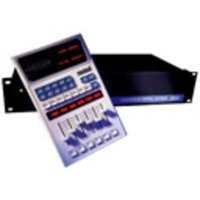
- Unpacking and Inspection
- Precautions
- PCM 80
- Contents
- Introduction
- Dual FX Card Operation
- The Dual FX Blocks and the Algorithms
- Contents, cont'd. 3. The Presets
- The Algorithms
- The Presets
- Dual FX Card Operation
- Handle cards with care.
- MIDI SysEx register dumps require that the algorithm card used to create the effect(s) be loaded.
- Can't dump effect Need algorithm card
- Effect unchanged Need algorithm card
- Effect unchanged No data in dump
- Loading the Dual FX Algorithms
- Card Load: Dual FX 1.0 2.1 (Press LOAD)
- Extensions now available
- Cannot load while running extension
- Loading the Dual FX Presets
- Extension
- R 1.1 DualStereoFX
- Using the Submixer
- Sends
- Returns
- Stereo Series 1
- Stereo Series 2
- Mono In/Stereo Out Series 1
- Mono In/Stereo Out Series 2
- Stereo Parallel
- Mono In/Stereo Out Parallel
- Dual Mono In/Stereo Out
- Dual Mono In/Mono Out
- Rvb and FX Block Controls
- RvbMix, FX Mix
- RvblnLvl, FX InLvl
- Rvb In W, FX In W
- RvbOutLvl, FX OutLvl
- Rvb Out W, FX Out W
- RvbHiCut, FX HiCut
- RvbLoCut, FX LoCut
- The Dual FX Blocks and the Algorithms
- The Reverb Blocks
- Concert Hall
- Infinite
- The FX Blocks
- Glide
- The Resonant Chord Algorithms: Res1 and Res2
- Program Bank X0
- Solo Room ADJUST: Far Mics 0-24
- Left Room ADJUST: Right Mic 0-24
- Right Room ADJUST: Left Mic 0-24
- Organ Room ADJUST: Slow/Fast 0-1
- Phat Roads
- ADJUST: Depth
- 1–127
- Phat Roads 2
- Phat Roads 3
- StereoTunnel
- 1–100
- Is this on?
- ADJUST: PA spread
- 0-127
- ..AndTheGods ADJUST: Fall/Rise 0–1
- Mix>Perc>BP ADJUST: Band 0-127
- Mix>Snare>LP ADJUST: Hi Cut 0-127
- Mix>Snare>HP ADJUST: Lo Cut 0-127
- Mix>Drum>LP ADJUST: Hi Cut 0-127
- Mix>Drum>HP
- ADJUST: Lo Cut 0–127
- Mix>Drum>BP
- ADJUST: Band 0–127
- Mix>Kick>LP
- ADJUST: Hi Cut 0-127
- Mix>Kick>HP
- Mix>Gate>LP ADJUST: Hi Cut 0–100
- Mix>Gate>BP ADJUST: Center 0–100
- Mix>Car Park ADJUST: Spooky 0–127
- Mix>Amb1>LP
- Mix>Amb1>HP
- Mix>Amb1>BP
- Mix>Amb2>LP
- Mix>Amb2>HP
- Mix>Amb3>LP
- Mix>Amb3>HP
- StereoFutz 1
- StereoFutz 2
- Outdoor
- OutdoorWall
- ips TapeSlap ADJUST: TapeSpeed 1-4
- 15ips Echo ADJUST: Feedback 0–100
- 7.5ipsEkoRvb ADJUST: Feedback 0-100
- V SpeedEko1 ADJUST: TapeSpeed 0–100
- V SpeedEko2 ADJUST: TapeSpeed 0–100
- V SpeedEko3 ADJUST: TapeSpeed 0–100
- Eko Spills 1 ADJUST: Depth 1–100
- Eko Spills 2 ADJUST: Feedback 1–100
- X-RhythmEko1 ADJUST: X-Mix 0–100
- X-RhythmEko2 ADJUST: X-Mix 0–100
- X-RhythmEko3 ADJUST: X-Mix 0–100
- X-RhythmEko4 ADJUST: R-Speed 0-100
- X-RhythmEko5 ADJUST: Rvb Mix 0-100
- SlipTheEkos1 ADJUST: Back Beat 0–100
- SlipTheEkos2 ADJUST: Back Beat 0–100
- SlipTheEkos3 ADJUST: Back Beat 0–100
- SlipTheBeat1 ADJUST: Back Beat 0–100
- SlipTheBeat2 ADJUST: Back Beat 0–100
- Program Bank X1
- KnobLocation ADJUST: Width 0–90
- KnobPanSwap ADJUST: Width 0–90
- AutoPanSwap
- ips PlateSlap
- 15ips Plate
- 4PoleRvb BP ADJUST: Center 0–127
- 4PoleRvb HP ADJUST: LoCut 0–127
- 4PoleRvb LP ADJUST: HiCut 0-127
- Chorus>Rvb 1 ADJUST: Rvb Mix 0–100
- Chorus>Rvb 2 ADJUST: Rvb Mix 0–100
- Rvb>Chorus 1 ADJUST: Rvb Mix 0–100
- Auto Pan Rvb ADJUST: Hi Cut 0–100
- Knob Pan Rvb ADJUST: Pan 0–100
- FilterPanner ADJUST: PanWidth 0–100
- EQ'd Rvb HP1 ADJUST: Sizzle 0-127
- EQ'd Rvb HP2 ADJUST: Sizzle 0–127
- EQ'd Rvb LP ADJUST: Boom 0–127
- EQ'd Rvb BP ADJUST: Band 0-127
- EQ'd RvbSlap ADJUST: Slap 0–127
- EQ'd RvbEnv1 ADJUST: HiRelease 0-100
- EQ'd RvbEnv2 ADJUST: LoRelease 0–100
- EQ'd RvbEnv3 ADJUST: HiRelease 0-100
- EQ'd RvbEnv4 ADJUST: LoRelease 0–100
- Wah Verb ADJUST: Depth 0–100
- Wah Verb Eko
- ADJUST: Feedback 0–100
- Wah Eko Verb
- Weird EkoRvb
- Echo Rise 1
- ADJUST: RiseTime 1–100
- Echo Rise 2
- Echo Rise 3
- ADJUST: Feedback 1–100
- Echo Rise 4 ADJUST: Depth 1–100
- Rvb Eko Rise ADJUST: RiseTime 1–100
- EQ'd Eko LP ADJUST: Dark Knob 0-127
- EQ'd Eko HP ADJUST: Sizzle 0-127
- EQ'd EkoEnv1
- EQ'd EkoEnv2
- EQ'd EkoEnv3
- StereoTapEko
- Flange>Rvb ADJUST: Rvb Mix 0–100
- Rvb>Flange ADJUST: Rvb Mix 0–100
- LFO Flange
- Tape Flange1
- Tape Flange2 ADJUST: ReelBrake 0–100
- Rvb>T Flange ADJUST: ReelBrake 0–100
- T Flange>Eko ADJUST: ReelBrake 0-100
- VS EkoFlange ADJUST: TapeSpeed 0–100
- Aerosol: Wet ADJUST: Low Depth 0–100
- Aerosol: Dry ADJUST: Low Depth 0–100
- Aerosol:Mix ADJUST: Rvb Mix 0–100
- Phat Detune1 ADJUST: Depth 1–100
- Program Bank X2
- 4PoleEQ HP ADJUST: Lo Cut 0-127
- 4PoleEQ BP ADJUST: Center 0–127
- 4PoleKnobWah ADJUST: Center 0–127
- 4PoleLFOWah ADJUST: Depth 0–100
- Weird! ADJUST: Feedback 0–100
- Weirder! ADJUST: Feedback 0–100
- Weirdest! ADJUST: Feedback 0–100
- Phased Fbk ADJUST: Feedback 0–100
- KnobFlange 1
- ADJUST: Notch 0–100
- KnobFlange 2
- KnobFlange 3
- Envelo Hall
- ADJUST: Release 0–127
- Flange>Ghost
- ADJUST: Depth 0–100
- Ghost>Flange ADJUST: Depth 0–100
- Bass Tone
- ADJUST: Pitch 0–12
- Gate>Gate
- ADJUST: Shape 0-127
- Gate on 1 & 3 ADJUST: Shape 0–127
- Symphonic ADJUST: Swish Lvl 0–100
- Spin Cycle ADJUST: Spin Rate 0–50
- Dino Steps ADJUST: Pitch 0–12
- Hoo-Ha ADJUST: LFO Rate 0–50
- GrossEnctrs
- Notches-Chmb
- Multi FX
- FrameDly 24
- FrameDly 25
- FrameDly 30
- MikedChamb 1
- MikedChamb 2
- Phone>Room ADJUST: Room Mix 0-127
- Mono In/Stereo Out
- Mono>Perc>BP ADJUST: Band 0-127
- Mono>Snr>LP ADJUST: Hi Cut 0-127
- Mono>Snr>HP ADJUST: Lo Cut 0-127
- Mono>Drum>LP ADJUST: Hi Cut 0–127
- Mono>Drum>HP ADJUST: Lo Cut 0–127
- Mono>Drum>BP ADJUST: Band 0-127
- Mono>Kick>LP ADJUST: Hi Cut 0-127
- Mix>Kick>HP ADJUST: Lo Cut 0-127
- Mono>Gate>LP ADJUST: Hi Cut 0-100
- Mono>Gate>BP ADJUST: Center 0–100
- Mono>Tunnel ADJUST: Depth 1–100
- Mono>CarPark ADJUST: Spooky 0–127
- Mono>Amb1>LP
- ADJUST: Hi Cut
- Mono>Amb1>HP
- ADJUST: Lo Cut
- Mono>Amb1>BP
- ADJUST: Band
- Mono>Amb2>LP
- Mono>Amb2>HP
- Mono>Amb3>LP
- Mono>Amb3>HP
- Program Bank X3
- Trance ADJUST: Depth 0–100
- DualTapGate1 ADJUST: GateWidth 0–100
- DualTapGate2 ADJUST: GateWidth 0–100
- X-Eko + Rvb1 ADJUST: Eko Rate 0–100
- DuckEko+ Rvb1 ADJUST: Eko X-Fbk 0–100
- Bounce+ Rvb1 ADJUST: Eko Fbk 0–100
- Bounce+ Rvb2 ADJUST: Eko X-Fbk 0–100
- Bounce+ Rvb3 ADJUST: Eko X-Fbk 0-100
- Bounce+ Eko1 ADJUST: Bnce Fbk 0–100
- Bounce+ Eko2 ADJUST: Eko Delay 0–100
- Bounce+ Eko3 ADJUST: Eko Slip 0–100
- Bounce+ Eko4 ADJUST: Ekos/Beat 0–100
- Bounce+ Eko5 ADJUST: FadeToPan 0–100
- TapEko+Echo ADJUST: DlyTimeR 0-127
- PhoneInRoom ADJUST: Phone Pan 0-100
- TV In Room
- ADJUST: TV Pan
- 0-100
- Phone<>Room
- ADJUST: Swap
- Flange+Ghost
- S Flange + Rvb ADJUST: Reel Brake 0–100
- Flange+Plt ADJUST: Mid Rt 0-127
- AutoPan+Chmb ADJUST: PanWidth 0–100
- Slap + Kick ADJUST: FX/RvbBal 0–48
- Chorus+Chmb ADJUST: Mid Rt 0-127
- LoPass+Chmb ADJUST: CutOff 0-127
- HiPass+Chmb ADJUST: CutOff 0-127
- B.Pass+Chmb ADJUST: Center 0–127
- B.Pass+Hall ADJUST: Center 0–127
- Tremolo+Chmb ADJUST: Depth 0–127
- Tremolo+Plt ADJUST: Depth 0–127
- Tremolo+Hall ADJUST: Depth 0–127
- Dual Mono In/Dual Mono Out (X3 3.0 - X3 4.9)
- L dks R Lvl ADJUST: Duck dB 0–24
- L dks R Eq ADJUST: Duck dB 0–24
- L dks R HiFc ADJUST: Hi Duck 0–100
- L dks R LoFc ADJUST: Hi Duck 0–100
- L dks R Band ADJUST: Duck Band 0–10
- Slap / Kick ADJUST: FX/Rvb Bal 0-48
- Phone X-Fade
- ADJUST: X-Fade
- ToneL/PlateR
- ADJUST: Rvb Out
- Phone / Room
- ADJUST: PhoneFutz
- 0–35
- TV / Room
- ADJUST: TVFutz
- 0-35
- Organ/Room 1
- ADJUST: Slow/Fast
- 0-1
- Organ/Room 2 ADJUST: Slow/Fast 0-1
- M Flange/Rvb ADJUST: Reel Brake 0-100
- TapEko/Gate ADJUST: Feedback 0–100
- Eko15/Plate ADJUST: Feedback 0–100
- V Eko1/ Rvb ADJUST: TapeSpeed 0–100
- V Eko2/Rvb ADJUST: TapeSpeed 0–100
- V Eko / Eko ADJUST: TapeSpeed 0–100
- EkoRise/Rvb
- ADJUST: RiseSpeed 0-100
- EkoRise/Eko
- ADJUST: RiseSpeed 0–100
- Program Bank X4
- Flange/Chmb ADJUST: Mid Rt 0-127
- Flange/Plt ADJUST: Mid Rt 0-127
- Flange/Hall ADJUST: Mid Rt 0-127
- TapEko/Echo ADJUST: DlyTimeR 0–120
- LoPass/Chmb ADJUST: CutOff 0-127
- LoPass/Plate ADJUST: CutOff 0-127
- LoPass/Hall ADJUST: CutOff 0-127
- HiPass/Chmb
- ADJUST: CutOff 0-127
- HiPass/Plate
- ADJUST: CutOff 0–127
- HiPass/Hall
- B.Pass/Chmb
- ADJUST: Center 0-127
- B.Pass/Plate
- B.Pass/Hall
- Rotary/Chmb
- ADJUST: Slow/Fast 0-1
- Rotary/Plate
- Rotary/Hall
- Tremolo/Chmb ADJUST: Depth 0-127
- Tremolo/Plt ADJUST: Depth 0-127
- Tremolo/Hall ADJUST: Depth 0-127
Brand : LEXICON
Model : PCM80
Category : Effect machine