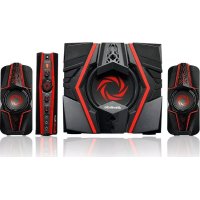
SonicBlast GS331 - Speaker AVERMEDIA - Free user manual and instructions
Find the device manual for free SonicBlast GS331 AVERMEDIA in PDF.


Pick your language and provide your email: we'll send you a specifically translated version.
| Product Type | Speaker |
| Brand | AVerMedia |
| Model | SonicBlast GS331 |
| Dimensions (approx.) | 300 x 150 x 150 mm |
| Weight (approx.) | 2.0 kg |
| Power Supply | USB-C or AC adapter (5V/2A) |
| Audio Output | 20W RMS |
| Connectivity | Bluetooth 5.0, 3.5mm AUX-in, USB-A for playback |
| Controls | Volume, Play/Pause, Power, Bluetooth pairing button |
| Frequency Response | 80 Hz – 20 kHz |
| Driver | Full-range driver, passive radiator |
| Battery Capacity (if portable) | 3600 mAh, up to 8 hours playback |
| Compatibility | Smartphones, tablets, computers, gaming consoles |
| Additional Features | MicroSD card slot, built-in microphone for speakerphone |
| Cleaning Instructions | Wipe with damp cloth; do not use harsh chemicals |
| Safety Precautions | Avoid exposure to water and extreme temperatures; unplug when not in use |
| Spare Parts | Available: USB-C cable, AUX cable, user manual |
| Repairability | Battery replaceable by service center; drivers not user-serviceable |
Frequently Asked Questions - SonicBlast GS331 AVERMEDIA
How do I pair the SonicBlast GS331 with Bluetooth?
Press and hold the Bluetooth button until the LED flashes. Enable Bluetooth on your device and select 'SonicBlast GS331' from the list.
Can I use the speaker while charging?
Yes, the speaker supports pass-through charging, so you can use it while connected to power.
What is the battery life of the GS331?
The built-in 3600 mAh battery provides up to 8 hours of playback at moderate volume.
Does the speaker have a microphone for calls?
Yes, it has a built-in microphone for hands-free calling. You can answer calls by pressing the Play/Pause button.
How do I reset the speaker?
If the speaker is unresponsive, press and hold the Power button for 10 seconds until it powers off, then turn it back on.
What audio inputs are available?
The speaker supports Bluetooth, a 3.5mm AUX input, and a USB-A port for playing music from a USB drive.
Can I connect two speakers together?
No, the SonicBlast GS331 does not support daisy-chaining or stereo pairing.
Why is the speaker not charging?
Check that the USB-C cable is fully inserted and use a power adapter with at least 5V/2A output. Try a different cable if the issue persists.
How do I clean the speaker?
Use a soft, damp cloth to wipe the exterior. Do not allow moisture into any openings. Do not use abrasive cleaners.
What is the warranty period?
AVerMedia offers a 1-year limited warranty for manufacturing defects. Check your region for specific terms.
User questions about SonicBlast GS331 AVERMEDIA
0 question about this device. Answer the ones you know or ask your own.
Ask a new question about this device
No questions yet. Be the first to ask one.
Download the instructions for your Speaker in PDF format for free! Find your manual SonicBlast GS331 - AVERMEDIA and take your electronic device back in hand. On this page are published all the documents necessary for the use of your device. SonicBlast GS331 by AVERMEDIA.
USER MANUAL SonicBlast GS331 AVERMEDIA
Manual assistant
Powered by Anthropic
Waiting for your message
Product information
Brand : AVERMEDIA
Model : SonicBlast GS331
Category : Speaker