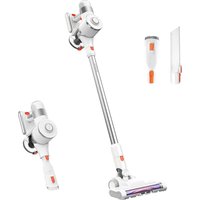
U10 Pro - Broom Ultenic - Free user manual and instructions
Find the device manual for free U10 Pro Ultenic in PDF.


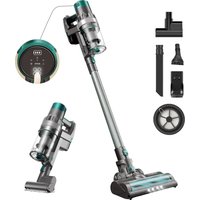
| Product Type | Cordless Stick Vacuum Cleaner |
| Model | Ultenic U10 Pro |
| Dimensions | Approximately 1100 mm (L) x 250 mm (W) x 200 mm (H) |
| Weight | Approximately 2.8 kg (body only) |
| Battery Type | Lithium-ion, 2200 mAh, 25.2 V |
| Battery Runtime | Up to 40 minutes (low speed), 15 minutes (max) |
| Charging Time | 4-5 hours |
| Dustbin Capacity | 0.6 liters |
| Filtration System | HEPA filter (washable) |
| Suction Power | 150 AW (air watts) max |
| Motor Type | Digital brushless motor, 100,000 RPM |
| Display | LED touch screen with battery indicator and mode |
| Modes | Auto, Eco, Max, and Manual (adjustable) |
| Attachments | Motorized brush roll, crevice tool, 2-in-1 dusting brush, flexible hose |
| Brush Roll Control | Auto-adjusting for different floor types (carpet/hardwood) |
| Noise Level | ~75 dB (typical use) |
| Maintenance | Washable HEPA filter and brush roll; dustbin rinsable |
| Warranty | 2 years |
| Certifications | CE, FCC, RoHS |
Frequently Asked Questions - U10 Pro Ultenic
User questions about U10 Pro Ultenic
0 question about this device. Answer the ones you know or ask your own.
Ask a new question about this device
Download the instructions for your Broom in PDF format for free! Find your manual U10 Pro - Ultenic and take your electronic device back in hand. On this page are published all the documents necessary for the use of your device. U10 Pro by Ultenic.
USER MANUAL U10 Pro Ultenic
User Manual
Stick Vacuum
U10 PRO
Safety Precautions & Warnings
IMPORTANT! Always switch off the appliance before cleaning, when not in use or before attempting any maintenance task. The charger must only be connected to an AC power supply at the voltage shown on the rating label. This cleaner should only be used for its intended purpose as described in this instruction manual. Never operate the vacuum cleaner without filters.
Read the manual attentively before using the appliance for the first time.
When using your vacuum cleaner, basic precautions should always be observed, including the following;
- This appliance is not intended for use by persons (including children) with reduced physical, sensory or mental capabilities or lack of experience and knowledge, unless they have been given supervision or instruction concerning use of the appliance by a person responsible for their safety.
- Children should be supervised to ensure that they do not play with the appliance.
- To prevent electrical shock, do not immerse the appliance, battery, or power plug into water or other liquids.
- To prevent electrical shock, do not use the vacuum cleaner outdoors or on wet surfaces.
- Always check the power cord before use, the power cord and the plug should be in a good condition and must not be damaged. If the power supply cord is damaged or defective, it must be replaced by the manufacturer, its service agent or similarly qualified persons in order to avoid a hazard
- The appliance and charging base are intended for domestic indoors use only.
- Do not unplug by pulling on the power cord. To unplug, grasp the plug, not the power cord. Use only Australian and New Zealand electrical safety approved extension cords.
- Do not pull or carry the appliance by the power cable, use the power cable as a handle or pull the power cable around sharp edges or corners. Avoid running the appliance over the power cable.
- Do not handle or operate the appliance with wet hands and follow electrical safety precautions at all times.
- Extreme caution should be exercised when using the appliance on stairs.
- Do not attempt to change the attachments while the appliance is switched on. Use only manufacturer's recommended accessories.
- Do not operate the vacuum cleaner too close to heaters, radiators and other hot surfaces.
- Do not use the appliance to pick up flammable items or combustible liquids (i.e. gasoline, hot ashes, cigarettes, matches, explosive materials or anything burning) or use in areas where such substances and items may be present.
- Do not use the appliance to pick up toxic materials (i.e. chlorine bleach, ammonia).
- Never operate or use the appliance without the filters in place.
- Before vacuuming, remove any large or sharp objects from the floor or cleaning surface in order to prevent damage to the filter.
- If the air inlet or floor head is blocked, switch off the cleaner straight away. Clear the blocked object before attempting to start the vacuum cleaner again.
- Before carrying out any maintenance service or cleaning the filters, always switch off the vacuum cleaner.
- Keep openings away from your face and body.
- Do not use the vacuum cleaner if it is damaged or broken. If connection cables are damaged, have them replaced immediately.
- Never clean the vacuum cleaner or any of the electrical parts, especially the electrical connections, with water or liquid cleaners.
- Never attempt to make any modifications electrically to the vacuum cleaner and charging base.
• Always store the appliance and charger indoors in a cool and dry place. - Do not pick up water, for dry household use only.
- Use the electric power head only for vacuuming dust and dry substances in the home.
- Never run over the power cable with the power head as this may cause damage to the power cable.
- Never touch the roller brush while the vacuum cleaner is switched on.
- To prevent unnecessary wear on the power head, keep it moving while in operation.
- Damage caused by improper use or by not observing the instructions in this manual will void the warranty.
Battery use and care
- The appliance is only to be used with the charger uniquely provided with the appliance.
- Only use the specifically designated charger to charge the battery.
- When appliance is not in use, keep it away from other metal objects, like paper clips, coins, keys, nails, screws or other small metal objects that can make a connection from one terminal to another. Shorting the appliance terminals together may cause burns or a fire.
- Under abusive conditions, battery may catch fire and explode.
- Do not charge or store the appliance outdoors or inside the car. Only charge or store the battery in a dry indoor area where the temperature is more than 5°C but less than 45°C . The charger is for indoor used only.
- Never attempt to open the battery for any reason. If the plastic housing of the battery casing breaks or cracks, immediately discontinue use and do not recharge. Battery is not a serviceable part.
• The charger is not a serviceable part. - Before disposal of your battery, fully discharge your battery by running the product until it stops.
- The cleaner contains a Li-Ion battery. Do not dispose of the appliance with your local garbage. Contact your local council for instructions on how to safely dispose of the battery.
- Do not use the charger to charge a non-chargeable battery.
About Your Product
Congratulations on the purchase of your new Ultenic Stick Vacuum. There are many useful features built into your cleaner and we recommend that you carefully read this instruction manual to take the best advantage of these features.

Charging port
Exhaust filter
Boost button
Rod release button
Rod
Battery release button Battery On/off trigger
Dust bin release button Dust bin
Dust bin lid release button
Crevice tool
Dusting brush
Wall storage bracket (screws are not included.)
Adapter
Specifications:
Voltage: 25.9V DC
Power: 400W with powerhead Dust
capacity: 0.6L
Battery type: 2200mAh Lion
Runtime: 35 mins*
Charge time: 4-5 hours
Net weight: 2.34Kg
Before You Begin
This cleaner must be operated in accordance with these instructions and used only for domestic household cleaning to remove DRY dirt and dust from household carpets, flooring, walls and fabrics. This cleaner is not fit to be used as an industrial cleaner and will void the manufacturer's warranty if used inappropriately.
Please read these instructions thoroughly
This will ensure you obtain full benefit from your new cleaner. Keep this instruction manual in a handy place for future reference.
Important
Always switch off the appliance before cleaning, attempting any maintenance task, fitting or removing accessories, or when not in use. The charger must only be connected to an AC power supply at the voltage shown on the rating label. This cleaner should only be charged with the charger provided. This cleaner should only be used for its intended purpose as described in these instructions.
Precautionary measures:

- Do not operate the vacuum cleaner too close to heaters, radiators or other hot surfaces.
- Before inserting the plug into the wall, make sure your hands are dry.

- Before turning on the vacuum cleaner, safely remove any large objects from the floor or cleaning surface in order to prevent damage to the filter.

- When you want to remove the plug from the power socket, do not use the power cable, gently pull the plug from the power socket.

- Do not use this vacuum cleaner to pick-up water or liquids.
Product Use
Assembly
IMPORTANT! Always remove the battery from the appliance before fitting or removing accessories.
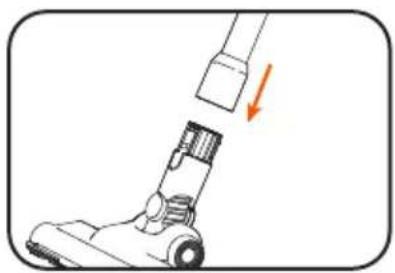
- Insert the power head into the rod. You will hear a "click" sound when it is securely in place.
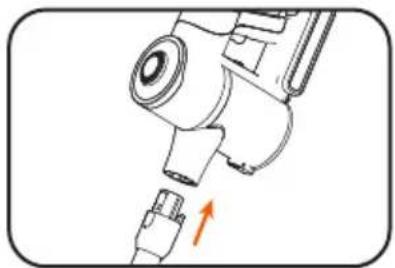
- To install the rod, insert the plug end of the rod into the air inlet of the cleaner. Once it is securely in place, you will hear a "click" sound.

Inserting the battery
-
Slide the battery into the main unit of the vacuum cleaner. Once it is in place, you will hear a "click" sound.
-
To remove the battery, press the battery release button and gently pull the battery from the vacuum cleaner.
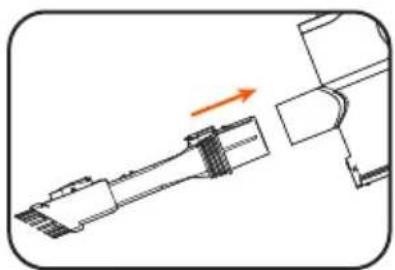
Connecting accessories to the unit
-
Insert accessories into the air inlet of the cleaner. You will hear a "click" sound when each is securely in place.
-
To disassemble, press the rod release button on the cleaner and then pull the accessory out from the air inlet.
Instructions for Use

Turning on the vacuum
Press the on/off button to turn on the vacuum.
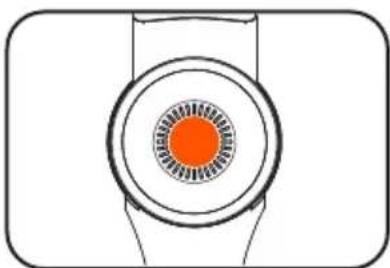
Switch to boost mode
To switch between low power and high power, press the boost button.
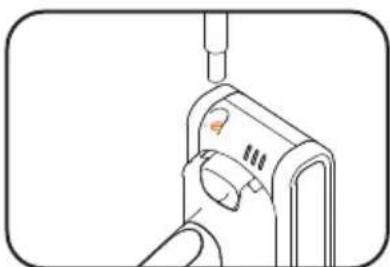
Charging the vacuum cleaner
NOTE: When the charging indicator light flashes during use, the vacuum cleaner battery is running low and requires charging.
Insert the charger cable into the battery charging port
Charging indicator light:
Flashes red: battery require charging. When all three blue led stop flashing battery is fully charged
ATTENTION: It is recommended to charge your product after each use to maintain maximum performance.
NOTE: This product takes 4-5 hours to charge. Before the first three uses of the vacuum cleaner, however, 12 hours of continuous charging is required.
CAUTION! Do not try to open the battery and repair it yourself.
NOTE: As a safety precaution, the vacuum cannot be switched on while the vacuum is charging.
Accessories

Dusting brush
The dusting brush can be used as a soft dusting brush for cleaning a variety of surfaces or as an upholstery tool for cleaning furniture.

Crevice tool
The crevice tool can be used to clean hard-to-reach places or in tight crevices.

Power head
Ideal for daily cleaning on carpets and hard floors.
NOTE: If the power head is blocked, the motor switches off automatically. If this occurs, switch off the vacuum cleaner and remove the battery. Remove any object that has blocked the power head, and switch the vacuum cleaner on again. If the power head does not start again after cleaning, do not try to dismantle the power head. Please contact your local Godfreys store.
Product Maintenance
IMPORTANT! Turn off the cleaner and remove the battery before conducting any maintenance tasks. It is recommended to clean the dust bin after each use or when dust reaches the max fill line.

Storage
- Install the wall storage bracket onto the wall using wall mounting screws (not included).
- Insert the vacuum cleaner into the wall storage bracket, ensuring it is securely in place.
- Place the accessories into the corresponding slots on the wall storage bracket.
NOTE: If you are not going to use the machine for a long period of time, it is recommended to remove the battery from the machine during storage to maintain the battery life.
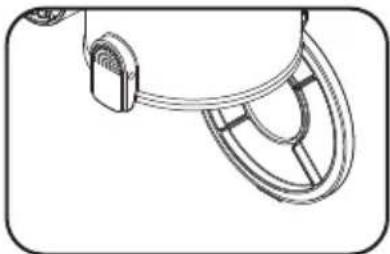
Emptying the dust bin
Press the dust bin lid release button to open the bottom cover of the vacuum cleaner and empty the dust bin.
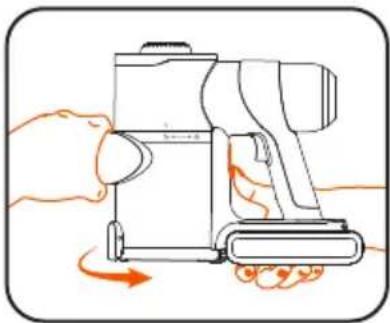
Cleaning the dust bin and filters
- Press the dust bin release button and, at the same time, turn the dust bin anti-clockwise to remove it from the unit.
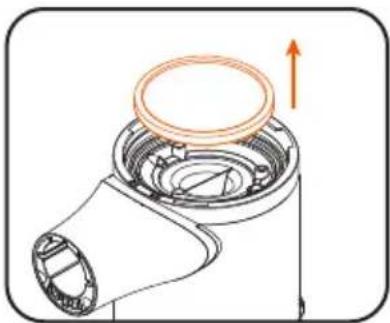
- The HEPA filter can be found in the dust bin.
NOTE: It is recommended to replace the filters every six months or when they become visibly dirty.

- Lift the cyclone filter and release it from the cleaner.

- To remove the exhaust filter, turn the filter cap anti-clockwise. Then, pull the exhaust filter from the filter cap.
NOTE: It is recommended to replace the filters every six months or when they become visibly dirty.

Cleaning the roller brush
- Slide the roller brush release button in the direction of the arrow shown on the button.

- Gently pull the roller brush out to clean or replace it.
Troubleshooting
| Problem | Possible cause | Solution |
| Cleaner doesn't start | Flat battery | Charge the vacuum cleaner |
| Reduced suction | The dust bin is full of dust | Empty the dust bin |
| Filter is blocked | Clean or replace the filter | |
| The airway is blocked | Clear the airway | |
| The charging indicator light fails to turn blue during charging (led 1 to 3 flashes blue indicates the status of charging) | The charger is not fully inserted into the cleaner | Reinsert the charger into the cleaner, ensuring it is securely in place |
| The charger is not connected to the mains power | Connect the charger to the mains power | |
| Insufficient application time after charging | Insufficient charging time | Fully charge the battery according to the instructions described in the charging section |
| Normal discharge reduction in battery | Purchase a new battery | |
| Light flashes from red to blue intermittently | Battery is not inserted into the cleaner properly | Remove the battery and reinsert it into the cleaner until you hear it click into place |
Customer Service
| United States | service-us@ultenic.com |
| Deutschland | service-de@ultenic.com |
| France | service-fr@ultenic.com |
| España | service-es@ultenic.com |
| Canada | service-ca@ultenic.com |
| United Kingdom | service-uk@ultenic.com |
| Italia | service-it@ultenic.com |
| 日本 | service-jp@ultenic.com |
| Others support@ultenic.com |

www.ultenic.com

Ultenic_Official
ultenic__official
UltenicOfficial

Ultenic_Official

Ultenic_Official
- USER MANUAL
- SAFETY PRECAUTIONS & WARNINGS
- WHEN USING YOUR VACUUM CLEANER, BASIC PRECAUTIONS SHOULD ALWAYS BE OBSERVED, INCLUDING THE FOLLOWING
- BATTERY USE AND CARE
- ABOUT YOUR PRODUCT
- SPECIFICATIONS
- BEFORE YOU BEGIN
- PLEASE READ THESE INSTRUCTIONS THOROUGHLY
- IMPORTANT
- PRECAUTIONARY MEASURES
- PRODUCT USE
- ASSEMBLY
- INSERTING THE BATTERY
- CONNECTING ACCESSORIES TO THE UNIT
- INSTRUCTIONS FOR USE
- TURNING ON THE VACUUM
- SWITCH TO BOOST MODE
- CHARGING THE VACUUM CLEANER
- CHARGING INDICATOR LIGHT
- ACCESSORIES
- DUSTING BRUSH
- CREVICE TOOL
- POWER HEAD
- PRODUCT MAINTENANCE
- STORAGE
- EMPTYING THE DUST BIN
- CLEANING THE DUST BIN AND FILTERS
- CLEANING THE ROLLER BRUSH
Brand : Ultenic
Model : U10 Pro
Category : Broom