9555NB - Grinders MAKITA - Free user manual and instructions
Find the device manual for free 9555NB MAKITA in PDF.


| Product type | Angle grinder |
| Brand | MAKITA |
| Model | 9555NB |
| Wheel diameter | 125 mm |
| Shaft thread | M14 |
| No load speed | 10,000 min⁻¹ |
| Overall length | 258 mm |
| Net weight | 1.4 kg |
| Safety category | Double insulation (class II) |
| Power supply | Single-phase mains, same voltage as rating plate |
| Applications | Cutting, grinding and sanding of metals and stone without water |
| Switch | Slide switch with lock for continuous operation |
| Shaft lock | Yes, for accessory change |
| Wheel guard | Included, adjustable to 180° |
| Side handle | Included, screws on the side |
| Sound pressure level | 84 dB(A) |
| Operating noise level | May exceed 85 dB(A) |
| Weighted acceleration | ≤ 2.5 m/s² |
| Maintenance | Clean ventilation slots regularly |
| Reparability | Authorized Makita service center, genuine Makita replacement parts |
| Compatible accessories | Depressed center wheels, abrasive discs, wire brushes, dust collection guard |
Frequently Asked Questions - 9555NB MAKITA
User questions about 9555NB MAKITA
0 question about this device. Answer the ones you know or ask your own.
Ask a new question about this device
Download the instructions for your Grinders in PDF format for free! Find your manual 9555NB - MAKITA and take your electronic device back in hand. On this page are published all the documents necessary for the use of your device. 9555NB by MAKITA.
USER MANUAL 9555NB MAKITA
natural_image
Line drawing of a power tool with a circular base and central hub, no text or symbols present
1
2
natural_image
Diagram of a mechanical power tool with two rotating arms and a central hub (no text or labels)3
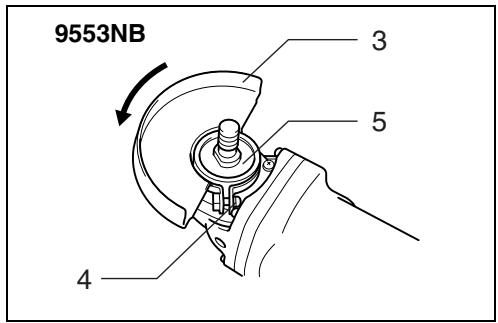
4
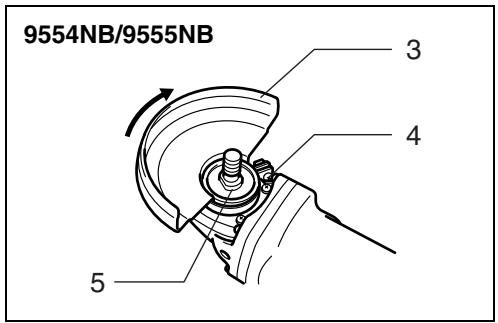
5
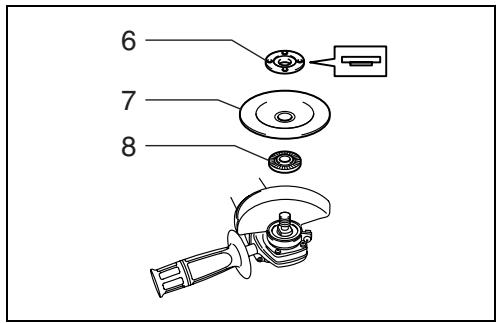
6
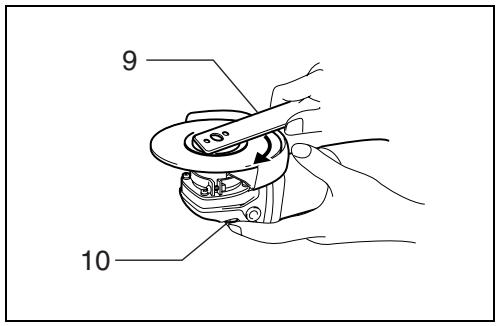
7
8
9
Symbols
The followings show the symbols used for the tool. Be sure that you understand their meaning before use.
Symboles
Explanation of general view
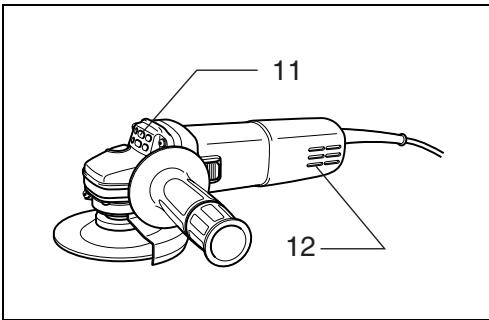
| 1 | Shaft lock | 6 | Lock nut | 10 | Shaft lock |
| 2 | Switch lever | 7 | Depressed center grinding | 11 | Exhaust vent |
| 3 | Wheel guard | wheel/ Multi-disc | 12 | Inhalation vent | |
| 4 | Screw | 8 | Inner flange | ||
| 5 | Bearing box | 9 | Lock nut wrench |
SPECIFICATIONS
| Model | 9553NB | 9554NB | 9555NB |
| Depressed center wheel diameter | 100 mm | 115 mm | 125 mm |
| Spindle thread | M10 | M14 | M14 |
| No load speed ( min^-1 ) | 11,000 | 10,000 | 10,000 |
| Overall length | 258 mm | 258 mm | 258 mm |
| Net weight | 1.4 kg | 1.4 kg | 1.4 kg |
| Safety class |
- Due to our continuing program of research and development, the specifications herein are subject to change without notice.
- Note: Specifications may differ from country to country.
Intended use
The tool is intended for cutting, grinding and sanding of metal and stone materials without the use of water.
Power supply
The tool should be connected only to a power supply of the same voltage as indicated on the nameplate, and can only be operated on single-phase AC supply. They are double-insulated in accordance with European Standard and can, therefore, also be used from sockets without earth wire.
Safety hints
For your own safety, please refer to the enclosed safety instructions.
ADDITIONAL SAFETY RULES
ENB031-6
- Always use eye and ear protection. Other personal protective equipment such as dust mask, gloves, helmet and apron should be worn.
- Always be sure that the tool is switched off and unplugged before carrying out any work on the tool.
- Keep guards in place.
- Use only wheels with correct size and wheels having a maximum operating speed at least as high as the highest No Load Speed marked on the tool's nameplate. When using depressed center wheels, be sure to use only fiberglass-reinforced wheels.
- Check the wheel carefully for cracks or damage before operation. Replace cracked or damaged wheel immediately.
- Observe the instructions of the manufacturer for correct mounting and use of wheels. Handle and store wheels with care.
- Do not use separate reducing bushings or adaptors to adapt large hole abrasive wheels.
- Use only flanges specified for this tool.
-
Do not damage the spindle, the flange (especially the installing surface) or the lock nut. Damage to these parts could result in wheel breakage.
-
For tools intended to be fitted with threaded hole wheel, ensure that the thread in the wheel is long enough to accept the spindle length.
- Before using the tool on an actual workpiece, test run the tool at the highest no load speed for at least 30 seconds in a safe position. Stop immediately if there is any vibration or wobbling that could indicate poor installation or a poorly balanced wheel. Check the tool to determine the cause.
- Check that the workpiece is properly supported.
- Hold the tool firmly.
- Keep hands away from rotating parts.
- Make sure the wheel is not contacting the workpiece before the switch is turned on.
- Use the specified surface of the wheel to perform the grinding.
- Do not use cutting off wheel for side grinding.
- Watch out for flying sparks. Hold the tool so that sparks fly away from you and other persons or flammable materials.
- Pay attention that the wheel continues to rotate after the tool is switched off.
- Do not touch the workpiece immediately after operation; it may be extremely hot and could burn your skin.
- Position the tool so that the power cord always stays behind the tool during operation.
- If working place is extremely hot and humid, or badly polluted by conductive dust, use a short-circuit breaker (30 mA) to assure operator safety.
- Do not use the tool on any materials containing asbestos.
- Do not use water or grinding lubricant.
- Ensure that ventilation openings are kept clear when working in dusty conditions. If it should become necessary to clear dust, first disconnect the tool from the mains supply (use non metallic objects) and avoid damaging internal parts.
- When use cut-off wheel, always work with the dust collecting wheel guard required by domestic regulation.
- Cutting discs must not be subjected to any lateral pressure.
SAVE THESE INSTRUCTIONS.
FUNCTIONAL DESCRIPTION
CAUTION:
- Always be sure that the tool is switched off and unplugged before adjusting or checking function on the tool.
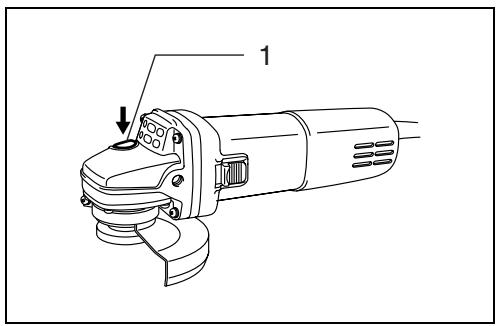
Shaft lock (Fig. 1)
CAUTION:
- Never actuate the shaft lock when the spindle is moving. The tool may be damaged.
Press the shaft lock to prevent spindle rotation when installing or removing accessories.
Switch action (Fig. 2)
CAUTION:
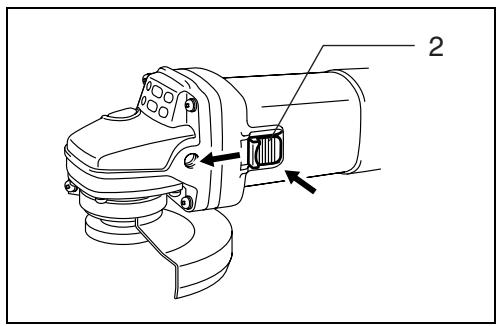
- Before plugging in the tool, always check to see that the slide switch actuates properly and returns to the "OFF" position when the rear of the slide switch is depressed.
To start the tool, slide the slide switch toward the "I (ON)" position. For continuous operation, press the front of the slide switch to lock it.
To stop the tool, press the rear of the slide switch, then slide it toward the "O (OFF)" position.
ASSEMBLY
CAUTION:
- Always be sure that the tool is switched off and unplugged before carrying out any work on the tool.
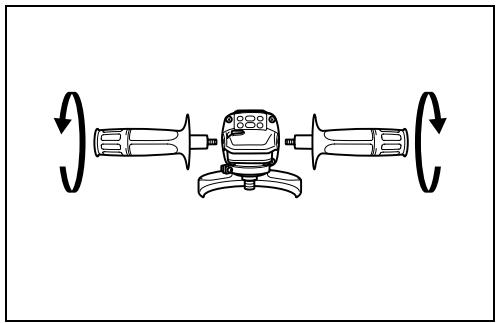
Installing side grip (handle) (Fig. 3)
CAUTION:
- Always be sure that the side grip is installed securely before operation.
Screw the side grip securely on the position of the tool as shown in the figure.
Installing or removing wheel guard (Fig. 4 & 5)
CAUTION:
- The wheel guard must be fitted on the tool so that the closed side of the guard always points toward the operator.
Mount the wheel guard with the protrusion on the wheel guard band aligned with the notch on the bearing box. Then rotate the wheel guard around 180 degrees. Be sure to tighten the screw securely.
To remove wheel guard, follow the installation procedure in reverse.
Installing or removing depressed center grinding wheel/Multi-disc
Mount the inner flange onto the spindle. Fit the wheel/disc on the inner flange and screw the lock nut onto the spindle. (Fig. 6)
To tighten the lock nut, press the shaft lock firmly so that the spindle cannot revolve, then use the lock nut wrench and securely tighten clockwise.
To remove the wheel, follow the installation procedure in reverse. (Fig. 7)
WARNING:
- Only actuate the shaft lock when the spindle is not moving.
OPERATION
WARNING:
- It should never be necessary to force the tool. The weight of the tool applies adequate pressure. Forcing and excessive pressure could cause dangerous wheel breakage.
- ALWAYS replace wheel if tool is dropped while grinding.
- NEVER bang or hit grinding disc or wheel onto work.
- Avoid bouncing and snagging the wheel, especially when working corners, sharp edges etc. This can cause loss of control and kickback.
- NEVER use tool with wood cutting blades and other sawblades. Such blades when used on a grinder frequently kick and cause loss of control leading to personal injury.
CAUTION:
- After operation, always switch off the tool and wait until the wheel has come to a complete stop before putting the tool down.
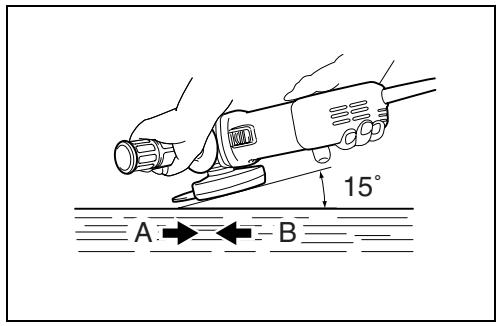
Grinding and sanding operation (Fig. 8)
ALWAYS hold the tool firmly with one hand on housing and the other on the side handle. Turn the tool on and then apply the wheel or disc to the workpiece.
In general, keep the edge of the wheel or disc at an angle of about 15 degrees to the workpiece surface.
During the break-in period with a new wheel, do not work the grinder in the B direction or it will cut into the workpiece. Once the edge of the wheel has been rounded off by use, the wheel may be worked in both A and B direction.
MAINTENANCE
CAUTION:
- Always be sure that the tool is switched off and unplugged before attempting to perform inspection or maintenance.
The tool and its air vents have to be kept clean. Regularly clean the tool's air vents or whenever the vents start to become obstructed. (Fig. 9)
To maintain product SAFETY and RELIABILITY, repairs, any other maintenance or adjustment should be performed by Makita Authorized or Factory Service Centers, always using Makita replacement parts.
ACCESSORIES
CAUTION:
- These accessories or attachments are recommended for use with your Makita tool specified in this manual. The use of any other accessories or attachments might present a risk of injury to persons. Only use accessory or attachment for its stated purpose.
If you need any assistance for more details regarding these accessories, ask your local Makita service center.
- Wheel guard (Wheel cover)
- Inner flange
- Depressed center wheels
- Lock nut (For depressed center wheel)
- Rubber pad
- Abrasive discs
- Lock nut (For abrasive disc)
- Lock nut wrench
- Wire cup brush
- Wire bevel brush 85
- Side grip
• Dust collecting wheel guard
Descriptif
EC-DECLARATION OF CONFORMITY
We declare under our sole responsibility that this product is in compliance with the following standards of standardized documents,
EN50144, EN55014, EN61000
in accordance with Council Directives, 73/23/EEC, 89/336/EEC and 98/37/EC.
FRANÇAISE
DÉCLARATION DE CONFORMITÉ CE
Michigan Drive, Tongwell, Milton Keynes,
Bucks MK15 8JD, ENGLAND
Responsible manufacturer:
Fabricant responsible :
EU-DEKLARATION OM KONFORMITET
Michigan Drive, Tongwell, Milton Keynes,
Bucks MK15 8JD, ENGLAND
For European countries only
Noise and Vibration
The typical A-weighted sound pressure level is 84 dB (A).
The noise level under working may exceed 85 dB (A).
- Wear ear protection. -
The typical weighted root mean square acceleration value is not more than 2.5 m/s^2 .
These values have been obtained according to EN50144.