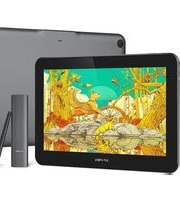
Artist Pro 16TP - Graphic tablet XP-Pen - Free user manual and instructions
Find the device manual for free Artist Pro 16TP XP-Pen in PDF.


Pick your language and provide your email: we'll send you a specifically translated version.
| Type of product | Graphic tablet with screen (pen display) |
| Screen size (diagonal) | 15.6 inches |
| Active drawing area | 344.16 x 193.59 mm |
| Display resolution | 1920 x 1080 pixels (Full HD) |
| Color gamut | 90% NTSC |
| Pen pressure levels | 8192 levels |
| Pen tilt support | ±60° |
| Report rate | 200 PPS (reports per second) |
| Dimensions (width x depth x height) | 435 x 270 x 15 mm |
| Weight | 1.63 kg |
| Power supply | USB-C (5V/2A) or DC 12V 1.5A (adapter included) |
| Primary functions | Digital drawing, painting, photo editing, note-taking |
| Touch functionality | Multi-touch gesture support |
| Shortcut buttons | 8 customizable express keys |
| VESA mount compatible | Yes (100 x 100 mm) |
| Maintenance and cleaning | Use a soft, dry microfiber cloth; avoid liquids and abrasive cleaners. Clean screen surface gently. |
| Safety instructions | Do not expose to moisture or extreme temperatures; use only the provided charger and cables; avoid dropping. |
| Spare parts and repairability | Replacement pen nibs, USB cable, digitizer film; consult XP-Pen service for battery or screen repair. |
| General information | XP-Pen Artist Pro 16TP; compatible with Windows, macOS, Android (selected devices); packaged with pen, stand, USB cable, and driver CD. |
| Warranty | Typical 1-year limited warranty (varies by region) |
Frequently Asked Questions - Artist Pro 16TP XP-Pen
What is the pen technology used?
The XP-Pen Artist Pro 16TP uses electromagnetic resonance (EMR) technology, requiring no battery in the pen.
Does the tablet support touch gestures?
Yes, it supports multi-touch gestures like pinch-to-zoom, rotate, and two-finger scroll.
Can I use the Artist Pro 16TP with Android devices?
Yes, it is compatible with selected Android devices that support USB-C DP-alternate mode. Check XP-Pen's compatibility list.
How do I install the driver?
Download the latest driver from the XP-Pen official website, run the installer, and follow on-screen instructions. Connect the tablet after driver installation.
What is the difference between Artist Pro 16TP and Artist 16 Pro?
The 'TP' model adds touch functionality and a laminated screen with anti-glare coating, reducing parallax.
How do I calibrate the pen?
Use the XP-Pen Pen Tablet software. Go to 'Pen Settings' and adjust the pressure curve. For screen calibration, use the 'Screen Calibration' tool.
Can I replace the pen nibs?
Yes, the pen comes with 8 standard nibs and a nib extractor. Replacement nibs are available separately.
Does the tablet work without a driver?
Basic mouse functionality works without a driver, but for full pressure sensitivity and express keys, the driver must be installed.
What is the warranty period?
The XP-Pen Artist Pro 16TP typically comes with a 1-year limited warranty. Register your product on the XP-Pen website for warranty verification.
How do I clean the screen?
Power off the tablet, then gently wipe the screen with a soft, dry microfiber cloth. Do not use alcohol or harsh cleaners.
User questions about Artist Pro 16TP XP-Pen
0 question about this device. Answer the ones you know or ask your own.
Ask a new question about this device
No questions yet. Be the first to ask one.
Download the instructions for your Graphic tablet in PDF format for free! Find your manual Artist Pro 16TP - XP-Pen and take your electronic device back in hand. On this page are published all the documents necessary for the use of your device. Artist Pro 16TP by XP-Pen.
USER MANUAL Artist Pro 16TP XP-Pen
Manual assistant
Powered by Anthropic
Waiting for your message
Product information
Brand : XP-Pen
Model : Artist Pro 16TP
Category : Graphic tablet