
B650M-AYW WIFI - Motherboard ASUS - Free user manual and instructions
Find the device manual for free B650M-AYW WIFI ASUS in PDF.
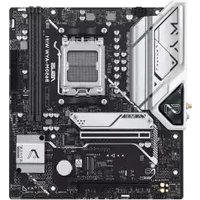


| Product type | Motherboard |
| Form factor | Micro-ATX |
| Chipset | AMD B650 |
| CPU socket | AM5 |
| Supported processors | AMD Ryzen 7000 series |
| Memory support | DDR5, dual channel, up to 128GB |
| Expansion slots | 1x PCIe 5.0 x16, 1x PCIe 4.0 x16, 1x PCIe 4.0 x1 |
| Storage interfaces | 2x M.2 (PCIe 5.0/4.0), 4x SATA III |
| USB ports | Rear: 2x USB 3.2 Gen2, 4x USB 2.0; Front: 1x USB 3.2 Gen1 header, 2x USB 2.0 headers |
| Networking | WiFi 6 (802.11ax), Bluetooth 5.2, Realtek 2.5Gb Ethernet |
| Audio | Realtek ALC897 7.1-channel HD audio |
| Power supply requirement | ATX 24-pin, 8-pin CPU |
| Dimensions (W x D) | 244 x 244 mm |
| Weight (with packaging) | Approx. 1.2 kg |
| Operating temperature | 0°C to 40°C |
| Storage temperature | -20°C to 60°C |
| Cleaning instructions | Use a dry, soft cloth; avoid liquids and abrasives |
| Safety precautions | Disconnect power before installation; use anti-static wrist strap |
| Spare parts and repairability | Contact ASUS support; only authorized repairs |
Frequently Asked Questions - B650M-AYW WIFI ASUS
User questions about B650M-AYW WIFI ASUS
0 question about this device. Answer the ones you know or ask your own.
Ask a new question about this device
Download the instructions for your Motherboard in PDF format for free! Find your manual B650M-AYW WIFI - ASUS and take your electronic device back in hand. On this page are published all the documents necessary for the use of your device. B650M-AYW WIFI by ASUS.
USER MANUAL B650M-AYW WIFI ASUS
Copyright © 2025 ASUSTeK COMPUTER INC. All Rights Reserved.
B650M-AYW WIFI Specifications Overview ....ix
Chapter 1: Product Overview
1.1 Introduction....1-1
1.2 Component Names.... 1-2
4. Drivers and Utilities
5. RAID Configuration Guide
About this manual

1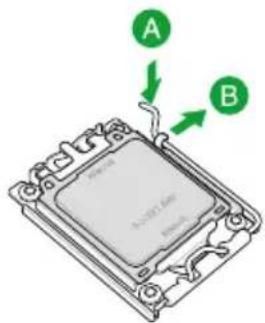
2
3
4
5


2
3
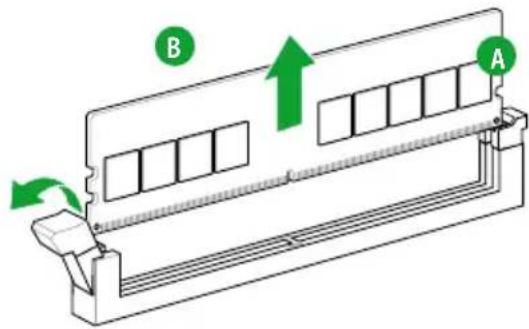
Remove the memory

Responsible Party: Asus Computer International
Address: 48720 Kato Rd., Fremont, CA 94538, USA
Phone / Fax No: (510)739-3777 / (510)608-4555
This device complies with part 15 of the FCC Rules. Operation is subject to the following two conditions: (1) This device may not cause harmful interference, and (2) this device must accept any interference received, including interference that may cause undesired operation.
This equipment has been tested and found to comply with the limits for a Class B digital device, pursuant to part 15 of the FCC Rules. These limits are designed to provide reasonable protection against harmful interference in a residential installation. This equipment generates, uses and can radiate radio frequency energy and, if not installed and used in accordance with the instructions, may cause harmful interference to radio communications. However, there is no guarantee that interference will not occur in a particular installation. If this equipment does cause harmful interference to radio or television reception, which can be determined by turning the equipment off and on, the user is encouraged to try to correct the interference by one or more of the following measures:
- Reorient or relocate the receiving antenna.
- Increase the separation between the equipment and receiver.
- Connect the equipment into an outlet on a circuit different from that to which the receiver is connected.
- Consult the dealer or an experienced radio/TV technician for help.
HDMI Trademark Notice
The terms HDMI, HDMI High-Definition Multimedia Interface, HDMI trade dress and the HDMI Logos are trademarks or registered trademarks of HDMI Licensing Administrator, Inc.

HIGH-DEFINITION MULTIMEDIA INTERFACE
Safety Precautions
Australia statement notice
From 1 January 2012 updated warranties apply to all ASUS products, consistent with the Australian Consumer Law. For the latest product warranty details please visit https://www.asus.com/support/. Our goods come with guarantees that cannot be excluded under the Australian Consumer Law. You are entitled to a replacement or refund for a major failure and compensation for any other reasonably foreseeable loss or damage. You are also entitled to have the goods repaired or replaced if the goods fail to be of acceptable quality and the failure does not amount to a major failure.
If you require assistance please call ASUS Customer Service 1300 2787 88 or visit us at https://www.asus.com/support/.
Declaration of compliance for product environmental regulation
ASUS follows the green design concept to design and manufacture our products, and makes sure that each stage of the product life cycle of ASUS product is in line with global environmental regulations. In addition, ASUS disclose the relevant information based on regulation requirements.
Please refer to https://esg.asus.com/Compliance.htm for information disclosure based on regulation requirements ASUS is complied with:
EU REACH and Article 33
Complying with the REACH (Registration, Evaluation, Authorisation, and Restriction of Chemicals) regulatory framework, we published the chemical substances in our products at ASUS REACH website at https://esg.asus.com/Compliance.htm.
EU RoHS
This product complies with the EU RoHS Directive. For more details, see https://esg.asus.com/Compliance.htm
India RoHS
This product complies with the "India E-Waste (Management) Rules, 2016" and prohibits use of lead, mercury, hexavalent chromium, polybrominated biphenyls (PBBs) and polybrominated diphenyl ethers (PBDEs) in concentrations exceeding 0.1% by weight in homogenous materials and 0.01% by weight in homogenous materials for cadmium, except for the exemptions listed in Schedule II of the Rule.
Vietnam RoHS
ASUS products sold in Vietnam, on or after September 23, 2011, meet the requirements of the Vietnam Circular 30/2011/TT-BCT.
ASUS recycling and takeback programs come from our commitment to the highest standards for protecting our environment. We believe in providing solutions for you to be able to responsibly recycle our products, batteries, other components as well as the packaging materials. Please go to https://esg.asus.com/en/Takeback.htm for detailed recycling information in different regions.

DO NOT throw the motherboard in municipal waste. This product has been designed to enable proper reuse of parts and recycling. This symbol of the crossed out wheeled bin indicates that the product (electrical and electronic equipment) should not be placed in municipal waste. Check local regulations for disposal of electronic products.

DO NOT throw the mercury-containing button cell battery in municipal waste. This symbol of the crossed out wheeled bin indicates that the battery should not be placed in municipal waste.
France sorting and recycling information


FCC RF Caution Statement
WARNING: Any changes or modifications not expressly approved by the party responsible for compliance could void your authority to operate the equipment.
RF exposure warning
This equipment must be installed and operated in accordance with provided instructions and the antenna(s) used for this transmitter must be installed to provide a separation distance of at least 20 cm from all persons and must not be co-located or operating in conjunction with any other antenna or transmitter. End-users and installers must be provided with antenna installation instructions and transmitter operating conditions for satisfying RF exposure compliance.
Compliance Statement of Innovation, Science and Economic Development Canada (ISED)
This device complies with Innovation, Science and Economic Development Canada licence exempt RSS standard(s). Operation is subject to the following two conditions: (1) this device may not cause interference, and (2) this device must accept any interference, including interference that may cause undesired operation of the device.
Operation in the band 5150–5250 MHz is only for indoor use to reduce the potential for harmful interference to co-channel mobile satellite systems.
CAN ICES-003(B)/NMB-003(B)
KC: Korea Warning Statement
Class B equipment (Home broadcasting and communication equipment)
NCC: Wireless Statement
Japan RF Equipment Statement
For outdoor use
Simplified UKCA Declaration of Conformity
ASUSTek Computer Inc. hereby declares that this device is in compliance with the essential requirements and other relevant provisions of The Radio Equipment Regulations 2017 (S.I. 2017/1206). Full text of UKCA declaration of conformity is available at https://www.asus.com/support/. The WiFi operating in the band 5150-5350MHz shall be restricted to indoor use for the country listed below:
UK
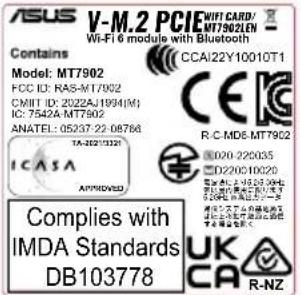
UKCA RF Output table (The Radio Equipment Regulations 2017) MT7902LEN (Model: MT7902)
| Function Frequency Maximum Output Power EIRP (mW) | |
| WiFi | 2.4 - 2.4835 GHz < 100 |
| 5.15 - 5.35 GHz < 200 | |
| 5.47 - 5.725 GHz < 200 | |
| 5.725 - 5.875 GHz* < 25 | |
| 5.925 - 6.425 GHz < 200 | |
| Bluetooth 2.4 - 2.4835 GHz < 100 | |
Receiver Category 1
* Non-Intel modules: 5.725 - 5.85 GHz
Simplified EU Declaration of Conformity
ASUSTek Computer Inc. hereby declares that this device is in compliance with the essential requirements and other relevant provisions of Directive 2014/53/EU. Full text of EU declaration of conformity is available at https://www.asus.com/support/
The WiFi operating in the band 5150-5350MHz shall be restricted to indoor use for countries listed in the table below:
https://www.asus.com/support/
https://www.asus.com/support/
https://www.asus.com/support/
https://www.asus.com/support/
- ASUS offers a voluntary manufacturer's Commercial Guarantee. • ASUS reserves the right to interpret the provisions of the ASUS Commercial Guarantee.
- This ASUS Commercial Guarantee is provided independently and in addition to the statutory Legal Guarantee and in no way affects or limits the rights under the Legal Guarantee.
For all the guarantee information, please visit https://www.asus.com/support.
- COPYRIGHT © 2025 ASUSTEK COMPUTER INC. ALL RIGHTS RESERVED
- CHAPTER 1: PRODUCT OVERVIEW
- DRIVERS AND UTILITIES
- RAID CONFIGURATION GUIDE
- ABOUT THIS MANUAL
- REMOVE THE MEMORY
- HDMI TRADEMARK NOTICE
- SAFETY PRECAUTIONS
- AUSTRALIA STATEMENT NOTICE
- DECLARATION OF COMPLIANCE FOR PRODUCT ENVIRONMENTAL REGULATION
- EU REACH AND ARTICLE
- EU ROHS
- INDIA ROHS
- VIETNAM ROHS
- FRANCE SORTING AND RECYCLING INFORMATION
- FCC RF CAUTION STATEMENT
- RF EXPOSURE WARNING
- COMPLIANCE STATEMENT OF INNOVATION, SCIENCE AND ECONOMIC DEVELOPMENT CANADA (ISED)
- KC: KOREA WARNING STATEMENT
- NCC: WIRELESS STATEMENT
- JAPAN RF EQUIPMENT STATEMENT
- FOR OUTDOOR USE
- SIMPLIFIED UKCA DECLARATION OF CONFORMITY
- UK
- UKCA RF OUTPUT TABLE (THE RADIO EQUIPMENT REGULATIONS 2017) MT7902LEN (MODEL: MT7902)
- SIMPLIFIED EU DECLARATION OF CONFORMITY
- HTTPS://WWW.ASUS.COM/SUPPORT
Brand : ASUS
Model : B650M-AYW WIFI
Category : Motherboard