
Performer - DJ Equipment Rane - Free user manual and instructions
Find the device manual for free Performer Rane in PDF.


Pick your language and provide your email: we'll send you a specifically translated version.
| Product Type | DJ Mixer / Controller |
| Brand | Rane |
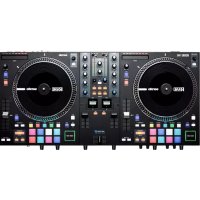
| Model | Performer |
| Dimensions (Width x Depth x Height) | 13.0 x 10.0 x 2.5 inches (330 x 254 x 64 mm) |
| Weight | 6.5 lbs (2.95 kg) |
| Power Supply | AC 100-240V, 50/60 Hz (external power adapter) |
| Power Consumption | 30 W maximum |
| Audio Inputs | 2x RCA (line), 2x XLR (microphone) |
| Audio Outputs | 2x XLR (main), 2x RCA (booth), 1x 1/4" TRS (headphone) |
| USB Port | 1x USB Type-B (for computer connection) |
| Supported Software | Serato DJ Pro, Virtual DJ, Traktor |
| Channels | 2-channel mixer with built-in audio interface |
| EQ | 3-band EQ per channel (High, Mid, Low) |
| Effects | Built-in effects: Echo, Reverb, Flanger, Filter |
| Maintenance & Cleaning | Wipe with a dry, soft cloth. Do not use solvents or abrasive cleaners. |
| Safety | Operate in a well-ventilated area. Avoid exposure to liquids or extreme temperatures. |
| Spare Parts & Repairability | Contact Rane authorized service centers for spare parts. Device is not user-serviceable. |
Frequently Asked Questions - Performer Rane
How do I connect the Rane Performer to my computer?
Use the included USB cable to connect the USB Type-B port on the rear panel to a USB port on your computer. Ensure you have installed the latest drivers from the Rane website.
Does the Performer work with Serato DJ Pro?
Yes, the Rane Performer is class-compliant with Serato DJ Pro. It may require a license key for full functionality.
What is the maximum sample rate and bit depth?
The built-in audio interface supports up to 24-bit / 96 kHz audio resolution.
Can I use the Performer without a computer?
Yes, the Performer can be used as a standalone analog mixer with external audio sources connected via RCA inputs.
How do I update the firmware on my Rane Performer?
Download the latest firmware from the Rane support page. Connect the device via USB and run the firmware updater utility.
What headphones impedance is recommended?
Headphones with impedance between 32 and 100 ohms are recommended for optimal performance.
Is the Performer compatible with Traktor?
Yes, the Performer can be used with Traktor as a generic MIDI controller. Mapping files are available from the community.
How do I adjust the crossfader curve?
The crossfader curve can be adjusted via software settings in Serato or by using the internal dip switches on the device (refer to the manual).
What is the warranty period for the Rane Performer?
Rane offers a 2-year limited warranty from the date of purchase. Register your product online for warranty activation.
Can I connect turntables to the Performer?
Yes, the Performer has line-level inputs. To use turntables with a phono output, you need an external phono preamp.
User questions about Performer Rane
0 question about this device. Answer the ones you know or ask your own.
Ask a new question about this device
No questions yet. Be the first to ask one.
Download the instructions for your DJ Equipment in PDF format for free! Find your manual Performer - Rane and take your electronic device back in hand. On this page are published all the documents necessary for the use of your device. Performer by Rane.
USER MANUAL Performer Rane


Manual assistant
Powered by Anthropic
Waiting for your message
Product information
Brand : Rane
Model : Performer
Category : DJ Equipment