
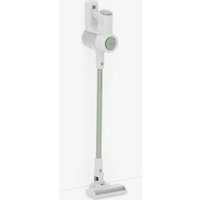
VC-SV06AEU-G - Vacuum Cleaner SHARP - Free user manual and instructions
Find the device manual for free VC-SV06AEU-G SHARP in PDF.


| Product type | Canister vacuum cleaner with bag |
| Brand | Sharp |
| Model | VC-SV06AEU-G |
| Color | Gray |
| Dimensions (L x W x H) | 400 x 250 x 300 mm |
| Weight | 5.2 kg |
| Power supply | Mains 220-240 V, 50-60 Hz |
| Rated power | 1000 W |
| Tank capacity | 1.5 L |
| Filter type | Washable HEPA filter |
| Noise level | 78 dB (A) |
| Operating radius | 8 m |
| Functions | Variable power adjustment, combined floor/carpet brush, cyclonic filter |
| Maintenance | Clean the filter regularly, empty the tank, check the brush |
| Safety | Class II, overheat protection |
| Available spare parts | Filters, dust bags, brushes, hose |
Frequently Asked Questions - VC-SV06AEU-G SHARP
User questions about VC-SV06AEU-G SHARP
0 question about this device. Answer the ones you know or ask your own.
Ask a new question about this device
Download the instructions for your Vacuum Cleaner in PDF format for free! Find your manual VC-SV06AEU-G - SHARP and take your electronic device back in hand. On this page are published all the documents necessary for the use of your device. VC-SV06AEU-G by SHARP.
USER MANUAL VC-SV06AEU-G SHARP
User manual
VC-SV06AEU-G
Stick vacuum
EN BG DA ES ET EL FR FI IT CS HU LT
NO NL PL PT RO SK SL SR SV UK
*Product images are for illustration purposes only. Actual product may vary.

Attention:
Your product is marked with this symbol.
It means that used electrical and electronic products should not be mixed with general household waste. There is a separate collection system for these products.
A. Information on Disposal for Users (private households)
1. In the European Union
Attention: If you want to dispose of this equipment, please do not use the ordinary dustbin! Used electrical and electronic equipment must be treated separately and in accordance with legislation that requires proper treatment, recovery and recycling of used electrical and electronic equipment.
Following the implementation by member states, private households within the EU states may return their used electrical and electronic equipment to designated collection facilities free of charge*.
In some countries* your local retailer may also take back your old product free of charge if you purchase a similar new one.
* Please contact your local authority for further details.
If your used electrical or electronic equipment has batteries or accumulators, please dispose of these separately beforehand according to local requirements. By disposing of this product correctly you will help ensure that the waste undergoes the necessary treatment, recovery and recycling and thus prevent potential negative effects on the environment and human health which could otherwise arise due to inappropriate waste handling.
2. In other Countries outside the EU
If you wish to discard this product, please contact your local authorities and ask for the correct method of disposal.
For Switzerland: Used electrical or electronic equipment can be returned free of charge to the dealer, even if you don't purchase a new product.
Further collection facilities are listed on the homepage of www.swico.ch or www.sens.ch.
B. Information on Disposal for Business Users
1. In the European Union
If the product is used for business purposes and you want to discard it:
Please contact your SHARP dealer who will inform you about the take-back of the product. You might be charged for the costs arising from take-back and recycling. Small products (and small amounts) might be taken back by your local collection facilities.
For Spain: Please contact the established collection system or your local authority for take-back of your used products.
2. In other Countries outside the EU
If you wish to discard of this product, please contact your local authorities and ask for the correct method of disposal.
www.sharpconsumer.com/contact/
www.sharpconsumer.com/support/
www.sharpconsumer.com/documents-of-conformity/
For service, please refer to www.sharpconsumer.com/contact/, for your warranty rights go to www.sharpconsumer.com/support/ or contact the retailer where you purchased your product.
Declarations of conformity are available from www.sharpconsumer.com/documents-of-conformity/
Contents
Box contents ....3
Location of controls and parts ....4
Display and controls ....5
Battery charging, storage and use 6
Filter and dust bin 9
Tools and their use ....10
Self standing 11
Display panel 12
General cleaning and maintenance 12
Dealing with blockages 13
AC Adapter 14
Troubleshooting....15
Technical specifications ....16
Introduction
This cordless stick vacuum system features an intelligent digital motor with LED display, removable Li-ion battery pack. It's lightweight and versatile and easily converts from whole home stick vacuum to handheld power vac for spot cleaning with the various accessory tools.
Box contents
| Item Description VC-SV06AEU-G | |
| 1 Vacuum (without accessories or battery pack) | √ |
| 2 Motorized Head with Brush Roller fitted | √ |
| 3 Power Adapter (EU/UK) | √ |
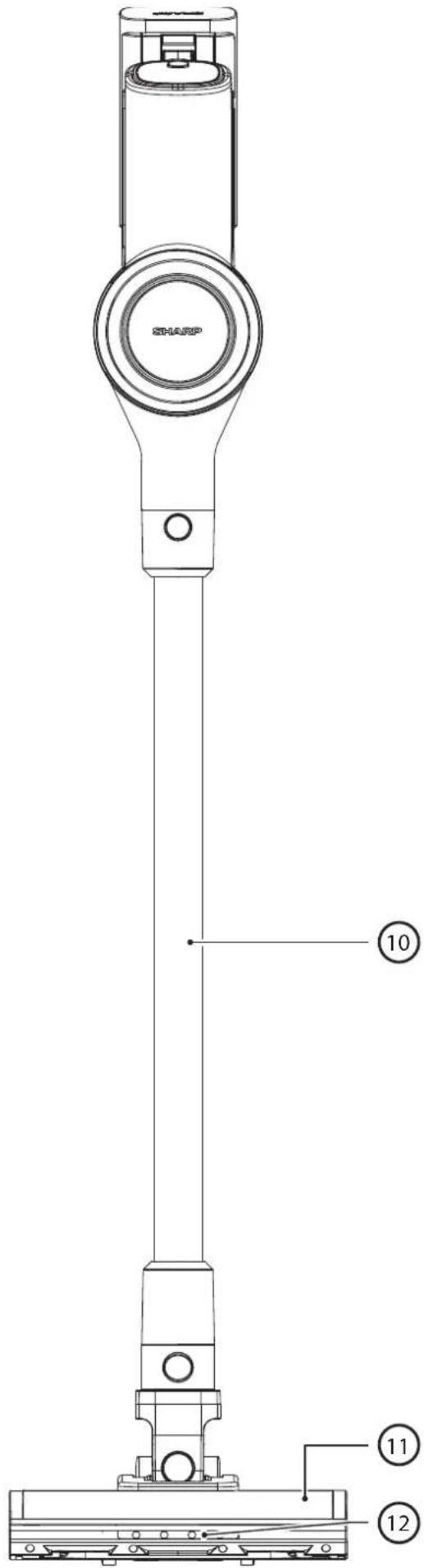
Location of controls and parts
| VC-SV06AEU-G | |
| Item Description | |
| 1 LED Display | |
| 2 Speed Selection Button | |
| 3 ON/OFF Power Trigger | |
| 4 Battery Charging Port | |
| 5 Battery Release Button | |
| 6 Rechargeable/Replaceable Battery | |
| 7 Filter Assembly | |
| 8 Dust Bin | |
| 9 AC Adapter | |
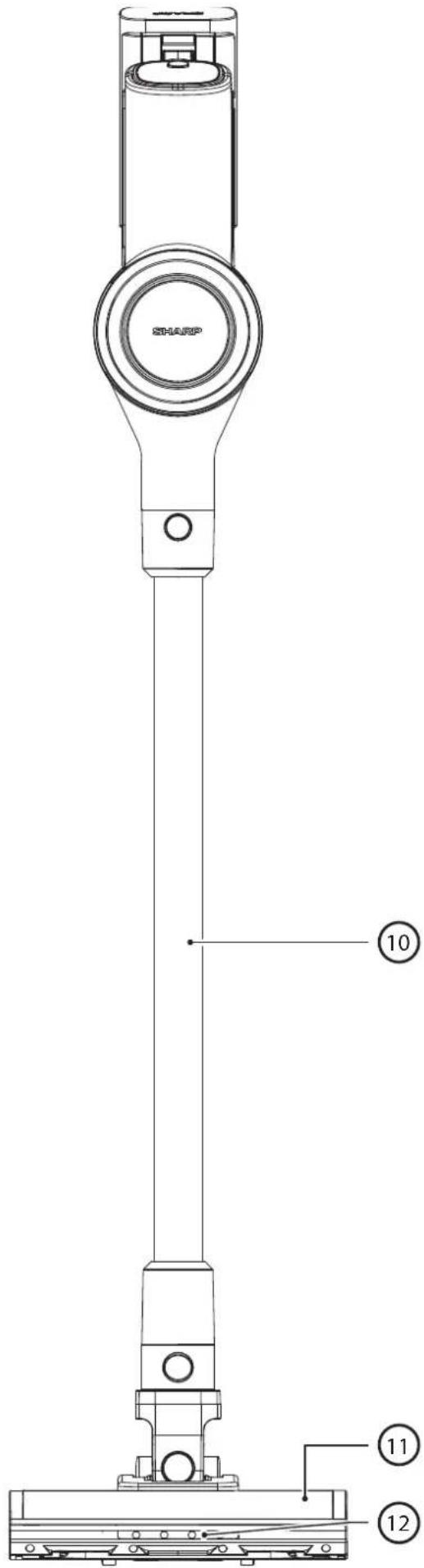
| 10 Metal Extension Rod | |
| 11 Motorised Roller Head with LED Lights | |
| 12 LED Lights on Floor Brush Roller |


Display and controls
LED display:
- Remaining battery charge
- Speed selection button
- Power trigger button
How to operate
- Press the POWER TRIGGER button once to start cleaning. There is no need to keep the button pressed. Press the button again to turn off.
- The vacuum will automatically default to ECO Suction. Use the SELECTION button to choose from 2 Suction Modes: ECO/TURBO • ECO for larger rooms and surface areas. • TURBO for quick pick-ups or deep cleaning.
- During operational use, the digital display will indicate remaining battery charge percentage, speed, and any motor blocking or roller brush tangles impacting performance.

Battery charging, storage and use
Your SHARP stick vacuum cleaner has 2 Lithium-Ion batteries included as standard. The specifications of the batteries are as below. Note that the batteries are not interchangeable between models.
| Model VC-BA06AEU-G | |
| Voltage (V) 22,2 | |
| Cell Type ICR18650-20SG | |
| Technology Lithium-Ion | |
| Number of Cells 6 | |
| Power (Wh) 44,4 | |
| Capacity (mAh) 2000 | |
| Charging Time (hours) 4 | |
| Net Weight (kg) 0,429 | |
| Unit Dimension (W x D x H) mm 158 x 65 x 85 | |
| Standard/Certification UKCA/CE/RoHS/REACH | |
| Colour Green | |
| To be used with | VC-SV06AEU-G |
| Recommended AC Adapter CZH015265065TRWQ |
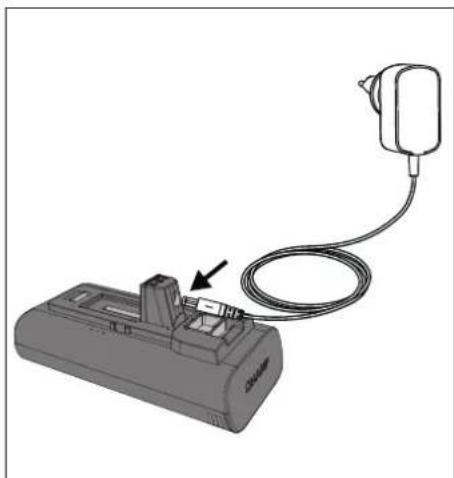
Location of parts and connection to the AC adapter for charging
- Main Unit Connector
- Charging Port
- Release Lever
- Securing Clip
- Charge Status
- Ventilation
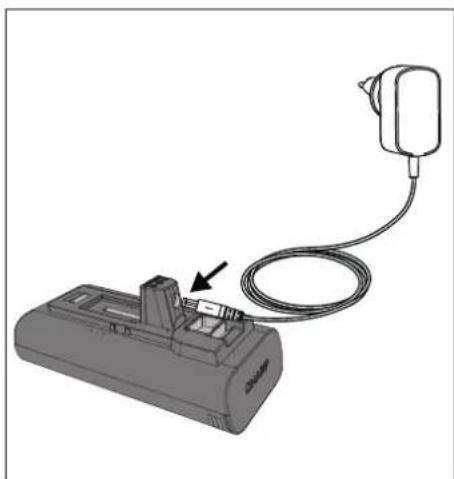
Before first use the detachable lithium-ion battery must be fully charged. It can be charged either installed or uninstalled by connecting the power cord to the recharging port and a standard electrical outlet.

Charging the battery
There are several ways in which the battery or batteries can be charged.
It is possible to charge one battery either while connected to the vacuum, or when it is out of the vacuum. Place vacuum or battery on a flat, stable surface. Connect the power cord directly to charging port located on the hand grip.

Good charging habits
- Use only the supplied Sharp AC adapter.
- Charge before the battery's capacity runs below 25% - Lithium-ion batteries have a limited number of charge cycles, so it's best to charge the battery before it is completely depleted to extend its lifespan.
- Avoid overcharging - once the battery is fully charged, unplug it from the charger to avoid overcharging, which can also shorten the battery's lifespan.
- If left unused, a fully charged battery will lose its charge over time.
- Store in a cool, dry place - extreme temperatures can damage the battery, so make sure to store it in a cool, dry place, ideally at room temperature.
- If you plan to store your device for longer than six months, charge the battery to 50% every six months to keep it fresh.
NOTE: During first use, run the battery all the way down to properly condition it. Recommended charging times are as below.
| Charging Times (hours) | |
| 1 Battery 4 | |
Usage Times
| Run Time for | 1 Battery (minutes) |
| ECO 25 | |
| Turbo 16 |
Battery status indication
When the battery is charging or discharging the status can be checked by either looking at the charge percentage on the vacuum display or by the lights on the side of the battery itself.
| 10% - 30% | |
| 31% - 70% | |
| >70% |
There are 3 lights, if all of these are on then the battery charge is greater than 70%.
When the battery is flat, a single red light will flash. As the battery charges this light will turn blue and flash until the second light starts to flash and the first one becomes static. When the second light stops flashing and becomes static, the final light will start to flash. Charging is complete when all 3 lights are blue and static. The lights will stay in this condition until the battery is disconnected from the AC adapter.
WARNING: Special instructions for handling the Lithium-ion battery pack
Follow instructions carefully. This will reduce the risk of explosion, electric shock and possibly serious injury or death.
- Only use approved Sharp AC adapter to charge your battery pack.
- Use a power source with the voltage specified on the nameplate of the charger.
- The Sharp battery pack and AC Adapter are specifically designed to work together.
- Do not operate the AC adapter with a damaged cord or plug.
- Do not place the battery pack near fire or heat.
- Exposure to fire or temperature above 60°C may cause the battery pack to explode.
- Do not charge the battery pack in a damp or wet location.
- Do not charge in the presence of flammable liquids or gases.
- Ensure the battery pack is never immersed into water.
- Do not charge in an area of extreme heat (above 40°C) or cold (below 10°C).
- Charging will work best at normal room temperature.
- Do not crush, drop or damage the battery pack.
- Do not use a battery pack or AC adapter that has been dropped or received a sharp blow.
- Damage to the battery pack may cause the battery pack to explode. Properly dispose of the battery pack immediately by following instructions on how to dispose of battery pack or contact service centre for advice.
- Do not open, modify or attempt to repair a battery pack.
- The battery may give off fumes if it becomes damaged or is used incorrectly.
- Ensure the area is well ventilated and seek medical attention should you experience any adverse effects.
- The battery may leak liquid if it becomes damaged or is used incorrectly.
- If you come into contact with any liquid from the battery, rinse off immediately with mild soap and water. If the liquid comes into contact with your eyes, rinse with water and seek medical attention.
- Keep battery pack away from small metal objects which may result in the shortening of the battery terminals.
Disposal of equipment and batteries
This product does not contain any parts that are serviceable by the user.
Electronic products and batteries should not be mixed with general household waste. Household users should contact either the retailer where they purchased this product, or their local government office for details of where and how they can take these items for environmentally safe recycling.
Do not dispose as household waste or in a fire as the battery pack may explode.
Batteries should be disposed of according to local regulations.

This symbol means that the product contains batteries covered by European Directive 2013/56/EU which cannot be disposed of with normal household waste. Cd, Hg and Pb underneath the wheelie bin symbol shows whether the battery contains, cadmium (Cd), mercury (Hg) or lead (Pb).

This symbol on a product means that the product is covered by European Directive 2012/19/EU and must not be disposed of or dumped with your other household waste.

These symbols on the products, packaging and/or accompanying documents mean that used electrical and electronic products should not be mixed with general household waste.
CE and UKCA statement:
- The full CE text and UKCA declaration of conformity are available at sharpconsumer.eu, enter the download section of your model and choose "Declaration of Conformity".
Filter and dust bin
Your vacuum has several filters contained within it to ensure that unclean air is not recycled into the room and for protection of the motor. The sealed dust bin captures and traps 99.9% of dust, allergens, dander and dirt.

- Bin release button.
- Sealed dust bin
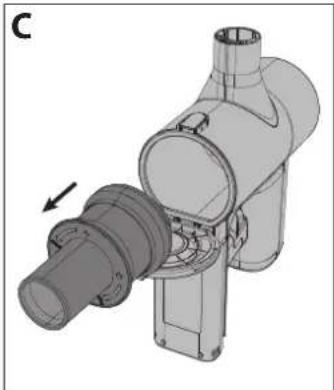
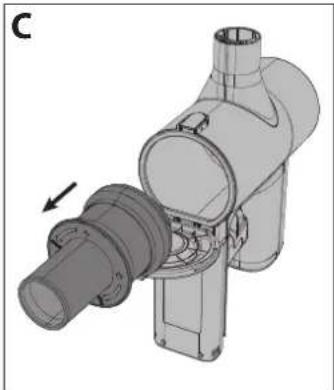
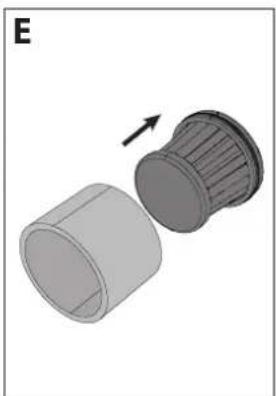
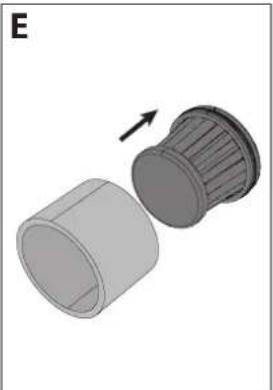
- HEPA 13 filter.
- Filter sleeve
- Metal mesh filter to separate large particles.
- Multi-cone cyclonic spinning to isolate dust particles
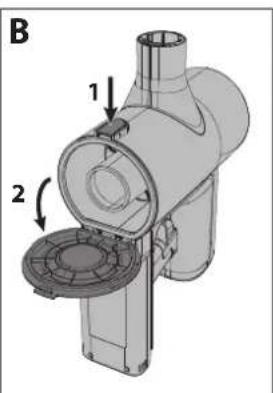
Emptying Dust Bin
- Hold the hand vacuum over a rubbish container.
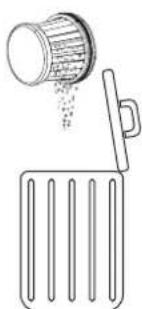
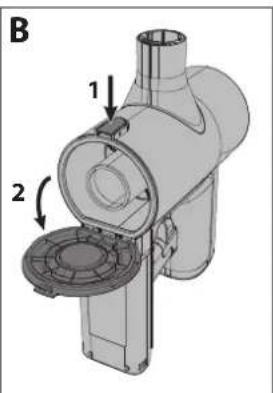
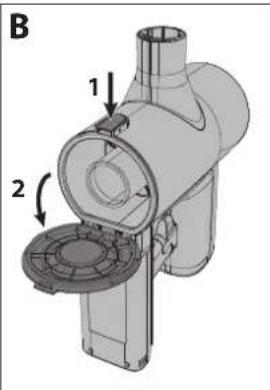
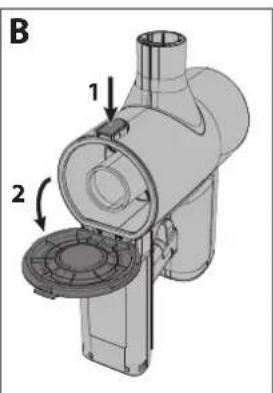
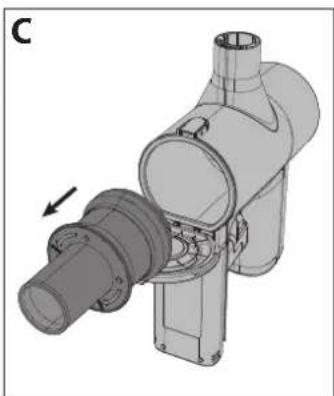
- Then, press the bin release button to open the bin. Carefully empty contents into a rubbish container. If necessary, clean the HEPA filter.
- Make sure HEPA Filter Assembly is secure (turning the entire assembly clockwise) before closing dust bin door (a "click" will be heard when the door is locked).
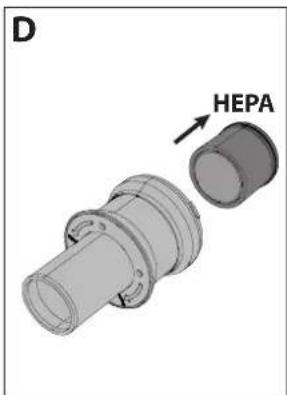
Removing and Cleaning High Density Filter
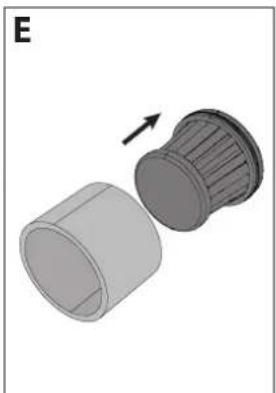
- Turn the HEPA filter assembly counterclockwise until it releases from unit.
- Pull out the HEPA filter assembly and clean as necessary (see below).
- Insert HEPA-density filter back into HEPA filter assembly.
- Make sure high density filter assembly is secure (by turning clockwise) before closing dust bin door.
NOTE: If the HEPA filter is very dirty, it can be washed in water. After washing, dry for at least 24 hours to ensure that it is completely dry before inserting back into the vacuum.
To ensure the high performance of the HEPA filter, it is recommended that it is replaced every 3 months. To order your replacement filter use model number VC-SVF1A.

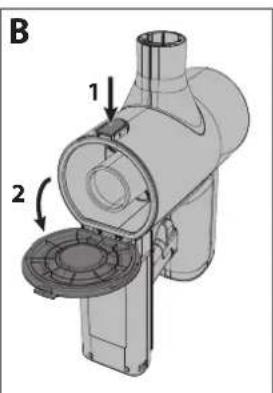


NOTE: DO NOT use the vacuum without the Filter Sleeve, HEPA13 or Mesh Filter fitted. This will result in large dust particles or debris entering the motor and causing damage.
Tools and their use
Your SHARP stick vacuum comes with various tools as shown below.
Metal Extension Rod
Use this tool with the motorised head to allow easy cleaning of floors.

Motorized Brush Roller
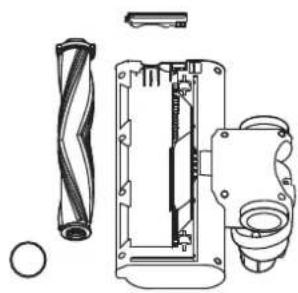
The motorised brush roller is ideal for cleaning all types of floors. The V-Roller is fitted as standard and this is interchangeable with the brush roller. Both rollers provide excellent performance on all floor types. With the addition of a bright headlight, the motorised head allows you to see any dirt, dust and debris to be vacuumed, it also allows you to see into darker corners and edges for complete cleaning.

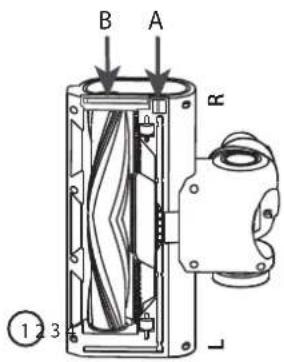
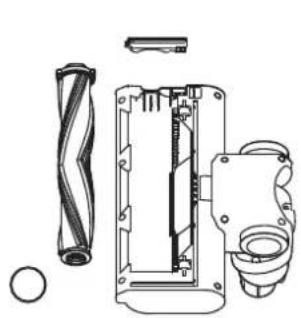
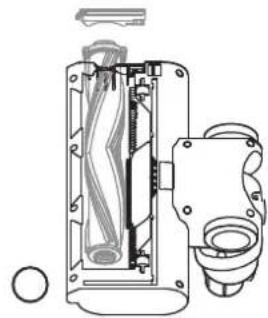
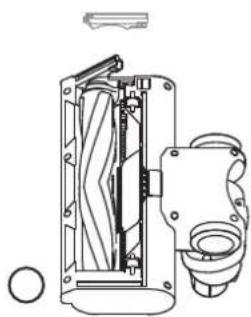
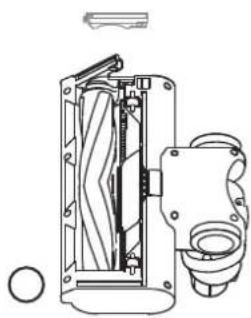
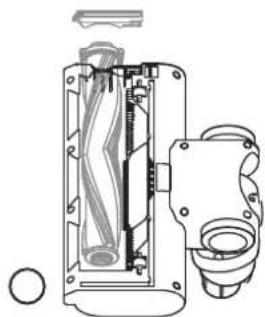
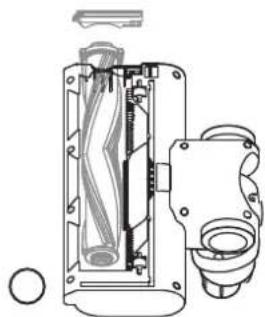
To change, clean or maintain the roller, follow the instructions below.
- Push the lever marked A down and at the same time as pulling the brush roller plate (item B) up.
- Remove the roller brush plate.
- Take out the roller brush by pulling up from the right-hand side (R).
- Insert the roller by engaging on the left-hand side (L) then pushing down on the right so it locates securely. Now reinsert the roller brush plate by pushing it down so it clicks.


V-Roller
Use the V Roller on all types of floors.

Self standing


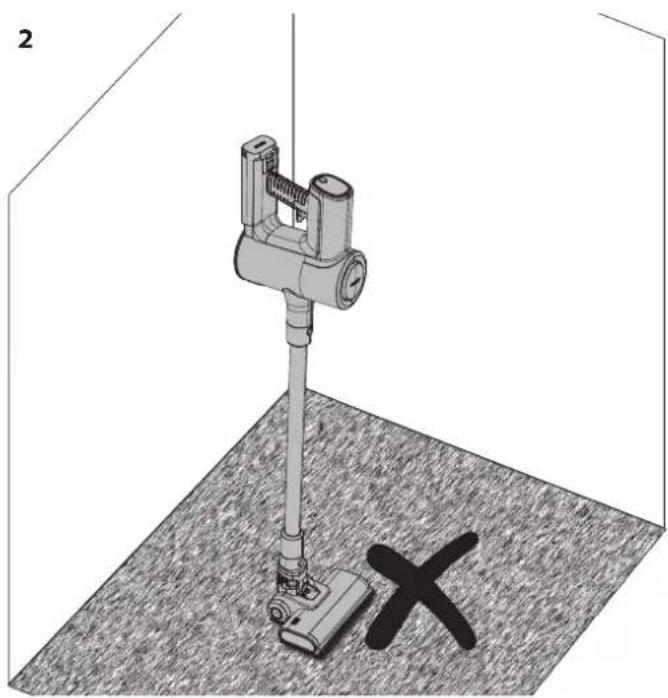
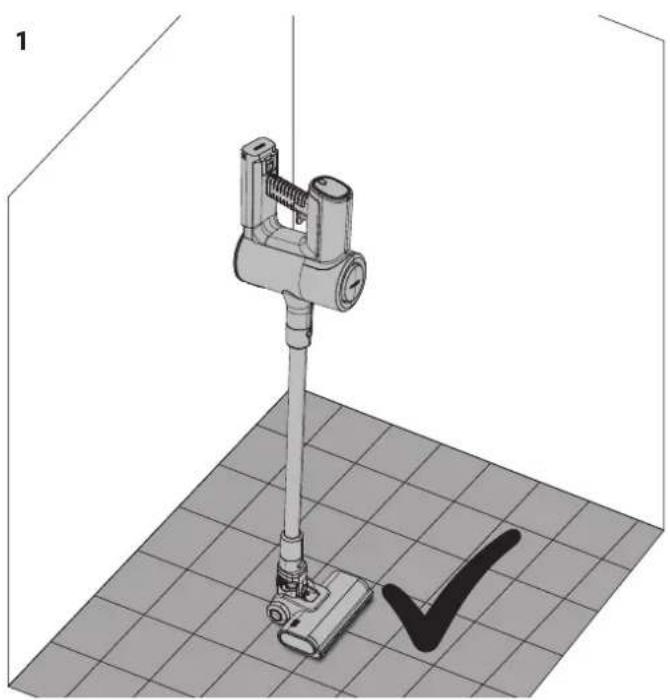
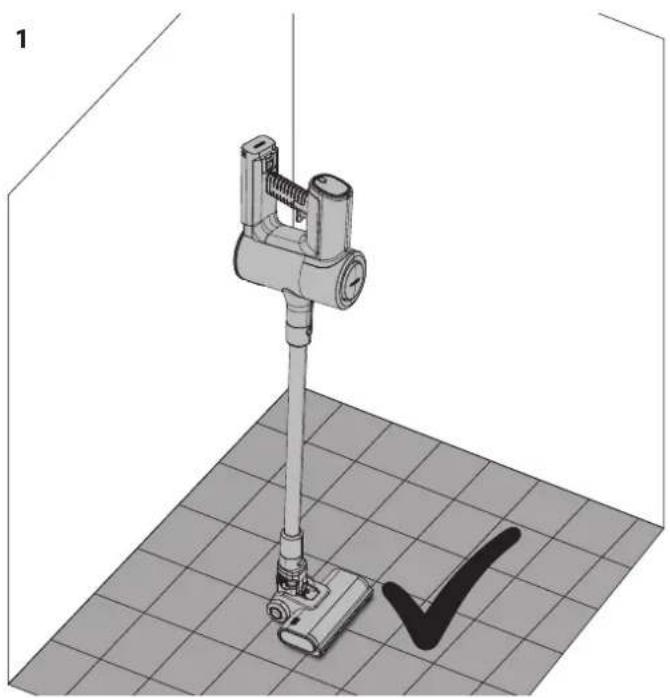
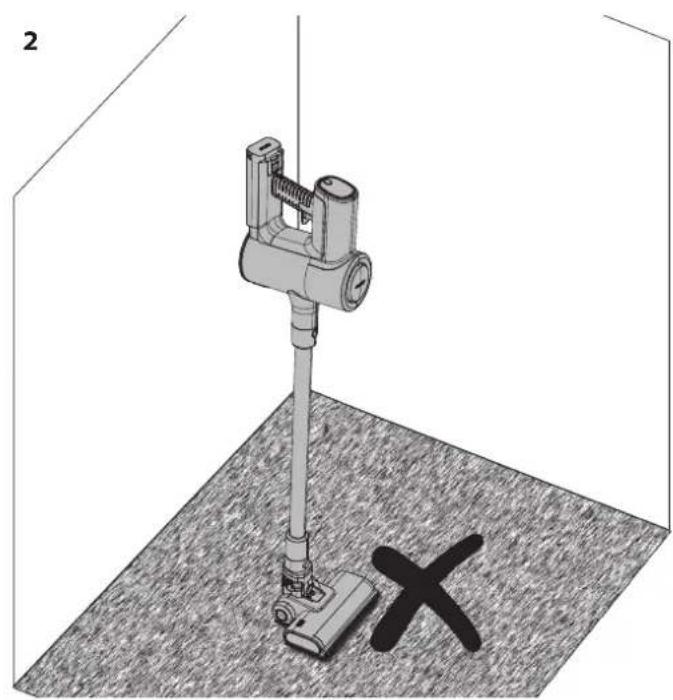
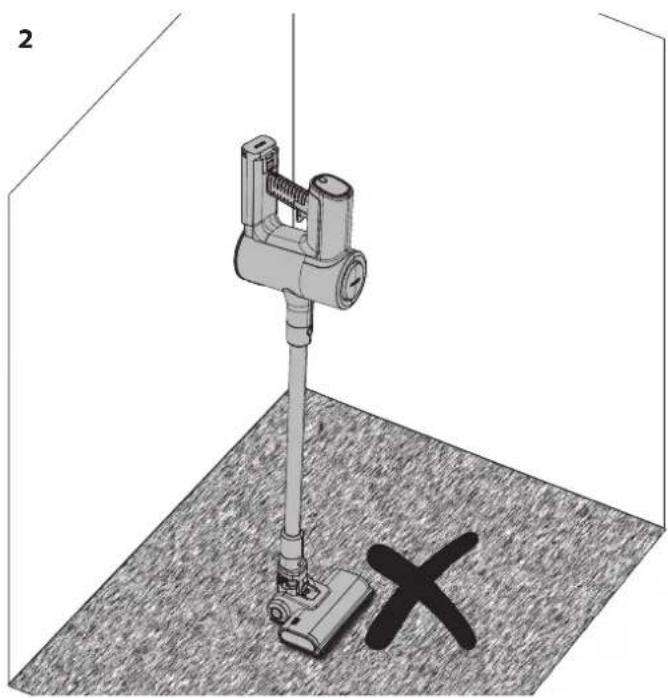
- Okay to use Self Standing on hard floor.
- DO NOT use Self Standing on soft/carpeted floors.
When using your SHARP stick vacuum on a hard floor it is possible to place your vacuum in the Self Standing position. For this to work correctly, the vacuum must be connected to the motorised head unit via the metal extension rod; also ensure that the battery is installed.
With your foot gently resting on the motorised head, move the vacuum so that the vacuum is in the upright position. You will hear a click when the head is locked.

Gently let go of the vacuum and it will self-stand.
CAUTION: Your vacuum will self-stand on hard floors, if it is knocked over there it is possible that damage or injury may occur. Ensure that once in the self-stand position it is not pushed over. While in the self standing mode, do not leave unattended, especially if you have young children or pets.
Display panel
The multifunction display panel shows important information on the function and use of your stick vacuum.
To change the speed of the motor from ECO (most efficient) to Turbo (most powerful), press this button. When the unit is off, press this button to show how much power is left in the battery for each mode of operation.

- Percentage of battery power remaining.
- Mode selection button – ECO or Turbo power.
- Visual indication of remaining power based on battery level. This will change when the mode button is pressed.
- Operation mode. This will change when the mode button is pressed. In the case of any issue occurring with your stick vacuum, it is possible that an error code may be shown on the display panel. Consult the Troubleshooting section of this user manual for more details should an error code appear.
General cleaning and maintenance
To ensure that your SHARP stick vacuum remains in good condition and continues to provide reliable service, it is recommended to clean and maintain it on a regular basis.
Exterior parts can be cleaned with a soft cloth. If there are stubborn marks, use a non-abrasive, gentle cleaning fluid to remove. Never use abrasive cleaners or cloths to maintain your SHARP stick vacuum as these will damage the surface.
General tips after use are:
1. Empty the Dust Chamber
Suction is reduced if the dust chamber is full of debris, so emptying after and during use will provide a much better cleaning experience.

2. Clean the Rollers
Remove any hair or debris which may have been attached to and/or wrapped around the roller during use as this will improve the performance on the next use. For anything which has been wrapped around the roller, use a cleaning tool cutting edge to remove.

3. Check for Blockages
Ensure that the air pathways are clear of obstructions such as clumps of hair, pet hair or large items of debris. Use a light (the torch on your mobile phone) to look down the pipe to see if it is clear.

4. Clean the Filter
Clogged filters are the most common reason for poor suction. Clean these after every use and if the performance is being degraded it can be washed in water and left to dry for 24 hours. It is recommended that the HEPA filter is replaced every 3 months.
Dealing with blockages
It is possible that on occasion your stick vacuum will become blocked with debris. You may need to dismantle parts to gain access to clean and unblock.
When dealing with blockages, use a long stiff wire with a blunt end to clear pipes. Be careful not to damage the pipe.
AC Adapter

Your SHARP stick vacuum is supplied with an AC adapter which can be used with either a UK (3-pin) or EU (2-pin) mains socket. The AC adapter supplied with your stick vacuum will depend on the vacuum and battery model; refer to the table below to match up the vacuum model and AC adapter.
Only use the supplied and SHARP recommended AC adapter with your Stick Vacuum.
AC adapter specifications can be found at the end of this User Manual.
Changing the adapter mains connection type
Your AC adapter is supplied with 2 mains connection plates which can be interchanged depending on your mains outlet type. The connection plate on the left is for the UK, Ireland and Cyprus. The 2-pin connection plate on the right is for most other EU countries.

To install the correct plate for your mains outlet, select the correct one (UK or EU) and place it on the AC adapter as shown in the picture below; the plate should sit in the recess. Turn clockwise until a click is heard and the connection plate is now installed. If you are unsure, please contact our helpline for advice.

To remove the plate, press the button A and rotate the plate anticlockwise. The plate can now be removed.

Troubleshooting
| Problem Reason Resolution | ||
| Error code E01 appears in the display. | Head motor has been stopped from rotating. | Remove obstruction from roller in the motorised head. |
| Poor pick up performance. Reduced suction. | Set the vacuum mode to Turbo.Empty the dust bin.Clean the fl iters.Ensure that the vacuum airways are not blocked or obstructed. | |
| Vacuum has stopped or will not work. | Issue with battery or battery connection. | Check that the battery is fully charged.Ensure that the battery is correctly connected to the vacuum. |
| Roller will not rotate. Mechanical issue. | Remove obstruction from roller in the motorised head.Clean roller and head unit. | |
| Battery light is flashing red. | Battery almost flat. | Recharge battery. |
| Accessory is broken or not working. | Contact the SHARP call center to discuss. A new part can be supplied free of charge if under warranty or on a chargeable basis if necessary. | |
| Motorised head is noisy. Brush roller fitted. | If the brush roller is fitted, the bristles will make a noise as they connect with the casing of the head. | |
Should you experience any other problems with your SHARP stick vacuum, please contact our call centre for further advice and information.
To order replacement accessories, filters and batteries, please call or email your SHARP service center.
Technical specifications
| Model VC-SV06AEU-G | |
| Battery Capacity (mAh) 2000 | |
| Battery Voltage (V) 22,2 | |
| Battery Power (Wh) 44,4 | |
| Battery Size (W x H x D in mm) 158 x 65 x 85 | |
| Battery Weight (kg) 0,429 | |
| Number of Cells 6 | |
| Single Battery Charging Time (hours) 4 | |
| Dual Battery Charging Time (hours) 8 | |
| Colour Main Body White | |
| Control Panel | Digital |
| Display Type | LCD |
| Dust Container Capacity (L) | 0,55 |
| Exhaust Filter Type | HEPA 13 |
| Gross Weight (kg) | 5,2 |
| Motor Power (W) | 150 |
| Motor Type | DC motor |
| Noise Level (dB) | ≤80 |
| Off Mode Power Consumption (W) | 0,5 |
| Over Heating Protection | Yes |
| Plug | EU/UK Plug Adapter |
| Motot Power Consumption (W) | 150 |
| Run Time in Max Power (minutes) | 16 |
| Run Time in Med Power (minutes) | N/A |
| Run Time in Min Power (minutes) | 25 |
| Safety Logo Certification | CE / UKCA |
| Suction Power Min (kPa) | 6 |
| Suction Power Max (kPa) | 12 |
| Suction Power Max (Air Watts) | 62 |
| LED Headlight | Yes |
| Headlight Colour | White |
| Unit Size (W x H x D in mm) | 120 x 1205 x 270 |
| Unit Weight (kg) | 3,9 |
| AC Adapter | |
| Model | CZH015265065TRWQ |
| Input | 100-240V AC / 50/60Hz / 0.5A |
| Power Requirements | AC 100-240V ~ 50/60Hz |
| Output | 26.5V DC / 650mA |
| Colour | White |
| Length of power cable (mm) | 1500mm |
| To be used with | VC-SV06AEU-G |
| IP Rating | IP20 (indoor use only) |
| Manufacturer | Shenzhen Chanzeho Technology Co. Limited7/F, Spa Centre, No.53-55Lockhart Road, Wan Chai,Hong Kong |

www.sharpconsumer.com/contact/
www.sharpconsumer.com/support/
www.sharpconsumer.com/documents-of-conformity/

Display and controls
LED display:

| 10% - 30% | |
| 31% - 70% | |
| >70% |


V-roller
Freestanding


3. Check for blockages
www.sharpconsumer.com/contact/
www.sharpconsumer.com/support/
www.sharpconsumer.com/documents-of-conformity/

| 10% - 30% | |
| 31% - 70% | |
| >70% |


V-roller
Freestanding


2. Clean the rollers
4. Clean the filter assembly
Troubleshooting
www.sharpconsumer.com/contact/
www.sharpconsumer.com/support/
www.sharpconsumer.com/documents-of-conformity/
Display panel ....11

| 10% - 30% | |
| 31% - 70% | |
| >70% |


Motorized brush roll


V-roll
Self-standing


- Okay to use Self-standing on hard floor.
- DO NOT use Self-standing on soft/carpeted floors.
2. Clean the rollers
3. Check for blockages
4. Clean the filter
www.sharpconsumer.com/contact/
www.sharpconsumer.com/support/
www.sharpconsumer.com/documents-of-conformity/
Contents
Package contents....2

| 10% - 30% | |
| 31% - 70% | |
| >70% |




V-roller brush
Self-standing


Troubleshooting
www.sharpconsumer.com/contact/
www.sharpconsumer.com/support/
www.sharpconsumer.com/documents-of-conformity/

Display and controls
LED display:
| 10% - 30% | |
| 31% - 70% | |
| >70% |


V-roller
Self-standing


4. Clean the filter
www.sharpconsumer.com/contact/
www.sharpconsumer.com/support/
www.sharpconsumer.com/documents-of-conformity/
Sisu
Karbi sisu 2


Head laadimistavad
| 10% - 30% | |
| 31% - 70% | |
| >70% |



Mootoriga hari rull


V-rull
Isetoetuv


2. Puhastage rullid
3. Kontrollige ummistusi
4. Puhasta fi Iter
Törgete lahendamine
www.sharpconsumer.com/contact/
www.sharpconsumer.com/support/
www.sharpconsumer.com/documents-of-conformity/

Οθόνη και ελέγχοι
LED screen:
| 10% - 30% | |
| 31% - 70% | |
| >70% |


V-Polo
Self-supporting


Troubleshooting
www.sharpconsumer.com/contact/
www.sharpconsumer.com/support/
www.sharpconsumer.com/documents-of-conformity/
Table of contents

| 10% - 30% | |
| 31% - 70% | |
| >70% |




V-Roller
Self-supporting

Clearing jams
Troubleshooting
www.sharpconsumer.com/contact/
www.sharpconsumer.com/support/
www.sharpconsumer.com/documents-of-conformity/

Display and controls
LED display:

Good charging practices
| 10% - 30% | |
| 31% - 70% | |
| >70% |


V-roller
Self-standing

2. Clean the rollers
Handling blockages
Troubleshooting
www.sharpconsumer.com/contact/
www.sharpconsumer.com/support/
www.sharpconsumer.com/documents-of-conformity/
Contents
Package contents 2

Display and controls
LED display:
- Remaining battery charge
- Speed selection button
- Power activation button
How to use
Good charging habits
| 10% - 30% | |
| 31% - 70% | |
| >70% |


NOTE: Do not use the vacuum without the sleeve filter, HEPA13, or mesh filter installed. This will result in large dust particles or debris entering the motor and causing damage.
Tools and their use
Motorized brush roller


V-roller
Use the V-roller on all types of floors.

Self-standing


2. Clean the rollers
4. Clean the filter
Clogged filters are the most common cause of poor suction. Clean them after each use, and if performance decreases, they can be washed with water and left to dry for 24 hours. It is recommended to replace the HEPA filter every 3 months.

Clearing blockages
Your stick vacuum cleaner may occasionally become clogged with debris. You may need to disassemble parts to access cleaning and remove the clog.
When dealing with clogs, use a long, stiff wire with a blunt end to clean the tube. Be careful not to damage the tube.
AC adapter
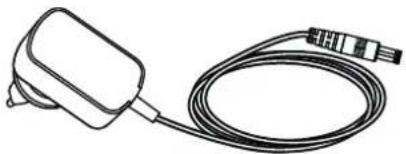
Your SHARP stick vacuum cleaner comes with an AC adapter that can be used with a British (3-pin) or EU (2-pin) socket. The AC adapter that comes with your stick vacuum cleaner depends on the model of the vacuum and battery; see the table below to match the vacuum model and AC adapter.
Use only the supplied and SHARP-recommended AC adapter with your stick vacuum cleaner.
AC adapter specifications can be found at the end of this User Manual.
www.sharpconsumer.com/contact/
www.sharpconsumer.com/support/
www.sharpconsumer.com/documents-of-conformity/
Table of contents

Display and controls
LED display:

Good charging habits
| 10% - 30% | |
| 31% - 70% | |
| >70% |


Motorized brush roll


V-cylinder
Standalone

Troubleshooting
www.sharpconsumer.com/contact/
www.sharpconsumer.com/support/
www.sharpconsumer.com/documents-of-conformity/

Display and controls
LED display:
| 10% - 30% | |
| 31% - 70% | |
| >70% |


V-Roller
Self-supporting


2. Clean the rollers
4. Clean the filter
www.sharpconsumer.com/contact/
www.sharpconsumer.com/support/
www.sharpconsumer.com/documents-of-conformity/
Contents
Table of contents....2

Display and controls
LED display:
Good charging practices
| 10% - 30% | |
| 31% - 70% | |
| >70% |


V-roller
Self-contained


www.sharpconsumer.com/contact/
www.sharpconsumer.com/support/
www.sharpconsumer.com/documents-of-conformity/
Contents
Package contents 2

Display and controls
LED display:

Good charging practices
| 10% - 30% | |
| 31% - 70% | |
| >70% |


V-roller
Charging


2. Clean the rollers
4. Clean the filter
Troubleshooting
www.sharpconsumer.com/contact/
www.sharpconsumer.com/support/
www.sharpconsumer.com/documents-of-conformity/
For service, please see www.sharpconsumer.com/contact/, for your warranty rights, go to www.sharpconsumer.com/support/ or contact the dealer where you purchased your product.
Good charging habits
| 10% - 30% | |
| 31% - 70% | |
| >70% |



V-Roller
Use the V-roller on all types of floors.

Self-standing


2. Clean the rollers
3. Check for blockages
www.sharpconsumer.com/contact/
www.sharpconsumer.com/support/
www.sharpconsumer.com/documents-of-conformity/
Contents

Display and controls
LED display:

Good charging habits
| 10% - 30% | |
| 31% - 70% | |
| >70% |


V-roller brush
Autonomous

2. Clean the rollers
Troubleshooting
www.sharpconsumer.com/contact/
www.sharpconsumer.com/support/
www.sharpconsumer.com/documents-of-conformity/
Table of contents

Good charging habits
| 10% - 30% | |
| 31% - 70% | |
| >70% |



V-Roller
Self-standing


2. Clean the rollers
4. Clean the filter
www.sharpconsumer.com/contact/
www.sharpconsumer.com/support/
www.sharpconsumer.com/documents-of-conformity/
Contents

Display and controls
LED display:
| 10% - 30% | |
| 31% - 70% | |
| >70% |



NOTE: Do not use the vacuum without the Bag Filter, HEPA13, or Mesh Filter installed. This will result in large dust particles or debris entering the motor, causing damage.


V-Roller
Self-standing

2. Clean the rollers
4. Clean the filter
Dealing with blockages
www.sharpconsumer.com/contact/
www.sharpconsumer.com/support/
www.sharpconsumer.com/documents-of-conformity/
Table of contents

| 10% - 30% | |
| 31% - 70% | |
| >70% |


Motorized brush roller
V-Roller
Self-standing


2. Clean the rollers
4. Clean the filter
Dealing with blockages
www.sharpconsumer.com/contact/
www.sharpconsumer.com/support/
www.sharpconsumer.com/documents-of-conformity/

| 10% - 30% | |
| 31% - 70% | |
| >70% |


V-Roller
Freestanding


2. Clean the rollers
4. Wash the filter
Dealing with blockages
Troubleshooting
www.sharpconsumer.com/contact/
www.sharpconsumer.com/support/
www.sharpconsumer.com/documents-of-conformity/
Contents
Box contents 2
Location of controls and parts ....3
Display and controls ....4
Charging the battery, storage and use ....5
Filter and dust container 8

Display and controls
LED display:

| 10% - 30% | |
| 31% - 70% | |
| >70% |


Motorized roller brush


V-Roller
Self-standing


- It is okay to use the self-standing feature on hard floors.
- DO NOT use the self-standing feature on soft/carpeted floors.
When using your SHARP vacuum on a hard surface, it is possible to place the vacuum in a self-standing position. For this to work properly, the vacuum must be connected to the motorized head via the metal extension wand; also make sure the battery is installed.
Gently lower the vacuum and it will remain upright by itself.
CAUTION: Your vacuum will stand upright on hard floors. If it tips over, damage or injury may occur. Make sure not to tip it over when it is in the self-standing position. While it is in self-standing mode, do not leave it unattended, especially if you have small children or pets.
Display panel
2. Clean the rollers
4. Clean the filter
www.sharpconsumer.com/contact/
www.sharpconsumer.com/support/
www.sharpconsumer.com/documents-of-conformity/
Contents
Box contents 2
Location of controls and parts ....3
Display and controls ....4
Battery charging, storage and use ....5

Display and controls
LED display:
Power supply features
- Use only the supplied Sharp AC adapter.
- Charge before the battery capacity drops below 25% - lithium-ion batteries have a limited number of charge cycles, so it is best to charge the battery before it is completely drained to extend its lifespan.
- Avoid overcharging - when the battery is fully charged, unplug it from the charger to avoid overcharging, which can also shorten battery life.
- If left unused, a fully charged battery will lose its charge over time.
- Store in a cool, dry place - extreme temperatures can damage the battery, make sure to store it in a cool, dry place, ideally at room temperature.
- If you plan to store your device for more than six months, charge the battery to 50% every six months to keep it in good working order.
| 10% - 30% | |
| 31% - 70% | |
| >70% |
There are 3 lights; if all are on, the battery capacity is above 70%.


NOTE: Do not use the vacuum without the filter, HEPA13 or mesh filter installed. This will result in large dust particles or debris entering the motor and causing damage.
Tools and their use
Motorized brush roller
To change, clean, or maintain the roller, follow the instructions below.
- Press the lever marked A down and simultaneously pull the brush roller plate (item B) upward.
- Remove the brush roller plate.
- Pull the brush roller out by lifting it upward from the right side (R).
- Insert the roller by placing it on the left side (L), then press it down on the right side to secure it. Now reinsert the floor brush plate with the roller by pressing it down until it clicks.


V-Roller
Use the V roller on all types of floors.

Standing only


2. Clean the rollers
4. Clean the filter
Clogged filters are the most common reason for poor suction power. Clean them after each use, and if performance degrades, they can be washed in water and left to dry for 24 hours. It is recommended to replace the HEPA filter every 3 months.

Clearing blockages
Your SHARP stick vacuum comes with an AC adapter that can be used with a UK (3-pin) or EU (2-pin) power outlet. The AC adapter supplied with your stick vacuum will depend on the vacuum model and battery; see the table below to match the vacuum model and AC adapter.
Use only the supplied and SHARP-recommended AC adapter with your stick vacuum.
The specifications of the AC adapter can be found at the end of this User Manual.
Troubleshooting
| Problem Razlog Rezolucija | ||
| Kod greške E01 se pojavljuje na displeju. | Motor glave je zaustavljen od rotiranja. | Uklonite prepreku sa valjka u motorizovanoj glavi. |
| Loša efi kasnost usisavanja. Smanjen usis. | Podesite režim usisivača na Turbo.Ispraznite kantu za smeće.Očistite fi Itere.Proverite da li su vazdušni kanali usisivača blokirani ili preprečeni. | |
| Usisivač je zaustavljen ili neće raditi. | Problem sa baterijom ili konekcijom baterije. | Proverite da li je baterija potpuno napunjena.Postarajte se da je baterija ispravno povezana sa usisivačem. |
| Valjak se neće rotirati. Mehanički problem. | Uklonite prepreku sa valjka u motorizovanoj glavi.Očistite valjak i glavnu jedinicu. | |
| Svetlo baterije treperi crveno. Baterija je skoro prazna. Punite bateriju. | ||
| Pribor je pokvaren ili ne radi. | Kontaktirajte SAHRP call centar za razgovor. Novi deo može biti dostavljen besplatno ako je pod garancijom ili naplativ ako je potrebno. | |
| Motorni deo je bučan. Četkasti valjak je postavljen. | Ako je četkasti valjak postavljen, čekinje će proizvesti buku kada dođu u kontakt sa kućištem glave. | |
If you have any other problems with your SHARP stick vacuum, please contact our call center for further advice and information.
To order replacement accessories, filters, and batteries, please call or email your SHARP service center.
www.sharpconsumer.com/contact/
www.sharpconsumer.com/support/
www.sharpconsumer.com/documents-of-conformity/
Contents

Good charging habits
| 10% - 30% | |
| 31% - 70% | |
| >70% |


Motorized brush roll


V-roll
Self-standing


2. Clean the rollers
4. Clean the filter
Handle blockages
Troubleshooting
www.sharpconsumer.com/contact/
www.sharpconsumer.com/support/
www.sharpconsumer.com/documents-of-conformity/

Display and controls
LED display:

| 10% - 30% | |
| 31% - 70% | |
| >70% |




V-roller
Auto-parking


2. Clean the rollers
4. Clean the filter
Sharp Consumer Electronics Poland sp. z o.o.
Ostaszewo 57B, 87-148 Łysomice, Poland
SHARP CORPORATION
1 Takumi-cho, Sakai-ku
Sakai City, Osaka
590-8522, Japan
SDA/MAN/0329 V1
www.sharpconsumer.eu
SHARP


- USER MANUAL
- ATTENTION
- INFORMATION ON DISPOSAL FOR USERS (PRIVATE HOUSEHOLDS)
- IN THE EUROPEAN UNION
- IN OTHER COUNTRIES OUTSIDE THE EU
- INFORMATION ON DISPOSAL FOR BUSINESS USERS
- CONTENTS
- INTRODUCTION
- DISPLAY AND CONTROLS
- LED DISPLAY
- HOW TO OPERATE
- BATTERY CHARGING, STORAGE AND USE
- LOCATION OF PARTS AND CONNECTION TO THE AC ADAPTER FOR CHARGING
- CHARGING THE BATTERY
- GOOD CHARGING HABITS
- USAGE TIMES
- BATTERY STATUS INDICATION
- FOLLOW INSTRUCTIONS CAREFULLY. THIS WILL REDUCE THE RISK OF EXPLOSION, ELECTRIC SHOCK AND POSSIBLY SERIOUS INJURY OR DEATH
- DISPOSAL OF EQUIPMENT AND BATTERIES
- CE AND UKCA STATEMENT
- FILTER AND DUST BIN
- EMPTYING DUST BIN
- REMOVING AND CLEANING HIGH DENSITY FILTER
- TOOLS AND THEIR USE
- METAL EXTENSION ROD
- MOTORIZED BRUSH ROLLER
- TO CHANGE, CLEAN OR MAINTAIN THE ROLLER, FOLLOW THE INSTRUCTIONS BELOW
- V-ROLLER
- SELF STANDING
- DISPLAY PANEL
- GENERAL CLEANING AND MAINTENANCE
- GENERAL TIPS AFTER USE ARE
- EMPTY THE DUST CHAMBER
- CLEAN THE ROLLERS
- CHECK FOR BLOCKAGES
- CLEAN THE FILTER
- DEALING WITH BLOCKAGES
- AC ADAPTER
- CHANGING THE ADAPTER MAINS CONNECTION TYPE
- FREESTANDING
- CLEAN THE FILTER ASSEMBLY
- MOTORIZED BRUSH ROLL
- V-ROLL
- SELF-STANDING
- V-ROLLER BRUSH
- SISU
- HEAD LAADIMISTAVAD
- MOOTORIGA HARI RULL
- V-RULL
- ISETOETUV
- PUHASTAGE RULLID
- KONTROLLIGE UMMISTUSI
- PUHASTA FI ITER
- ΟΘΌΝΗ ΚΑΙ ΕΛΈΓΧΟΙ
- LED SCREEN
- V-POLO
- SELF-SUPPORTING
- TABLE OF CONTENTS
- CLEARING JAMS
- GOOD CHARGING PRACTICES
- HANDLING BLOCKAGES
- HOW TO USE
- CLEARING BLOCKAGES
- V-CYLINDER
- STANDALONE
- SELF-CONTAINED
- CHARGING
- AUTONOMOUS
- WASH THE FILTER
- MOTORIZED ROLLER BRUSH
- POWER SUPPLY FEATURES
- TO CHANGE, CLEAN, OR MAINTAIN THE ROLLER, FOLLOW THE INSTRUCTIONS BELOW
- STANDING ONLY
- HANDLE BLOCKAGES
- AUTO-PARKING
Brand : SHARP
Model : VC-SV06AEU-G
Category : Vacuum Cleaner