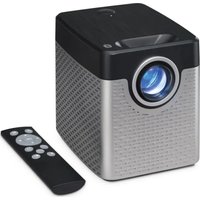
PJ504 - Projector GPX - Free user manual and instructions
Find the device manual for free PJ504 GPX in PDF.


Pick your language and provide your email: we'll send you a specifically translated version.
| Product Type | Portable CD/MP3 Player with FM Radio |
| Brand | GPX |
| Model | PJ504 |
| Dimensions (L x W x H) | 20 x 15 x 5 cm |
| Weight | 0.5 kg |
| Power Supply | Mains (adapter included) or 4 AA batteries |
| Supported Formats | CD, CD-R, CD-RW, MP3 |
| FM Radio | Yes, with telescopic antenna |
| Main Functions | Play, pause, stop, track skip, search, programming, repeat, shuffle play |
| Audio Output | 3.5 mm headphone jack |
| Maintenance and Cleaning | Clean with a soft, dry cloth. Do not use solvents. |
| Safety | Do not expose to moisture, excessive heat, or shocks. |
| Spare Parts and Repairability | Contact an authorized GPX service center for repairs. |
| Included Accessories | Mains adapter, earphones, user manual |
| General Information | Portable device designed for home use. |
Frequently Asked Questions - PJ504 GPX
How to turn on the GPX PJ504?
Press the POWER button located on the top or side of the device. If the device does not turn on, check the batteries or plug in the mains adapter.
How to listen to FM radio?
Press the FUNCTION button until Radio mode is selected. Then use the SCAN or TUNING buttons to search for stations. Extend the telescopic antenna for better reception.
How to insert a CD?
Open the CD compartment lid by pressing the OPEN button. Place the CD in the center, printed side up, then gently close the lid.
The CD won't play, what should I do?
Check that the CD is clean and scratch-free. Make sure the format is compatible (CD, CD-R, CD-RW, MP3). Try cleaning the CD with a soft cloth. If the problem persists, reset the device by unplugging the power for a few minutes.
How to skip to the next track?
Press the SKIP >>| button to skip to the next track. To go back to the previous track, press the |<< SKIP button.
How to adjust the volume?
Turn the VOLUME knob or press the VOL +/- buttons to increase or decrease the sound.
Can I use headphones?
Yes, plug your headphones into the PHONES 3.5 mm jack on the side. The internal speaker automatically turns off.
How to program the track playback order?
In CD/MP3 mode, press PROG during playback. Use the skip buttons to select a track and press PROG again to add it. Repeat, then press PLAY to start the programmed playback.
The device is not working, what should I do?
Check the batteries or mains power. Make sure the mode is correctly selected. If the display does not light up, replace the batteries or check the power cord. If the malfunction persists, contact customer service.
Where to find spare parts?
Contact an authorized GPX service center or check the official website for spare parts. Do not attempt to repair the device yourself, as this will void the warranty.
User questions about PJ504 GPX
0 question about this device. Answer the ones you know or ask your own.
Ask a new question about this device
No questions yet. Be the first to ask one.
Download the instructions for your Projector in PDF format for free! Find your manual PJ504 - GPX and take your electronic device back in hand. On this page are published all the documents necessary for the use of your device. PJ504 by GPX.
USER MANUAL PJ504 GPX


Manual assistant
Powered by Anthropic
Waiting for your message
Product information
Brand : GPX
Model : PJ504
Category : Projector