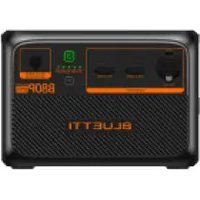
B80P - Power bank BLUETTI - Free user manual and instructions
Find the device manual for free B80P BLUETTI in PDF.


| Product Type | Expansion Battery for Portable Power Stations |
| Brand | BLUETTI |
| Model | B80P |
| Battery Chemistry | LiFePO₄ (Lithium Iron Phosphate) |
| Capacity | 806 Wh (80 Ah @ 12.8 V) |
| Cycle Life | 3,500+ cycles to 80% capacity |
| Dimensions | 16.5 × 11.0 × 9.3 inches (420 × 280 × 236 mm) |
| Weight | 22.0 lbs (10.0 kg) |
| Input Voltage | 12 V DC (via PV or AC adapter) |
| Output Voltage | 12 V DC (via Anderson port) |
| Max Charging Current | 30 A |
| Max Discharging Current | 30 A |
| Operating Temperature Range | 14°F to 104°F (-10°C to 40°C) |
| BMS (Battery Management System) | Overcharge, overdischarge, overcurrent, short circuit, temperature protection |
| Compatible Power Stations | BLUETTI AC200P, AC200MAX, AC300, AC500, EP500, EP500Pro |
| Connection Type | Anderson Powerpole connector (included cable) |
| Maintenance | Store at 50-80% charge; recharge every 3-6 months |
| Cleaning | Wipe with dry cloth; avoid moisture and solvents |
| Safety Certifications | UL, CE, FCC, RoHS |
| Warranty | 24 months (extendable with registration) |
Frequently Asked Questions - B80P BLUETTI
User questions about B80P BLUETTI
0 question about this device. Answer the ones you know or ask your own.
Ask a new question about this device
Download the instructions for your Power bank in PDF format for free! Find your manual B80P - BLUETTI and take your electronic device back in hand. On this page are published all the documents necessary for the use of your device. B80P by BLUETTI.
USER MANUAL B80P BLUETTI
Portable Power Station
User Manual
Please Read This Manual Before Use And Follow Its Guidance. Keep This Manual For Future Reference.

Warning
- Charge the unit before first use.
- Do not use solar panels with open circuit voltage higher than 28V. Solar input voltage range for the unit is DC 12V\~28V.
- Charge the unit when the SoC drops below 5%. If the SoC drops to 0, power off the unit and charge it for at least 30mins before restarting.
- If not used for more than 3 months, charge the unit to 40%\~60% SoC and store it with the power off. For optimum battery life, discharge and charge the unit every 3 months.
Thank You!
Thank you for making BLUETTI a part of your family.
From the very beginning, BLUETTI has tried to stay true to a sustainable future through green energy storage solutions for both indoor and outdoor use while delivering an exceptional eco-friendly experience for our homes and our world. That's why BLUETTI makes its presence in 70+ countries and is trusted by millions of customers across the globe.

Contents
1 Safety Instructions 05
1.1 General Safety 05
1.2 Handling 07
1.3 Storage and Usage 07
2 What's In The Box 08
3 Product Overview 10
3.1 Diagram 10
3.2 Specifications 11
4 Operation 12
4.1 Buttons 12
4.2 Power indicator 12
4.3 Charging 12
4.4 Discharging 14
5 Appendix 16
5.1 FAQs 16
5.2 Abbreviations 17
1. Safety Instructions
Read this manual for instructions on the proper use and safety information for the unit.
Follow the warnings and instructions marked on the unit and its accessories.
Pay attention to the "Instruction", "Caution", "Warning" and "Danger" symbols in this manual, and follow the instructions carefully to avoid injury or damage.
The Safety Requirements provided herein are for illustrative purposes that include but are not limited to those listed in this manual. Actual operation shall comply with all applicable safety standards.
If you have any questions, feel free to contact BLUETTI support or your local BLUETTI dealers.
1.1. General Safety
• Always operate or store the unit in the conditions specified in this manual.
- The installation and ambient conditions must comply with the regulations in the relevant international, national or regional standards.
- Unauthorized disassembly, alteration of the equipment or modification of the software code is not allowed.
⚠ BLUETTI shall not be liable for the following circumstances:
- Equipment damage caused by force majeure, such as earthquake, fire, storm, flood, mudslide, etc.
- Damage or loss during transportation.
- Damage caused by storage conditions that do not meet the requirements specified in this manual.
- Damage to the hardware or data of the equipment due to customer negligence, improper operation or intentional damage.
- Damage to the system caused by a third party or the customer, including handling and installation that does not meet the requirements specified in this manual.
- The product is intended for use with audio/video, information and communication technology equipment only.
- This product is not suitable for providing electrical service for equipment and machines that are highly dependent on the reliability of electrical power supply and that involve personal safety, such as atomic energy, aviation, medical, etc. Poweroak will not be held responsible for any personal safety accidents, fire accidents, equipment failures, etc. caused by using this product to supply power to the above equipment and machines.
- Damage caused by adjustment, alteration or removal of identification marks.
!
- Do not install, use and maintain the unit in adverse weather conditions such as lightning, rain, snow and strong breezes (including but not limited to handling and operating the unit, plugging and unplugging signal connections to outdoor facilities, working at height, outdoor installations, etc.).
• Always turn off the power source before starting any electrical work.
- Do not clean the unit with water.
- Do not disassemble, modify, tamper with or repair the unit on your own.
- Regularly inspect the unit and its accessories for damage or deterioration.
- Use a tester to check for the presence of dangerous voltage before touching any conductor or terminal.
- If the unit's shell is cracked during transportation or use, do not use it and contact BLUETTI support or your local BLUETTI dealers.
- Use a dry powder extinguisher if the unit catches fire.
- In case of fire, EVACUATE the building or affected area immediately, activate the closest FIRE ALARM system and CALL 9-1-1 or your local emergency phone number.
- Use genuine cables and accessories provided by BLUETTI.
- Keep the unit away from heat sources or high temperatures, and do not expose it to direct sunlight.
- Do not store the unit with flammable liquids, gases, or explosive materials.
- Make sure the area where you are using the unit is well ventilated and spacious.
- Do not block or cover the vents of the unit as this may cause irreversible damage to it.
- Use the unit for its intended purpose and avoid stacking objects on top of it during storage or use.
- Do not move the unit during operation as the vibrations and shocks associated with movement may cause damage to the internal hardware.
- In case of malfunction, turn off the unit immediately and contact BLUETTI support or your local BLUETTI dealers if this manual cannot adequately explain the malfunction to you.
- Do not place the unit on an unstable or inclined surface.
- Do not insert foreign objects into any port and vent of the unit.
- Keep away from children and pets.
The symbol is intended to alert you to read the instructions before operating and maintenance in the literature accompanying the product.
- The product is intended for use with audio/video, information and communication technology equipment only.
- Connect the equipment to a socket-outlet with earthing connection by means of a power cord.
- The socket-outlet shall be installed near the equipment and shall be easily accessible.
- Disposal of a battery into fire or a hot oven, or mechanically crushing or cutting of a battery, that can result in an explosion.
• Leaving a battery in an extremely high temperature surrounding environment that can result in an explosion or the leakage of flammable liquid or gas
- The battery subjected to extremely low air pressure that may result in an explosion or
the leakage of flammable liquid or gas
- Attention should be drawn to environmental aspects of battery disposal.
- Please refer the information on exterior bottom enclosure for electrical and safety information before installing or operating the apparatus. Please refer the information on exterior bottom enclosure for electrical and safety information before installing or operating the apparatus

Legal and Regulatory Requirements
- The transportation, wiring and maintenance shall comply with all applicable laws, regulations and standards.
- User-provided materials and tools required shall meet the requirements specified in applicable laws, regulations and relevant standards.
1.2. Handling
Use mechanical assistance as needed (e.g. trolleys and adjustable height workbenches).
Recommended number of people based on the weight of product
| Weight | Number of people |
| <18kg | 1 |
| 18kg~32kg | 2 |
| 32kg~55kg | 3 |
| >55kg | 4 or a cart |
1.3. Storage and usage
- When not using the unit for over 3 months, charge it to 40% to 60% SoC to keep it in optimal condition.
• Before storing the unit, power it off and remove all electrical connections from it. - Store the unit in a cool and dry place. The ideal temperature range is 10°C to 30°C . The unit can be safely charged and discharged at temperatures of -20°C to 40°C . However, it's NOT recommended to store the unit in harsh temperatures for extended periods of time.
- Fully cycle the unit every 6 months to maintain the battery's health.

If the SoC drops to 0 (during operation or upon startup), take the following
actions to safely restart the unit:
1) Shut down immediately.
2) Charging within 48 hours.
3) Battery should be kept at an ambient temperature of 5°C to 35°C for 24 hours before charging.
It is recommended to charge the unit via an AC source. If charging via solar energy, ensure that your solar system provides an output of more than 100W.
BLUETTI shall not be liable for any equipment damage caused by the violation of above instructions.
2. What's In The Box
Standard Packaging
| Item Picture Qty. | ||
| Expansion Battery |  | 1 |
| Battery Expansion Cable (800mm) |  | 1 |
| User Manual |  | 1 |
| Warranty Card |  | 1 |
| Quality Certificate |  | 1 |
Optional
(Available on official BLUETTI website)
| Item Picture | |
| TYPE-C Cable(5A/100W, 2m) |  |
| Car Charging Cable(16AWG, 720mm) |  |
| Solar Charging Cable(16AWG, 1500mm) |  |
 | |
| Power Bank Output Cable |  |
| 200W Charger |  |
3. Product Overview
3.1 Diagram
The BLUETTI B80P can be used with AC60P as an external expansion battery, or as a DC power station to run your devices independently. It offers up to 120W output with 3 DC ports - USB-A, USB-C and car cigarette lighter port, perfect for your phone, laptop, car fridge, and more. While LiFePO4 battery cells and an advanced battery management system (BMS) protect your device from a variety of potential risks during daily operation. When connected to AC60P, it adds extra 806Wh capacity to the whole power system for longer device runtime.

Cigarette Lighter Port
Power Button
DC Input
Power Indicator
DC Power Button
USB-A Port
USB-C Port
Battery Expansion Port
Bleed Valve
3.2 Specifications
| Model B80P | |
| General | |
| Battery Capacity | 806Wh |
| Cell Type | LiFePO4 |
| Charging Temperature | 0° °C/32°F~104°F |
| Discharging Temperature | -20° ° |
| Storage Temperature | -20° ° |
| Working Humidity | |
| Weight | About 9.9kg/21.83lbs |
| Dimensions (L*W*H) | 290mm×207mm×204mm/11.42in×8.15in×8.03in |
| DC Output | |
| Cigarette Lighter Port | 12VDC/10A |
| USB-A | 3.6-12VDC, 3A,18W Max. |
| USB-C (Type-C) | 5/9/12/15/20VDC, 3A; 20VDC, 5A (Built-in eMarker chip) |
| DC Input | |
| Interface | DC7909 |
| Power | 200W/8A MAX. |
| Voltage | 12V~28VDC |
| Expansion Port | |
| Rated voltage | 22.4VDC |
| Max. Input Current | 30A |
| Power Bank Output | 25.2VDC, 200W Max. |
4. Operation
4.1 Buttons

B80P has a power button and a DC output button.
- Press the power button to start up B80P. Press and hold for more than 2 seconds to turn it off.
- Press the DC power button to turn on/off the DC output (cigarette lighter and USB output).
4.2. Power indicator
BLUETTI B80P has 5 LED indicators. From left to right, they represent 20%, 40%, 60%, 80%, 100% SoC, respectively.
4.3 Charging
B80P supports 4 charging methods: AC60P charging, solar, car (cigarette lighter) and adapter.
4.3.1. AC60P Charging
Connect the AC60P and B80P and plug the AC60P into a wall outlet via the AC charging cable. The AC60P will automatically charge the B80P.

4.3.2. Solar Charging
Connect the solar panels (in series or parallel) to B80P via the solar charging cable.
Note: Please make sure your solar panels comply with:
Voc: 12V-28VDC Input Current: 8A Max. Input Power: 200W Max.

Warning: The open circuit voltage of solar panels cannot exceed 28V, otherwise it will damage the device.(Note:This is not covered in the warranty.)
4.3.3. Car Charging
Connect the B80P to vehicle's 12V/24V cigarette lighter port via the car charging cable.

Warning: Cigarette lighter must be completely plugged in, otherwise it may cause safety risks.
4.3.4. Adapter Charging
The B80P can be charged via adapter. Please make sure the output voltage of adapter is between 12V\~28VDC.

4.4 Discharging
4.4.1. DC Output
The operation time of B80P is subject to many factors, such as ambient temperature, discharge rate, battery capacity, altitude, load characteristics, etc.
• 12V/10A cigarette lighter
• USB-C (5/9/12/15/20VDC, 3A; 20VDC, 5A)
• USB-A (5V/3A; 9V/2A; 12V/1.5A)
- Expansion Port (17.5V-25.2VDC, 30A Max.)
4.4.2. Connect to AC60P
With the battery expansion cable, AC60P supports up to 2 B80P expansion batteries for a total capacity of 2015Wh. Turn on AC60P to activate the whole power system.
Note: Make sure the AC60P and B80P are off when connecting and disconnecting

AC60P+2*B80P
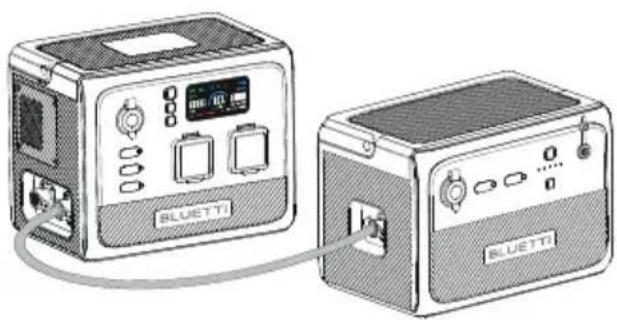
AC60P+1*B80P
4.4.3. Power Bank Mode
Connect the B80P to a compatible power station via the power bank output cable, press and hold its power button for about 5s, and it can recharge the power station directly.
Note:
In Power Bank mode, the B80P delivers a voltage of up to 25VDC. Please check the DC input voltage of your BLUETTI power station for compatibility.

4.4.4. Estimated Operation Time
Operation time (estimated) = Battery capacity (Wh) × DoD × η ÷ (load power)
Note:
1) Load power and operation time are measured in watts and hours.
2) DoD refers to depth of discharge. B80P works at 90% DoD for longer battery life. η is the conversion efficiency of the inverter, which is 90% for B80P.
E.g. If you run a 40W refrigerator with B80P, the operation time will be:
806 Wh × 90 % × 90 % ÷ 40 W ≈ 16 hrs
Note: Low temperature and excessive loads could greatly impact the battery capacity and reduces its normal operation time.
5. Appendix
5.1 FAQs
Q1: How do I know whether my devices will work well with this product?
A: Please evaluate the total constant load of your devices. If it doesn't exceed the Max. output power of B80P (120W), you can use this power station to run your devices.
Note: Some devices with built-in motor/compressor may start at 2-4 times the rated power, which can easily overload the B80P.
Q2: Can I use third-party solar panels to charge this product?
A: Yes, you can. Make sure your solar panels have an open circuit voltage of 12V-28V and have the MC4 connectors. Please do NOT mix different types of solar panels.
Note: Time required for one full charge depends on weather condition, the sunshine intensity and the angle of solar panels.
Q3: Can it charge and discharge at the same time?
A: Yes. It supports pass-through charging. B80P comes with the premium LiFePO4 battery and proprietary Battery Management System to ensure that it can charge and discharge at the same time.
Q4: Why does the B80P shut down automatically?
A: Two scenarios in which B80P shuts down itself:
If DC output is not turned on after power on, it will automatically shut down after 4 hours.
If DC output is less than 10W, it will automatically shut down after 24 hours.
Q5: Why is the charging power often too low?
A: B80P has a built-in intelligent BMS that automatically adjusts the charging power in response to the battery temperature and SoC, thus protecting the battery and extending its service life.
5.2 Abbreviations
• MPPT: Maximum Power Point Tracking
- SoC: State of Charge
• AC: Alternating Current
- DC: Direct Current
• PV: Photovoltaic (Solar Panels)
- DoD: Depth of Discharge
- ECO mode: It's an energy-saving mode(It's on by default). It can not be turned off. If DC output is not turned on after power on, it will automatically power down after 4 hours.
For more information, please visit:

@ BLUETTI Support
@BLUETTI Official

@bluetti_official

@ bluetti.inc

@bluetti_inc

sale-eu@bluettipower.com
sale-uk@bluettipower.com
EU REP
Address: Lise-Meitner-Str. 14 28816
Stuhr Germany
Mail: logi@bluetti.de
UK REP
Address: Unit 2 NorthGate, Bolsover Business Park,
Woodhouse Lane Chesterfield England, S44 6BD
Mail:poweroak.eu@bluetti.com
Customer Service(DE)
Tel:49 8006273016 (Monday to
Friday from 9 a.m. to 17 p.m. (Ger-
Customer Service(UK)
Tel: 44 8000472906 (Monday-Friday
9:00-17:00)
SHENZHEN POWEROAK NEWENER CO., LTD.
Add: F19, BLD No.1, Kaidaer, Tongsha Rd No.168, Xili Street,
Nanshan, Shenzhen, China
After-sales address in EU: Lise-Meitner-Strasse 14, 28816
Stuhr, Germany
After-sales address in UK: Unit 2 Northgate, Bolsover
Busines Park, Woodhouse Line, Chesterfield England S44 6BD

B80P
Tragbare Powerstation
Benutzerhandbuch
Vielen Dank!
4.4 Entladen
4.4.1. DC-Ausgang
AC60P + 2 × B80P
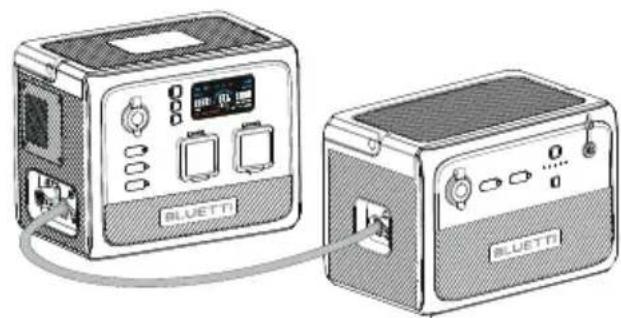
AC60P + 1 × B80P
• SOC: Ladezustand (State of Charge)
• AC: Wechselstrom (Alternating Current)
• DC: Gleichstrom (Direct Current)
• PV: Photovoltaik (Solarpaneele)
Address: Lise-Meitner-Str. 14 28816
Stuhr Germany
Mail: logi@bluetti.de
UK REP
Address: Unit 2 NorthGate, Bolsover Business Park,
Woodhouse Lane Chesterfield England, S44 6BD
Mail:poweroak.eu@bluetti.com
Customer Service(DE)
Tel:49 8006273016 (Monday to
Friday from 9 a.m. to 17 p.m. (Ger-
Customer Service(UK)
Tel: 44 8000472906 (Monday-Friday
9:00-17:00)
SHENZHEN POWEROAK NEWENER CO., LTD.
Add: F19, BLD No.1, Kaidaer, Tongsha Rd No.168, Xili Street,
Nanshan, Shenzhen, China
Busines Park, Woodhouse Line, Chesterfield England S44 6BD

Thank you for choosing BLUETTI. Please read the terms and conditions and fill in the warranty card. This card, together with your proof of purchase, entitles you to the service of the product under the terms of this warranty. The warranty period starts from the date of product receipt.
| Item | Warranty Period |
| Main unit (including batteries) | 72 months* |
| Solar panel | 12 months |
| Accessories (adapter/cable/others) | 12 months |
* Only applies to products purchased directly from the official BLUETTI website. If you purchased the product from other channels, the warranty is valid for 24 months. However, you can register for BLUETTI VIP on the official website to get a free warranty extension.
The warranty does not cover:
- Issues arising after the warranty period has expired;
- Damage resulting from improper use, maintenance, or storage, contrary to the user manual;
- Unauthorized disassembly, repair, or modifications;
• Damage caused by force majeure events.

Valid Proof of Purchase
01 Order No. of purchases made through authorized platforms.
02 Sales invoice or order confirmation email that clearly shows the description of the product, its price and sales channel.
03 The defective item's serial number (usually on the bottom of the product) and/or visible proof (eg. Short video) depicting the defect will be required.

How to Return/Replace/Repair
01 Contact us for a Return Merchandise Authorization (RMA) Number. We will not accept returned items without prior authorization and RMA.
02 Write the RMA number in the form below and on the outer package of the parcel.
03 Send the defective product to our local warehouse.
Warranty Policy
| Customer Name: Date: | |||
| Compay(optional): | |||
| Address: | City: State: Zip: | ||
| Phone: | Fax: | ||
| Email Address: | |||
| Purchase From: |
| Name of Tech Support Spoken To: |
| RMA #: |
| Model Name: | |
| Serial #: | |
| Purchase Date: | |
| Problem Description: |

BLUETTI
[Figure]
L
Certificate
Inspector:
QC: ____


- PORTABLE POWER STATION
- USER MANUAL
- WARNING
- THANK YOU
- CONTENTS
- SAFETY INSTRUCTIONS
- GENERAL SAFETY
- ⚠ BLUETTI SHALL NOT BE LIABLE FOR THE FOLLOWING CIRCUMSTANCES
- LEGAL AND REGULATORY REQUIREMENTS
- HANDLING
- STORAGE AND USAGE
- IF THE SOC DROPS TO 0 (DURING OPERATION OR UPON STARTUP), TAKE THE FOLLOWING
- WHAT'S IN THE BOX
- OPTIONAL
- PRODUCT OVERVIEW
- 3.1 DIAGRAM
- OPERATION
- 4.1 BUTTONS
- POWER INDICATOR
- 4.3 CHARGING
- AC60P CHARGING
- SOLAR CHARGING
- CAR CHARGING
- ADAPTER CHARGING
- 4.4 DISCHARGING
- DC OUTPUT
- CONNECT TO AC60P
- POWER BANK MODE
- NOTE
- ESTIMATED OPERATION TIME
- APPENDIX
- 5.1 FAQS
- 5.2 ABBREVIATIONS
- FOR MORE INFORMATION, PLEASE VISIT
- EU REP
- UK REP
- CUSTOMER SERVICE(DE)
- CUSTOMER SERVICE(UK)
- SHENZHEN POWEROAK NEWENER CO., LTD
- B80P
- TRAGBARE POWERSTATION
- BENUTZERHANDBUCH
- VIELEN DANK
- 4.4 ENTLADEN
- DC-AUSGANG
- THE WARRANTY DOES NOT COVER
- VALID PROOF OF PURCHASE
- HOW TO RETURN/REPLACE/REPAIR
- BLUETTI
- CERTIFICATE
Brand : BLUETTI
Model : B80P
Category : Power bank