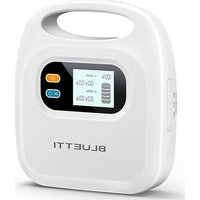
X30 - Power bank BLUETTI - Free user manual and instructions
Find the device manual for free X30 BLUETTI in PDF.


| Product Type | Portable Power Bank |
| Model | X30 |
| Brand | BLUETTI |
| Battery Capacity | 30000 mAh / 111 Wh |
| Battery Type | Lithium-ion |
| Dimensions | 167 x 80 x 30 mm |
| Weight | 650 g |
| Input Port | USB-C (Power Delivery 60W) |
| Output Ports | 2x USB-A (18W max), 1x USB-C (60W max) |
| Wireless Charging | Yes, 15W max |
| Display | LED digital display for battery level and output |
| Charging Time | Approx. 6 hours via USB-C 60W |
| Pass-Through Charging | Supported |
| Safety Features | Overcharge, overdischarge, short circuit, and temperature protection |
| Operating Temperature | 0°C to 40°C |
| Storage Temperature | -10°C to 50°C |
| Key Functions | Charge smartphones, tablets, laptops, and other USB devices |
| Maintenance | Wipe with a soft, dry cloth. Avoid liquid cleaners. |
| Repairability | Not user-serviceable; contact BLUETTI support for any issues. |
| Spare Parts | Replacement USB-C cable included; other parts not sold separately |
| Compliance | CE, FCC, RoHS |
Frequently Asked Questions - X30 BLUETTI
User questions about X30 BLUETTI
0 question about this device. Answer the ones you know or ask your own.
Ask a new question about this device
Download the instructions for your Power bank in PDF format for free! Find your manual X30 - BLUETTI and take your electronic device back in hand. On this page are published all the documents necessary for the use of your device. X30 by BLUETTI.
USER MANUAL X30 BLUETTI
Please read this manual carefully before use and keep it for future reference.

Thank You!
Thank you for making BLUETTI a part of your family.
From the very beginning, BLUETTI has tried to stay true to a sustainable future through green energy storage solutions for both indoor and outdoor use while delivering an exceptional eco-friendly experience for our homes and our world. That's why BLUETTI makes its presence in 70+ countries and is trusted by millions of customers across the globe.

Copyright © BLUETTI Corporation. All rights reserved.
No part of this document may be reproduced or transmitted in any form or by any means without the prior written consent of BLUETTI Corporation.
Trademark Declaration
BLUETTI is a trademark of BLUETTI Corporation.
All other trademarks mentioned in this manual are owned by the trademark owners.
Notice
BLUETTI's products, services, and features are subject to the agreed-upon terms and conditions during purchase. Please note that some products, services, or features described in this manual may not be available under your purchase contract. Unless otherwise specified in the contract, BLUETTI makes no representations or warranties of any kind, express or implied, with respect to the contents of this manual.
The contents of this manual are subject to change without notice. Please get the latest version from: https://www.bluettipower.com/pages/user-guides
If you have any questions or concerns about this manual, please contact BLUETTI support for further assistance.
SHENZHEN POWEROAK NEWENER CO., LTD.
Address: F19, BLD No.1, Kaidaer, Tongsha Rd No.168, Xili Street, Nanshan, Shenzhen, China
Website: https://www.bluettipower.com
Customer Service
Tel: 800-200-2980 (Monday to Sunday 9:00-17:00)
Email: sale@bluettipower.com (Pre-sales),
service@bluettipower.com (After-sales)
Contents
1 Safety Instructions 06
1.1 General Safety 06
1.2 Storage and Usage 07
2 What's In The Box 08
3 Product Overview 10
4 LCD Screen 11
5 Operations 12
5.1 Powering On/Off 12
5.2 Charging 12
5.3 Discharging 12
5.4 Set Battery Protection Mode 13
6 Specifications 14
7 Abbreviations 14
1. Safety Instructions
Read this manual for instructions on the proper use and safety information for the unit. Follow the warnings and instructions marked on the unit and its accessories.
Pay attention to the "Instruction", "Caution", "Warning" and "Danger" symbols in this manual, and follow the instructions carefully to avoid injury or damage. For operations not covered in the manual, please contact our company if necessary. BLUETTI will not be responsible for unauthorized operations.
The Safety Requirements provided herein are for illustrative purposes that include but are not limited to those listed in this manual. Actual operation shall comply with all applicable safety standards.
1.1. General Safety
• Always operate or store the unit in the conditions specified in this manual.
- The installation and ambient conditions must comply with the regulations in the relevant international, national or regional standards.
- Unauthorized disassembly, alteration of the equipment or modification of the software code is not allowed.
⚠ BLUETTI shall not be liable for the following circumstances:
- Equipment damage caused by force majeure, such as earthquake, fire, storm, flood, mudslide, etc.
- Damage or loss during customer's own transportation.
- Damage caused by storage conditions that do not meet the requirements specified in this manual.
- Damage to the hardware or data of the equipment due to customer negligence, improper operation or intentional damage.
- Damage to the system caused by a third party or the customer, including handling and installation that does not meet the requirements specified in this manual.
- Damage caused by adjustment, alteration or removal of identification marks.
⚠️ Regulate your operations to avoid danger:
- Do not install, use and maintain the unit in adverse weather conditions such as lightning, rain, snow and strong breezes (including but not limited to handling and operating the unit, plugging and unplugging signal connections to outdoor facilities, working at height, outdoor installations, etc.).
• Always turn off the power source before starting any electrical work.
- Do not clean the unit with water.
- Do not disassemble, modify, tamper with or repair the unit on your own.
- Regularly inspect the unit and its accessories for damage or deterioration.
- If the unit's enclosure is cracked during transportation or use, do not use it and contact BLUETTI support or your local BLUETTI dealers.
- Use a dry powder extinguisher if the unit catches fire.
- In case of fire, EVACUATE the building or affected area immediately, activate the closest FIRE ALARM system and CALL 9-1-1 or your local emergency phone number.
- Use genuine cables and accessories provided by BLUETTI.
- Keep the unit away from heat sources or high temperatures, and do not expose it to direct sunlight.
- Do not store the unit with flammable liquids, gases, or explosive materials.
- Make sure the area where you are using the unit is well ventilated and spacious.
- Do not block or cover the vents of the unit as this may cause irreversible damage to it.
- Use the unit for its intended purpose and avoid stacking objects on top of it during storage or use.
- Do not move the unit during operation as the vibrations and shocks associated with movement may cause damage to the internal hardware.
- In case of malfunction, turn off the unit immediately and contact BLUETTI support or your local BLUETTI dealers if this manual cannot adequately explain the malfunction to you.
- Do not place the unit on an unstable or inclined surface.
- Do not insert foreign objects into any port and vent of the unit.
- Keep away from children and pets.

Legal and Regulatory Requirements
- The transportation, wiring and maintenance shall comply with all applicable laws, regulations and standards.
- User-provided materials and tools required shall meet the requirements specified in applicable laws, regulations and relevant standards.
1.2. Storage and usage
- When not using the unit for over 3 months, charge it to 40% to 60% SoC to keep it in optimal condition.
- Store the unit in a cool and dry place. The ideal temperature range is 10°C to 30°C . The unit can be safely charged and discharged at temperatures of -20°C to 40°C . However, it's NOT recommended to store the unit in harsh temperatures for extended periods of time.
- Fully cycle the unit every 3 months to maintain the battery's health.
- Clean the unit with a soft dry cloth.
- Before storing the unit, power it off and remove all electrical connections from it.

If the SoC drops to 0 (during operation or upon startup), take the following
actions to safely restart the unit:
1) Shut down immediately.
2) Charging within 48 hours.
3) Battery should be kept at an ambient temperature of 5° C to 35° C for 24 hours before charging.
BLUETTI shall not be liable for any equipment damage caused by the violation of above instructions.
2. What's In The Box
Standard Packaging
| ItemNo. Picture Qty. | |||
| 1 | Portable Power Bank |  | 1 |
| 2 | DC 12V/5A Power Cable (I) |  | 1 |
| 3 | DC 12V/5A Power Cable (II) |  | 1 |
| 4 | DC 24V/4A Power Cable |  | 1 |
| 5 | DC 24V/4A Power Cable |  | 1 |
| 6 | DC 24V/4A Power Cable |  | 1 |
| 7 | Connector for HP(Connecting with 5 together to power AirSense 10) |  | 1 |
| 8 | Connecting Adaptor(Connecting with 5 (tagged end) to power DC15V Transcend Mini) |  | 1 |
Standard Packaging
| ItemNo. Picture Qty. | |||
| 9 | AC Adaptor |  | 1 |
| 10 | Storage Bag |  | 1 |
| 11 | User Manual |  | 1 |
3. Product Overview
X30 is a DC portable power bank with an internal integrated large capacity battery pack. With external adapter charging, LCD display, USB-A and 12V/15V/24V DC output, it is suitable for CPAP power supply and mobile phone charging. Refer to 6. Specifications for more details of X30.
The keys and interfaces of X30 are shown in Figure 3-1.

Figure 3-1 Keys and Interfaces of X30
Table 3-1 Descriptions of Keys and Interfaces
| DescriptionNameNo. | ||
| 1 | LCD Screen | Displays operation information e.g. SoC and charging/discharging status. |
| 2 | Power Button | Press and hold it for 3 seconds to power on/off X30. |
| 3 | DC Button | Enable/disable the DC output. |
| 4 | Charging Port | Charge X30 through this port. |
| 5 | USB-A Output | With DC 5V/2.5A output. |
| 6 | DC Output (24V) | Power devices with DC 24V input. |
| 7 | DC Output (15V) | Power devices with DC 15V input. |
| 8 | DC Output (12V) | Power devices with DC 12V input. |
4. LCD Screen
The LCD screen is lit when X30 is powered on. If X30 is powered off, press and hold the power button for 3 seconds to turn it on. The display is shown in Figure 4-1.
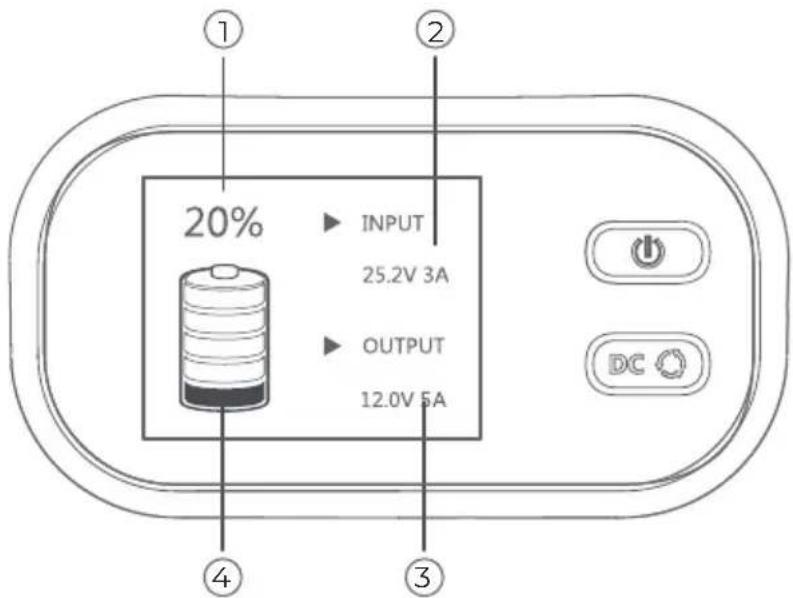
Figure 4-1 LCD Screen
Table 4-1 LCD Screen Description
| DescriptionNameNo. | ||
| 1 | SoC(State of Charging) | Displays the current battery level.When the icon % flashes continuously, X30 is in battery protection mode. |
| 2 | Charging(Power Input) | Indicates that X30 is being charged. |
| 3 | Disharging(Power Output) | Displays when X30 is powered on.Fashes when a load is connected. Press the DC button and the power output information is displayed (e.g. 12.0V 4A), which means X30 has started powering the DC device. |
| 4 | Battery Level | The icon has 5 segments, each indicating 20% of battery power.Note: SoC number indicates the accurate battery level.When the bottom segment flashes, the remaining battery level is less than 5% and the buzzer will continue to beep.Please charge X30 in time. |
5. Operations
5.1 Powering On/Off
- Powering On: When X30 is off, press and hold the power button for 3 seconds to power it on. The LCD screen will light up and the buzzer will sound for 3 seconds.
If the LCD backlight is off, press the power button for 0.3 seconds to lihgt it up again.
- Powering Off: When X30 is on, press and hold the power button for 3 seconds to power it off. The LCD screen will be turned off and the buzzer will sound for 3 seconds.
5.2 Charging
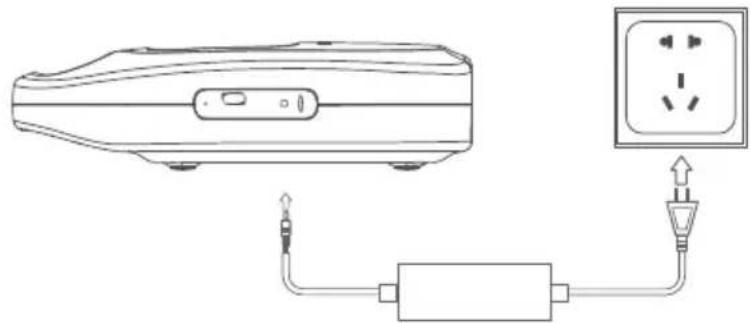
X30 can only be charged via the AC adaptor.
Connect one end of the adaptor to the charging port of X30, and the other end to a wall outlet. As shown in the figure below.
5.3 Discharging
The DC outputs of X30 include USB-A, DC 24V, DC 15V and DC 12V. It can power various kinds of devices.
5.3.1 USB-A Port
Simply connect a supported device to this port for charging.

5.3.2 DC 12V/15V/24V Outputs
Confirm the power input port of your device matches the relevant DC output of X30.
(1) Connect your device to the matched DC port of X30.
(2) The device is identified by X30, and the corresponding icon flashes on the LCD screen.
(3) Press the DC button, the icon stops flashing and the power output of X30 is enabled.
Note:
- Only one of the three ports (DC 24V, DC 15V and DC-12V) can be used at a time.
- Before switching output ports, disconnect the connected device and repeat the steps above.

5.4 Set Battery Protection Mode
The battery life can be extended under Battery Protection Mode. When enabled, the battery level of X30 will remain between 60% and 70%.
It is recommended to enable this mode if X30 is kept being charged.
- Enable Battery Protection Mode: When X30 is powered on, press and hold the DC button for 5 seconds to enable battery protection mode. When enabled, the % icon on the LCD screen will continue to flash.
- Disable Battery Protection Mode: Press and hold the DC button for 5 seconds. The mode will also be disabled when powering off X30 or removing the charger. When disabled, the % icon on the LCD screen stops flashing.
6. Specifications
| Item Specification | |
| General | |
| Battery capacity | 297Wh |
| Battery cell | Ternary Lithium |
| Net weight | About 1.8 kg |
| Dimensions | 202mm×221mm×62mm |
| Charging temperature | 0°C~40°C |
| Discharging temperature | -20°C~+40°C |
| Storage temperature | -20°C~+40°C |
| Working humidity | 5%~95% |
| DC Output | |
| DC output ports | DC5525 12V/5ADC5525 15V/4ADC5525 24V/4A |
| USB-A*1 | 5V/2.5A |
| Adapter Input | |
| Interface | DC35135 |
| Input power | 75W/3A max. |
| Input voltage | 23.8V~26V |
7. Abbreviations
- DC: Direct Current
- SoC: State of Charge
Warranty Card
Manufacture Date ____
Sale Date ____
File No. ____
Manufacturer ____
Warranty Instructions
- 12-months warranty
- After-Sale-Service mailbox: service@bluettipower.com
- Following situations will go against the warranty terms:
A. Any problems, malfunction or damages due to incorrect using methods or caused by unauthorized disassembly or repair.
B. The damage caused by force majeure, fire and other extreme abnormal conditions.
C. Without the warranty card or the card records is not clear, complete, or without the sales company seal

BLUETTI
Certificate
Inspector:
QC: ____
Just Power On
P/N:17.0303.0590-03A3



- THANK YOU
- COPYRIGHT © BLUETTI CORPORATION. ALL RIGHTS RESERVED
- TRADEMARK DECLARATION
- NOTICE
- SHENZHEN POWEROAK NEWENER CO., LTD
- CUSTOMER SERVICE
- CONTENTS
- SAFETY INSTRUCTIONS
- GENERAL SAFETY
- ⚠ BLUETTI SHALL NOT BE LIABLE FOR THE FOLLOWING CIRCUMSTANCES
- ⚠️ REGULATE YOUR OPERATIONS TO AVOID DANGER
- LEGAL AND REGULATORY REQUIREMENTS
- STORAGE AND USAGE
- IF THE SOC DROPS TO 0 (DURING OPERATION OR UPON STARTUP), TAKE THE FOLLOWING
- WHAT'S IN THE BOX
- PRODUCT OVERVIEW
- LCD SCREEN
- OPERATIONS
- 5.1 POWERING ON/OFF
- 5.2 CHARGING
- 5.3 DISCHARGING
- 5.3.1 USB-A PORT
- 5.3.2 DC 12V/15V/24V OUTPUTS
- CONFIRM THE POWER INPUT PORT OF YOUR DEVICE MATCHES THE RELEVANT DC OUTPUT OF X30
- NOTE
- 5.4 SET BATTERY PROTECTION MODE
- SPECIFICATIONS
- ABBREVIATIONS
- WARRANTY CARD
- WARRANTY INSTRUCTIONS
- BLUETTI
- CERTIFICATE
Brand : BLUETTI
Model : X30
Category : Power bank