
C250P - Color laser printer KONICA MINOLTA - Free user manual and instructions
Find the device manual for free C250P KONICA MINOLTA in PDF.


User questions about C250P KONICA MINOLTA
0 question about this device. Answer the ones you know or ask your own.
Ask a new question about this device
Download the instructions for your Color laser printer in PDF format for free! Find your manual C250P - KONICA MINOLTA and take your electronic device back in hand. On this page are published all the documents necessary for the use of your device. C250P by KONICA MINOLTA.
USER MANUAL C250P KONICA MINOLTA
natural_image
Illustration of a multi-tiered printer with open lid and internal compartments (no text or symbols visible)
Introduction
Introduction
Copyright © 1998-2000 The OpenSSL Project. All rights reserved.
Redistribution and use in source and binary forms with or without modification, are permitted provided that the following conditions are met:
- Redistributions of source code must retain the above copyright notice, this list of conditions and the following disclaimer.
- Redistributions in binary form must reproduce the above copyright notice, this list of conditions and the following disclaimer in the documentation and/or other materials provided with the distribution.
- All advertising materials mentioning features or use of this software must display the following acknowledgment:
"This product includes software developed by the OpenSSL Project for use in the OpenSSL Toolkit. (http://www.openssl.org/) - The names "OpenSSL Toolkit" and "OpenSSL Project" must not be used to endorse or promote products derived from this software without prior written permission. For written permission, please contact openssl-core@openssl.org.
- Products derived from this software may not be called "OpenSSL" nor may "OpenSSL" appear in their names without prior written permission of the OpenSSL Project.
- Redistributions of any form whatsoever must retain the following acknowledgment:
"This product includes software developed by the OpenSSL Project for use in the OpenSSL Toolkit (http://www.openssl.org/)
THIS SOFTWARE IS PROVIDED BY THE OpenSSL PROJECT "AS IS" AND ANY EXPRESSED OR IMPLIED WARRANTIES, INCLUDING, BUT NOT LIMITED TO, THE IMPLIED WARRANTIES OF MERCHANTABILITY AND FITNESS FOR A PARTICULAR PURPOSE ARE DISCLAIMED. IN NO EVENT SHALL THE OpenSSL PROJECT OR ITS CONTRIBUTORS BE LIABLE FOR ANY DIRECT, INDIRECT, INCIDENTAL, SPECIAL, EXEMPLARY, OR CONSEQUENTIAL DAMAGES (INCLUDING, BUT NOT LIMITED TO, PROCUREMENT OF SUBSTITUTE GOODS OR SERVICES; LOSS OF USE, DATA, OR PROFITS; OR BUSINESS INTERRUPTION) HOWEVER CAUSED AND ON ANY THEORY OF LIABILITY, WHETHER IN CONTRACT, STRICT LIABILITY, OR TORT (INCLUDING NEGLIGENCE OR OTHERWISE) ARISING IN ANY WAY OUT OF THE USE OF THIS SOFTWARE, EVEN IF ADVISED OF THE POSSIBILITY OF SUCH DAMAGE.
This product includes cryptographic software written by Eric Young (eay@crypt-Soft.com). This product includes software written by Tim Hudson (tjh@cryptsoft.com).
Original SSLeay License
Copyright © 1995-1998 Eric Young (eay@cryptsoft.com) All rights reserved. This package is an SSL implementation written by Eric Young (eay@cryptsoft.com).
The implementation was written so as to conform with Netscapes SSL. This library is free for commercial and non-commercial use as long as the following conditions are aheared to. The following conditions apply to all code found in this distribution, be it the RC4, RSA, Ihash, DES, etc., code; not just the SSL code.
The SSL documentation included with this distribution is covered by the same copyright terms except that the holder is Tim Hudson (tjh@cryptsoft.com).
Copyright remains Eric Young's, and as such any Copyright notices in the code are not to be removed. If this package is used in a product, Eric Young should be given attribution as the author of the parts of the library used. This can be in the form of a textual message at program startup or in documentation (online or textual) provided with the package.
Redistribution and use in source and binary forms, with or without modification, are permitted provided that the following conditions are met:
- Redistributions of source code must retain the copyright notice, this list of conditions and the following disclaimer.
- Redistributions in binary form must reproduce the above copyright notice, this list of conditions and the following disclaimer in the documentation and/or other materials provided with the distribution.
- All advertising materials mentioning features or use of this software must display the following acknowledgement:
"This product includes cryptographic software written by Eric Young (eay@crypt-soft.com)"
The word ‘cryptographic’ can be left out if the rouines from the library being used are not cryptographic related :-).
- If you include any Windows specific code (or a derivative thereof) from the apps directory (application code) you must include an acknowledgement:
"This product includes software written by Tim Hudson (tjh@cryptsoft.com)"
THIS SOFTWARE IS PROVIDED BY ERIC YOUNG “AS IS” AND ANY EXPRESS OR IMPLIED WARRANTIES, INCLUDING, BUT NOT LIMITED TO, THE IMPLIED WARRANTIES OF MERCHANTABILITY AND FITNESS FOR A PARTICULAR PURPOSE ARE DISCLAIMED. IN NO EVENT SHALL THE AUTHOR OR CONTRIBUTORS BE LIABLE FOR ANY DIRECT, INDIRECT, INCIDENTAL, SPECIAL, EXEMPLARY, OR CONSEQUENTIAL DAMAGES (INCLUDING, BUT NOT LIMITED TO, PROCUREMENT OF SUBSTITUTE GOODS OR SERVICES; LOSS OF USE, DATA, OR PROFITS; OR BUSINESS INTERRUPTION) HOWEVER CAUSED AND ON ANY THEORY OF LIABILITY, WHETHER IN CONTRACT, STRICT LIABILITY, OR TORT (INCLUDING NEGLIGENCE OR OTHERWISE) ARISING IN ANY WAY OUT OF THE USE OF THIS SOFTWARE, EVEN IF ADVISED OF THE POSSIBILITY OF SUCH DAMAGE.
The licence and distribution terms for any publicly available version or derivative of this code cannot be changed. i.e. this code cannot simply be copied and put under another distribution licence [including the GNU Public Licence.]
All other product names mentioned are trademarks ou registered trademarks of their respective companies.
Software license agreement
This package contains the following materials provided by Konica Minolta Business Technologies, Inc. (KMBT): software included as part of the printing system, the digitally-encoded machine-readable outline data encoded in the special format and in the encrypted form (“Font Programs”), other software which runs on a computer system for use in conjunction with the Printing Software (“Host Software”), and related explanatory written materials (“Documentation”). The term “Software” shall be used to describe Printing Software, Font Programs and/or Host Software and also include any upgrades, modified versions, additions, and copies of the Software.
The Software is being licensed to you under the terms of this Agreement.
KMBT grants to you a non-exclusive sublicense to use the Software and Documentation, provided that you agree to the following:
- You may use the Printing Software and accompanying Font Programs for imaging to the licensed output de-vice(s), solely for your own internal business purposes.
- In addition to the license for Font Programs set forth in Section 1 (“Printing Software”) above, you may use Roman Font Programs to reproduce weights, styles, and versions of letters, numerals, characters and symbols (“Typefaces”) on the display or monitor for your own internal business purposes.
- You may make one backup copy of the Host Software, provided your backup copy is not installed or used on any computer. Notwithstanding the above restrictions, you may install the on any number of computers solely for use with one or more printing systems running the Printing Software.
- You may assign its rights under this Agreement to an assignee of all of Licensee's right and interest to such Software and Documentation ("Assignee") provided you transfer to Assignee all copies of such Software and Documentation Assignee agrees to be bound by all of the terms and conditions of this Agreement.
- You agree not to modify, adapt or translate the Software and Documentation.
- You agree that you will not attempt to alter, disassemble, decrypt, reverse engineer or decompile the Software.
- Title to and ownership of the Software and Documentation and any reproductions thereof shall remain with KMBT and its licensor.
-
Trademarks shall be used in accordance with accepted trademark practice, including identification of the trademark owner's name. Trademarks can only be used to identify printed output produced by the Software. Such use of any trademark does not give you any rights of ownership in that trademark.
-
You may not rent, lease, sublicense, lend or transfer versions or copies of the Software Licensee does not use, or Software contained on any unused media, except as part of the permanent transfer of all Software and Documentation as described above.
- IN NO EVENT WILL KMBT OR ITS LICENSOR BE LIABLE TO YOU FOR ANY CONSEQUENTIAL, INCIDENTAL INDIRECT, PUNITIVE OR SPECIAL DAMAGES, INCLUDING ANY LOST PROFITS OR LOST SAVING, EVEN IF KMBT HAS BEEN ADVISED OF THE POSSIBILITY OF SUCH DAMAGES, OR FOR ANY CLAIM BY ANY THIRD PARTY. KMBT OR ITS LICENSOR DISCLAIMS ALL WARRANTIES WITH REGARD TO THE SOFTWARE, EXPRESS OR IMPLIED, INCLUDING, WITHOUT LIMITATION IMPLIED WARRANTIES OF MERCHANTABILITY, FITNESS FOR A PARTICULAR PURPOSE, TITLE AND NON-INFRINGEMENT OF THIRD PARTY RIGHTS. SOME STATES OR JURISDICTIONS DO NOT ALLOW THE EXCLUSION OR LIMITATION OF INCIDENTAL, CONSEQUENTIAL OR SPECIAL DAMAGES, SO THE ABOVE LIMITATIONS MAY NOT APPLY TO YOU.
- Notice to Government End Users: The Software is a “commercial item,” as that term is defined at 48 C.F.R.2.101, consisting of “commercial computer software” and “commercial computer software documentation,” as such terms are used in 48 C.F.R. 12.212. Consistent with 48 C.F.R. 12.212 and 48 C.F.R. 227.7202-1 through 227.7202-4, all U.S. Government End Users acquire the Software with only those rights set forth herein.
- You agree that you will not export the Software in any form in violation of any applicable laws and regulations regarding export control of any countries.
Table des matières
Introduction
Energy Star® x-3
Software license agreement ...... x-7
CDRH Regulation 1-16
Impression Test 2-28
Pour Macintosh 2-28
Indications relatives aux serrages papier 8-5
NOTE: This equipment has been tested et found to comply with the limits pour a Class A digital device, pursuant to Part 15 of the FCC Rules.
These limits are designed to provide reasonable protection against harmful interference when the equipment is operated in a commercial environment. This equipment generates, uses et can radiate radio frequency energy et, if not installed et used in accordance with the instruction manual, may cause harmful interference to radio communications. Operation of this equipment in a residential area is likely to cause harmful interference in which case the user will be required to correct the interference at his own expense.
WARNING: The design et production of this unit conform to FCC regulations, et any changes ou modifications must be registered with the FCC et are subject to FCC control. Any changes made by the purchaser ou user without first contacting the manufacturer will be subject to penalty under FCC regulations.
This device must be used with a shielded network (10 Base-T/100 Base-TX) cable et a shielded parallel cable. The use of non-shielded cables is likely to result in interference with radio communications et is prohibited under FCC rules.
This Class A digital apparatus complies with Canadian ICES-003.
This machine is certified as a Class 1 Laser product under Radiation Performance Standard according to the Food, Drug and Cosmetic Act of 1990. Compliance is mandatory for Laser products marketed in the United States and is reported to the Center for Devices and Radiological Health (CDRH) of the U.S. Food and Drug Administration of the U.S. Department of Health and Human Services (DHHS). This means that the device does not produce hazardous laser radiation.
The label shown on page 1-18 indicates compliance with the CDRH regulations and must be attached to laser products marketed in the United States.

CAUTION
Incorrect handling may result in hazardous radiation exposure.
→ Use of controls, adjustments or performance of procedures other than those specified in this manual may result in hazardous radiation exposure.
This is a semiconductor laser. The maximum power of the laser diode is 10 mW and the wavelength is 775-800 nm.
KLASS 1 LASER APPARAT

VAROITUS
Émission d'ozone

ATTENTION
natural_image
Illustration of a printer with a prohibition symbol overlay (no text or symbols present)Panneau de contrôle
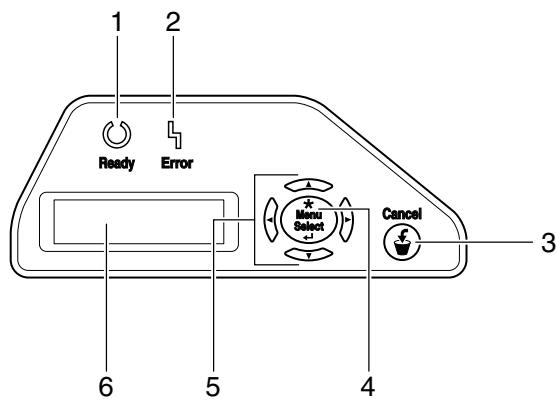
natural_image
Technical line drawing of a printer or printer with a magnified inset showing a switch (no text or symbols present)
Rappel
natural_image
Diagram of a printer's internal structure showing internal components and a paper feeding mechanism (no text or labels)natural_image
Illustration of a hand operating a printer with mechanical components (no text or symbols visible)flowchart
graph TD
    A["Block VBCD"] --> B["Arrow to Block"]
    C["Block VBCD"] --> D["Arrow to Block"]
natural_image
Line drawing of a hand inserting a component into a rack-mounted device (no text or symbols)natural_image
Line drawing of hands installing or adjusting a file into a rack (no text or symbols visible)natural_image
Diagram of a mechanical device with internal components and an arrow indicating motion (no text or symbols present)natural_image
Illustration of a hand operating a printer into a rack, showing internal components and wiring (no text or symbols)natural_image
Technical line drawing of two mechanical assembly steps showing internal components and mounting brackets (no text or symbols)
...
Remarque
natural_image
Illustration of a hand inserting a component into a device casing, with no visible text or symbolsnatural_image
Diagram of a printer internal structure showing internal components and a hand holding a tray (no text or labels visible)natural_image
Illustration of a computer tower with hands installing or adjusting the internal components (no text or symbols visible)natural_image
Technical line drawing of a cylindrical mechanical component (no text or symbols)natural_image
Illustration of a hand holding a rectangular electronic device with bidirectional arrows indicating rotation (no text or symbols)natural_image
Diagram of a computer tower with an open drive and internal components, showing hand placement and zoomed-in detail (no text or symbols)natural_image
Diagram of an open industrial machine with internal components and a curved arrow indicating motion (no text or symbols present)
...
Remarque
natural_image
Line drawing of a printer or scanner device with internal components and a directional arrow indicating motion (no text or symbols present)natural_image
Diagram of a hand inserting a component into a device panel (no text or symbols visible)natural_image
Diagram showing a mechanical component with an upward arrow pointing to a rectangular box (no text or symbols present)natural_image
Mechanical assembly diagram showing hands operating a component with a hatched section (no text or symbols)natural_image
Technical line drawing of a mechanical assembly with no visible text or symbolsnatural_image
Diagram of a hand inserting a component into a machine, showing a curved arrow indicating rotation (no text or symbols present)natural_image
Illustration of a hand holding a mechanical component with an upward arrow indicating motion (no text or symbols present)natural_image
Illustration of a hand holding a mechanical component with an arrow indicating rotation (no text or symbols present)natural_image
Diagram of a hand holding a spring attached to a mechanical component, with a downward arrow indicating force or direction (no text or symbols present)natural_image
Illustration of a hand pressing a mechanical component with a black arrow indicating force (no text or symbols present)natural_image
Illustration of a hand inserting a component into a device (no text or symbols visible)natural_image
Line drawing of a hand holding a small electronic component inside a housing (no text or symbols)natural_image
Diagram of an open industrial machine with internal components and a curved arrow indicating motion (no text or symbols present)natural_image
Technical line drawing of a printer internal structure with no visible text or symbolsnatural_image
Technical line drawing of an open industrial machine with internal compartments and a scroll tray (no text or symbols)natural_image
Technical line drawing of an open industrial machine with internal compartments and a roller stack (no text or symbols)natural_image
Diagram of an open computer chassis showing internal components and a curved arrow indicating a process (no text or symbols present)
ATTENTION
natural_image
Line drawing of a hand cleaning a stack of paper sheets from a computer tower (no text or symbols)
Rappel

Rappel
natural_image
Illustration of a hand inserting a device into a rack, showing internal components and mounting brackets (no text or symbols)
Rappel
natural_image
Diagram of a hand inserting a component into a device casing, showing internal components and a directional arrow (no text or symbols)natural_image
Diagram of a printer internal structure showing internal components and a tray with buttons (no text or symbols visible)natural_image
Diagram of a mechanical assembly with internal components and an arrow indicating direction (no text or symbols)natural_image
Technical line drawing of a multi-compartment printer or scanner device with no visible text or symbolsnatural_image
Line drawing of a hand inserting a device into a machine (no text or symbols)natural_image
Illustration of a hand pouring granular material into a container (no text or symbols)
natural_image
Technical line drawing of a mechanical device with a clamping mechanism (no text or symbols)natural_image
Diagram of a mechanical device with internal components and directional arrows indicating movement (no text or symbols)natural_image
Diagram of a printer internal structure showing internal components and a directional arrow (no text or symbols)natural_image
Diagram of a printer or printer being inserted into a paper holder, showing mechanical components and a hand adjusting the cover (no text or symbols present)natural_image
Diagram of a printer's internal structure showing paper feed, paper tray, and printer handle (no text or labels)natural_image
Technical line drawing of a mechanical assembly with no visible text or symbolsnatural_image
Technical line drawing of a mechanical assembly with no visible text or symbolsnatural_image
Diagram of a server rack with an arrow indicating a component being inserted (no text or symbols present)natural_image
Technical line drawing of a server rack with an arrow indicating a component (no text or symbols present)natural_image
Technical line drawing of a server rack with an internal component and directional arrow (no text or symbols)natural_image
Diagram of a mechanical device with internal components and an arrow indicating motion (no text or symbols present)natural_image
Diagram of a mechanical device with internal components and an arrow indicating a process (no text or symbols present)natural_image
Technical line drawing of a printer or printer with paper being inserted, showing internal components and no text or symbols.natural_image
Technical line drawing of a printer internal structure showing internal components and paper feed (no text or symbols)natural_image
Illustration of a printer's internal structure with a hand adjusting the panel (no text or symbols visible)natural_image
Technical line drawing of a mechanical device with an arrow indicating a component (no text or symbols present)
ATTENTION
natural_image
Line drawing of a printer or scanner device with internal components and a directional arrow indicating movement (no text or symbols present)natural_image
Technical line drawing of a mechanical component with arrows indicating motion or force (no text or symbols)natural_image
Technical line drawing of a mechanical component with a highlighted section (no text or symbols)natural_image
Line drawing of a dam structure with water flowing through it (no text or symbols)natural_image
Illustration of a hand inserting a card into a folder (no text or symbols)natural_image
Technical line drawing of a printer or scanner device with no visible text or symbolsnatural_image
Illustration of hands using a tool to adjust or install a component, with arrows indicating direction (no text or symbols present)natural_image
Diagram of a hand inserting a component into an open device, showing a curved arrow indicating rotation (no text or symbols present)natural_image
Illustration of hands using a machine to press or install a component with arrows indicating motion (no text or symbols)natural_image
Illustration of a hand inserting a card into an open file (no text or symbols visible)natural_image
Illustration of a hand using a tool to adjust or install a component, with arrows indicating motion (no text or symbols present)natural_image
Diagram of a hand inserting a device into a machine casing, showing internal components and a curved arrow indicating rotation (no text or symbols present)natural_image
Technical line drawing of a printer or scanner device with no visible text or symbolsnatural_image
Diagram of a hand inserting a cable into a mechanical device component (no text or symbols visible)natural_image
Technical diagram of a mechanical assembly with no visible text or symbolsnatural_image
Technical line drawing of a printer or scanner device with no visible text or symbolsnatural_image
Illustration of hands using a tool to adjust or install a mechanical component, with no visible text or symbols.natural_image
Illustration of a hand adjusting a door panel with arrows indicating motion (no text or symbols)natural_image
Diagram of a hand inserting a component into an open device, showing a curved arrow indicating rotation (no text or symbols present)natural_image
Line drawing of a hand inserting a card into a printer (no text or symbols)natural_image
Illustration of a hand cleaning a mechanical component with arrows indicating direction (no text or symbols)natural_image
Line drawing of a hand operating a mechanical device with no visible text or symbolsnatural_image
Diagram of a mechanical component with an arrow indicating rotational motion (no text or symbols)natural_image
Illustration of a hand inserting a component into a device housing (no text or symbols visible)natural_image
Illustration of a hand inserting a component into a device (no text or symbols visible)natural_image
Line drawing of a hand holding a small electronic component inside a mechanical housing (no text or symbols)natural_image
Illustration of a hand operating a mechanical device with no visible text or symbols19 Fermez la porte frontale.
| Default Paper Size | = A4 |
| Paper Tray | = Auto |
| Output Tray | = Elevate Tray |
| Binding Position | = Left Binding |
| Double-Sided | = Off |
| Staple | = Off |
| Hole-Punch | = Off |
| Orientation | = Portrait |
| # of Sets | = 1 |
| No Matching Paper in Tray Setting | |
| = Stop Printing (Tray Fixed) | |
| Spool Setting | = On |
| Convert | = Off |
| PDL Setting | = Auto |
Installed
| Printer HDD | = | Installed |
| Printer Memory | = | 512 [ MByte ] |
Printer Information
Installed Tray
| Tray 1 | = A4 |
| Tray 2 | = A4 |
| Tray 3 | = A3 |
| Tray 4 | = None |
| LCT | = None |
PCL Setting
| Font Source | = 1 |
| Font Number | = 0 |
| Font Pitch | = 12.00 |
| Font Point | = 10.00 |
| Symbol Set | = PC-8, Code Page 437 |
| Line/Page | = 63 [ Line / Page ] |
| CR/LF Mapping | = Off |
Option
| Duplex Unit | = | Installed |
| Finisher | = | Available |
| Punch Unit | = | Available |
| Fold Unit | = | Not Available |
| Fax Unit | = | Available |
Firmware Version
| Printer Controller | = | 4037-3000-G00-05-000(00) |
PS Setting
| Print Reports | = | Disable |
Network
MAC Address
| MAC Address | = 00:20:6B: |
I/F Setting
| IEEE 1284 Timeout | = 60 [sec.] |
| Network Rx Timeout | = 60 [sec.] |
| USB Timeout | = 60 [sec.] |
| Parallel I/F | = ECP |
TCP/IP
| TCP/IP | = Enable |
| IP Address | = 192.168.1.20 |
| Subnet Mask | = 255.255.255.0 |
| Default Gateway | = 192.168.1.1 |
RAW Port No.
| RAW Port 0 | = 9100 |
| RAW Port 1 | = 9112 |
| RAW Port 2 | = 9113 |
| RAW Port 3 | = 9114 |
| RAW Port 4 | = 9115 |
| RAW Port 5 | = 9116 |
Netware
| Netware | = | Disable |
Appletalk
| Appletalk | = | Disable |
SMB
| SMB | = Enable |
Test Print
| Configuration |
| PCL Font List |
| PS Font List |
| Demo Page |
PCL Font List Internal Fonts
P.1
| Font | Pitch/Point | Escape Sequence | Font # | Font ID |
| Courier | Scalable | (01X(s0p10h0s0b4099T00000 | 00000 | |
| CG Times | Scalable | (01X(s1p12v0s0b4101T00001 | 00001 | |
| CG Times Bold | Scalable | (01X(s1p12v0s3b4101T00002 | 00002 | |
| CG Times Italic | Scalable | (01X(s1p12v1s0b4101T00003 | 00003 | |
| CG Times Bold Italic | Scalable | (01X(s1p12v1s3b4101T00004 | 00004 | |
| CG Omega | Scalable | (01X(s1p12v0s0b4113T00005 | 00005 | |
| CG Omega Bold | Scalable | (01X(s1p12v0s3b4113T00006 | 00006 | |
| CG Omega Italic | Scalable | (01X(s1p12v1s0b4113T00007 | 00007 | |
| CG Omega Bold Italic | Scalable | (01X(s1p12v1s3b4113T00008 | 00008 | |
| Coronet | Scalable | (01X(s1p12v1s0b4116T00009 | 00009 | |
| Clarendon Condensed | Scalable | (01X(s1p12v4s3b4140T00010 | 00010 | |
| Univers Medium | Scalable | (01X(s1p12v0s0b4148T00011 | 00011 | |
| Univers Bold | Scalable | (01X(s1p12v0s3b4148T00012 | 00012 | |
| Univers Medium Italic | Scalable | (01X(s1p12v1s0b4148T00013 | 00013 | |
| Univers Bold Italic | Scalable | (01X(s1p12v1s3b4148T00014 | 00014 | |
| Univers Med. Condensed | Scalable | (01X(s1p12v4s0b4148T00015 | 00015 | |
| Univers Bold Condensed | Scalable | (01X(s1p12v4s3b4148T00016 | 00016 | |
| Univers Med. Cond. It. | Scalable | (01X(s1p12v5s0b4148T00017 | 00017 | |
| Univers Bold Cond. It. | Scalable | (01X(s1p12v5s3b4148T00018 | 00018 | |
| Antique Olive | Scalable | (01X(s1p12v0s0b4168T00019 | 00019 | |
| Antique Olive Bold | Scalable | (01X(s1p12v0s3b4168T00020 | 00020 | |
| Antique Olive Italic | Scalable | (01X(s1p12v1s0b4168T00021 | 00021 | |
| Garamond Antiqua | Scalable | (01X(s1p12v0s0b4197T00022 | 00022 | |
| Garamond Halbfett | Scalable | (01X(s1p12v0s3b4197T00023 | 00023 | |
| Garamond Kursiv | Scalable | (01X(s1p12v1s0b4197T00024 | 00024 |
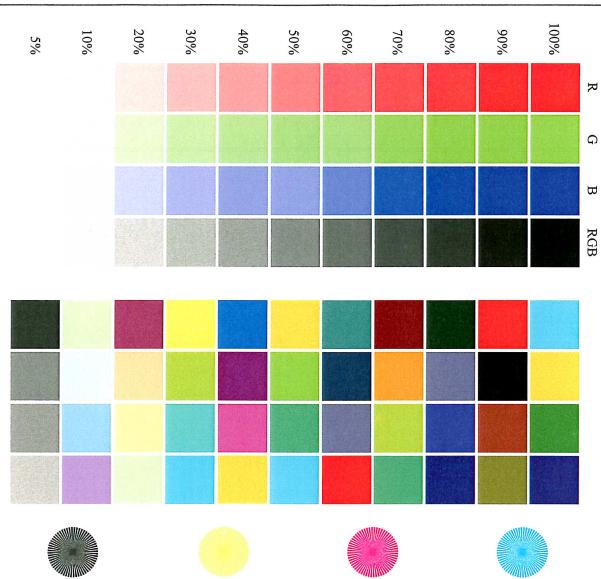
The quick brown fox jumps over the lazy dog. The quick brown fox jumps over the lazy dog. The quick brown fox jumps over the lazy dog. The quick brown fox jumps over the lazy dog. The quick brown fox jumps over the lazy dog. The quick brown fox jumps over the lazy dog. The quick brown fox jumps over the lazy dog. The quick brown fox jumps over the lazy dog. The quick brown fox jumps over the lazy dog. The quick brown fox jumps over the lazy dog. The quick brown fox jumps over the lazy dog.
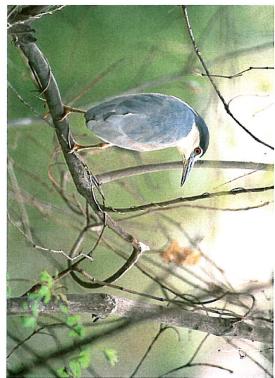
natural_image
A bird perched on a branch with green foliage in the background (no text or symbols visible)Test Page
10.5 Glossaire
Désinstallation .....2-19, 2-25
Disposition 3-91
Dos 3-23, 3-60
E
impression ...... 3-20, 3-52, 9-22
Espace requis ....1-22
Ethernet 1-44
F
Fil de charge
Impression SMB .....2-30, 2-38
Imprimer les rapports .....4-25
Incident 8-3
Informations relatives
Installation ....2-7, ....2-21, 3-10, ....3-48, 3-103
Kit de perforation 1-34
L
Layout 3-82
LCT 5-19, 8-11
Macintosh 2-21, 2-30
Magasin 1 .... 5-11, 8-8
Magasin 2 .... 5-16, 8-9
Magasin 3 .... 5-16, 8-10
Magasin 4 .... 5-16, 8-10
Magasin papier ....3-12, ....4-10, 4-24
Marge 3-16, 3-57
FS-603 1-34, 5-27, 8-23
N
Connection 2-37, 9-3
Perforation 3-17, 3-59
Perforer 5-29