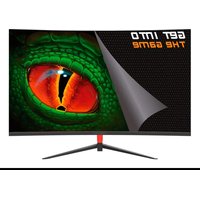
XGM49UW5K - Monitor KeepOut - Free user manual and instructions
Find the device manual for free XGM49UW5K KeepOut in PDF.


Pick your language and provide your email: we'll send you a specifically translated version.
| Product type | Monitor |
| Brand | KeepOut |
| Model | XGM49UW5K |
| Screen size | 49 inches (124.5 cm) curved |
| Resolution | 5120 x 1440 pixels (dual WQHD+) |
| Refresh rate | 144 Hz |
| Response time | 1 ms (MPRT) |
| Panel type | VA |
| Brightness | 450 cd/m² |
| Contrast | 3000:1 static |
| Viewing angle | 178° / 178° |
| Connectivity | 2x HDMI 2.1, 2x DisplayPort 1.4, 1x USB-C (90W PD), 4x USB-A 3.0, headphone jack |
| Built-in speakers | 2 x 5 W |
| VESA mount | Yes, 100 x 100 mm |
| Adjustments | Tilt, swivel, height (130 mm) |
| Dimensions (with stand) | 119.5 x 56.2 x 28.1 cm |
| Weight (with stand) | 12.8 kg |
| Power consumption (typical) | 65 W |
| Power supply | Internal power adapter, 100-240 V |
| Key features | Picture-in-Picture mode, Integrated KVM, FreeSync Premium Pro, HDR400 |
| Maintenance and cleaning | Wipe with a soft, dry cloth. Do not use abrasive products or solvents. |
| Safety | Do not expose to moisture or extreme temperatures. Use a grounded power outlet. |
| Spare parts and repairability | Contact KeepOut after-sales service. Repairability index: 8.2/10. |
| General information | 2-year warranty. Made in China. Energy rating: F. |
Frequently Asked Questions - XGM49UW5K KeepOut
How do I connect my computer to the KeepOut XGM49UW5K monitor?
Use a DisplayPort, HDMI, or USB-C cable depending on the available ports on your computer. The monitor automatically detects the source. For optimal resolution, prefer DisplayPort or USB-C.
What is the maximum resolution I can use?
The native resolution is 5120 x 1440 pixels at 144 Hz. Make sure your graphics card supports this resolution. For 4K sources, the monitor displays at 2560 x 1440.
How do I activate Picture-in-Picture (PIP) mode?
Press the menu button, go to 'PIP/PBP' and select 'PIP'. You can choose the size and position of the secondary window.
What to do if the screen remains black?
Check that the power cable is plugged in, the monitor is on (blue indicator), and the input source matches the one being used. Test with another cable or another device.
How to clean the screen without damaging it?
Turn off the monitor and unplug it. Use a slightly damp microfiber cloth (distilled water). Wipe gently without pressing. Never use chemical cleaners.
Does the monitor support wall mounting?
Yes, it is VESA 100 x 100 mm compatible. Use a wall mount kit suitable for the weight (12.8 kg with stand, approximately 11 kg without stand).
How to adjust the height and tilt?
The stand allows height adjustment (up to 130 mm), tilt from -5° to +20°, and left/right rotation. Gently pull or push on the top frame for tilt.
Why is the refresh rate limited to 60 Hz?
Check your system display settings. In Windows, go to Settings > Display > Advanced display settings and select 144 Hz. Make sure you are using a quality cable (DisplayPort 1.4 or HDMI 2.1).
How to save energy with this monitor?
Activate Eco mode via the OSD menu. The monitor automatically goes to sleep after a period of inactivity (adjustable). Typical power consumption is 65 W, reduced to 0.5 W in standby.
Where to find spare parts if needed?
Contact KeepOut support via the official website. For cables, use standard models (HDMI, DP, USB-C). For internal components, call an authorized repairer.
User questions about XGM49UW5K KeepOut
0 question about this device. Answer the ones you know or ask your own.
Ask a new question about this device
No questions yet. Be the first to ask one.
Download the instructions for your Monitor in PDF format for free! Find your manual XGM49UW5K - KeepOut and take your electronic device back in hand. On this page are published all the documents necessary for the use of your device. XGM49UW5K by KeepOut.
USER MANUAL XGM49UW5K KeepOut
Manual assistant
Powered by Anthropic
Waiting for your message
Product information
Brand : KeepOut
Model : XGM49UW5K
Category : Monitor