
5GB72290IN - Cooker BLAUPUNKT - Free user manual and instructions
Find the device manual for free 5GB72290IN BLAUPUNKT in PDF.


| Product type | Freestanding gas/electric range |
| Brand | Blaupunkt |
| Model | 5GB72290IN |
| Dimensions (H x W x D) | 85 x 60 x 60 cm |
| Net weight | 55 kg |
| Power supply | Gas (butane/propane) and electric 220-240 V ~ 50 Hz |
| Number of burners | 5 (including 1 triple crown) |
| Oven type | Multifunction electric oven with convection |
| Oven capacity | 75 liters |
| Cooking functions | Convection, natural convection, grill, top/bottom heat, defrost |
| Oven light | Yes, with halogen bulb |
| Oven door | Cool touch glass, removable for cleaning |
| Ignition | Built-in electronic (push-button) |
| Safety | Thermocouple on each burner, child safety, automatic oven shut-off |
| Cleaning and maintenance | Easy-clean enamel walls, removable door |
| Repairability index | 8,2/10 |
| Availability of spare parts | Yes, via Blaupunkt after-sales service for 10 years |
| Included accessories | 1 grid, 1 drip tray, 2 baking sheets |
| Energy class (oven) | A (scale from A+++ to D) |
| Noise level | 48 dB (A) |
Frequently Asked Questions - 5GB72290IN BLAUPUNKT
User questions about 5GB72290IN BLAUPUNKT
0 question about this device. Answer the ones you know or ask your own.
Ask a new question about this device
Download the instructions for your Cooker in PDF format for free! Find your manual 5GB72290IN - BLAUPUNKT and take your electronic device back in hand. On this page are published all the documents necessary for the use of your device. 5GB72290IN by BLAUPUNKT.
USER MANUAL 5GB72290IN BLAUPUNKT

Attention

Attention

Attention

Attention


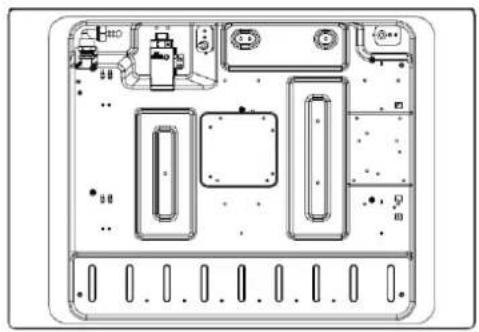
Bottom view

24 Safety Instructions 25 Installation 26 Child and People Safety 27 During Use 29 Cleaning and Service 29 Environmental Information
Instructions for use and maintenance
30 Description of the appliance 31 How to Use the appliance 33 Safety and Energy saving advice 34 Cleaning and Maintenance
Technical instructions
36 Using instructions 37 Positioning 38 Installing the appliance 39 Gas Connection 40 Gas Specification 41 Electrical Connection 42 Gas adjustment 43 Trouble shooting
Safety Instructions
■ Please take the time to read this Instruction Manual before installing or using the appliance. ■ This instruction booklet must be kept with the appliance for any future reference.
If the appliance is sold or transferred to another person, ensure the booklet is passed on to the new user.
■ The manufacturer declines any liability should these safety measures not be observed. ■ The following marks are made to be easily understood so that you can prevent any accident caused by misuse in advance, and use the appliance more conveniently. - Read the following contents thoroughly and ensure you understand them.
 | Danger/Warning | Neglect of this mark may result in severe personal injury or death. |
 | Caution | Neglect of this mark may result in minor personal injury or property damage. |
The following marks are used in the Instruction Manual as follows:


Caution
No Fire Tool

No Access

Must Do

Danger
■ If gas seems to leak, take the actions as follow:
- Do not turn on the light.
- Do not switch on/off any electrical appliance and do not touch any electric plug.
- Do not use a telephone.
1 Stop using the product and close the middle valve. 2 Open the window to ventilate. 3 Contact our service centre by using a phone outside.
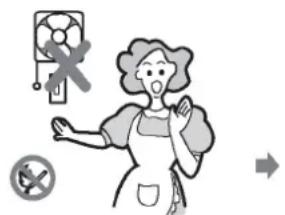
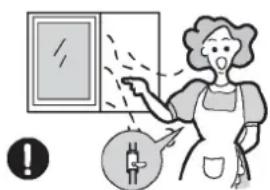


* The fuel gas contains mercaptan, so that you can smell the gas leak (smell of rotten garlic or egg) even where only 1/1000 of the gas is in the air.

Warning
■ This appliance shall be installed in accordance with regulations in force and only used in a well ventilated space.

■ Prior to installation, ensure that the gas and electrical supply complies with the type stated on the rating plate.

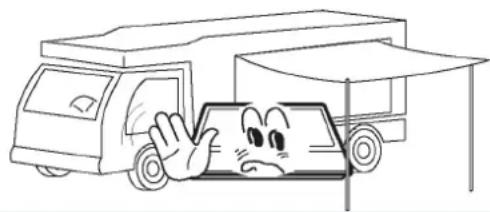
■ Where this appliance is installed in marine craft or in caravans, it should not be used as a space heater.
The gas pipe and electrical cable must be installed in such a way that they do not touch any parts of the appliance.


Caution
This appliance should be installed by a qualified technician or installer. The adjustment conditions for this appliance are stated on the label or data plate. Remove all packaging before using the appliance. After unpacking the appliance, make sure the product is not damaged and that the connection cord is in perfect condition. Otherwise, contact the dealer before installing the appliance. The adjacent furniture and all materials used in the installation must be able to withstand a minimum temperature of 85°C above the ambient temperature of the room it is located in, whilst in use. In the event of burner flames being accidentally extinguished, turn off the burner control and do not attempt to re-ignite the burner for at least one minute. The use of a gas cooking appliance results in the production of heat and moisture in the room in which it is installed. Ensure that the kitchen is well ventilated: keep natural ventilation holes open or install a mechanical ventilation device (mechanical extractor hood). Prolonged intensive use of the appliance may call for additional ventilation, for example opening of a window, or more effective ventilation, for example increasing the level of mechanical ventilation where present.

Warning
Do not allow children to play near or with the appliance. The appliance gets hot when it is in use. Children should be kept away until it has cooled.


Caution
This appliance is designed to be operated by adults. Children can also injure themselves by pulling pans or pots off the appliance. This appliance is not intended for use by children or other persons whose physical, sensory or mental capabilities or lack of experience and knowledge prevents them from using the appliance safely without supervision or instruction by a responsible person to ensure that they can use the appliance safely.
Warning
Only use the appliance for preparing food.

Do not modify the appliance. The burner panel is not designed to operate from an external timer or separate remote control system.

The use of a gas cooking appliance results in the production of heat and moisture in the room in which it is installed. Ensure that the kitchen is well ventilated: keep natural ventilation holes open or install a mechanical ventilation device (mechanical extractor hood).

Do not use this appliance if it comes in contact with water. Do not operate this appliance with wet hands.

The heating and cooking surfaces of the appliance become hot when they are in use, take all due precautions.
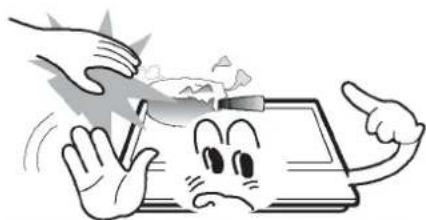
Do not use large cloths, tea towels or similar as the ends could touch the flames and catch fire.

Never leave the appliance unattended when cooking.

■ Unstable or misshapen pans should not be used on the appliance as they can cause an accident by tipping or spillage.

■ Do not use or flammable materials in the storage drawer near this appliance.

■ Perishable food, plastic items and aerosols may be affected by heat and should not stored above or below the appliance.
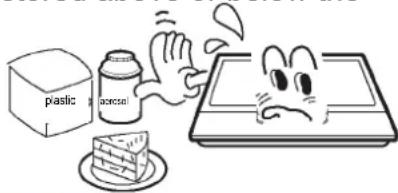
■ Do not spray aerosols in the vicinity of this appliance while it is in operation.

■ Ensure the control knobs are in the ‘●’ position when not in use.


Caution
■ This appliance is intended for domestic cooking only. It is not designed for commercial or industrial purposes. ■ Prolonged intensive use of the appliance may call for additional ventilation, for example opening of a window, or increasing the level of mechanical ventilation where present. ■ Use heat-resistant pot holders or gloves when handling hot pots and pans. ■ Do not let pot holders come near open flames when lifting cookware. ■ Take care not to let pot holders or gloves get damp or wet, as this causes heat to transfer through the material quicker with the risk of burning yourself. ■ Only ever use the burners after placing pots and pans on them. Do not heat up any empty pots or pans. ■ Never use plastic or aluminium foil dishes on the appliance. ■ When using other electrical appliances, ensure the cable does not come into contact with the appliance surfaces of the cooking appliance. ■ If you have any mechanical parts eg. an artificial heart in your body, consult a doctor before using the appliance. ■ Do not use a tea towel or similar materials in place of a pot holder. Such cloths can catch fire on a hot burner. ■ When using glass cookware, make sure it is designed for top plate cooking. If the surface is made of glass-cracked, switch off the appliance to avoid defeat electrocution. ■ To minimise the possibility of burns, ignition of flammable materials and spillage, turn cookware handles toward the side or center of the top plate without extending over adjacent burners. ■ Always turn burner controls off before removing cookware. ■ Carefully watch foods being fried at a high flame setting. ■ Always heat fat slowly and watch as it heats. ■ Foods for frying should be as dry as possible. Frost on frozen foods or moisture on fresh foods can cause hot fat to bubble up and over the sides of the pan. ■ Never try to move a pan of hot fat, especially a deep fat fryer. Wait until the fat is completely cool.

Warning
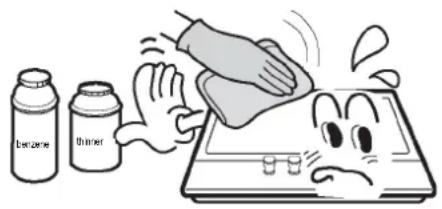
■ Never use abrasive or caustic cleaning agents.
■ This appliance should only be repaired or serviced by an authorised Service Engineer and only genuine approved spare parts should be used.


Caution
■ Before attempting to clean the appliance, it should be disconnected from the mains and cooled. ■ You should not use a steam jet or any other high pressure cleaning equipment to clean the appliance.
Environmental Information
After installation, please dispose of the packaging with due regard to safety and the environment. When disposing of an old appliance, make it unusable by cutting off the cable.


Correct Disposal of This Product (Waste Electrical & Electronic Equipment)
This marking shown on the product or its literature indicates that it should not be disposed with other household wastes at the end of its working life. To prevent possible harm to the environment or human health from uncontrolled waste disposal, please separate this from other types of wastes and recycle it responsibly to promote the sustainable reuse of material resources. Household users should contact either the retailer where they purchased this product, or their local government office, for details of where and how they can take this item for environmentally safe recycling. Business users should contact their supplier and check the terms and conditions of the purchase contract. This product should not be mixed with other commercial wastes for disposal.
| Top Plate | Dimension (W*D*H) | Ignition device | Gas Connection | Electric supply | Burner Feature | ΣQn |
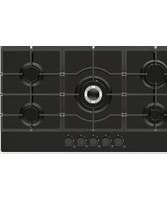
| Glass | 750*520*90 | Continuous Ignition Type | G1/2 thread | 220-240Vac, 50Hz-60Hz, 2W | Rapid (1), Semi-rapid(2), Auxiliary (1), Triple-Crown(1) | 11.1 kW |
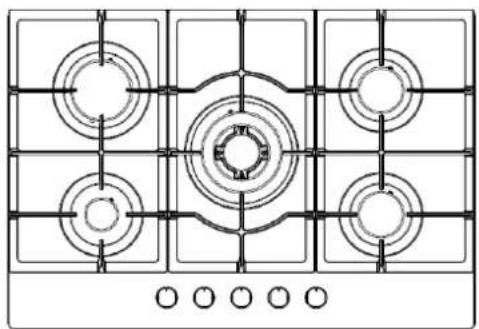
Description of the appliance
Accessories
Bracket (4)
Sponge (4)
Screw (4)
Injector (5)
Gas-pipe bend (1)
Instruction Manual (1)
How to Use the appliance
The following symbols will appear on the control panel, next to each control handle:
- Black circle: gas off
▲ Large flame: maximum setting
▲ Small flame: minimum setting

■ The minimum setting is at the end of the anti-clockwise rotation of the control handle. ■ All operation positions must be selected between the maximum and minimum position. ■ The symbol on the control panel, next to the control handle will indicate which burner it operates.
Automatic ignition with flame failure safety device
The appliance is fitted with a flame failure safety device on each burner, which is designed to stop the flow of gas to the burner head in the event of the flame going out.
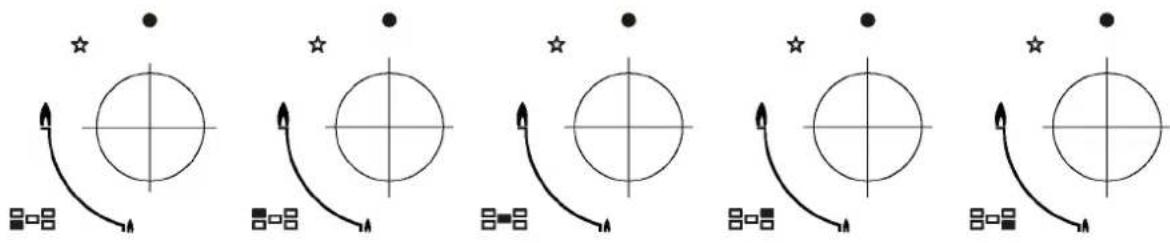
Automatic ignition with flame failure safety device
The appliance is fitted with a flame failure safety device on each burner, which is designed to stop the flow of gas to the burner head in the event of the flame going out.
To ignite a burner:
o Press in the control knob of the burner that you wish to light and turn it anti-clockwise to the maximum position. o If you keep the control knob depressed, the automatic ignition for the burner will operate. o You should hold down the control knob for 15 seconds after the flame on the burner has lit. If after 15s the burner has not lit, stop operating the device and open the compartment door and/or wait at least 1 min before attempting a further ignition of the burner. o After this 15-second interval, to regulate the flame you should continue turning the control knob anti-clockwise until the flame is at a suitable level. The operating position MUST be at a position between the maximum and minimum position. To switch the burner off, turn the control knob fully clockwise to the gas off position. o In case of power failure, the burners can be lit by carefully using a match.
Safety and Energy saving advice
- The diameter of the bottom of the pan should correspond to that of the burner.
| BURNERS | PANS | |
| min. | max. | |
| Triple-Crown | 200mm | 240mm |
| Rapid | 200mm | 240mm |
| Semi-Rapid | 160mm | 180mm |
| Auxiliary | 120mm | 160mm |

■ Do not use cookware that overlaps the edge of the burner.
| NO | YES | |||
 | Do not use small diameter cookware on large burners.The flame should never come up the sides of the cookware. | Always use cookware that is suitable for each burner, to avoid wasting gas and discolouring the cookware. |  | |
 | Avoid cooking without a lid or with the lid half off-as this wastes energy | Place a lid on the cookware. |  | |
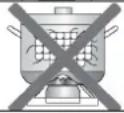 | Do not use a pan with a convex or concave bottom. | Only use pots, saucepans and frying pans with a thick, flat bottom. | 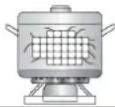 | |
 | Do not place cookware on one side of a burner, as it could tip over. | Always place the cookware right over the burners, not to one side. |  | |
| Do not use cookware with a large diameter on the burners near the controls, which when placed on the middle of the burner may touch the controls or be so close to them that they increase the temperature in this area and may cause damage. | ||||
 | Never place cookware directly on top of the burner. | Place the cookware on top of the trivet. | ||
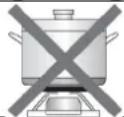 | Do not place anything, eg.flame tamer, asbestos mat, between pan and pan support as serious damage to the appliance may result. | |||
 | Do not use excessive weight and do not hit the cooktop with heavy objects. | Handle cookware carefully when they are on the burner. | ||

■ It is not recommended to use roasting pans, frying pans or grill stones heated simultaneously on several burners because the resulting heat build-up may damage the appliance. ■ Do not touch the top plate and trivet whilst in use for a certain period after use. ■ As soon as a liquid starts boiling, turn down the flame so that it will barely keep the liquid simmering.

Cleaning and Maintenance

■ Cleaning operations must only be carried out when the appliance is completely cool. ■ The appliance should be disconnected from your mains supply before commencing any cleaning process. ■ Clean the appliance regularly, preferably after each use. ■ Abrasive cleaners or sharp objects will damage the appliance surface; you should clean it using water and a little washing up liquid.
| Usable | Unusable |
 Soft cloth Soft cloth Neutral Detergent Neutral Detergent |  Nylon Brush Nylon Brush  Metal Brush[24ZD] Edible Oil Metal Brush[24ZD] Edible Oil  Acidic/Alkali Detergent[STWK] Abrasive Acidic/Alkali Detergent[STWK] Abrasive  Thinner/Benz Thinner/Benz |
Pan support, Control handles
■ Take off the Pan support. ■ Clean these and the control handles with a damp cloth, washing up liquid and warm water. For stubborn soiling, soak beforehand. ■ Dry everything with a clean soft cloth.
Top plate
■ Regularly wipe over the top plate using a soft cloth well wrung-out in warm water to which a little washing up liquid has been added. ■ Dry the top plate thoroughly after cleaning. ■ Thoroughly remove salty foods or liquids from the hob as soon as possible to avoid the risk of corrosion. ■ Stainless steel parts of the appliance may become discoloured over time. This is normal because of the high temperatures. Each time the appliance is used these parts should be cleaned with a product that is suitable for stainless steel.
BURNERS
■ Remove the burner lids and Flame Spreaders by pulling them upwards and away from the top plate. ■ Soak them in hot water and a little detergent or washing up liquid. ■ After cleaning and washing them, wipe and dry them carefully. Make sure that the flame holes are clean and completely dry. ■ Wipe the fixed parts of the burner cup with a damp cloth and dry afterwards. ■ Gently wipe the ignition device and flame supervision device with a well wrung-out cloth and wipe dry with a clean cloth. ■ Before placing the burners back on the top plate, make sure that the injector is not blocked.
■ Re-assemble the Auxiliary, Semi-Rapid, Rapid and Triple-Crown burners as follows :


- Place the flame spreader (4) on to the burner cup (5) so that the ignition device and the flame supervision device extend through their respective holes in the flame spreader. The flame spreader must click into place correctly.
- Position the burner lid (1,2,3) onto the flame spreader (4) so that the retaining pins fit into their respective recesses.

Replace parts in the correct order after cleaning.
- Do not mix up the top and bottom.
- The locating pins must fit exactly into the notches.

Warnings
■ Do not modify this appliance. ■ This appliance must be installed by an authorized technician or installer. ■ Prior to installation, ensure that the local distribution conditions (nature of the gas and gas pressure) and the adjustment of the appliance are compatible. ■ The adjustment conditions for this appliance are stated on the label (or data plate). ■ This appliance is not connected to a combustion products evacuation device. It should be installed and connected in accordance with current installation regulations. Particular attention should be given to the relevant requirements regarding ventilation. ■ Before installing, turn off the gas and electricity supply to the appliance. ■ All appliances containing any electrical components must be earthed. ■ Ensure that the gas pipe and electrical cable are installed in such a way that they do not touch any parts of the appliance which may become hot. - Gas pipe or connector shouldn't be bent or blocked by any other appliances. - Check the dimensions of the appliance as well as the dimensions of the gap to be cut in the kitchen unit. ■ The panels located above the work surface, directly next to the appliance, must be made of non-flammable material. Both the stratified surfacing and the glue used to secure it should be heat resistant, to prevent deterioration. ■ Turn on appliance tap and light each burner. Check for a clear blue flame without yellow tipping. If burners show any abnormalities, check the following: - Burner lid on correctly - Flame spreader positioned correctly - Burner vertically aligned with injector nipple ■ A full operational test and a test for possible leakages must be carried out by the fitter after installation. ■ The flexible hose shall be fitted in such a way that it cannot come into contact with a moveable part of the housing unit and does not pass through any space susceptible of becoming congested. ■ Grease cranes produced at the factory to meet the requirement of all life hob.
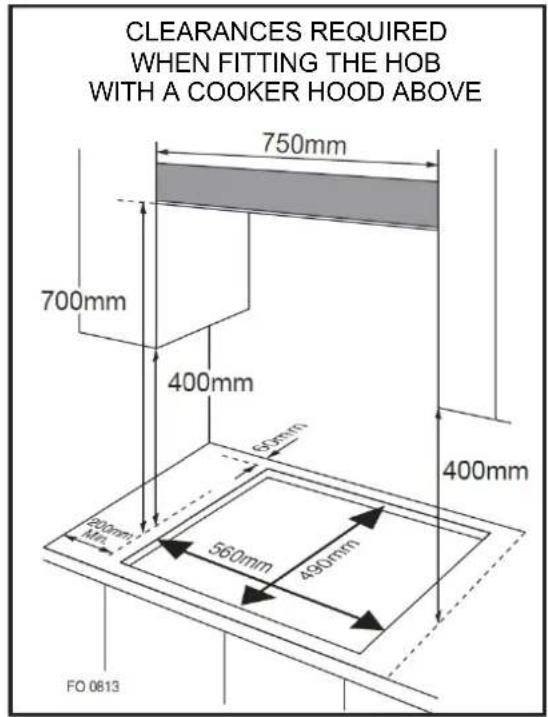
■ This appliance is to be built into a kitchen unit or 600mm worktop, providing the following minimum distances are allowed;
o The edges of the hob must be a minimum distance of 60 mm from a side or rear wall. o 700 mm between the highest point of the hob surface (including the burners) and the underside of any horizontal surface directly above it. o 400 mm between the hob surfaces, providing that the underside of the horizontal surface is in line with the outer edge of the hob. If the underside of the horizontal surface is lower than 400 mm, then it must be at least 50 mm away from the outer edges of the hob. o 50 mm clearance around the appliance and between the hob surface and any combustible materials. o You must have a gap of at least 25 mm and at most 74 mm between the underneath of the appliance and any surface that is below it.

- An oven must have forced ventilation to install a hob above it.
- Check the dimensions of the oven in the installation manual.
- The cut out size must obey the indication.
Installing the appliance
- Remove the pan supports, the burner lid, and the flame spreader, and carefully turn the appliance upside down and place it on a cushioned mat.
Take care that the ignition devices and flame supervision devices are not damaged in this operation.
- Apply the sponge provided around the edge of the appliance.
- Do not leave a gap in the sealing agent or overlap the thickness.
Sponge
The thickness of the sponge is 3 mm. The width of the sponge is 10 mm.
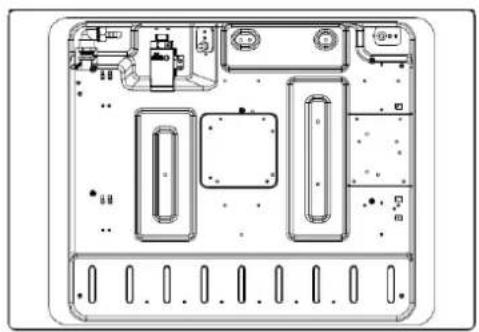
Bottom view


Do not use a silicon sealant to seal the appliance against the aperture.
This will make it difficult to remove the appliance from the aperture in future, particularly if it needs to be serviced.

- Place the bracket (B) over the holes that match the size of the screws. There is one set of screw holes in each corner of the hob (H).
Slightly tighten a screw (C) through the bracket (B) so that the bracket is attached to the hob, but so that you can still adjust the position.
- Carefully turn the hob back over and then gently lower it into the aperture hole that you have cut out.
- On the underneath of the hob, adjust the brackets into a position that is suitable for your worktop.
Then fully tighten the screws (C) to secure the hob into position.

■ This appliance must be installed and connected in accordance with installation regulations in force in the country in which the appliance is to be used. ■ This appliance is supplied to run on LPG and natural gas. Conversion for use on LPG and natural gases must only be undertaken by a qualified person.
Gas supply replacement and installation guidelines:
LPG > NG
NG > LPG

It is the law that all gas appliances are installed by competent persons in accordance with the current edition of the Gas Safety Installation and Use Regulations. It is in your interest and that of safety to ensure compliance with the law. In the UK, GASSAFE registered installers work to safe standards of practice. The hob must also be installed in accordance with the current edition of BS 6172. Failure to install the cooker correctly could invalidate the warranty, liability claims and lead to prosecution.
Gas category, gas type and destination country (for all models)
Gas category, gas type and destination country (for all models)
| Country | Type of nature gas | Type of liquefied petroleum gas(accessory)* |
| Germany | G20/20 | G30/50 |
| Austria | ||
| Switzerland | G30/29 | |
| Italy | ||
| Spain | ||
| Belgium | ||
| Great Britain | ||
| France | ||
| Luxembourg | / |
* The gas cooktop is preset to natural gas (20 mbar). It can be converted to liquefied petroleum gas (not included in delivery).
Suitable accessories can be found at www.blaupunkt-einbaugeraete.de
Gas Specification
| Gas type & pressure | Heat input and orifice size marked(mm) | |||
| Wok burner | Rapid burner | Semi-rapid | Auxiliary-rapid | |
| 3.6kW(262g/h) | 3.0kW(218g/h) | 1.75kW(127g/h) | 1.0kW(73g/h) | |
| G30 29mbar | 0,96 | 0,85 | 0,65 | 0,50 |
| G20 20mbar | 1,32 | 1,30 | 0,97 | 0,72 |
■ This appliance must be earthed. ■ This appliance is designed to be connected to a 220-240V, 50Hz-60Hz AC electricity supply. ■ The wires in the mains lead are coloured in accordance with the following code; - Green/yellow = Earth
- Blue = Neutral
- Brown = Live
The wire which is coloured green and yellow must be connected to the terminal which is marked with the letter E or by the earth symbol.

■ Take precautions on the operations and adjustments to be carried out when converting from one gas to another. ■ All work must be carried out by a qualified technician. ■ Before you begin, turn off the gas and electricity supply to the appliance.

Change the injector of the burners.
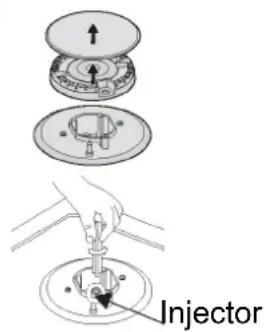
Remove the pan support, burner lid, and flame spreader.
Unscrew the injector using a 7mm box spanner and replace it with the stipulated injector for the new gas supply. Carefully reassemble all components. After injectors are replaced, it is advisable to strongly tighten the injector in place.

Adjustment of minimum level of the flame.


① Turn the taps down to minimum. ② Remove the knob from the tap and place a small bladed screwdriver in the centre of the tap shaft. ③ The correct adjustment is obtained when the flame has a length of about 3-4 mm. - For butane/propane gas, the adjusting screw must be tightly screwed in. - Refit the control knob. Make sure that the flame does not go out by quickly turning from maximum flow to minimum flow. If it does, then remove the control knob and make further adjustments to the gas flow, testing it again once the adjustment has been made. ④ Repeat this process for each one of the gas taps.

■ Do not dismantle the tap shaft: in the event of a malfunction, change the whole tap. ■ Before placing the burners back on the top, make sure that the injector is not blocked. ■ A full operational test and a test for possible leakages must be carried out after gas conversion (such as soap water or gas detector).
■ After completing conversion, a qualified technician or installer has to mark "V" on the right gas category to match with the setting on the rating plate. Remove the previous setting "V" mark.
Troubleshooting
■ Repairs should be performed by a licensed technician only. Improper repair may result in considerable danger to you and others. ■ However, some minor problems can be resolved as follows:
| Problem | Probable cause | Solution |
| Not ignited | No Spark. | Check the electricity supply. |
| The burner lid is badly assembled. | Assemble the lid correctly. | |
| The gas supply is closed. | Open the gas supply completely. | |
| Badly ignited | The gas supply is not completely open. | Open the gas supply completely. |
| The burner lid is badly assembled. | Assemble the lid correctly. | |
| The ignition plug is contaminated with alien substance. | Wipe alien substance with a dry cloth. | |
| The burners are wet. | Dry the burners lids carefully. | |
| The holes in the flame spreader are clogged. | Clean the flame spreader. | |
| Noise made when combusted and ignited | The burner lid is badly assembled. | Assemble the burner lid correctly. |
| Flame goes out when in use. | The flame supervision device is contaminated with alien substance. | Clean the flame supervision device. |
| Product being cooked has boiled over and extinguished the flame. | Turn off burner knob. Wait one minute and reignite zone. | |
| A strong draught may have blown the flame out. | Please turn off zone and check cooking area for draught such as open windows. Wait one minute and reignite zone | |
| Yellow Flame | The holes in the flame spreader are clogged. | Clean the flame spreader. |
| Different gas is used. | Check the gas used. | |
| Unstable Flame | The burner lid is badly assembled. | Assemble the burner lid correctly. |
| Gas Smell | Gas leakage | Stop using the product and close the middle valve. Open the window to ventilate. Contact our service centre by using a phone outside. |

■ If the problem is not solved, please contact the customer care centre.
Technical instructions

Warning

Warning

Warning

Warning


Bottom view


Caution

Caution
During use
Caution


Sealant


Warning

Warning

Warning

Warning


Sealant


OBS

OBS
During use

OBS

OBS


Sealant


Attention

Attention

Attention

Attention


Gasket




- ATTENTION
- INSTRUCTIONS FOR USE AND MAINTENANCE
- TECHNICAL INSTRUCTIONS
- SAFETY INSTRUCTIONS
- THE FOLLOWING MARKS ARE USED IN THE INSTRUCTION MANUAL AS FOLLOWS
- DANGER
- IF GAS SEEMS TO LEAK, TAKE THE ACTIONS AS FOLLOW
- WARNING
- CAUTION
- ENVIRONMENTAL INFORMATION
- CORRECT DISPOSAL OF THIS PRODUCT (WASTE ELECTRICAL & ELECTRONIC EQUIPMENT)
- DESCRIPTION OF THE APPLIANCE
- ACCESSORIES
- HOW TO USE THE APPLIANCE
- AUTOMATIC IGNITION WITH FLAME FAILURE SAFETY DEVICE
- SAFETY AND ENERGY SAVING ADVICE
- CLEANING AND MAINTENANCE
- PAN SUPPORT, CONTROL HANDLES
- TOP PLATE
- BURNERS
- RE-ASSEMBLE THE AUXILIARY, SEMI-RAPID, RAPID AND TRIPLE-CROWN BURNERS AS FOLLOWS
- WARNINGS
- INSTALLING THE APPLIANCE
- SPONGE
- GAS SPECIFICATION
- CHANGE THE INJECTOR OF THE BURNERS
- ADJUSTMENT OF MINIMUM LEVEL OF THE FLAME
- TROUBLESHOOTING
- DURING USE
- SEALANT
- OBS
- GASKET
Brand : BLAUPUNKT
Model : 5GB72290IN
Category : Cooker