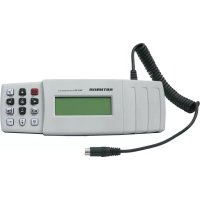
FFB 100 - Remote control KATHREIN - Free user manual and instructions
Find the device manual for free FFB 100 KATHREIN in PDF.


Pick your language and provide your email: we'll send you a specifically translated version.
| Product Type | Universal Remote Control |
| Brand | Kathrein |
| Model | FFB 100 |
| Dimensions (approx.) | 20 x 5 x 2 cm |
| Weight (with batteries) | Approx. 100 g |
| Power Supply | 2 x AAA batteries (not included) |
| Battery Life | Up to 6 months typical use |
| Compatible Devices | TV, STB, DVD, audio systems (most brands) |
| Control Type | Infrared (IR) |
| Keypad Layout | Standard with numeric keys, volume, channel, navigation |
| Programming Method | Auto-search or manual code entry |
| Learning Function | Yes (can learn IR commands from original remotes) |
| Macro Support | Not supported |
| Backlight | No |
| Indicator Lights | Yes (LED for battery/operation) |
| Range | Up to 10 meters (line of sight) |
| Material | Plastic (ABS) |
| Color | Black |
| Cleaning & Maintenance | Wipe with a soft, dry cloth. Avoid liquids. |
| Safety | Keep away from water and extreme temperatures. Remove batteries if not used for long periods. |
| Spare Parts / Repairability | Only replaceable batteries. No user-serviceable parts. |
Frequently Asked Questions - FFB 100 KATHREIN
How do I set up the Kathrein FFB 100 remote control?
Insert two AAA batteries, then follow the programming instructions in the manual. You can use auto-search or manual code entry. For most devices, the remote will automatically find the correct code.
What devices are compatible with the FFB 100?
The FFB 100 is a universal remote that works with most TVs, set-top boxes, DVD players, and audio systems. It supports many major brands like Samsung, LG, Sony, Panasonic, etc.
How do I program the remote without a code?
Use the auto-search function: press and hold the device button (e.g., TV) until the LED blinks, then repeatedly press the power button until the device turns off. Then press OK to save.
The remote is not working. What should I check?
First, check that batteries are inserted correctly and have charge. Ensure there is a clear line of sight to the device. If still not working, try re-programming or resetting by removing batteries for 30 seconds.
Can the FFB 100 learn commands from my original remote?
Yes, it has a learning function. Place the remotes head-to-head and follow the learning procedure in the manual to copy any IR command.
How do I replace the batteries?
Open the battery compartment on the back, remove old batteries, insert new AAA batteries with correct polarity, and close the cover.
What does the blinking LED mean?
A blinking LED indicates that the remote is in programming mode or the battery is low. If it blinks rapidly, replace batteries.
How do I reset the remote to factory settings?
Remove the batteries, press any button for 10 seconds to discharge, then re-insert batteries. Alternatively, use the reset function in the menu if available.
Does the remote support macros?
No, the FFB 100 does not have macro capabilities. It can only send a single command at a time.
Is the FFB 100 backlit?
No, this model does not feature a backlight. Buttons are not illuminated.
User questions about FFB 100 KATHREIN
0 question about this device. Answer the ones you know or ask your own.
Ask a new question about this device
No questions yet. Be the first to ask one.
Download the instructions for your Remote control in PDF format for free! Find your manual FFB 100 - KATHREIN and take your electronic device back in hand. On this page are published all the documents necessary for the use of your device. FFB 100 by KATHREIN.
USER MANUAL FFB 100 KATHREIN
Manual assistant
Powered by Anthropic
Waiting for your message
Product information
Brand : KATHREIN
Model : FFB 100
Category : Remote control