
H2F HL626 X UK - Dishwasher HOTPOINT - Free user manual and instructions
Find the device manual for free H2F HL626 X UK HOTPOINT in PDF.


User questions about H2F HL626 X UK HOTPOINT
0 question about this device. Answer the ones you know or ask your own.
Ask a new question about this device
Download the instructions for your Dishwasher in PDF format for free! Find your manual H2F HL626 X UK - HOTPOINT and take your electronic device back in hand. On this page are published all the documents necessary for the use of your device. H2F HL626 X UK by HOTPOINT.
USER MANUAL H2F HL626 X UK HOTPOINT
Before using the appliance carefully read Safety Instructions guide.
CONTROL PANEL
- On-Off/Reset button with indicator light
- Program selection button with indicator light
- Half Load button with indicator light
- Rinse Aid refill indicator light
- Salt refill indicator light
- Program indicator lights
- Delay indicator light
- Delay button with indicator light
- Tablet (Tab) button with indicator light
- Start/Pause button with indicator light / Drain out

FIRST TIME USE
FILLING THE SALT RESERVOIR
The use of salt prevents the formation of LIMESCALE on the dishes and on the machine's functional components.
It is mandatory that the salt reservoir never be empty.
- It is important to set the water hardness.
The salt reservoir is located in the lower part of the dishwasher and must be filled when the SALT REFILL indicator light in the control panel is lit.
-
Remove the lower rack and unscrew the reservoir cap (anticlockwise).
-
Position the funnel (see figure) and fill the salt reservoir right up to its edge (approximately 1 kg); it is not unusual for a little water to leak out.
-
Only the first time you do this: fill the salt reservoir with water.
-
Remove the funnel and wipe any salt residue away from the opening. Make sure the cap is screwed on tightly, so that no detergent can get into the container during the wash program (this could damage the water softener beyond repair).
Whenever you need to add salt, it is mandatory to complete the procedure before the beginning of the washing cycle to avoid corrosion.
FILLING THE RINSE AID DISPENSER

Rinse aid makes dish DRYING easier. The rinse aid dispenser A should be filled when the RINSE AID REFILL indicator light ✦ in the control panel is lit.
NEVER pour the rinse aid directly into the appliance tub.
FILLING THE DETERGENT DISPENSER
To open the detergent dispenser use the opening device C. Introduce the detergent into the dry dispenser D only. Place the amount of detergent for pre-washing directly inside the tub.
The detergent dispenser automatically opens up at the right time according to the program.
If all-in-one detergents are used, we recommend using the TABLET button, because it adjusts the program so that the best washing and drying results are always achieved Usage of detergent not designed for dishwashers may cause malfunction or damage to the appliance.
WATER SOFTENING SYSTEM
Water softener automatically reduces water hardness, consequently preventing scale buildup on heater, contributing also to better cleaning efficiency. This system regenerates itself with salt, therefore it is required to refill salt container when empty.
Frequency of regeneration depends on water hardness level setting - regeneration takes place once per 6 Eco cycles with water hardness level set to 3. Regeneration process starts in final rinse and finishes in drying phase, before cycle ends.
- Single regeneration consumes: 3.5L of water;
• Takes up to 5 additional minutes for the cycle;
• Consumes below 0.005kWh of energy.
PROGRAMS TABLE
| Program Pro | Programs description | Drying phase | Available options *) | Duration of wash program (h:min)** | Water consumption (litres/cycle) | Energy consumption (kWh/cycle) | |
| 1. | ECO | Eco 50°- Eco program is suitable to clean normally soiled table-ware, that for this use, it is the most efficient program in terms of its combined energy and water consumption, and that it is used to assess compliance with the EU Ecodesign legislation. | √ | 3:35 9.5 | 0.95 | ||
| 2. | Intensive 65° - Program recommended for heavily soiled crockery, especially suitable for pans and saucepans (not to be used for delicate items). | √ | 2:40 | 18.0 1.60 | |||
| 3. | Mixed 55° - Mixed soil. For normally soiled dishes with dried food residues. | √ | 2:15 | 16.0 1.40 | |||
| 4. | Rapid 28' 50°- Program to be used for half load of lightly-soiled dishes with no dried food residues. Does not include drying phase. | - | 0:28 9.0 | 0.50 | |||
| 5. | Soak - Use to refresh crockery planned to be washed later. No detergent to be used with this program. | - | 0:12 4.7 | 0.01 | |||
ECO program data is measured under laboratory conditions according to European Standard EN 60436:2020.
Note for Test Laboratories:
For information on comparative EN testing conditions, please send an email to the following address: dw_test_support@whirlpool.com
Pre-treatment of the dishes is not needed before any of the programs.
*) Not all options can be used simultaneously.
**) Values given for programs other than the program Eco are indicative only. The actual time may vary depending on many factors such as temperature and pressure of the incoming water, room temperature, amount of detergent, quantity and type of load, load balancing, additional selected options and sensor calibration. The sensor calibration can increase program duration up to 20 min.
OPTIONS AND FUNCTIONS
Please scan the QR code on your product in order to have more detailed information.
OPTIONS can be selected directly by pressing the corresponding button (see CONTROL PANEL). If an option is not compatible with the selected program (see PROGRAMS TABLE), the corresponding LED flashes rapidly 3 times and beeps will sound. The option will not be enabled.
DELAY - It is possible to delay the start time of the program by 2, 4 or 8 hours. The DELAY function cannot be set once a program cycle has been started.
1/2 HALF LOAD - If there are not many dishes to be washed, a half load cycle may be used in order to save water, electricity and detergent. Remember to halve the amount of detergent.
TABLET (Tab)- If you use powder or liquid detergent, this option should be off.
DRAIN OUT - To stop and cancel the active cycle, the DRAIN OUT function can be used.
A long press of START/PAUSE button, will activate the DRAIN OUT function. The active program will be stopped and the water in the dishwasher will be drained out.
LOADING THE RACKS
CAPACITY: 14 standard place-settings
UPPER RACK

(loading example for the upper rack)
Load delicate and light dishes: glasses, cups, saucers, low salad bowls.
LOWER RACK

(loading example for the lower rack)
For pots, lids, plates, salad bowls, cutlery etc.. Large plates and lids should ideally be placed at the sides to avoid interferences with the spray arm.
FOLDABLE
FLAPS WITH AD-JUSTABLE POSITION

CUTLERY BASKET
The basket is equipped with top grilles for improved cutlery arrangement. The cutlery basket should be positioned only at the front of the lower rack.

Knives and other utensils with sharp edges must be placed in the cutlery basket with the points facing downwards or they must be positioned horizontally in the tip-up compartments on the upper rack.
CLEANING AND MAINTENANCE
More information in the Daily Reference Guide on website.
CLEANING THE FILTER ASSEMBLY CLEANING THE SPRAY ARMS

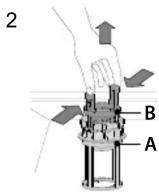


In case you find foreign objects (such as broken glass, porcelain, bones, fruit seeds etc.) please remove them carefully.
NEVER REMOVE the wash-cycle pump protection (black detail) (Fig 4).

To remove the upper spray arm, turn the plastic locking ring in a clockwise direction.

The lower spray arm may be removed by pulling it upwards.
Policies, standard documentation, ordering of spare parts and additional product information can be found by:
• Using QR code on your product.
- Visiting our website docs.hotpoint.eu and parts-selfservice.whirlpool.com
- Alternatively, contact our After-sales Service (See phone number in the warranty booklet). When contacting our After-sales Service, please state the codes provided on your product's identification plate.
The model information can be retrieved using the QR-Code reported in the energy label. The label also includes the model identifier that can be used to consult the portal of the registry at https://eprel.ec.europa.eu.

Brand : HOTPOINT
Model : H2F HL626 X UK
Category : Dishwasher