USER MANUAL SIM693WLD SMEG
1.1 General safety instructions 30
1.2 Manufacturer liability 31
1.3 Appliance purpose 31
1.4 Disposal 31
1.5 Identification plate 32
1.6 This user manual 32
1.7 How to read the user manual 32
2 Description 33
2.1 General Description 33
2.2 Available accessories 34
3 Use 35
3.1 Instructions 35
3.2 Preliminary operations 36
3.3 Using the hob 36
4 Cleaning and maintenance 47
4.1 Instructions 47
4.2 Cleaning the surfaces 47
4.3 Ordinary weekly cleaning 47
4.4 Food stains or residues 47
4.5 What to do if... 48
5 Installation 49
5.1 Electrical connection 49
5.2 Safety instructions 51
5.3 Section cut from the countertop 51
5.4 Mounting 52
1 Instructions
1.1 General safety instructions
Risk of personal injury
Risk of damaging the appliance
- Do not use abrasive or corrosive detergents (e.g. scouring powders, stain removers and pan scourers) on glass parts.
- Use wooden or plastic utensils.
- Do not seat on the appliance.
- Do not use steam jets to clean the appliance.
- Do not obstruct ventilation openings and heat dispersal slots.
- Never leave the appliance unattended during cooking operations where fats or oils could be released.
- Never leave objects on the cooking surface.
- Do not use the appliance to heat rooms for any reason.
For this appliance
- If your hob has a cookware detector, do not rely on it exclusively.
- Remove any traces of liquid from the lid (if fitted) before opening.
- Let the cooking surface cool down before closing the lid.
- If cracks or fissures form, or if the glass ceramic cooking surface breaks, turn off the appliance immediately. Disconnect the power supply and call Technical Support.
- People who have pacemakers or other similar devices fitted must make sure that the operation of these devices is not jeopardised by the inductive field, whose frequency range is between 20 and 50kHz .
- In conformity with the provisions regarding electromagnetic compatibility, the electromagnetic induction cooking hob comes under group 2 and class B (EN 55011).
1.2 Manufacturer liability
The manufacturer declines all liability for damage to persons or property caused by:
- Use of the appliance other than that specified;
- Failure to observe the provisions of the user manual;
- Tampering with any part of the appliance;
- Use of non-original spare parts.
1.3 Appliance purpose
- This appliance is intended for cooking food in the home environment. Every other use is considered improper.
- This appliance may be used by children aged at least 8 and by people of reduced physical, sensory or mental capacity, or lacking in experience in the use of electrical appliances, provided that they are supervised or instructed by adults who are responsible for their safety.
- The appliance is not designed to operate with external timers or with remote-control systems.
1.4 Disposal

This appliance must be disposed of separately from other waste (Directives 2002/95/EC, 2002/
96/EC, 2003/108/EC). The appliance does not contain substances in quantities sufficient to be considered hazardous to health and the environment, in accordance with current European directives.
To dispose of the appliance:
- Cut the power supply cable and remove it along with the plug.

Power voltage Danger of electrocution
- Disconnect the mains power supply.
- Unplug the appliance.
Instructions
- Deliver the appliance to the appropriate recycling centre for electrical and electronic equipment waste, or return it to the retailer when purchasing an equivalent product, on a one for one basis.
Our appliances are packed in non-polluting and recyclable materials.
- Deliver the packing materials to the appropriate recycling centre.

Plastic packaging Danger of suffocation
- Do not leave the packaging or any part of it unattended.
- Do not let children play with the plastic bags.
1.5 Identification plate
The identification plate bears the technical data, serial number and brand name of the appliance. Do not remove the identification plate for any reason.
1.6 This user manual
This user manual is an integral part of the appliance and must therefore be kept in its entirety and within the user's reach for the whole working life of the appliance.
Read this user manual carefully before using the appliance.
1.7 How to read the user manual
This user manual uses the following reading conventions:
Instructions

General information on this user manual, on safety and final disposal.
Description

Description of the appliance and its accessories.
Use

Information on the use of the appliance and its accessories, cooking advice.
Cleaning and maintenance

Information for proper cleaning and maintenance of the appliance.
Installation

Information for the qualified technician: Installation, operation and inspection.

Safety instructions

Information

Advice
-
Sequence of instructions for use.
-
Standalone instruction.
2 Description
2.1 General Description
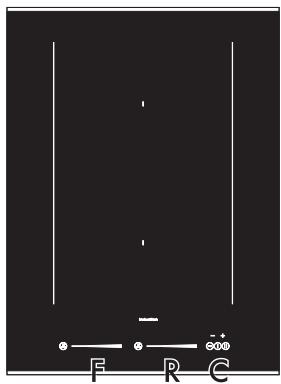
38 cm
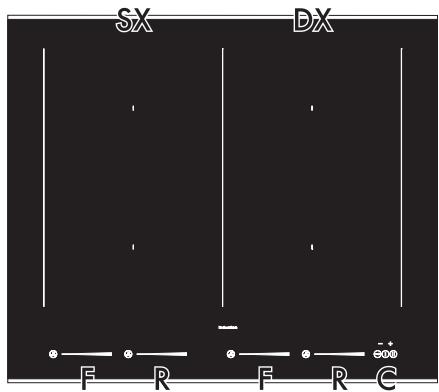
60 cm
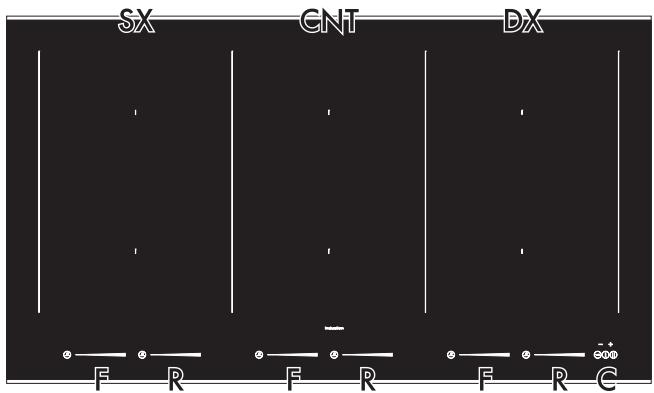
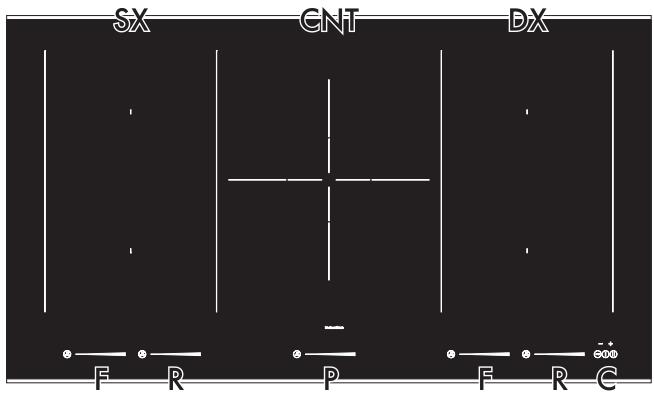
90 cm
Description
SX = Left cooking zone
CNT = Centre cooking zone
DX = Right cooking zone
F = Front plate controls
R = Rear plate controls
P = Paella plate control
C = General controls zone
Table of power draws
| Large | Plate measurements (mm) | Max. power absorbed (W)* | Power absorbed in Power function (W)* |
| F - R | 200 x 180 | 2100 | 3700 |
| P | 280 x 280 | 3700 | 5500 |
- power levels are approximate and may vary according to the pan used or the settings made.
Advantages of induction cooking

The appliance is equipped with an induction generator for each cooking zone. Each generator located under the glass ceramic cooking surface creates an electromagnetic field which induces a thermal current in the base of the pan. This means the heat is no longer transmitted from the hob to the pan but created directly inside the pan by the inductive current.
- Energy saving thanks to the direct transmission of energy to the pan (suitable magnetisable cookware is required) compared to traditional electric cooking.
- Improved safety as the energy is only transmitted to the pan placed on the hob.
-
High level of energy transmitted from the induction cooking zone to the base of the pan.
Rapid heating speed.
-
Reduced danger of burns as the cooking surface is only heated under the base of the pan; foods which overflow do not stick.
2.2 Available accessories
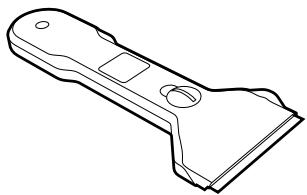
Scaper
Useful for cleaning the hob.

The accessories intended to come into contact with food are made of materials that comply with the provisions of current legislation.

Original supplied and optional accessories can be requested to Authorised Assistance Centres. Use only original accessories supplied by the manufacturer.
3 Use
3.1 Instructions

High temperature Danger of burns
- Protect your hands wearing heat-proof gloves during use.
- Do not touch or clean the hob surface during operation or when the residual heat indicator lights are still on.
- Do not put empty pans or frying pans on switched on cooking zones.
- Do not allow children younger than 8 years old to come near the appliance when in operation.
- Activate the key lock when you have children or pets which could reach the hob.
- After use the cooking zones remain hot for a certain period of time after they have been turned off. Do not touch the hob surfaces.

High temperature Danger of fire or explosion
- Do not use or leave flammable materials near the appliance or directly underneath the hob.
- Do not cook using closed tins or containers, plastic kitchenware or containers.
- Do not leave the appliance unattended during cooking operations where fats or oils could be released.
- In case you notice cracks or fissures or you cannot turn off the appliance, disconnect the power supply and contact the Assistance Centre.

Improper use Risk of damage to surfaces
- Do not use the hob if the pyrolytic cycle is taking place inside any oven installed below.
- Never place pans with bases which are not perfectly flat and smooth.
- Avoid hard, solid objects falling on the cooking surface.
- Do not use the hob as a support surface.
3.2 Preliminary operations
In order to remove any moisture that could have accumulated during the manufacturing process and for the electronic circuits and control keypad to work properly:
- Remove the protective films from the external surfaces of the appliance and accessories.
- Remove any labels (apart from the technical data plate).
- Place a pan full of water on each of the front cooking zones and switch them on to the maximum power setting for at least 30 minutes.
- After 30 minutes, switch off the front cooking zones and repeat this operation for the rear cooking zones and any central cooking zone.
- If after carrying out the above operations the controls do not work properly, it might be necessary to extend the operations until the moisture has completely evaporated.
3.3 Using the hob

On first connection to the electrical mains, an automatic check will be carried out that will switch on all indicator lights for a few seconds.
All the appliance's control and monitoring devices are located together on the front panel. The induction hob is controlled by means of the Touch control sensor keys. Lightly touch a symbol on the glass ceramic surface. A beep will sound to confirm every effective touch.
List of symbols

On/Off key: turns the hob on or off.

Pause key: pauses cooking.

Control lock key: prevents accidental ation of controls.

Increase key: increases the cooking or timer.

Decrease key: decreases the cooking or timer.

ll bar: increases or decreases the er level.

Special functions key: activates the iance's special functions.
Cookware suitable for use in induction cooking
Cookware used on the induction cooking surface must be made of metal, with magnetic properties and a sufficiently large base.
Suitable cookware:
- Enamelled steel cookware with thick bases.
- Cast iron cookware with an enamelled base.
- Cookware in multilayer stainless steel, ferritic stainless steel and aluminium with a special base.
Unsuitable cookware:
- Copper, stainless steel, aluminium, fireproof glass, wood, ceramic and terracotta cookware.
To see whether the pan is suitable, bring a magnet close to the bottom: if it is attracted, the pan is suitable for induction cooking. If you do not have a magnet, you can put a small amount of water in the pan, place it on a cooking zone and start the cooking
zone. If the symbol appears on the display, it means the pan is not suitable.
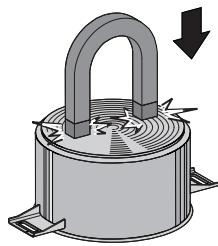

Use only cookware with a perfectly flat bottom which is suitable for induction hobs. Using cookware with an irregular bottom could jeopardise the efficiency of the heating system and prevent cookware from being detected on the cooking zone.
Limiting the cooking duration
The hob has an automatic device which limits the duration of use.
If the cooking zone settings are not changed, the maximum duration of operation for each zone depends on the power level selected.
When the device for limiting the duration of use is activated, the cooking zone turns off, a short alert sounds and, if the zone is hot,
the symbol H appears on the display.
| Set power level | Maximum cooking duration in hours |
| 1 | 8 1⁄2 |
| 2 | 6 1⁄2 |
| 3 | 5 1⁄2 |
| 4 | 4 1⁄2 |
| 5 | 3 1⁄2 |
| 6 | 2 1⁄2 |
| 7 | 2 1⁄2 |
| 8 | 2 |
| 9 | 1 1⁄2 |
Protection from overheating
If the hob is used on full power for a long period, the electronics will have trouble cooling down if the room temperature is high.
To avoid excessively high temperatures forming in the electronics, the power to the cooking zone is reduced automatically.
Advice on energy-saving
- The diameter of the base of the pan must correspond to the diameter of the cooking zone.
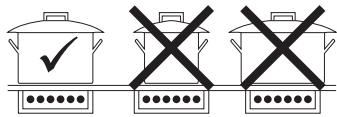
- When buying a pan, check whether the diameter indicated is that of the base or the top of the pan, as the top is almost always larger than the base.
- When preparing dishes with long cooking times, you can save time and energy by using a pressure cooker, which also makes it possible to preserve the vitamins in the food.
- Make sure that the pressure cooker contains enough liquid as, if there is not enough and it overheats, this may cause damage to both the pressure cooker and the cooking zone.
- If possible, always cover pans with a suitable lid.
- Choose a pan suitable for the quantity of food to be cooked. A large, half-empty pan leads to a waste of energy.

Under certain circumstances, if the hob and the oven are being used at the same time, the maximum power limit that can be used by the electrical system might be exceeded.
Power levels
The power in the cooking zone can be adjusted to various levels. The table shows the levels suitable for various types of cooking.
| Power level | Suitable for: |
| 0 | OFF setting |
| 1 - 2 | Cooking small amounts of food (minimum power) |
| 3 - 4 | Cooking |
| 5 - 6 | Cooking large quantities of food, roasting larger portions |
| 7 - 8 | Roasting, slow frying with flour |
| 9 | Roasting |
| P* | Roasting / browning, cooking (maximum power) |
Switching the hob on and off
To activate the hob keep the On/Off key pressed for at least 1 second. To deactivate the hob keep the On/Off key pressed for at least 2 seconds.

If no power value is selected within a few seconds, the hob is automatically deactivated.
Switching on the cooking zone automatically
After switching on the hob:
- Position a pan (suitable for induction cooking and not empty) on the cooking zone you wish to use.
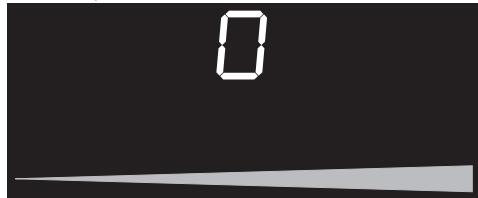
The display of the cooking zone used will
turn on: the power value indicated is

Adjusting the cooking zone
After switching on the hob:
- Place a finger on the left-hand side of the scroll bar of the cooking zone to be used.
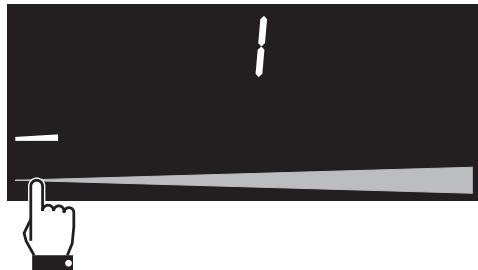
The display of the cooking zone used will turn on: the power value indicated is
- Move your finger to the left or right on the scroll bar to select the cooking power, between and , or else activate the Power function (see "Power Function").
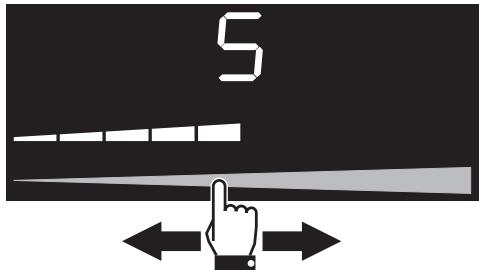
The display of the cooking zone used will show the set cooking power.
Switching off the cooking zone
- Move your finger all the way to the left on the scroll bar of the cooking zone you wish to turn off.
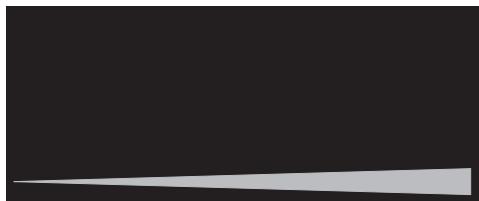
The display for the cooking zone will turn off.

Hold the On/Off key ① down for at least 2 seconds to switch off all cooking zones at the same time.
Quick selection

This function allows you to quickly set the cooking zones to the required power.
After switching on the hob:
- Place a finger on the scroll bar of the cooking zone to be used, at approximately the required power level.
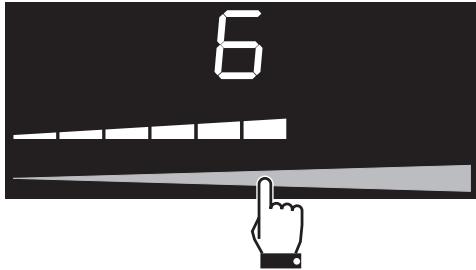
- Move your finger to the left or right to select the required cooking power.
Power Function

This function allows you to use the maximum possible power for the cooking zone.
After switching on the hob:
- Place a finger on the left-hand side of the scroll bar of the cooking zone to be used.
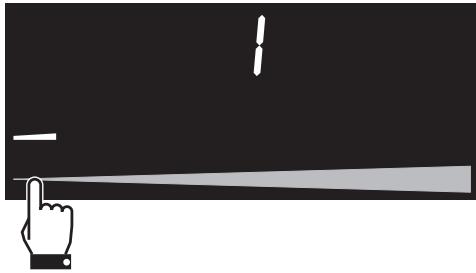
The display of the cooking zone used will
turn on: the power value indicated is
- Move your finger all the way to the right of the scroll bar to select the Power function.
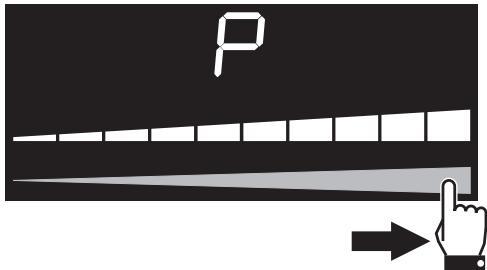
The display of the cooking zone used will
show P
It is possible to perform quick activation of the power function.
- After turning the hob on, place your finger all the way to the right on the scroll bar of the cooking zone you wish to use.
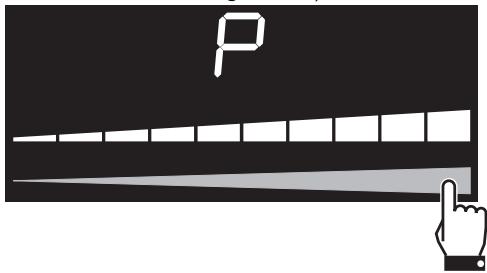

The Power function is available for 10 minutes, after which the power level drops automatically to 9.
Bridge function

This function allows you to run two cooking zones (front and rear) in parallel at the same time.
After switching on the hob:
- Simultaneously place one finger on the left scroll bar and another finger on the right scroll bar of the cooking zones you wish to use.
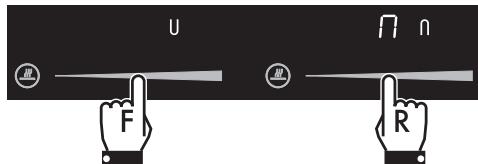
The displays of the cooking zones will turn on: the display shows the "master" U symbol while the right-hand display
shows followed by the "slave" symbol.
- Use the left-hand scroll bar to set the required cooking power.

The same parameters are set on both cooking zones.
To deactivate the Bridge function:
- Simultaneously place one finger on the left scroll bar and another finger on the right scroll bar of the cooking zones you wish to turn off.
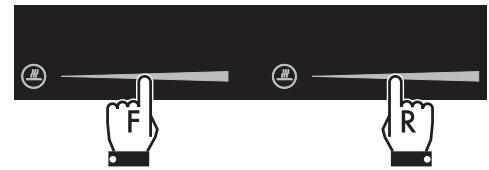

It is only possible to use the Bridge function on vertically connected zones (F and R).
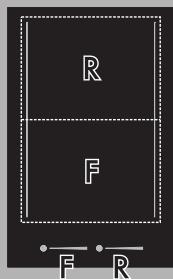

It is not possible to activate the Bridge function in the paella cooking zone.
Cooking guidelines
The table below shows the power values which can be set, together with the corresponding type of food. Settings may vary depending on the amount of food and consumer taste.
| Power level | Suitable for: |
| 1 - 2 | Reheating food, keeping small amounts of water on the boil, and whipping up sauces with egg yolk or butter. |
| 3 - 4 | Cooking solid or liquid food, keeping water on the boil, defrosting deep-frozen food, cooking 2- or 3-egg omelettes, fruit and vegetables, various cooking processes. |
| 5 - 7 | Stewing meat, fish and vegetables, simmering food, making jams etc. |
| 8-9 | Cooking or frying meat, fish, steaks and liver; browning meat, fish, eggs, etc. |
| P | Deep-frying potatoes, etc., or bringing water to the boil rapidly. |
Residual heat

Improper use Danger of burns
Supervise children carefully as they cannot readily see the residual heat indicator. The cooking zones remain hot for a certain period of time even after they have been turned off. Make sure that children never touch the hob.
If the cooking zone is still hot after being
switched off, the symbol H will be
displayed on the display. The symbol clears once the temperature drops below 40^ .
Melting function

This function allows you to melt foods.
To activate the Melting function, first turn on the hob, then:
- Press the special functions key for the required cooking zone once. The
display shows followed by the symbol
To deactivate the Melting function:
- Press the special functions key three times.
Keep Warm Function

The Keep warm function allows you to keep cooked food hot.
To activate the Keep Warm function, first turn on the hob, then:
- Press the special functions key for the required cooking zone twice. The display shows followed by the symbol
To deactivate the Keep Warm function:
- Press the special functions key twice.
Simmering function

This function allows you to keep the liquid in the pan simmering.
To activate the Simmering function, first turn on the hob, then:
- Press the special functions key for the required cooking zone three times. The display shows followed by the symbol
To deactivate the Simmering function:
- Press the special functions key once.
Pause function

This function pauses the operation of all cooking zones.
The Pause function can be activated when at least one cooking zone is switched on:
- Hold down the pause key. The display shows an LED above the pause key and the message on the displays of all the cooking zones.

All the hob's keys will be disabled, except for the control lock key. All cooking zones will switch off.
To deactivate the Pause function:
- Press the key
The rightmost cooking zone display will show an animation for a few seconds.
- Place a finger on the left-hand side of the scroll bar and slide it to the right.
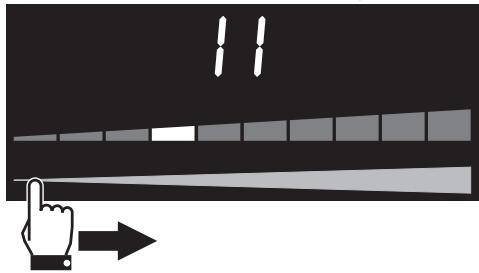

If no key is pressed within 5 seconds, the hob will turn off automatically.
Control lock

This function disables all keys of the display to prevent against operation by children or accidental selection.
To activate the Control lock, first turn on the hob, then:
- Hold down the control lock key for 3 seconds. The display will show an LED above the control lock key.

The control lock will not be deactivated in the event of a power cut.
To deactivate the Control lock:
- Hold down the control lock key for 3 seconds. The LED above the control lock key will turn off.
Timer

This function is used to set a timer which will sound a buzzer at the end of the preset time.
To activate the timer, first turn on the hob, then:
- Press the timer keys + and at the same time.
The display will show the time indicator
- The timer symbol below the time indicator shows that the function has been activated.
- Press the timer keys and to set the timer (hold down to advance quickly).
The display is set to "minutes经济效益". On the first press of the timer key + 1 minute is set. It is possible to set a time shorter than one minute:
- Press the timer key between 1 and 5 times to select a timer of less than one minute (from 0.50 to 0.10 seconds).
With each press of the timer key, the time decreases by 10 seconds.
If the setting exceeds 9 minutes 900, the message min will be shown under the time indicator and the display will be set to "hours.minutes" 1.59 (up to a maximum of 1 hour, 59 minutes)
3. The timer will start a few seconds after the last selection.

Using the minute minder does not stop the operation of the cooking zones but rather informs the user when the set minutes have run out.

The timer can be activated while the cooking zones are on or off.
At the end of the set time, a buzzer tells the user that the Minute minder has finished.
- To deactivate the buzzer, press the timer key or
Deactivating the timer
To deactivate the timer during the countdown:
- Press the On/Off key ①
The LED above the On/Off key will turn on.
- Press the timer keys and at the same time.
The countdown will be interrupted.
- Hold down the timer key until the countdown is reset.
Timed cooking

This function is used to program the automatic switch-off of each cooking zone at the end of a period of time.
The timed cooking function can be activated when at least one cooking zone is switched on:
- Press the timer keys + and at the same time.
The display will show the time indicator
- The timer symbol next to the power level value of the plate indicates that the function is activated.
- Press the timer keys and to set timed cooking (hold down to advance quickly).
The display is set to "minutes(seconds)". If the setting exceeds 9 minutes 5.00, the message min will be shown under the time indicator and the display will be set to "hours(minutes)" 1.59 (up to a maximum of 1 hour, 59 minutes).
- Timed cooking will start a few seconds after the last selection.
At the end of the set time, a buzzer tells the user that the Minute minder has finished.
- To deactivate the buzzer, press the timer key or

This function can be activated on multiple cooking zones at the same time. The flashing LED and time indicator refer to the next cooking zone to be switched off.
Modifying or deactivating timed cooking
To modify timed cooking during the countdown:
- Press the On/Off key 0
The LED above the On/Off key will turn on.
- Press the timer keys and at the same time.
The countdown will be interrupted.
- Press the timer keys + and to modify the timed cooking settings.
To deactivate timed cooking during the countdown:
- Press the On/Off key 0
The LED above the On/Off key will turn on.
- Press the timer keys and at the same time.
The countdown will be interrupted.
- Hold down the timer key until the countdown is reset.
4 Cleaning and maintenance
4.1 Instructions

Improper use Risk of damage to surfaces
- Do not use steam jets to clean the appliance.
- Do not spill sugar or sweet mixtures on the hob during cooking.
- Do not place materials or substances that could melt (plastic or aluminium foil).
- Keep sensor keys clean at all times and do not rest any object on them.
- Do not use cleaning products containing chlorine, ammonia or bleach on parts made of steel or that have metallic surface finishes (e.g. anodizing, nickel or chrome plating).
- Do not use abrasive or corrosive detergents (e.g. scouring powders, stain removers and metallic sponges) on glass parts. Use wooden or plastic utensils.
4.2 Cleaning the surfaces
To keep the surfaces in good condition, they should be cleaned regularly after use. Let them cool first.
4.3 Ordinary weekly cleaning
Clean and maintain the hob once a week using an ordinary glass cleaning product. Always follow the manufacturer's instructions. The silicon in these products creates a protective, water-repellent membrane which also resists dirt. All marks stay on the membrane and can therefore be removed easily. After cleaning, dry the surface with a clean cloth. Make sure that there is no detergent left on the cooking surface as it will undergo a corrosive reaction when heated up and could modify the structure of the cooking surface.
4.4 Food stains or residues
Smudges from aluminium-based pans can be easily cleaned off with a cloth dampened in vinegar.
After cooking, remove any burnt residues with the scraper provided; rinse with water and dry thoroughly with a clean cloth.
Regular use of the scraper considerably reduces the need for chemical detergents for the daily cleaning of the hob.
Dirt which may have fallen on the hob while cleaning lettuce or potatoes can scratch the hob when moving pans.
Consequently, remove any dirt from the cooking surface immediately.
Changes in colour do not affect the operation and stability of the glass. These are not alterations to the material of the hob but just residues which have not been removed and have then carbonised.
Shiny surfaces can form due to the bases of pans, especially aluminium ones, rubbing on the surface, and due to the use of unsuitable detergents. They are difficult to remove using conventional cleaning products. It may be necessary to repeat the cleaning process several times. Use of corrosive detergents or rubbing of pan bases can wear away the decoration on the hob over time and contribute to the formation of stains.
4.5 What to do if...
The hob does not work:
Make sure that the hob is connected and that the main switch is turned on.
- Make sure that there is no power failure.
- Make sure that the fuse has not blown. In this case replace the fuse.
- Make sure that the circuit breaker of the residential electrical system has not tripped. In this case, re-activate the circuit breaker.
The cooking results are unsatisfactory:
- Make sure that the cooking temperature is not too high or too low.
The hob smokes:
- Let the hob cool down and clean it once cooking is complete.
- Make sure that the food has not spilled out of the pan and use a larger cooking vessel, if needed.
The fuses blow or the circuit breaker of the residential electrical system trips repeatedly.
- Call Technical Support or an electrician.
There are cracks or fissures in the hob:
- Turn off the appliance immediately, disconnect the power supply and contact Technical Support.
5 Installation
5.1 Electrical connection

Power voltage Danger of electrocution
- Have the electrical connection performed by authorised technical personnel.
- Use personal protective equipment.
- The appliance must be connected to earth in compliance with electrical system safety standards.
- Disconnect the mains supply.
- Do not pull the cable to remove the plug.
- Use cables withstanding a temperature of at least 90^ .
- The tightening torque of the screws of the terminal supply wires must be 1.5 - 2 Nm.
Check the grid characteristics against the data indicated on the plate.
The identification plate bearing the technical data, serial number and brand name is visibly positioned on the appliance.
Do not remove this plate for any reason.
Perform the ground connection using a wire that is 20mm longer than the other wires.
The appliance is connected as follows:
90 cm models:
380-415 V 3N~ (default)
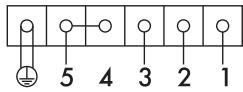
6 × 2.5 ~mm^2 six-core cable.
If the cable is replaced, the appliance can also function in the following modes:
*use the jumper provided
- 380-415 V 2N~/ 220-240 V 3~
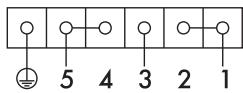
4 × 2.5 ~mm^2 four-core* cable.
220-240 V 1N~
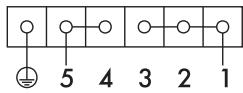
3 × 6 ~mm^2 three-core* cable.
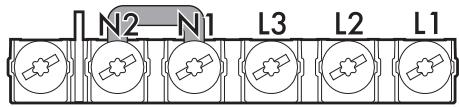
The diagram below illustrates the power supply terminal from below, with no cables connected. Terminals 4 and 5 must be connected at all times.

60 cm models:
220-240 V 3N~ (default)
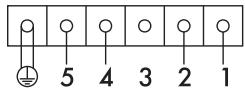
6 × 1.5 ~mm^2 six-core cable.
If the cable is replaced, the appliance can also function in the following modes:
380-415 V2N~
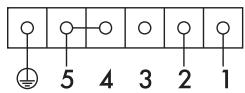
4 × 2.5 ~mm^2 four-core* cable.
220-240 V 1N~
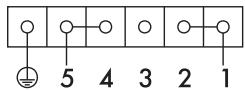
3 × 4 ~mm^2 three-core* cable.
The diagram below illustrates the power supply terminal from below, with no cables connected.
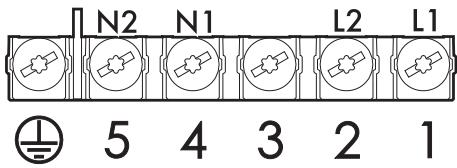
38 cm models:
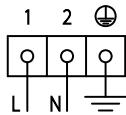
3 × 1.5 ~mm^2 three-core cable.
Fixed connection
Fit the power line with an omnipolar circuit breaker in compliance with installation regulations.
The circuit breaker should be located near the appliance and in an easily reachable position.
Connection with plug and socket
Make sure that the plug and socket are of the same type.
Avoid using adapters and shunts as these could cause overheating and a risk of burns.

Run the power cable in the rear part of the unit. Take care that it does not come into contact with the lower part of the hob or any oven built-in underneath it.

Be careful when connecting additional electrical appliances. Connection cables must not come into contact with hot cooking zones.
Testing
At the end of installation, carry out a brief inspection test. If the hob fails to operate, after checking that you have carried out the instructions correctly, unplug the appliance and contact Technical Support.
5.2 Safety instructions

Heat production during appliance operation Risk of fire
- Check that the carcase material is heat resistant.
- Check that the carcase has the required openings.
- Do not obstruct the ventilation grille in front of the product during mounting.
Veneers, adhesives or plastic coatings on adjacent furniture should be temperature-resistant (>90^) , otherwise they might warp over time.
The minimum clearance between a ventilation hood and the cooking surface must be at least the distance indicated in the ventilation hood installation instructions.
The minimum clearances must also be respected for the edges of the hob on the back as indicated in the mounting illustrations.
5.3 Section cut from the countertop

The following operation requires building and/or carpentry work and must therefore be carried out by a competent tradesman.
Installation can be carried out on various materials such as masonry, metal, solid wood or plastic laminated wood as long as they are heat resistant (>90^)
Create an opening with the dimensions shown in the figure in the countertop of the piece of furniture.
Dimensions for flush mounting
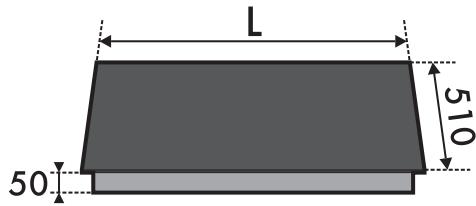
| L (mm) | X (mm) | Y (mm) |
| 380 | 310 | 490 |
| 600 | 560 | 490 |
| 900 | 880 | 490 |
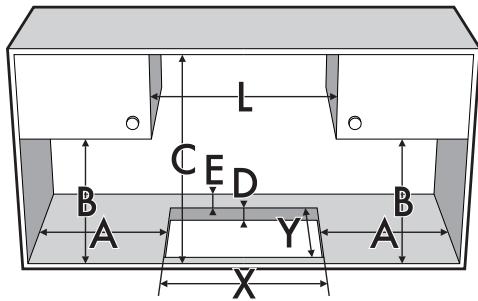
| A (mm) | B (mm) | C (mm) | D (mm) | E (mm) |
| min 50 | min 460 | min 750 | 20 - 60 | min 50 |
5.4 Mounting
Over built-in oven
The clearance between the hob and the kitchen furniture or other installed appliances must be enough to ensure sufficient ventilation and air discharge. If installed above an oven, a space must left between the bottom of the hob and the top of the appliance installed below.
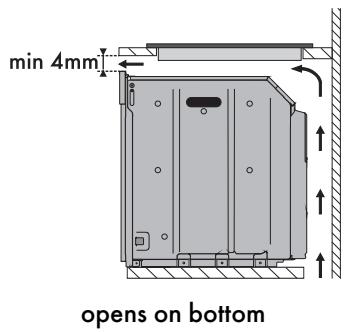
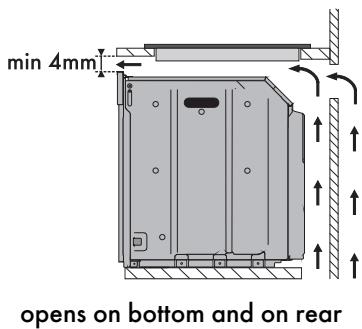

If installed on top of an oven, the latter must be equipped with a cooling fan.
Over empty kitchen unit or drawers
If there are other pieces of furniture (lateral walls, drawers, etc.), dishwashers or fridges under the hob, a double-layer wooden base must be installed at least 20mm from the bottom of the hob to avoid any accidental contact. It must only be possible to remove the double-layer base using suitable equipment.
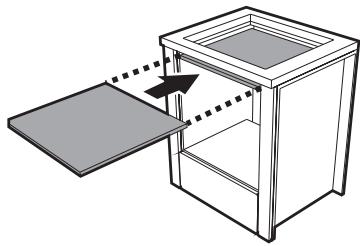
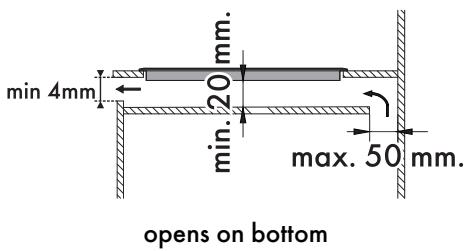
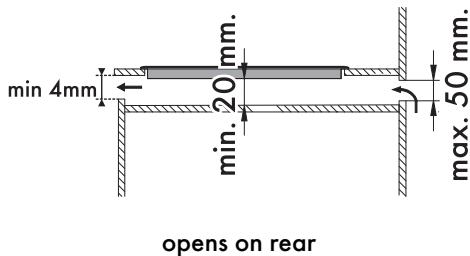

Failure to install the double-layer wooden base exposes the user to possible accidental contact with sharp or hot parts.
Ventilation
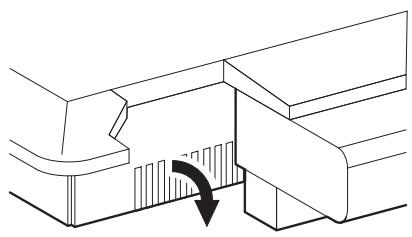
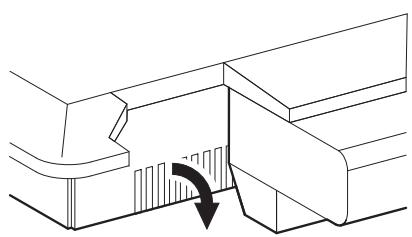
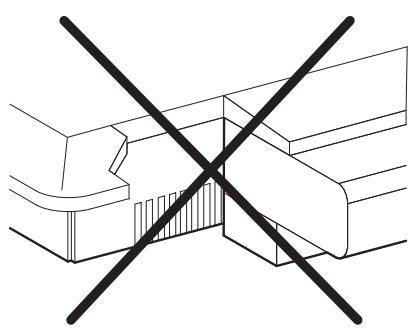
The illustrations below show two examples of installation suitable for proper ventilation and one example of incorrect installation to be avoided.
Hob seal
To prevent leakage of liquid between the frame of the hob and the countertop, place the adhesive seal provided along the entire outer edge of the hob before assembly.
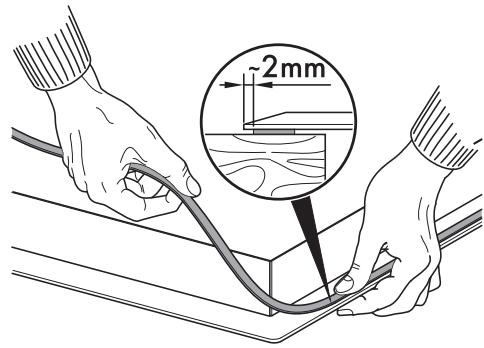

Do not use silicone to secure the hob. This would make it impossible to remove the hob, if necessary, without damaging it.
Spring clips
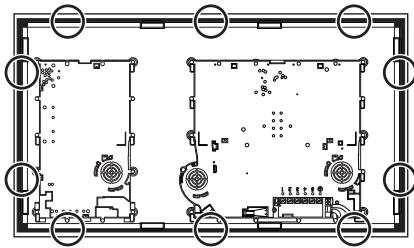
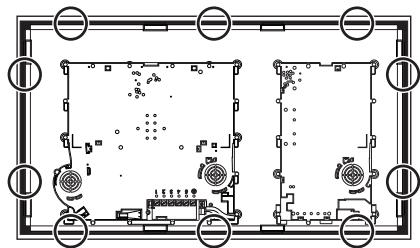
To ensure the hob is fixed and centred as accurately as possible, the clips provided must be positioned as described below:
- Fit the clips by gently pressing them horizontally into the appropriate space.
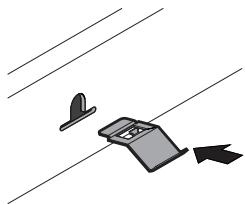
- Then turn them upwards to fix them in place.
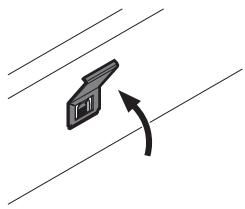
Position of slot for clips
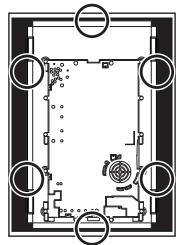
38 cm
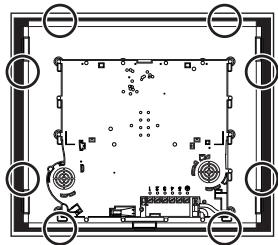
60 cm
90 cm