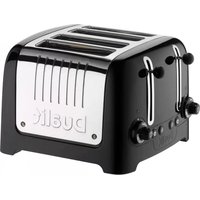
Lite Toaster - Toaster DUALIT - Free user manual and instructions
Find the device manual for free Lite Toaster DUALIT in PDF.


Pick your language and provide your email: we'll send you a specifically translated version.
| Product Type | 2-Slice Toaster |
| Brand | Dualit |
| Model | Lite Toaster |
| Dimensions | Approx. 28 x 18 x 20 cm (11 x 7 x 8 in) |
| Weight | Approx. 2.5 kg (5.5 lbs) |
| Power | 1800 W |
| Voltage | 220-240 V |
| Frequency | 50/60 Hz |
| Browning Control | Variable with 6 settings |
| Functions | Defrost, Reheat, Cancel |
| High-Lift Lever | Yes, for easy removal of small items |
| Crumb Tray | Removable, easy to clean |
| Housing Material | Stainless steel and plastic |
| Cord Length | Approx. 1.2 m |
| Cleaning Method | Unplug, wipe with damp cloth, empty crumbs |
| Safety Features | Auto shut-off, cool-touch exterior |
| Spare Parts | Available from Dualit customer service |
| Certification | CE, UKCA |
| Warranty | 2 years |
| Colour | Black or White |
Frequently Asked Questions - Lite Toaster DUALIT
How do I clean my Dualit Lite Toaster?
Always unplug the toaster before cleaning. Wipe the exterior with a damp cloth and mild detergent. Do not immerse in water. Empty the removable crumb tray regularly. Use a soft brush to remove crumbs from the slots.
Why is my toast unevenly browned?
Ensure the browning control is set correctly. Uneven toasting can occur if the bread slices vary in thickness. Try centering the bread in the slots and avoid overloading the toaster.
Can I toast frozen bread?
Yes, use the Defrost function. Simply insert frozen bread, select the desired browning level, and press the Defrost button. The toaster will adjust the cycle to thaw and toast.
How do I use the reheat function?
To reheat previously toasted bread, insert the toast and press the Reheat button. The toaster will warm the bread without additional browning. Cancel the cycle at any time.
Is it safe to leave the toaster unattended?
The toaster has an auto shut-off feature, but it is recommended to never leave it unattended during use. Always supervise children and pets near the appliance.
How do I adjust the browning setting?
Turn the browning control dial to select your preferred level, from light (1) to dark (6). The setting can be adjusted during the cycle if needed.
What is the high-lift lever for?
The high-lift lever raises the toast higher above the slots, making it easier to remove small items like crumpets or bagels without burning your fingers.
How do I empty the crumb tray?
Slide out the crumb tray located at the bottom of the toaster. Empty crumbs into the bin and wipe the tray with a damp cloth. Ensure the tray is fully inserted before use.
Where can I buy spare parts?
Contact Dualit customer service or visit the official Dualit website. Authorized retailers may also stock spare parts such as crumb trays and heating elements.
What is the warranty period?
The Dualit Lite Toaster comes with a 2-year warranty against manufacturing defects. Register your product on the Dualit website to extend the warranty.
User questions about Lite Toaster DUALIT
0 question about this device. Answer the ones you know or ask your own.
Ask a new question about this device
No questions yet. Be the first to ask one.
Download the instructions for your Toaster in PDF format for free! Find your manual Lite Toaster - DUALIT and take your electronic device back in hand. On this page are published all the documents necessary for the use of your device. Lite Toaster by DUALIT.
USER MANUAL Lite Toaster DUALIT

Manual assistant
Powered by Anthropic
Waiting for your message
Product information
Brand : DUALIT
Model : Lite Toaster
Category : Toaster