Vario Bread 3S - Toaster DUALIT - Free user manual and instructions
Find the device manual for free Vario Bread 3S DUALIT in PDF.


User questions about Vario Bread 3S DUALIT
0 question about this device. Answer the ones you know or ask your own.
Ask a new question about this device
Download the instructions for your Toaster in PDF format for free! Find your manual Vario Bread 3S - DUALIT and take your electronic device back in hand. On this page are published all the documents necessary for the use of your device. Vario Bread 3S by DUALIT.
USER MANUAL Vario Bread 3S DUALIT
Dualit Newgen UK 1208.qpp 19/01/2009 09:25 Page 1
NewGen Toaster
Instruction Manual & Guarantee
Dualit®
Since 1945

natural_image
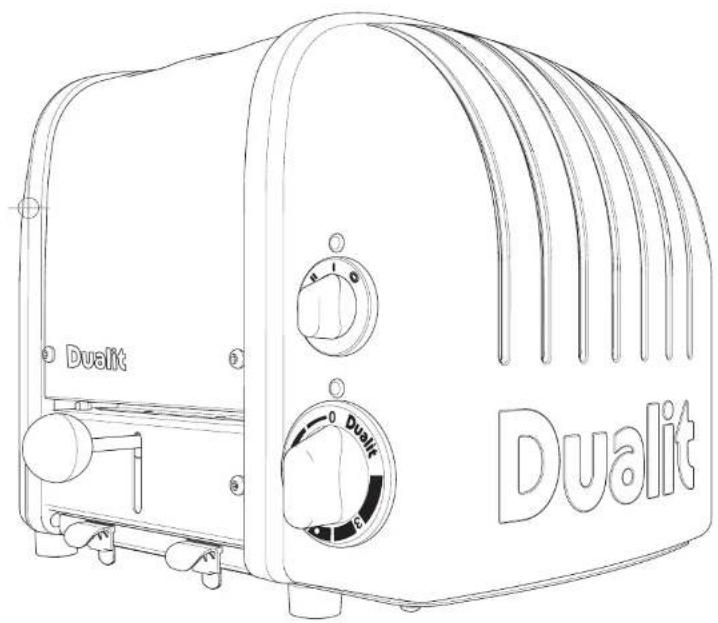
Line drawing of a Dualit 3rd-to-4 grater with control knobs and front panel (no text or symbols on the device itself)TOASTING SINCE 1945
For over sixty five years, Dualit toasters have reflected an attitude that's fundamentally British. They are a symbol of the fact that it's the simple things in life that are the most rewarding and the most important.
Dualit toasters can turn out hundreds of crisp, golden slices per hour. They are gleaming, sturdy and tough as old boots. And as much a part of British life as toast itself.
It should come as no surprise that the man who invented the Dualit toaster was an engineer. In 1946, Max Gort-Barten produced the original Dualit toaster from his workshop just off London's Old Kent Road.
Combining strength, versatility and ingenuity it was a toaster that set new standards, soon followed by a commercial toaster, incorporating a time switch among its many (entirely) original features.
natural_image
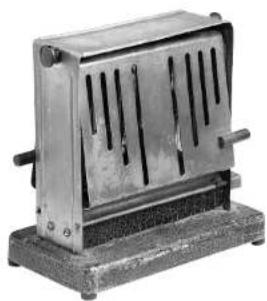
Metallic industrial device with vertical slots and a base (no visible text or symbols)Manually operated and designed for heavy-duty use, each Dualit toaster is a blend of the simple and highly sophisticated. Each toaster is assembled by hand, much as it always was. The assembler's individual number will be found on the base plate.
In an age in which so much becomes obsolete overnight, the Dualit toaster is built without compromise. It remains one of the few objects to survive the passing of the years with grace and style.
CONTENTS
Safety precautions 4
Before first use 5
Knowing your toaster 6
Accessories 8
sandwich cage
warming rack
Toasting tips 9
Height adjustable foot 9
The Selector (2 slot model) 10
The Selector (4 slot model) 11
Toasting 12
Toasting frozen bread 13
Making toasted sandwiches 14
Cleaning and care 15
Replacement parts 16
Replacing elements 17
Troubleshooting 18
Guarantee 19
SAFETY PRECAUTIONS
READ ALL INSTRUCTIONS
BEFORE USING THE TOASTER KEEP THESE INSTRUCTIONS FOR FUTURE REFERENCE
- WARNING: This appliance must be earthed.
- We recommend that the toaster is plugged into a socket that has no other appliance connected to it. Failure to do this may cause an overload, trip a circuit breaker or blow a fuse. Preferably the socket outlet should be protected by a Residual Current device (RCD)
- Before plugging in, check that the voltage on the rating label is the same as the mains supply.
- To protect against electric shock, do not immerse any part of this product in water or other liquid.
- Unplug from outlet when not in use and before cleaning. Allow to cool before putting on or taking off parts.
- Do not operate the appliance with a damaged cord or plug.
- Do not allow cable to touch hot surfaces, or to hang over edge of a table or counter top.
-
When in use a fire may occur if the toaster is covered or touching flammable material.
-
Do not attempt to dislodge bread when the toaster is plugged in.
- Broad may burn. Therefore toasters must not be used near or below curtains and other combustible materials.
- When toasting do not leave appliance unattended. THIS IS AN ATTENDED APPLIANCE
- This appliance is not intended for use by persons (including children) with reduced physical, sensory or mental capabilities, or lack of experience and knowledge, unless they have been given supervision or instruction concerning use of the appliance by a person responsible for their safety.
• Children should be supervised to ensure that they do not play with this appliance. - Do not store toaster in an appliance garage or cover.
- Do not use outdoors.
- The toaster is not intended to be operated by means of an external timer or separate remote-control system.
-
Accessible surfaces of the toaster may get not during use.
NOTE: Any plug cut from power supply cord should be disposed of immediately. Inserting any cut off Plug into a 13A socket-outlet is hazardous. -
Never use the plug without the fuse cover fitted. Ensure replacement fuse is the same current value as original.
- Replacement fuses should be ASTA approved to BS 1362.
- Do not operate any appliance with a damaged lead or plug, or after the appliance malfunctions, or has been damaged in any manner.
If the supply cord is damaged, it must be replaced by the manufacturer, its service agent or similarly qualified persons in order to avoid a hazard.
SAVE THESE INSTRUCTIONS
in the interest of improving products, Qualit Ltd. reserves the right to change the product specification without prior notice.
IMPORTANT - BEFORE USING
Your Dualit toaster has patented ProHeat elements. These elements need to be conditioned before loasting for the very first time. Then continue to toast as per the instructions.
natural_image
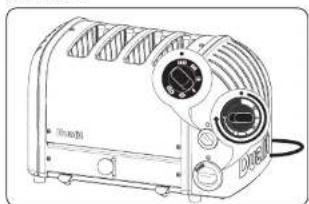
Line drawing of a DURD 1000 electric toaster with two side fans and control buttons (no text or symbols)Set the selector switch so ALL the slots are active, with NO bread in the slots, turn the timer all the way round and let it run back to the off position.
Some smoke may vent from the slots, THIS IS NOT A FAULT and is perfectly safe. There may be a slight popping crinkling sound, this is due to heat expansion of the elements and is perfectly normal.
natural_image
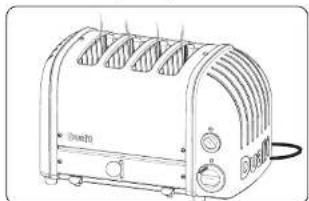
Line drawing of a standard 3D render with a round toaster and two side monitors (no text or symbols)Your toaster is now conditioned and ready for use.
Dualit Newgen UK 1208.qqp 19/01/2009 09:23 Page 6
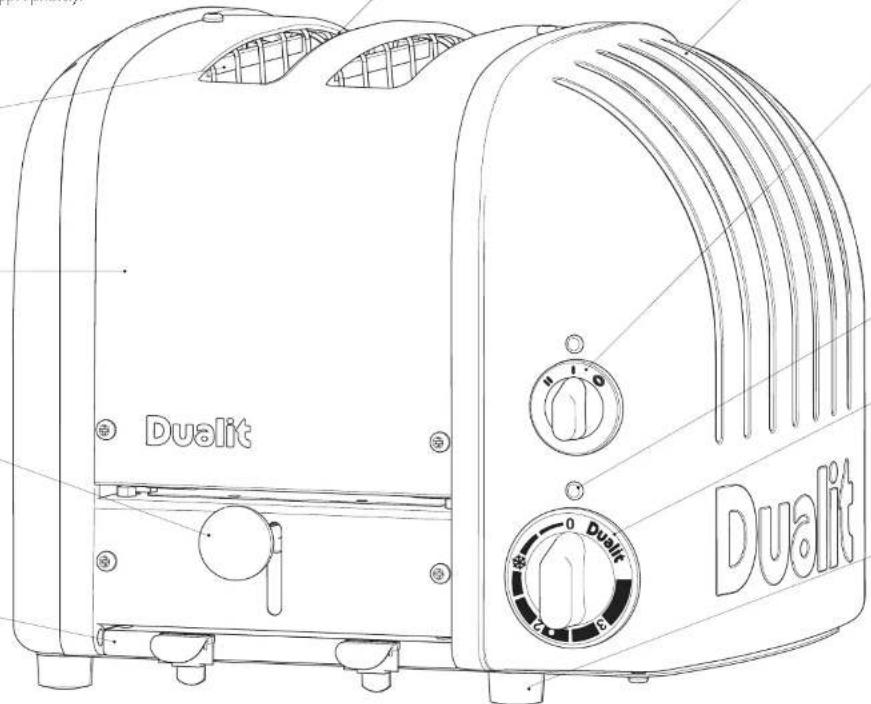
KNOW YOUR TOASTER
Unpack the box with care, keeping all the packaging materials until you are satisfied everything is present and in working order. Once satisfied remove any tags from the toaster and recycle the packaging appropriately.
PROHEAT ELEMENTS
Patented heavy duty replaceable elements.
STAINLESS STEEL COVER
MANUAL EJECTOR Mechanical Peek & Pop ejector for greater toasting control.
CRUMB TRAY
Keeps your work surfaces clear of crumbs.
natural_image
Line drawing of a Dualit 3rd-to-4 grater with control knobs and buttons (no text or symbols on the device itself)6
7
ALUMINIUM CASTINGS
Heavy duty cast aluminium castings.
SELECTOR SWITCH
Select number of slices or buns you are loasting.
2 Slot model 4 Slot model


POWER NEON
Illuminates when toasting.
MECHANICAL TIMER WITH DEFROST
Timer controlled defrost and toasting.
FEET
Compensate for uneven surfaces.
All illustrations are for representation only, your model may have a different selector switch and number of slots from illustrations shown.
Dualit Newgen UK 1208.qqp 19/01/2009 09:23 Page 8
ACCESSORIES - SOLD SEPARATELY
THE SANDWICH CAGE
Convert your toaster into a toasted sandwich maker with this quick and easy to use accessory.
Using a cage also offers greater toasting control, for toasting smaller items such as crumpets, scones, teacakes or muffins.
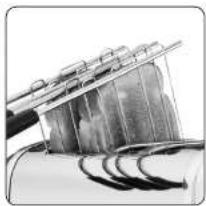
THE WARMING RACK
The 'warming rack' is a universal accessory for all Dualit NewGen Toasters.
Perfect for warming or lightly toasting any bread product that will not fit inside the slots. Items like croissants, scones, pastries or tortillas are just a few.
natural_image
Close-up of a mechanical component with curved grooves and a metallic bracket (no visible text or symbols)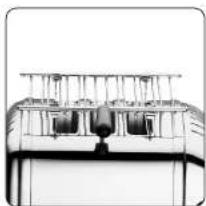
natural_image
Exterior view of a modern office building (no signage)TOASTING TIPS
Here are a few tips to help get the best out of your toaster.
- FULLY LOAD ALL HEATED UP SLOTS. If a slot is heated but no bread is inserted, the bread in the adjacent slot will toast unevenly.
• ALWAYS LOAD YOUR SLOTS STARTING FROM THE LEFT. - DIFFERENT BREADS WILL TOAST AT DIFFERENT RATES, wholemeal bread take longer than white bread, fresh bread will take longer than day old bread. Remember to adjust your timer to allow for your particular type of bread.
• After the first round of toast, the elements and toaster body will be at full operating temperature, subsequent rounds will take less time to toast. - Use the bagel setting to toast burger buns, bagels, muffins or tea cakes, this setting toasts one side whilst gently warming the other.
- The thickest slice of bread that will fit in your toaster is 28mm thick. Forcing bread which is too thick or too long into the slots will be difficult to eject once toasted.
- You may find it easier to use a 'sandwich cage' to toast smaller items. Inserting, checking and removing will all be easier (sold separately).
- When hand cutting a fresh loaf, cut the slices as evenly as possible. Uneven slices will least unevenly.
- Keep elements free from breadcrumbs and broken pieces of bread. If left these may burn out the elements. With the toaster unplugged use a soft brush to clean inside your toaster, do not use a knife!
• To reheat recently made toast set timer to 'defrost' symbol. - Cancel toasting manually at any time by rotating the timer back to 'O'. This will not damage your timer.
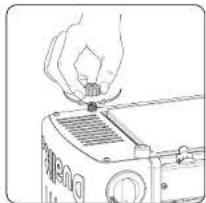
HEIGHT ADJUSTABLE FOOT
- Your toaster is fitted with one adjustable foot which may be raised or lowered to compensate for uneven surfaces.
- The adjustable foot is located on the base of the toaster and is hexagonal in shape, rotate it to adjust the height.
natural_image
Line drawing of a hand placing a small object onto a device (no text or symbols)Dualit Newgen UK 1208.qcp 19/01/2009 09:23 Page 10
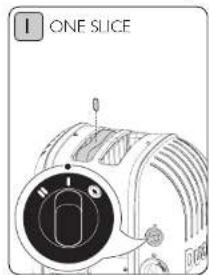
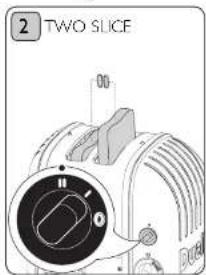
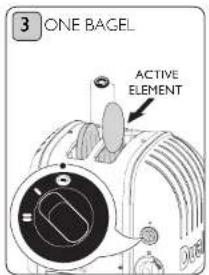
THE SELECTOR (2 SLOT MODEL)
This avoids uneven toasting and saves energy at the same time.
text_image
I ONE SLICERotate the 'selector switch' clockwise to the one slice indicator.
Only the left-hand slot will toast on both sides.
text_image
2 TWO SLICERotate the 'selector switch' clockwise to the two slice indicator.
Both slots will toast on both sides.
text_image
3 ONE BAGEL ACTIVE ELEMENTRotate the 'selector switch' anti-clockwise to the bagel indicator.
Only the centre element will heat up. Ensure the cut side of your bagel or bun is facing the active centre element.
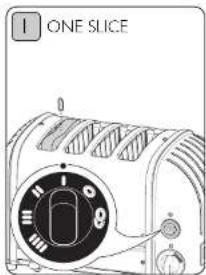
THE SELECTOR (4 SLOT MODEL)
This avoids uneven toasting and saves energy at the same time.
text_image
ONE SLICERotate the 'selector switch' clockwise to the one slice indicator. The left hand slot will heat up on both sides.
text_image
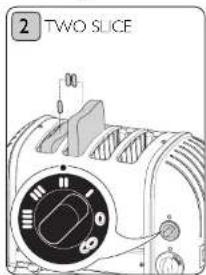
2 TWO SLICERotate to the two slice indicator. The first two slots from the left will toast on both sides.
text_image
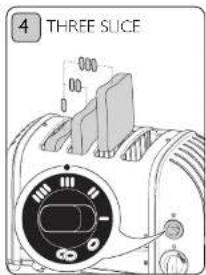
4 THREE SLICERotate the 'selector switch' clockwise to the three slice indicator. The first three slots from the left will toast on both sides.
text_image
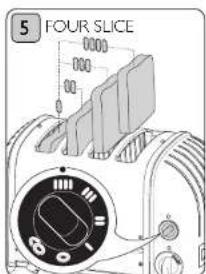
5 FOUR SLICERotate the 'selector switch' clockwise to the four slice indicator. All slots will heat up.
text_image
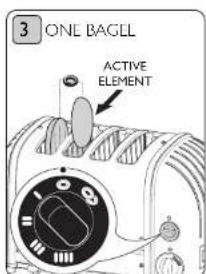
3 ONE BAGEL ACTIVE ELEMENTRotate the 'selector switch' anti-clockwise to the one bagel symbol. Only the second element from the left will heat up.
text_image
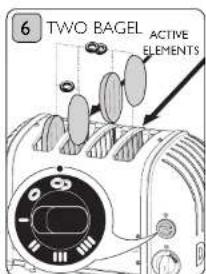
6 TWO BAGEL ACTIVE ELEMENTSRotate the 'selector switch' anti-clockwise to the two bagel symbol. Only the second and forth element from the left will heat up.
Dualit Newgen UK 1208.qcp 19/01/2009 09:24 Page 12
TOASTING
The longer the bread is in the toaster the darker the toast will become. After a few goes, you will quickly get to know where to set the 'timer' for your particular bread.
text_image
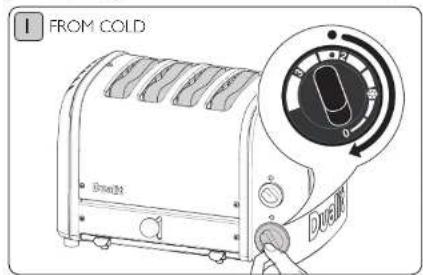
FROM COLD Dwell 24°C 0°C 24°C DwellWhen the toaster is cold and being used for the first time set the 'timer' to the 'circle' indicator, the extra time is because the metal body will absorb some heat. After the toaster has warmed up, slightly reduce the toasting time to give consistent results.
text_image
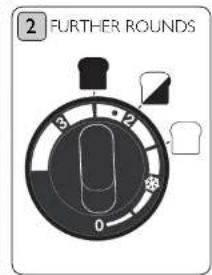
2 FURTHER ROUNDS 3 12 0Set 'timer' to desired level. 1.5 = Lightly toasted 2.0 = Medium toast 2.5 = Well done toast.
text_image
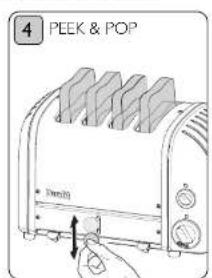
4 PEEK & POP 10mmCheck the progress of your toast at any time by pushing down on the 'ejector knob'.
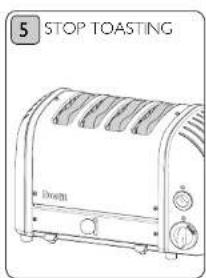
text_image
5 STOP TOASTING Drive21The 'timer' will click off from 0.5 to 0 position. You can Cancel toasting manually at any time by rotating the the 'timer' back to 'O'.
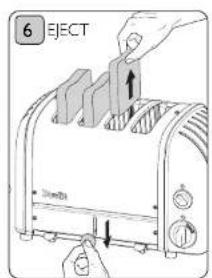
text_image
6 EJECT 30mmThe toast will not pop up, but will keep warm inside the toaster. Press down the 'ejector knob' and the toast will pop up ready for serving.

TOASTING FROZEN BREAD
Toast bread directly from the freezer with this handy setting.
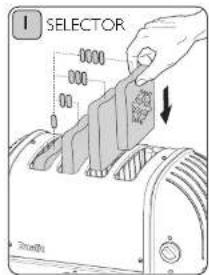
text_image
I SELECTOR 0000 000 000 000 000 000 000 000 000 000 000 000 000 000 000 000 000 000 000 000 000 000 000 000 000 000Rotate the 'selector switch' clockwise to the desired number slots you require and insert your frozen slices of bread.
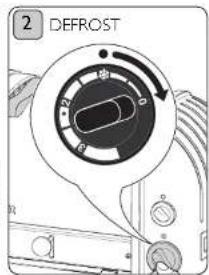
text_image
2 DEFROSTRotate the 'Timer' to the defrost symbol and let the timer wind down to '0'.
text_image
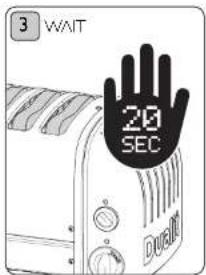
3 WAIT 20 SEC DURBITWhen the timer stops wait 20 seconds.
text_image
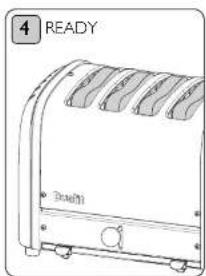
4 READY BraultiYour bread will now be defrosted and ready for toasting.
text_image
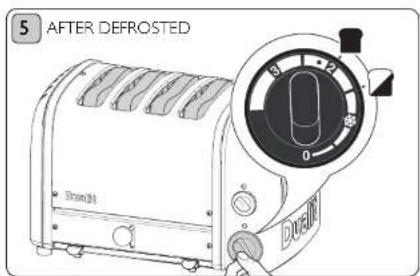
5 AFTER DEFROSTED Dramill DuminiWind the 'timer' to the '2' indicator for well done toast or '1.5' for medium toast.
Then continue to toast as if toasting fresh bread as shown on previous page.
Dualit Newgen UK 1208.qcp 19/01/2009 03:24 Page 14
MAKING TOASTED SANDWICHES
The sandwich cage accessory will transform your toaster into a versatile sandwich toaster.
text_image
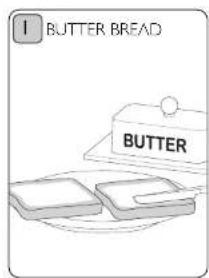
1 BUTTER BREAD BUTTERUse medium sliced bread, lightly butter the OUTSIDE OF EACH SLICE.
text_image
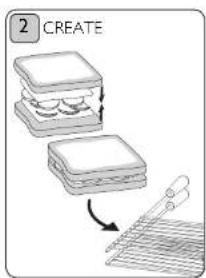
2 CREATEPlace your fillings between the unbuttered sides.
DO NOT OVERFILL
THE SANDWICH.
Place sandwich in cage.
text_image
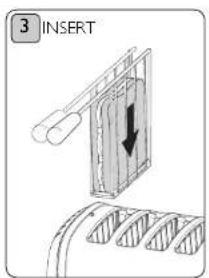
3 INSERTSel 'selector' and starting from the left insert cage into the slots. Push down until clamped tightly shut.
text_image
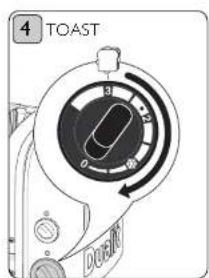
4 TOAST DOWNToast until the sandwich is golden. Setting 3 on the 'timer'. Adjust for your bread type.
text_image
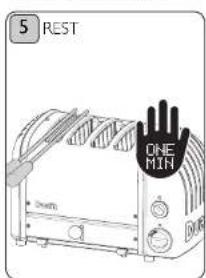
5 REST ONE MINAllow to rest for a further minute inside the toaster to allow fillings to fully warm,
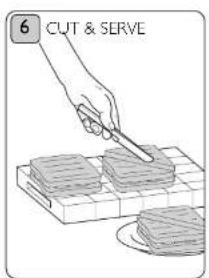
text_image
6 CUT & SERVERemove, Cut and Serve.
CAUTION: FILLINGS CAN BE HOT.
CLEANING & CARE
IMPORTANT: ENSURE THE TOASTER IS UNPLUGGED AND ALLOWED TO FULLY COOL BEFORE STARTING TO CLEAN.
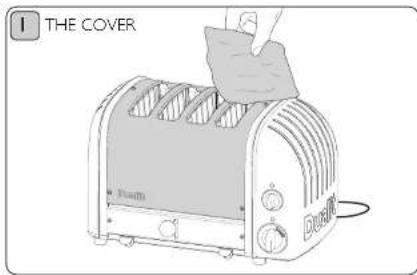
text_image
I THE COVER RoutiAFTER EACH USE
Wipe the 'stainless steel cover' with a non-abrasive cloth. A stainless steel cleaner can be used to restore shine to the cover only, but do not use an aggressive cleaner or one that contains ammonia.
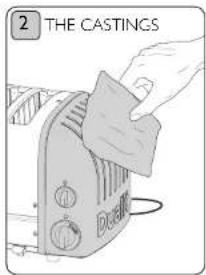
text_image
2 THE CASTINGS DigitalWipe the aluminium end castings with a damp cloth. Do not use a chemical or abrasive cleaner.
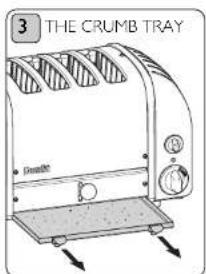
text_image
3 THE CRUMB TRAY DrambleEmpty the 'crumb tray' on a regular basis. Daily if being used in a commercial kitchen.
text_image
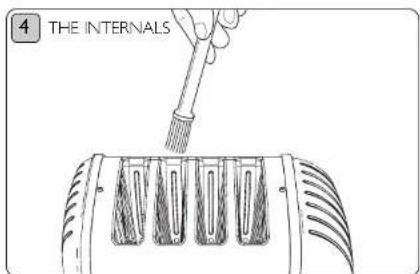
4 THE INTERNALSWith the toaster unplugged use a SOFT BRUSH to clean inside your toaster, do not use a sharp or metal utensil! Crumbs should be carefully brushed off the elements using only a soft brush, the toaster can be turned upside down and excess crumbs be shaken out.
Dualit Newgen UK 1208.qcp 19/01/2009 09:24 Page 16
REPLACEMENT PARTS
The NewGen toaster is also kind on the environment, all parts are repairable or replaceable, you don't throw a Dualit NewGen toaster, for a nominal cost we fix it for you.
Dualit repairs department regularly receive toasters over 40 years old. They are fixed and go back to the owner in full working order. If your toaster needs a repair, simply contact our helpline on 01293 652 500 for repair or servicing advice.
ALL SERVICING MUST BE CARRIED OUT BY A QUALIFIED ELECTRICIAN OR REPAIRER.
For your own protection only use original Dualit spares in your toaster.
- When replacing ProHeat elements, only use genuine Dualit elements (stamped "DUALIT").
- The safety and the performance of the toaster cannot be guaranteed if inferior elements are used.
- Fitting of non Dualit parts will also invalidate the guarantee.
REPLACING ELEMENTS
ALL SERVICING MUST BE CARRIED OUT BY A QUALIFIED ELECTRICIAN OR REPAIRER & PAT TESTED.
text_image
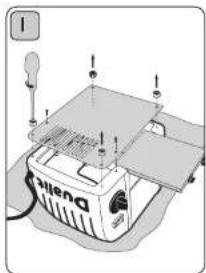
Diagram of a sewing machine with labeled parts and a numbered component, likely for assembly or repair instructions.Unplug and place toaster on a soft cloth. Remove crumb tray and unscrew feet to remove the base plate.
natural_image
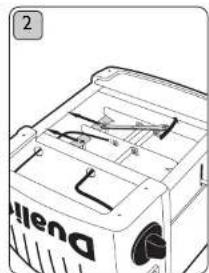
Line drawing of a vehicle's front bumper with visible engine compartment and exhaust pipe (no text or symbols)Loosen locking nuts on retaining plate using a 6.5mm spanner and slide back.
natural_image
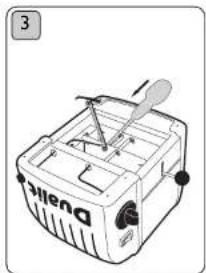
Line drawing of a Dwell electric scooter with a propeller and fan (no text or symbols)Unscrew brass links and wires.
natural_image
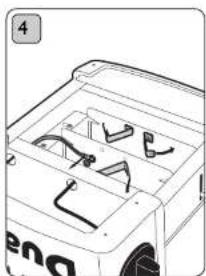
Line drawing of a vehicle's front bumper with internal compartments and handlebars (no text or symbols)Bend brass links and wires away from the element.
text_image
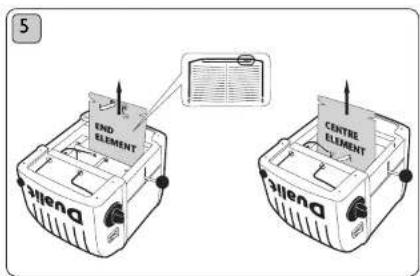
5 END ELEMENT CENTRE ELEMENT Silen DRemove element. To re-assemble, reverse procedure ensuring wires and parts are correctly positioned. Ensure new element is marked the same as the one removed and is seated correctly in the channels either side. PAT test before use.
TROUBLESHOOTING
MY TOASTER IS NOT WORKING:
- Check the toaster is plugged in.
• Check if the 'neon' is glowing red.
If yes, your elements or 'selector' switch may need replacing.
If no, your plug fuse may have blown or your timer may need replacing.
I GET UNEVEN TOASTING:
- Check the selector switch is set for the number of slots being used.
- Starting from the left, ensure you have loaded all heated up slots.
- The heavy duty Proheat elements can take a few moments to reach optimum toasting temperature. Preheating the slots prior to inserting your bread will eliminate this. Rotate the 'timer' all the way round, let it wind down to the circle indicator then insert your bread into the active slots.
- Ensure size and type of bread being toasted is the same.
• End elements take a little longer to warm up than centre elements, once toaster is at optimum operating temperature this will no longer occur.
MY TOASTER WOBBLIES ON MY WORK SURFACE:
- Use the adjustable foot under the toaster to compensate for uneven surfaces.
MY TOAST GETS STUCK WHEN I EJECT FROM THE TOASTER:
• Slices thicker than 28mm will get stuck
• Hand cut slice must be cut evenly
• Using a 'sandwich cage' can make toasting thicker items easier.
ONE SIDE OF MY BREAD IS NOT TOASTING:
- Check the 'selector' switch is set correctly. If set to Bagel setting only one side will toast and remember insert bread from the very left hand slot.
• One or more of the elements may need replacing, call the helpline or visit www.dualit.com for replacements.
SMOKE COMING OUT OF THE SLOTS
- If this is the first time using your toaster, this is normal your elements are being conditioned.
• Empty the crumb tray. A build up of crumbs can bum or cause a fire. - Some crumbs or pieces of bread may be stuck in the toaster. Unplug, remove the crumb tray then turn the toaster upside down over a sink or bin and gently shake the crumbs out or use a soft brush to clean inside your toaster.
GUARANTEE
This appliance is of excellent quality and construction. However, if any defects in materials or workmanship do appear during the relevant guarantee period, we will, at our discretion, either repair or replace the defective parts, free of charge, subject to the terms and conditions of our Guarantee shown below.
This Guarantee covers both parts and labour. Carriage is not included.
Your guarantee period is as follows:
- 1 years on parts
• 2 years on ProHeat elements
This Guarantee provides benefits which are additional to, and do not affect, your statutory rights. This guarantee does not cover the cost of returning the product to the dealer from whom it was purchased or to ourselves. This guarantee applies only to products sold and located in mainland Great Britain. It does not cover liability in respect of or replacement of plugs, cables or fuses and also does not cover defects due to:
- Failure to use or maintain product in accordance with Dualit's instructions.
• The product being connected to an unsuitable electricity supply.
• Accidental damage to or abuse or misuse of the product.
• The product has not been modified except by Dualit or approved agent. - Dismantling of or interference with the product.
- Theft or attempted theft of the product.
Before returning any product under this guarantee, please check that
- You have followed the product instructions correctly.
- Your mains electricity supply is functional.
- The defect is not due to a blown fuse. If you wish to claim under this guarantee you should:
- Send the product, postage or carriage paid, to the dealer from whom it was purchased or to Dualit direct.
- Ensure that the product is clean and packed carefully (preferably in its original carton).
- Enclose details of your name, address and telephone number and when and where the product was purchased, together with proof of purchase (e.g. a till receipt).
- Give exact details of the nature of the defect.
This Guarantee does not cover any other claims whatsoever, including, without limitation, any liability for incidental, indirect, or consequential damage, nor does it cover any claims for conversion or modification or for the costs of repair carried out by any third party without, the prior consent of Dualit. If replacement parts are fitted to the product this will not extend the period of the guarantee.
For further advise contact the Dualt customer helpline on +44 (0)1293 652 500 (09:00 to 17:00 Monday to Friday).
Alternatively, email Dualit at info@dualit.com or visit www.dualit.com.
Dualit Newgen UK 1208.qcp 19/01/2009 09:24 Page 20
Dualit®


Dualit Limited County Oak Way Crawley West Sussex RH11 7ST
Telephone: +44 (0) 1293 652 500 Facsimile: +44 (0) 1293 652 555
Email: info@dualit.com Web: www.dualit.com

natural_image
Technical line drawing of a mechanical component with no visible text or symbolsGB1208