Brave 4 Elite - Sports camera Akaso - Free user manual and instructions
Find the device manual for free Brave 4 Elite Akaso in PDF.


Pick your language and provide your email: we'll send you a specifically translated version.
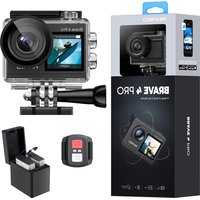
| Product Type | Action Camera |
| Brand | Akaso |
| Model | Brave 4 Elite |
| Image Sensor | 12MP CMOS |
| Video Resolution | 4K 30fps, 2.7K 30fps, 1080p 60fps |
| Photo Resolution | 12MP (4032x3024) |
| Field of View | 170° Ultra Wide Angle |
| Waterproof Depth | Up to 30m (with case) |
| Battery Capacity | 1050mAh Li-ion |
| Battery Life | Approximately 90 minutes (4K recording) |
| Storage | Micro SD card up to 64GB (Class 10 or UHS-I) |
| Connectivity | Wi-Fi, HDMI, USB-C |
| Dimensions | 60 x 40 x 25 mm (without case) |
| Weight | 58 g (camera only) |
| Power Input | 5V/1A via USB-C |
| Image Stabilization | Electronic Image Stabilization (EIS) |
| Main Functions | 4K video, 12MP photo, time-lapse, slow motion, burst mode, loop recording |
| Maintenance | Clean lens with soft cloth; keep waterproof seals free of debris |
| Safety | Do not expose to extreme temperatures; use only approved accessories |
| Spare Parts and Repairability | Replacement batteries, mounts, and cases available; not user-serviceable internally |
| General Information | Includes camera, waterproof case, mounting accessories, USB cable, and user manual |
Frequently Asked Questions - Brave 4 Elite Akaso
How do I turn on the Akaso Brave 4 Elite?
Press and hold the Power/Mode button on the top of the camera for about 2 seconds until the screen turns on. To turn off, press and hold the same button again.
How can I record 4K video?
From the main camera mode, press the Mode button to cycle to video mode. Tap the Settings icon (gear) on the screen, then select Video Resolution and choose 4K 30fps. Press the shutter button to start recording.
Is the Akaso Brave 4 Elite waterproof without a case?
No, the camera itself is not waterproof. It must be used inside the included waterproof housing to protect it from water. The housing is rated to 30 meters (100 feet) depth.
How do I connect the camera to my phone?
Download the Akaso Go app on your smartphone. Turn on the camera's Wi-Fi by pressing Mode button repeatedly until Wi-Fi icon appears, then select it. Open the app, connect to the camera's Wi-Fi network (password: 12345678). The app allows remote control and file transfer.
What microSD card should I use?
Use a microSD card (not included) with Class 10 or UHS-I rating up to 64GB. Higher capacity may work but is not officially supported. Format the card in the camera before first use.
How do I change the battery?
Open the side battery door by sliding it. Remove the old battery by gently pulling the plastic tab. Insert the new battery with contacts facing inward, close the door securely.
Can I use the camera while charging?
Yes, you can use the camera while connected to a USB power source (e.g., power bank). However, recording 4K video may consume more power than the charger provides, so battery level may still drop.
How do I transfer files to my computer?
Remove the microSD card from the camera and insert it into a card reader connected to your computer. Alternatively, connect the camera to the computer via USB-C cable; the camera will appear as a removable drive. Copy files from the DCIM folder.
What does the red blinking light mean?
When the red LED on the front blinks, it indicates the camera is recording video or taking a time-lapse. A solid red light means the camera is in photo mode or connected to Wi-Fi.
How do I reset the camera to factory settings?
Go to Settings menu, scroll to Reset option, and confirm. Alternatively, remove the battery for 30 seconds and reinsert it. This will restore default settings without deleting files on the SD card.
User questions about Brave 4 Elite Akaso
0 question about this device. Answer the ones you know or ask your own.
Ask a new question about this device
No questions yet. Be the first to ask one.
Download the instructions for your Sports camera in PDF format for free! Find your manual Brave 4 Elite - Akaso and take your electronic device back in hand. On this page are published all the documents necessary for the use of your device. Brave 4 Elite by Akaso.
USER MANUAL Brave 4 Elite Akaso

Manual assistant
Powered by Anthropic
Waiting for your message
Product information
Brand : Akaso
Model : Brave 4 Elite
Category : Sports camera