BKS4478 - Kitchen scale Becken - Free user manual and instructions
Find the device manual for free BKS4478 Becken in PDF.


| Product Type | Digital Kitchen Scale |
| Brand | Becken |
| Model | BKS4478 |
| Maximum Capacity | 5000 g (5 kg) |
| Graduation (Precision) | 1 g |
| Units of Measurement | g, kg, lb, oz, ml, fl.oz |
| Platform Material | Tempered Glass |
| Power Source | 2 x AAA batteries (included) |
| Dimensions (L x W x H) | 200 x 150 x 20 mm |
| Weight | 350 g |
| Tare Function | Yes |
| Auto-Off | Automatic shutdown after 2 minutes of inactivity |
| Low Battery Indicator | Yes |
| Overload Indication | Yes ("Err" or "O-Ld") |
| Display | LCD, backlit |
| Additional Functions | Weight conversion, tare subtraction, water/milk volume measurement |
| Cleaning Instructions | Wipe with a damp cloth; do not immerse in water |
| Safety Notes | Keep away from liquids and extreme temperatures; replace batteries if leaking |
| Spare Parts Availability | Batteries (standard AAA); other parts not user-serviceable |
| Warranty | 1 year limited warranty |
Frequently Asked Questions - BKS4478 Becken
User questions about BKS4478 Becken
0 question about this device. Answer the ones you know or ask your own.
Ask a new question about this device
Download the instructions for your Kitchen scale in PDF format for free! Find your manual BKS4478 - Becken and take your electronic device back in hand. On this page are published all the documents necessary for the use of your device. BKS4478 by Becken.
USER MANUAL BKS4478 Becken
MANUAL DE INSTRUÇÕES
Dear client,
Thank you for purchasing this product.
The quality of this appliance has been certified by several laboratory tests. This instructions manual is provided to simplify the use of the appliance as well as to guarantee a safe use.
Please read carefully the instructions and safety measures described in this manual.
We sincerely hope you will be satisfied when using your new appliance.
INDEX
1. SAFETY INSTRUCTIONS 4
2. OPERATING INSTRUCTIONS 6
1.1. Humidity and Water 5
1.2. Cleaning 5
1.3. General Precautions 5
2.1 Product Description 6
2.2. Product usage 6
2.3. Maintenance 11
3. TECHNICAL SPECIFICATIONS 11
4. POST-SALE SERVICE 11
5. ENVIRONMENTAL PROTECTION 12
BECKEN
1. SAFETY INSTRUCTIONS
Important Warnings
Before using your appliance read these instructions manual carefully and keep it in a safe place as you may need to consult it in the future.
Before turning on your appliance, and to ensure a safe and correct operation, do not use if:
- It has fallen to the ground;
- You notice any evidence of damage;
- Any anomaly occurs during its operation.
To avoid hazards or deterioration of your appliance through incorrect use it is advisable to read these instructions thoroughly.
Your appliance should not be used for other purposes than the ones intended and solely for household use. Any damage resulting from using the appliance outside this scope, any incorrect use, as well as any manual modifications to the product will not be covered and automatically voids the warranty.
Assistance
In case of malfunction, take your appliance to the Customer Support Service for assistance.
This appliance can be used by children aged from 8 years and above if they have been given supervision or instruction
concerning use of the appliance in a safe way and if they understand the hazards involved. Cleaning and user maintenance shall not be made by children unless they are older than 8 and supervised. Keep the appliance out of reach of children aged less than 8 years.
Appliances can be used by persons with reduced physical, sensory or mental capabilities or lack of experience and knowledge if they have been given supervision or instruction concerning use of the appliance in a safe way and understand the hazards involved.
Children shall not play with the appliance.
These instructions are also available at www.suporteworten.pt
1.1 Humidity and Water
Do not use your appliance in humid places. Furthermore, do not place your appliance under water (e.g. for cleaning).
1.2. Cleaning
To clean the exterior of the product, use a dry soft cloth only.
1.3. General Precautions
- Please follow the instructions in the user manual which will help you to properly install and operate this product and enjoy its advanced features. Please keep the instructions for future reference.
- Read all instructions before using the product.
- Maintenance and service operations are only to be carried out by authorized professionals.
BECKEN
- Any damage caused by manual modifications to the product is not covered by the warranty.
- If this product is used for other purposes than the ones originally intended, or if it is not correctly connected, the product may become damaged and the warranty will be voided.
2. OPERATING INSTRUCTIONS
2.1. Product Description
LCD screen


Weight mode Milk volume mode

Water volume mode
2.2. Product usage
FEATURES
- Indicates volume of water and milk
- Two weight unit systems, convertible: g/lb:oz
- Two volume unit systems, convertible: mL/fl'oz
- Low battery / Overload indication
- High precision gauge sensor
- Tare function
- Auto-off
INSTALLING OR REPLACING THE BATTERY
2x 1.5 V (AA/AAA) batteries. Remove package foil before use.
A. Remove the used batteries with the aid of a sharp object, if needed.
B. Install the new batteries by putting one side of the battery down first and pressing down the other side. (Please observe the polarity)
BUTTON FUNCTION

MODE
Weight mode

Turn on/off, reset to zero, change tare
UNIT
Change between Metric or Imperial unit systems (conversion button at the bottom of scale).
HOW TO CHANGE BETWEEN MODES
After turning on the scale, press the MODE button to select the mode and unit, as shown below:

flowchart
graph LR
    A["Weight mode"] --> B["Water volume mode"]
    B --> C["Milk Volume mode"]
    D["UNIT"] --> E["UNIT"]
    F["UNIT"] --> G["UNIT"]
If the scale has both the Metric (g/mL) and Imperial (lb:oz/fl'oz) unit systems, press the MODE button to choose the working mode (weight, milk volume, water volume) and then press the UNIT button to change between the two systems. Take the conversion of weight unit for example:

BECKEN
- When setting g as the weight unit, the default volume unit is mL;
- When setting lb:oz as the weight unit, the default volume unit is fl'oz.
TO START WEIGHING
1. Weighing mode
- Place the scale on a hard, flat surface.
- Place a bowl (if necessary) on the scale.
- Press ①ZERO to turn on the scale.
- Wait until the LCD shows 'O'.
- Press the MODE button to convert to the desired weighing mode.
- Place the object to the weighed on the scale (or bowl) to start weighing. The LCD will show the weight reading.
- If the object being weighed is water or milk, press the MODE button to choose the volume mode and view the corresponding volume.
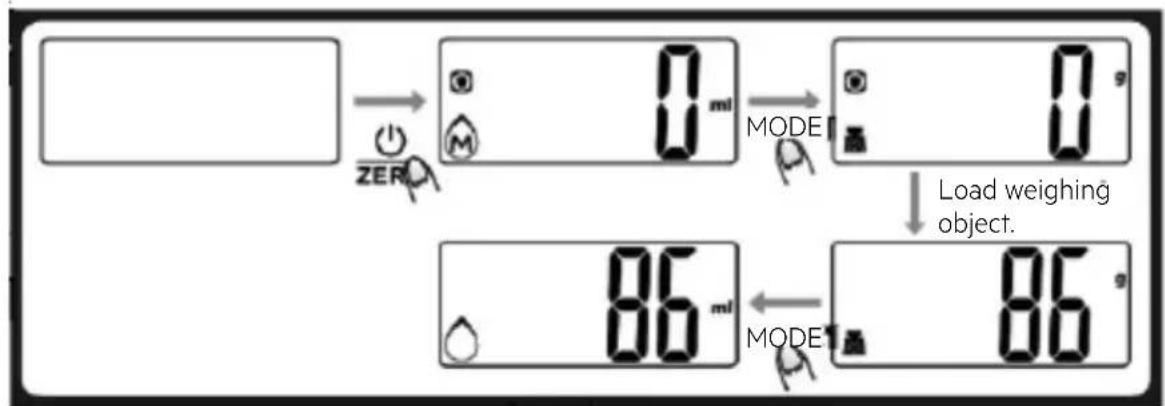
2. Volume indication mode
- Place the scale on a hard, flat surface.
- Press to turn on the scale.
- Wait until the LCD shows '0' and press the MODE button to choose the desired mode.
- Put a liquid container onto the scale. The LCD will show the weight of the container.
- Press the ZERO button to zero or tare weight.
- Pour liquid (water or milk) into the container; the LCD will show the volume of the liquid.
- Press the MODE button to choose the 'Weight' mode and view the liquid's weight.

'ZERO' OR 'TARE' FUNCTION
To weigh different loads consecutively without removing loads from the scale, start by putting the first load on the scale to get a weight reading. Then, press the ZERO button to reset the LCD reading to '0' before adding the next load. You can repeat this operation as many times as necessary.
Condition 1: 'ZERO' function
When the total sum of all loads on the scale ≤ 4% of scale's max. weight capacity.
(4 % = 80 g when capacity is 2000 g;
200 g when capacity is 5000 g)
The LCD will show ---- or '0 g' each time the button is pressed. This means the scale is not stable, please wait. If it displays '0 g' and the icon

BECKEN
'o' is shown on the left side of the LCD, it means the ZERO function is activated. The max. weight capacity remains unchanged.
Condition 2: 'TARE' function
When the total sum of all loads on the scale >4 % of the scale's max. weight capacity.
(4 % = 80 g when capacity is 2000 g;
200 g when capacity is 5000 g)
The LCD will show ---- or '0 g' each time the button is pressed. This means the scale is not stable, please wait. If it displays '0 g' and the icon 'T' is shown on the upper left corner of the LCD, it means the TARE function is activated. The max. weight capacity is reduced by the total weight of the load.
Under this condition:
By pressing ZERO, you can see the total weight of all loads on the scale. If you want to weigh more loads, just press ZERO to reset the LCD reading to 'O' again.
AUTO SHUT OFF
Auto shut-off occurs if the display shows '0' or shows the same weight reading for 2 minutes.

MANUAL SHUT OFF
To maximize the scale's battery life, always press ①ZERO to turn the scale off after using it.
Note: When the display shows '0', press ZERO to turn off the scale. When the display shows the weight reading, press ZERO for 3 seconds to turn off the scale.

WARNING INDICATORS
- Replace with a new battery.
- Scale overload. Remove the item to avoid damage. The max. weight capacity is indicated on the scale.

2.3. Maintenance
- Clean the scale with a slightly damp cloth. DO NOT immerse the scale in water or use chemical/abrasive cleaning agents.
- All plastic parts should be cleaned immediately after contact with fats, spices, vinegar and strongly flavoured/coloured foods. Avoid contact with acids such as citrus juices.
- Always use the scale on a hard, flat surface. DO NOT use on carpet.
3. TECHNICAL SPECIFICATIONS
Weight unit: 1g/0.1oz
Weight limit: 5Kg/11lb
Power supply: 2x1.5v AAA (included)
4. POST-SALE SERVICE
Becken has designed this appliance in order to guarantee maximum reliability. However, if a problem occurs do not attempt to open the appliance – there is a risk of electrical shock. If you are not able to solve the problem, please contact the Customer Support Service of any Worten, Modelo or Continente store in order to be assisted. Worten Equipamentos para o Lar provides a warranty against manufacturing defects for a 3-year period, or for another period provided for by the applicable legislation, from the date of purchase of the appliance.
BECKEN
WARNING: any attempt to repair the appliance without contacting the manufacturer or seller will void the warranty.
All users must be familiar with these instructions. Knowing what could go wrong can help prevent problems from occurring.
5. ENVIRONMENTAL PROTECTION
In order to protect the environment, we strive to reduce the volume of packaging used, limiting it to three easily sorted materials: cardboard, paper and plastic. The appliance is manufactured using recyclable materials after disassembled by a specialized company. Please comply with local regulations concerning the recycling of all materials.

natural_image
Symbol of a trash bin crossed with no text or numbers, representing waste sorting or restriction (no text present)Estimado cliente,
APAGADO MANUAL
natural_image
Symbol of a trash bin crossed with no visible text or numbersCaro(a) cliente,
DESLIGAMENTO MANUAL
natural_image
Symbol of a trash bin crossed out by two diagonal lines, with no text or numbers present.PT
BECKEN
Imported, produced and distributed by:
Worten Equipamentos p/o Lar S.A.

- INDEX
- SAFETY INSTRUCTIONS 4
- OPERATING INSTRUCTIONS 6
- BECKEN
- SAFETY INSTRUCTIONS
- Important Warnings
- Assistance
- Humidity and Water
- Cleaning
- General Precautions
- OPERATING INSTRUCTIONS
- Product Description
- LCD screen
- Product usage
- FEATURES
- INSTALLING OR REPLACING THE BATTERY
- BUTTON FUNCTION
- HOW TO CHANGE BETWEEN MODES
- TO START WEIGHING
- Weighing mode
- Volume indication mode
- 'ZERO' OR 'TARE' FUNCTION
- Condition 1: 'ZERO' function
- Condition 2: 'TARE' function
- Under this condition:
- AUTO SHUT OFF
- MANUAL SHUT OFF
- WARNING INDICATORS
- Maintenance
- TECHNICAL SPECIFICATIONS
- POST-SALE SERVICE
- ENVIRONMENTAL PROTECTION
- APAGADO MANUAL
- DESLIGAMENTO MANUAL
Brand : Becken
Model : BKS4478
Category : Kitchen scale