
KL125P2 - Lighting TP-LINK - Free user manual and instructions
Find the device manual for free KL125P2 TP-LINK in PDF.


| Product Type | Smart LED Bulb |
| Model | KL125P2 |
| Brand | TP-Link |
| Connectivity | WiFi 2.4 GHz (802.11 b/g/n) |
| Smart Compatibility | Amazon Alexa, Google Assistant, Apple Home (Matter), Samsung SmartThings, IFTTT |
| Light Source | LED |
| Base Type | E26 (standard medium screw) |
| Shape | A19 |
| Lumens | 800 lumens (60W equivalent) |
| Wattage | 9W |
| Color Temperature | 2500K – 6500K (tunable white) |
| Dimmable | Yes (via app, voice, or schedules) |
| Voltage | 100-240V AC, 50/60Hz |
| Beam Angle | 120° |
| Lifespan | 15,000 hours |
| Dimensions | 60 mm (diameter) x 110 mm (height) |
| Weight | 100 g |
| Operating Temperature | 0°C to 40°C (32°F to 104°F) |
| Certifications | FCC, ETL, UL, CE, RoHS |
| Warranty | 2 years |
| Package Contents | 1 x KL125P2 Smart Bulb, Quick Start Guide |
| Maintenance & Cleaning | Wipe with a dry cloth. Do not use water or liquid cleaners. |
| Safety Precautions | Do not use with standard wall dimmers; ensure proper ventilation. Not for enclosed fixtures. |
| Repair & Spare Parts | No user-serviceable parts. Contact TP-Link support for service. |
Frequently Asked Questions - KL125P2 TP-LINK
User questions about KL125P2 TP-LINK
0 question about this device. Answer the ones you know or ask your own.
Ask a new question about this device
Download the instructions for your Lighting in PDF format for free! Find your manual KL125P2 - TP-LINK and take your electronic device back in hand. On this page are published all the documents necessary for the use of your device. KL125P2 by TP-LINK.
USER MANUAL KL125P2 TP-LINK
Setup Using Amazon Frustration-Free Setup·5
Main Device Control 8
Configure Your Smart Bulb 9
Create Scenes 14
Schedule A Scene 16
Auto-Off Timer 17
Reset Your Smart Bulb 18
Works with Kasa 19
Authentication 20
About This Guide
This guide provides a brief introduction to smart bulb and the Kasa Smart app, as well as regulatory information.
Features available in smart bulb may vary by model and software version. Smart bulb availability may also vary by region or ISP. All images, steps, and descriptions in this guide are only examples and may not reflect your actual smart bulb experience.
Conventions
In this guide, the following convention is used:
| Convention | Description |
| Teal | Key information appears in teal, including management page text such as menus, items, buttons and so on. |
| Underline | Hyperlinks are in teal and underlined. You can click to redirect to a website. |
Support
- Specific product information can be found on the product page at https://www.tp-link.com. A Technical Community is provided for you to discuss our products at https://community.tp-link.com.
- Our Technical Support contact information can be found at the Help center of the Kasa Smart app and the Contact Technical Support page at https://www.tp-link.com/support.
- Videos about how to configure the smart bulb features can be found on the Setup Videos page at https://www.tp-link.com/support/setup-video/#smart-bulbs.
Introduction
The Smart Bulb is part of the Kasa smart home family of products, including plugs, switches, cameras and more. You can adjust brightness, track energy consumption, set schedules and timers and set an alarm that wakes you naturally by simulating the sunrise. Group lights together to control your smart bulbs more easily and create your own scenes.
Turn your home into a true smart home with Kasa Smart. You can also control multiple smart home devices with the Kasa Smart app or use your voice for added convenience. With Kasa, your home is never more than a few taps away.
- No Hub Required - The smart bulb screws in just like an ordinary bulb. Simply download the Kasa Smart app, connect to Wi-Fi and enjoy. No need for a hub or extra equipment.
- Scheduling - Set your smart bulb to turn on or off while you are home or away.
- Energy Saving - Reduce power usage without compromising on light quality.
- Voice Control - Use simple voice commands with Alexa, Google Assistant or SmartThings.
- Remote Control - Set up the smart bulb easily and control from anywhere with the free Kasa Smart app.
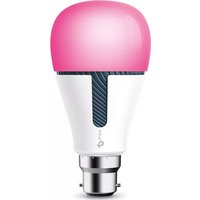
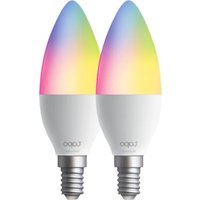
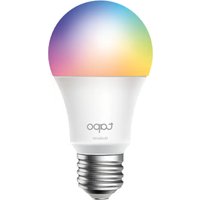
| KL110 (Dimmable) | KL130 (Multicolor) | KL125 (Multicolor) |
 |  |  |
| A dimming range from 1%-100%, lighting for any occasion | A wide range of colors and adjustable brightness (2500K~9000K) | A wide range of colors and adjustable brightness (2500K~6500K) |
| KL110B (Dimmable) | KL130B (Multicolor) | KL135 (Multicolor) |
 |  |  |
| A dimming range from 1%-100%, lighting for any occasion | A wide range of colors and adjustable brightness (2500K~9000K) | A wide range of colors and adjustable brightness (2500K~9000K)FFS (Frustration-Free Setup) supported |
Set Up Your Smart Bulb
Follow the steps below to set up your smart bulb via the Kasa Smart app.
1. Download Kasa Smart App
Go to Google Play or the App Store or scan the QR code below to download and install the Kasa Smart app.

2. Log In to Kasa Smart App
Open the app and use your TP-Link ID to log in. If you don't have a TP-Link ID, tap Create Account and the app will guide you through the rest.

3. Add Your Devices
Tap the + button in the app and select Device to add your new Kasa smart bulb. Follow app instructions to complete the setup.

Setup Using Amazon Frustration-Free Setup
What is Amazon Frustration-Free Setup (FFS)?
Amazon Frustration-Free Setup can help connect and set up your Kasa smart bulb in fewer steps, without having to remember and re-enter your Wi-Fi password on each device.
To use this feature, confirm the following:
- The new Kasa smart bulb supports Amazon FFS (Currently only model KL135 supports Amazon FFS).
- You have an Amazon FFS enabled Alexa device or router.
- You have saved your Wi-Fi information to Amazon by using Alexa echo.
- Your Kasa smart bulb and router are on the same network as your Alexa echo.
LED Indications during Amazon Frustration-Free Setup
| LED Status | |
| Solid white Ready for setup or working properly | |
| Blinking red, green and blue once in sequence and then remain solid white | FFS setup in progress |
| Blinking white three times | FFS setup failed and you can set up the bulb from app manually |
How to use Amazon Frustration-Free Setup with Kasa bulbs
- Open the Amazon Alexa app. Then go to More > Skills & Games.
- Enter Kasa in the search bar and choose TP-LINK Kasa.

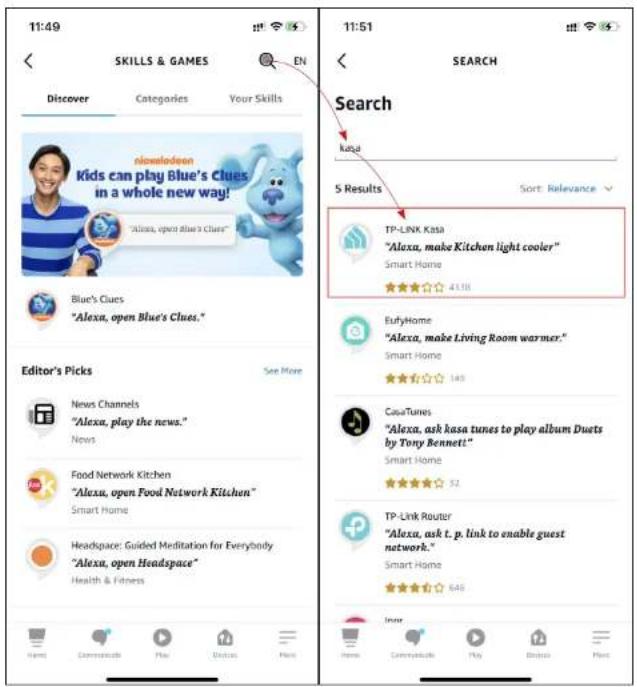
- Tap the ENABLE TO USE button.

- Log in with your TP-Link ID that has bound to your Kasa smart bulb, and then tap Authorize. After authorized successfully, the message TP-LINK Kasa has been successfully linked will come up.

- Plug in your Kasa smart bulb and the setup will complete automatically in two minutes.
For setting up more Kasa smart bulbs, just plug in and enjoy!
Done!
If this new smart bulb displays on the Home page in the Kasa Smart app, it indicates this bulb has been successfully associated with your Amazon account and joined your Wi-Fi network automatically.
If this new smart bulb does not display on the Home page in the Kasa Smart app, try setting it up manually via the Kasa Smart app by following Set Up Your Smart Bulb.
Main Device Control
After you successfully set up your smart bulb, you will see the Devices page in the Kasa app. You can add new devices, control multiple devices simultaneously in a group, configure account settings, and more.
Devices Page
Tap the ON/OFF button to instantly turn on/off the bulb.
Add a Group
Tap + > Group to add a group for controlling multiple devices simultaneously.
Tip: You need to add some devices before you group them together.
Configure Kasa Settings
Swipe right and you can configure settings for your Kasa account or get more information about Kasa.


Configure Your Smart Bulb
On the Devices page, tap a smart bulb and enter the Smart Bulb page. You can adjust the light temperature or color (only for KL130 / KL125 / KL135), power on or off your bulb at one tap, set brightness, schedules, shortcuts, track energy consumption and configure the bulb settings.
*Here we take KL130 as an example.
Power On/Off At One Tap
On the Smart Bulb page, you can quickly power on or off your smart bulb with a single button.

Adjust Brightness
Dim your smart bulb with a range from 1% to 100%.

Adjust Light Temperature
Adjust the light temperature for your smart bulb easily (Only for KL130 / KL125 / KL135).

Adjust Color
Choose a preferred color for your smart bulb (Only for KL130 / KL125 / KL135).

Presets and Recents
Tap to customize presets and apply what you have set recently to your smart bulb.
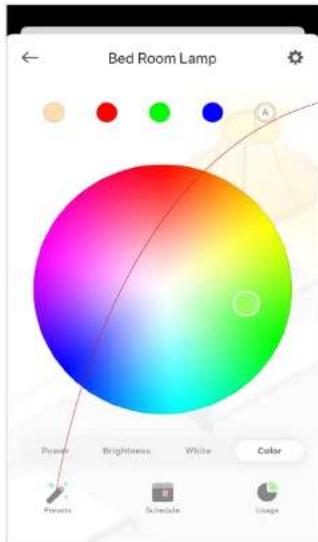

Shortcuts
With shortcuts, you can quickly apply your favourite presets at one tap.

Auto-White
Tap the Auto-White shortcut and your smart bulb will follow the color and brightness of the sun throughout the day.

Edit Shortcuts
To edit shortcuts, just select one and tap edit. Choose the preferred color effects and then save the settings.
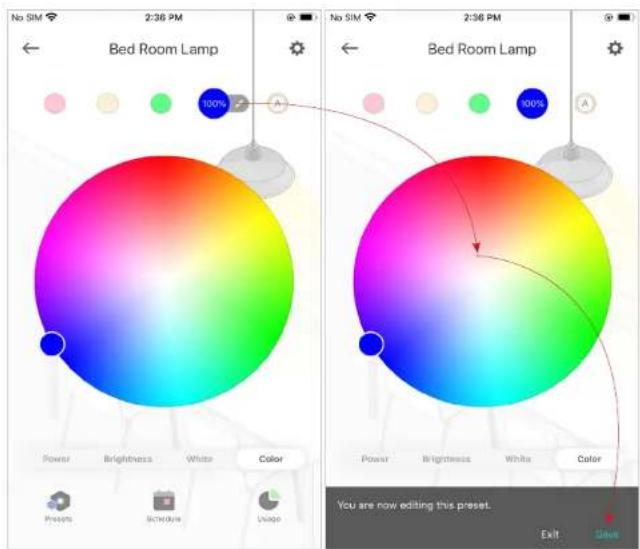
Add Schedules
Tap to add schedules for your smart bulb to simplify your daily routine by creating automatic On/Off actions.


Track Energy Usage
Tap to view and track energy consumption of your smart bulb.


Device Settings
Tap to configure device settings and check device information.
Device States
Set the default state when your smart bulb is turned on from the app and the power source.

Create Scenes
A scene is a preset group of smart devices that can be customized and activated simultaneously at the touch of a button from your smartphone or tablet, allowing you to easily set your mood, activity or fit any special occasion. This page allows you to preset how your smart home devices should act automatically at special occasions.
- On the Scenes page, tap +.
- Choose a default one or customize a new scene.
- Tap the light bulb and set what to do when the scene is run.


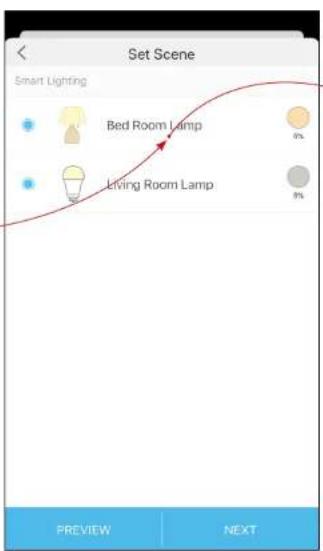

- Set a name for the scene. 4. Pick an icon for your bulb. 6. After creating the new scene, tap the scene to apply it.


Schedule A Scene
After you create a scene, you can schedule it to be applied automatically at the time specified. For example, if you want to automatically apply your scene "TV Time" at 7:33 PM every weekday, follow the steps below.
- Go to Smart Actions page and tap Add an Action.

- Select Schedule a Scene. 3. Select a scene and set a time schedule for the scene.


- Give this schedule a name to help you remember.

Auto-Off Timer
Whenever your smart bulb is turned on, you can set an auto-off timer to turn it off after a designated amount of time. For example, if you want your bedroom lamp to turn off automatically 21 minutes after being turned on, follow the steps below:
- Go to the Smart Actions page and tap "Add an Action."

- Select "Auto-Off Timer."
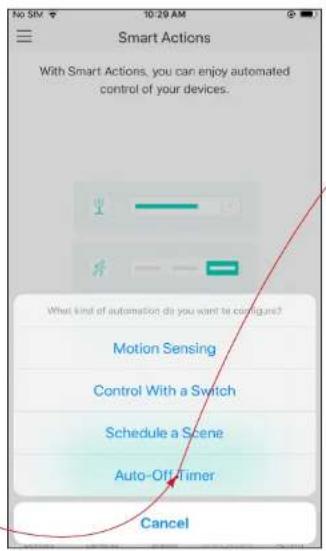
- Select a device and set the auto-off timer for that device.

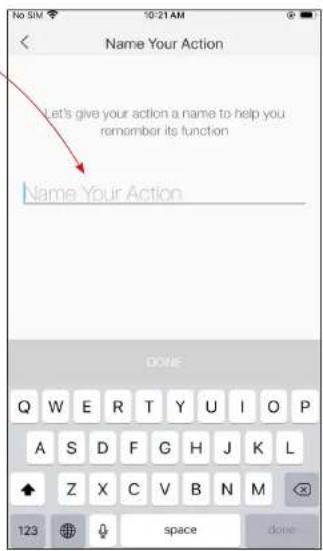
- Give this timer a name to help you remember it.
Reset Your Smart Bulb
There are two types of reset available: a soft reset, which resets only the Wi-Fi settings, and a factory reset, which erases all custom settings and restores them to factory defaults.
Soft Reset
- Turn the light switch controlling the bulb to the OFF position.
- Flip the light switch on and off 5 times (each cycle lasting about 1 second), and stop when the light is on for the fifth time. Three blinks afterward indicate a successful soft reset.
Factory Reset
Method 1:
- Turn the light switch controlling the bulb to the OFF position.
- Flip the light switch on and off 10 times (each cycle lasting about 1 second), and stop when the light is on for the tenth time. Three blinks afterward indicate a successful factory reset.
Method 2
On the Devices page in the Kasa app, swipe left on the bulb and tap Delete.

OR In the Kasa app, tap the smart bulb and tap ⚙️ Remove Device.

Works with Kasa
Use the Kasa app to pair your smart bulb with Amazon Alexa, Google Home Assistant, SmartThings, and other third-party services to enjoy a full hands-free experience. Kasa helps manage the rest of your smart home too, working with Nest to trigger changes when you arrive home or leave for the day.
- Launch the Kasa Smart app and swipe right, then tap Works with Kasa.
- Select one and follow app instructions to complete the settings.

Authentication
FCC Compliance Information Statement

Product Name: Kasa Smart Light Bulb, Dimmable / Kasa Smart Light Bulb, Multicolor / Kasa Smart Wi-Fi Light Bulb, Multicolor / Kasa Smart Wi-Fi Light Bulb, Multicolor
Model Number: KL110 / KL130 / KL125 / KL135
Responsible party:
TP-Link USA Corporation
Address: 10 Mauchly, Irvine, CA 92618
Website: http://www.tp-link.com/us/
Tel: +1 626 333 0234
This equipment has been tested and found to comply with the limits for a Class B digital device, pursuant to part 15 of the FCC Rules. These limits are designed to provide reasonable protection against harmful interference in a residential installation. This equipment generates, uses and can radiate radio frequency energy and, if not installed and used in accordance with the instructions, may cause harmful interference to radio communications. However, there is no guarantee that interference will not occur in a particular installation. If this equipment does cause harmful interference to radio or television reception, which can be determined by turning the equipment off and on, the user is encouraged to try to correct the interference by one or more of the following measures:
- Increase the separation between the equipment and receiver.
- Connect the equipment into an outlet on a circuit different from that to which the receiver is connected.
- Consult the dealer or an experienced radio/TV technician for help.
This device complies with part 15 of the FCC Rules. Operation is subject to the following two conditions:
- This device may not cause harmful interference.
- This device must accept any interference received, including interference that may cause undesired operation.
Any changes or modifications not expressly approved by the party responsible for compliance could void the user's authority to operate the equipment.
Note: The manufacturer is not responsible for any radio or TV interference caused by unauthorized modifications to this equipment. Such modifications could void the user's authority to operate the equipment.
FCC RF Radiation Exposure Statement
This equipment complies with FCC RF radiation exposure limits set forth for an uncontrolled environment. This device and its antenna must not be co-located or operating in conjunction with any other antenna or transmitter.
To comply with FCC RF exposure compliance requirements, this grant is applicable to only Mobile Configurations. The antennas used for this transmitter must be installed to provide a separation distance of at least 20 cm from all persons and must not be co-located or operating in conjunction with any other antenna or transmitter.
We, TP-Link USA Corporation, have determined that the equipment shown above has been shown to comply with the applicable technical standards, FCC part 15. There is no unauthorized change made in the equipment and the equipment is properly maintained and operated.
Issue Date: 2021-07-16
CE Mark Warning

This is a class B product. In a domestic environment, this product may cause radio interference, in which case the user may be required to take adequate measures.
OPERATING FREQUENCY (the maximum transmitted power)
2412 MHz - 2472 MHz (20dBm)
No restrictions exist in the use of radio frequencies or frequency bands in all EU member states and EFTA countries.
EU declaration of conformity
TP-Link hereby declares that the device is in compliance with the essential requirements and other relevant provisions of directives 2014/53/EU, 2009/125/EC, 2011/65/EU and (EU) 2015/863.
The original EU declaration of conformity may be found at https://www.tp-link.com/en/support/ce/
RF Exposure Information
This device meets the EU requirements (2014/53/EU Article 3.1a) on the limitation of exposure of the general public to electromagnetic fields by way of health protection.
The device complies with RF specifications when the device used at 20 cm from your body.
UKCA Mark

UK Declaration of Conformity
TP-Link hereby declares that the device is in compliance with the essential requirements and other relevant provisions of the Radio Equipment Regulations 2017.
The original UK Declaration of Conformity may be found at https://www.tp-link.com/support/ukca
Canadian Compliance Statement
This device contains licence-exempt transmitter(s)/receiver(s) that comply with Innovation, Science and Economic Development Canada's licence-exempt RSS(s). Operation is subject to the following two conditions:
1) This device may not cause interference.
2) This device must accept any interference, including interference that may cause undesired operation of the device.
Radiation Exposure Statement:
This equipment complies with IC radiation exposure limits set forth for an uncontrolled environment. This equipment should be installed and operated with minimum distance 20cm between the radiator & your body.
Industry Canada Statement
CAN ICES-3 (B)/NMB-3(B)
CAN ICES-005(B)/NMB-005(B)
Korea Warning Statements
Note 1: “Exceeding 0.1 wt %” and “exceeding 0.01 wt %” indicate that the percentage content of the restricted substance exceeds the reference percentage value of presence condition.
Note 2: “○” indicates that the percentage content of the restricted substance does not exceed the percentage of reference value of presence.
Note 3: The “—” indicates that the restricted substance corresponds to the exemption.

- Keep the device away from water, fire, humidity or hot environments.
- Do not attempt to disassemble, repair, or modify the device. If you need service, please contact us.
- Do not use the device where wireless devices are not allowed.
- Only use the control provided with or specified by these instructions to control this device.
Please read and follow the above safety information when operating the device. We cannot guarantee that no accidents or damage will occur due to improper use of the device. Please use this product with care and operate at your own risk.
WARNING:
- Operating Temperature: -15°C ~ 40°C (5°F ~ 104°F)
- Storage Temperature: -20°C ~ 70°C (-4°F ~ 158°F)
- Operating Humidity: 10% ~ 90% RH, Non-condensing
Storage Humidity: 10% ~ 90% RH, Non-condensing. NOT FOR EMERGENCY LIGHTING. Do not install the Smart Bulb with wet hands or when standing on wet or damp surfaces. NOT for use in totally enclosed or recessed luminaires. Suitable for damp locations. The increased weight may reduce the mechanical stability of certain luminaires and lampholders and may impair contact making and lamp retention. RISK OF ELECTRIC SHOCK OR BURNS. Switch OFF the light switch controlling the bulb and WAIT for the bulb to cool down before attempting to change it. Compatible with regular light switches. Not suitable for use with standard in-wall dimmers. Not compatible with photosensors, motion sensors, or timers. Dimmable via the app only. Only use the control provided with or specified by these instructions to control this lamp. This lamp will not operate properly when connected to a standard (incandescent) dimmer or dimming control.
Explanation of the symbols on the product label
| SymbolExplanation | |
 | Indoor use only |
 | RECYCLINGThis product bears the selective sorting symbol for Waste electrical and electronic equipment (WEEE). This means that this product must be handled pursuant to European directive 2012/19/EU in order to be recycled or dismantled to minimize its impact on the environment.User has the choice to give his product to a competent recycling organization or to the retailer when he buys a new electrical or electronic equipment. |
- ABOUT THIS GUIDE
- CONVENTIONS
- SUPPORT
- INTRODUCTION
- SET UP YOUR SMART BULB
- DOWNLOAD KASA SMART APP
- LOG IN TO KASA SMART APP
- ADD YOUR DEVICES
- SETUP USING AMAZON FRUSTRATION-FREE SETUP
- WHAT IS AMAZON FRUSTRATION-FREE SETUP (FFS)
- HOW TO USE AMAZON FRUSTRATION-FREE SETUP WITH KASA BULBS
- DONE
- MAIN DEVICE CONTROL
- DEVICES PAGE
- ADD A GROUP
- CONFIGURE KASA SETTINGS
- CONFIGURE YOUR SMART BULB
- POWER ON/OFF AT ONE TAP
- ADJUST BRIGHTNESS
- ADJUST LIGHT TEMPERATURE
- ADJUST COLOR
- PRESETS AND RECENTS
- SHORTCUTS
- AUTO-WHITE
- EDIT SHORTCUTS
- ADD SCHEDULES
- TRACK ENERGY USAGE
- DEVICE SETTINGS
- DEVICE STATES
- CREATE SCENES
- SCHEDULE A SCENE
- AUTO-OFF TIMER
- RESET YOUR SMART BULB
- SOFT RESET
- FACTORY RESET
- METHOD
- WORKS WITH KASA
- AUTHENTICATION
- FCC RF RADIATION EXPOSURE STATEMENT
- CE MARK WARNING
- OPERATING FREQUENCY (THE MAXIMUM TRANSMITTED POWER)
- EU DECLARATION OF CONFORMITY
- RF EXPOSURE INFORMATION
- UKCA MARK
- UK DECLARATION OF CONFORMITY
- CANADIAN COMPLIANCE STATEMENT
- RADIATION EXPOSURE STATEMENT
- INDUSTRY CANADA STATEMENT
- KOREA WARNING STATEMENTS
- WARNING
Brand : TP-LINK
Model : KL125P2
Category : Lighting