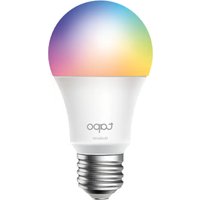
Tapo L430C - Lighting TP-LINK - Free user manual and instructions
Find the device manual for free Tapo L430C TP-LINK in PDF.


Pick your language and provide your email: we'll send you a specifically translated version.
| Product Type | Smart Wi-Fi LED Light Bulb |
| Model | Tapo L430C |
| Brand | TP-Link |
| Connectivity | Wi-Fi 2.4 GHz |
| Wattage | 9W (equivalent to 60W incandescent) |
| Lumen Output | 800 lumens |
| Color Temperature | 2700K - 6500K (tunable white) |
| Color Range | 16 million colors |
| Smart Control | Via Tapo app (iOS/Android) |
| Voice Control | Amazon Alexa, Google Assistant |
| Dimmable | Yes, via app or voice |
| Scheduling | Yes, timer and sunrise/sunset |
| Away Mode | Yes, random on/off |
| Scenes | Yes, custom scenes and presets |
| Installation | Screw into standard E26/E27 base |
| Operating Temperature | 0°C to 40°C |
| Dimensions | Diameter 60mm, Height 112mm |
| Weight | 95g |
| Power Source | AC 120V, 60Hz (or 220-240V, 50/60Hz) |
| Warranty | 2 years limited |
| Certifications | FCC, CE, RoHS |
Frequently Asked Questions - Tapo L430C TP-LINK
How do I reset the Tapo L430C bulb to factory defaults?
Turn the bulb on and off three times quickly (within 2 seconds per cycle). The bulb will flash three times to confirm reset.
Does the Tapo L430C require a hub?
No, it connects directly to your Wi-Fi router via 2.4 GHz. No additional hub is needed.
Can I use the Tapo L430C with a physical dimmer switch?
No, it is not compatible with traditional wall dimmers. Use the app or voice for dimming.
What voice assistants are supported?
Amazon Alexa and Google Assistant. Works with routines and voice commands.
How do I install the Tapo L430C?
Screw it into a standard E26/E27 socket, turn on the power, and follow the Tapo app setup instructions.
Can I control the bulb when I'm away from home?
Yes, via the Tapo app with remote access. Ensure the bulb and phone are connected to the internet.
What is the color temperature range?
It offers tunable white from warm 2700K to cool 6500K, plus millions of colors.
How do I clean the Tapo L430C?
Wipe gently with a dry cloth. Do not use liquids or abrasive cleaners.
Can I set schedules or timers?
Yes, use the Tapo app to set timers, sunrise/sunset triggers, and away mode for random schedules.
What is the expected lifespan of the bulb?
Approximately 15,000 hours, depending on usage.
User questions about Tapo L430C TP-LINK
0 question about this device. Answer the ones you know or ask your own.
Ask a new question about this device
No questions yet. Be the first to ask one.
Download the instructions for your Lighting in PDF format for free! Find your manual Tapo L430C - TP-LINK and take your electronic device back in hand. On this page are published all the documents necessary for the use of your device. Tapo L430C by TP-LINK.
USER MANUAL Tapo L430C TP-LINK


Manual assistant
Powered by Anthropic
Waiting for your message
Product information
Brand : TP-LINK
Model : Tapo L430C
Category : Lighting