KL130B - Lighting TP-LINK - Free user manual and instructions
Find the device manual for free KL130B TP-LINK in PDF.


Pick your language and provide your email: we'll send you a specifically translated version.
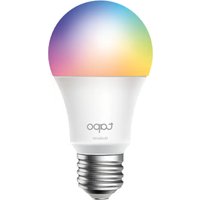
| Type de produit | Smart Light Bulb |
| Marque | TP-Link |
| Modèle | KL130B |
| Dimensions (diamètre x hauteur) | 2.36 in x 4.53 in (60 mm x 115 mm) |
| Poids | 4.2 oz (119 g) |
| Alimentation | 120V AC, 60 Hz |
| Wattage | 9.5W (équivalent 60W incandescent) |
| Flux lumineux | 800 lumens |
| Température de couleur | 2500K à 6500K (blanc réglable) |
| Couleurs RVB | 16 millions de couleurs |
| Durée de vie | 20 000 heures |
| Connectivité | Wi-Fi 802.11 b/g/n 2,4 GHz |
| Compatibilité Maison Connectée | Amazon Alexa, Google Assistant, Apple HomeKit |
| Contrôle via application | Kasa Smart (iOS et Android) |
| Commande vocale | Oui, via les assistants compatibles |
| Gradation | Oui, de 1% à 100% |
| Programmation | Oui, via l'app Kasa |
| Accès à distance | Oui (via Internet) |
| Économie d'énergie | Jusqu'à 85% d'énergie par rapport aux incandescentes |
| Matériaux | Polycarbonate, aluminium |
| Certifications | FCC, ETL |
| Entretien et nettoyage | Essuyer avec un chiffon sec lorsque l'ampoule est froide et éteinte |
| Sécurité | Ne pas immerger dans l'eau, utiliser dans un luminaire fermé |
| Pièces détachées | Non disponibles (ampoule non démontable) |
Frequently Asked Questions - KL130B TP-LINK
How do I reset the KL130B bulb to factory defaults?
Turn the bulb on and off three times (on-off-on-off-on) within 2 seconds. It will flash to indicate reset.
How to connect the KL130B to Wi-Fi?
Install the Kasa app, create an account, tap the '+' icon, select 'Lighting', then follow in-app instructions to put the bulb into pairing mode (blinking) and connect to your 2.4 GHz Wi-Fi network.
Does the KL130B support Apple HomeKit?
Yes, the KL130B is compatible with Apple HomeKit. Use the Home app or Siri to control it. You can also use the Kasa app to set up HomeKit.
What are the dimensions of the KL130B bulb?
The bulb measures 2.36 inches (60 mm) in diameter and 4.53 inches (115 mm) in height.
Can the KL130B work with a dimmer switch?
It is designed to be dimmed via the app or voice, not via a physical dimmer switch. However, you can use a standard on/off switch to control power.
What is the maximum brightness of the KL130B?
It provides 800 lumens, equivalent to a 60-watt incandescent bulb, and can be dimmed down to 1%.
How do I change the color of the KL130B?
Use the Kasa app to choose from 16 million colors or set a color temperature from 2500K (warm) to 6500K (cool). Voice commands also work.
Can I schedule the KL130B to turn on/off at specific times?
Yes, in the Kasa app you can create schedules, timers, and even sunrise/sunset automations.
What happens if the Wi-Fi goes out?
The bulb will stay in its last state (on or off). You can still operate it manually with the light switch. When Wi-Fi is restored, it reconnects automatically.
Is the KL130B compatible with a 3-way switch?
Yes, it can be installed in a fixture controlled by a 3-way switch, but you must leave the switch in the 'on' position for smart control. The bulb will retain its last state.
User questions about KL130B TP-LINK
0 question about this device. Answer the ones you know or ask your own.
Ask a new question about this device
No questions yet. Be the first to ask one.
Download the instructions for your Lighting in PDF format for free! Find your manual KL130B - TP-LINK and take your electronic device back in hand. On this page are published all the documents necessary for the use of your device. KL130B by TP-LINK.
USER MANUAL KL130B TP-LINK


Manual assistant
Powered by Anthropic
Waiting for your message
Product information
Brand : TP-LINK
Model : KL130B
Category : Lighting