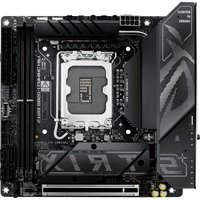
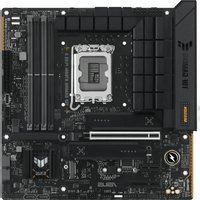
ROG STRIX Z790-I GAMING WIFI - Wall socket ASUS - Free user manual and instructions
Find the device manual for free ROG STRIX Z790-I GAMING WIFI ASUS in PDF.


Pick your language and provide your email: we'll send you a specifically translated version.
| Product Type | Mini-ITX Motherboard |
| Form Factor | Mini-ITX (17.0 x 17.0 cm) |
| Dimensions | 17.0 x 17.0 cm (6.7 x 6.7 in) |
| Weight | 0.25 kg (0.55 lb) |
| Power Supply | ATX 24-pin + 8-pin EPS |
| CPU Socket | LGA1700 |
| Memory Support | DDR5, up to 64GB, dual channel |
| Expansion Slots | 1x PCIe 5.0 x16 |
| Storage | 2x M.2 slots (PCIe 4.0/5.0), 4x SATA 6Gb/s |
| Wireless Connectivity | WiFi 6E (2x2), Bluetooth 5.3 |
| Ethernet | 2.5Gb Ethernet |
| Audio | ROG SupremeFX 7.1 ALC4080 |
| USB Ports | 1x USB 3.2 Gen2x2 (Type-C), 7x USB 3.2 Gen2, 4x USB 2.0 |
| Maintenance and Cleaning | Use compressed air; avoid liquids; remove dust from heatsinks |
| Safety | Use with compatible PSU; handle with anti-static precautions |
| Spare Parts and Repairability | CMOS battery replaceable; other components non-repairable; warranty service |
| General Information | ASUS ROG Strix Z790-I Gaming WiFi; supports Intel 12th/13th Gen |
Frequently Asked Questions - ROG STRIX Z790-I GAMING WIFI ASUS
What CPU is compatible with the ASUS ROG STRIX Z790-I GAMING WIFI?
It supports Intel 12th (Alder Lake) and 13th Gen (Raptor Lake) processors with LGA1700 socket.
What type of RAM does the motherboard support?
It supports DDR5 memory in dual channel configuration, up to a total of 64GB.
How do I update the BIOS on this motherboard?
You can update the BIOS using the built-in EZ Update tool in the UEFI, or via USB Flashback (a USB port and power supply required, press the BIOS Flashback button).
Does it support PCIe 5.0?
Yes, the motherboard has one PCIe 5.0 x16 slot for graphics cards.
How many M.2 slots are there and what speeds?
There are two M.2 slots: one supports PCIe 5.0 x4, the other supports PCIe 4.0 x4.
What is the maximum RAM speed supported?
It supports DDR5 speeds up to 6400+ MHz (overclocked), depending on the CPU and memory kit.
Does the motherboard have integrated WiFi and Bluetooth?
Yes, it includes built-in WiFi 6E (802.11ax) and Bluetooth 5.3.
How do I install the motherboard in my case?
Ensure the case supports Mini-ITX form factor. Use the provided standoffs and screws, align the I/O shield, and connect all cables.
What power supply is recommended?
A high-quality ATX power supply with at least 750W is recommended for gaming builds with a dedicated GPU.
Is the RGB lighting customizable?
Yes, the motherboard has integrated RGB LEDs and two ARGB headers (5V 3-pin) for additional lighting, customizable via ASUS Aura Sync software.
User questions about ROG STRIX Z790-I GAMING WIFI ASUS
0 question about this device. Answer the ones you know or ask your own.
Ask a new question about this device
No questions yet. Be the first to ask one.
Download the instructions for your Wall socket in PDF format for free! Find your manual ROG STRIX Z790-I GAMING WIFI - ASUS and take your electronic device back in hand. On this page are published all the documents necessary for the use of your device. ROG STRIX Z790-I GAMING WIFI by ASUS.