
DCM-280 - CD Player DENON - Free user manual and instructions
Find the device manual for free DCM-280 DENON in PDF.



| Product type | 5-disc CD changer player |
| Brand | DENON |
| Model | DCM-280 |
| Dimensions (W x H x D) | 434 x 115 x 392 mm |
| Weight | 6.3 kg |
| Power supply | 60 Hz, voltage as per label, power consumption 14 W |
| Number of channels | 2 |
| Frequency response | 2 – 20,000 Hz |
| Signal-to-noise ratio | 108 dB |
| Dynamic range | 98 dB |
| Distortion (1 kHz) | 0.003% |
| Channel separation | 96 dB |
| Output voltage (variable) | 0.2 – 2.0 V |
| Compatible discs | Audio CD 8 cm and 12 cm, finalized CD-R/RW, MP3 |
| Changer capacity | 5 discs (carousel) |
| Playback functions | Normal, programmed (32 tracks), random, repeat (track/disc/all), direct play, manual search, pause |
| Audio outputs | Line (RCA), coaxial digital, headphone (variable) |
| Additional connections | Sync jack (for synchronized recording) |
| Remote control | Wireless RC-258 (infrared, range 8 m) |
| Included accessories | RC-258 remote control, R6P/AA batteries (2), RCA connection cable, user manual |
| Maintenance and cleaning | Soft dry cloth; do not use solvents (benzene, thinner) or anti-static products; clean discs from the center outward |
| Safety | Unplug if not used for extended periods; avoid high temperatures, humidity, dust, and foreign objects; do not disassemble; use transport screws for moving |
| Spare parts / repairability | RC-258 remote control, batteries, connection cable, transport screws (red); consult a DENON dealer for internal parts |
| General information | Manual available in French (53 pages); compliance with EN60065, EN55013, EN55020, EN61000-3-2, EN61000-3-3 |
Frequently Asked Questions - DCM-280 DENON
User questions about DCM-280 DENON
0 question about this device. Answer the ones you know or ask your own.
Ask a new question about this device
Download the instructions for your CD Player in PDF format for free! Find your manual DCM-280 - DENON and take your electronic device back in hand. On this page are published all the documents necessary for the use of your device. DCM-280 by DENON.
USER MANUAL DCM-280 DENON
TO PREVENT FIRE OR SHOCK HAZARD, DO NOT EXPOSE THIS APPLIANCE TO RAIN OR MOISTURE.
CAUTION:
1. Handle the power supply cord carefully
Do not damage or deform the power supply cord. If it is damaged or deformed, it may cause electric shock or malfunction when used. When removing from wall outlet, be sure to remove by holding the plug attachment and not by pulling the cord.
2. Do not open the top cover
In order to prevent electric shock, do not open the top cover. If problems occur, contact your DENON DEALER.
3. Do not place anything inside
Do not place metal objects or spill liquid inside the CD player. Electric shock or malfunction may result.
Please, record and retain the Model name and serial number of your set shown on the rating label.
Model No. DCM-380/280 Serial No.
CAUTION
RISK OF ELECTRIC SHOCK DO NOT OPEN

CAUTION: TO REDUCE THE RISK OF ELECTRIC SHOCK, DO NOT REMOVE COVER (OR BACK). NO USER SERVICEABLE PARTS INSIDE. REFER SERVICING TO QUALIFIED SERVICE PERSONNEL.

The lightning flash with arrowhead symbol, within an equilateral triangle, is intended to alert the user to the presence of uninsulated "dangerous voltage" within the product's enclosure that may be of sufficient magnitude to constitute a risk of electric shock to persons.

The exclamation point within an equilateral triangle is intended to alert the user to the presence of important operating and maintenance (servicing) instructions in the literature accompanying the appliance.
FOR CANADA MODEL ONLY
CAUTION
TO PREVENT ELECTRIC SHOCK DO NOT USE THIS (POLARIZED) PLUG WITH AN EXTENSION CORD, RECEPTACLE OR OTHER OUTLET UNLESS THE BLADES CAN BE FULLY INSERTED TO PREVENT BLADE EXPOSURE.
- POUR LES MODELES CANADIENS UNIQUEMENT
ATTENTION
POUR PREVENIR LES CHOCS ELECTRIQUES NE PAS UTILISER CETTE FICHE POLARISEE AVEC UN PROLONGATEUR UNE PRISE DE COURANT OU UNE AUTRE SORTIE DE COURANT, SAUF SI LES LAMES PEUVENT ETRE INSEREES A FOND SANS EN LAISSER AUCUNE PARTIE A DECOUVERT.
NOTE:
This CD player uses the semiconductor laser. To allow you to enjoy music at a stable operation, it is recommended to use this in a room of 10^ (50 ^) 35^ (95 ^)
LABELS (for U.S.A. model only)
CERTIFICATION
THIS PRODUCT COMPLIES WITH DHHS RULES 21CFR SUBCHAPTER J APPLICABLE AT DATE OF MANUFACTURE.
CAUTION:
USE OF CONTROLS OR ADJUSTMENTS OR REFORMANCE OF PROCEDURES OTHER THAN THOSE SPECIFIED HEREIN MAY RESULT IN HAZARDOUS RADIATION EXPOSURE.
THE COMPACT DISC PLAYER SHOULD NOT BE ADJUSTED OR REPAIRED BY ANYONE EXCEPT PROPERLY QUALIFIED SERVICE PERSONNEL.
This device complies with Part 15 of the FCC Rules. Operation is subject to the following two conditions: (1) This device may not cause harmful interference, and (2) this device must accept any interference received, including interference that may cause undesired operation.
This Class B digital apparatus meets all requirements of the Canadian Interference-Caising Equipment Regulations.
"CLASS 1 LASER PRODUCT"
ADVARSEL:
USYNLIG LASERSTRÁLING VED ÅBNING, NAR SIKKERHEDSAFBRYDERE
ER UDE AF FUNKTION. UNDGÅ UDSAETTELSE FOR STRÄLING.
VAROITUS!
LAITTEEN KÄYTTÄMINEN MUULLA KUIN TÄSSÄ
KÄYTTÖOHJEESSA MAINTULLA TAVALLA SAATTAA ALTISTAA
KÄYTTÄJÄN TURVALLISUUSLUOKAN 1 YLITTÄVALLE
NAKYMÄTTÖMÄLLE LASERSÄTEILLYLLE.
WARNING-
OM APPARATEN ANVÄNDS PÅ ANNAT SÄTT ÅN I DENNA BRUKSANVISNING SPECIFICERATS, KAN ANVÄNDAREN UTSÄTTAS FÖR OSYNLIG LASERSTRÄLNING SOM ÖVERSKRIDER GRÄNSEN FÖR LASERKLASS 1.
- Read Instructions - All the safety and operating instructions should be read before the product is operated.
- Retain Instructions - The safety and operating instructions should be retained for future reference.
- HeedWarnings - All warnings on the product and in the operating instructions should be adhered to.
- Follow Instructions - All operating and use instructions should be followed.
- Cleaning - Unplug this product from the wall outlet before cleaning. Do not use liquid cleaners or aerosol cleaners.
- Attachments - Do not use attachments not recommended by the product manufacturer as they may cause hazards.
- Water and Moisture - Do not use this product near water - for example, near a bath tub, wash bowl, kitchen sink, or laundry tub; in a wet basement; or near a swimming pool; and the like.
- Accessories - Do not place this product on an unstable cart, stand, tripod, bracket, or table. The product may fall, causing serious injury to a child or adult, and serious damage to the product. Use only with a cart, stand, tripod, bracket, or table recommended by the manufacturer, or sold with the product. Any mounting of the product should follow the manufacturer's instructions, and should use a
mounting accessory recommended by the manufacturer.
- A product and cart combination should be moved with care. Quick stops, excessive force, and uneven surfaces may cause the product and cart combination to overturn.
- Ventilation – Slots and openings in the cabinet are provided for ventilation and to ensure reliable operation of the product and to protect it from overheating, and these openings must not be blocked or covered. The openings should never be blocked by placing the product on a bed, sofa, rug, or other similar surface. This product should not be placed in a built-in installation such as a bookcase or rack unless proper ventilation is provided or the manufacturer's instructions have been adhered to.
- Power Sources – This product should be operated only from the type of power source indicated on the marking label. If you are not sure of the type of power supply to your home, consult your product dealer or local power company. For products intended to operate from battery power, or other sources, refer to the operating instructions.
- Grounding or Polarization - This product may be equipped with a polarized alternating-current line plug (a plug having one blade wider than the other). This plug will fit into the power outlet only one way. This is a safety feature. If you are unable to insert the plug fully into the outlet, try reversing the plug. If the plug should still fail to fit, contact your electrician to replace your obsolete outlet. Do not defeat the safety purpose of the polarized plug.
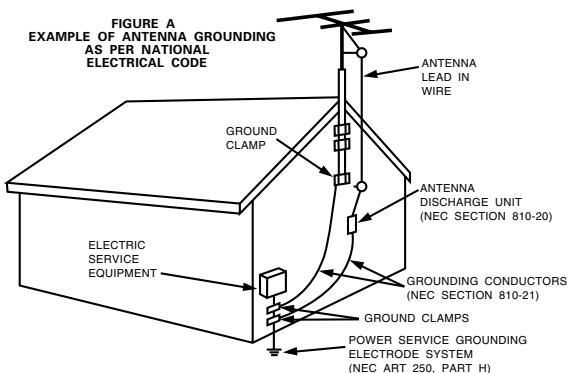
NEC-NATIONAL ELECTRICAL CODE
- Power-Cord Protection – Power-supply cords should be routed so that they are not likely to be walked on or pinched by items placed upon or against them, paying particular attention to cords at plugs, convenience receptacles, and the point where they exit from the product.
- Outdoor Antenna Grounding - If an outside antenna or cable system is connected to the product, be sure the antenna or cable system is grounded so as to provide some protection against voltage surges and built-up static charges. Article 810 of the National Electrical Code, ANSI/NFPA 70, provides information with regard to proper grounding of the mast and supporting structure, grounding of the lead-in wire to an antenna discharge unit, size of grounding conductors, location of antenna-discharge unit, connection to grounding electrodes, and requirements for the grounding electrode. See Figure A.
- Lightning - For added protection for this product during a lightning storm, or when it is left unattended and unused for long periods of time, unplug it from the wall outlet and disconnect the antenna or cable system. This will prevent damage to the product due to lightning and power-line surges.
- Power Lines - An outside antenna system should not be located in the vicinity of overhead power lines or other electric light or power circuits, or where it can fall into such power lines or circuits. When installing an outside antenna system, extreme care should be taken to keep from touching such power lines or circuits as contact with them might be fatal.
- Overloading – Do not overload wall outlets, extension cords, or integral convenience receptacles as this can result in a risk of fire or electric shock.
- Object and Liquid Entry – Never push objects of any kind into this product through openings as they may touch dangerous voltage points or short-out parts that could result in a fire or electric shock. Never spill liquid of any kind on the product.
- Servicing – Do not attempt to service this product yourself as opening or removing covers may expose you to dangerous voltage or other hazards. Refer all servicing to qualified service personnel.
- Damage Requiring Service – Unplug this product from the wall outlet and refer servicing to qualified service personnel under the following conditions:
a) When the power-supply cord or plug is damaged,
b) If liquid has been spilled, or objects have fallen into the product,
c) If the product has been exposed to rain or water,
d) If the product does not operate normally by following the operating instructions. Adjust only those controls that are covered by the operating instructions as an improper adjustment of other controls may result in damage and will often require extensive work by a qualified technician to restore the product to its normal operation,
e) If the product has been dropped or damaged in any way, and
f) When the product exhibits a distinct change in performance – this indicates a need for service.
- Replacement Parts - When replacement parts are required, be sure the service technician has used replacement parts specified by the manufacturer or have the same characteristics as the original part. Unauthorized substitutions may result in fire, electric shock, or other hazards.
- Safety Check - Upon completion of any service or repairs to this product, ask the service technician to perform safety checks to determine that the product is in proper operating condition.
- Wall or Ceiling Mounting - The product should be mounted to a wall or ceiling only as recommended by the manufacturer.
- Heat – The product should be situated away from heat sources such as radiators, heat registers, stoves, or other products (including amplifiers) that produce heat.
NOTE ON USE / OBSERVATIONS RELATIVES A L'UTILISATION / NOTAS SOBRE EL USO
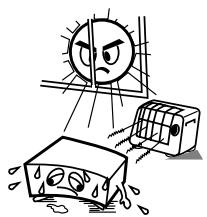
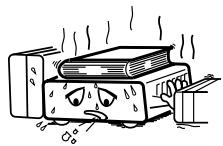
* (For sets with ventilation holes)
- Do not obstruct the ventilation holes.
- Ne pas obstruer les trouss d'airation.
- No obstruya los orificios de ventilacion.
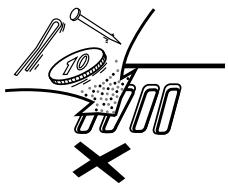
The ventilation should not be impeded by covering the ventilation openings with items, such as newspapers, table-cloths, curtains, etc.
- No naked flame sources, such as lighted candles, should be placed on the apparatus.
- Please be care the environmental aspects of battery disposal.
- Apparatus shall not be exposed to dripping or splashing and no objects filled with liquids, such as vases, shall be placed on the apparatus.
- No objects filled with liquids, such as vases, shall be placed on the apparatus.
- DECLARATION OF CONFORMITY
We declare under our sole responsibility that this product, to which this declaration relates, is in conformity with the following standards: EN60065, EN55013, EN55020, EN61000-3-2 and EN61000-3-3.
Following the provisions of 73/23/EEC, 89/336/EEC and 93/68/EEC Directive.
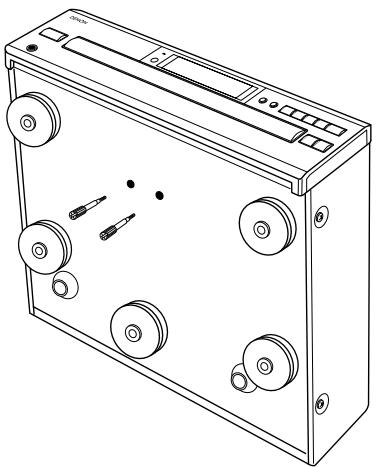
At the bottom of the player there are two red shipping screws for use when the player is transported. Before using the player, turn these screws counterclockwise and remove them.
If the shipping screws are still in place and the power is turned on, the disc tray will not open. If this happens, turn off the power, unplug the power cord from the power outlet and remove the shipping screws.
Retain these screws as they will be needed when the player is transported.
Before transporting the player, take out the discs, close the disc tray, turn off the power after "0 00 00:00" is displayed and unplug the power cord from the power outlet. Then install the shipping screws by turning them clockwise. Be sure to fasten them securely.
Thank you for purchasing the DENON compact disc player. Read the Operating Instructions thoroughly, and operate this player properly.
TABLE OF CONTENTS
1 FEATURES 5
2 BEFORE USING 6
3 CLEANING 7
4 CDs 7
5 NAMES OF PARTS AND THEIR FUNCTIONS 8,9
6 OPENING AND CLOSING THE DRAWER AND LOADING A DISC 10
7 CONNECTIONS 11
8 NORMAL PLAY 12
OTHER PLAY METHODS 13~17
10 PLAYING MP3 FILES 18, 19
11 PLAY USING THE REMOTE CONTROL UNIT. 20, 21
12 COMPACT DISCS 22
13 TROUBLE? CHECK THE PLAYER TO FIND WHAT'S WRONG 22
14 SPECIFICATIONS. 22
In addition to the CD Player unit, please check to make sure the following items are included in the packing box:
(1) Operating Instructions 1
(2) Connection Cords. 1
(3) Remote Control Unit RC-258 1
(4) R6P (AA size) Dry batteries 2
IMPORTANT
(CANADIAN MODEL ONLY)
This digital apparatus does not exceed the Class B limits for radio noise emissions from digital apparatus setout in the Radio Interference Regulations of the Canadian Department of Communication.
1 FEATURES
(1) HDCD® (High Definition Compatible Digital) decoder (DCM-380 only)
HDCD is an encoding/decoding technology that greatly reduces the distortion occurring at the time of digital recording while maintaining compatibility with the conventional CD format. HDCD allows 20-bit data to be converted into the 16-bit data of current CDs with no loss in sound quality.
The use of this HDCD decoder makes it possible to achieve the high resolution and low distortion characteristic of HDCD when playing HDCD-compatible discs, and DENON's digital technology optimizes the high sound quality possibilities of HDCD technology. Furthermore, normal CDs and HDCD-compatible CDs are automatically identified, and the optimum digital signal processing for that type of disc used.
(2) High performance digital filter
The DCM-380/280 uses high precision 8-times oversampling digital filters.
(3) Simple Playback of 8cm CD Singles
8cm CD singles can be played without using an adaptor.
(4) Programming of up to 32 tracks
All of the tracks on a CD can be programmed to play in any order. Programming in units of discs (all tracks on a disc) is also possible.
(5) Newly developed carousel-type changer mechanism included
This mechanism can house five discs, and while one disc is playing the remaining four discs can be changed. In addition, the carousel can be rotated either clockwise or counterclockwise, so searching between discs is fast.
(6) Wireless Remote Control Accessory
In addition to general operations such as Play, Stop and Pause, this remote control unit enables direct selection, direct programming, and other functions. Use of the remote control unit adds greatly to the operating ease of the DCM-380/280, enhancing its outstanding features.
(7) CD-RW Playback Capability
The DCM-380/280 can play finalized CD-R and CD-RW discs.
(8) MP3 Playback
2 BEFORE USING
Condensation
Condensation
Condensation can be seen as water droplets that have formed on the windows of a heated room in winter.
Conditions for the Formation of Condensation
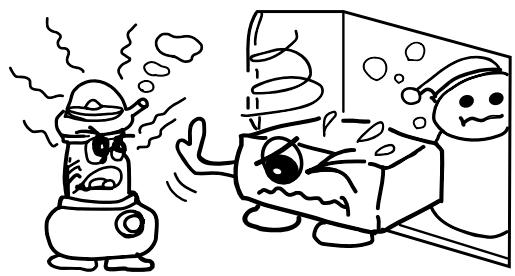
In winter, when the unit is brought from outdoors to a warm indoor location, or when the room temperature is suddenly raised by a heater, condensation will form on the operating parts within the unit and normal operation will no longer be possible.
Condensation can also form in summer when the breeze from an air conditioner strikes the unit directly. Should this occur, change the setup location of the unit.
■ Measures to Take After Condensation Forms
- If condensation has formed, switch on the power and leave the unit for a while. Although the time will differ according to the surrounding conditions, the unit should be usable in 1 to 2 hours.
- Should condensation form on the disc, wipe the disc clean.
Other Precautions
■ Illustrations used for descriptive purposes may differ from the actual items.
Please keep the instruction manual.
After reading this instruction manual, please keep it in a safe place together with the warranty.
Setup Precautions
Please provide a spacing of more than 10~cm between the top, rear, and side surfaces of subwoofer and walls or other audio/video equipment, etc.
- When using this unit or other electronic equipment that contains microprocessors at the same time as using a tuner or TV, noise or screen interference can occur on the audio and video of the tuner or TV. Should this occur, pay careful attention to the following points.
- Separate this unit as much as possible from the tuner or TV.
- Separate the antenna line of the tuner or TV from the power cable and input/output connection cables of this unit as much as possible.
- Use of indoor antennas and 300/ohms feedline are especially susceptible to such interference. We recommend the use of outdoor antennas and 75/ohms coaxial cable.
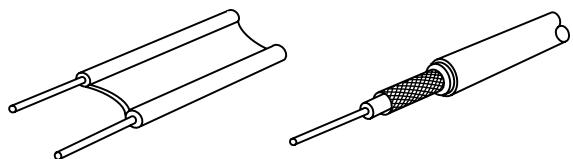
300 Ω/ohms feedline
75 Ω/ohms coaxial cable
When not using the DCM-380/280
Under normal circumstances
Always remove the disc and turn the power off.
- When leaving home for long periods of times such as for trips, be sure to unplug the power supply cord.
When moving the DCM-380/280
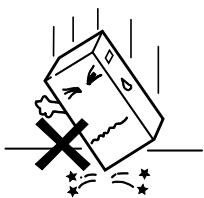
- Do not subject the DCM-380/280 to shocks.
- Always check that the disc has been removed and the connection cords disconnected before moving the DCM-380/280.
3 CLEANING
Cleaning the main unit
Use a soft cloth and wipe lightly to remove dirt from the cabinet and operation panel.
- When using chemically treated cloths, follow the precautions that have been written for them.
- Do not use benzene, thinners, or other organic solvents or insecticides on the main unit since they may cause a change in quality or color.
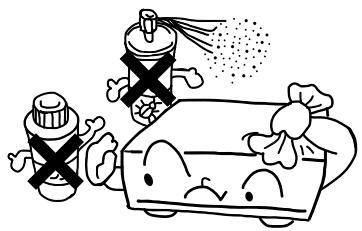
NOTE:
Do not use record spray or antistatic. Also do not use volatile chemicals such as benzene or thinner.
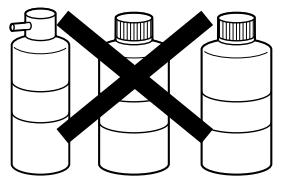
Record
spray
Thinner
Benzene
Cleaning discs
Fingerprints or dirt on the disc may lower sound and picture quality or cause breaks in playback. Wipe off fingerprints or dirt.
Use a commercially available disc cleaning set or a soft cloth to wipe off fingerprints or dirt.
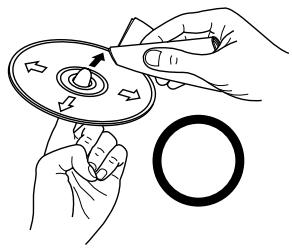
Wipe gently from the middle outwards.
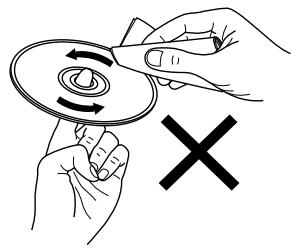
Do not wipe with a circular motion.
4 CDs
Discs
This unit uses CDs (optical digital audio discs) which bear the mark located at the right.
Note that specially shapes CDs, for example, heart shaped or hexagonal cannot be played. Do not attempt to use such CDs since doing so may cause breakdown of this unit.

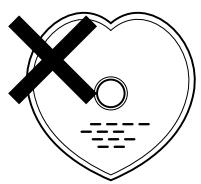
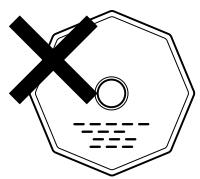
Holding discs
Avoid touching the surface of discs when loading and unloading them.
Be careful not to get fingerprints on the signal surface (the side which shines in rainbow colors).
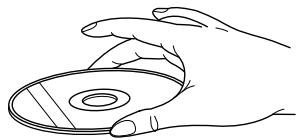
Cautions on Handling Discs
- Do not get fingerprints, grease or dirt on discs.
- Be especially careful not to scratch discs when removing them from their cases.
- Do not bend discs.
- Do not heat discs.
- Do not enlarge the center hole.
- Do not write on the labeled (printed) side with a ball-point pen or a pencil.
- Water droplets may form on the surface if the disc is moved suddenly from a cold place to a warm one. Do not use a hairdryer, etc., to dry the disc.
Cautions on Storing Discs
Always eject discs after playing them.
- Keep discs in their cases to protect them from dust, scratches and warping.
- Do not put discs in the following places:
- Exposed to direct sunlight for long periods of time
- Humid or dusty places
- Places exposed to heat from heaters, etc
5 NAMES OF PARTS AND THEIR FUNCTIONS
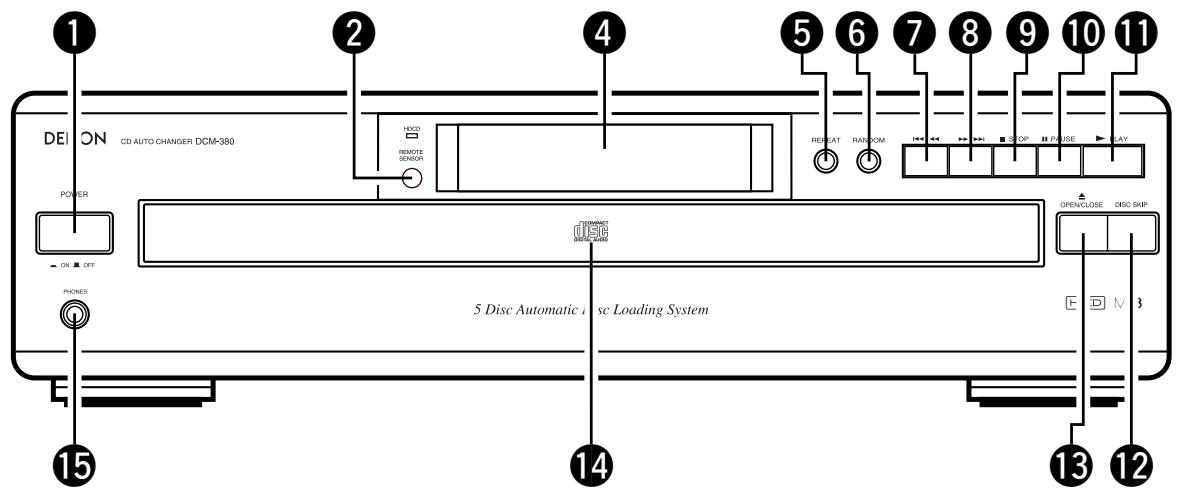
FRONT PANEL
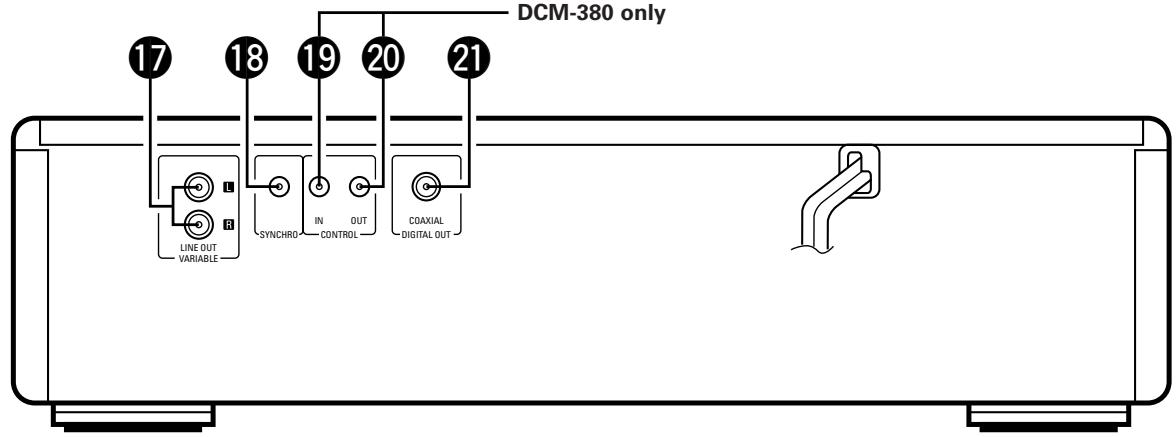
REAR PANEL
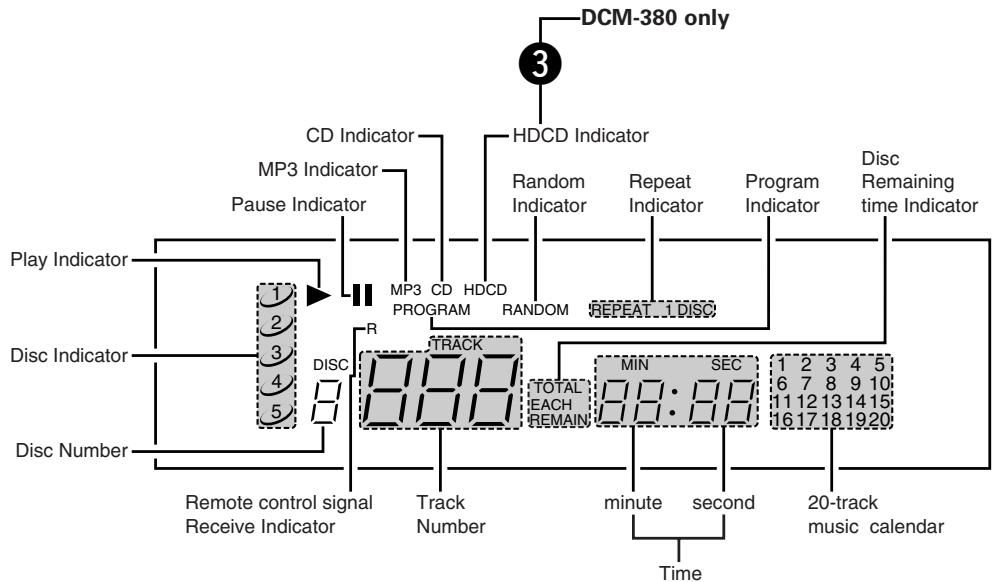
DISPLAY
1 Power Switch (POWER)
- Press this button to switch on the power.
Remote Control Receptor (REMOTE SENSOR)
- This receptor receives infrared signals from the wireless remote control unit.
- Aim the wireless remote control unit at this receptor window when operating it.
3 HDCD Indicator (DCM-380 only)
- This lights when an HDCD-compatible disc is playing.
4 Display Window
- The Disc No., Track No., playing time and other information are displayed in the display window.
Repeat Button (REPEAT)
- Press this button for repeated playback. The "REPEAT" indicator appears on the display. The following three types of repeat modes are available.
- When pressed once, the "REPEAT" and "1" indicators light and the track currently playing is repeated.
- When pressed again, the "REPEAT" and "1 DISC" indicators light and all the tracks on the disc currently playing are repeated.
- When pressed again, the "REPEAT" and "DISC" indicators light and all the discs currently set on the tray are repeated.
- When pressed again, the "REPEAT" and "DISC" indicators turn off and the repeat mode is cancelled.
The repeat function can also be used during programmed and random playback, but in this case only the all repeat ("REPEAT" and "DISC" indicator) mode is available. (Refer to page 15 for details.)
Random button (RANDOM)
- Press this button to begin random play.
- Pressing this button during stop, and press the PLAY button play to full automatic random play.
- Pressing this button during playing of a program starts random play of the tracks in the program. (See page 15, item 7.)
Automatic/Manual Search Reverse Button (I / )
- Press this button to return the pickup to the beginning of the present track. Press again to return to other tracks.
- By pressing the button a number of times, the pickup will move back the corresponding number of tracks.
- Keep on pressing this button for more than 0.5 seconds during playback for fast reverse search. As long as the button is kept pressed, music signals are played back faster than normal.
- Keep on pressing this button for more than 5 seconds, reverse search becomes approximately 4 times faster.
Automatic/Manual Search Forward Button (▶▶/▶▶I)
- Press this button to move the pickup forward to the beginning of the next track. Press again to move ahead to other tracks.
- By pressing the button a number of times, the pickup will advance the corresponding number of tracks.
- Keep on pressing this button for more than 0.5 seconds during playback for fast forward search. As long as the button is kept pressed, music signals are played back faster than normal.
- Keep on pressing this button for more than 5 seconds, forward search becomes approximately 4 times faster.
9 Stop Button (STOP)
- Press this button to stop play.
10 Pause Button (II PAUSE)
- Press this button to stop play temporarily.
- Pressing the PAUSE button during play stops play temporarily. The "▶" indicator goes off and the "■" indicator lights up.
- To cancel the Pause state, press either the PLAY button 11 or the PAUSE button 10 a second time.
1 Play Button (▶ PLAY)
- Press this button to play a disc.
The “▶” indicator lights up when the button is pressed, the number of the disc and the track being played is displayed by the Disc Number and Track No. indicator, and the amount of elapsed time for the current track is displayed by the Time indicator. - The “▶” indicator goes off after playing of the final track of the final disc is finished and the player stops.
12 Disc Skip Button (DISC SKIP)
Each time this button is pressed, the carousel will rotate in a clockwise direction to the next tray position. This allows for loading or unloading of discs.
This button is also used to select the next disc, in the normal play continuously.
13 Open/Close Button (△ OPEN/CLOSE)
- Press this button when opening.
- The drawer is opened toward the front.
- Press the button again to close the drawer.
14 Loading Printer
- Discs can be loaded and unloaded when this drawer is open. Do not force the drawer closed by hand.
15 Headphone Jack (PHONES)
- Insert the jack of the headphones when desiring to listen to a disc privately. (Headphones are sold separately.)
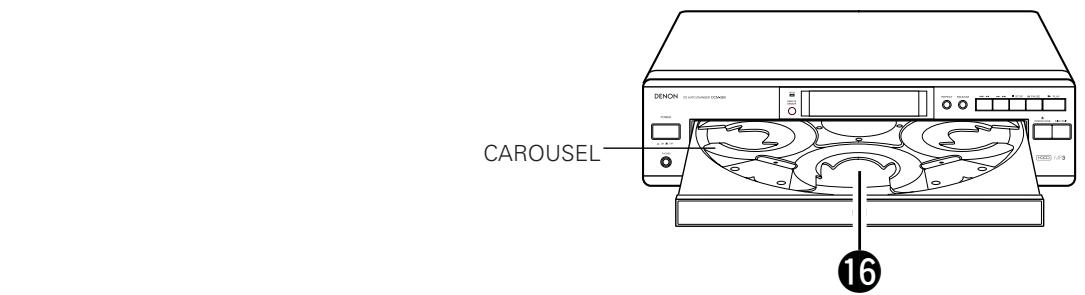
16 Disc Trays (1 ~ 5)
- One disc per tray can be loaded.
Output Terminal (LINE OUT)
- Connect the connection cords from these terminals to the amplifier's input terminals. (Refer to page 11 for connections.)
18 SYNCHRO Jack (SYNCHRO)
- To make a synchronized recording, this jack must be connected to the SYNCHRO jack of the deck with a connection cord. (Refer to page 11 for connections.)
19 Control Input Connector (CONTROL IN) (DCM-380 only)
- This is the input connector for wired remote control. Consult your DENON dealer if you wish to use this connector.
20 Control Output Connector (CONTROL OUT) (DCM-380 only)
- This is the output connector for wired remote control. Consult your DENON dealer if you wish to use this connector.
2 Digital Audio Output Connector (COAXIAL)
- Connect a commercially available 75/ ohms pin-plug cord.
- Digital data is output from this connector.
Continuous Button Operation
If the Automatic/Manual Search Reverse button 7 or the Automatic/Manual Search Forward button 8 are held in, the function of that button will be repeated.
6 OPENING AND CLOSING THE DRAWER AND LOADING A DISC
Opening and closing the drawer (This operation only works while the power is on.)
- Press the POWER switch to turn on the power.
- Press the OPEN/CLOSE button.
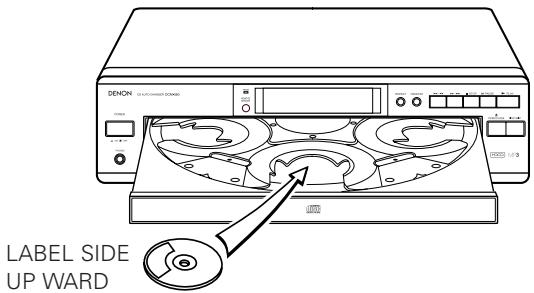
How to load a disc
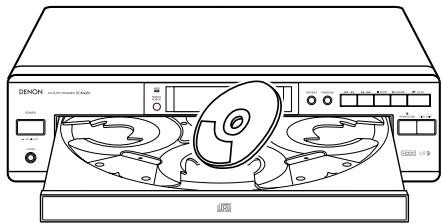
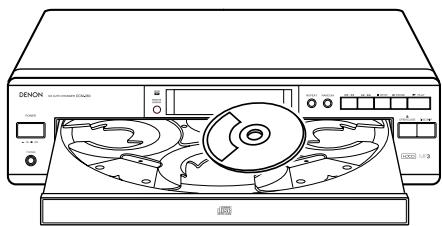
- Make sure the drawer is completely open.
- Hold the disc by the edges and place it on the disc tray. (Do not touch the signal surface, i.e., the glossy side.)
- Set the disc properly in the tray according to its size.
Set 8 cm discs in the center hole.
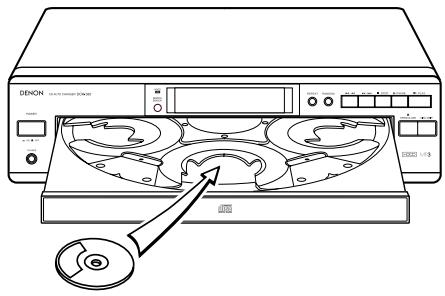
Set 12 cm discs in the outer hole. - When the drawer is opened during the stop mode, discs can be loaded in the 3 disc trays. If the DISC SKIP button is pressed, the carousel turns and a disc can be loaded in the another disc tray. When the drawer is opened during the play mode, it is possible to load and unload discs in all of the disc trays other than the one whose disc is currently playing. 3 discs can be replaced and press the DISC SKIP button to switch the other disc tray that can be replaced.
- Press the OPEN/CLOSE button to close the drawer.
Caution:
- The player will not operate properly and the disc may even be damaged if it is not set correctly.
- If your finger should get caught in the drawer when it closes, press the OPEN/CLOSE button.
- Do not place any foreign objects on the disc tray, and do not place more than one disc on the tray at a time. Otherwise malfunction may occur.
- Do not push in the disc tray manually when the power is off as this may cause malfunction and damage the CD player.
-
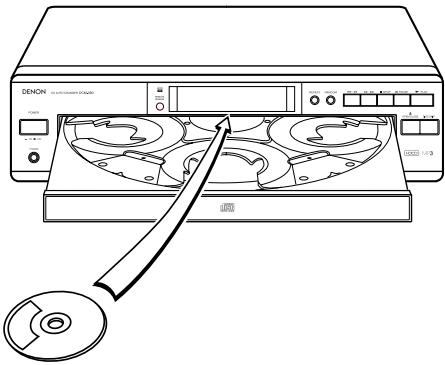
Do not touch the carousel while it is turning. Also, do not turn the carousel by hand when it is stopped. Doing so could damage it.
-
Do not insert disc where indicated by arrow. This could damage the internal mechanism in the unit.


7 CONNECTIONS
(1) Connecting the Output Terminal
- Connect one end of the connection cord supplied with the CD Player to the output terminals, left (L) and right (R) of the CD Player, and the other end to the CD, AUX or TAPE PLAY input terminals, left (L) and right (R), of the amplifier.
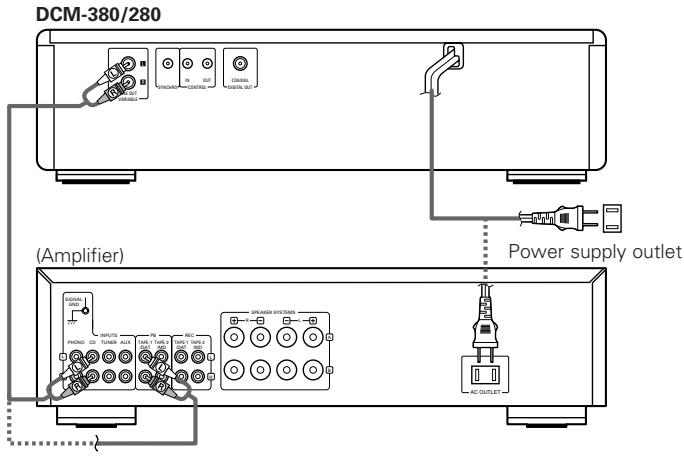
(2) Connecting the Digital Output Jack (COAXIAL)
- Use a 75 Ω/ohm pin cord to connect the digital output jack (COAXIAL) of the CD Player to the digital input jack (COAXIAL) on a digital processor or MD recorder, available in stores.
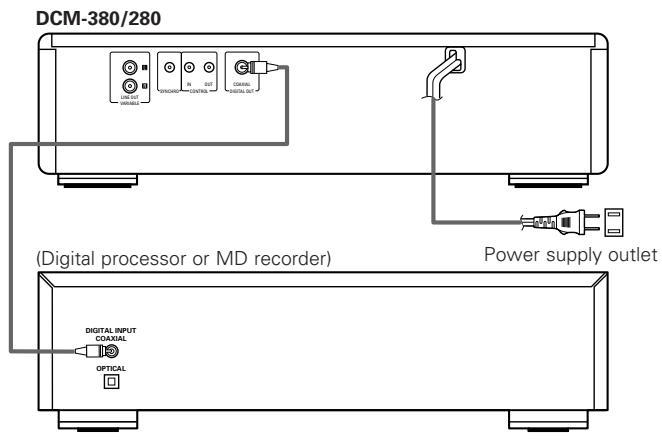
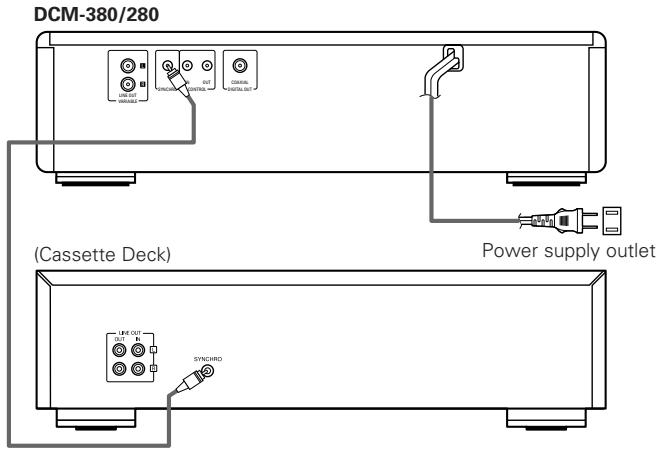
(3) SYNCHRO Jack Connections
- Connect the SYNCHRO jack with a DENON cassette deck which is equipped with a SYNCHRO jack, then make a synchronized recording. Use the connection cord supplied with the cassette deck.
- To make use of this function, also connect the output jacks and make the settings so that a recording can be made from the CD player to the cassette deck.
8 NORMAL PLAY
Follow the steps below to get an understanding of the disc play procedure.
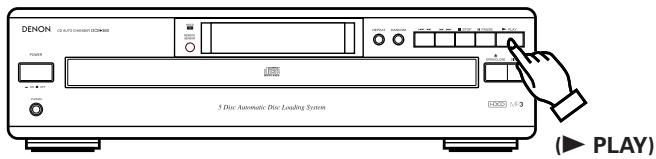
(1) Starting Playback
- Turn the POWER switch on and press the OPEN/CLOSE button to open the drawer.
- Set the disc to be played in the front side tray.
- Press the PLAY button.
- The drawer closes and the disc just loaded is played.
- The disc number, track number and elapsed time, etc., for the disc currently playing appear on the display window.
- If the OPEN/CLOSE button is pressed while a disc is playing, playback continues, but the drawer opens and four discs can be replaced. The disc that can be replaced switches when the DISC SKIP button is pressed.
Press the OPEN/CLOSE button again to close the drawer.
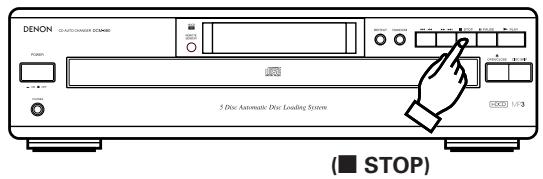
(2) Stopping Playback
- Press the STOP button to stop playback.
-
To replace discs, press the OPEN/CLOSE button. The disc which was playing switches over to the front side and the drawer opens.
-
Set the disc you want to played in the front side.
OTHER PLAY METHODS
In addition to normal play, the following methods can be used when playing a disc.
To Play the Desired Disc and
Desired Track . Direct Selection (Remote control only)
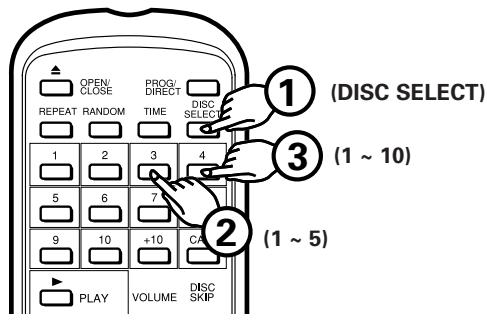
- Press the DISC SELECT button.
- Use the number buttons (1 to 5) to select the number of the disc to be played.
-
Next, use the number buttons (1 to 10 and +10) to select the number of the track to be played.
-
For example, to play the 4th track on the 3rd disc:
Press DISC SELECT, 3 and 4.
To play the 12th track on the 5th disc:
Press [DISC SELECT], [5], +10 and [2].
Playback begins from the number of the disc and track selected.
To Move to the Next Disc
DuringPlayback. DiscSkip
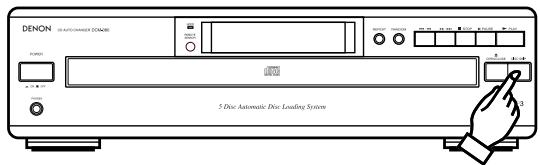
(DISCSKIP)
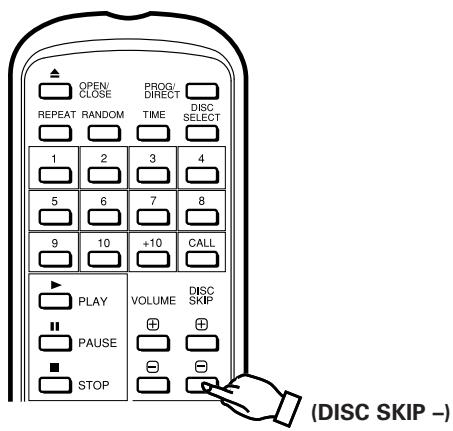
- Press the DISC SKIP button. The carousel in the drawer turns and the disc on the next tray is played.
For example, if disc number 3 was playing, the disc switches to disc number 4, and if disc number 5 was playing, the disc switches to disc number 1. - In addition, when the DISC SKIP - button on the remote control unit is pressed, the carousel turns in the opposite direction and the previous disc is played.
3 To Move to the Next Track
during Play Automatic Search
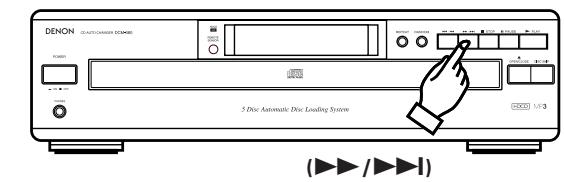
Press the / button for less than 0.5 seconds during playback.
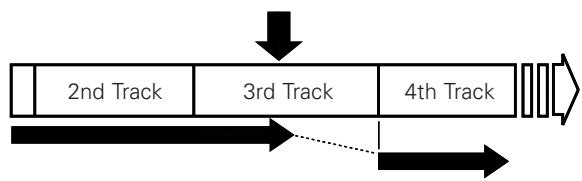
- The pickup will advance to the beginning of the next track and playback will continue. Pressing the button several times will forward the pickup the corresponding number tracks.
Press the / button.
- During Random or Program operation, player moves to the beginning of the next random or program track selection.
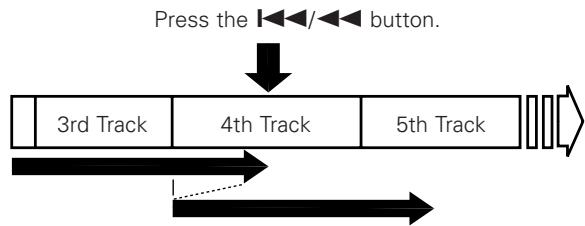
4 To return to the beginning of the
track now being played Automatic Search
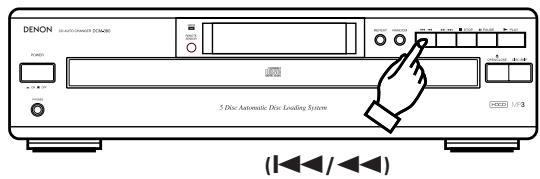
Press the 144 button for less than 0.5 seconds during playback.
- The pickup will return to the beginning of the current track and playback will continue. Pressing the button several times will return the pickup the corresponding number tracks.
To Play the Desired Discs and the Desired Tracks in the Desired Order . Program Selection
- You can play certain tracks on the loaded discs in any order.
- Tracks on a disc not loaded can also be programmed, but if you try to play that disc, the microprocessor detects that it is not loaded and the following disc is played automatically.
- Up to 32 tracks can be set in a program.
(1) Programming (Remote control only)
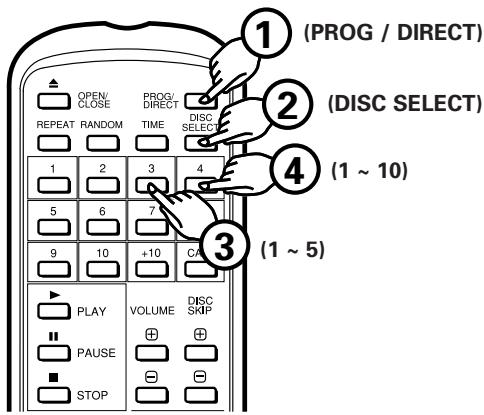
- Press the PROG/DIRECT button. The "PROGRAM" indicator lights. Use the DISC SELECT button, number and +10 buttons to select the disc to be programmed.
For example, to program the 3rd track on the 2nd disc and the 12 track on the 5th disc, press PROG/DIRECT, DISC SELECT, [2], [3], DISC SELECT, [5], +10 and [2].
(2) To Check the Programmed Tracks (Remote control only)
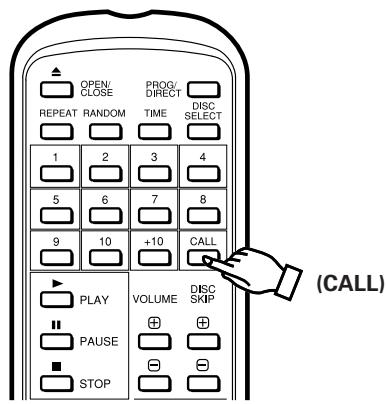
- Press the CALL button on the wireless remote control
The contents of the program are displayed in order one item at a time each time the CALL button is pressed.
(3) To Play a Program
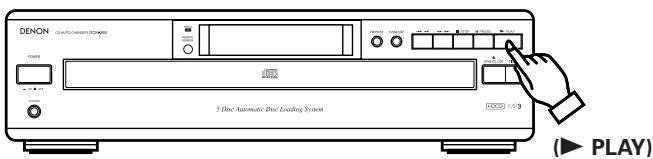
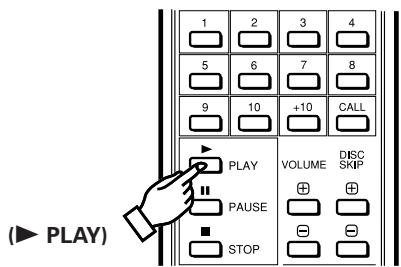
- Press the PLAY button to play the programmed selections in the order in which they were programmed.
(4) To clear the entire program
- Pressing the PROG/DIRECT button once more erases the entire program. Pressing the OPEN/CLOSE button also erases the contents of a program.
- Pressing the PROG/DIRECT button while a program is being played cancels the program. Play will then be continuous to the end of the disc currently being played, after which the player will stop automatically.
Cautions:
- Programmed playback is not possible with MP3 discs.
If an MP3 disc is specified, that step in the program is ignored. - If a program is run during playing of a track or from the Pause state, the track which is currently being played becomes the 1st track in the program.
- Direct selection cannot be done while a program is being played. Inputting the track number of a desired track with the Track Number buttons adds the input track to the end of the program.
- When programming, do not program a track number which is not recorded on the disc. If such a number is programmed by mistake, the player ignore the program.
To Repeat Play of All Tracks Repeat Play
- Press the REPEAT button. The "REPEAT" indicator will light up.
- Steps ① and ② can be done in any order, with the same results.
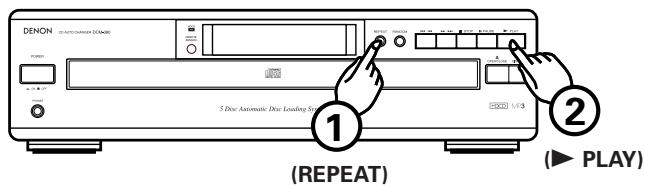
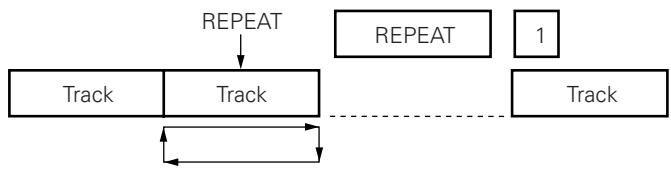
- When the REPEAT button is pressed once, the "REPEAT" and "1" indicators light. In this mode, the track currently playing is repeated.
- If the REPEAT button is pressed again, the "REPEAT" and "1 DISC" indicators light, and the disc currently playing is repeated.
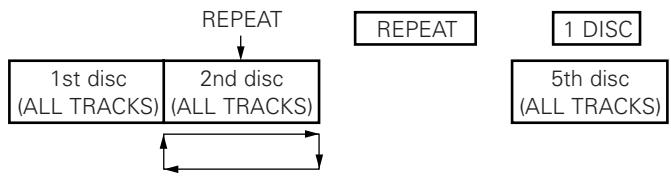
- If the REPEAT button is pressed again, the "REPEAT" and "DISC" indicators light, and all the discs currently loaded are repeated.
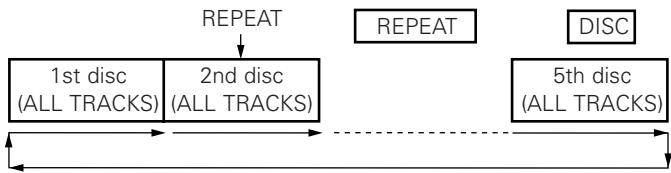
- Pressing the REPEAT button during play will also cause the player to repeat play (of all tracks).
- To cancel repeat play, press the REPEAT button once more.
- Pressing the REPEAT button while a program is being played will cause the tracks in the program to be played again in order.
- Pressing the REPEAT button during Random play will cause the tracks to be played again at random.
7 Letting the Player Select the Order of Play Random Play (When using the remote control unit)
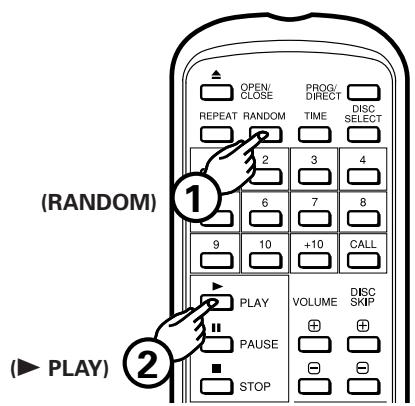
(1) Full Random Play
- Press the RANDOM button, then press the PLAY button. The microcomputer will then start play of the tracks on the 5 discs at random.
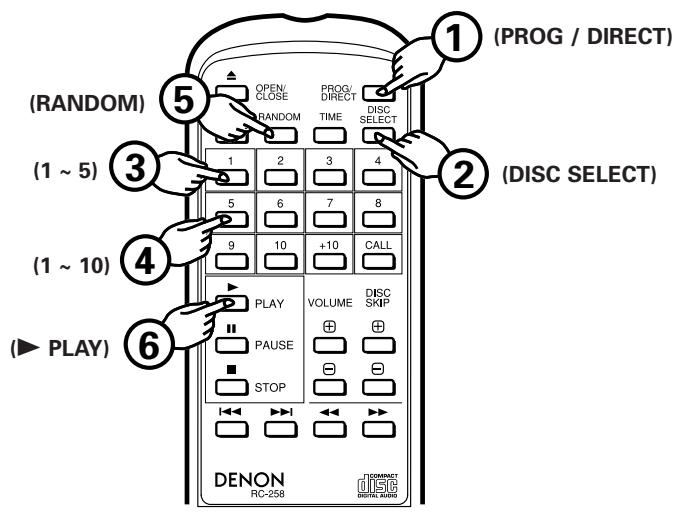
(2) Program Random Play (Remote control only)
- After pressing the PROG/DIRECT button and inputting a program (See item ⑤ on page 14), press the RANDOM button, then the PLAY button. The microcomputer will then select tracks from the program at random and play them.
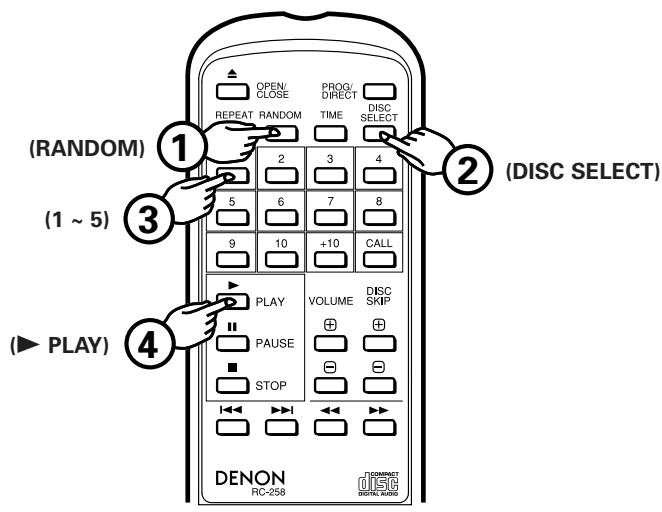
(3) Disc Sequential Random Play
- Press the RANDOM button and specify the disc numbers (1 to 5) with the DISC SELECT button and the number buttons. A press of the PLAY button will result in the player randomly selecting and playing tracks on the disc in the order of specified discs. Up to 5 discs can be selected, and the same disc can be selected, two or more times. Disc sequential random play is cancelled when play ends.
(4) To Cancel Random Play
- Pressing the RANDOM button once more cancels the Random function. Play will then proceed from the track currently being played to the end of the last track on the disc, then stop. Pressing the OPEN/CLOSE button also cancels the Random function.
Cautions:
- Pressing the RANDOM button during normal play starts full random play.
- Pressing the RANDOM button during Program play starts random play of the tracks in the program, including the tracks which have already been played.
- During random play, the player may display the number of disc which is not loaded in the tray. In such a case, the player will read the disc information, then reset automatically to correct. This is not a malfunction.
- MP3 discs are ignored during program random play.
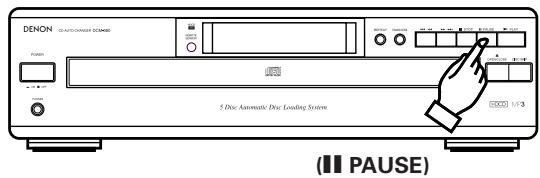
To Stop Play Temporarily.
-
Pressing the PAUSE button during play stops play at that point. Pressing the PAUSE button once more starts play again from the same point.
-
Press the PAUSE button.
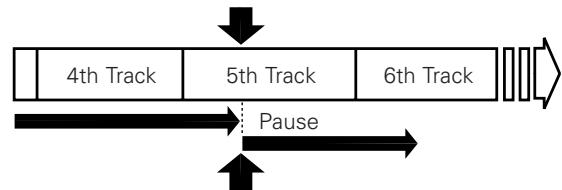
- Press the PLAY button or PAUSE button to start play.
9 Audible quick search.. Manual Search
- Using this function, you can cue to a desired point within a track, either in the forward or reverse direction.
- Release the / or / button when the desired point has been reached. Normal playback then continues.
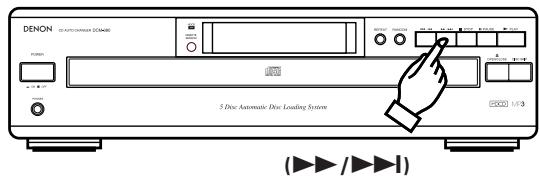
(1) Manual Search Forward
Keep on pressing the / button for more than 0.5 seconds during playback. Playback of the track is sped up.
- As a reference, the current track number and elapsed playback time within the track are displayed.
- Manual search forward is approximately 4 times faster when the / button is kept on pressing more than 5 seconds.
- If the / button is kept pressed after the end of the final track on the disc is reached, "33" is displayed and manual search stops. To return to another point, press the / button until "33" disappears.
- If the / button is kept on pressing and the end of the current track is reached during random play or programmed play, the next track is searched and playback starts.
(2) Manual Search in Reverse
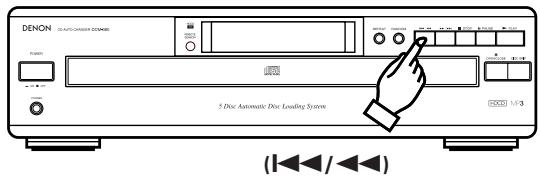
Keep on pressing the 1 button for more than 0.5 seconds during playback. Reverse playback of the track is sped up.
- As a reference, the current track number and elapsed playback time within the track are displayed.
- Manual search in reverse is approximately 4 times faster when the button is kept on pressing more than 5 seconds.
- If the / button is kept pressed after the beginning of the first track on the disc is reached, "CCC" is displayed and manual search stops. To return to another point, press the / button until "CCC" disappears.
- If the 144 button is kept on pressing and the beginning of the current track is reached during random play or programmed play, the manual search in reverse is canceled and playback starts.
10 To Cue and Stop Play . . . . . . . . . . . . . . . . . . . . . . . . . . . . . . . . . . . . . . . . . . . . . . . . . . . . . . . . .
(Remote control only)
(1) Cuing by Direct Selection
- Cuing by direct selection, then entering the Pause state, is convenient for practicing vocals with background music.
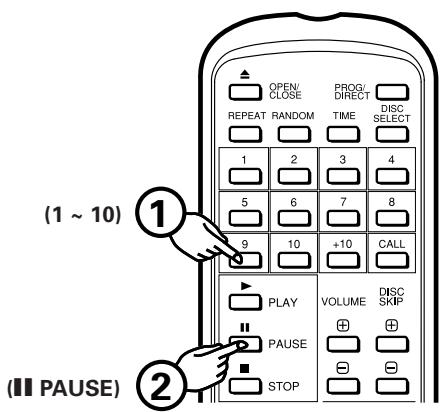
- Press the number buttons to set the number of the desired track.
-
Press the PAUSE button.
-
To start play, press the PLAY button or PAUSE button.
(2) Cuing by Program Selection
- After setting the desired track selections in a program, press the PAUSE button. The player will advance to the beginning of the 1st track in program memory and wait in the pause state.
Synchronized Recording
Function Synchronized Recording Function
Connecting the SYNCHRO jack with a DENON cassette deck which is equipped with a SYNCHRO jack will allow synchronized recordings to be made.
- To use this function, be sure to connect the SYNCHRO jacks as well as the LINE OUT terminal. (Refer to page 11 for connections.) Then, load a disc.
- With the CD player in the stop or pause condition, starting a synchronized recording at the cassette deck side will automatically cause the CD player to start playing. (This is synchronized play.)
- The remote control indicator of the display will blink during synchronized play.
NOTES:
- Synchronized play is also possible in the program mode.
- The repeat mode are cancelled when synchronized play is started.
- Except for the STOP,▶ PLAY and TIME buttons, the buttons will not operate during synchronized play.
- In the play condition, even if you start a synchronized recording at the cassette deck side, CD player will not synchronize with the cassette deck and the cassette deck becomes synchronized pause condition. In this case push the STOP button of the cassette deck, set the CD player in the stop or pause condition and start a synchronized recording at the cassette deck side again.
- For further details, see the owner's manual for the cassette deck that has been connected.
10 PLAYING MP3 FILES
There are many sites on the Internet from which you can download music files in MP3 format. These files can be downloaded following the instructions on the site and stored on CD-R/RW discs which can then be played on the DCM-380/280.
The music on commercially available music CDs can be converted into MP3 files on a computer using MP3 encoding programs. When this is done, the data is reduced to approximately 1/10 the original size. This MP3 data can then be stored on a CD-R/RW disc, allowing you to create a single 12cm CD-R/RW disc containing about 10 times more music than a normal music CD, that is some 100 tracks or more (^*)
-
This is an approximately value for MP3 files of tracks about 5 minutes long converted at a standard bit rate (128 kbps) and stored on a CD-R/RW disc with a capacity of 650 MB.
-
Recordings you make are for your personal use and should not be used in ways infringing upon the copyright holder as per copyright laws.
NOTES:
- The DCM-380/280 is compatible with "MPEG-1 Audio Layer-3", "MPEG-2 Audio Layer-3" and "MPEG-2.5 Audio Layer-3" standards (sampling frequencies - 32 kHz, 44.1 kHz and 48 kHz). It is not compatible with MP1 or MP2 standards.
- When writing MP3 files on a CD-R/RW disc, set the writing program's format to "ISO9660 level 1" or "ISO9660 level 2". MP3 files written in other formats may not play properly. With some writing programs it is not possible to record in "ISO9660" format. Use an "ISO9660" format writing program.
- Generally speaking, the higher the MP3 file's bit rate, the better the sound quality. With the DCM-380/280 it is recommended to use MP3 files written with a bit rate of 128 kbps or greater.
- The writing program may change the positions of the folders and files when writing the MP3 files on the CD-R/RW disc, so the files may not be played in the expected order.
- Make sure to give MP3 files the extension ".MP3". Files with extensions other than ".MP3" or without extensions cannot be played. (On Macintosh computers, MP3 files can be played by adding the extension ".MP3" after the file name consisting of a maximum of 8 Roman capital letters and/or numerals when recording them on CD-R/RW discs.)
- To protect copyrights, no digital signals are output when playing MP3 files.
- A maximum of 99 folders can be played on the DCM-380/280. Folders over 8 layers down, however, cannot be played. The maximum number of files is also 512. If there are 513 files, only the first 512 are played. (Files other than those with the extension ".MP3" are not counted.)
- It may not be possible to play some CD-R/RW discs due to dirt, scratches or the disc's properties.
- Do not apply seals or tape to the label or signal side of CDs or CD-R/RW discs. The glue could get on the disc surface, making the disc get stuck inside the set.
- The DCM-380/280 is multi-session compatible. Only first music CDs can be played if the first session is a music CD, and only MP3 files can be played if the first session consists of MP3 files.
- The DCM-380/280 is mixed-audio compatible. Only music files can be played.
- The DCM-380/280 is not compatible with packet write programs.
- The DCM-380/280 is not compatible with play lists.
- The DCM-380/280 is not compatible with ID3-Tag.
- Program selection and program random play are not possible with MP3 discs.
1 Normal Play
Follow the steps below to get an understanding of the disc play procedure.
(1) Starting Playback
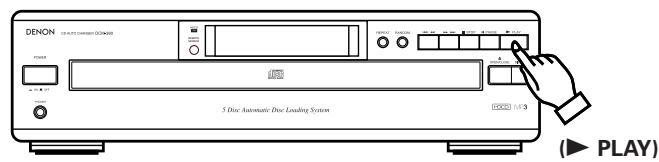
- Turn the POWER switch on and press the OPEN/CLOSE button to open the drawer.
- Set the MP3 disc to be played in the front side tray.
- Press the PLAY button.
- The drawer closes and the disc just loaded is played.
- The disc number, track number and elapsed time, etc., for the disc currently playing appear on the display window.
- If the OPEN/CLOSE button is pressed while a disc is playing, playback continues, but the drawer opens and four discs can be replaced. The disc that can be replaced switches when the DISC SKIP button is pressed.
Press the OPEN/CLOSE button again to close the drawer.
(2) Stopping Playback
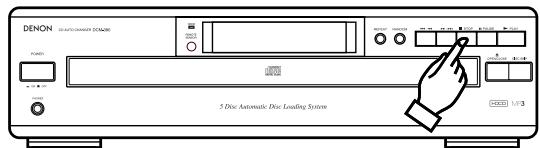
STOP
- Press the STOP button to stop playback.
-
To replace discs, press the OPEN/CLOSE button. The disc which was playing switches over to the front side and the drawer opens.
-
Set the MP3 disc you want to played in the front side.
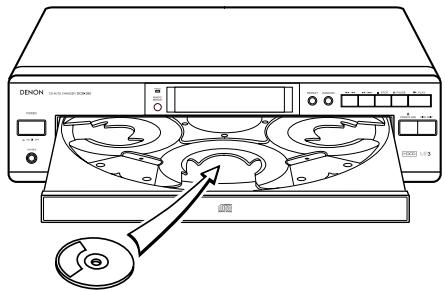
Other Play Methods
The DCM-380/280 is compatible with discs containing up to 256 tracks.
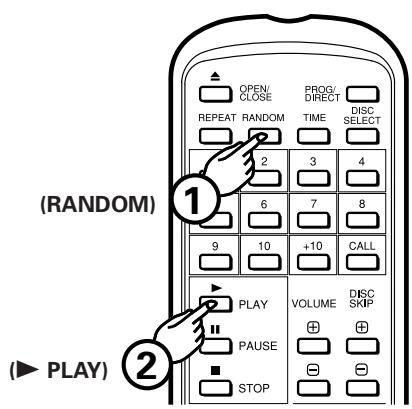
(1) Full Random Play
- Press the RANDOM button, then press the PLAY button. The microcomputer will then start play of the tracks on the 5 discs at random.
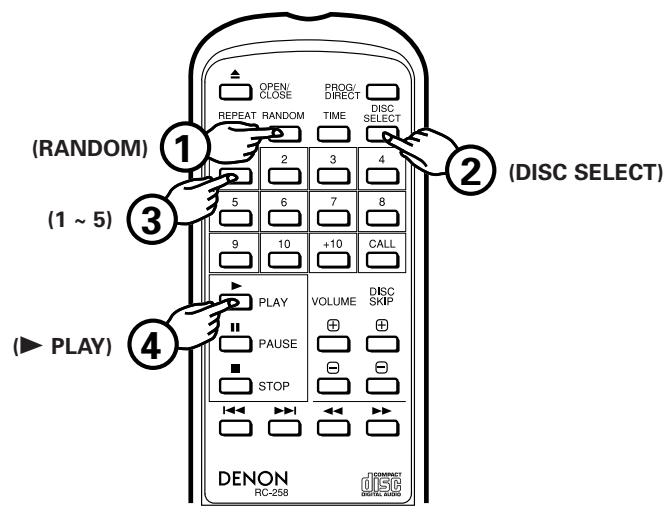
(2) Disc Sequential Random Play
- Press the RANDOM button and the disc number of MP3 (1 to 5) with the DISC SELECT button and the number buttons. A press of the PLAY button will result in the player randomly selecting and playing tracks on the disc in the order of specified discs. Up to 5 discs can be selected, and the same disc can be selected, two or more times. Disc sequential random play is cancelled when play ends.
(3) To Cancel Random Play
- Pressing the RANDOM button once more cancels the Random function. Play will then proceed from the track currently being played to the end of the last track on the disc, then stop. Pressing the OPEN/CLOSE button also cancels the Random function.
(4) To Repeat Play of All Tracks
- Press the REPEAT button. The "REPEAT 1" indicator will light up.
- Steps ① and ② can be done in any order, with the same results.
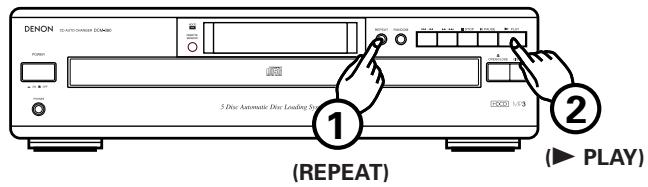
- When the REPEAT button is pressed once, the "REPEAT" and "1" indicators light. In this mode, the track currently playing is repeated.
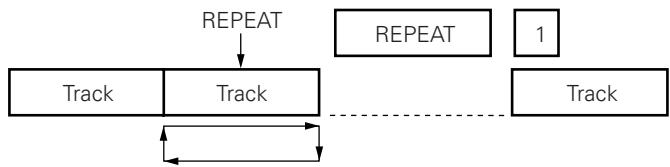
- If the REPEAT button is pressed again, the "REPEAT" and "1 DISC" indicators light, and the disc currently playing is repeated.
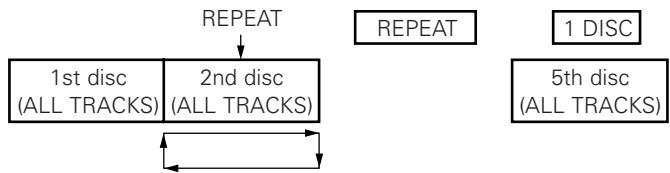
- If the REPEAT button is pressed again, the "REPEAT" and "DISC" indicators light, and all the discs currently loaded are repeated.
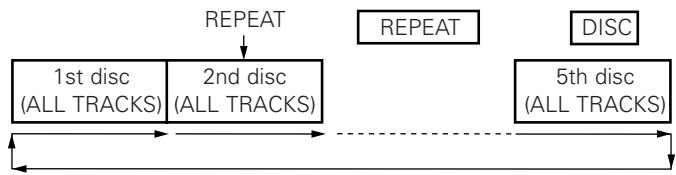
- Pressing the REPEAT button during play will also cause the player to repeat play (of all tracks).
- To cancel repeat play, press the REPEAT button once more.
NOTE:
- The single track and 1 disc repeat mode cannot be set during disc sequential random play.
11 PLAY USING THE REMOTE CONTROL UNIT
The DCM-380/280 CD Player can be controlled from across the room using the accessory Remote Control Unit.
(1) Inserting the Dry Battery
- Remove the cover on the back of the remote control unit.
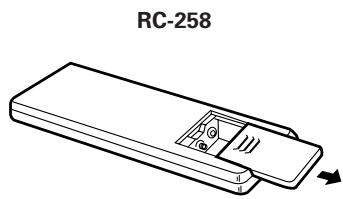
- Insert two R6P (AA size) batteries in the RC-258, following the indications on the battery compartment.
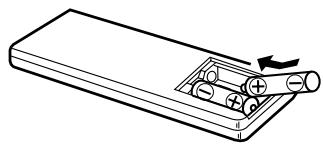
- Replace the cover on the back of the remote control unit.
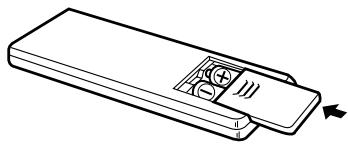
Cautions Concerning Dry Batteries
- Use R6P batteries in the RC-258 remote control unit.
- Depending on the frequency of use, the dry batteries should be replaced approximately once per year.
- If the remote control unit fails to control the CD Player, even before a year has passed, replace the dry batteries with new ones.
- Be sure to follow polarity indications inside the case of the remote control unit, inserting the + end and - end of each battery in the directions indicated.
-
Batteries may become damaged or leak under the following conditions.
-
Using new batteries together with old ones.
- Using different types of batteries together.
- Do not short batteries, take them apart, subject them to heat or throw them into a fire.
- When the remote control unit is not used for a long period of time, remove the dry batteries.
- If fluid leaks from the batteries, be sure to wipe up all battery fluid inside the battery case and replace the batteries with new ones.
(2) Using the Remote Control Unit
- Aim the remote control unit toward the light receptor in the front of the CD Player, as shown in the drawing below.
- The remote control unit can be used up to a distance of 8 meters in a straight line from the CD Player. However, this distance will be shortened if there is some obstruction between the remote control unit and the light receptor, or if the beam of light is slanted.
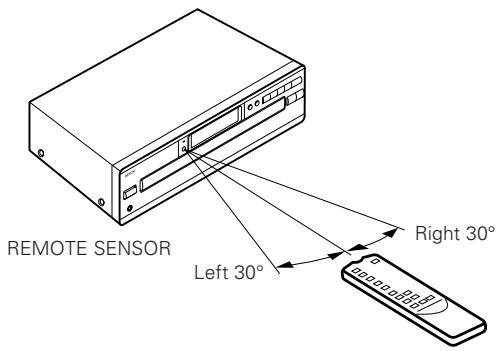
- The remote control unit has the same functions as the main unit, but the following operations cannot be done.
- Switching the power on and off.
Cautions During Use
- Do not press the operating buttons on the main unit and the remote control unit at the same time. This could cause a malfunction.
- Operation of the remote control unit will be hindered if a strong light from the sun or a light fixture is shining on the REMOTE SENSOR, or if there is an obstruction between the remote control unit and the CD player unit.
Setting to the Program Mode
- For program search, press the PROG/DIRECT button then the number buttons (1 through 10 and +10).
- The remote control unit is normally set to the direct mode.
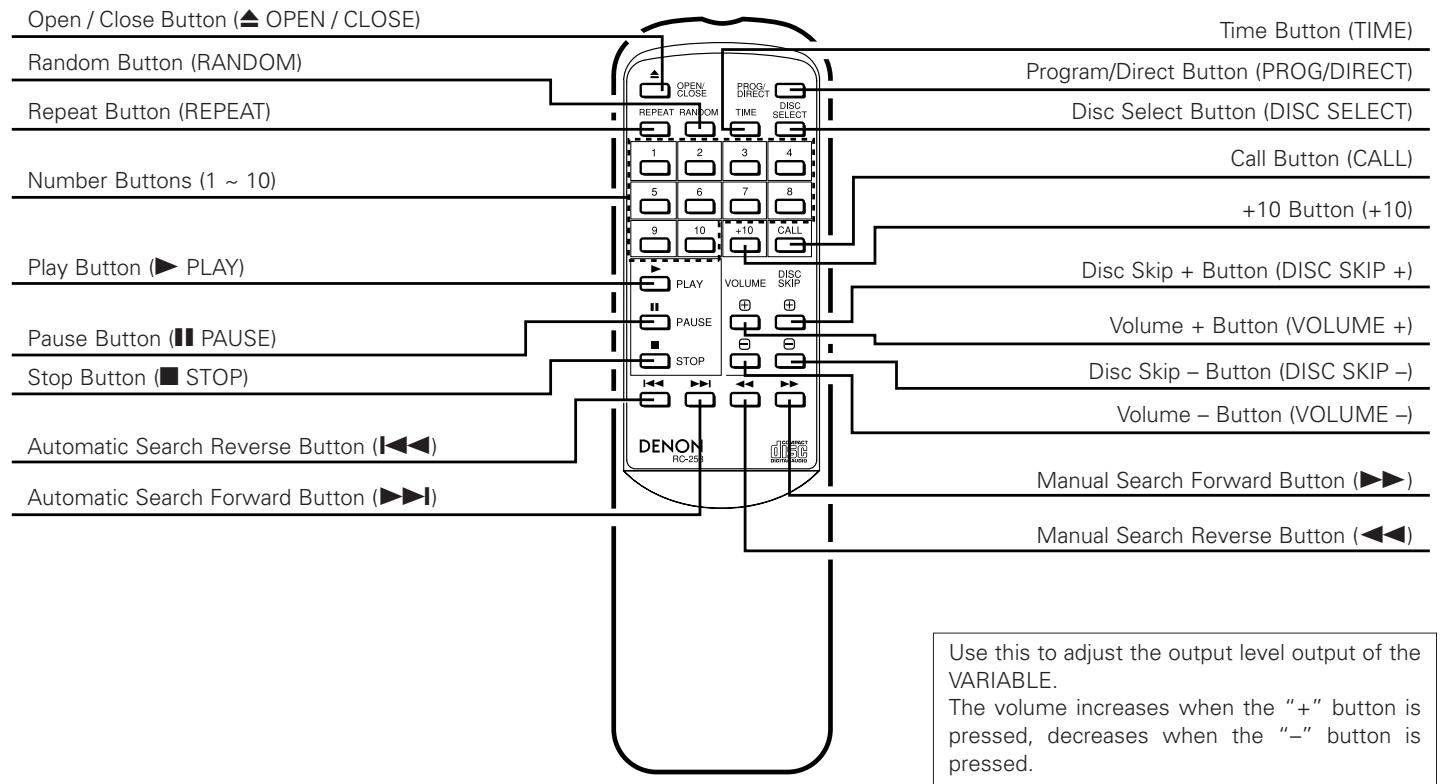
Disc Selection
Use the DISC SELECT and number buttons to select the number of the disc to be played.
“-” appears on the disc number section of the display for 2 seconds when the DISC SELECT button is pressed. Press the number button corresponding to the number of the disc to be played while “-” is displayed to select the disc number.
Track numbers are selected if the number buttons are pressed while “-” is not displayed on the disc number section of the display.
- Direct Selection
Normally, direct search is possible simply by pressing the desired number buttons.
- Program Selection (During playback, the track which is currently playing is programmed as the 1st track.)
Press the PROG/DIRECT button, then press the number buttons.
For example, to program tracks number 3, 11, and 5, press PROG/DIRECT 3 +10 and 1 5
To cancel the program, press the PROG/DIRECT button.
- Inputting the Track Numbers
For track numbers below 10, simply press the corresponding button. For track numbers of 11 and greater, press the +10 then the number buttons.
For example, for track number 22 press +10 twice then 2.
Volume
The volume control on the unit will operate when the VOLUME buttons are pressed. The volume can be checked by looking at the position of the control.
Use this to adjust the output level output of the VARIABLE.
The volume increases when the "+" button is pressed, decreases when the "-" button is pressed.
- Skipping Discs
The DISC SKIP +, - button will not function in the random and program modes.
During disc sequential random playback, when the DISC SKIP + button is pressed, the following disc is played in random order.
Volume
The output level of the VARIABLE output terminal can be changed. When the VOLUME button is pressed, " - " appears in the TIME M (minutes) section of the display window and the level appears in the S (seconds) section. The volume can be changed between a maximum of "00" and a minimum of " - 12" in 12 steps, by approximately 1.5 dB per step.
- The Time indicator indicates the amount of elapsed time for the track currently being played, the amount of time remaining for the current track and the amount of time remaining for all tracks yet to be played.
Normally, the amount of elapsed time for the current track is displayed. Pressing this button once causes the "EACH" "REMAIN" indicator to light up, displaying the amount of time remaining for the current track. Pressing the button once more, causes the "TOTAL" "REMAIN" and "-" indicator to light up, displaying the number and the time remaining for all tracks yet to be played on the disc. Pressing the button once again turns the "TOTAL" "REMAIN" indicator off and causes the indicator to display the elapsed time for the current track. - During playback, the total remaining time is the remaining time for the disc. For programmed playback, the remaining time for the program is only displayed when the programmed tracks are all on the same disc.
"---" is displayed when tracks on more than one disc are programmed. - In the case that the total playing time of programmed tracks becomes more than 99:59, "--: --" is displayed.
12 COMPACT DISCS
1. Cautions in Handling Compact Discs
- Do not get fingerprints, oil, dirt or other substances on the compact disc. If the disc becomes dirty, wipe it off with a dry, soft cloth.
- Do not clean compact discs with benzene, paint thinner, water, record spray, anti-static agent, silicon cloth or similar substances.
- Take particular care to prevent scratches to the back side of the compact disc when removing it from the case and when inserting it in its case.
- Do not bend compact discs.
- Do not apply to compact discs.
- Do not attempt to enlarge the center hole of the disc.
- Do not write on the label (printed) side of the disc with a ball point pen or pencil.
- Bringing a CD into a warm room from a cold place could cause moisture to condense on the disc surface. Do not attempt to dry the disc with a hair dryer, etc.
2. Storage of Compact Discs
After play, be sure to remove the disc from the player.
- To prevent dust, scratches, deformation, etc., be sure to store compact discs in their case.
- Do not store compact discs in the following locations.
1) Places where direct sunlight strikes for long periods of time.
2) Places with a high humidity or a lot of dust.
3) Places reached by heat from a heater or similar appliance.
13 TROUBLE? CHECK THE PLAYER TO FIND WHAT'S WRONG
Even when it appears that there is trouble, check the following points carefully.
The drawer won't open/close when the OPEN/CLOSE button is pressed.
Is the Power switch on?
After a disc is loaded "0 00 00M 00s" is displayed in the display window.
Is the disc loaded correctly? See page 10, 12, 22.
Play does not begin when the PLAY button is pressed.
Is the disc dirty or scratched?.... See page 22.
There is no sound, or the sound is distorted.
- Is the output cord connected correctly to the amplifier?.... See page 11.
- Does the sound return to normal when the amplifier's knobs are adjusted or the proper input device is selected?
The player won't go to the place specified in the search.
Is the disc dirty or scratched? See page 22.
A program cannot be played.
Is the method used to make a program and run it correct? .See page 14.
The player won't operate correctly when the remote control unit is used.
- Are the dry batteries in the remote control unit dead? .See page 20.
- Is the remote control unit located too far from the CD Player unit? . . . . . . . . . . . . . . . . . . . . . . . . . . . . . . . . . . . . . . . . . . . . . . . . . . See page 20.
14 SPECIFICATIONS
| AUDIO | DCM-380 | DCM-280 |
| Number of Channels: | 2 Channels | |
| Frequency Characteristics: | 2 ~ 20,000 Hz | |
| Dynamic Range: | 100 dB | 98 dB |
| S N Ratio: | 112 dB | 108 dB |
| High Frequency Distortion: | 0.0025% (1kHz) | 0.003% |
| Separation: | 98 dB | 96 dB |
| Wow and Flutter: | Less than the measuring (±0.001% W. peak) | |
| Output Voltage: | Variable 0.2 ~ 2.0 V | |
| DISC USED | Audio compact discs are used 12 cm (5 in) and 8 cm (3 in) | |
| OVERALL | ||
| Power Supply: | 60 Hz | |
| Voltage is shown on rating labe | ||
| Power Consumption: | 14 W | |
| External Dimensions: | 434 (W) x 115 (H) x 392 (D) mm (17-3/32" x 4-17/32" x 15-7/16" | |
| Mass: | 6.3 kg (13.1 lbs.) | 6.3 kg (13.1 |
FUNCTIONS AND DISPLAY
| Functions: | Five discs can be used, Direct Track Selection, Program Selection, Random Play, etc. |
| Displays: | Disc No., Track No., Time (min., sec.), Play, Pause, Repeat, Random, etc. |
| Other: | Headphone Jack (Level Variable) |
| REMOTE CONTROL UNIT RC-258 | |
| Remote Control Method: | Infrared Pulse system |
| Power Supply: | 3 V DC Two R6P (standard SIZE AA) |
| External Dimensions: | 50 (W) x 175 (H) x 18 (D) mm (1-31/32" x 6-57/64" x 45/64") |
| Mass: | 100g (approx. 3 oz) (Includes batteries) |
ATTENTION:
- TO PREVENT FIRE OR SHOCK HAZARD, DO NOT USE THIS PLUG WITH AN EXTENSION CORD, RECEPTACLE OR OTHER OUTLET UNLESS THE BLADES CAN BE FULLY INSERTED TO PREVENT BLADE EXPOSURE.
- TO PREVENT FIRE OR SHOCK HAZARD, DO NOT EXPOSE THIS APPLIANCE TO RAIN OR MOISTURE.
The lightning flash with arrowhead symbol, within an equilateral triangle, is intended to alert the user to the presence of uninsulated "dangerous voltage" within the product's enclosure that may be of sufficient magnitude to constitute a risk of electric shock to persons.
CAUTION
RISK OF ELECTRIC SHOCK DO NOT OPEN
CAUTION:
TO REDUCE THE RISK OF ELECTRIC SHOCK, DO NOT REMOVE COVER (OR BACK). NO USER-SERVICEABLEPARTS INSIDE. REFER SERVICING TO QUALIFIED SERVICE PERSONNEL.

The exclamation point within an equilateral triangle is intended to alert the user to the presence of important operating and maintenance (servicing) instructions in the literature accompanying the appliance.
IMPORTANT SAFETY INSTRUCTIONS
1) Read these instructions.
2) Keep these instructions.
3) Heed all warnings.
4) Follow all instructions.
5) Do not use this apparatus near water.
6) Clean only with dry cloth.
7) Do not block any ventilation openings. Install in accordance with the manufacturer's instructions.
8) Do not install near any heat sources such as radiators, heat registers, stoves, or other apparatus (including amplifiers) that produce heat.
9) Do not defeat the safety purpose of the polarized or grounding-type plug. A polarized plug has two blades with one wider than the other. A grounding type plug has two blades and a third grounding prong. The wide blade or the third prong are provided for your safety. If the provided plug does not fit into your outlet, consult an electrician for replacement of the obsolete outlet.
10) Protect the power cord from being walked on or pinched particularly at plugs, convenience receptacles, and the point where they exit from the apparatus.
11) Only use attachments/accessories specified by the manufacturer.
12) Unplug this apparatus during lightning storms or when unused for long periods of time.
13) Refer all servicing to qualified service personnel. Servicing is required when the apparatus has been damaged in any way, such as power-supply cord or plug is damaged, liquid has been spilled or objects have fallen into the apparatus, the apparatus has been exposed to rain or moisture, does not operate normally, or has been dropped.
This appliance shall not be exposed to dripping or splashing water and that no object filled with liquid such as vases ahall be placed on the apparatus.


- CAUTION:
- Handle the power supply cord carefully
- Do not open the top cover
- Do not place anything inside
- CAUTION
- RISK OF ELECTRIC SHOCK DO NOT OPEN
- CAUTION: TO REDUCE THE RISK OF ELECTRIC SHOCK, DO NOT REMOVE COVER (OR BACK). NO USER SERVICEABLE PARTS INSIDE. REFER SERVICING TO QUALIFIED SERVICE PERSONNEL.
- FOR CANADA MODEL ONLY
- - POUR LES MODELES CANADIENS UNIQUEMENT
- ATTENTION
- NOTE:
- LABELS (for U.S.A. model only)
- CERTIFICATION
- ADVARSEL:
- VAROITUS!
- WARNING-
- NOTE ON USE / OBSERVATIONS RELATIVES A L'UTILISATION / NOTAS SOBRE EL USO
- - DECLARATION OF CONFORMITY
- TABLE OF CONTENTS
- In addition to the CD Player unit, please check to make sure the following items are included in the packing box:
- IMPORTANT
- (CANADIAN MODEL ONLY)
- FEATURES
- BEFORE USING
- Condensation
- Conditions for the Formation of Condensation
- ■ Measures to Take After Condensation Forms
- Other Precautions
- Setup Precautions
- When not using the DCM-380/280
- Under normal circumstances
- When moving the DCM-380/280
- CLEANING
- Cleaning the main unit
- Cleaning discs
- CDs
- Discs
- Holding discs
- Cautions on Handling Discs
- Cautions on Storing Discs
- NAMES OF PARTS AND THEIR FUNCTIONS
- OPENING AND CLOSING THE DRAWER AND LOADING A DISC
- How to load a disc
- CONNECTIONS
- Connecting the Output Terminal
- Connecting the Digital Output Jack (COAXIAL)
- SYNCHRO Jack Connections
- NORMAL PLAY
- OTHER PLAY METHODS
- To Play the Desired Disc and
- To Move to the Next Disc
- To Move to the Next Track
- To return to the beginning of the
- Programming (Remote control only)
- To Check the Programmed Tracks (Remote control only)
- To Play a Program
- To clear the entire program
- Cautions:
- To Repeat Play of All Tracks Repeat Play
- To Cancel Random Play
- Manual Search in Reverse
- To Cue and Stop Play . . . . . . . . . . . . . . . . . . . . . . . . . . . . . . . . . . . . . . . . . . . . . . . . . . . . . . . . .
- (Remote control only)
- Cuing by Direct Selection
- Cuing by Program Selection
- Synchronized Recording
- Function Synchronized Recording Function
- NOTES:
- PLAYING MP3 FILES
- Normal Play
- Starting Playback
- Stopping Playback
- To Cancel Random Play
- To Repeat Play of All Tracks
- PLAY USING THE REMOTE CONTROL UNIT
- Inserting the Dry Battery
- Cautions Concerning Dry Batteries
- Using the Remote Control Unit
- Cautions During Use
- Setting to the Program Mode
- Disc Selection
- - Direct Selection
- - Program Selection (During playback, the track which is currently playing is programmed as the 1st track.)
- - Inputting the Track Numbers
- Volume
- - Skipping Discs
- COMPACT DISCS
- Cautions in Handling Compact Discs
- Storage of Compact Discs
- TROUBLE? CHECK THE PLAYER TO FIND WHAT'S WRONG
- The drawer won't open/close when the OPEN/CLOSE button is pressed.
- There is no sound, or the sound is distorted.
- The player won't go to the place specified in the search.
- A program cannot be played.
- The player won't operate correctly when the remote control unit is used.
- SPECIFICATIONS
- FUNCTIONS AND DISPLAY
- ATTENTION:
- IMPORTANT SAFETY INSTRUCTIONS
Brand : DENON
Model : DCM-280
Category : CD Player