
DCD-F109 - CD Player DENON - Free user manual and instructions
Find the device manual for free DCD-F109 DENON in PDF.


| Product Type | CD Player |
| Brand | Denon |
| Model | DCD-F109 |
| Disc Compatibility | CD, CD-R, CD-RW |
| Playback Formats | CD-DA, MP3 |
| Outputs | Analog RCA, Digital Optical |
| Headphone Output | Yes (3.5mm jack) |
| Dimensions (W x H x D) | 434 x 107 x 279 mm |
| Weight | 4.2 kg |
| Power Consumption | 12 W (standby: 0.3 W) |
| Power Supply | AC 230 V, 50/60 Hz |
| Main Functions | Play, Pause, Stop, Next/Previous Track, Repeat, Shuffle, Program Play |
| Display | Fluorescent display with track and time information |
| Remote Control | Included (RC-1148) |
| Care and Cleaning | Clean exterior with soft dry cloth; use lens cleaner for CD mechanism |
| Safety | Do not expose to moisture; avoid placement near heat sources |
| Spare Parts & Repairability | Laser pickup available; service by qualified technician |
| General Information | High-quality audio playback with advanced servo circuit |
Frequently Asked Questions - DCD-F109 DENON
User questions about DCD-F109 DENON
0 question about this device. Answer the ones you know or ask your own.
Ask a new question about this device
Download the instructions for your CD Player in PDF format for free! Find your manual DCD-F109 - DENON and take your electronic device back in hand. On this page are published all the documents necessary for the use of your device. DCD-F109 by DENON.
USER MANUAL DCD-F109 DENON
Thank you for choosing a DENON CD player. This guide provides step-by-step instructions for setting up your CD player.
If you have setup problems:
If you need additional help in solving problems, contact DENON customer service in your area.
See the address sheet included in the box.
Before You Begin
ENGLISHDEU
What's In the Box
| CD Player | Coaxial digital cable | System cable | |
| Safety Instructions | Getting Started | Owner's manual | Service network list |
Required for F109 system connections

☐No remote control unit is included with the DCD-F109.
- This booklet includes descriptions of operations using the remote control unit included with the DRA-F109.
- For details about the remote control unit, see the DRA-F109's owner's manual.

Note that the illustrations in this manual is for explanation purposes and may differ from the actual unit.
ENGLISHDEU
Setup Steps
There are five steps to the setup process.
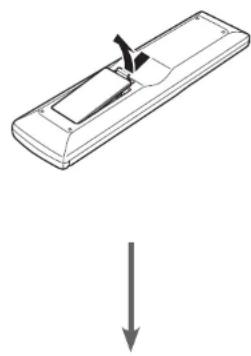
1 Install batteries in the remote control unit
2 Make the system connection
3 Turn the CD player's power on
4 Play a CD
5 Play an iPod or USB memory device
1 Install batteries in the remote control unit
The remote control unit is included with DRA-F109 (sold separately).
natural_image
Simple line drawing of a remote control with a handle and arrow indicating downward motion (no text or symbols)R03/AAA batteries

natural_image
Diagram of a remote control with battery and battery casing, showing internal components (no text or labels)ENGLISHDEU
2 Make the system connection
DCD-F109

flowchart
graph TD
    A["Coaxial digital cable"] --> B["Digital OUT CD"]
    B --> C["COAL"]
    C --> D["Digital IN OPPT"]
    D --> E["Remote CONNECTOR OUT"]
    E --> F["DRA-F109"]
    F --> G["AC OUTLET AC IN"]
    G --> H["AC IN"]
    H --> I["AC OUTLET AC IN"]
    I --> J["Remote CONNECTOR OUT"]
    J --> K["Remote CONNECTOR OUT"]
    K --> L["Remote CONNECTOR OUT"]
    L --> M["Remote CONNECTOR OUT"]
    M --> N["Remote CONNECTOR OUT"]
    N --> O["Remote CONNECTOR OUT"]
    O --> P["Remote CONNECTOR OUT"]
    P --> Q["Remote CONNECTOR OUT"]
    Q --> R["Remote CONNECTOR OUT"]
    R --> S["Remote CONNECTOR OUT"]
    S --> T["Remote CONNECTOR OUT"]
Refer to the DRA-F109 owner's manual to connect the power cord.
ENGLISHDEL
3 Turn the CD player's power on

4 Play a CD
ENGLISHDEU


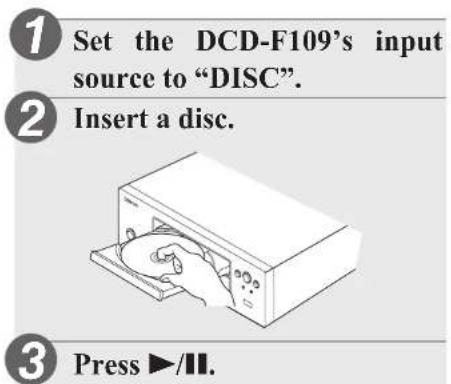
1 Set the DCD-F109's input source to "DISC".
2 Insert a disc.
3 Press ▶/II.
ENGLISHDEL
5 Play an iPod or USB memory device
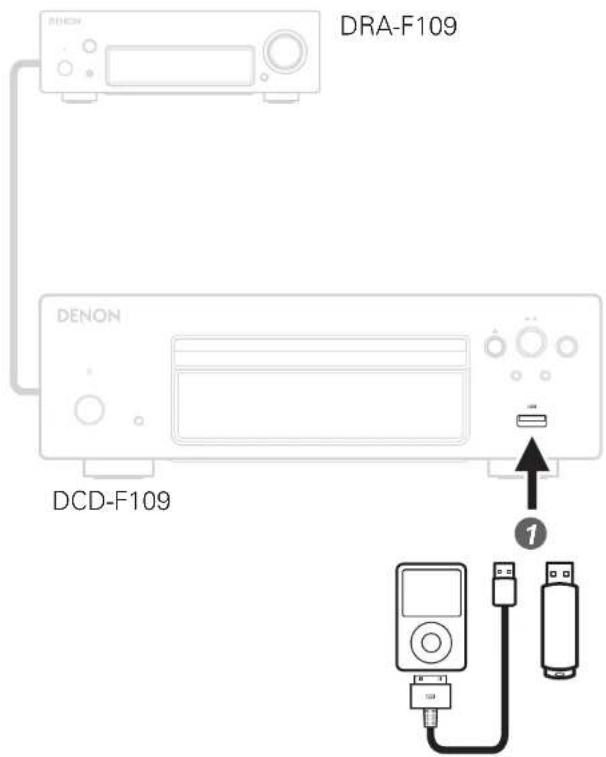
1 Connect an iPod or USB memory device to the USB port.
Playback will begin automatically when you connect an iPod or USB memory device.
ENGLISHDEU
Owner's Manual
The included CD-ROM contains an Adobe PDF version of the full owner's manual for the CD player.
Please reference this manual for more details about the setup and operation of the CD player and it's features.
NOTE
The contents of the included CD-ROM cannot be viewed using this player.
1 Insert the disc into your PC. Follow the screen or double click on the PDF file.

natural_image
Line drawing of a desktop computer with an open CD and drive slot (no text or symbols)
natural_image
Line drawing of a desktop computer setup with monitor, tower, keyboard, and mouse (no text or symbols)DENON
www.denon.com
D&M Holdings Inc.
Printed in China 5411 1086/00AD




Brand : DENON
Model : DCD-F109
Category : CD Player