
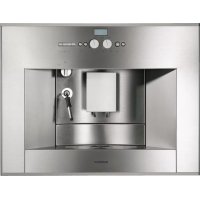
CM450712 - Coffee machine GAGGENAU - Free user manual and instructions
Find the device manual for free CM450712 GAGGENAU in PDF.


Pick your language and provide your email: we'll send you a specifically translated version.
| Product Type | Built-in fully automatic coffee machine |
| Dimensions (H x W x D) | 45.5 x 37.5 x 45.5 cm (adjustment for niche required) |
| Weight | Approx. 30 kg |
| Power Supply | 220-240 V, 50/60 Hz, 1.5 kW |
| Milk System | Integrated steam wand for frothing milk |
| Bean Hopper Capacity | 250 g |
| Water Tank Capacity | 1.2 L |
| Coffee Spout Height | Adjustable from 70 to 140 mm |
| Pump Pressure | 15 bar |
| Grinder | Ceramic disc grinder with 5-step adjustment |
| Programmable Beverages | Espresso, coffee, cappuccino, latte macchiato, hot water |
| User Profiles | Up to 4 personalised profiles |
| Display | TFT colour display with touch control |
| Cleaning Program | Automatic descaling and cleaning programme |
| Removable Brew Unit | Yes, easy to remove for rinsing |
| Drip Tray | Removable, capacity 500 ml |
| Safety Features | Auto shut-off, child lock |
| Spare Parts Available | Water filter, milk frother nozzle, drip tray, coffee grounds container |
| Repairability Index | 8/10 (easy to access main components) |
| Energy Efficiency Class | A |
Frequently Asked Questions - CM450712 GAGGENAU
How do I descale the Gaggenau CM450712 coffee machine?
Use the automatic descaling program. Pour descaler into the water tank and place a container under the coffee spout. Navigate to the maintenance menu on the TFT display and select Descaling. Follow on-screen instructions; the process takes about 20 minutes.
How often should I clean the brew unit?
Clean the removable brew unit weekly. Remove it by opening the side cover, rinse under warm water without detergent, and let it dry. Lubricate the seal every 3 months with food-grade silicone grease.
What does error code E02 mean?
Error E02 indicates that the water tank is empty or not properly inserted. Check the water level and ensure the tank is correctly seated. If the error persists, clean the tank contacts.
How can I adjust the coffee grinding level?
Open the bean hopper lid and turn the adjuster (located inside) with a coin. Level 1 is finest, level 5 is coarsest. Adjust only when the grinder is running to avoid damage.
Can I use pre-ground coffee?
Yes, use the pre-ground coffee compartment. Open the bypass flap next to the bean hopper and add a single dose of ground coffee (max 1 scoop). The machine will use it for the next brew.
How do I change the water filter?
Replace the water filter every 2 months. Remove the old filter from the water tank, insert a new one from Gaggenau, and activate it via the menu: Settings > Filter > Activate. The machine will rinse automatically.
The coffee is too weak. What can I do?
Increase the coffee strength via the menu: select your beverage, then adjust the strength to 'strong' or 'double'. Also check the grind setting; a finer grind yields stronger coffee.
How do I clean the milk system?
After each use, the machine performs a short steam rinse. For a deeper clean, use the milk cleaning program: attach a container to the steam wand, fill it with milk cleaner, and start the 'Milk Clean' cycle from the menu.
Why is the machine not dispensing hot water?
Ensure the water tank is full and the steam function is selected. If the water is still cold, the boiler may need descaling. Run a descaling cycle if you haven't done so recently.
How do I reset the machine to factory settings?
Go to the main menu, select Settings > Factory Reset, and confirm. The machine will restart with default profiles and beverage settings.
User questions about CM450712 GAGGENAU
0 question about this device. Answer the ones you know or ask your own.
Ask a new question about this device
No questions yet. Be the first to ask one.
Download the instructions for your Coffee machine in PDF format for free! Find your manual CM450712 - GAGGENAU and take your electronic device back in hand. On this page are published all the documents necessary for the use of your device. CM450712 by GAGGENAU.
USER MANUAL CM450712 GAGGENAU
Manual assistant
Powered by Anthropic
Waiting for your message
Product information
Brand : GAGGENAU
Model : CM450712
Category : Coffee machine