
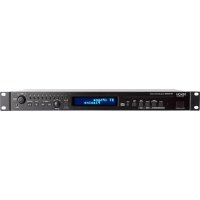
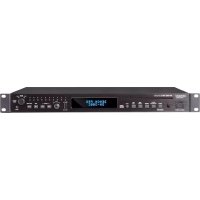
DVD-1800BD - Blu-ray player DENON - Free user manual and instructions
Find the device manual for free DVD-1800BD DENON in PDF.


Pick your language and provide your email: we'll send you a specifically translated version.
| Product Type | Blu-ray Disc Player |
| Model Number | DVD-1800BD |
| Brand | Denon |
| Disc Playback | BD-ROM, DVD-Video, DVD-R/RW, CD, CD-R/RW |
| Video Output | HDMI 1.4a (1080p/24, up to 1080p/60) |
| Audio Output | HDMI (with Dolby TrueHD, DTS-HD Master Audio), Optical, Coaxial |
| Connectivity | HDMI Out, Ethernet, USB 2.0 (front), Optical Out, Coaxial Out |
| Power Supply | AC 120V, 60Hz (or 220-240V depending on region) |
| Power Consumption | 35 W (typical), Standby: 0.5 W |
| Dimensions (W x H x D) | 430 x 58 x 249 mm (16.9 x 2.3 x 9.8 in) |
| Weight | 3.5 kg (7.7 lbs) |
| Operating Temperature | 5°C to 35°C (41°F to 95°F) |
| Storage Temperature | -20°C to 55°C (-4°F to 131°F) |
| Formats Supported | BD-Video, DVD-Video, DVD-R/RW, CD-DA, MP3, JPEG, DivX |
| Remote Control | Included (RC- ...) |
| Accessories | Remote control, batteries, power cable, user manual |
| Maintenance | Clean with soft, dry cloth. Do not use solvents. |
| Safety Precautions | Do not expose to rain or moisture. Place on flat, stable surface. |
| Spare Parts and Repairability | Contact Denon customer service for service and parts. |
| General Information | Region code may vary. Make sure disc compatibility. |
Frequently Asked Questions - DVD-1800BD DENON
What disc formats does the Denon DVD-1800BD play?
The Denon DVD-1800BD plays BD-ROM, DVD-Video, DVD-R/RW, CD, and CD-R/RW. It also supports audio CD, MP3, JPEG, and DivX files on compatible discs.
Does the DVD-1800BD support 3D Blu-ray?
No, the DVD-1800BD is not a 3D-capable player. It outputs up to 1080p/60 via HDMI 1.4a.
How do I connect the player to my TV?
Use an HDMI cable from the player's HDMI output to your TV's HDMI input. For audio, you can also use optical or coaxial digital outputs.
Can I play DVDs from any region?
The player is typically region-locked. Check the region code on the back panel. Most units are Region 1 for DVDs and Region A for Blu-ray discs.
How do I update the firmware?
Connect the player to the internet via Ethernet. Go to Setup > Firmware Update and select 'Update via Network'. Follow on-screen instructions.
What should I do if the disc won't play?
Make sure the disc is clean and not scratched. Check that the disc format is compatible. Try a different disc. If issue persists, clean the lens with a lens cleaning disc.
Does the player support streaming services?
No, the DVD-1800BD is a basic Blu-ray player without built-in streaming apps. It only plays physical discs and media via USB.
How do I clean the player?
Unplug the player. Use a soft, dry cloth to wipe the exterior. Do not use liquid or aerosol cleaners. For the lens, use a commercial lens cleaning disc.
What is the standby power consumption?
The standby power consumption is approximately 0.5 W. To save energy, unplug the player if not used for long periods.
Where can I find the user manual?
The user manual is available for free download at notice-facile.com in PDF format. You can also request a translated version.
User questions about DVD-1800BD DENON
0 question about this device. Answer the ones you know or ask your own.
Ask a new question about this device
No questions yet. Be the first to ask one.
Download the instructions for your Blu-ray player in PDF format for free! Find your manual DVD-1800BD - DENON and take your electronic device back in hand. On this page are published all the documents necessary for the use of your device. DVD-1800BD by DENON.
USER MANUAL DVD-1800BD DENON
Manual assistant
Powered by Anthropic
Waiting for your message
Product information
Brand : DENON
Model : DVD-1800BD
Category : Blu-ray player