
DCF01 - Coffee machine SMEG - Free user manual and instructions
Find the device manual for free DCF01 SMEG in PDF.
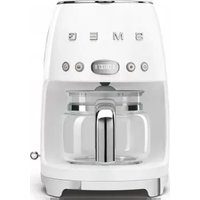


| Product Type | Drip Coffee Machine |
| Brand | Smeg |
| Model | DCF01 |
| Dimensions (W x D x H) | 32.8 x 21.7 x 36.5 cm |
| Weight | 3.5 kg |
| Power Consumption | 1050 W |
| Voltage | 220-240 V ~ 50/60 Hz |
| Water Tank Capacity | 1.25 L (10 cups) |
| Coffee Type | Ground coffee |
| Filter Type | Permanent gold-tone filter (included) or paper filter #4 |
| Carafe Material | Thermal stainless steel |
| Programmable Timer | Yes, 24-hour digital timer |
| Auto Shut-off | After 30 minutes of inactivity |
| Anti-Drip System | Yes, allows removing carafe during brewing |
| Pause & Serve | Yes |
| Water Level Indicator | Yes, transparent window with scale |
| Maintenance | Descaling recommended every 2-3 months |
| Cleaning | Wipe exterior with damp cloth; carafe and filter basket dishwasher safe |
| Safety Features | Overheat protection, boil-dry protection |
| Spare Parts Available | Carafe, lid, filter basket, water tank |
| Repairability | Designed for easy repair; spare parts available from Smeg |
| Design | Retro style, available in multiple colors |
| Warranty | 2 years |
Frequently Asked Questions - DCF01 SMEG
User questions about DCF01 SMEG
0 question about this device. Answer the ones you know or ask your own.
Ask a new question about this device
Download the instructions for your Coffee machine in PDF format for free! Find your manual DCF01 - SMEG and take your electronic device back in hand. On this page are published all the documents necessary for the use of your device. DCF01 by SMEG.
USER MANUAL DCF01 SMEG
Thank you for purchasing this Smeg 50's Style drip coffee machine.
By choosing one of our products, you have selected an appliance which combines iconic style with innovative technical design and attention to detail.
A Smeg appliance coordinates perfectly with other Smeg products, or works equally great as a standalone statement piece in your kitchen.
We hope you enjoy using your new appliance!
For further information on the product, please visit: www.smeg50style.com or www.smeg.com.

Drip coffee machine
Contents
1 Instructions 24
1.1 Introduction 24 1.2 This user manual 24 1.3 Intended use 24 1.4 General safety instructions 24 1.5 Manufacturer liability 27 1.6 Identification plate 27 1.7 Disposal 27
2 Description 28
2.1 Product description 28
3 Use 29
3.1 Before first use 29 3.2 First use 30 3.3 Accessing the settings menu 30 3.4 How to prepare the coffee 32
4 Cleaning and maintenance 37
4.1 Instructions 37 4.2 Cleaning the drip coffee machine 37 4.3 Cleaning the drip coffee machine components 37 4.4 Descaling 38 4.5 What to do if... 40
TRANSLATION OF THE ORIGINAL INSTRUCTIONS
We advise you to read this manual carefully, as it contains all the instructions for maintaining the appliance's aesthetic and functional qualities.
For further information on the product: www.smeg.com

1 Instructions
1.1 Introduction
Key information for the user:
Instructions

General information on this user manual, on safety and final disposal.
Description

Appliance description.
Use

Information on using your appliance.
Cleaning and care

Information for proper cleaning and maintenance of the appliance.

Safety instructions

Information

Advice
1.2 This user manual
This user manual is an integral part of the appliance and must therefore be kept in its entirety and in an accessible place for the whole working life of the appliance.
1.3 Intended use
The appliance can be used to prepare drip coffee. Every other use is considered improper. Do not use the appliance for anything other than its intended use.
- The drip coffee machine must not be used inside a piece of furniture.
- WARNING: Do not use the appliance if the surface is cracked.
1.4 General safety instructions
- The appliance must not be used by persons (including children) with reduced physical, sensory or mental capabilities or with a lack of experience and knowledge, unless appropriately supervised, or instructed on the safe use of the appliance by a person responsible for their safety.
- Children must be supervised at all times to ensure they do not play with the appliance.
- Cleaning and maintenance of the appliance must not be performed by children, unless closely supervised.
- Do not use the appliance outdoors.
Instructions
- Never submerge the appliance in water.
- Plug into an earthed 3-pin socket.
- Do not remove the earth pin.
- Do not use an adapter.
- Do not use an extension cord.
- Failure to observe these warnings can lead to fire, electrocution or even death.
- This appliance is intended for household use. Moreover, it cannot be used:
• In kitchen areas provided for employees in shops, offices and other working environments; • In farms/farm stay facilities - By guests in hotels, motels and residential environments; • In bed and breakfasts.
- If the power cord is damaged, contact technical support to arrange for this to be replaced in order to avoid any possible hazards.
Only for European markets:
- This appliance may be used by children from the age of 8 provided they are supervised or instructed on the safe use of the appliance and they understand the associated risks. • Cleaning and maintenance may be performed by children from the age of 8 as long as they are appropriately supervised.
- Keep the appliance and its cord out of reach of children under the age of 8 years.
• Children must never play with the appliance. - The appliance may be used by people with reduced physical, sensory or mental capabilities or lack of experience and knowledge if they have been given supervision or instruction concerning use of the appliance in a safe way and if they understand the hazards involved. - Disconnect the appliance from the power socket before assembly, disassembly and cleaning.
For this appliance
- Follow all safety instructions in order to use the appliance safely.
- Read this user manual carefully before using the appliance.
- Switch off the appliance immediately after use.
- Do not leave the coffee machine unattended during use.
- Always disconnect the drip coffee machine from the power socket before installing or removing components, or before cleaning it.
- Unplug the coffee machine before cleaning it and if you notice any fault.
- Allow the drip coffee machine to cool down before cleaning it.
- Leave a space of 10 cm around the drip coffee machine.
- Do not use the drip coffee machine if there is no water in the tank.
- Use cold, preferably filtered, water. Do not use other liquids. Make sure that the lid is firmly closed.
- Danger of burns! Do not open the lid while the coffee is being brewed.
- Danger of burns! Do not touch hot surfaces with your hands: use the handles and buttons.
- Danger of burns! The keep-warm plate remains hot for a few minutes after the coffee has been brewed. Do not touch it.
- Danger of burns! The surface of the heating element remains hot after use. Do not touch it.
- Do not use the drip coffee machine or parts of it with parts or accessories made by other manufacturers.
- Only use original spare parts. The use of spare parts not approved by the manufacturer could lead to fires, electric shocks or personal injury.
- Only place the drip coffee machine on level and dry surfaces.
- Avoid getting the drip coffee machine wet and do not spray liquids onto it. In the event of contact with liquid, immediately switch off the power at the socket or main breaker and dry the appliance thoroughly: Electric shock hazard!
- Do not position the appliance near sinks or taps.
- Do not use harsh detergents or sharp objects to clean the drip coffee machine.
- Do not make any modifications to the appliance.
- Never try to put out a fire or flames with water: turn off the appliance and remove the plug from the socket, and smother the flames with a fire blanket or other appropriate cover.
- Prevent the power cord from coming into contact with sharp edges.
- Never position the appliance above or near gas or electric hob burners when they are hot or in use, inside an oven or near other heat sources.
- Make sure that the lid has been inserted firmly into the top of the jug.
- Do not place the jug on a hob or in a microwave oven.
- Do not place the hot jug on cold or wet surfaces.
- Do not use the jug if it is damaged or the handle is loose.
- Fill the water tank before plugging the appliance into the electrical outlet.
- Do not install the appliance in environments where the temperature is 0°C or lower.
1.5 Manufacturer liability
The manufacturer shall not be liable for injuries or property damage caused by:
- Use of the appliance other than that specified.
- Failure to read the user manual • Tampering with any part of the appliance • Use of non-original spare parts.
- Failure to observe the safety instructions.
1.6 Identification plate
The identification plate bears the technical data, serial number, and brand name of the appliance. Do not remove the identification plate for any reason.
1.7 Disposal

This appliance must be disposed of separately from other waste (Directive 2012/19/EU). The appliance does not contain substances in quantities sufficient to be considered hazardous to health and the environment, in accordance with current European directives.

Electrical voltage Danger of electrocution
- Disconnect the mains supply.
- Unplug the appliance.
- Old appliances do not belong in household waste! To comply with current legislation, old appliances, on reaching the end of their useful lives, should be taken to a disposal facility where they can be sorted. This allows precious materials from old appliances to be recycled and helps protect the environment. For further information, contact the relevant local authorities or your nearest waste recycling centre.
Our appliances are packed in non-polluting and recyclable materials.
• Take these packing materials to the appropriate recycling centre.

Plastic packaging Danger of suffocation
- Do not leave the packaging or any part of it unattended.
- Do not let children play with the plastic bags.
2 Description
2.1 Product description

Drip coffee machine
1 Lid 2 Water tank (1.4 litres) 3 Filter holder with anti-drip system 4 Permanent filter 5 ON/OFF button 6 AROMA setting button 7 Time / settings display 8 4 CUPS function button 9 AUTO START button 10 Boiler outlet 11 Jug lid 12 Jug (10 cups) 13 Jug handle 14 Time / timer setting lever 15 Base and non-slip feet 16 Scoop 17 Water tank level indicator (max. 1.4 litres) 18 Keep Warm plate
3 Use
3.1 Before first use
- Remove any labels and stickers from the drip coffee machine.
- Thoroughly wash and dry the components of the drip coffee machine (see "4 Cleaning and maintenance").
- Lift the lid (1) by pulling the tab upwards (2).


To make it easier to fill the tank, make sure that the lid is completely open.
- Fill the tank (3) with fresh clean water, taking care not to exceed the maximum level shown on the level indicator (4) (1.4 litres).


Danger of malfunction
- Do not use the drip coffee machine if there is no water in the tank.
- Only put fresh clean water in the tank.
- Do not use liquids other than water.

The components intended to come into contact with food are made of materials that comply with the provisions of current legislation.
3.2 First use
- Plug the appliance into an electrical outlet.
- The symbols on the display flash.

- Set the time using the lever (1).
- Set the time by moving the lever up (+) to increase the value or down (-) to decrease it.
- Confirm the setting by placing the lever in the central position and press (OK).

- Set the minutes following the same procedure.
- After confirming the minutes setting, the appliance activates the CLOCK mode.

When the appliance is switched on for the first time, the default time will be shown in the 12h format indicating AM/PM.
To change the time format, see the "Time format settings menu" section.
3.3 Accessing the settings menu
The appliance allows you to personalise some settings:
• SE01: Set the hour format • SE02: Set the water hardness • SE03: Enable / disable sounds
Access the settings menu by pressing the

and buttons simultaneously for 3
seconds.
Press any button to exit from the settings menu.
Time format settings menu
The time format can be modified after the appliance has been switched on for the first time:
- Access the settings menu and select SE01.
- Move the lever to select the required format (12h or 24h).
- Move the lever to the central position and press (OK) to confirm the setting. The format will flash for 2 seconds: the setting has been saved.

The time format only needs to be set once and the setting is saved.
Modifying the time:
- Make sure that the required format (12h or 24h) has been set as indicated in the previous section.
- Keep the lever pressed in the central position for 3 seconds: the display starts to flash.
- Modify the hours and minutes as indicated in the "3.2 First use" section.
Water hardness settings menu
The water hardness can be set by selecting one of the 3 settings: HARD, MEDIUM and SOFT.
- Access the settings menu and select SE02: The display indicates HA02 (medium hardness) by default.
- Move the lever up (+) or down (-) to set the required setting: HA01 (soft), HA02 (medium) and HA03 (hard).
- Move the lever to the central position and press (OK) to confirm the setting. The selection flashes for 2 seconds: the setting is saved.
Sounds settings menu
The sounds can be disabled as follows:
- Access the settings menu and select SE03.
- Move the lever up or down until OFF appears on the display.
- Move the lever to the central position and press (OK) to confirm the setting. The selection flashes for 2 seconds: the setting is saved.
To re-enable the sounds:
- Access the settings menu and select SE03.
- Move the lever up or down until ON appears on the display.
- Move the lever to the central position and press (OK) to confirm the setting. The selection flashes for 2 seconds: the setting is saved.
Rinsing of the internal circuits
Rinse the internal circuits after filling the tank:
- Place the jug (6) on the Keep Warm plate (7) WITHOUT putting ground coffee into the filter.
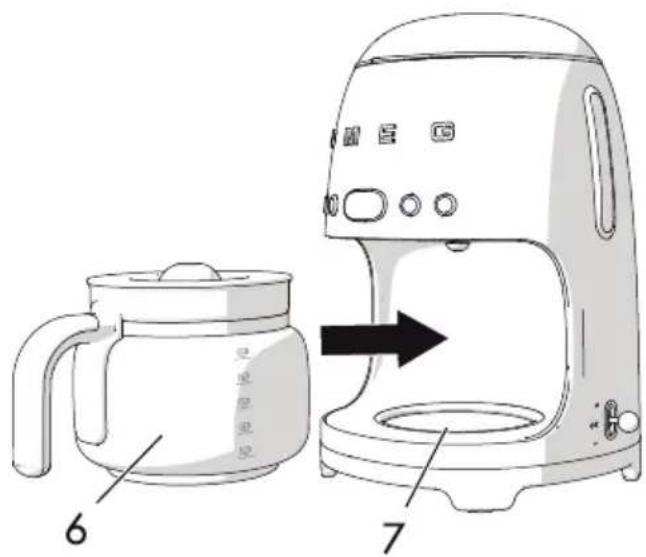
- Press the ON/OFF button.
- Wait for the cycle to finish and empty the jug.
- Repeat the cycle: the appliance is now ready for use.
3.4 How to prepare the coffee
- Fill the water tank as indicated in section "3.1 Before first use".
- Lift the lid of the water tank (1) and insert the permanent filter (2) into the filter holder (3).

- Fill with the amount of coffee required, according to the number of cups to be prepared, using the scoop (4) provided.


The permanent filter allows you to prepare filter coffee without using paper filters. However, according to your own preference, a paper filter #4 can be used instead.
Place the paper filter in the filter holder and add the required amount of coffee.

• One level scoop of ground coffee is approximately equivalent to one cup. However, the amount of ground coffee to be used may vary according to personal taste.
• Use good quality medium ground coffee.
- Close the lid (1) by lowering the tab.
- Place the jug (5) with the lid (6) on the Keep Warm plate (7). Make sure that the lid fits perfectly into the anti-drip valve (8).

- Press the ON/OFF button to enable the BREW mode: The LED on the ON/OFF button lights up and flashes quickly for the entire time the coffee is being brewed.

It is normal for steam to be produced while the coffee is being brewed.

Danger of burns
- Do not open the lid of the water tank while the coffee is being brewed.
- You can stop the coffee from being brewed at any time by pressing the ON/OFF button.

Caution
- Do not open the lid of the drip coffee machine as soon as the brewing cycle has finished. Wait for at least 5 minutes after the coffee has been brewed before opening the lid. - After 5 minutes, it is possible to remove the filter and fill the tank again to brew more coffee.


- Pressing any of the buttons, apart from the ON/OFF button, does not affect the coffee brewing function in any way.
- If the ON/OFF button is not pressed, the coffee continues to be brewed according to the automatic setting to fill the jug completely (10 cups).

- The filter holder and the permanent filter may be hot after the coffee has been brewed. Be careful when removing them.
- The base of the jug may be very hot after the coffee has been brewed. Take care when removing it and make sure that you do not place the jug on a heat-sensitive surface.
KEEP WARM mode
The KEEP WARM mode is activated automatically after the coffee has been brewed and keeps the Keep Warm plate on for 40 minutes.
In this way, the coffee will remain hot for 40 minutes after it has been brewed.
In the KEEP WARM mode, the LED of the ON/OFF button flashes slowly and the KEEP WARM icon lights up on the display.
The ON/OFF button turns off automatically at the end of the KEEP WARM mode.
The KEEP WARM mode can be stopped manually at any time by pressing the
ON/OFF button: the LED of the ON/OFF button and the KEEP
WARM icon turn off.

The KEEP WARM mode cannot be activated if the BREW mode is stopped manually or if the 4 CUPS mode is active.

Danger of burns
- The Keep Warm plate remains warm after the coffee has been brewed: be careful not to touch it when removing the jug.
Setting the AROMA
This setting allows you to choose between two aroma intensity levels for your coffee: DELICATE or INTENSE.
The appliance is set by default to
DELICATE: the LED of the aroma button Ⓞ is off and on the display only the lower coffee bean of the icon 🔒 appears selected.
To modify the setting:
- Press the AROMA button to select INTENSE: the LED of the AROMA button lights up and on the display both coffee beans of the icon appear selected.
- Press the AROMA button again to select DELICATE: the LED of the AROMA button turns off and the upper coffee bean from the icon appears unselected.

The required aroma setting is maintained for subsequent brewing cycles.
Using the 4 CUPS function
This function allows you to brew a small amount of coffee, corresponding to approximately 4 cups.
To select the 4 CUPS function:
- Press the button to set it to ON: the LED of the 4 CUPS function button turns on.
- Press the button again to set this function to OFF: the LED of the button turns off.

If the 4 CUPS mode has been selected, the KEEP WARM mode cannot be activated.
Setting the time for the AUTO START mode
This setting allows the appliance to be programmed to switch on automatically to brew the drip coffee at a time selected by the user.
To set the time at which the appliance switches on automatically, proceed as follows:
- Make sure that the time displayed is correct. Otherwise, set the correct time as described in section "3.2 First use".
- Press and hold the button for 3 seconds to set the automatic start time mode AUTO START: The LED of the button and the time display (HH:MM) start to flash.
- Move the lever up (+) or down (-) to set the time.
- Confirm the time by moving the lever to the central position and press (OK).
- Once set, the time for the AUTO START function will be saved automatically and will be used until it is modified.
AUTO START mode
- Press the AUTO START button to start the AUTO START mode: the LED of the AUTO START button will light up and the hours and minutes of the set start time for brewing the coffee will flash for a few seconds on the display. Then the current time will then be displayed.
- Press the AROMA button to select the intensity of the coffee required for the AUTO START mode. If necessary, depending on the quantity to be brewed in AUTO START mode, press the 4 CUPS function button to memorise the function.
- The appliance remains in AUTO START mode until the pre-set time. The brewing cycle starts automatically.
- Press the AUTO START ⏻ button at any time to exit from the AUTO START mode.
4 Cleaning and maintenance
4.1 Instructions

Improper use Danger of electrocution
- Unplug the drip coffee machine before cleaning it.
- Do not immerse the drip coffee machine in water or other liquids.
- Allow the drip coffee machine to cool down before cleaning it.

Improper use Risk of damage to surfaces
- Do not use steam jets to clean the drip coffee machine.
- Do not use cleaning products containing chlorine, ammonia or bleach on parts with metal surface finishes (e.g. anodised, nickel- or chrome-plated).
- Do not use abrasive or corrosive detergents (e.g. powder products, stain removers and metallic scourers).
- Do not use rough or abrasive materials or sharp metal scrapers.
4.2 Cleaning the drip coffee machine
To keep the outer surface of the coffee machine in good condition, it should be cleaned regularly after use. Let the appliance cool down first. Clean with a soft, damp cloth.

4.3 Cleaning the drip coffee machine components
Cleaning the permanent filter and the filter holder
- Lift the tab of the lid (1) and pull the permanent filter (2) upwards and then the filter holder (3).

- Clean the permanent filter and the filter holder, removing any residues of coffee.
- Rinse the filter and the filter holder under tap water and dry thoroughly.

The permanent filter and the filter holder can be washed in a dishwasher.
Cleaning the jug
- Empty the jug after each use to prevent staining caused by coffee residue.
- Wash the jug in hot, soapy water using a soft brush.
- Rinse and dry thoroughly.

Risk of damaging the jug
- Do not wash the jug in a dishwasher as it could become permanently damaged.
4.4 Descaling
Depending on the water hardness setting, the appliance automatically indicates when descaling has to be carried out.
The DESCALING icon starts to flash on the display to warn the user that a descaling cycle should be carried out. To start the descaling cycle:
- Pour water and the descaler into the water tank.
- Press the ON/OFF ⏻ and AUTO START ⏻ buttons simultaneously for 5 seconds to start the DESCALING cycle: the LEDs of the ON/OFF ⏻ and AUTO START ⏻ buttons flash and the DESCALING 88:88 AM PM icon flashes until the end of the cycle.
- At the end of the cycle, the display reverts to CLOCK mode and the
DESCALING 88:88 AM PM
disappears from the display.
Cleaning and care
- Rinse the appliance by operating it with just water for at least 2 cycles, filling the tank to its maximum limit (1.4 litres).

Caution
• Coffee can be brewed even if the DESCALING alarm is active. - Carry out a descaling cycle when prompted to do so by the appliance. - Limescale deposits can prevent the appliance from working correctly, especially if the water is very hard.

- Regularly descaling the appliance helps to preserve the aroma of the coffee and to keep the appliance in good working order.

Danger of personal injury and damage to the appliance
- The descaler contains acid which can irritate the skin and eyes.
- Follow the manufacturer's instructions and safety warnings on the pack to the letter; they will also tell you what to do in the event of contact with skin or eyes.
- Use descaling products recommended by Smeg to avoid damaging the drip coffee machine.

4.5 What to do if...
| Problem Possible causes Solution | ||
| Coffee does not come out | No water in tank. Fill the tank. | |
| Scale build-up. Perform a descaling cycle. | ||
| Coffee takes a long time to be dispensed | Scale build-up. Perform a descaling cycle. | |
| The coffee has an acidic taste | Possible stagnation of coffee in the circuits. | Rinse as described in section "4.4 Descaling". |
| The drip coffee machine overflows | The filter is not positioned correctly. | Insert the filter correctly in the filter holder. |
| The jug is not positioned correctly on the base. | Make sure that the jug is positioned correctly under the boiler outlet. | |
| There is no lid on the jug. Place the lid on the jug. | ||
| Excessive amount of coffee. | Place up to a maximum of 5 level scoops of ground coffee into the permanent filter. | |
| Coffee is too finely ground. | Use ground coffee for drip coffee machines. | |
Problem Possible causes Solution
Only water comes out of the drip coffee machine
No ground coffee in the filter.
Put the required amount of ground coffee into the filter.


If the problem has not been resolved or in the case of other types of fault, contact your local technical support centre.
- CONTENTS
- INSTRUCTIONS
- DESCRIPTION
- USE
- CLEANING AND MAINTENANCE
- TRANSLATION OF THE ORIGINAL INSTRUCTIONS
- INTRODUCTION
- THIS USER MANUAL
- INTENDED USE
- GENERAL SAFETY INSTRUCTIONS
- ONLY FOR EUROPEAN MARKETS
- FOR THIS APPLIANCE
- MANUFACTURER LIABILITY
- IDENTIFICATION PLATE
- DISPOSAL
- ELECTRICAL VOLTAGE DANGER OF ELECTROCUTION
- PLASTIC PACKAGING DANGER OF SUFFOCATION
- PRODUCT DESCRIPTION
- BEFORE FIRST USE
- DANGER OF MALFUNCTION
- FIRST USE
- ACCESSING THE SETTINGS MENU
- TIME FORMAT SETTINGS MENU
- MODIFYING THE TIME
- WATER HARDNESS SETTINGS MENU
- SOUNDS SETTINGS MENU
- RINSING OF THE INTERNAL CIRCUITS
- HOW TO PREPARE THE COFFEE
- DANGER OF BURNS
- CAUTION
- KEEP WARM MODE
- SETTING THE AROMA
- USING THE 4 CUPS FUNCTION
- SETTING THE TIME FOR THE AUTO START MODE
- AUTO START MODE
- IMPROPER USE DANGER OF ELECTROCUTION
- IMPROPER USE RISK OF DAMAGE TO SURFACES
- CLEANING THE DRIP COFFEE MACHINE
- CLEANING THE DRIP COFFEE MACHINE COMPONENTS
- CLEANING THE PERMANENT FILTER AND THE FILTER HOLDER
- CLEANING THE JUG
- RISK OF DAMAGING THE JUG
- DESCALING
- CLEANING AND CARE
- DANGER OF PERSONAL INJURY AND DAMAGE TO THE APPLIANCE
- WHAT TO DO IF
- PROBLEM POSSIBLE CAUSES SOLUTION
Brand : SMEG
Model : DCF01
Category : Coffee machine