
FGBHS-213 - Smart Home Fibaro - Free user manual and instructions
Find the device manual for free FGBHS-213 Fibaro in PDF.


| Product Type | Smart Home Sensor (Multi-Sensor) |
| Brand | Fibaro |
| Model | FGBHS-213 |
| Dimensions (L x W x H) | 4.5 x 4.5 x 2.0 cm |
| Weight | 45 g (including battery) |
| Power Source | 1x CR123A 3V Lithium battery |
| Battery Life | Up to 2 years (typical usage) |
| Wireless Protocol | Z-Wave Plus (868.4 MHz or 908.4 MHz depending on region) |
| Range | Up to 50 m indoors (line-of-sight) |
| Supported Functions | Motion detection, temperature measurement, light intensity measurement, tamper alarm |
| Sensor Detection Angle | 110° (horizontal) |
| Temperature Measurement Range | 0°C to 40°C (±0.5°C accuracy) |
| Light Measurement Range | 0 to 30000 lux |
| Operating Temperature | 0°C to 40°C |
| Operating Humidity | Up to 85% RH (non-condensing) |
| IP Rating | IP20 (indoor use only) |
| Installation | Wall mount or freestanding |
| Maintenance | Clean with soft dry cloth; do not use solvents |
| Safety Certifications | CE, FCC, Z-Wave Plus certified |
| Spare Parts | Battery (CR123A) is replaceable; no other user-serviceable parts |
| Repairability | Not designed for repair; contact Fibaro support for defects |
| Included Accessories | Mounting bracket, double-sided tape, user manual |
Frequently Asked Questions - FGBHS-213 Fibaro
User questions about FGBHS-213 Fibaro
0 question about this device. Answer the ones you know or ask your own.
Ask a new question about this device
Download the instructions for your Smart Home in PDF format for free! Find your manual FGBHS-213 - Fibaro and take your electronic device back in hand. On this page are published all the documents necessary for the use of your device. FGBHS-213 by Fibaro.
USER MANUAL FGBHS-213 Fibaro
FIBARO SINGLE SWITCH FGBHS-213
CONTENTS
1: Description and features 3
2: Supported loads 4
3: Installation 5
4: Pairing the accessory 7
5: Reset 8
6: Functionality 9
7: Configurable parameters 11
8: Specifications 12
9: Regulations 13
Important safety information

Read this manual before attempting to install the device!
Failure to observe recommendations included in this manual may be dangerous or cause a violation of the law. The manufacturer, Fibar Group S.A. will not be held responsible for any loss or damage resulting from not following the instructions of operating manual.

Danger of electrocution!
FIBARO Single Switch is designed to operate in electrical home installation. Faulty connection or use may result in fire or electric shock.
All works on the device may be performed only by a qualified and licensed electrician. Observe national regulations.
Even when the device is turned off, voltage may be present at its terminals. Any maintenance introducing changes into the configuration of connections or the load must be always performed with disabled fuse

Required overcurrent protection
FIBARO Single Switch must be protected with an overcurrent protection (fuse) with a value not higher than 10A.
HomeKit technology
Apple HomeKit technology provides an easy, secure way to control HomeKit-enabled accessories using Siri on your iPhone, iPad, or iPod touch.
After installing your FIBARO Single Switch, configure it from a compatible app with just a few simple steps.
You can even create your own custom scenes to control your home settings. For example, you can create a scene to automatically turn off the lights, lock your doors, close the garage door, and set the thermostat to the desired temperature in just one step.

To control this HomeKit-enabled accessory, iOS 9.3 or later is recommended.
Controlling this HomeKit-enabled accessory automatically and away from home requires an Apple TV with tvOS 9.2 or later or an iPad with iOS 9.3 or later set up as a home hub.
#1: Description and features
FIBARO Single Switch is designed to be installed in standard wall switch boxes or anywhere else where it is necessary to control electric devices.
FIBARO Single Switch allows to control connected devices either via HomeKit technology (using Bluetooth ^® low energy) or via a switch connected directly to it and is equipped with active power and energy consumption metering functionality.
Main features of FIBARO Single Switch:
- Compatible with Apple HomeKit technology,
- Bluetooth® low energy technology for wireless communication,
- Advanced microprocessor control,
- Works with various types of switches – momentary, toggle, three-way, etc,
- To be installed in wall switch boxes of dimensions allowing for installation, conforming to provisions of applicable regulations,
• FIBARO Single Switch is an extension unit.
#2: Supported loads
The Single Switch may operate under the following loads:
• Conventional incandescent light sources,
• Halogen light sources,
- Electrical appliances which power consumption does not exceed the limit for a specified device,
- Loads up to 8A rated current.

Applied load and the Single Switch itself may be damaged if the applied load is inconsistent with the technical specifications!
When connecting the Single Switch act in accordance with the following rules:
- Do not connect loads greater than those recommended!
- Do not connect types of loads other than resistive and incandescent!
#3: Installation

Connecting the Single Switch in a manner inconsistent with this manual may cause risk to health, life or material damage.
When connecting the Single Switch act in accordance with the following rules:
- Connect only in accordance with one of the diagrams,
- Electrical installation must be protected by overcurrent protection (fuse) of with a value not higher than 10A,
- The Single Switch should be installed in a wall switch box compliant with a relevant national safety standards and with depth no less than 60mm,
- Electrical switches used in installation should be compliant with the relevant safety standards,
- Length of wires used to connect the control switch should not exceed 10m.
Notes for the diagrams:

S1 - terminal for 1st switch
S2 - terminal for 2nd switch (not used at the moment)
L - terminal for live lead
Q - output terminal of the 1st channel
N - terminal for neutral lead
B - service button

NOTE
Switch connected to the S1 terminal is a master switch. It activates the basic functionality of the device (turning the load on/off).

WARNING!
Danger of electro- cution, take precau- tions to avoid electric shock!
Installation of the Single Switch:
- Switch off the mains voltage (disable the fuse).
- Open the wall switch box.
- Connect with one of following the diagrams for appropriate device:
single wall switch: double wall switch:


Wiring diagrams - Single Switch
- After verifying correctness of the connection switch on the mains voltage.
- Pair the device (see "Pairing the accessory" on page 7).
- Turn off the mains voltage, then arrange the device in a wall switch box.
- Close the wall switch box and turn on the mains voltage.
#4: Pairing the accessory
- Open the Settings app on your iOS device.
- Go to the Bluetooth ^® section, and turn the Bluetooth ^® on.
- Place the accessory next to your iOS device.
- Open a HomeKit compatible app of your choosing on your iOS device.
- Open pairing window in your HomeKit app to detect available accessories.
- Choose Single Single Switch you wish to pair.
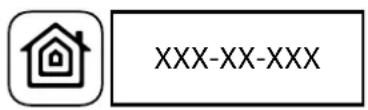
- Find HomeKit Setup Code on the last page of Quick Start Guide included in the box that looks like this:
- Start pairing with your HomeKit app.
- Point your iOS device's camera at the Setup Code to scan it or enter the Setup Code manually.
- If entered Setup Code is valid, the device will complete the setup process.
- Follow instructions displayed in the application.
i NOTE
Remember to keep your HomeKit Setup Code in safe place. You may need it in case of re-pairing.

WARNING!
Danger of electro- cution, take precau- tions to avoid electric shock!
#5: Reset
Resetting the Single Switch to factory defaults:
Reset procedure allows to restore the accessory back to its factory settings including HomeKit pairing.
- Open the wall switch box.
- Press and hold the button.
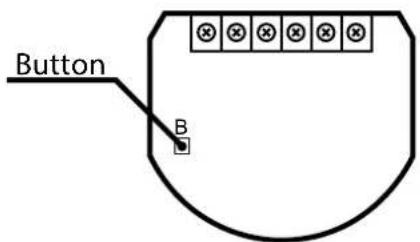
- Wait for the LED indicator to glow yellow.
- Release the button.
- Click the button to confirm.
-
Accessory will glow red to confirm reset.
-
Delete the accessory from the app before pairing it again.
#6: Functionality
Power consumption monitoring:
The Single Switch measure current active power consumption and reports it to your iOS device.
New power consumption report is sent:
- if current power changed by at least 20% compared to last reported,
- if current power changed by at least 200W compared to last reported,
- once every hour,
• after turning on/off.
Energy consumption monitoring:
The Single Switch measure cumulative energy consumption and reports it to your iOS device.
New energy consumption report is sent:
- if aggregate energy consumption changed by at least 0.1kWh compared to last reported,
- once every hour.
To reset energy consumption memory:
-
Open the wall switch box.
-
Press and hold the button.

-
Wait for the LED indicator to glow green
-
Release the button.
-
Click the button to confirm.

NOTE
Power consumption reports are sent not more frequently than every 10 second.

WARNING!
Danger of electro- cution, take precau- tions to avoid electric shock!

NOTE
Status fault values may be combined, e.g. 1+2=3 means overheat and overload occurred.

WARNING!
Danger of electro- cution, take precau- tions to avoid electric shock!
Malfunction detection:
The Single Switch detects some malfunctions and reports them to your iOS device.
Every malfunction is sent using Status Fault with code assigned to every event:
1 - overheat - device detected excessive heat and will turn off
2 - overload - device detected excessive electrical current and will turn off
3 - overheating and overload - device detected excessive heat and excessive electrical current, device will turn off
4 – relay contacts sticked - control over device relays is lost
8 - no communication with power metering module, device will turn off
Maintenance load controlling:
The Single Switch can turn on and off connected loads even if is not paired or connected to an external switch (e.g. to test its operation). To change state of the device to opposite one:
- Open the cover.
- Press and hold the button.

-
Wait for the LED indicator to glow white.
-
Release the button.
-
Click the button to confirm.
-
As long as LED is lit, clicking button will turn on/off the connected device.
-
Maintenance control will be disabled after 5 seconds of inactivity.
Device identification:
The Single Switch can identify itself if your are not sure which device you are currently controlling. When you ask the device to identify itself via HomeKit-compatible app it will:
- triple blink blue 3 times with the build-in LED,
- change state of the device to opposite one for approx. 5 seconds (only if paired with HomeKit network).
#7: Configurable parameters
1. Type of connected switch
This parameter allows to select type of wall switch connected to the device.
| Available settings: 0 – momentary switch1 – toggle switch (contact closed - ON, contact opened - OFF)2 – toggle switch (device changes status when switch changes status) |
| Default setting: 1 (toggle switch - synced) |
2. Restore state after power failure
This parameter determines if the device will return to state prior to the power failure after power is restored.
| Available settings: | 0 – the device does not save the state prior to the power failure and sets „off” position1 – the device does not save the state prior to the power failure and sets „on” position2 – the device restores its state prior to the power failure |
| Default setting: 2 (state is restored) | |
i NOTE
If parameter 1 is set to 1, parameter 2 is irrelevant and device state is always the same as switch state.
#8: Specifications
| Power supply: | 100-240V~ 50/60 Hz |
| Rated load current: | 8A |
| Operating temperature: | 0-35°C |
| For installation in boxes: | ≥ 50mm , depth ≥ 60mm |
| Overcurrent protection: | required external 10A circuit breaker |
| Radio protocol: | Bluetooth® low energy |
| Radio signal power: | EIRP up to 10dBm |
| Radio frequency: | 2.4 GHz |
| EU directives compliance: | RED 2014/53/EURoHS 2011/65/EU |
| Dimensions (L x W x H): | 42.5 x 38.25 x 20.3 mm |
#9: Regulations
Legal Notices
All information, including, but not limited to, information regarding the features, functionality, and/or other product specification are subject to change without notice. Fibaro reserves all rights to revise or update its products, software, or documentation without any obligation to notify any individual or entity.
FIBARO and Fibar Group logo are trademarks of Fibar Group S.A. The Bluetooth word mark and logos are registered trademarks owned by Bluetooth SIG, Inc. and any use of such marks by Fibar Group S.A. is under license. Apple, iPhone, iPad, iPad Air, and iPod touch are trademarks of Apple Inc., registered in the U.S. and other countries. HomeKit is a trademark of Apple Inc. All other brands and product names referred to herein are trademarks of their respective holders.
Use of the Works with Apple HomeKit logo means that an electronic accessory has been designed to connect specifically to iPod touch, iPhone, or iPad, respectively, and has been certified by the developer to meet Apple performance standards. Apple is not responsible for the operation of this device or its compliance with safety and regulatory standards.
WEEE Directive Compliance

Device labelled with this symbol should not be disposed with other household wastes. It shall be handed over to the applicable collection point for the recycling of waste electrical and electronic equipment.
Declaration of conformity

Hereby, Fibar Group S.A. declares that FIBARO Single Switch is in compliance with the essential requirements and other relevant provisions of Directive 2014/53/EU.


- FIBARO SINGLE SWITCH FGBHS-213
- CONTENTS
- 1: Description and features 3
- 2: Supported loads 4
- 3: Installation 5
- 4: Pairing the accessory 7
- 5: Reset 8
- 6: Functionality 9
- 7: Configurable parameters 11
- 8: Specifications 12
- 9: Regulations 13
- Important safety information
- Read this manual before attempting to install the device!
- Danger of electrocution!
- Required overcurrent protection
- HomeKit technology
- #1: Description and features
- Main features of FIBARO Single Switch:
- #2: Supported loads
- The Single Switch may operate under the following loads:
- Applied load and the Single Switch itself may be damaged if the applied load is inconsistent with the technical specifications!
- #3: Installation
- Connecting the Single Switch in a manner inconsistent with this manual may cause risk to health, life or material damage.
- Notes for the diagrams:
- NOTE
- WARNING!
- Installation of the Single Switch:
- #4: Pairing the accessory
- i NOTE
- #5: Reset
- Resetting the Single Switch to factory defaults:
- #6: Functionality
- Power consumption monitoring:
- Energy consumption monitoring:
- Malfunction detection:
- Maintenance load controlling:
- Device identification:
- #7: Configurable parameters
- Type of connected switch
- Restore state after power failure
- #8: Specifications
- #9: Regulations
- Legal Notices
- WEEE Directive Compliance
- Declaration of conformity
Brand : Fibaro
Model : FGBHS-213
Category : Smart Home