
SPIN SWEEP - Electric broom HOOVER - Free user manual and instructions
Find the device manual for free SPIN SWEEP HOOVER in PDF.


| Brand | HOOVER |
| Model | SPIN SWEEP (also available in SPIN SWEEP PRO version) |
| Product Type | Manual push outdoor sweeper |
| Intended Use | Hard, flat surfaces (tile, concrete, asphalt, etc.) |
| Operating Mode | Sweeping by rotating brushes driven by the pushing motion |
| Collection Bin | Removable with handle, easy emptying |
| Brush Height Adjustment | Multiple positions: Low (smooth surfaces) and High (uneven surfaces) for SPIN SWEEP; 5 positions for SPIN SWEEP PRO |
| Handle | Telescopic height-adjustable (2 holes for SPIN SWEEP, 5 for PRO) |
| Side Guide | Yes, for cleaning along walls and edges |
| Power Supply | None (manual device) |
| Maintenance | Clean the bin and brushes with water and a mild detergent. Do not use a high-pressure cleaner. |
| Safety Precautions | Do not pick up liquids, burning or hazardous materials. Do not use barefoot. Keep children at a distance. |
| Warranty | 1 year for domestic and light commercial use |
| Spare Parts | Replacement brushes, collection bin (available through Hoover service centers) |
| After-Sales Service | Hoover authorized service centers (USA: 1 800 944-9200, Canada: 1 800 463-3923) |
| Included Accessories | Handle in sections (2 lower + 1 upper), collection bin |
Frequently Asked Questions - SPIN SWEEP HOOVER
User questions about SPIN SWEEP HOOVER
0 question about this device. Answer the ones you know or ask your own.
Ask a new question about this device
Download the instructions for your Electric broom in PDF format for free! Find your manual SPIN SWEEP - HOOVER and take your electronic device back in hand. On this page are published all the documents necessary for the use of your device. SPIN SWEEP by HOOVER.
USER MANUAL SPIN SWEEP HOOVER
Review this manual before operating sweeper
Thank you for choosing a HOOVER product.
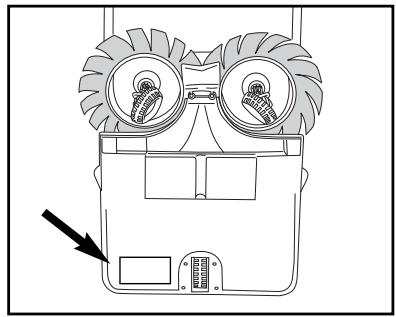
Please enter the COMPLETE model and serial numbers in the spaces provided.
The numbers are located on the bottom of your outdoor sweeper.
Model
Serial number
Hint: Attach your sales receipt to this owner's manual.
Verification of date of purchase may be required for warranty service of your HOOVER product.
Be sure to fill out and return the product registration card included with your outdoor sweeper (see back cover).
Contents
Important Safeguards. 2
Carton Contents 3
Assembly 3-4
How to Use 4-5
Maintenance. 6
If You Have a Problem............7
Service. 8
Warranty. 8
Important Safeguards!
When using any equipment, always follow basic precautions, including the following:
READ ALL INSTRUCTIONS BEFORE USING THIS PRODUCT
Warning:
To reduce the risk of fire, electric shock or injury:
- Close supervision is necessary when any equipment is used by or near children. Do not allow outdoor sweeper to be used as a toy.
- Keep hair, loose clothing, fingers, feet and all parts of body away from openings and moving parts. Do not operate outdoor sweeper in bare feet or when wearing open toe shoes or sandals.
- Do not use to pick up anything that is burning or smoking, such as cigarettes, matches, or hot ashes.
- Do not use to pick up flammable, combustible, explosive, toxic, carcinogenic or other materials and liquids dangerous to health.
- To avoid injury, use heavy gloves when removing glass, metal or similar material from dirt bin.
- Do not use the outdoor sweeper near heat sources such as fire, fan heaters, or other heat dissipating devices.
- Do not sweep over electrical cords.
- Use outdoor sweeper only for its intended use as described in the instructions. Use only attachments recommended by The Hoover Company; others may cause hazards.
Save these instructions!
If you need any assistance:
Visit our website at www.hoover.com. Click on the "Service" button to find the service outlet nearest you.
Please do not return this product to the store.
1. Assembly
SpinSweep™
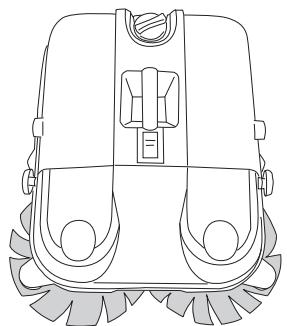
Carton contents
A. Lower handle sections (2)
B. Top handle section
C. Outdoor sweeper
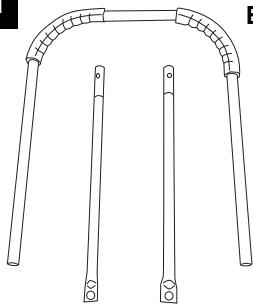
1-1
A
B
C
SpinSweep™ Pro Carton contents
A. Lower handle sections (2)
B. Top handle section
C. Outdoor sweeper
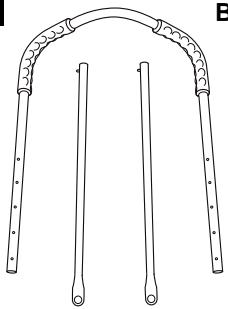
1-1
A
B
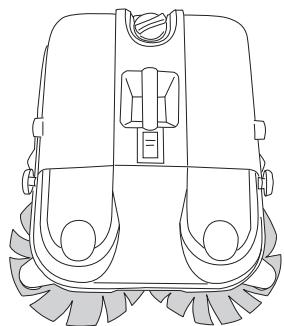
C
NOTE: Handle assembly differs slightly between SpinSweep™ and SpinSweep™ Pro. Refer to the proper section for your model for handle assembly. Handle attachment, use and maintenance for the two models are the same.
Assemble handle - SpinSweep™

1-2
Insert round end of straight lower handle sections (A) into each side of upper handle section (B).
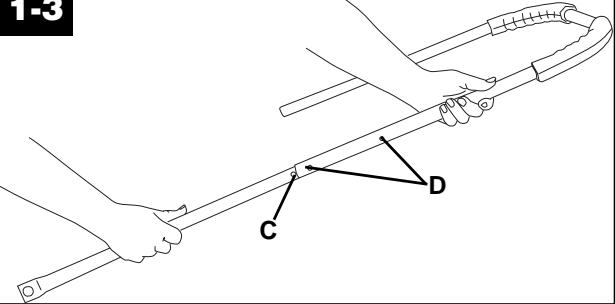
1-3
Press button (C) on lower handle section. Slide lower section into upper handle until button snaps into one of the holes (D).
Select upper holes for a shorter handle or lower holes for a longer handle.
Assemble handle - SpinSweep™ Pro
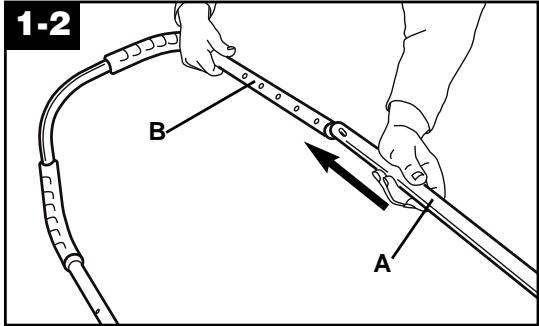
Insert round end of straight lower handle sections (A) into each side of upper handle section (B).
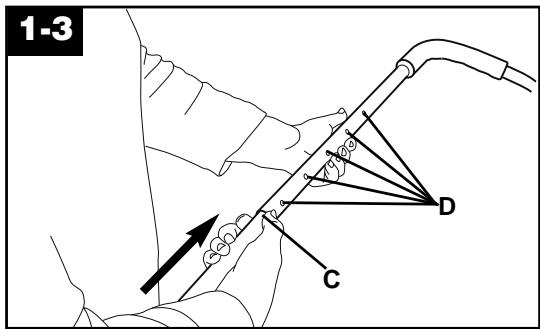
Press button (C) on lower handle section. Slide lower section into upper handle until button snaps into one of the holes (D). For your convenience, there are five height adjustment holes. Select upper holes for a shorter handle or lower holes for a longer handle.
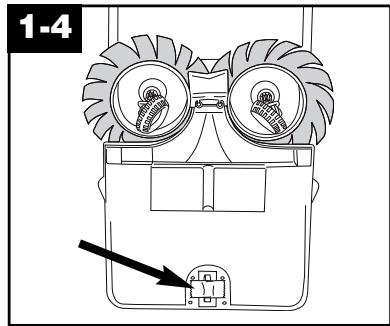
Remove tape from caster wheel on bottom of unit. (SpinSweep™ Pro only)
For SpinSweep™ and SpinSweep™ Pro models --
Attach handle
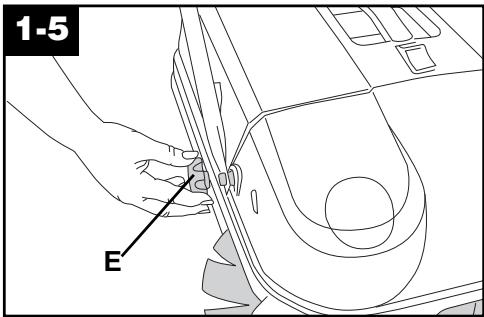
Unscrew handle knobs (E) from each side of sweeper.
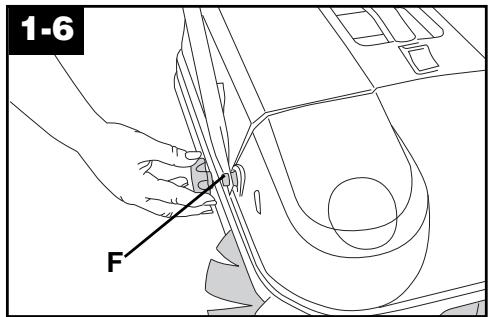
Fit holes on handle onto screw posts (F).
Reattach knobs and twist to tighten.
2. How to use
Sweeper description
- Handle
- Handle knobs
- Dirt bin
- Brush height adjustment control
- Dirt bin handle
- Dirt bin release button
- SpinSweep™ brushes
- Wall guides
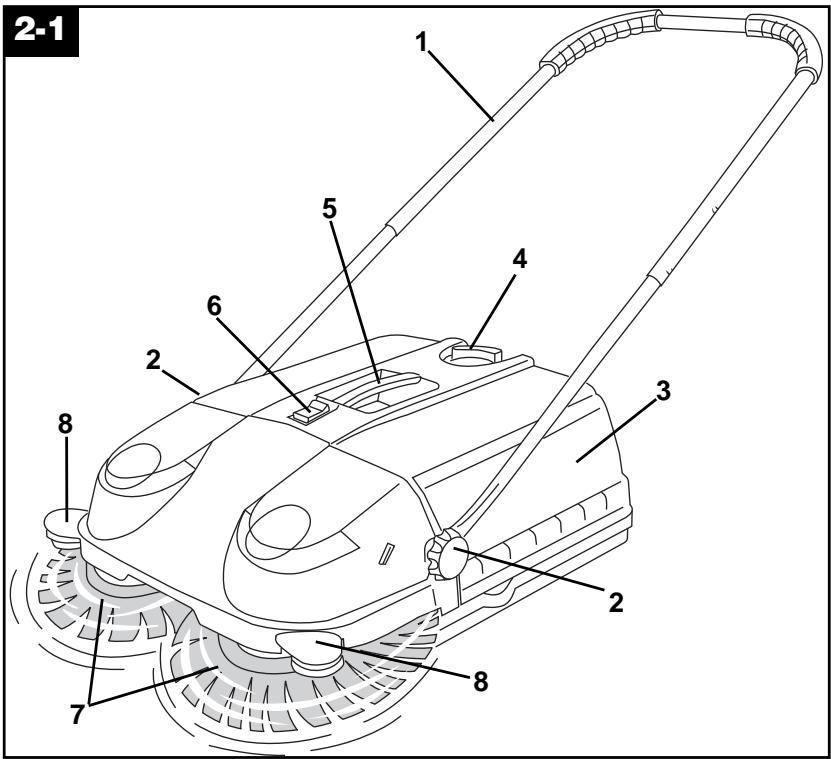
The outdoor sweeper is designed for use on hard, flat surfaces. It is not intended to be used for wet pick up or on lawns. Do not use outdoor sweeper on steps.
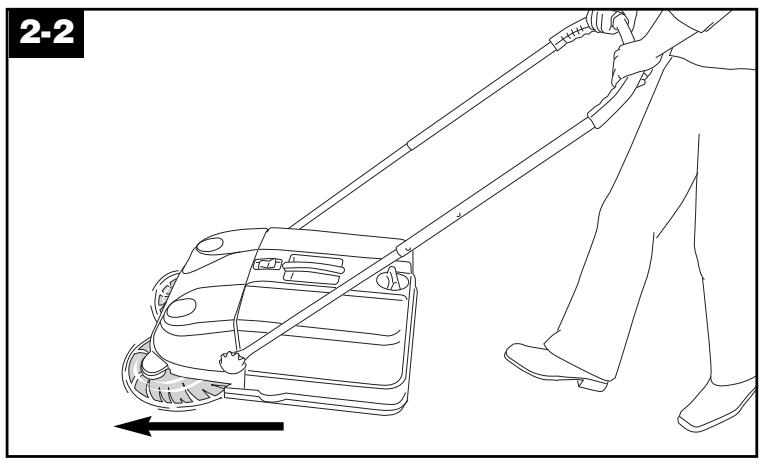
The brushes rotate and sweep up debris when the sweeper is pushed forward.
For best results, push the outdoor sweeper at a normal walking pace.
Brush height adjustment
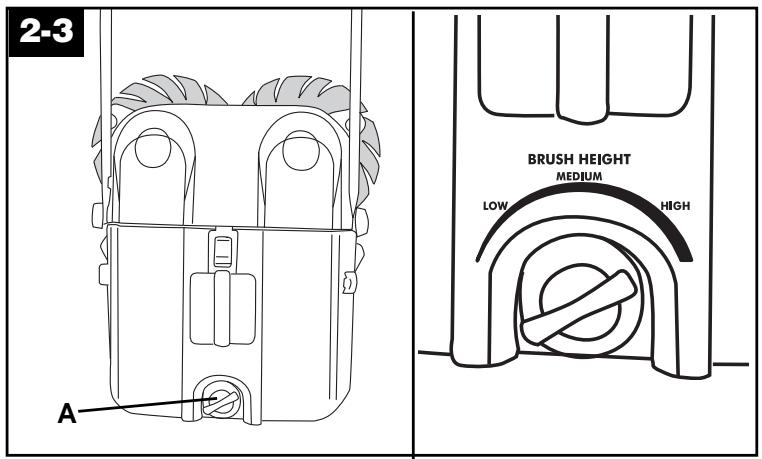
Turn the height adjustment control (A) toward "HIGH" to raise the brushes. (The rear of the sweeper will move to a lower position.) Turn it towards "LOW" to lower the brushes. (The rear of the sweeper will move to a higher position.)
The settings
LOW - for smooth surfaces and picking up debris that is small in size.
HIGHER settings - for rougher surfaces, such as brick and asphalt, or for picking up larger debris.
If the sweeper is difficult to push on a surface, turn the height adjustment toward "HIGH".
Wall guides
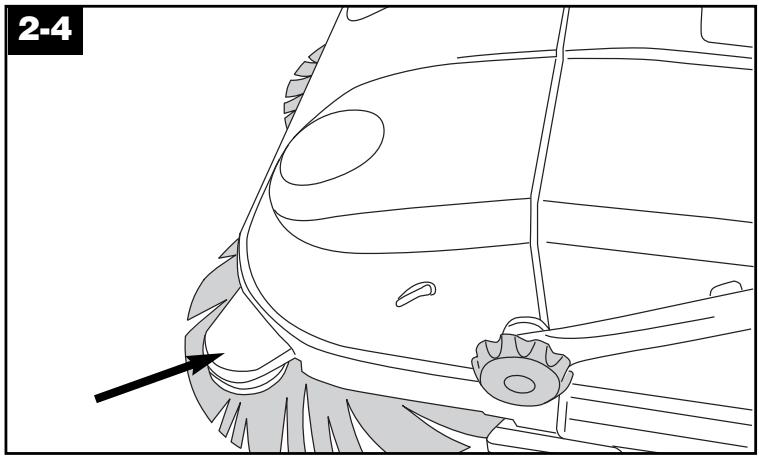
Wall guides are provided on each side of the sweeper to aid in sweeping close to walls or edges.
Guide either side of sweeper along walls.
3. Maintenance
Familiarize yourself with these home maintenance tasks, as proper use and care of your outdoor sweeper will ensure continued cleaning ability.
Dirt bin
When to empty
It is recommended that the dirt bin be emptied after every use.
How to empty
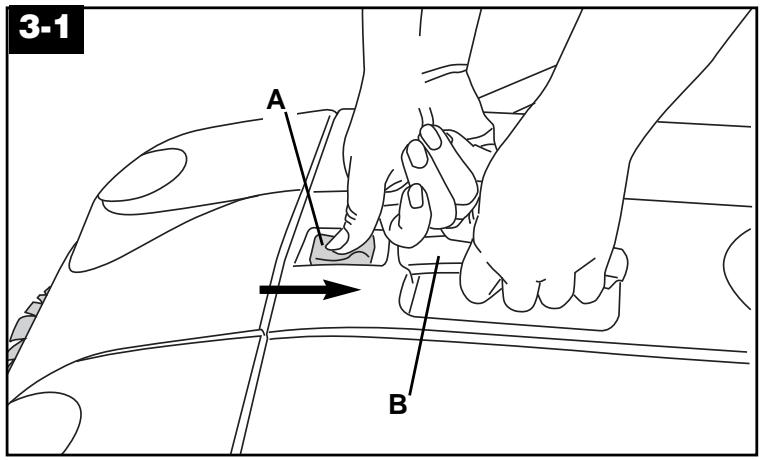
Slide dirt bin release (A) toward rear of sweeper.
Lift on handle (B) and remove bin.
Empty bin in an approved trash receptacle. If needed, clean the bin and exterior of sweeper with water and mild detergent. Do not use any solvent-based cleansers.
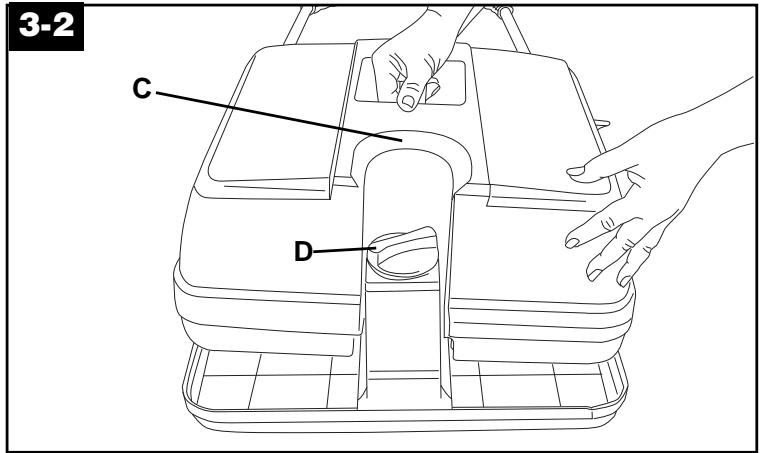
To replace dirt bin, align indent (C) on bin over height adjustment (D).
Lower bin onto sweeper and snap in place.
The brushes
Clean brushes with water and mild detergent. Do not use high pressure water spray to clean the brushes.
New brushes can be installed by your local Hoover Service Center.
Storage
Loosen handle knobs and rotate handle toward the brushes and past the "stoppers" (E). Tighten the handle knobs.
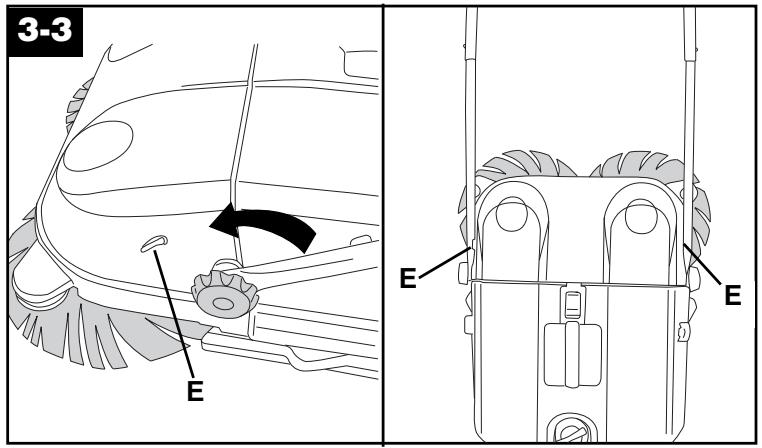
Store the outdoor sweeper either standing upright or hanging.
Store in a dry place.

4. If you have a problem
Problem: Debris is swept back onto surface during use.
Possible cause
Possible solution
- Light debris has collected in front of dirt bin.
- Tip the outdoor sweeper back to allow debris to move to back of dirt bin.
Problem: Line of debris is left while using.
Possible cause
Possible solution
- Fine debris or large amounts of debris have been picked up.
- Overlap the sweeping path to more effectively clean the area.
- Sweeper is being pushed too slowly.
- Push sweeper slightly faster.
Problem: Sweeper difficult to push.
Possible cause
Possible solution
- Surface is rough or uneven.
- Turn the height adjustment knob toward a higher setting.
Problem: Sweeper does not pick up debris.
Possible cause
Possible solution
- Height adjustment setting set too high for small debris.
- Turn the height adjustment knob toward a lower setting.
- Height adjustment setting set too low for large debris.
- Turn the height adjustment knob toward a higher setting.
Problem: Brushes won't turn.
Possible cause
Possible solution
- Surface is uneven.
- Turn the height adjustment knob toward a higher setting.
- Surface is too smooth.
- Sweeper not designed for optimum performance on low friction surfaces, such as vinyl decks.
Service
To obtain approved HOOVER service and genuine HOOVER parts, locate the nearest Hoover Factory Service Center or Authorized Hoover Warranty Service Dealer (Depot) by:
- checking the Yellow pages under “Vacuum Cleaners - Household” OR -
· checking the list of Factory Service Centers provided with this sweeper OR - - checking the Service section of The Hoover Company on-line at www.hoover.com OR -
- calling 1-800-944-9200 for an automated referral of authorized service outlet locations (U.S. only).
Do not send your sweeper to The Hoover Company in North Canton for service, as this will only result in delay.
If further assistance is needed, contact The Hoover Company Consumer Response Center, North Canton, Ohio 44720, Phone: 330-499-9499.
In Canada, contact Hoover Canada, Burlington, Ontario L7R 4A8, Phone: 1-800-263-6376.
Always identify your sweeper by the complete model number when requesting information or ordering parts. (The model number appears on the bottom of the sweeper.)
Full One Year Warranty
Your HOOVER® sweeper is warranted in normal household and light commercial use, in accordance with the Owner's Manual against original defects in material and workmanship for a period of one full year from date of purchase. This warranty provides, at no cost to you, all labor and parts to place this sweeper in correct operating condition during the warranted period. This warranty applies when the sweeper is purchased in the United States, including its territories and possessions, or in Canada or from a U.S. Military Exchange. Sweepers purchased elsewhere are covered by a limited one year warranty which covers the cost of parts only. This warranty does not apply if the sweeper is used in a heavy commercial or rental application.
This warranty only applies when the product is in use in the country or territory in which it is purchased.
Warranty service can only be obtained by presenting the sweeper to one of the following authorized warranty service outlets. Proof of purchase will be required before service is rendered.
- Hoover Factory Service Centers
- Hoover Authorized Warranty Service Dealers (Depots)
For an automated referral of authorized service outlets in the U.S.A., phone 1-800-944-9200 OR
visit The Hoover Company on-line at www.hoover.com.
This warranty does not cover pick up, delivery, or house calls; however, if you mail your sweeper to a Hoover Factory Service Center for warranty service, transportation will be paid one way.
While this warranty gives you specific legal rights, you may also have other rights which vary from state to state.
If further assistance is needed, or if there are questions concerning this warranty or the availability of warranty service outlets, write or phone the Consumer Response Center, The Hoover Company, 101 East Maple St., North Canton, Ohio 44720.
Phone: 1-330-499-9499
In Canada, contact Hoover Canada, Burlington, Ontario L7R 4A8, 1-800-263-6376.
HOOVER™
SpinSweep™ SpinSweep™ Pro
are registered trademarks