HOOVER FREESPACE CYCLONIC - Vacuum Cleaner

FREESPACE CYCLONIC - Vacuum Cleaner HOOVER - Free user manual and instructions

Find the device manual for free FREESPACE CYCLONIC HOOVER in PDF.

📄 93 pages English EN Download 💬 AI Question 11 questions ⚙️ Specs
Notice HOOVER FREESPACE CYCLONIC - page 5
Pick your language and provide your email: we'll send you a specifically translated version.
Product type Vacuum cleaner
Brand HOOVER
Model FREESPACE CYCLONIC
Separation technology Bagless cyclonic
Vacuum type Canister
Power supply Mains with power cord
Rated voltage 220-240 V
Fuse (UK) 13 A
Filtration Washable HEPA filter and washable Purefilt outlet filter
Reservoir capacity Transparent cyclonic cassette
Included accessories Telescopic tube, 2-position brush (hard floors/carpets), mini turbo nozzle, multi-function nozzle, furniture nozzle
Special features Nanopack storage system, fill level indicator, automatic shut-off in case of overheating
Filter maintenance Clean after 5 empties: tap and wash with lukewarm water
Spare parts HEPA filter T90, outlet filter T87, mini turbo nozzle J26, hose D95, brush G85, parquet brush G81
Safety Double insulation, do not use outdoors or on wet surfaces

Frequently Asked Questions - FREESPACE CYCLONIC HOOVER

How to empty the cyclonic cassette?
Detach the hose from the vacuum. Press the handle buttons and remove the cyclonic cassette. Hold it upside down, unhook the filter panel and open the cassette. Pour the contents into a bin. Close the flap and replace the cassette in the vacuum. Important: the hose must be detached before removing the cassette.
How to clean the washable filters?
For optimal performance, clean the filters after 5 empties. Tap dust off the HEPA and outlet filters, then wash them with lukewarm water without detergent. Dab with a dry cloth and let dry completely before reinstalling. Never use hot water.
What to do if the fill level indicator is on while the cassette is empty?
This likely indicates a dirty filter or blockage. Clean the washable filters. Also check that the telescopic tube and hose are not blocked. Use a rod to unclog if necessary. If the indicator stays on, the appliance will stop automatically after 10 minutes to prevent overheating.
Why does the vacuum stop by itself?
The vacuum has a safety device that stops it automatically if the cassette is full, the system is blocked, or the filters are dirty for more than 10 minutes. Unplug the appliance, resolve the issue (empty the cassette, clean filters, unblock), then plug it back in. The cut-out resets automatically.
How to assemble the vacuum?
Remove the vacuum and accessories from the packaging. Push the end of the hose into the vacuum until it clicks. Attach the hose/handle to one end of the telescopic tube and the brush to the other end. Accessories can be stored on the tube's accessory holder. Ensure all connections are snapped securely.
How to use the Nanopack system to store the vacuum?
Detach the floor nozzle and handle from the telescopic tube, then reduce the tube to its minimum length. Place the vacuum upright and push the tube storage clip into the recess at the base. Wrap the hose around the vacuum and place the handle and nozzle in the designated slots. This system saves considerable space.
What accessories are available and what are they for?
Included accessories: 2-position brush (for carpets and hard floors), mini turbo nozzle (deep cleaning for upholstery), multi-function nozzle (crevices, brushing, furniture) and furniture nozzle. The mini turbo nozzle should not be used on long-fringe rugs or piles >15 mm.
How to adjust the suction power?
Two methods depending on the model: slide the valve on the handle for manual modulation (open = less powerful). Use the power slider on the appliance to adjust suction. Use low suction for delicate fabrics.
Where to find spare parts?
Use exclusively genuine Hoover parts. References: HEPA filter T90 (35600636), outlet filter T87 (35600541), mini turbo nozzle J26 (35600543), hose D95 (35600544), 2-position brush G85 (35600545), parquet brush G81 (35600391). Available at your local Hoover dealer.
How to clear a blockage in the system?
First check the cassette: if full, empty it. If empty but indicator on, clean the filters. If still blocked, use a rod or handle to unclog the telescopic tube or hose. Do not let the appliance run for more than 10 minutes with the indicator on; it will stop automatically.

User questions about FREESPACE CYCLONIC HOOVER

1 question about this device. Answer the ones you know or ask your own.

Ask a new question about this device

The email remains private: it is only used to notify you if someone responds to your question.

Why does a red light turn on the handle of the HOOVER FREESPACE CYCLONIC vacuum cleaner?
Frequently Asked Questions - 23/04/2026
Response Notice-Facile

The red light that turns on the handle of your HOOVER FREESPACE CYCLONIC vacuum cleaner is the cassette fill level indicator. This indicator signals that your device requires immediate attention before continuing to use it.

According to the official manual, this indicator lights up in the following three situations:

  • The cyclonic cassette is full: this is the most common reason. You should empty the cassette as soon as possible.
  • An obstruction is blocking the system: check the hose and the main brush for blockages.
  • The filters are dirty or clogged: the HEPA filter and the exhaust filter may restrict airflow.

Procedure to turn off the red light:

  • Empty the cyclonic cassette by pressing both buttons on the handle, then remove the cassette from the body of the vacuum cleaner.
  • Check that the cassette is not obstructed and that the hose is clear.
  • Clean the HEPA filter and the exhaust filter with warm water, especially after 5 emptyings of the cassette.
  • Reinsert the cassette firmly back into the vacuum cleaner.

Important warning: the indicator remains lit as long as one of these three conditions persists. If you use the vacuum cleaner for more than ten minutes with this indicator on, an electronic device will automatically stop the appliance to prevent overheating. Do not ignore this alert signal.

If after emptying the cassette, cleaning the filters, and checking for obstructions, the red light remains on, the device may have a technical problem. Contact Hoover customer service at 0892 35 00 89 (France) for professional assistance.

Respond (be the first)

Download the instructions for your Vacuum Cleaner in PDF format for free! Find your manual FREESPACE CYCLONIC - HOOVER and take your electronic device back in hand. On this page are published all the documents necessary for the use of your device. FREESPACE CYCLONIC by HOOVER.

USER MANUAL FREESPACE CYCLONIC HOOVER

natural_image Red and white photo of a FreeSpace air purifier with 'HOOVER' branding and 'FREESPACE' logo (no readable text beyond branding)

OOVER

GENERATION FUTURE
HOOVER FREESPACE CYCLONIC - 2

natural_image Close-up of a hand holding a handheld vacuum cleaner with yellow arrows pointing to the component (no text or symbols visible)

HOOVER FREESPACE CYCLONIC - 3

natural_image Close-up of hands holding a black cylindrical pipe with a yellow arrow indicating direction (no text or symbols)

HOOVER FREESPACE CYCLONIC - 4

natural_image Hand operating a vacuum cleaner device with a yellow arrow indicating the lever (no text or symbols visible)

HOOVER FREESPACE CYCLONIC - 5

natural_image Hand inserting a black cable into a blue vacuum cleaner's air vent, with a yellow arrow indicating the cable attachment (no text or symbols visible)

HOOVER FREESPACE CYCLONIC - 6

natural_image Close-up of a hand pressing down on a red vacuum cleaner's air vent (no visible text or symbols)

HOOVER FREESPACE CYCLONIC - 7

natural_image Close-up of a hand pressing a button on a red and silver appliance (no visible text or symbols)

HOOVER FREESPACE CYCLONIC - 8

natural_image Hand holding a black brushstroke with yellow directional arrows, no text or symbols visible

HOOVER FREESPACE CYCLONIC - 9

natural_image Close-up of a hand pressing down on a red vacuum cleaner's air vent (no text or symbols visible)

HOOVER FREESPACE CYCLONIC - 10

natural_image Close-up of hands holding a mechanical device with black clamps and metal components, no visible text or symbols

HOOVER FREESPACE CYCLONIC - 11

natural_image Close-up of a person's foot using a HOOVER vacuum cleaner on a gray base (no text or symbols visible)

HOOVER FREESPACE CYCLONIC - 12

natural_image 3D rendering of a HOVER vacuum cleaner with label P11 (no additional text or symbols visible)

HOOVER FREESPACE CYCLONIC - 13

natural_image Two black hairbrushes, one with a brush and the other with a handle, shown against a white background (no text or symbols)

HOOVER FREESPACE CYCLONIC - 14

natural_image Red and black vacuum cleaner with coiled hose, displayed against white background (no text or symbols visible)

HOOVER FREESPACE CYCLONIC - 15

natural_image Close-up of a red and gray vacuum cleaner with coiled tubing (no visible text or symbols)

HOOVER FREESPACE CYCLONIC - 16

natural_image 3D rendering of a blue and gray vacuum cleaner with a yellow arrow indicating motion (no text or symbols on the device itself)

HOOVER FREESPACE CYCLONIC - 17

natural_image Exterior view of a modern blue and gray vacuum cleaner (no text or symbols visible)

HOOVER FREESPACE CYCLONIC - 18

natural_image Close-up of a red computer mouse with silver and white casing, featuring a logo on the handle (no readable text or symbols)

P18 FreeShare

HOOVER FREESPACE CYCLONIC - 20

natural_image Red and black vacuum cleaner with a hand inserting a component, no visible text or symbols on the device itself.

HOOVER FREESPACE CYCLONIC - 21

natural_image Hand holding a red vacuum cleaner with a gray top, showing internal components and a yellow directional arrow (no text or symbols)

HOOVER FREESPACE CYCLONIC - 22

natural_image Hand holding a red vacuum cleaner with a gray base, no visible text or symbols on the device itself

HOOVER FREESPACE CYCLONIC - 23

natural_image Close-up of hands assembling a white and blue cleaning brush (no text or symbols visible)

HOOVER FREESPACE CYCLONIC - 24

natural_image Close-up of a red industrial vacuum cleaner with a hand inserting a plastic cover into it (no visible text or symbols)

IMPORTANT SAFETY REMINDERS:

This cleaner should only be used for domestic cleaning, as described in this User Guide. Please ensure that this guide is fully understood before operating the appliance.

Warning: Electricity can be extremely dangerous. This appliance is double insulated and must not be earthed. This plug is fitted with a 13 amp fuse (UK Only).

Important: The wires in the mains power lead are coloured in accordance with the following code:

Blue - Neutral

Brown - Live

Static electricity: Some carpets can cause a small build up of static electricity. Any static electricity discharge is not hazardous to health.

Remember: After use, switch the cleaner off and remove the plug from the electricity supply. Always switch off and remove the plug before cleaning the appliance or attempting any maintenance.

Safety with children, elderly or the infirm: Do not let children play with the appliance or its controls. Please supervise the use of the appliance by older children, the elderly or the infirm.

IT IS IMPORTANT THAT YOU DO NOT

  • Position the cleaner above you when cleaning the stairs.
  • Use the cleaner out of doors on wet surfaces or for wet pickup.
  • Pick up matches, hot ash, cigarette ends, hard or sharp objects or anything that may damage the cleaner.
  • Spray with or pick up flammable liquids, cleaning fluids, aerosols or their vapours as this may cause risk of fire/explosion.
  • Run over the supply cord whilst using the cleaner or remove the plug by pulling on the cord.
  • Stand on or wrap the power cord around arms or legs when using the cleaner.
  • Continue to use your cleaner if it appears to be faulty. If the supply cord is damaged, stop using the cleaner IMMEDIATELY. To avoid a hazard, an authorised Hoover service engineer must replace the supply cord.
  • Remove the cyclonic cassette before removing the hose from the cleaner.
    • Use the appliance to clean people or animals.

ASSEMBLING YOUR CLEANER

Remove the cleaner and accessories form their packaging. Please dispose of the packaging material in a safe and conscientious way.

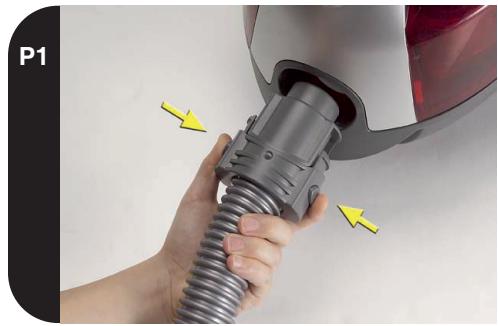
Insert the hose end into the cleaner, ensuring it clips and locks into position. To release: simply press the two buttons on the hose end and pull (P1).

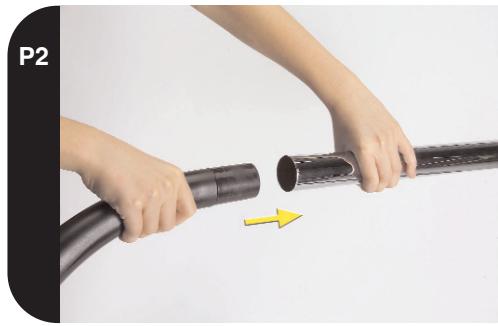
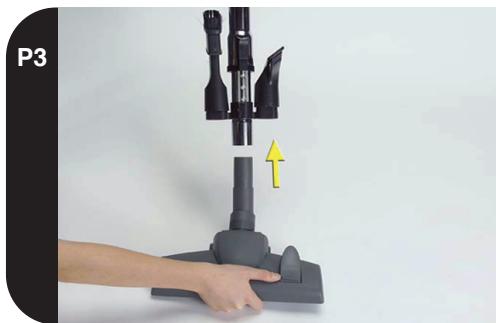
Fit the hose/handle and floor nozzle onto opposite ends of the telescopic tube (P2 & P3). The accessory tools can be stored on the tool holder fixed to the telescopic tube (P3).

USING YOUR CLEANER

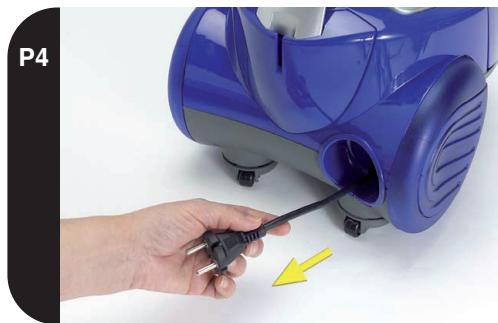
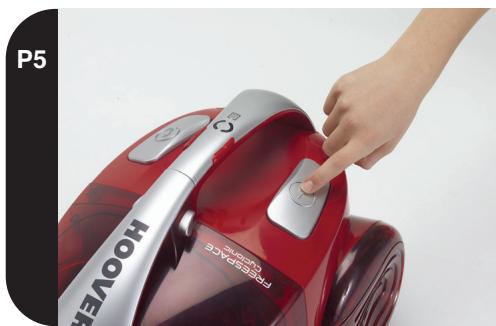
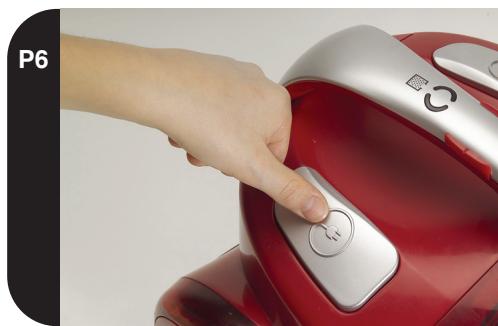
Power supply - Pull cord and plug into power supply (P4). Please make sure the cord is fully extended before using the cleaner. Press the on/off pedal once to start the cleaner (P5). Press it again to stop the cleaner before removing the plug after use. Press the cord rewind button to wind the power cord back into the cleaner (P6).

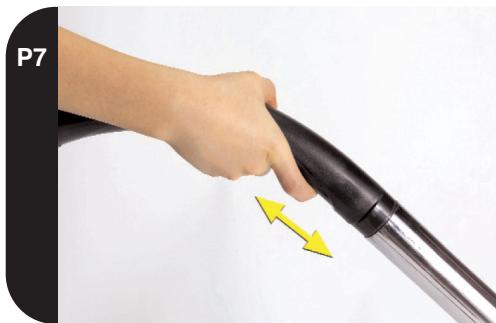
Fixed power control (depending on model) - Adjust the suction by moving the handle valve: suction will decrease when opening the valve (P7). Use low suction for delicate fabrics.

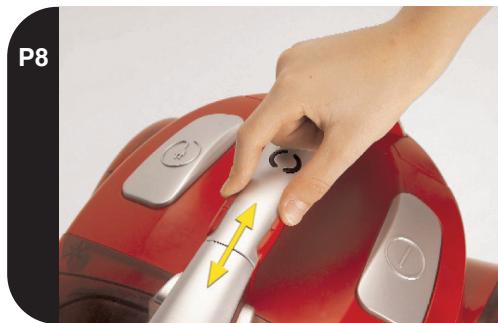
Variable power control (depending on model) - Slide the variable power adjuster to increase or decrease the suction (P8). Use low suction for delicate fabrics.

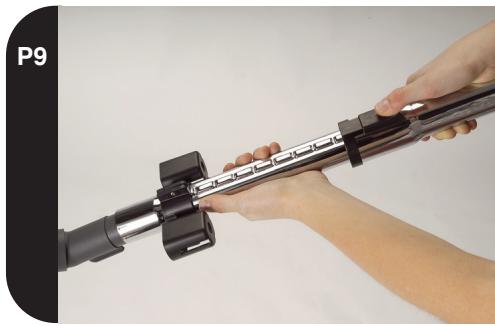
Telescopic Tritube – The telescopic Tritube can be extended or collapsed by pressing the latches forward and pulling or pushing the tubes to the desired length (P9).

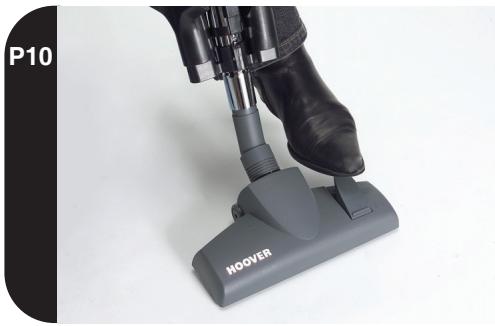
Carpet & Floor Nozzle - Press pedal on the nozzle to lower the brush head when cleaning hard floors (P10). Press the pedal again to lift the brush head when cleaning carpets.

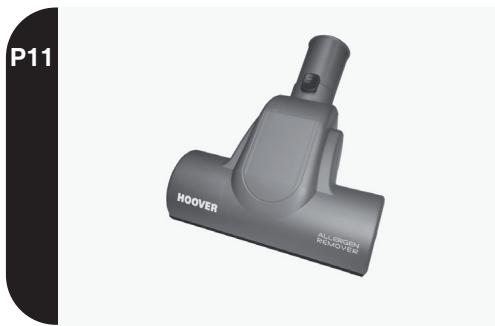
Mini Turbo Nozzle (depending on model) - Use the mini turbo nozzle (P11) for deep cleaning on textile surfaces. Important: do not use the Mini Turbo Nozzle on rugs with long fringes, animal hide and with carpet piles deeper than 15mm. Do not keep the nozzle stationary while the brush is rotating.

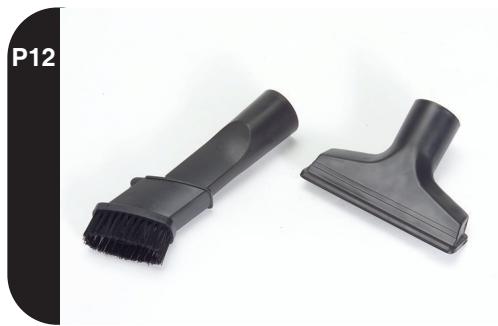
Multifunction Tool - (P12) This tool can be used as:

  1. Crevice tool: for corners and hard to reach areas
  2. Dusting brush: for bookshelves, frames, keyboards etc.

Furniture Nozzle (depending on model) - For soft furnishings and fabrics (P12).

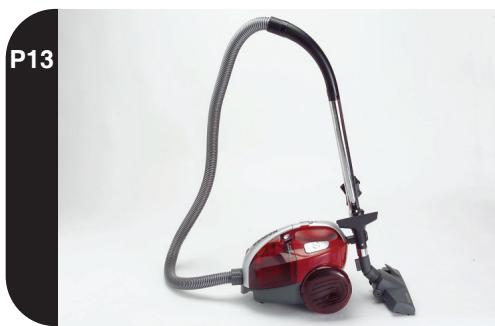
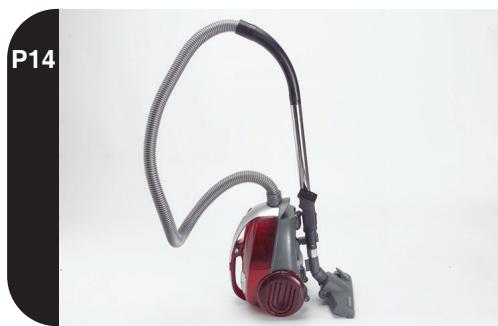
Parking and storage - The telescopic Tritube can be parked for temporary storage during cleaning or in the storage position when not in use (P13 & P14).

Nanopack Storage System -The unique Nanopack Storage System allows the cleaner to be stored in an ultra compact configuration with a significantly smaller storage volume than other cleaners.

To store the cleaner using the Nanopack system:

  1. Detach the floor nozzle and hose handle from the Tritube then collapse the Tritube to its minimum storage length (see 'Telescopic Tritube').
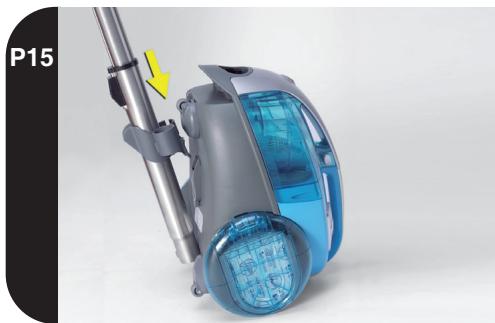
  2. Position the cleaner in the upright position and slot the tool storage bracket on the Tritube into the recess located on the base of the cleaner (P15).
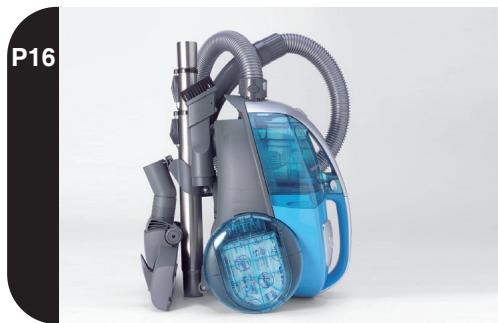
  3. Wrap the hose around the product before fitting the hose handle and floor nozzle into the locations provided on the tool storage bracket (P16).

CLEANER MAINTENANCE

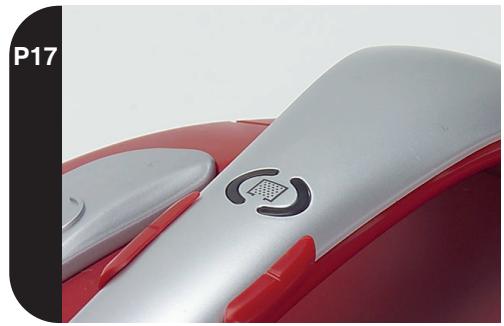
Emptying the cyclonic cassette - Please empty the cassette after each use of the cleaner or if the cassette-check indicator is illuminated (P17).

  1. Remove the hose from the cleaner (P1).
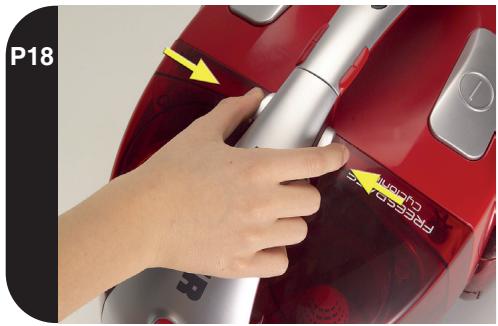
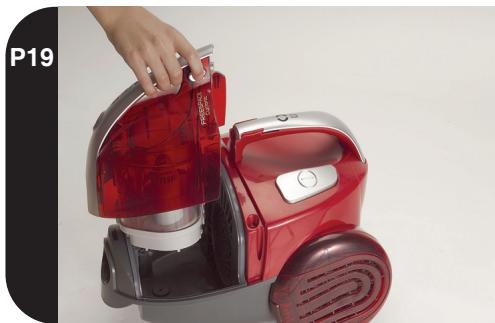
  2. Press buttons on handle (P18) and lift cyclonic cassette out of the cleaner (P19).
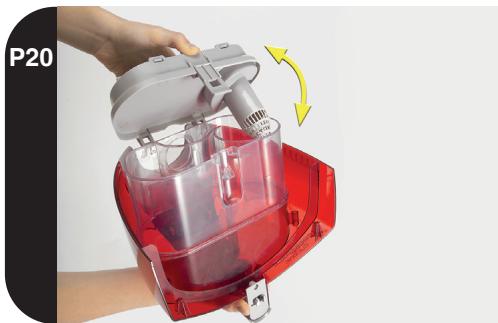
  3. Hold the cassette upside down so that the filter panel faces upwards. Unlatch the filter panel and open the cassette (P20). Carefully tip the contents of the cassette into a bin.
  4. Use the brush nozzle when necessary, to remove excessive dust from the internal surface of the cassette.
  5. Close the cassette door. Re-fit Freespace cyclonic cassette into the cleaner and push down on the cassette to secure.

Important: The hose must be removed before removing or replacing the cyclonic cassette.

Remember: The cassette check indicator will also illuminate if an obstruction has occurred. In this case refer to the section "Removing a blockage from the system".

IMPORTANT: Cleaning the washable filters - To maintain optimum performance please tap and, if necessary, wash the cyclonic cassette hepa filter and exhaust filter after 5 cassette empties using handwarm water. Remove excess water from the filters with a dry cloth and leave to dry fully before replacing.

Important: Do not use hot water or detergents. In the unlikely event of the filters becoming damaged, fit a genuine Hoover replacement. Do not try and use the product without the cassette or filters fitted.

To remove the cyclonic cassette Hepa filter:

  1. Remove the cyclonic cassette (see Emptying the cyclonic cassette).
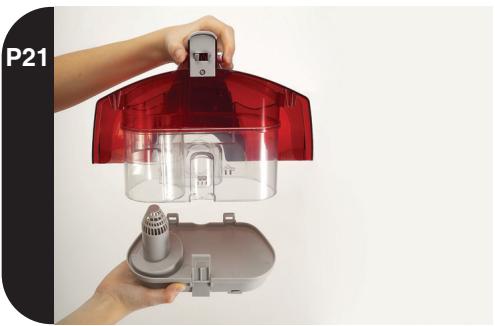
  2. Unlatch then unhinge the filter panel from the bottom of the cyclonic cassette (21).
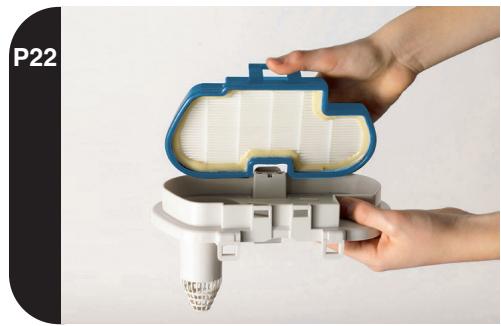
  3. Press the release latch on the blue filter frame to unlock the hepa filter from the filter panel (P22).
  4. Remove the washable hepa filter.

To remove the Purefilt filter:

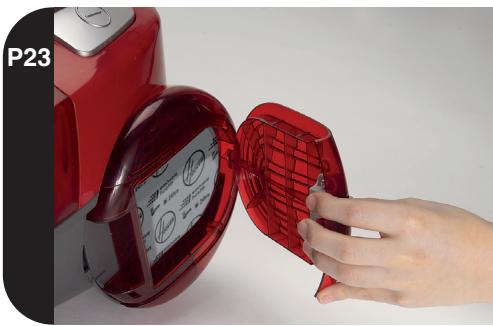
  1. Unlatch and remove exhaust filter cover (P23)
  2. Remove the washable exhaust filter.

Removing a blockage from the system - If the check indicator is illuminated:

" Check if the cassette is full. If so refer to 'Emptying the cyclonic cassette'.
" If the cassette is empty but the indicator is illuminated:
1. Do the filters need cleaning? If so refer to 'Cleaning the washable filters'.
2. Check if there is any other blockage in the system - Use a rod or pole to remove any blockage from the extension tube or flexible hose.

Warning -The cassette check indicator will remain illuminated if the cleaner is used when the cassette is full, if there is a blockage or if the filters are dirty. If used for a period of over ten minutes with the cassette check indicator illuminated, an electronic cut out will switch the cleaner off to prevent any risk of overheating. If this should happen, switch the cleaner off, unplug and correct the fault (see 'Removing a blockage from the system'). The cut out will automatically reset upon switching the cleaner back on.

USER CHECKLIST

Should you have a problem with the product, complete this simple user checklist before calling your local Hoover service.

  • Is there a working electricity supply to the cleaner? Please check with another electrical appliance.
    • Is the cyclonic cassette over-filled? Please refer to 'Cleaner Maintenance'.
  • Is the filter blocked? Please refer to 'Cleaner Maintenance'.
  • Is the hose or nozzle blocked? Please refer to 'Removing a blockage from the system'.

IMPORTANT INFORMATION

Genuine Hoover Spares and Consumables - Always replace parts with Genuine Hoover Accessories and Consumables. These are available from your local Hoover Dealer or you can buy original Hoover consumable spares online at www.HOOVER.CO.UK or call 01204 556111:

Cyclonic Cassette Hepa Filter: T90 - pack number 35600636 Purefilt Exhaust Filter: T87 - pack number 35600541 Mini Turbo Nozzle: J26 - pack number 35600543 Flexible Hose: D95 - pack number 35600544 C&F Nozzle: G85- pack number 35600545 Caresse Nozzle: G81-pack number 35600391

Should you require service at any time, please call your local Hoover Service office.

The Environment

This appliance is marked according to the European Directive 2002/96/EC on Waste Electrical Electronic Equipment (WEEE).

By ensuring this product is disposed of correctly you will help prevent potential negative consequences for the environment and human health, which could otherwise be caused by inappropriate waste handling of this product.

The symbol on the product indicates that this product may not be treated as household waste. Instead it shall be handed over to the applicable collection pint for the recycling of electrical and electronic equipment.

Disposal must be carried out in accordance with local environmental regulations for waste disposal.

For more detailed information about treatment, recovery and recycling of this product, please contact your local city office, your household waste disposal service or shop where you purchased the product.

Guarantee

The guarantee conditions for this appliance are as defined by our representative in the country in which it was sold. Details regarding these conditions can be obtained from the dealer from whom it was purchased. The bill of sale or receipt must be produced when making any claim under the terms of this guarantee. Subject to change without notice.

REMARQUES IMPORTANTES CONCERNANT LA SÉCURITÉ :

Gias customer service

Suisse

Tel.0848/780.780

Candy Hoover Austria

GmbH

Dominikanerbastei 4

A-1011 Wien

www.candy-hoover.at

707 200 188

O ambiente:

VIKTIGE SIKKERHETSPÅMINNELSER:

Manual assistant
Powered by Anthropic
Waiting for your message
Product information

Brand : HOOVER

Model : FREESPACE CYCLONIC

Category : Vacuum Cleaner