
CUBE-60 - Guitar amplifier ROLAND - Free user manual and instructions
Find the device manual for free CUBE-60 ROLAND in PDF.


| Product Type | Guitar Combo Amplifier |
| Power Output | 60 W RMS |
| Speaker | 1 x 12 inches (30 cm) |
| Channels | 4 (Clean, Crunch, Lead, Metal) |
| Equalization | 3 bands (bass, mid, treble) |
| Built-in Effects | Reverb, Delay, Chorus, Flanger |
| Inputs | 1 x 6.35 mm jack (instrument) |
| Outputs | 1 x headphones (6.35 mm jack), 1 x line (6.35 mm jack) |
| Controls | Volume, gain, equalizer, channel selector, effects, master |
| Dimensions (approx) | 500 x 400 x 300 mm |
| Weight | 15 kg |
| Power Supply | Mains 230 V AC, 50/60 Hz |
| Power Consumption | 60 W |
| Included Accessories | Power cable |
| Care and Cleaning | Unplug the device before cleaning. Use a dry, soft cloth. |
| Safety | Do not expose to moisture. Unplug during storms. |
| Spare Parts and Repairability | Parts available through Roland authorized network. Device repairable by a professional. |
Frequently Asked Questions - CUBE-60 ROLAND
User questions about CUBE-60 ROLAND
0 question about this device. Answer the ones you know or ask your own.
Ask a new question about this device
Download the instructions for your Guitar amplifier in PDF format for free! Find your manual CUBE-60 - ROLAND and take your electronic device back in hand. On this page are published all the documents necessary for the use of your device. CUBE-60 by ROLAND.
USER MANUAL CUBE-60 ROLAND
Thank you, and congratulations on your choice of the Roland CUBE-60 Guitar Amplifier.
These sections provide important information concerning the proper operation of the unit. Additionally, in order to feel assured that you have gained a good grasp of every feature provided by your new unit, Owner's manual should be read in its entirety. The manual should be saved and kept on hand as a convenient reference.
Before using this unit, carefully read the sections entitled
• IMPORTANT SAFETY INSTRUCTIONS (p. 2)
• USING THE UNIT SAFELY (p. 3–p. 4)
• IMPORTANT NOTES (p. 5).
This unit is equipped with a protection circuit.
The protection circuit helps ensure safety by operating when excessive input continues for a long time while the device is at a location with a high ambient temperature. Sound drop-out may occur when the protection circuit is actuated during use.
Please read through the documentation carefully to ensure correct use.
Main Features
- 60-watt output, high-performance, DSP guitar amp with built-in 30 cm (12-inch) speaker.
- Offers nine types of COSM amps, including realistic modeling of seven of the most popular guitar amps and two original amp types, “ACOUSTIC” and “DYNA AMP.” The newly developed “DYNA AMP” lets you achieve previously unexperienced levels of tonal variation based on your picking dynamics, for whole new levels of expression.
Composite Object Sound Modeling (COSM) is Roland's innovative and powerful sound modeling technology. COSM analyzes the many factors that make up the original sound, such as the electrical and physical characteristics of the original, and then produces a digital model that can reproduce the same sound.
- Channel can be switched between "JC CLEAN" and "LEAD." Channel switching can be done via foot switch (optional).
- In addition to an easy-to-use, 3-band equalizer, the CUBE-60 also features a PRESENCE knob, which you can use to create a wide variety of precisely defined sounds.
- Comes equipped with four effects types, chorus, flanger, phaser, and tremolo, along with an independent system with the basic delay and reverb effects. You can also use foot switches (optional) to switch these effects on and off.
- Equipped with a convenient “RECORDING OUT jack” handy for use in recording. This output also functions as a headphone jack.
Also features LINE OUT, TUNER OUT, and EXT SPEAKER outs. These outputs can be used for all kinds of performances, from recording to live gigs.

ATTENTION
RISQUE DE CHOC ELECTRIQUE NE PAS OUVRIR

CAUTION: TO REDUCE THE RISK OF ELECTRIC SHOCK, DO NOT REMOVE COVER (OR BACK).
NO USER-SERVICEABLE PARTS INSIDE.
REFER SERVICING TO QUALIFIED SERVICE PERSONNEL.

The lightning flash with arrowhead symbol, within an equilateral triangle, is intended to alert the user to the presence of uninsulated “dangerous voltage” within the product's enclosure that may be of sufficient magnitude to constitute a risk of electric shock to persons.

The exclamation point within an equilateral triangle is intended to alert the user to the presence of important operating and maintenance (servicing) instructions in the literature accompanying the product.
INSTRUCTIONS PERTAINING TO A RISK OF FIRE, ELECTRIC SHOCK, OR INJURY TO PERSONS.
IMPORTANT SAFETY INSTRUCTIONS SAVE THESE INSTRUCTIONS
WARNING - When using electric products, basic precautions should always be followed, including the following:
- Read these instructions.
- Keep these instructions.
- Heed all warnings.
- Follow all instructions.
- Do not use this apparatus near water.
- Clean only with a dry cloth.
- Do not block any of the ventilation openings. Install in accordance with the manufacturers instructions.
- Do not install near any heat sources such as radiators, heat registers, stoves, or other apparatus (including amplifiers) that produce heat.
-
Do not defeat the safety purpose of the polarized or grounding-type plug. A polarized plug has two blades with one wider than the other. A grounding type plug has two blades and a third grounding prong. The wide blade or the third prong are provided for your safety. If the provided plug does not fit into your outlet, consult an electrician for replacement of the obsolete outlet.
-
Protect the power cord from being walked on or pinched particularly at plugs, convenience receptacles, and the point where they exit from the apparatus.
- Only use attachments/accessories specified by the manufacturer.
- Unplug this apparatus during lightning storms or when unused for long periods of time.
- Refer all servicing to qualified service personnel. Servicing is required when the apparatus has been damaged in any way, such as power-supply cord or plug is damaged, liquid has been spilled or objects have fallen into the apparatus, the apparatus has been exposed to rain or moisture, does not operate normally, or has been dropped.
For the U.K.
WARNING: THIS APPARATUS MUST BE EARTHED
IMPORTANT: THE WIRES IN THIS MAINS LEAD ARE COLOURED IN ACCORDANCE WITH THE FOLLOWING CODE. GREEN-AND-YELLOW: EARTH, BLUE: NEUTRAL, BROWN: LIVE
As the colours of the wires in the mains lead of this apparatus may not correspond with the coloured markings identifying the terminals in your plug, proceed as follows:
The wire which is coloured GREEN-AND-YELLOW must be connected to the terminal in the plug which is marked by the letter E or by the safety earth symbol ⏻ or coloured GREEN or GREEN-AND-YELLOW.
The wire which is coloured BLUE must be connected to the terminal which is marked with the letter N or coloured BLACK.
The wire which is coloured BROWN must be connected to the terminal which is marked with the letter L or coloured RED.
USING THE UNIT SAFELY
INSTRUCTIONS FOR THE PREVENTION OF FIRE, ELECTRIC SHOCK, OR INJURY TO PERSONS
About ⚠️ WARNING and ⚠️ CAUTION Notices
| ⚠ WARNING | Used for instructions intended to alert the user to the risk of death or severe injury should the unit be used improperly. |
| ⚠ CAUTION | Used for instructions intended to alert the user to the risk of injury or material damage should the unit be used improperly.* Material damage refers to damage or other adverse effects caused with respect to the home and all its furnishings, as well to domestic animals or pets. |
About the Symbols
| The △ symbol alerts the user to important instructions or warnings. The specific meaning of the symbol is determined by the design contained within the triangle. In the case of the symbol at left, it is used for general cautions, warnings, or alerts to danger. | |
| The ⊙ symbol alerts the user to items that must never be carried out (are forbidden). The specific thing that must not be done is indicated by the design contained within the circle. In the case of the symbol at left, it means that the unit must never be disassembled. | |
| The ● symbol alerts the user to things that must be carried out. The specific thing that must be done is indicated by the design contained within the circle. In the case of the symbol at left, it means that the power-cord plug must be unplugged from the outlet. |
ALWAYS OBSERVE THE FOLLOWING
WARNING
- Before using this unit, make sure to read the instructions below, and the Owner's Manual.

- Connect mains plug of this model to a mains socket outlet with a protective earthing connection.

- Do not open or perform any internal modifications on the unit.

- Do not attempt to repair the unit, or replace parts within it (except when this manual provides specific instructions directing you to do so). Refer all servicing to your retailer, the nearest Roland Service Center, or an authorized Roland distributor, as listed on the "Information" page.

• Never use or store the unit in places that are:
- Subject to temperature extremes (e.g., direct sunlight in an enclosed vehicle, near a heating duct, on top of heat-generating equipment); or are
- Damp (e.g., baths, washrooms, on wet floors); or are
- Humid; or are
- Exposed to rain; or are
- Dusty; or are
- Subject to high levels of vibration.
- Make sure you always have the unit placed so it is level and sure to remain stable. Never place it on stands that could wobble, or on inclined surfaces.

- The unit should be connected to a power supply only of the type described in the operating instructions, or as marked on the rear side of unit.

- Do not excessively twist or bend the power cord, nor place heavy objects on it. Doing so can damage the cord, producing severed elements and short circuits. Damaged cords are fire and shock hazards!


WARNING

- This unit, either alone or in combination with an amplifier and headphones or speakers, may be capable of producing sound levels that could cause permanent hearing loss. Do not operate for a long period of time at a high volume level, or at a level that is uncomfortable. If you experience any hearing loss or ringing in the ears, you should immediately stop using the unit, and consult an audiologist.
- Do not allow any objects (e.g., flammable material, coins, pins); or liquids of any kind (water, soft drinks, etc.) to penetrate the unit.


- Immediately turn the power off, remove the power cord from the outlet, and request servicing by your retailer, the nearest Roland Service Center, or an authorized Roland distributor, as listed on the “Information” page when:

- The power-supply cord, or the plug has been damaged; or
• If smoke or unusual odor occurs - Objects have fallen into, or liquid has been spilled onto the unit; or
- The unit has been exposed to rain (or otherwise has become wet); or
- The unit does not appear to operate normally or exhibits a marked change in performance.
- In households with small children, an adult should provide supervision until the child is capable of following all the rules essential for the safe operation of the unit.

- Protect the unit from strong impact. (Do not drop it!)

- Before using the unit in a foreign country, consult with your retailer, the nearest Roland Service Center, or an authorized Roland distributor, as listed on the “Information” page.

WARNING
- Do not force the unit's power-supply cord to share an outlet with an unreasonable number of other devices. Be especially careful when using extension cords—the total power used by all devices you have connected to the extension cord's outlet must never exceed the power rating (watts/amperes) for the extension cord. Excessive loads can cause the insulation on the cord to heat up and eventually melt through.

- Do not put anything that contains water (e.g., flower vases) on this unit. Also, avoid the use of insecticides, perfumes, alcohol, nail polish, spray cans, etc., near the unit. Swiftly wipe away any liquid that spills on the unit using a dry, soft cloth.

CAUTION
- The unit should be located so that its location or position does not interfere with its proper ventilation.

- At regular intervals, you should unplug the power plug and clean it by using a dry cloth to wipe all dust and other accumulations away from its prongs. Also, disconnect the power plug from the power outlet whenever the unit is to remain unused for an extended period of time. Any accumulation of dust between the power plug and the power outlet can result in poor insulation and lead to fire.

CAUTION
- Always grasp only the plug on the power-supply cord when plugging into, or unplugging from an outlet.

- Try to prevent cords and cables from becoming entangled. Also, all cords and cables should be placed so they are out of the reach of children.

- Never climb on top of, nor place heavy objects on the unit.

- Never handle the power cord or its plug with wet hands when plugging into, or unplugging from, an outlet.

- Before moving the unit, disconnect the power plug from the outlet, and pull out all cords from external devices.

- Before cleaning the unit, turn off the power and unplug the power cord from the outlet (p. 5).

- Whenever you suspect the possibility of lightning in your area, pull the plug on the power cord out of the outlet.

- Do not remove the speaker grille and speaker by any means. Speaker not user replaceable. Shock hazardous voltages and currents are present inside the enclosure.

For EU Countries
CE
This product complies with the requirements of European Directives EMC 89/336/EEC and LVD 73/23/EEC.
For the USA
FEDERAL COMMUNICATIONS COMMISSION RADIO FREQUENCY INTERFERENCE STATEMENT
This equipment has been tested and found to comply with the limits for a Class B digital device, pursuant to Part 15 of the FCC Rules. These limits are designed to provide reasonable protection against harmful interference in a residential installation. This equipment generates, uses, and can radiate radio frequency energy and, if not installed and used in accordance with the instructions, may cause harmful interference to radio communications. However, there is no guarantee that interference will not occur in a particular installation. If this equipment does cause harmful interference to radio or television reception, which can be determined by turning the equipment off and on, the user is encouraged to try to correct the interference by one or more of the following measures:
Reorient or relocate the receiving antenna.
– Increase the separation between the equipment and receiver.
- Connect the equipment into an outlet on a circuit different from that to which the receiver is connected.
- Consult the dealer or an experienced radio/TV technician for help.
This device complies with Part 15 of the FCC Rules. Operation is subject to the following two conditions:
(1) This device may not cause harmful interference, and
(2) This device must accept any interference received, including interference that may cause undesired operation.
Unauthorized changes or modification to this system can void the users authority to operate this equipment.
This equipment requires shielded interface cables in order to meet FCC class B Limit.
For Canada
NOTICE
This Class B digital apparatus meets all requirements of the Canadian Interference-Causing Equipment Regulations.
AVIS
In addition to the items listed under “IMPORTANT SAFETY INSTRUCTIONS” and “USING THE UNIT SAFELY” on pages 2, 3 and 4, please read and observe the following:
Power Supply
- Do not connect this unit to same electrical outlet that is being used by an electrical appliance that is controlled by an inverter (such as a refrigerator, washing machine, microwave oven, or air conditioner), or that contains a motor. Depending on the way in which the electrical appliance is used, power supply noise may cause this unit to malfunction or may produce audible noise. If it is not practical to use a separate electrical outlet, connect a power supply noise filter between this unit and the electrical outlet.
- Before connecting this unit to other devices, turn off the power to all units. This will help prevent malfunctions and/or damage to speakers or other devices.
- Although the LEDs are switched off when the POWER switch is switched off, this does not mean that the unit has been completely disconnected from the source of power. If you need to turn off the power completely, first turn off the POWER switch, then unplug the power cord from the power outlet. For this reason, the outlet into which you choose to connect the power cord's plug should be one that is within easy reach and readily accessible.
Placement
- Using the unit near power amplifiers (or other equipment containing large power transformers) may induce hum. To alleviate the problem, change the orientation of this unit; or move it farther away from the source of interference.
- This device may interfere with radio and television reception. Do not use this device in the vicinity of such receivers.
- Noise may be produced if wireless communications devices, such as cell phones, are operated in the vicinity of this unit. Such noise could occur when receiving or initiating a call, or while conversing. Should you experience such problems, you should relocate such wireless devices so they are at a greater distance from this unit, or switch them off.
- Do not expose the unit to direct sunlight, place it near devices that radiate heat, leave it inside an enclosed vehicle, or otherwise subject it to temperature extremes. Also, do not allow lighting devices that normally are used while their light source is very close to the unit (such as a piano light), or powerful spotlights to shine upon the same area of the unit for extended periods of time. Excessive heat can deform or discolor the unit.
- When moved from one location to another where the temperature and/or humidity is very different, water droplets (condensation) may form inside the unit. Damage or malfunction may result if you attempt to use the unit in this condition. Therefore, before using the unit, you must allow it to stand for several hours, until the condensation has completely evaporated.
- Do not allow rubber, vinyl, or similar materials to remain on the unit for long periods of time. Such objects can discolor or otherwise harmfully affect the finish.
- Do not paste stickers, decals, or the like to this instrument. Peeling such matter off the instrument may damage the exterior finish.
Maintenance
- For everyday cleaning wipe the unit with a soft, dry cloth or one that has been slightly dampened with water. To remove stubborn dirt, use a cloth impregnated with a mild, non-abrasive detergent. Afterwards, be sure to wipe the unit thoroughly with a soft, dry cloth.
- Never use benzine, thinners, alcohol or solvents of any kind, to avoid the possibility of discoloration and/or deformation.
Additional Precautions
- Use a reasonable amount of care when using the unit's buttons, sliders, or other controls; and when using its jacks and connectors. Rough handling can lead to malfunctions.
- When connecting / disconnecting all cables, grasp the connector itself—never pull on the cable. This way you will avoid causing shorts, or damage to the cable's internal elements.
- A small amount of heat will radiate from the unit during normal operation.
- To avoid disturbing your neighbors, try to keep the unit's volume at reasonable levels. You may prefer to use headphones, so you do not need to be concerned about those around you (especially when it is late at night).
- When you need to transport the unit, package it in the box (including padding) that it came in, if possible. Otherwise, you will need to use equivalent packaging materials.
- To prevent malfunction and/or damage to speakers or other devices, always turn down the volume, and turn off the power on all devices before making any connections.
- Once the connections have been completed, turn on power to your various devices in the order specified. By turning on devices in the wrong order, you risk causing malfunction and/or damage to speakers and other devices.
-
If you need to turn off the power completely, first turn off the POWER switch, then unplug the power cord from the power outlet. Refer to Power Supply (p. 5).
-
Turn on the device connected to the CUBE-60's input jack.
- Turn on the CUBE-60.
- Switch on any equipment connected to the CUBE-60's LINE OUT and RECORDING OUT/PHONES jacks.
Turn off the devices in the reverse order to which they were switched on.
- Wrap the power cord around the cord hook when trans-porting or storing the unit.
- Do not insert hands, fingers, etc, into the openings in the unit's rear panel. In particular, if the unit is to used in households with small children, always provide adult supervision to ensure that children keep their hands and feet out of these openings.
Control Panel
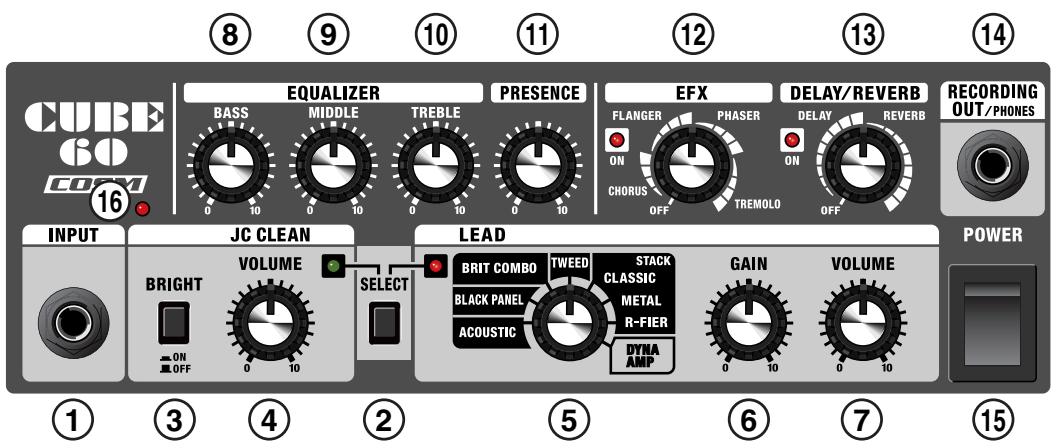
1. INPUT Jack
Connect your guitar here.
2. SELECT Switch
Switches you between the JC CLEAN and LEAD channels. You can confirm which channel is selected by checking the indicator's color (JC CLEAN: green; LEAD: red). The channel can be switched using the optional BOSS FS-5U foot switch.
JC CLEAN Channel
This is a model of Roland's famous JC-120 Jazz Chorus guitar amplifier.
The ultra-clean, ultra-flat sound offers a smooth. This becomes more effective when used in combination with a multi effector.
3. BRIGHT Switch
Creates a sparkling midrange and high end for a crisp and distinct sound.
This is perfect for chord strumming with humbucking pickups.
4. VOLUME Knob
Adjusts the JC CLEAN channel volume. On the CUBE-60, distortion is gradually added as you turn this knob to the right, producing a crunch sound as the knob is turned up near maximum.
LEAD Channel
5. Type Switch
You can select from the following eight amp types:
ACOUSTIC
This is an original amp type included with the acoustic simulator. Turns the sounds from your electric guitar into a clear, refined acoustic guitar sound.

Using this type together with a single coil pickup in the front position provides optimum sound quality. If using a humbucking pickup, slightly turn down the equalizer's BASS and MIDDLE settings.
BLACK PANEL
This is modeled on the classic Fender Twin Reverb amplifier, used in a wide variety of musical styles, from country to blues, jazz and rock. Exhibiting rich lows and a bright high end.
BRIT COMBO
This is modeled on the Vox AC-30TB, the rock amplifier that created the Liverpool sound of the '60s. It can produce a broad range of sounds, from clean to overdrive.
TWEED
This is modeled on the vintage Tweed Fender Bassman 4x10 Combo. The amplifier's four 10-inch speakers produce a clear upper-midrange with a fat low end, and its unique crunch tones make it a favorite of blues-rock guitarists.
CLASSIC STACK
This is modeled on the sound and response of a Marshall JMP1987. Used extensively in hard rock during the 1970s, this is truly the perfect amp for the “top rock” guitar sound.
METAL STACK
This is modeled on the Peavey EVH-5150. This is the high gain amp, so even at low volumes, you can still get heavy distortion and sustain.
R-FIER STACK
This is modeled on the MESA/Boogie Rectifier. This super high gain amp is capable of producing slash metal, grunge, and a wide range of other lead sounds.
DYNA AMP
This is an original amp sound that lets the player create previously unobtainable tonal changes according to the picking strength. Soft picking produces a transparent clean amp sound, while hard picking results in a deeply distorted high-gain amp sound. Once the sound is distorted, the tone then changes according to the force used in picking, greatly expanding your range of expression.

Setting the GAIN knob to the optimal position provides the greatest effect.
Start by setting the GAIN knob to the center position, then adjust the knob so that a clean tone is obtained with soft picking and deep distortion is obtained with hard picking.

"Sample Settings" (p. 10; Dynamic Style)
* All product names mentioned in this document are trademarks or registered trademarks of their respective owners, and are not related to Roland Corporation.
In this manual, these names are used as appropriate ways to indicate sounds that are simulated using COSM technology.
6. GAIN Knob
Adjusts the LEAD channel's distortion level.
7. VOLUME Knob
Adjusts the LEAD channel volume.
EQUALIZER
8. BASS Knob
Adjusts the tone of the lower range.
9. MIDDLE Knob
Adjusts the tone of the midrange.
10.TREBLE Knob
Adjusts the tone of the upper range.
* No sound will be produced when BASS, MIDDLE, and TREBLE knobs are all set to 0 while the Type switch is set to BLACK PANEL or TWEED.
PRESENCE
11. PRESENCE Knob
Gives the midrange and high end a more lustrous contour. Very effective when you want to give the sound a good feeling of airiness.
EFX (Effects)
12. EFX (Effects) Knob
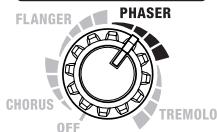
Turn this knob to chorus, flanger, phaser, or tremolo to select the corresponding effect. Turn the knob to adjust the amount of effect applied.
The ON indicator lights up when EFX is turned on, and goes out when EFX is turned off. You can also turn EFX on and off using an optional foot switch (the BOSS FS-5U).
* Graduations for CHORUS, FLANGER, PHASER, TREMOLO on a panel are for reference. Be sure to check the sound as you adjust the effects.
CHORUS
In this effect, a slightly detuned sound is added to the original sound, giving the sound greater breadth and fullness.
FLANGER
This creates a flanging effect that creates a sort of spinning sensation with the sound.
PHASER
This effect adds a variable phase-shifted signal to the direct sound, giving the sound a swirling character.
EFX
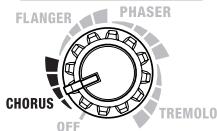
EFX
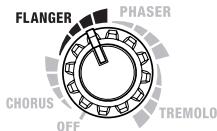
EFX
TREMOLO
Tremolo is an effect that creates a cyclic change in volume.
DELAY/REVERB
EFX

13. DELAY/REVERB Knob
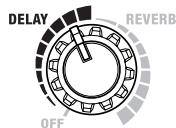
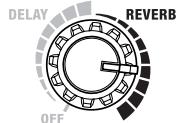
Turn this knob to DELAY or REVERB to switch to that effect. Turn the knob to adjust the amount of effect applied.
The ON indicator lights up when DELAY or REVERB is turned on, and goes out when DELAY or REVERB is turned off. You can also turn DELAY or REVERB on and off using an optional foot switch (the BOSS FS-5U).
* Graduations for DELAY, REVERB on a panel are for reference. Be sure to check the sound as you adjust the effects.
DELAY
Turn the knob to change the time and amount of delay effects.
DELAY/ REVERB
REVERB
Turn the knob to adjust the reverb level.
DELAY/ REVERB
14. RECORDING OUT/ PHONES Jack
When Using RECORDING OUT
Connect to a recorder or other recording device.
Features COSM speaker modeling, allowing you to use the CUBE-60 as a high-performance amp simulator.
When Using Headphones
Connect headphones to this jack.
The COSM speaker modeling allows the guitar amp to produce sounds with real punch.
* No sound is output from the CUBE-60's speaker or any external speaker when the RECORDING OUT/PHONES jack is in use.
15. POWER Switch
Turn the power on and off.
* This unit is equipped with a protection circuit. A brief interval (a few seconds) after power up is required before the unit will operate normally.
* Always make sure to have the volume level turned down before switching on power. Even with the volume all the way down, you may still hear some sound when the power is switched on, but this is normal, and does not indicate a malfunction.
* If you need to turn off the power completely, first turn off the POWER switch, then unplug the power cord from the power outlet. Refer to “Power Supply” (p. 5).
16. Power Indicator
This indicator lights when the unit is turned on.
Rear Panel
flowchart
graph TD
    A["FOOT SW"] --> B["DELAY/REVERB"]
    A --> C["EFX"]
    A --> D["CH SELECT"]
    E["EXT SPEAKER (8Ω MAX 60W) CLASS 2 WIRING"] --> F["Speaker cable"]
    G["LINE OUT"] --> H["INPUT"]
    I["TUNER OUT"] --> J["INPUT"]
    K["External Speaker"] --> L["Mixer"]
    style A fill:#99ccff,stroke:#333
    style E fill:#99ccff,stroke:#333
    style I fill:#99ccff,stroke:#333
    style K fill:#99ccff,stroke:#333
    style L fill:#99ccff,stroke:#333
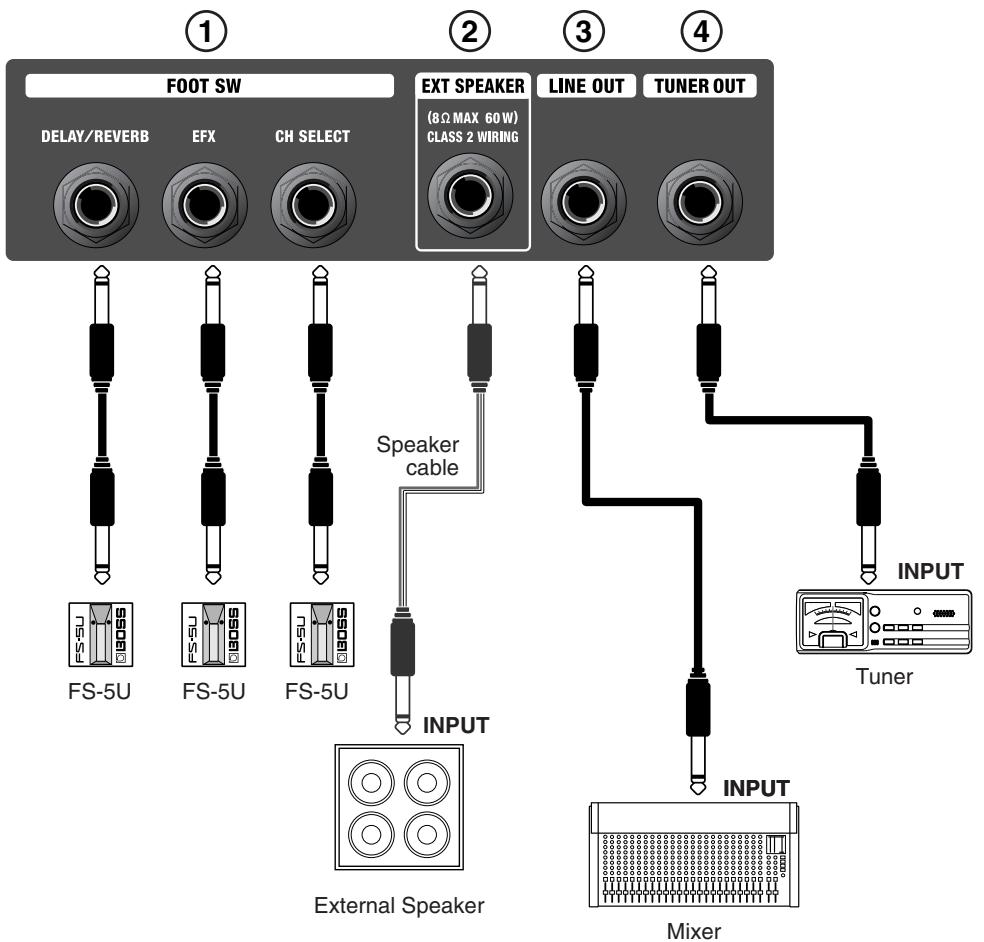
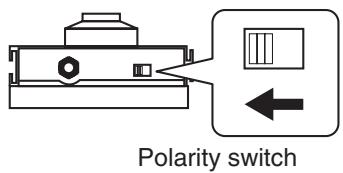
1. FOOT SW (Foot Switch) Jack
Foot switches (the optional BOSS FS-5U) are connected here.
* Set the polarity switch as shown below.
(CH SELECT)
Switches JC CLEAN/LEAD channels.
(EFX)
Switches on and off of EFX.
(DELAY/REVERB)
Switches on and off of DELAY/REVERB.
2. EXT SPEAKER (External Speaker) Jack
You can connect external speaker here.
When connected, sounds are played from both the CUBE-60 and the external speakers.
* When connecting to an external speaker, make sure the speaker conforms to the following specifications.
Impedance: 8 Ω maximum
Allowable power input: 60 watts minimum
* Only use speaker cable to connect the speaker. Do not use any
shielded cable designed for use with guitars.
* No sound is output from the CUBE-60's speaker or any external speaker when the RECORDING OUT/PHONES jack is in use.
3. LINE OUT Jack
Connects to a PA system, recorder, or other external system. The COSM speaker modeling allows the guitar amp to produce sounds with real punch.
Use this when using the unit with an external PA system or when line-recording performances while listening to the sound from the CUBE-60's speaker.
Adjust the output level with the JC CLEAN channel or LEAD channel VOLUME knob.
4. TUNER OUT Jack
Connect tuner to this jack.
* The output from here is unaffected by the CUBE-60's knob and switch settings.
Q: The volume level of the instrument connected to the CUBE-60 is too low.
A: Could you be using a connection cable that contains a resistor? Use a connection cable that does not contain a resistor.
Alternative Metal
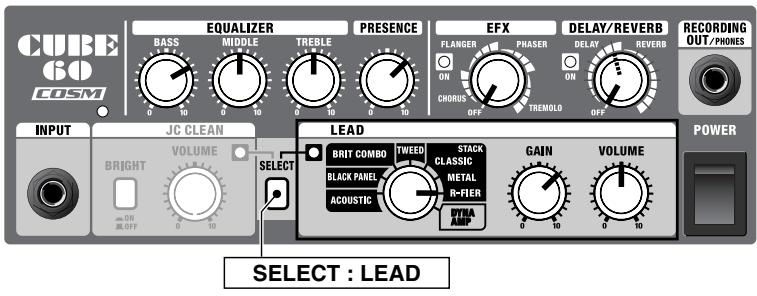
The perfect sound for heavy, sharp riffs.
Select the high-gain R-FIER amp, then use the equalizer to boost the low end even more.
You can add even more to the distortion's edge by raising the presence.
Used with a humbucking pickup in the rear position, it results in an extreme distortion effect.
Plus, you can add a long delay to use this as a lead sound with great sustain.
Space Clean
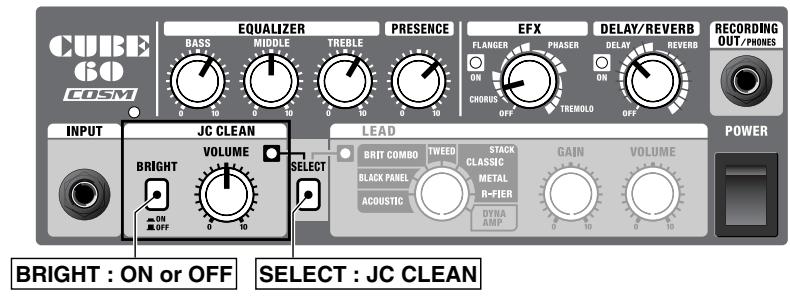
This is a transparent sound using spacial effects.
Select the JC CLEAN amp, modeled on the Roland JC-120, then add chorus and long delay.
Using this setting with a guitar equipped with single coil pickups makes beautiful sounding arpeggios and chord strumming.
If using a humbucking pickup, turn the BRIGHT switch to ON to achieve a bright, sparkling sound.
Depending on the phrase being played, it can be effective to set the delay sound's delay time slightly slower than the phrase's tempo.
Swamp Crunch
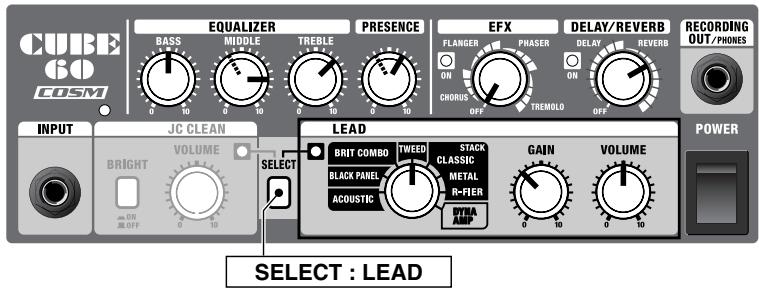
This is a blues sound found in vintage amps.
The boosted midrange is a particular characteristic of the TWEED amp.
By adjusting the TREBLE knob, you can emphasize the picking's attack sound.
To create a fat, sweet sound, reduce the presence a little.
To produce a transparent and sharp crunch sound, lower the midrange and boost the presence slightly.
You can also control the tube amp's characteristic sustain by adjusting the GAIN knob.
Classic Rock
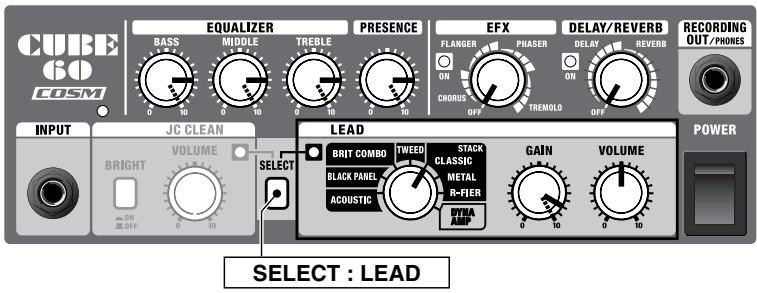
This is a 70s-style rock sound.
Turning up the gain produces a powerful rock sound in all riffs and solos.
A powerful low end is a characteristic of the sound emitted by the surfaces of the cabinet, so you can turn up the equalizer knobs, especially the BASS knob, and increase the presence to produce a sound with great punch.
Turning the GAIN knob and equalizer all the way up produces an even more powerful, driving sound.
Turning down the GAIN knob is also a perfect way to get a sharp crunch sound.
Dynamic Style
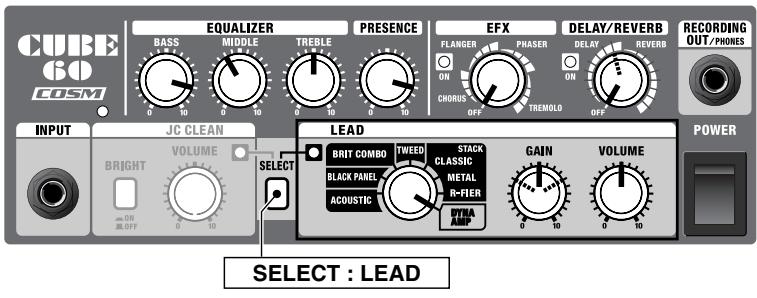
Country Twang
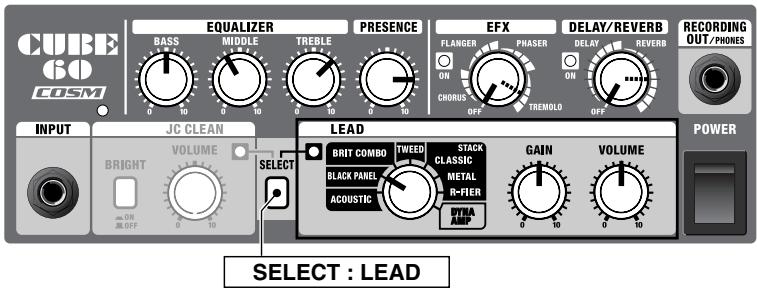
Mersey Beat
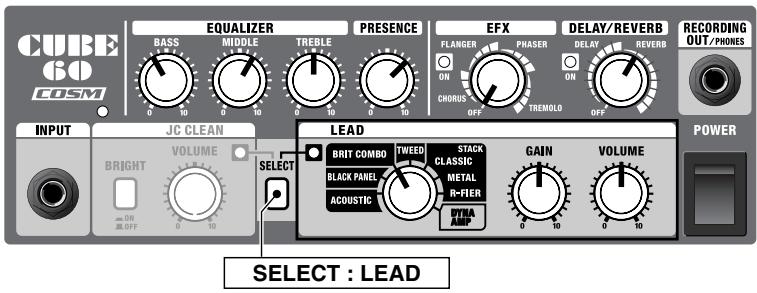
Setting Name:
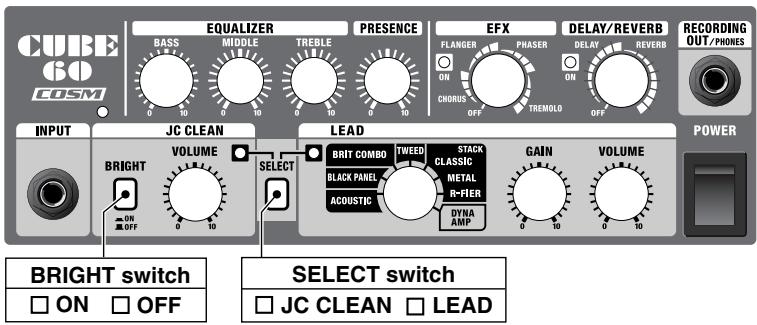
DYNA AMP is an original amp that uses relative picking strength to create changes in distortion depth.
First, adjust the GAIN knob so that a clean tone is obtained with soft picking and deep distortion is obtained when you pick hard.
Now, mixing arpeggios played with a gentle touch along with firmly picked chords and solos results in a guitar sound with huge dynamics.
Now, to create a broader, more open sound, cut the midrange and raise the low end and presence.
Using this in combination with the EFX and delay and reverb creates a sound with an even greater feeling of scale.
A dry, distinctive country sound.
The BLACK PANEL amp has a powerful midrange supported by a thick, solid low end, providing a clean sound that is punchy and sweet.
By adjusting the sound while maintaining the balance between the low and high ends, and in some cases cutting back on the midrange, you bring out the guitar's bright resonance even more.
Adding deep tremolo and reverb creates a good effect on guitars equipped with single-coil pickups.
On guitars equipped with humbucking pickups, turning down the highs creates a sweet sound that is perfectly matched for jazz and similar genres.
This is the famous Liverpool sound from the past.
This sound features a mild distortion that still lets all the notes in a chord come through clearly and distinctly.
Raise the midrange and presence on the BRIT COMBO amp to create a lively, energetic sound.
Adjust the GAIN knob so that sound does not distort too much when you play chords.
Use of a rear pickup provides a powerful sound with no muddiness, producing a beautiful resonance when mixing open strings with chords.
The sound may distort excessively when a guitar equipped with humbucking pickups or other high-output guitar is used. If this occurs, you can reduce the gain in order to get a good balance between the guitar sound and the distortion sound, or alternatively, you can adjust the sound by cutting back the low end.
Use this for keeping notes regarding your settings.
Rated Power Output
60 W
Nominal Input Level (1 kHz)
INPUT: -10 dBu/1 MΩ
Speaker
30 cm (12 inches)
Controls
POWER Switch, SELECT Switch
BRIGHT Switch, VOLUME Knob
TYPE Switch (ACOUSTIC, BLACK PANEL, BRIT COMBO, TWEED, CLASSIC STACK, METAL STACK, R-FIER STACK, DYNA AMP), GAIN Knob, VOLUME Knob
BASS Knob, MIDDLE Knob, TREBLE Knob
PRESENCE Knob
EFX Knob (CHORUS, FLANGER, PHASER, TREMOLO)
DELAY/REVERB Knob
Indicators
JC CLEAN Channel, LEAD Channel, EFX, DELAY/REVERB, POWER

This product must be disposed of separately at your local waste recycling centre. Do not dispose of in household waste bin.
Connectors
INPUT Jack (1/4" phone type) RECORDING OUT/PHONES Jack (Stereo 1/4" phone type) FOOT SW Jack (CH SELECT, EFX, DELAY/REVERB) (1/4" phone type) EXT SPEAKER Jack (1/4" phone type) LINE OUT Jack (1/4" phone type) TUNER OUT Jack (1/4" phone type)
Power Supply
AC 117 V, AC 230 V, AC 240 V (50/60 Hz) AC 220 V (60 Hz)
Power Consumption
60 W
Dimensions
410 (W) x 275 (D) x 440 (H) mm 16-3/16 (W) x 10-7/8 (D) x 17-3/8 (H) inches
Weight
14.5 kg / 32 lbs
Accessory
Owner's Manual
Option
Foot Switch FS-5U (BOSS)
* 0 dBu = 0.775 Vrms
* In the interest of product improvement, the specifications and/or appearance of this unit are subject to change without prior notice.
Block Diagram
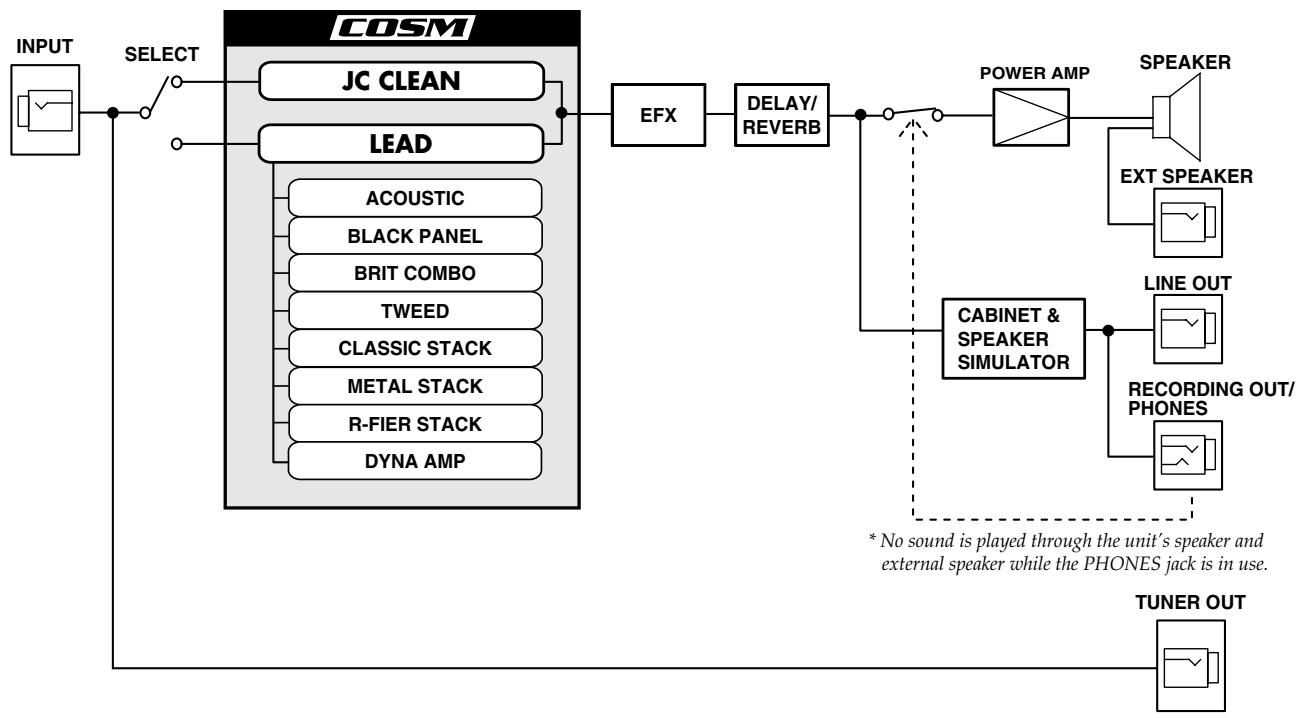
flowchart
graph LR
    INPUT["INPUT"] --> SELECT["SELECT"]
    SELECT --> JC_CLEAN["JC CLEAN"]
    SELECT --> LEAD["LEAD"]
    JC_CLEAN --> EFX["EFX"]
    LEAD --> ACOUSTIC["ACOUSTIC"]
    LEAD --> BLACK_PANEL["BLACK PANEL"]
    LEAD --> BRIT_COMBO["BRIT COMBO"]
    LEAD --> TWEED["TWEED"]
    LEAD --> CLASSIC_STACK["CLASSIC STACK"]
    LEAD --> METAL_STACK["METAL STACK"]
    LEAD --> R-FIER_STACK["R-FIER STACK"]
    LEAD --> DYNA_AMP["DYNA AMP"]

    ESFF["EFX"] --> DELAY_REVERB["DELAY/ REVERB"]
    DELAY_REVERB --> CAF1["△"]
    CAF1 --> POWER_AMP["POWER AMP"]
    POWER_AMP --> Speaker["SPEAKER"]
    Speaker --> EXTSpeaker["EXT SPEAKER"]
    EXTSpeaker --> LINEOUT["LINE OUT"]
    LINEOUT --> RECOLDING_OUT_Ratio["RECORDING OUT/ PHONES"]

    TAUR["TAUR"] --> TUNER_OUT["TUNER OUT"]

    style JC_CLEAN fill:#f9f,stroke:#333
    style LEAD fill:#f9f,stroke:#333
    style EFX fill:#ccf,stroke:#333
    style DELAY_REVERB fill:#ccf,stroke:#333
    style POWER_AMP fill:#cfc,stroke:#333
    style EXTSpeaker fill:#fcc,stroke:#333
    style LINEOUT fill:#ffc,stroke:#333
    style RECORDING_OUT Ratio fill:#fcc,stroke:#333
    style RECORDING_OUT Ratio fill:#fcc,stroke:#333
    style RECORDING_OUT Ratio fill:#fcc,stroke:#333
    style RECORDING_OUT Ratio fill:#fcc,stroke:#333
    style RECORDING_OUT Ratio fill:#fcc,stroke:#333
    style RECORDING_OUT Ratio fill:#fcc,stroke:#333
    style RECORDING_OUT Ratio filled areas=* noise
    note right of CAF1: * No sound is played through the unit's speaker and external speaker while the PHONES jack is in use.