
AD-8 - Synthesizer ROLAND - Free user manual and instructions
Find the device manual for free AD-8 ROLAND in PDF.


User questions about AD-8 ROLAND
0 question about this device. Answer the ones you know or ask your own.
Ask a new question about this device
Download the instructions for your Synthesizer in PDF format for free! Find your manual AD-8 - ROLAND and take your electronic device back in hand. On this page are published all the documents necessary for the use of your device. AD-8 by ROLAND.
USER MANUAL AD-8 ROLAND
Thank you, and congratulations on your choice of BOSS AD-8 Acoustic Guitar Processor.
Before using this unit, carefully read the sections entitled:
"USING THE UNIT SAFELY" (page 2-3) and "IMPORTANT NOTES" (page 4).
These sections provide important information concerning the proper operation of the unit. Additionally, in order to feel assured that you have gained a good grasp of every feature provided by your new unit, this manual should be read in its entirety. The manual should be saved and kept on hand as a convenient reference.
Main Features
- Using "Acoustic modeling," the unit converts the output from piezo pickups to the sound of a real acoustic guitar, as captured by a high-quality mic.
- COSM modeling recreates the important components of a variety of recording situations. Offered are six world-famous acoustic guitars along with a number of top-quality condenser mics. Now you can always obtain the best acoustic sound, whether performing live or recording in your home studio.
- Built-in "reverb," developed especially for use with acoustic guitars, lets you produce a wide range of spatial sounds, from the natural airiness to concert hall reverberation.
- Includes "anti-feedback" function that automatically suppresses howling.
- Built-in tuner lets you tune up easily, is ready whenever needed. The output can also be muted with the AD-8's pedal during tuning.
- "Memory" function allows you to configure up to four groups of settings to suit the material being played or the type of guitar you are using.
COSM (Composite Object Sound Modeling)
Composite Object Sound Modeling (COSM) is Roland's innovative and powerful sound modeling technology. COSM analyzes the many factors that make up the original sound, such as the electrical and physical characteristics of the original, and then produces a digital model that can reproduce the same sound.
Copyright © 2003 BOSS CORPORATION
All rights reserved. No part of this publication may be reproduced in any form without the written permission of BOSS CORPORATION.
USING THE UNIT SAFELY
INSTRUCTIONS FOR THE PREVENTION OF FIRE, ELECTRIC SHOCK, OR INJURY TO PERSONS
About WARNING and CAUTION Notices
| ▲WARNING | Used for instructions intended to alert the user to the risk of death or severe injury should the unit be used improperly. |
| ▲CAUTION | Used for instructions intended to alert the user to the risk of injury or material damage should the unit be used improperly. * Material damage refers to damage or other adverse effects caused with respect to the home and all its furnishings, as well to domestic animals or pets. |
About the Symbols
| ▲ | The △ symbol alerts the user to important instructions or warnings. The specific meaning of the symbol is determined by the design contained within the triangle. In the case of the symbol at left, it is used for general cautions, warnings, or alerts to danger. |
| ◎ | The ⊙ symbol alerts the user to items that must never be carried out (are forbidden). The specific thing that must not be done is indicated by the design contained within the circle. In the case of the symbol at left, it means that the unit must never be disassembled. |
| ◆ | The ● symbol alerts the user to things that must be carried out. The specific thing that must be done is indicated by the design contained within the circle. In the case of the symbol at left, it means that the power-cord plug must be unplugged from the outlet. |
ALWAYS OBSERVE THE FOLLOWING
WARNING


Before using this unit, make sure to read the instructions below, and the Owner's Manual.
- Do not open (or modify in any way) the unit or its AC adaptor.
- Do not attempt to repair the unit, or replace parts within it (except when this manual provides specific instructions directing you to do so). Refer all servicing to your retailer, the nearest Roland Service Center, or an authorized Roland distributor, as listed on the "Information" sheet.
- Never use or store the unit in places that are:
- Subject to temperature extremes (e.g., direct sunlight in an enclosed vehicle, near a heating duct, on top of heat-generating equipment); or are
- Damp (e.g., baths, washrooms, on wet floors); or are
- Humid; or are
- Exposed to rain; or are
- Dusty; or are
-
Subject to high levels of vibration.
-
Make sure you always have the unit placed so it is level and sure to remain stable. Never place it on stands that could wobble, or on inclined surfaces.


- Use only the specified AC adaptor (PSA series), and make sure the line voltage at the installation matches the input voltage specified on the AC adaptor's body. Other AC adaptors may use a different polarity, or be designed for a different voltage, so their use could result in damage, malfunction, or electric shock.

- Do not excessively twist or bend the power cord, nor place heavy objects on it. Doing so can damage the cord, producing severed elements and short circuits. Damaged cords are fire and shock hazards!

- This unit, either alone or in combination with an amplifier and headphones or speakers, may be capable of producing sound levels that could cause permanent hearing loss. Do not operate for a long period of time at a high volume level, or at a level that is uncomfortable. If you experience any hearing loss or ringing in the ears, you should immediately stop using the unit, and consult an audiologist.

- Do not allow any objects (e.g., flammable material, coins, pins); or liquids of any kind (water, soft drinks, etc.) to penetrate the unit.


- Immediately turn the power off, remove the AC adaptor from the outlet, and request servicing by your retailer, the nearest Roland Service Center, or an authorized Roland distributor, as listed on the "Information" sheet when:

- The AC adaptor or the power-supply cord has been damaged; or
- If smoke or unusual odor occurs
- Objects have fallen into, or liquid has been spilled onto the unit; or
- The unit has been exposed to rain (or otherwise has become wet); or
- The unit does not appear to operate normally or exhibits a marked change in performance.
WARNING
- In households with small children, an adult should provide supervision until the child is capable of following all the rules essential for the safe operation of the unit.

- Protect the unit from strong impact. (Do not drop it!)

- Do not force the unit's power-supply cord to share an outlet with an unreasonable number of other devices. Be especially careful when using extension cords—the total power used by all devices you have connected to the extension cord's outlet must never exceed the power rating (watts/amperes) for the extension cord. Excessive loads can cause the insulation on the cord to heat up and eventually melt through.

- Before using the unit in a foreign country, consult with your retailer, the nearest Roland Service Center, or an authorized Roland distributor, as listed on the "Information" sheet.

- Batteries must never be recharged, heated, taken apart, or thrown into fire or water.


CAUTION
- The unit and the AC adaptor should be located so their location or position does not interfere with their proper ventilation.

- Always grasp only the output plug or the body of the AC adaptor when plugging into, or unplugging from, this unit or an outlet.

- At regular intervals, you should unplug the AC adaptor and clean it by using a dry cloth to wipe all dust and other accumulations away from its prongs. Also, disconnect the power plug from the power outlet whenever the unit is to remain unused for an extended period of time. Any accumulation of dust between the power plug and the power outlet can result in poor insulation and lead to fire.

- Try to prevent cords and cables from becoming entangled. Also, all cords and cables should be placed so they are out of the reach of children.

CAUTION
- Never climb on top of, nor place heavy objects on the unit.

- Never handle the AC adaptor body, or its output plugs, with wet hands when plugging into, or unplugging from, an outlet or this unit.

- Before moving the unit, disconnect the AC adaptor and all cords coming from external devices.

- Before cleaning the unit, turn off the power and unplug the AC adaptor from the outlet.

- Whenever you suspect the possibility of lightning in your area, disconnect the AC adaptor from the outlet.

- If used improperly, batteries may explode or leak and cause damage or injury. In the interest of safety, please read and observe the following precautions (p. 5).

- Carefully follow the installation instructions for batteries, and make sure you observe the correct polarity.
- Avoid using new batteries together with used ones. In addition, avoid mixing different types of batteries.
- Remove the batteries whenever the unit is to remain unused for an extended period of time.
- If a battery has leaked, use a soft piece of cloth or paper towel to wipe all remnants of the discharge from the battery compartment. Then install new batteries. To avoid inflammation of the skin, make sure that none of the battery discharge gets onto your hands or skin. Exercise the utmost caution so that none of the discharge gets near your eyes. Immediately rinse the affected area with running water if any of the discharge has entered the eyes.
-
Never keep batteries together with metallic objects such as ballpoint pens, necklaces, hairpins, etc.
-
Used batteries must be disposed of in compliance with whatever regulations for their safe disposal that may be observed in the region in which you live.

IMPORTANT NOTES
In addition to the items listed under "USING THE UNIT SAFELY" on page 2-3, please read and observe the following:
Power Supply: Use of Batteries
- Do not use this unit on the same power circuit with any device that will generate line noise (such as an electric motor or variable lighting system).
- The AC adaptor will begin to generate heat after long hours of consecutive use. This is normal, and is not a cause for concern.
- The use of an AC adaptor is recommended as the unit's power consumption is relatively high. Should you prefer to use batteries, please use the alkaline type.
- Batteries should always be installed or replaced before connecting any other devices. This way, you can prevent malfunction and/or damage to speakers or other devices.
- Batteries are supplied with the unit. The life of these batteries may be limited, however, since their primary purpose was to enable testing.
- Before connecting this unit to other devices, turn off the power to all units. This will help prevent malfunctions and/or damage to speakers or other devices.
Placement
- Using the unit near power amplifiers (or other equipment containing large power transformers) may induce hum. To alleviate the problem, change the orientation of this unit; or move it farther away from the source of interference.
- This device may interfere with radio and television reception. Do not use this device in the vicinity of such receivers.
- Noise may be produced if wireless communications devices, such as cell phones, are operated in the vicinity of this unit. Such noise could occur when receiving or initiating a call, or while conversing. Should you experience such problems, you should relocate such wireless devices so they are at a greater distance from this unit, or switch them off.
- When moved from one location to another where the temperature and/or humidity is very different, water droplets (condensation) may form inside the unit. Damage or malfunction may result if you attempt to use the unit in this condition. Therefore, before using the unit, you must allow it to stand for several hours, until the condensation has completely evaporated.
Maintenance
-
For everyday cleaning wipe the unit with a soft, dry cloth or one that has been slightly dampened with water. To remove stubborn dirt, use a cloth impregnated with a mild, non-abrasive detergent. Afterwards, be sure to wipe the unit thoroughly with a soft, dry cloth.
-
Never use benzine, thinners, alcohol or solvents of any kind, to avoid the possibility of discoloration and/or deformation.
Repairs and Data
- Please be aware that all data contained in the unit's memory may be lost when the unit is sent for repairs. Important data should always be written down on paper, "Setting Memo." During repairs, due care is taken to avoid the loss of data. However, in certain cases (such as when circuitry related to memory itself is out of order), we regret that it may not be possible to restore the data, and Roland assumes no liability concerning such loss of data.
Additional Precautions
- Please be aware that the contents of memory can be irretrievably lost as a result of a malfunction, or the improper operation of the unit. To protect yourself against the risk of loosing important data, we recommend that you periodically save a backup copy of important data you have stored in the unit's memory written down on paper, "Setting Memo."
- Unfortunately, it may be impossible to restore the contents of data that was stored in the unit's memory once it has been lost. Roland Corporation assumes no liability concerning such loss of data.
- Use a reasonable amount of care when using the unit's buttons, sliders, or other controls; and when using its jacks and connectors. Rough handling can lead to malfunctions.
- Never strike or apply strong pressure to the display.
- When connecting / disconnecting all cables, grasp the connector itself—never pull on the cable. This way you will avoid causing shorts, or damage to the cable's internal elements.
- To avoid disturbing your neighbors, try to keep the unit's volume at reasonable levels. You may prefer to use headphones, so you do not need to be concerned about those around you (especially when it is late at night).
- When you need to transport the unit, package it in the box (including padding) that it came in, if possible. Otherwise, you will need to use equivalent packaging materials.
- Use a cable from Roland to make the connection. If using some other make of connection cable, please note the following precautions.
- Some connection cables contain resistors. Do not use cables that incorporate resistors for connecting to this unit. The use of such cables can cause the sound level to be extremely low, or impossible to hear. For information on cable specifications, contact the manufacturer of the cable.
Installing Batteries
Contents
- Batteries are supplied with the unit. The life of these batteries may be limited, however, since their primary purpose was to enable testing.
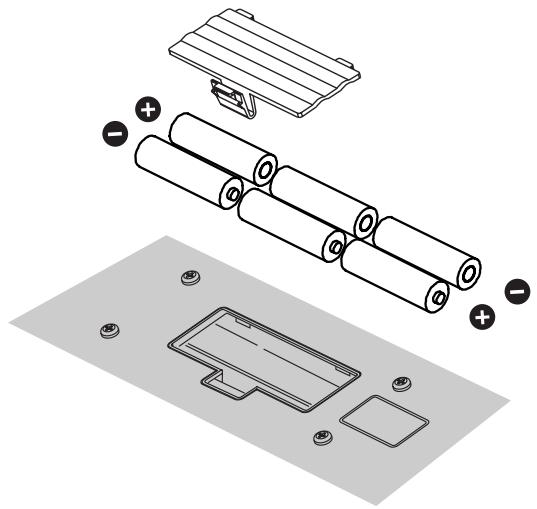
Insert the included batteries as shown in figure, being careful to orient the batteries correctly.
NOTE
- When turning the unit upside-down, get a bunch of newspapers or magazines, and place them under the four corners or at both ends to prevent damage to the buttons and controls. Also, you should try to orient the unit so no buttons or controls get damaged.
- When turning the unit upside-down, handle with care to avoid dropping it, or allowing it to fall or tip over.
- Make sure the "+" and "-" ends of the batteries are oriented correctly.
- When the batteries run down, the POWER indicator gets dim. If this happens, replace with new batteries.
- When replacing the batteries, use six AA type.
- Avoid using new batteries together with used ones. In addition, avoid mixing different types of batteries. Doing so can result in fluid leakage.
- Battery life can vary depending on battery type.
MEMO
Continuous usage time under battery power is about 23 hours with alkaline batteries and about 9 hours with carbon batteries. (This may vary according to usage conditions.)
USING THE UNIT SAFELY 2
IMPORTANT NOTES 4
Installing Batteries 5
Connections 6
Connecting to Mixers 6
Mono Connection. 6
Stereo Connection 7
Connecting to Acoustic Guitar Amps
or Multitrack Recorders 7
Mono Connection. 7
Stereo Connection 8
Connecting to Electric Guitar Amps. 8
Mono Connection. 8
Part Names and Functions 9
Front Panel. 9
BODY TYPE List. 10
Rear Panel. 13
Operation 14
ON/OFF Pedal Operation 14
MEMORY t/s Pedal Functions 14
Panel Operation. 15
Storing Settings (Write Operation) 16
Storing the "MANUAL" Sound in Memory.....16
Changing and Storing the "MEMORY" Sound.....16
Setting the Function Used When the Effects Are Off (Bypass/Mute) 17
Changing How Memory Numbers Are Indicated 17
How to Use the Tuner 18
How to Tune Your Instrument 18
Changing the Reference Pitch (PITCH) 18
How to Use the ANTI-FEEDBACK... 19
Returning Settings to Their Factory Defaults 20
Troubleshooting 21
Sample Settings 22
Setting Memo 23
Specifications 25
Connections
To prevent malfunction and/or damage to speakers or other devices, always turn down the volume, and turn off the power on all devices before making any connections.
- Rise the amp volume only after turning on the power to all connected devices.
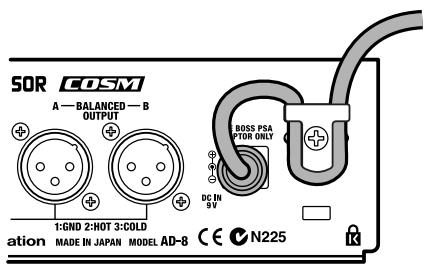
- To prevent the inadvertent disruption of power to your unit (should the plug be pulled out accidentally), and to avoid applying undue stress to the AC adaptor jack, anchor the power cord using the cord hook, as shown in the illustration.
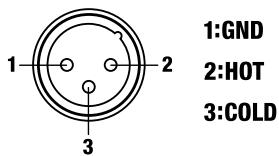
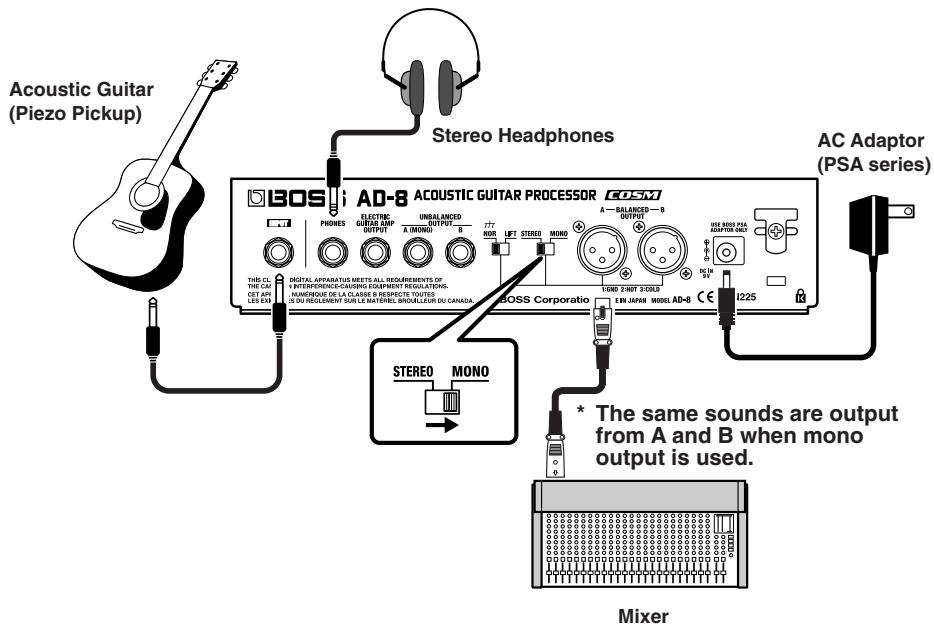
- The pin assignment for the XLR type connectors is as shown below. Before making any connections, make sure that this pin assignment is compatible with that of all your other devices.
- The power comes on when you insert the connector plug into the INPUT jack.
- Once the connections have been completed, turn on power to your various devices in the order specified. By turning on devices in the wrong order, you risk causing malfunction and/ or damage to speakers and other devices.
When powering up:
Turn on the power to your guitar amp last.
When powering down:
Turn off the power to your guitar amp first.
- Always make sure to have the volume level turned down before switching on power. Even with the volume all the way down, you may still hear some sound when the power is switched on, but this is normal, and does not indicate a malfunction.
Connecting to Mixers
Mono Connection
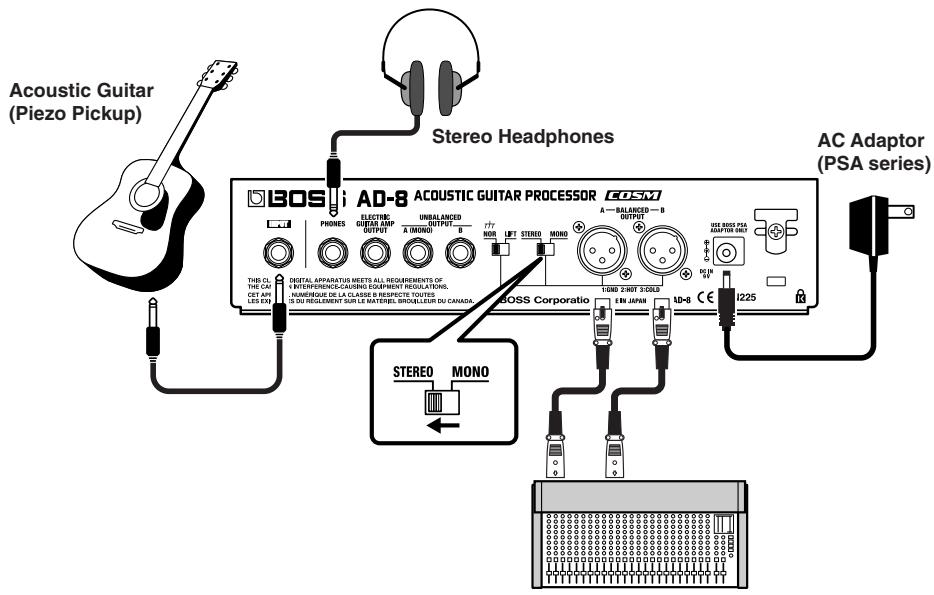
Stereo Connection
Mixer
Connecting to Acoustic Guitar Amps or Multitrack Recorders
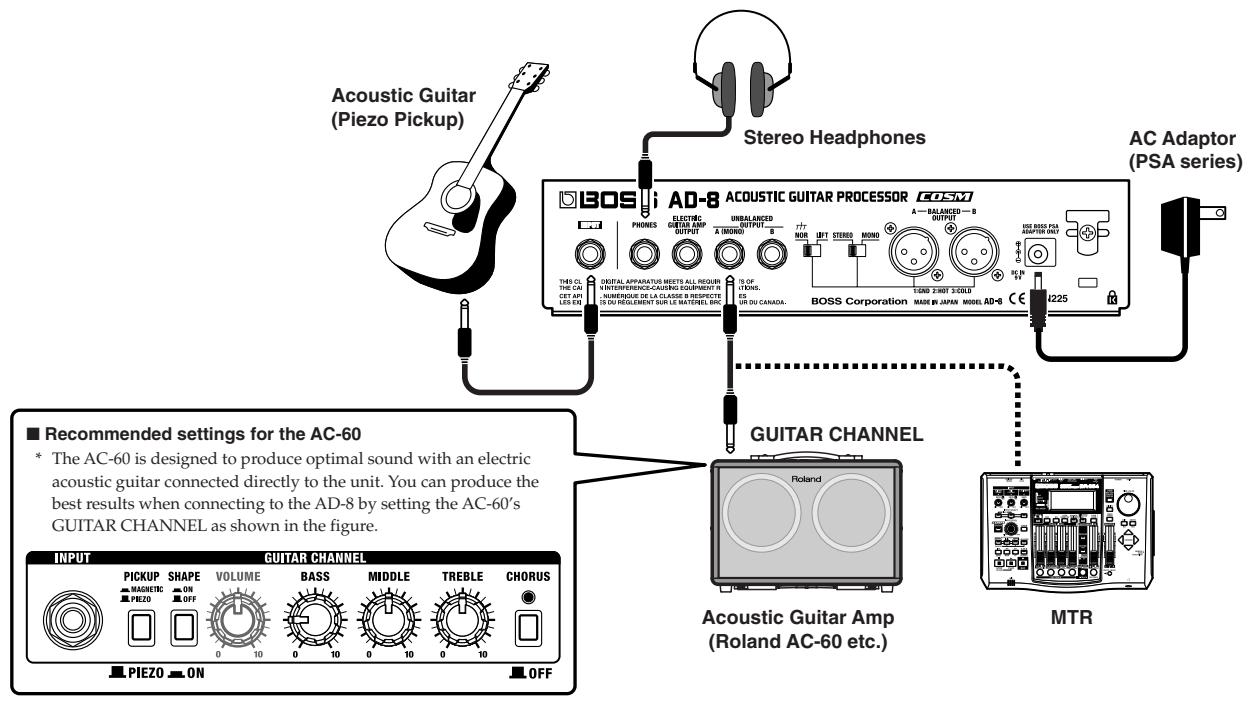
Mono Connection
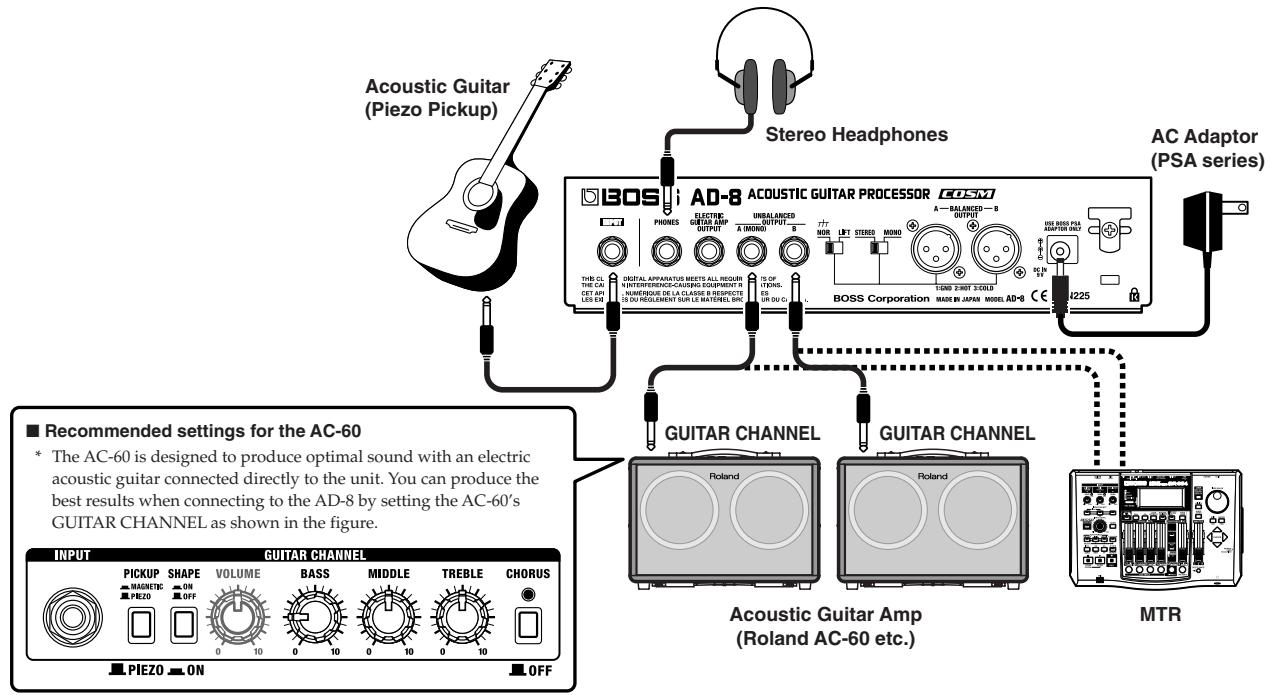
Stereo Connection
Connecting to Electric Guitar Amps
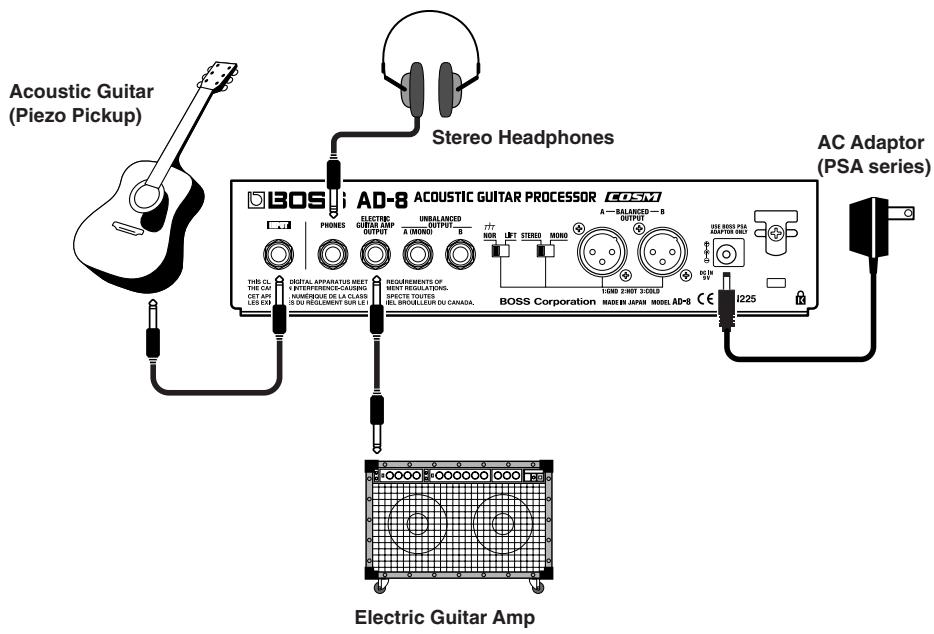
Mono Connection
Part Names and Functions
Front Panel
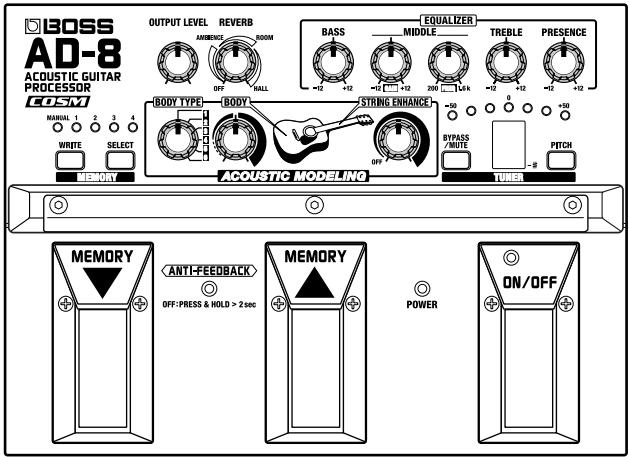
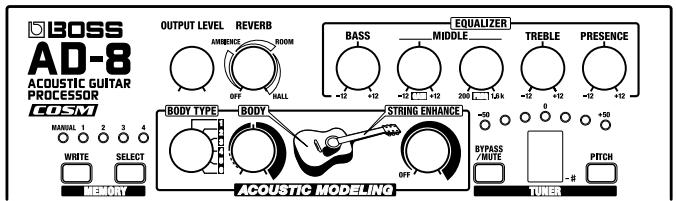
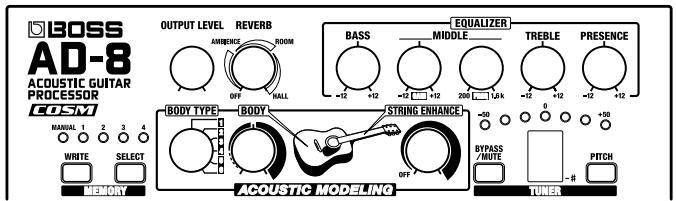
REVERB knob
You can switch this knob to attain any of three different reverb effects. The effect deepens as the knob is turned to the right.
No effects are applied with this is switched to OFF.
AMBIENCE:
This provides a sense of distance in the sound, like that obtained with off-mic recording.
ROOM:
This provides reverb like that obtained in a recording studio.
HALL:
This provides reverb like that obtained in a concert hall.
- Graduations for AMBIENCE, ROOM, and HALL on a panel are for reference. Be sure to check the sound as you adjust the effects.
EQUILER
BASS knob
This adjusts the balance of the lower range.
MIDDLE GAIN knob
This adjusts the balance of the midrange.
MIDDLE FREQ (frequency) knob
This specifies the frequency band to be adjusted with the MIDDLE GAIN knob. The band can be specified within the range from 200Hz to 1.6 kHz.
TREBLE knob
This adjusts the balance of the upper range.
PRESENCE knob
This adjusts the balance of the frequencies that are even higher than those adjusted with the TREBLE knob.
OUTPUT LEVEL knob
This adjusts the output volume level.
- The OUTPUT LEVEL knob only adjusts the volume pertaining to times when the effects are on. When the effects are switched off, the volume remains at a fixed level (bypass or mute).

STRING ENHANCE knob
Allows you to bring out more of the pleasant overtones of the guitar strings. Especially effective with finger picking.
POWER indicator
This is lit while the power is on.
- When the batteries run down, this indicator gets dim. If this happens, replace with new batteries.
BODY TYPE knob
Select the setting that is closest to the straight, unaffected sound of the guitar you are using.

"BODY TYPE List" (p. 10)
BODY knob
This adjusts the sound the body puts out.
The basic setting is with the knob at center position. Turning the knob to the right (clockwise) produces a bigger body sound; turn the knob to the left to achieve more of a piezo pickup tone quality.
- Increasing the BODY setting also raises the output level. If the sound becomes distorted, lower the output volume level with the OUTPUT LEVEL knob.
BODY TYPE List
The AD-8 includes six settings that model the beautiful resonance of these guitars as captured by ideally matched microphones.
| Guitar | Mic | Description | |
| 1 | Martin D-28 | Neumann U87 | Combination of the exquisite and balanced sound of this early-model Martin through a Neumann U87, the standard in studio condenser mics. |
| 2 | Martin 000-28 | Neumann U67 | Combines the sound of this guitar, with its solid low- and midrange resonance and clear, distinct sound, with the U67 tube condenser mic. |
| 3 | Gibson J-45 | Neumann U67 | Vintage model Gibson featuring a uniquely seasoned tone and characteristic respon-siveness, matched with the U67 tube condenser mic. |
| 4 | Gibson B-25 | Neumann U87 | Combination of this smaller-bodied vintage model, used often in Blues music, and a U87, the standard in studio condenser mics. |
| 5 | GUILD D-40 | AKG C12 | Guitar featuring warm resonance from the body and delicate resonance from the strings, combined with the C12 tube condenser mic. |
| 6 | Jose Ramirez | AKG C12 | World-renowned classical guitar model combined with the C12 tube condenser mic. |
- The trademarks listed in this document are trademarks of their respective owners, which are separate companies from BOSS. Those companies are not affiliated with BOSS and have not licensed or authorized BOSS's AD-8. Their marks are used solely to identify the equipment whose sound is simulated by BOSS's AD-8.
MEMORY
MANUAL indicator
This lights when MANUAL (p. 14) is selected.
MEMORY Number indicators 1-4
This lights when MEMORY 1-4 (p. 14) is selected.
During the write operation, the indicator flashes during write standby, flashing rapidly while data is being written.

You can change the way the numbers are indicated.

"Changing How Memory Numbers Are Indicated" (p. 17)
WRITE button
Press this to store settings to MEMORY 1-4.

"Storing Settings (Write Operation)" (p. 16)
SELECT button
Provides for selection among MANUAL and MEMORY 1-4.
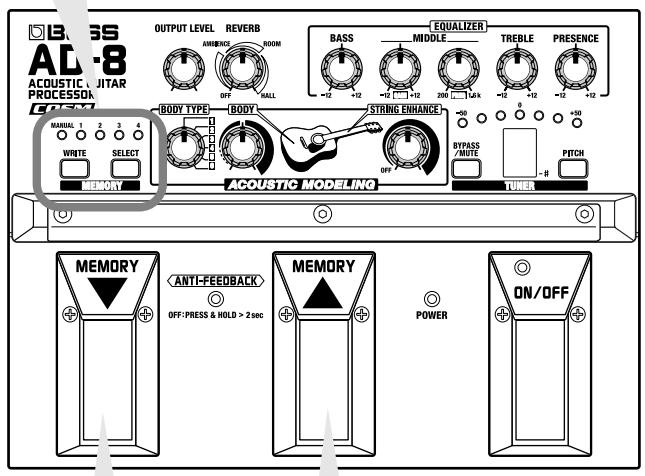
MEMORY Pedals (MEMORY / )
These perform two functions, selecting among MANUAL and MEMORY 1-4, and anti-feedback.

"MEMORY / Pedal Functions" (p. 14)
"How to Use the ANTI-FEEDBACK" (p. 19)
TUNER
TUNER meter
This shows the difference between the note indicated in the tuner display and the pitch of the sound being input while the tuner is operating.
TUNER display
This indicates the note names when the tuner is operating.

"How to Use the Tuner" (p. 18)
- Settings values and other information is displayed here when the tuner is not active.
PITCH button
This sets the tune's reference pitch.

"Changing the Reference Pitch (PITCH)" (p. 18)
BYPASS/MUTE button
This sets whether the AD-8 switches to Bypass or Mute mode when the effects are switched off with the ON/OFF pedal.

"Setting the Function Used When the Effects Are Off (Bypass/Mute)" (p. 17)
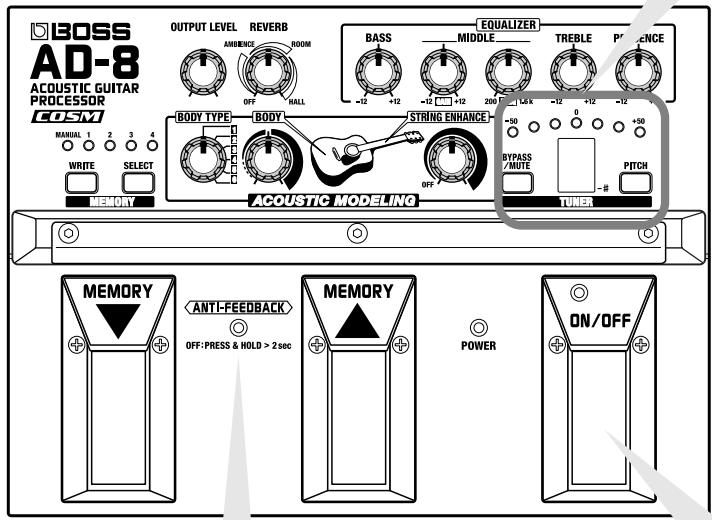
ANTI-FEEDBACK indicator
Indicates the status of the anti-feedback function.

Flashing: Detection of feedback frequencies in progress

Lit solidly: On

Unlit: Off

"How to Use the ANTI-FEEDBACK" (p. 19)
ON/OFF pedal
ON/OFF indicator
The effects are alternately switched on and off each time this pedal is pressed. The ON/OFF indicator lights when the effects are on.
ON:
Sounds set using the AD-8 are output.
OFF:
Sounds are output exactly as input (Bypass) or muted (Mute).

"ON/OFF Pedal Operation" (p. 14) "Setting the Function Used When the Effects Are Off (Bypass/Mute)" (p. 17)
Rear Panel
INPUT jack
Connect the output from your acoustic guitar or effects processor here.

"Connections" (p. 6)
- The AD-8 is switched on when a plug is connected to the INPUT jack. The power is turned off when the plug is disconnected from the jack. Be sure to disconnect any plug from this jack whenever the AD-8 is not in use.
PHONES jack
You can connect headphones here to listen to the sounds.
- Connect headphones only after turning on the power. Also be sure to disconnect the headphones before turning off the power.
ELECTRIC GUITAR AMP OUTPUT jack
This jack is used for connecting to electric guitar amps.

"Connecting to Electric Guitar Amps" (p. 8)
UNBALANCED OUTPUT A (MONO)/B jacks
These jacks are used for connecting to acoustic guitar amps, multitrack recorders, and other such equipment.
When using monaural signals, connect to the UNBALANCED OUTPUT A (MONO) jack.

"Connecting to Acoustic Guitar Amps or Multitrack Recorders" (p. 7)
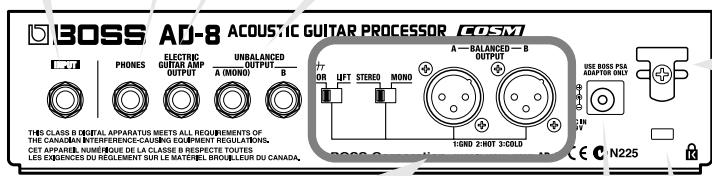
BALANCED OUTPUT A/B jacks
Use these jacks to connect to a mixer.

"Connecting to Mixers" (p. 6)
STEREO/MONO switch
This switches between stereo output (STEREO) and monaural output (MONO). The same sounds are output from A and B when mono output is used.
NOR/LIFT switch
This disconnects the 1:GND pin from the input's ground.
Switch this to "LIFT" if humming or other noise from ground loops becomes a problem.
The AD-8 is normally used with this set to NOR.
Cord Hook
Wrap the cable around this hook so that the AC adaptor cable is not pulled out accidentally

"Connections" (p. 6).
Security slot (R)
http://www.kensington.com/
AC Adaptor jack
This jack is used for connecting an optional AC adaptor (the PSA series).
Using the AC adaptor allows you to perform with the AD-8 for extended periods without having to worry about running out of battery power.
ON/OFF Pedal Operation
The ON/OFF pedal is set to "ON" when the power is turned on.
This turns the AD-8's effects on and off.
The ON/OFF indicator lights up when the effect is on.
On: Lit

Off:Unlit

When the effects are switched off, the input sounds are output as is (when set to the factory settings); the tuner is also operational.

You can also mute the output when the effects are turned off.

"Setting the Function Used When the Effects Are Off (Bypass/Mute)" (p. 17)
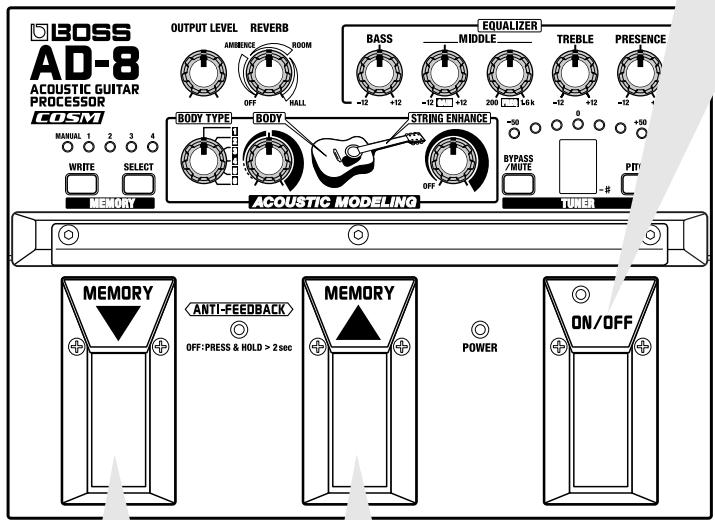
MEMORY / Pedal Functions
These pedals allow you select among MANUAL mode and MEMORY 1-4.
MANUAL:
The sound as determined by the settings of the panel's knobs is output.
MEMORY:
Sounds conforming to pre-programmed settings are output.
Press the MEMORY pedal to switch through the memories in the following sequence:
MANUAL MEMORY 1 MEMORY 2 MEMORY 3 MEMORY 4 MANUAL.
Press the MEMORY pedal to switch through the memories in the following sequence:
MANUAL MEMORY 4 MEMORY 3 MEMORY 2 MEMORY 1 MANUAL.

You can also use the MEMORY / pedals when using the anti-feedback function.

"How to Use the ANTI-FEEDBACK" (p. 19)
Panel Operation
So that you will be better able to follow along with the instructions in this document, first press the ON/OFF pedal so that the effects are "ON" (ON/OFF indicator is lit), and set the SELECT button to "MANUAL" (MANUAL indicator is lit).
Also, all knobs should be set as shown in the illustration.
- The AD-8 switches to "MANUAL" when the power is turned on.
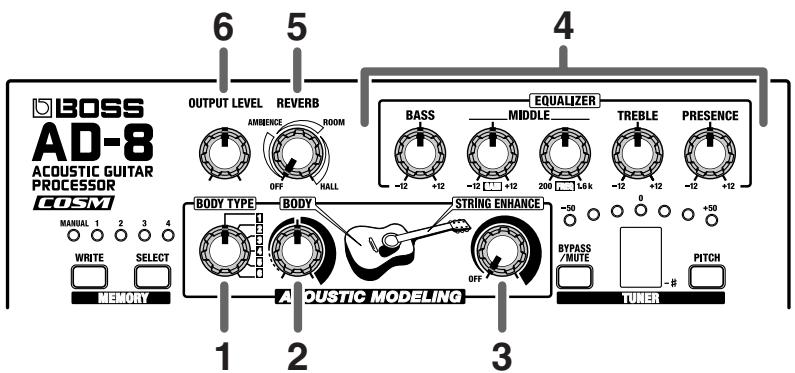
- Use the BODY type knob to select the sound that most closely corresponds to the basic, original sound of the guitar you are using.
- Adjust the sound the body produces with the BODY TYPE knob.
- Turn this knob to the left (counterclockwise) to get a sound close to that of a guitar's own sound.
- Turn the STRING ENHANCE knob if you want to bring out more of the pleasant overtones of the guitar strings.
- Adjust the EQUALIZER knobs as necessary to achieve the desired tone.
BASS:
This adjusts the balance of the lower range.
MIDDLE GAIN:
This adjusts the balance of the midrange.
MIDDLE FREQ:
This specifies the frequency band to be adjusted with the MIDDLE GAIN knob. The band can be specified within the range from 200Hz to 1.6kHz .
TREBLE:
This adjusts the balance of the upper range.
PRESENCE:
This adjusts the balance of the frequencies that are even higher than those adjusted with the TREBLE knob.
5. Add reverberation with the REVERB knob.
You can switch the knob to attain any of three different reverb effects. The effect deepens as the knob is turned to the right (clockwise).
AMBIENCE:
This provides a sense of distance in the sound, like that obtained with off-mic recording.
ROOM:
This provides reverb like that obtained in a recording studio.
HALL:
This provides reverb like that obtained in a concert hall.
- Adjust the volume with the OUTPUT LEVEL knob.
Storing Settings (Write Operation)
You can store up to four groupings of panel knob settings (MEMORY 1-4).
- The anti-feedback effect settings can also be stored.
Storing the "MANUAL" Sound in Memory
- Create the sound you want using knobs.
- Press the WRITE button.
The MEMORY indicator and the indicator for the currently selected memory flash, and the AD-8 is put into write standby.
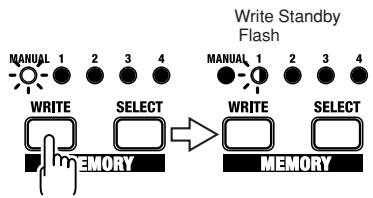
- Press the SELECT button to select the memory (number) to which you want to store the sound.
The indicator for the selected memory number flashes.
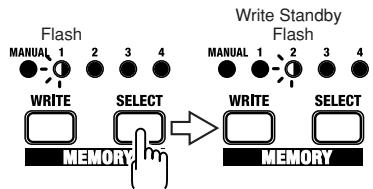
- Press the WRITE button.
The write operation is completed when the indicator for the write-destination memory begins to flash more rapidly.

Do not switch off the power while a write operation is in progress.
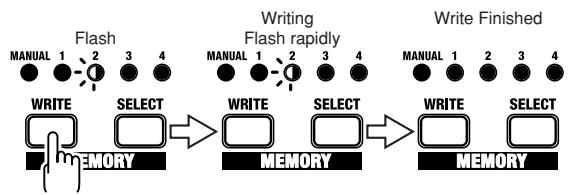
- To cancel the write operation, then before you press the WRITE button, rotate the knob, press the BYPASS/MUTE button, PITCH button, or operate the ON/OFF pedal.
Changing and Storing the "MEMORY" Sound
- Press the MEMORY / pedal or the SELECT button to change to the "MEMORY" sound.
- Operate the knobs to change the sound.
- Press the WRITE button.
The MEMORY indicator and the indicator for the currently selected memory number start to flash, and the AD-8 is put into write standby.
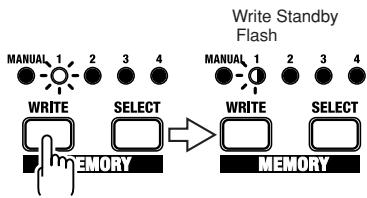
- Press the SELECT button to select the memory (number) to which you want to store the sound. The indicator for the selected memory number flashes.
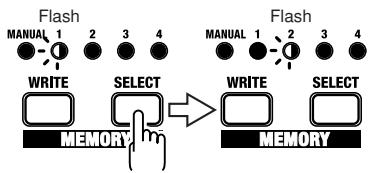
- Press the WRITE button.
The write operation is completed when the indicator for the write-destination memory begins to flash more rapidly.

Do not switch off the power while a write operation is in progress.
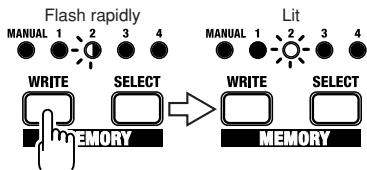
- If the knob or the pedal position is changed before the WRITE button is pressed, the write operation is cancelled, and the AD-8 is returned to the status in effect in Step 2 (when the "MEMORY" sound has been changed).
Setting the Function Used When the Effects Are Off (Bypass/Mute)
Changing How Memory Numbers Are Indicated
You can choose whether the AD-8 switches to Bypass mode or Mute mode when you switch the effects off with the ON/OFF pedal.
- This is set to switch to "Bypass" at the factory.
BYPASS:
Input sounds are output as is. Select this when you want to use the guitar output without any changes in the sound.
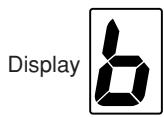
MUTE:
No sound is output. Select this setting when you want to mute the sound while tuning.
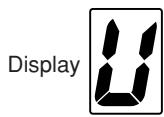
1. Press the BYPASS/MUTE button.
The current settings are indicated in the TUNER display.
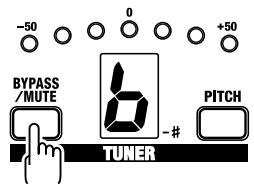
2. Hold down the BYPASS/MUTE button to switch the settings.
If nothing is altered during the next few moments, the settings are stored, and the indication in the TUNER display disappears.
- The settings remain stored in memory even after the power is turned off.
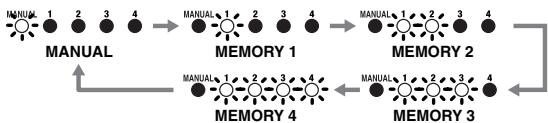
Not only can you confirm the currently selected memory merely by checking the lit MEMORY number indicators, you can also change the pattern in which the indicators light up. Select the pattern that provides the easiest way to check the memory in any particular environment.
- This is set to Lighting Pattern 1 at the factory.
Lighting Pattern 1 (Normal):
Only the indicator for the selected memory lights up (or flashes).
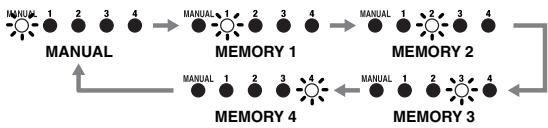
Lighting Pattern 2:
The number of indicators lighting up (or flashing) corresponds to the selected memory number.
HINT
When using the AD-8 in dimly lit surroundings, you can confirm memory numbers more easily by using the Lighting Pattern 2 setting.
1. Hold down the SELECT button for at least two seconds.
The lighting pattern is switched.
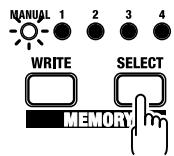
- The settings remain stored in memory even after the power is turned off.
How to Use the Tuner
The tuner is activated when the ON/OFF pedal is switched to "OFF" (when the ON/OFF indicator is off).
Tune your instrument in this mode.

On: Lit

Off:Unlit
How to Tune Your Instrument
1. Play a single note on your guitar.
The name of the note closest to the note being input in indicated in the TUNER display, and you can confirm how far the pitch is off with the TUNER meter.
- The lit dot in the display indicates "sharp."

2. Tune the guitar so that the note name for the open string is indicated in the TUNER display.
(Normal tuning)
| 6th string | 5th string | 4th string | 3rd string | 2nd string | 1st string |
| E | A | D | G | B | E |
3. Continue to tune the guitar until only the "0" indicator is lit in the TUNER meter.
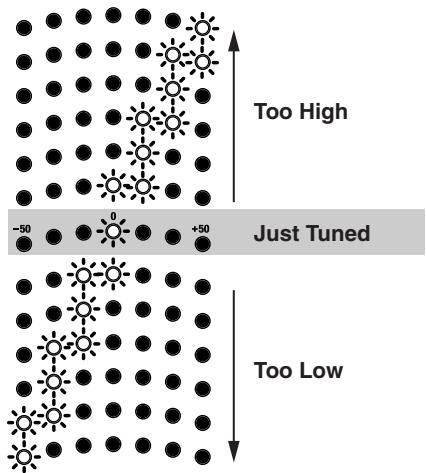

You can mute the output while the tuner is in operation.

"Setting the Function Used When the Effects Are Off (Bypass/ Mute)" (p. 17)
Changing the Reference Pitch (PITCH)
This specifies the frequency for the A note used as the reference for tuning in performance (this is referred to as the reference pitch). With the AD-8, you can set the reference pitch to any frequency from 438Hz to 445Hz .
- This is set to 440 Hz at the factory.
- The settings remain stored in memory even after the power is turned off.
1. Press the PITCH button.
The current reference pitch is indicated by the number in the ones place in the TUNER display (e.g., "0" when set to 400Hz ).
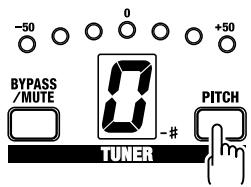
2. Hold down the PITCH button.
The reference pitch changes as follows.
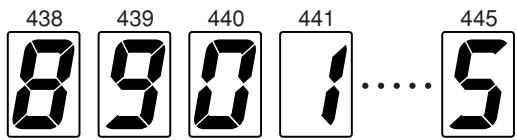
If nothing is altered during the next few moments, the settings are stored, and the indication in TUNER display disappears.
How to Use the ANTI-FEEDBACK
"Anti-feedback" is a function that suppresses feedback that occurs between the guitar and the amp. Feedback is suppressed by cutting the volume in frequencies at which it occurs.
The AD-8's anti-feedback function automatically detects the frequencies at which feedback occurs, and automatically attenuates the sounds at the detected frequencies, so feedback is rapidly and accurately suppressed.
Before Using the Anti-Feedback
- First, adjust the AD-8's output level, the distance between the guitar and the amp and between the guitar and the speakers, the direction the guitar is facing, and other factors making it harder for feedback to occur.
- When using the anti-feedback feature, you can suppress feedback at one point.
- If the feedback cannot be successfully suppressed using the anti-feedback feature, you'll need to go back and readjust your setup.
1. Simultaneously press the MEMORY pedal and MEMORY pedal.
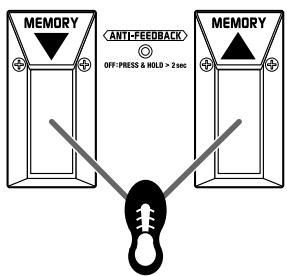
The ANTI-FEEDBACK indicator flashes, and the frequencies at which feedback occurs are automatically detected.
- Refrain from producing sound while the frequency at which feedback occurred is being detected automatically.
Once detection is completed, the indicator stops flashing and remains lit, and sounds at the detected frequencies as well as at frequencies one octave higher are cut.
- Anti-feedback is not applied when there is no input, or if no feedback is detected at any frequency.
- If you again hold down the MEMORY pedal and MEMORY pedal together while the ANTI-FEEDBACK indicator is lit, the anti-feedback is cancelled, and detection of frequencies with feedback begins again.
To exit the anti-feedback function, hold down the MEMORY pedal and MEMORY pedal for at least two seconds.
- The anti-feedback settings are not stored when in MANUAL mode.

If you perform the Write operation while the ANTI-FEEDBACK indicator is lit, the AD-8 stores the tone with the anti-feedback applied.

Anti-feedback is always off (the ANTI-FEEDBACK indicator is off) when the power is turned on.
Returning Settings to Their Factory Defaults
You can restore the following settings to their original factory values.
| MEMORY 1 | Sample Setting 1 (p. 22) |
| MEMORY 2 | Sample Setting 2 ( ” ) |
| MEMORY 3 | Sample Setting 3 ( ” ) |
| MEMORY 4 | Sample Setting 4 ( ” ) |
| Function when effects are off (p. 17) | BYPASS |
| Memory number indication (p. 17) | Lighting Pattern 1 |
| TUNER reference pitch (p. 18) | 440 Hz |

Carrying out the following procedure completely clears the content currently stored in the memories (1-4).
- Switch off the power (disconnect the connection plug from the INPUT jack).
- While holding down the WRITE button, switch on the power (insert the connection plug into the INPUT jack).
A flashing "F" appears in the TUNER display.
- Press the WRITE button.
After the TUNER display flashes more rapidly, the factory settings are restored, and the AD-8 returns to normal operation.
- To cancel the setting change and the unit returns to its ordinary state, then before you press the WRITE button, operate the MEMORY / or ON/OFF pedal.
Troubleshooting
The power doesn't come on
Is the guitar connected correctly to the INPUT jack?
Check the connections again (p. 6-p. 8).
- When running off batteries, the unit won't switch on unless there's something plugged into the INPUT jack.
Have the batteries run down?
Replace with fresh batteries (p. 5).
If your guitar pickup system uses batteries, have these batteries run down?
Refer to the owner's manual for your pickup system for instructions on replacing the batteries.
Is the specified AC adaptor (PSA-series sold separately) connected correctly?
Check the connections again (p. 6-p. 8).
There is no sound
Is the other equipment connected correctly?
Check the connections again (p. 6-p. 8).
Is the volume turned down on the connected guitar/ bass amp, effects processor, or other device?
Check the settings on the connected equipment (p. 6-p. 8).
Is the output level (OUTPUT LEVEL knob) set to minimum?
OperatetheOUTPUTLEVELknobtoadjusttheeffect level(p.9).
Have you put the AD-8 in Mute mode with the ON/OFF pedal?
Press the ON/OFF pedal to switch this to "ON" (ON/OFF indicator is lit). (p. 14)
Sound is distorted
Are the BODY, EQUALIZER, and OUTPUT LEVEL knobs at suitable settings?
Increasing the BODY, EQUALIZER (BASS, MIDDLE GAIN, TREBLE, PRESENCE), and OUTPUT LEVEL knob settings also raises the volume level. In such instances, turn the OUTPUT LEVEL knob to the left (counterclockwise) to reduce the output level.
If distortion remains even after lowering the output level with the OUTPUT LEVEL knob
Lower the output level of your guitar, effects processor, or other such gear.
When playing through a guitar amp, the sound as heard through headphones is almost completely different
Is the guitar connected to the ELECTRIC GUITAR AMP OUTPUT jack?
Guitar amps have special characteristics suited especially for electric guitars; when an acoustic guitar is used, the low and high frequencies tend to be boosted.
When playing through a guitar amp, connect to the ELECTRIC GUITAR AMP OUTPUT jack (p. 8, p. 13).
The volume level of the instrument connected to INPUT jack is too low
Could you be using a connection cable that contains a resistor?
Use a connection cable that does not contain a resistor.
Sample Settings
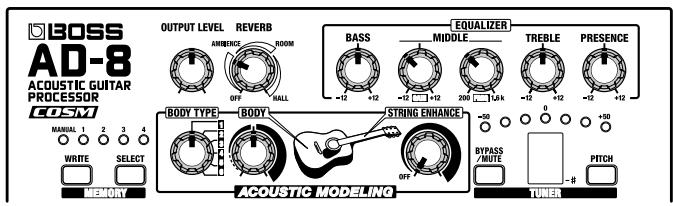
Chord Strumming. (MEMORY 1)
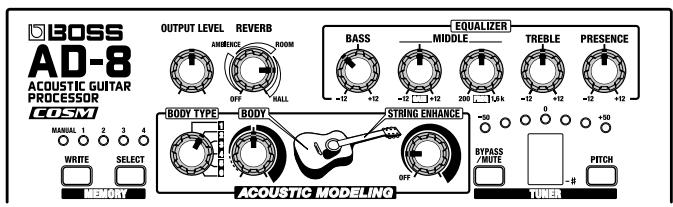
Finger Picking (MEMORY 2)
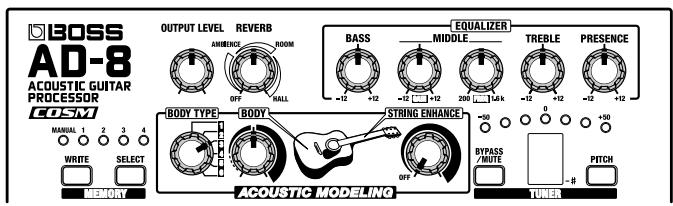
Flat Picking (MEMORY 3)
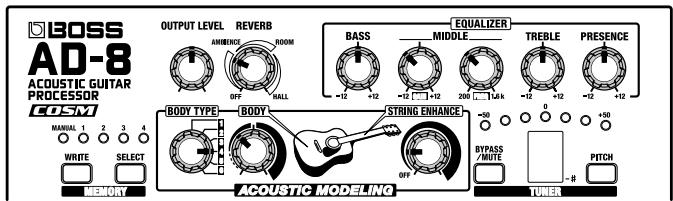
Blues (MEMORY 4)
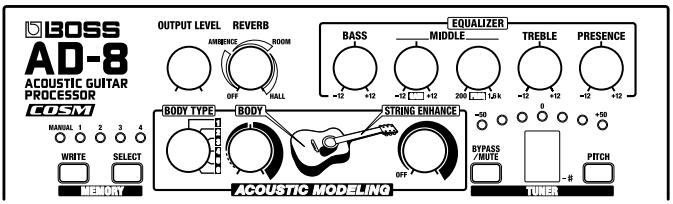
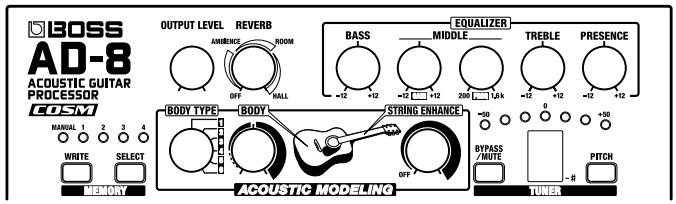
Setting Memo
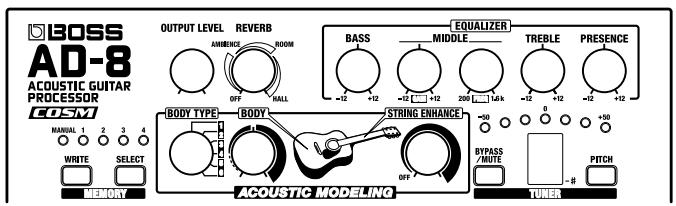
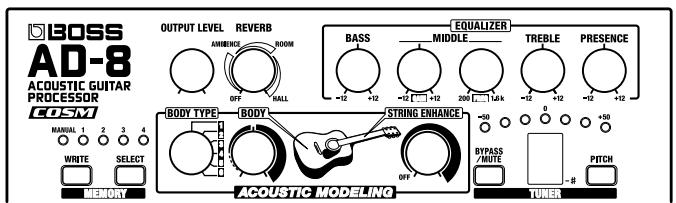
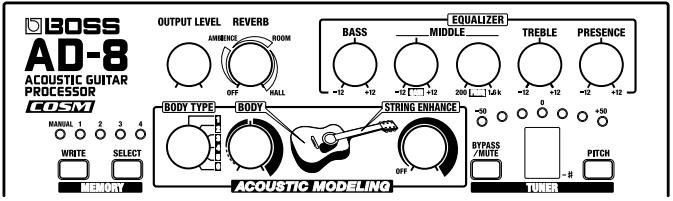
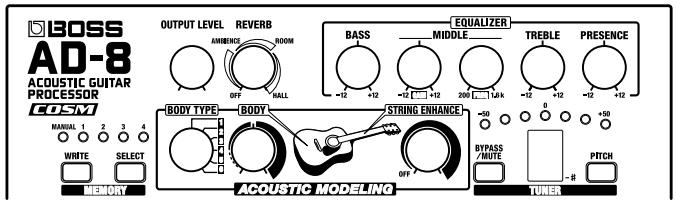
Specifications
AD-8: Acoustic Guitar Processor
Nominal Input Level
-20 dBu
Input Impedance
4.7 MΩ
Nominal output level
-20 dBu
Nominal Output Level
UNBALANCED OUTPUT A(MONO), B.: 1 kΩ
ELECTRIC GUITAR AMP OUTPUT
BALANCED OUTPUT A, B: 600 Ω
PHONES: 33Ω
Recommended Load Impedance
10k
Display
7 segments LED
Controls
ON/OFF pedal
MEMORY pedal
MEMORY pedal
BODY TYPE knob
BODY knob
STRING ENHANCE knob
BASS knob
MIDDLE GAIN knob
MIDDLE FREQ knob
TREBLE knob
PRESENCE knob
REVERB knob
OUTPUT LEVEL knob
SELECT button
WRITE button
PITCH button
BYPASS/MUTE button
STEREO/MONO switch
NOR/LIFT switch
Indicators
POWER indicator (serves also as battery check indicator)
ANTI-FEEDBACK indicator
ON/OFF indicator
MANUAL indicator
MEMORY Number indicator 1-4
TUNER meter
TUNER display
TUNER
Reference Pitch
A4: 438-445 Hz (1 Hz units)
Tuning Accuracy
±3cents
Connectors
INPUT jack (1/4 inch phone type)
PHONES jack (stereo 1/4 inch phone type)
ELECTRIC GUITAR AMP OUTPUT jack
(1/4 inch phone type)
UNBALANCED OUTPUT A (MONO) jack
(1/4 inch phone type)
UNBALANCED OUTPUT B jack (1/4 inch phone type)
BALANCED OUTPUT A jack (XLR type)
BALANCED OUTPUT B jack (XLR type)
AC Adaptor jack
Power Supply
DC 9 V: Dry battery (R6/LR6 (AA) type) × 6 , AC Adaptor
Current Draw
120mA
Expected battery life under continuous use:
Carbon: 9 hours
Alkaline: 23 hours
- These figures will vary depending on the actual conditions of use.
Dimensions
1.9kg (including batteries)
Accessories
Owner's Manual
Dry battery (R6 (AA) type) x 6
- We recommend that alkaline batteries be used when replacing the batteries.
Options
AC Adaptor (PSA series)
- 0~dBu = 0.775Vrms

In the interest of product improvement, the specifications and/or appearance of this unit are subject to change without prior notice.
FEDERAL COMMUNICATIONS COMMISSION RADIO FREQUENCY INTERFERENCE STATEMENT
This equipment has been tested and found to comply with the limits for a Class B digital device, pursuant to Part 15 of the FCC Rules. These limits are designed to provide reasonable protection against harmful interference in a residential installation. This equipment generates, uses, and can radiate radio frequency energy and, if not installed and used in accordance with the instructions, may cause harmful interference to radio communications. However, there is no guarantee that interference will not occur in a particular installation. If this equipment does cause harmful interference to radio or television reception, which can be determined by turning the equipment off and on, the user is encouraged to try to correct the interference by one or more of the following measures:
- Reorient or relocate the receiving antenna.
- Increase the separation between the equipment and receiver.
- Connect the equipment into an outlet on a circuit different from that to which the receiver is connected.
- Consult the dealer or an experienced radio/TV technician for help.
This device complies with Part 15 of the FCC Rules. Operation is subject to the following two conditions:
(1) This device may not cause harmful interference, and
(2) This device must accept any interference received, including interference that may cause undesired operation.
Unauthorized changes or modification to this system can void the users authority to operate this equipment.
This equipment requires shielded interface cables in order to meet FCC class B Limit.
For Canada
NOTICE
This Class B digital apparatus meets all requirements of the Canadian Interference-Caising Equipment Regulations.