
AC-60 - Guitar amplifier ROLAND - Free user manual and instructions
Find the device manual for free AC-60 ROLAND in PDF.


User questions about AC-60 ROLAND
0 question about this device. Answer the ones you know or ask your own.
Ask a new question about this device
Download the instructions for your Guitar amplifier in PDF format for free! Find your manual AC-60 - ROLAND and take your electronic device back in hand. On this page are published all the documents necessary for the use of your device. AC-60 by ROLAND.
USER MANUAL AC-60 ROLAND
Thank you, and congratulations on your choice of the Roland AC-60 Acoustic Chorus.
Before using this unit, carefully read the sections entitled:
- IMPORTANT SAFETY INSTRUCTIONS (page 2)
USING THE UNIT SAFELY (page 3-4) - IMPORTANT NOTES (page 5)
These sections provide important information concerning the proper operation of the unit. Additionally, in order to feel assured that you have gained a good grasp of every feature provided by your new unit, Owner's manual should be read in its entirety. The manual should be saved and kept on hand as a convenient reference.
Contents
IMPORTANT SAFETY INSTRUCTIONS 2
USING THE UNIT SAFELY 3
IMPORTANT NOTES 5
Main Features 6
Names of Things and What They Do 7
Control Panel. 7
Rear Panel 11
Example of Using Two Channels Combined 13
How to Use the Folding Stand 14
Using a Speaker Stand 15
Block Diagram 16
Specifications 17
INSTRUCTIONS PERTAINING TO A RISK OF FIRE, ELECTRIC SHOCK, OR INJURY TO PERSONS.
IMPORTANT SAFETY INSTRUCTIONS SAVE THESE INSTRUCTIONS
WARNING - When using electric products, basic precautions should always be followed, including the following:
- Read these instructions.
- Keep these instructions.
- Heed all warnings.
- Follow all instructions.
- Do not use this apparatus near water.
- Clean only with a dry cloth.
- Do not block any of the ventilation openings. Install in accordance with the manufacturers instructions.
- Do not install near any heat sources such as radiators, heat registers, stoves, or other apparatus (including amplifiers) that produce heat.
-
Do not defeat the safety purpose of the polarized or grounding-type plug. A polarized plug has two blades with one wider than the other. A grounding type plug has two blades and a third grounding prong. The wide blade or the third prong are provided for your safety. When the provided plug does not fit into your outlet, consult an electrician for replacement of the obsolete outlet.
-
Protect the power cord from being walked on or pinched particularly at plugs, convenience receptacles, and the point where they exit from the apparatus.
- Only use attachments/accessories specified by the manufacturer.
- Never use with a cart, stand, tripod, bracket, or table except as specified by the manufacturer, or sold with the apparatus. When a cart is used, use caution when moving the cart/apparatus combination to avoid injury from tip-over.
- Unplug this apparatus during lightning storms or when unused for long periods of time.
- Refer all servicing to qualified service personnel. Servicing is required when the apparatus has been damaged in any way, such as power-supply cord or plug is damaged, liquid has been spilled or objects have fallen into the apparatus, the apparatus has been exposed to rain or moisture, does not operate normally, or has been dropped.

For the U.K.
WARNING: THIS APPARATUS MUST BE EARTHED
IMPORTANT: THE WIRES IN THIS MAINS LEAD ARE COLOURED IN ACCORDANCE WITH THE FOLLOWING CODE. GREEN-AND-YELLOW: EARTH, BLUE: NEUTRAL, BROWN: LIVE
As the colours of the wires in the mains lead of this apparatus may not correspond with the coloured markings identifying the terminals in your plug, proceed as follows:
The wire which is coloured GREEN-AND-YELLOW must be connected to the terminal in the plug which is marked by the letter E or by the safety earth symbol or coloured GREEN or GREEN-AND-YELLOW.
The wire which is coloured BLUE must be connected to the terminal which is marked with the letter N or coloured BLACK.
The wire which is coloured BROWN must be connected to the terminal which is marked with the letter L or coloured RED.
USING THE UNIT SAFELY
INSTRUCTIONS FOR THE PREVENTION OF FIRE, ELECTRIC SHOCK, OR INJURY TO PERSONS
About WARNING and CAUTION Notices
| WARNING | Used for instructions intended to alert the user to the risk of death or severe injury should the unit be used improperly. |
| CAUTION | Used for instructions intended to alert the user to the risk of injury or material damage should the unit be used improperly. * Material damage refers to damage or other adverse effects caused with respect to the home and all its furnishings, as well to domestic animals or pets. |
About the Symbols
| ▲ | The △ symbol alerts the user to important instructions or warnings. The specific meaning of the symbol is determined by the design contained within the triangle. In the case of the symbol at left, it is used for general cautions, warnings, or alerts to danger. |
| ◎ | The ⊙ symbol alerts the user to items that must never be carried out (are forbidden). The specific thing that must not be done is indicated by the design contained within the circle. In the case of the symbol at left, it means that the unit must never be disassembled. |
| ◎ | The ● symbol alerts the user to things that must be carried out. The specific thing that must be done is indicated by the design contained within the circle. In the case of the symbol at left, it means that the power-cord plug must be unplugged from the outlet. |
ALWAYS OBSERVE THE FOLLOWING
WARNING
- Before using this unit, make sure to read the instructions below, and the Owner's Manual.

- To avoid overheating and possible fire and shock hazards, the AC-60 must not be used in an enclosure with less than 50~cm air spacing from all sides.

- Do not open or perform any internal modifications on the unit.

- Do not attempt to repair the unit, or replace parts within it (except when this manual provides specific instructions directing you to do so). Refer all servicing to your retailer, the nearest Roland Service Center, or an authorized Roland distributor, as listed on the "Information" page.

-
Never use or store the unit in places that are:
-
Subject to temperature extremes (e.g., direct sunlight in an enclosed vehicle, near a heating duct, on top of heat-generating equipment); or are
- Damp (e.g., baths, washrooms, on wet floors); or are
- Humid; or are
- Exposed to rain; or are
- Dusty; or are
-
Subject to high levels of vibration.
-
The unit should be connected to a power supply only of the type described in the operating instructions, or as marked on the unit.


WARNING
- Do not excessively twist or bend the power cord, nor place heavy objects on it. Doing so can damage the cord, producing severed elements and short circuits. Damaged cords are fire and shock hazards!

- This unit, either alone or in combination with an amplifier and headphones or speakers, may be capable of producing sound levels that could cause permanent hearing loss. Do not operate for a long period of time at a high volume level, or at a level that is uncomfortable. If you experience any hearing loss or ringing in the ears, you should immediately stop using the unit, and consult an audiologist.

- Do not allow any objects (e.g., flammable material, coins, pins); or liquids of any kind (water, soft drinks, etc.) to penetrate the unit.


- Immediately turn the power off, remove the power cord from the outlet, and request servicing by your retailer, the nearest Roland Service Center, or an authorized Roland distributor, as listed on the "Information" page when:

- The power-supply cord, or the plug has been damaged; or
- If smoke or unusual odor occurs
- Objects have fallen into, or liquid has been spilled onto the unit; or
- The unit has been exposed to rain (or otherwise has become wet); or
- The unit does not appear to operate normally or exhibits a marked change in performance.
WARNING
- In households with small children, an adult should provide supervision until the child is capable of following all the rules essential for the safe operation of the unit.

- Protect the unit from strong impact. (Do not drop it!)

- Do not force the unit's power-supply cord to share an outlet with an unreasonable number of other devices. Be especially careful when using extension cords—the total power used by all devices you have connected to the extension cord's outlet must never exceed the power rating (watts/amperes) for the extension cord. Excessive loads can cause the insulation on the cord to heat up and eventually melt through.

- Never lift up and carry the AC-60 by holding the folding stand.

- Before using the unit in a foreign country, consult with your retailer, the nearest Roland Service Center, or an authorized Roland distributor, as listed on the "Information" page.

CAUTION
- The unit should be located so that its location or position does not interfere with its proper ventilation.

- Always grasp only the plug on the power-supply cord when plugging into, or unplugging from an outlet.

- Any accumulation of dust between the power plug and the power outlet can result in poor insulation and lead to fire. Periodically wipe away such dust with a dry cloth. Also, disconnect the power plug from the power outlet whenever the unit is to remain unused for an extended period of time.

- Try to prevent cords and cables from becoming entangled. Also, all cords and cables should be placed so they are out of the reach of children.

- Never climb on top of, nor place heavy objects on the unit.

- Never handle the power cord or its plug with wet hands when plugging into, or unplugging from, an outlet.

- Before moving the unit, disconnect the power plug from the outlet, and pull out all cords from external devices.

- Before cleaning the unit, turn off the power and unplug the power cord from the outlet.

- Whenever you suspect the possibility of lightning in your area, pull the plug on the power cord out of the outlet.

- Always turn the phantom power off when connecting any device other than condenser microphones that require phantom power. You risk causing damage if you mistakenly supply phantom power to dynamic microphones, audio playback devices, or other devices that don't require such power. Be sure to check the specifications of any microphone you intend to use by referring to the manual that came with it.

(This instrument's phantom power: 48 V DC, 10 mA Max)
In addition to the items listed under "IMPORTANT SAFETY INSTRUCTIONS" and "USING THE UNIT SAFELY" on pages 2 and 3-4, please read and observe the following:
Power Supply
- Do not use this unit on the same power circuit with any device that will generate line noise (such as an electric motor or variable lighting system).
- Before connecting this unit to other devices, turn off the power to all units. This will help prevent malfunctions and/or damage to speakers or other devices.
Placement
- Using the unit near power amplifiers (or other equipment containing large power transformers) may induce hum. To alleviate the problem, change the orientation of this unit; or move it farther away from the source of interference.
- This device may interfere with radio and television reception. Do not use this device in the vicinity of such receivers.
- Noise may be produced if wireless communications devices, such as cell phones, are operated in the vicinity of this unit. Such noise could occur when receiving or initiating a call, or while conversing. Should you experience such problems, you should relocate such wireless devices so they are at a greater distance from this unit, or switch them off.
- Do not expose the unit to direct sunlight, place it near devices that radiate heat, leave it inside an enclosed vehicle, or otherwise subject it to temperature extremes. Also, do not allow lighting devices that normally are used while their light source is very close to the unit (such as a piano light), or powerful spotlights to shine upon the same area of the unit for extended periods of time. Excessive heat can deform or discolor the unit.
- When moved from one location to another where the temperature and/or humidity is very different, water droplets (condensation) may form inside the unit. Damage or malfunction may result if you attempt to use the unit in this condition. Therefore, before using the unit, you must allow it to stand for several hours, until the condensation has completely evaporated.
- Do not allow rubber, vinyl, or similar materials to remain on the unit for long periods of time. Such objects can discolor or otherwise harmfully affect the finish.
- Do not put anything that contains water (e.g., flower vases) on the unit. Also, avoid the use of insecticides, perfumes, alcohol, nail polish, spray cans, etc., near the unit. Swiftly wipe away any liquid that spills on the unit using a dry, soft cloth.
- Do not paste stickers, decals, or the like to this instrument. Peeling such matter off the instrument may damage the exterior finish.
- Do not allow objects to remain on top of the unit while it is in operation.
Maintenance
- To clean the unit, use a dry, soft cloth; or one that is slightly dampened. Try to wipe the entire surface using an equal amount of strength, moving the cloth along with the grain of the wood. Rubbing too hard in the same area can damage the finish.
- Never use benzine, thinners, alcohol or solvents of any kind, to avoid the possibility of discoloration and/or deformation.
Additional Precautions
- Use a reasonable amount of care when using the unit's buttons, sliders, or other controls; and when using its jacks and connectors. Rough handling can lead to malfunctions.
- When connecting / disconnecting all cables, grasp the connector itself—never pull on the cable. This way you will avoid causing shorts, or damage to the cable's internal elements.
- A small amount of heat will radiate from the unit during normal operation.
- When you need to transport the unit, package it in the box (including padding) that it came in, if possible. Otherwise, you will need to use equivalent packaging materials.
-
Use a cable from Roland to make the connection. If using some other make of connection cable, please note the following precautions.
-
Some connection cables contain resistors. Do not use cables that incorporate resistors for connecting to this unit. The use of such cables can cause the sound level to be extremely low, or impossible to hear. For information on cable specifications, contact the manufacturer of the cable.
-
To prevent malfunction and/or damage to speakers or other devices, always turn down the volume, and turn off the power on all devices before making any connections.
- Once the connections have been completed, turn on power to your various devices in the order specified. By turning on devices in the wrong order, you risk causing malfunction and/or damage to speakers and other devices.
When powering up:
Turn on the power to the AC-60 last.
When powering down:
Turn off the power to the AC-60 first.
- Wrap the AC cord around the cord hook when transporting or storing the unit.
Main Features
The AC-60 is a compact, high-performance monitor amp developed exclusively for use with acoustic instruments. It fully presents the harmonic richness of tone characteristic of acoustic instruments.
Compact, High-Performance Stereo Amp
- Comes equipped with two specially developed 16-cm (6.5-inch) wide-range speakers.
- Features stereo output (30 W + 30 W).
- Housed in a bass-reflex cabinet.
Features Two Independent Channels, GUITAR and MIC/LINE
Each channel includes a 3-band equalizer.
- GUITAR channel handles both piezo and magnetic pickups.
- The MIC/LINE channel features phantom power, utilizing highly reliable, dedicated 48 V-output phantom circuitry.
- Using the MIC/LINE channel for LINE input allows you to connect guitars with magnetic pickups. You can use a single guitar's piezo and magnetic pickups simultaneously and mix (blend) the sounds together.
High-Quality Digital Effects
- Includes three types of stereo chorus: "SPACE," whereby the chorus is synthesized in actual space; "RICH," in which the amount of the effect is applied separately in each frequency range; and "WIDE," which provides an enhanced sense of expansiveness using discrete frequency bands.
- Includes stereo reverb developed especially for acoustic instruments, which gives a sense of spaciousness and natural body to the sound.
- Also features a delay effect developed especially for acoustic instruments, which produces a soft, tuned sound.
- Furthermore, you can connect an optional foot switch and use it to turn these effects on and off.
Anti-Feedback Suppresses Feedback
- Anti-feedback features two ways to detect the feedback point, using the "Manual settings," or the "Auto settings," which allow the feedback point to be detected automatically.
- You can connect an optional foot switch and use your foot to operate this feature.
Mute Function
- The Mute switch provided makes it easy for you to mute the sounds for the AC-60's own speakers as well as the sounds from LINE OUT. By using the Mute function, you can plug in and out noiselessly at the guitar. Furthermore, when you have a tuner connected to TUNER OUT, the Mute function lets you tune your instrument without outputting any sound.
- You can connect an optional foot switch and use your foot to turn this on and off.
External Input Jacks (AUX IN)
- Includes external input jacks, allowing you to connect a CD player, backing machine, or other device in stereo.
- These include both RCA phono jacks and 1/4 ” phone jacks, making it possible to connect just about any kind of device.
Multiple Output Connectors
- Features DI out that allow you to output directly the signals input from connected instruments and mics. You can also connect a tuner. Compatible with TRS balanced output.
- Line outs feature 1 / 4 ” phone mono-output jacks in addition to XLR connectors for stereo output. You can use a single AC-60 for all applications.
- It also features a subwoofer out. Connecting a powered subwoofer allows you to play with an even punchier, more powerful low end.
- The amp also includes a headphones out that you can use when playing during nighttime hours and when making sound checks.
Convenient Placement Features
- Includes an "folding stand" that allows you to change the angle of the amp when using it for monitoring purposes.
- It also includes a "speaker stand adapter," which allows you to attach the AC-60 to a speaker stand. This makes using the AC-60 easier when you are performing standing up, and allows you to use the amp as a simple PA.
- Also included is a carrying case for greater portability.
Names of Things and What They Do
Control Panel
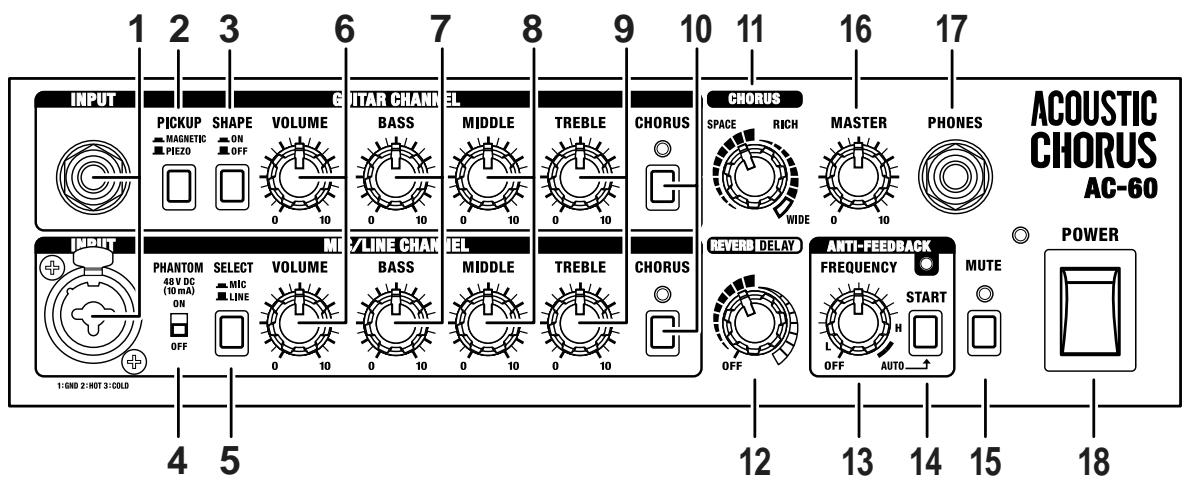
1. INPUT
(GUITAR CHANNEL)
Connect guitars here.
(MIC/LINE CHANNEL)
Connect mics and line-level devices here. You can also connect guitars with pickups equipped with preamps.
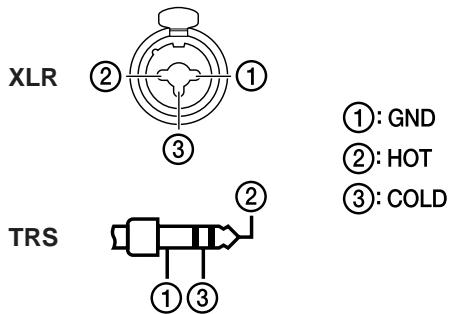
This handles balanced input, so you can connect 1/4 ” phone TRS jacks and XLR-type connectors.
HINT
You can use the two channels in combination.
Refer to "Example of Using Two Channels Combined" (P.13).
2. PICKUP button
This switches the input circuitry for either piezo or magnetic pickups, according to the type of pickup on the connected guitar. Press down the button for magnetic pickups.
- Set this to MAGNETIC if your guitar has an active pickup equipped with a preamp.
3. SHAPE button
Setting this to ON modifies the midrange to create a bright tone suitable for strumming chords.
This emphasizes brushing sounds, allowing you to strum with a more edgy feeling.
4. PHANTOM switch
This turns the phantom power on and off.
Set this to "ON" when connecting mics that require phantom power (condenser mic, etc.).
Set this to "OFF" when connecting mics that do not require phantom power or other devices.
NOTE
-
Use the following sequence when connecting mics that require phantom power:
-
Turn the PHANTOM switch off.
- Connect the mic.
-
Turn the PHANTOM switch on.
-
Supplying phantom power to mics that do not require it or supplying it to other devices may cause such equipment to malfunction. Always be sure to turn the switch off before connecting.
- To protect the circuitry, all output is muted momentarily after the PHANTOM switch is turned on or off.
- Phantom power is supplied only to the XLR connectors for the MIC/LINE channel INPUT.
- Noise may be produced if connectors are connected or disconnected while the phantom power is turned on.

Phantom Power
Because they have a comparatively wider range and better sound quality than dynamic mics, condenser mics are often used for miking acoustic guitars. However, they require a power source to operate. Although some condenser mics run off batteries placed within the mic housing, in many cases a type of power supply known as "phantom power" is required. This power supply uses the existing mic cable to feed power.
The AC-60's phantom power is output at a constant 48V , so it conforms to professional specifications required at recording studios.
5. SELECT button
This switches the input level to match that of the connected device (mic or line).
You can connect guitars with magnetic pickups when LINE is selected with the SELECT button.
- Note that the volume is increased if the switch is set to "MIC" when you have a line-level device connected.
6. VOLUME knob
- When using the AC-60 with the GUITAR channel and MIC/ LINE channel mixed, adjust the volume balance between the two channels with the VOLUME knob.
(GUITAR CHANNEL)
This adjusts the volume of the GUITAR channel.
- To accommodate the lower output of piezo pickups, the volume level when the VOLUME knob is between the 7 and 10 positions is set somewhat higher when the PICKUP button is set to PIEZO in comparison with the MAGNETIC setting.
(MIC/LINE CHANNEL)
This adjusts the volume of the MIC/LINE channel.
7. BASS knob
This adjusts the level of the low-frequency range.
Turning the knob to the right (clockwise) emphasizes the feeling of body in the sound.
8. MIDDLE knob
This adjusts the level of the midrange.
Turning the knob to the right creates a fatter sound when melodies or individual notes are played.
9. TREBLE knob
This adjusts the level of the high-frequency range.
Turning the knob to the right emphasizes brushing sound when chords are stroked.
MEMO
The tone of acoustic instruments varies immensely from one instrument to the next. The kind of sound required also varies according to how an instrument is being used in a particular ensemble. Actively use the BASS, MIDDLE, and TREBLE knobs to adjust the tone to suit the instrument you are using and the conditions in which it is being used. (Example)
- When using the AC-60 with the speaker stand attached, you may want to turn up the BASS knob so the lower range is perceived better.
- If the sound seems too harsh, such as immediately after changing strings, you may want to turn down the TREBLE knob to cut back on the high frequencies.
10. CHORUS button
This turns the chorus on and off.
The indicator lights up when this is on.
MEMO
You can use a foot switch (the optional BOSS FS-5U) to switch the chorus on and off. Turning the chorus on and off with the foot switch works on both channels.
11. CHORUS knob
You can switch between the three types of chorus (SPACE, RICH, and WIDE) by setting this knob.
You can adjust the amount of effect applied by changing the position of the knob.
- This is enabled when the CHORUS button is in the ON position.
- The markings indicating the SPACE and RICH positions are approximate. Listen to the sound to confirm the effect as you make adjustments.
SPACE
This is a spacially synthesized chorus. With spacially synthesized chorus, a method available only in stereo, the chorus effect is created by taking the sound from the right speaker, from which the effect sound is output, and the sound from the left speaker, which outputs the direct sound, and then mixing them in the actual space. This creates a greater lateral spread than that produced when the sounds are mixed electronically, providing a more natural sense of breadth.
RICH
This is a stereo chorus that is divided into three frequency ranges.
Here, the effect is separated into three bands, low-frequency, midrange, and high-frequency, and by applying the most suitable amount of chorus effect in each range, it provides a sense of fullness and breadth that is perfectly suited to the acoustic guitar.
The low end is firmly in the center, and sound spreads out more and more as the sound rises from the midrange up through the higher frequencies.
WIDE
While also relying on the division of sound into separate bands, this chorus offers even greater expansiveness than RICH.
The sound image spreads beyond the AC-60's speakers, producing an effect that seems to envelope the listener in sound.
12. REVERB/DELAY knob
You can adjust this knob to switch between the reverb and delay effects.
You can adjust the amount of effect applied by changing the position of the knob.
- Turn the knob to "OFF" if you are not using the reverb or delay effect.
- The markings indicating the reverb and delay positions are approximate. Listen to the sound to confirm the effect as you make adjustments.
REVERB
This stereo reverb, developed especially for acoustic instruments, gives a sense of spaciousness and natural sonic quality.
Turn the knob to adjust the volume of the reverb effect.
DELAY
This delay, developed especially for acoustic instruments, adds soft reflections to the original sound.
Turn the knob to change the delay time.
- You can use a foot switch (the optional BOSS FS-5U) to switch the reverb and delay on and off.
13. FREQUENCY knob
This selects the frequency at which the anti-feedback function operates.
Use the knob to switch between automatic and manual settings for the operational frequency. (p. 10)
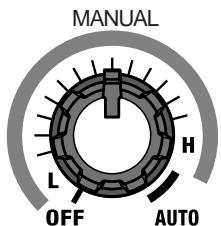
- Turn the knob to “OFF” if you are not using anti-feedback.
14. START button
This starts automatic detection of the feedback point.
The indicators show the operating status of the automatic detection function.
Standby: Flashes slowly
During Detection: Flashes rapidly
After Detection: Remains lit
- Holding down the START button for one second or longer puts automatic detection in standby.
ANTI-FEEDBACK
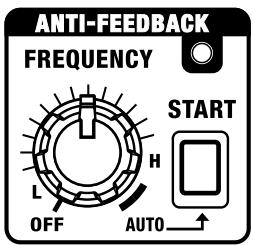
Anti-feedback is a function that controls feedback that arises between the guitar or mic and the amp.
The feedback is suppressed by attenuating the frequency at which the feedback occurs.
- This is not designed to work with respect to the high-frequency feedback that can occur when using microphones.
Anti-feedback can be used in two different ways; you can make use of either the "Auto settings" or the "Manual settings."
MEMO Feedback
This is a phenomenon where signals output from the speakers are then picked up again by the mic or pickup, and the sound is further amplified and output from the speakers, resulting in an unpleasant oscillating sound.
- If the anti-feedback alone does not control the feedback, adjust your settings, for example by lowering the volume or cutting the low frequencies.
Setting the Feedback Point Automatically
You can have the frequency at which the feedback is suppressed be determined automatically.
-
Use in conditions where feedback occurs.
-
Turn the FREQUENCY knob to the "AUTO" position.
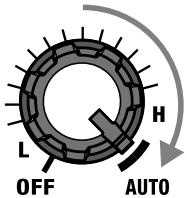
The ANTI-FEEDBACK indicator flashes slowly, and automatic detection goes into standby.
- Press the START button.
Automatic detection of the feedback point starts. The indicator flashes rapidly when detection is in progresses, and when the feedback point is found, the indicator lights steadily. If no feedback point is detected, the indicator flashes slowly, and the automatic detection function returns to standby. - Press the START button once more to conduct the automatic detection again.
Setting the Feedback Point Manually
Turn the knob to select the frequency at which the feedback is to be suppressed.
Turn the knob, moving through the range of L through H (the ANTI-FEEDBACK indicator lights up) to set the frequency at which the feedback is to be suppressed.
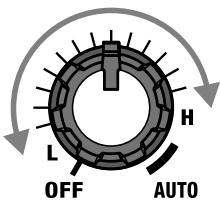
The frequency to which the anti-feedback function is applied increases as the knob is turned to the right.
MEMO
You can use a foot switch (the optional BOSS FS-5U) to run automatic detection of the feedback frequency or to turn the anti-feedback function on and off.
HINT
You can use anti-feedback even when feedback is not a problem. For example, you can use it to remove undesirable resonance in the low to midrange, as well as correct other problems with the sound quality.
15. MUTE button
This switches the Mute function on and off.
When you press the button, the MUTE indicator flashes, muting is turned on, and the speaker output and sounds from SUB WOOFER OUT and LINE OUT are muted.
With the mute function activated, you do not need to turn down the VOLUME knob or MASTER knob to mute the noise when plugging into, or unplugging from your guitar.
- Sounds from the DI OUT/TUNER OUT and PHONES jacks are not muted.
HINT
By connecting a tuner (optional) to DI OUT/TUNER OUT and then pressing the MUTE button, you can tune your instrument without the sound being output from the speakers.
MEMO
You can use a foot switch (the optional BOSS FS-5U) to switch muting on and off. (p. 12)
16. MASTER knob
This adjusts the volume from the speakers, PHONES, and SUB WOOFER OUT.
17. PHONES jack
Headphones are connected here. No sounds are output from the speakers or from SUB WOOFER OUT when headphones are connected.
18. POWER switch
This turns the AC-60's power on and off.
The POWER indicator lights up when the power is on.
- This unit is equipped with a protection circuit. A brief interval (a few seconds) after power up is required before the unit will operate normally.
Rear Panel
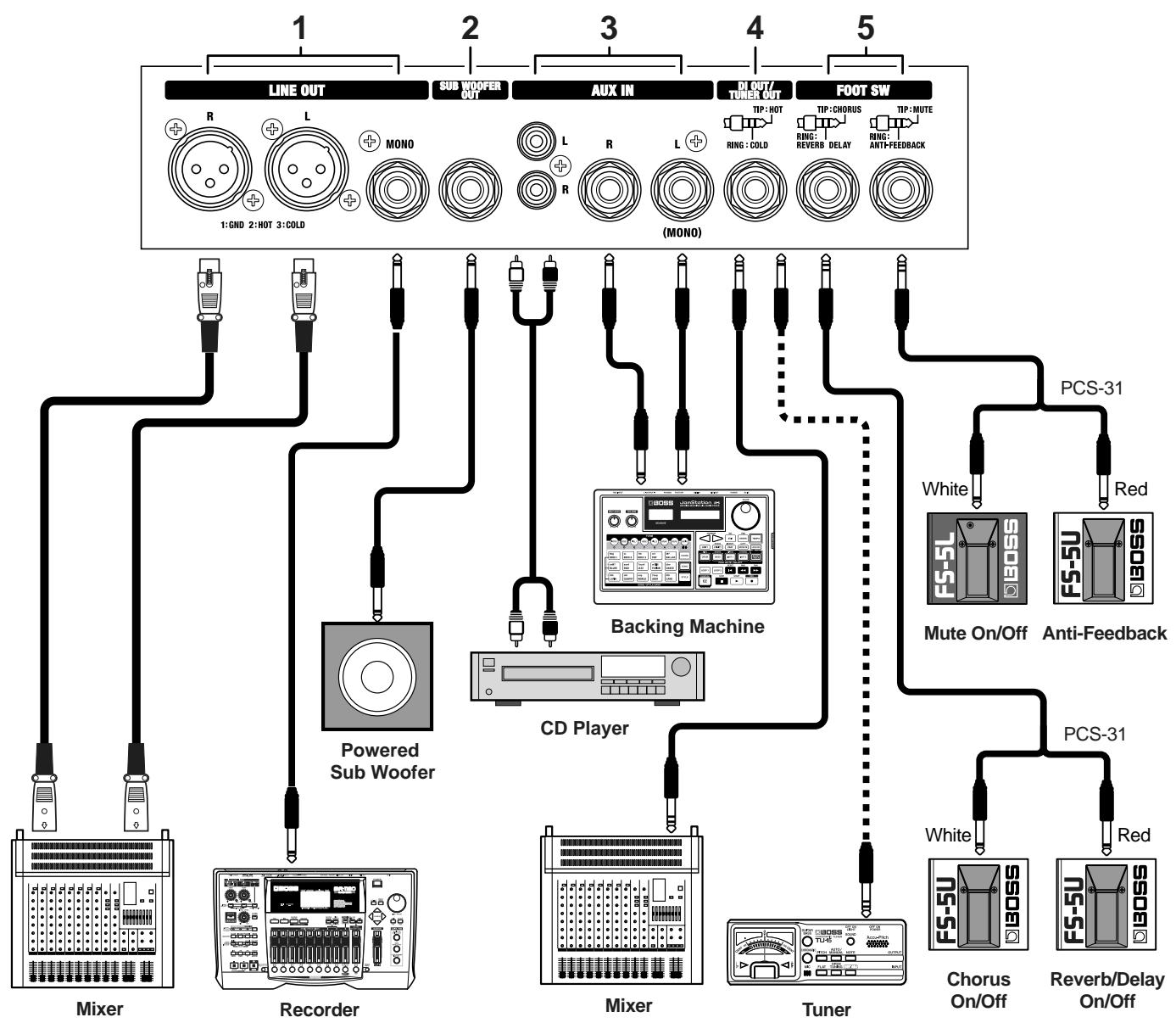
1. LINE OUT jack
You can connect a mixer, recording device, or other such device here. The output level is +4 dBu.
Included here are XLR connectors (L/R: stereo output) and 1/4 phone jacks (mono output).
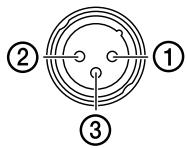
(1): GND
(2): HOT
(3): COLD
- You cannot adjust the volume for LINE OUT with the MASTER knob.
- When outputting stereo sounds from LINE OUT, you may not be able to achieve the same effect with sounds of spacially synthesized chorus (SPACE, WIDE) that you get when these sounds are played through the AC-60's own speakers.
2. SUB WOOFER OUT jack
You can connect a powered subwoofer to play back sounds with an even punchier, more powerful low end.
The volume is adjusted with the MASTER knob.
3. AUX IN jack
You can connect a CD player, backing machine, or other device and play back sounds in stereo. Inputs feature both RCA phono jacks and 1/4 phone jacks. When only the left 1/4 phone jack is connected, playback is in mono.
Although the input from AUX IN is output from the speakers, PHONES, and SUB WOOFER OUT, it is not output from LINE OUT. The volume is adjusted with the MASTER knob and muting on/off for these sounds is controlled with the MUTE button.
If devices are connected to both the RCA phono jacks and the 1/4 phone jacks, then the two inputs are mixed.
4. DI OUT/TUNER OUT jack
The direct sound of the device or instrument connected to the GUITAR or MIC/LINE channel is output here. This is a 1/4'' phone TRS jack with balanced output.
You can also use this jack to connect a tuner.
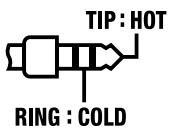
- If balanced output is not required, use a 1/4 ” phone (mono) plug to connect to this jack.
If balanced output is not required, you can use the special connection cable (the optional PCS-31) to use the DI OUT and TUNER OUT simultaneously.
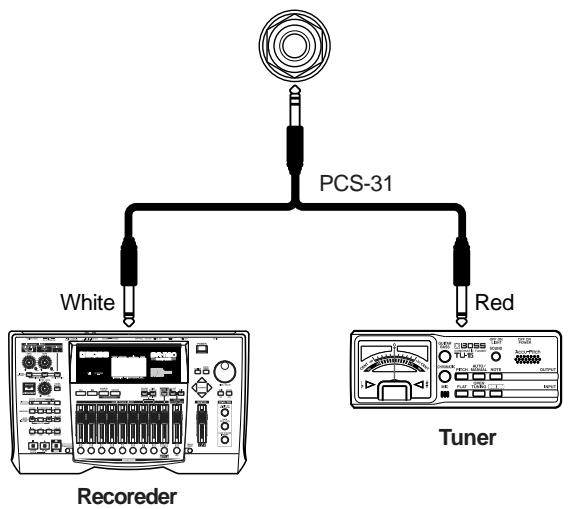

Be sure to connect the tuner to COLD (red side of PCS-31).
5. FOOT SW jack
The AC-60 accepts the FS-5L (latch type) and FS-5U (momentary type) foot switches.
- Set the polarity switch as shown below.
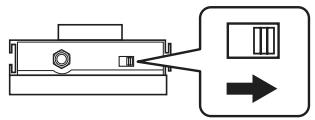
(MUTE, ANTI-FEEDBACK)
Using a special connection cable (the optional PCS-31) to connect two foot switches (the optional BOSS FS-5L and FS-5U), you can use the FS-5L to switch mating on and off, and use the FS-5U to operate the anti-feedback function.
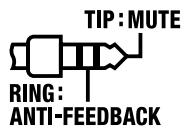
When a 1/4 phone (mono) plug is used to connect only one foot switch, only the Mute on/off function is enabled. Connect an FS-5L for this.
The MUTE button should be set to off when a foot switch is connected for muting.
- You cannot switch the muting off by pressing the foot switch when the MUTE button is on (when the MUTE indicator is lit).
- When using an FS-5U (momentary type) to switch muting on and off, the muting is switched on only while the switch is held down.
The foot switch's function with anti-feedback is as shown below.
- When the FREQUENCY knob is positioned in the range from L to H, the switch turns the anti-feedback function on and off.
- When the FREQUENCY knob is positioned at AUTO, the switch functions as the START switch for the automatic detection. Holding the foot switch down for one second or longer returns the automatic detection function to standby mode.
(CHORUS, DELAY/REVERB)
Using a special connection cable (the optional PCS-31) to connect two foot switches (the optional BOSS FS-5U), you can use one FS-5U to switch the chorus on and off, and use the other FS-5U to switch the delay or reverb on and off.
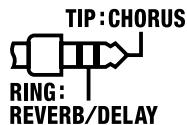
When a 1/4 ” phone (mono) plug is used to connect only one foot switch, only the chorus on/off function is enabled.
- The chorus on/off function works on both channels.
- You cannot switch the chorus on and off by pressing the foot switch when the CHORUS button is off.
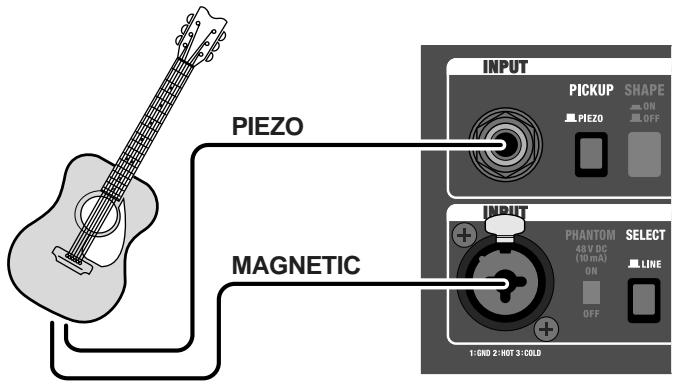
Example of Using Two Channels Combined
When Using One Guitar with Two Types of Pickups
GUITAR CHANNEL:
PiezoPickup (PICKUP button = PIEZO)
MIC/LINE CHANNEL:
Magnetic Pickup (SELECT button = LINE)
You can balance the volume levels using each channel's
VOLUME knob, and adjust the tone for each pickup to attain the optimal sound with the equalizer (BASS/MIDDLE/TREBLE) knobs.
When Using a Mic and a Pickup
GUITAR CHANNEL:
Piezo or Magnetic Pickup
MIC/LINE CHANNEL:
Condenser or Dynamic mic (SELECT button = MIC)
This allows you to blend the fat midrange of the pickup with the mic's delicate high end.
Set the PHANTOM switch to ON if using a condenser mic.
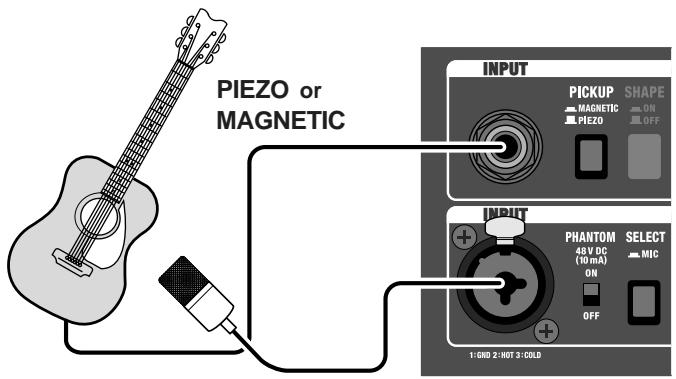
Condenser mic or Dynamic mic
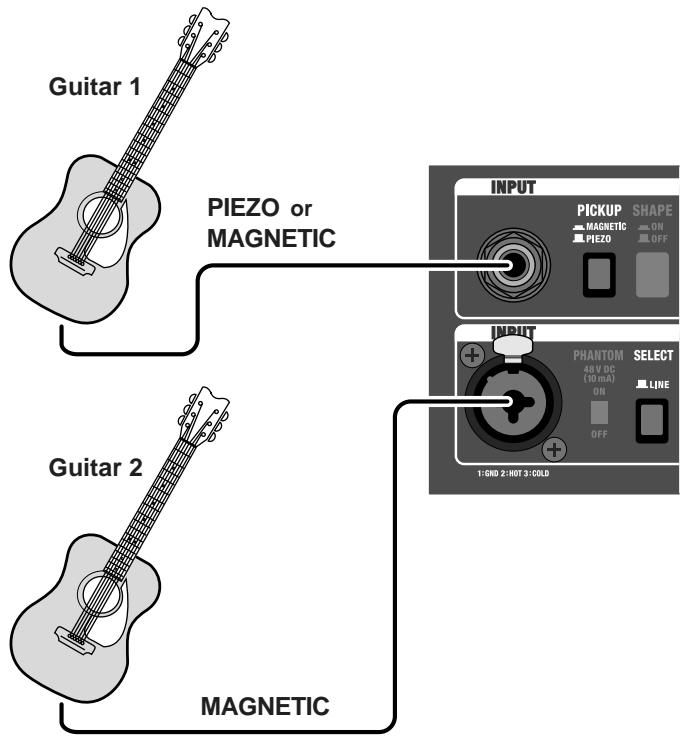
When Using Two Guitars
GUITAR CHANNEL:
Guitar 1 ....... Piezo or Magnetic Pickup
MIC/LINE CHANNEL:
Guitar 2 ......... Magnetic Pickup (SELECT button = LINE)
You can switch guitars without having to readjust the volume and tone.
How to Use the Folding Stand
When using the AC-60 on floors, or in other low-lying positions, then setting up and using the folding stand can make it easier to hear the sounds from the speakers.
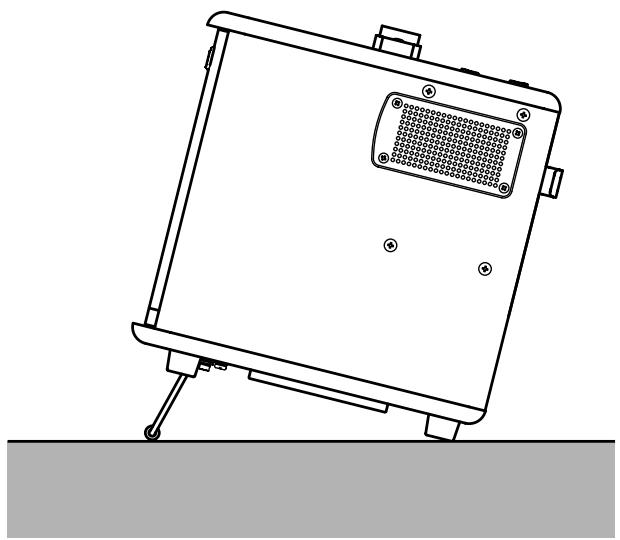

- When using the folding stand, always be sure to place it so the AC-60 remains level.
- When not using the folding stand, fold it up, and secure it to the bottom of the amp using the stoppers.
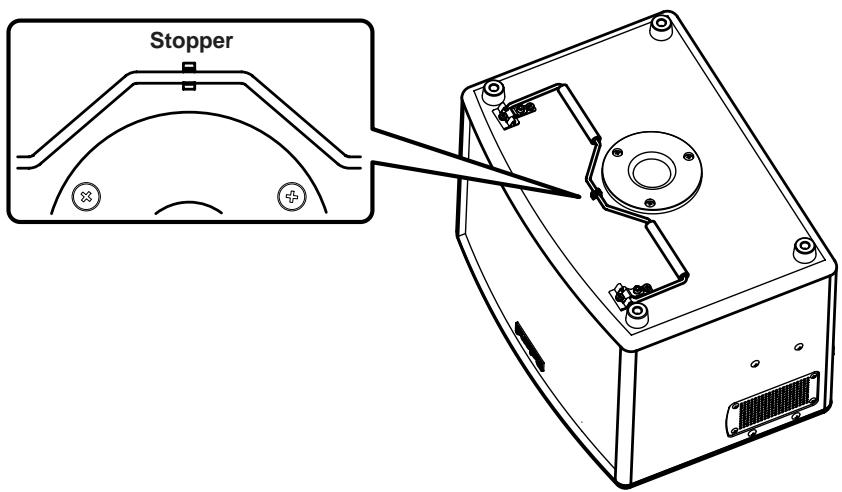
WARNING
- Never lift up and carry the AC-60 by holding the folding stand.
- Never place any objects on top of the AC-60 when using the folding stand.
Using a Speaker Stand
By using a speaker stand, you can mount the AC-60 at the optimal height for use as a monitor speaker or simple PA device.

WARNING
- The AC-60 is designed to be used only with speaker stands whose dimensions meet the specifications described below.
Do not use it with a speaker stand that does not meet the following specifications.
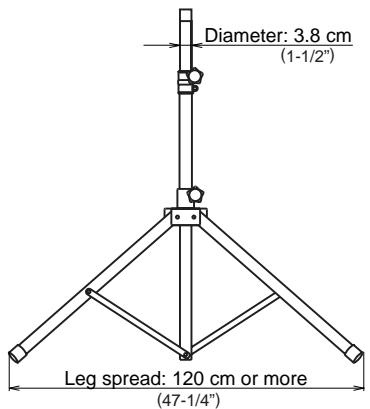
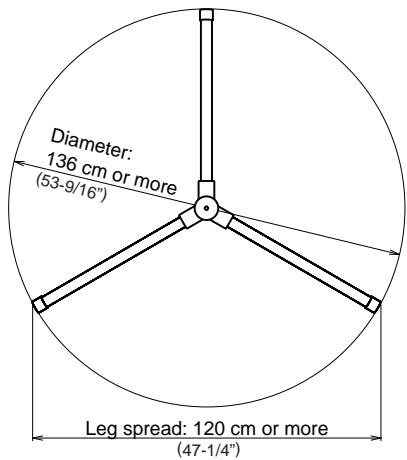
- Before use, adjust the speaker stand to a height of 165cm (65") or less and a leg spread of 120cm (47-1/4") or more, as shown in the figure below.
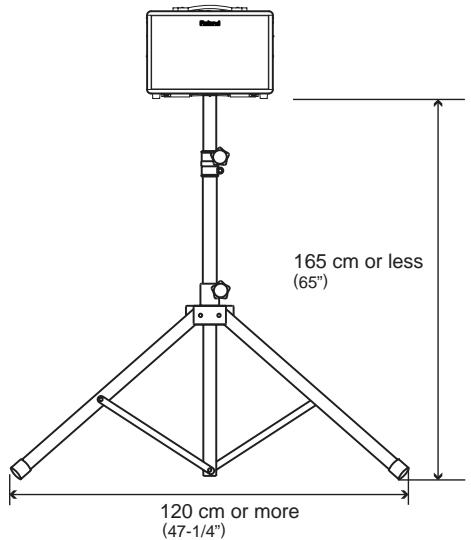
- Using a speaker stand that does not meet the specifications at left or that is adjusted to a height over 165 ~cm (65"), or a leg spread of less than 120 ~cm (47-1/4") may result in damage to equipment or injury due to the stand tipping over.
- When using AC-60 with a speaker stand, the speaker stand must be carefully placed so it is level and sure to remain stable.
- Cables connected to AC-60 should be given enough slack to prevent accidents that might result from someone tripping over them.
- To prevent accidents due to falls, do not place any object on the AC-60 when it's mounted on a speaker stand.
- Always have at least one other person assist you when mounting the AC-60 on a speaker stand, or when adjusting the height of the stand while the AC-60 remains mounted on it.
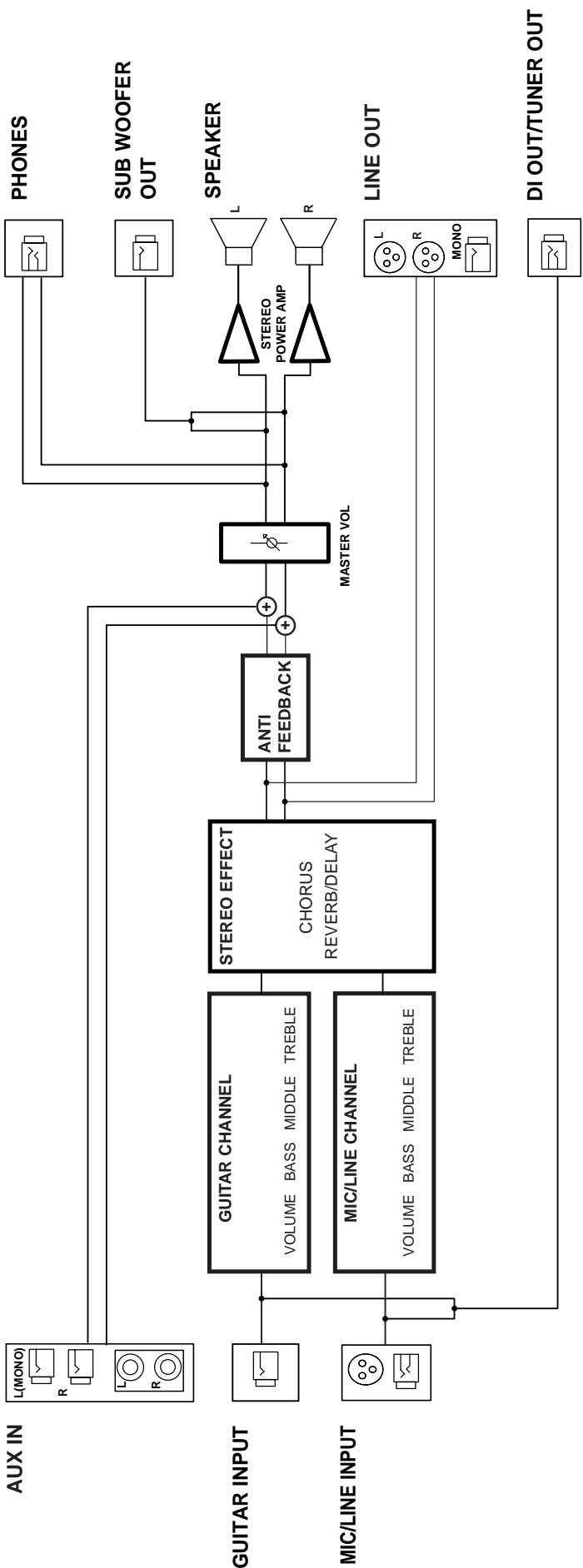
Block Diagram
Specifications
Rated Power Output
30W + 30W
Nominal Input Level (1 kHz)
GUITAR Channel: -10 dBu
MIC/LINE Channel: -50 / -10 dBu
AUX IN: -10 dBu
Nominal Output Level (1 kHz)
DI/TUNER OUT: +4 dBu
LINE OUT: +4 dBu
SUB WOOFER OUT: +4 dBu
- 0 dBu = 0.775 Vrms
Speakers
16 cm (6.5 inches) x 2
Controls
(GUITAR Channel)
PICKUP Switch (PIEZO/MAGNETIC)
SHAPE Switch
VOLUME Knob
Equalizer Knobs (BASS, MIDDLE, TREBLE)
CHORUS Switch
(MIC/LINE Channel)
PHANTOM Switch
SELECT Switch (MIC/LINE)
VOLUME Knob
Equalizer Knobs (BASS, MIDDLE, TREBLE)
CHORUS Switch
CHORUS Knob
REVERB/DELAY Knob
(ANTI-FEEDBACK)
FREQUENCY Knob
START Button
MUTE Switch
MASTER Knob
POWER Switch
Indicator
CHORUS (GUITAR Channel, MIC/LINE Channel)
ANTI-FEEDBACK
MUTE
POWER
Connectors
GUITAR Channel Input Jack (1/4" phone type)
MIC/LINE Input Jack (XLR type, 1/4" phone type)
AUX IN Jacks (RCA phono type,1/4" phone type)
DI/TUNER OUT Jack (1/4" TRS phone type)
LINE OUT Jacks (XLR type, 1/4" phone type)
SUB WOOFER OUT Jack (1/4" phone type)
PHONES Jack (1/4" TRS phone type)
FOOT SWITCH Jack (1/4" TRS phone type)
Power Supply
AC 117 V, AC 230 V, AC 240 V
Power Consumption
68 W
Dimensions
Foot Switch: BOSS FS-5L (Mute On/Off), BOSS FS-5U
Connection Cable: PCS-31

This product complies with the requirements of European Directives EMC 89/336/EEC and LVD 73/23/EEC.
For EU Countries
-For the USA
FEDERAL COMMUNICATIONS COMMISSION RADIO FREQUENCY INTERFERENCE STATEMENT
This equipment has been tested and found to comply with the limits for a Class B digital device, pursuant to Part 15 of the FCC Rules. These limits are designed to provide reasonable protection against harmful interference in a residential installation. This equipment generates, uses, and can radiate radio frequency energy and, if not installed and used in accordance with the instructions, may cause harmful interference to radio communications. However, there is no guarantee that interference will not occur in a particular installation. If this equipment does cause harmful interference to radio or television reception, which can be determined by turning the equipment off and on, the user is encouraged to try to correct the interference by one or more of the following measures:
- Reorient or relocate the receiving antenna.
- Increase the separation between the equipment and receiver.
- Connect the equipment into an outlet on a circuit different from that to which the receiver is connected.
- Consult the dealer or an experienced radio/TV technician for help.
This device complies with Part 15 of the FCC Rules. Operation is subject to the following two conditions:
(1) This device may not cause harmful interference, and
(2) This device must accept any interference received, including interference that may cause undesired operation.
Unauthorized changes or modification to this system can void the users authority to operate this equipment.
This equipment requires shielded interface cables in order to meet FCC class B Limit.
For Canada
NOTICE
This Class B digital apparatus meets all requirements of the Canadian Interference-Caising Equipment Regulations.
AVIS
When you need repair service, call your nearest Roland Service Center or authorized Roland distributor in your country as shown below.
AFRICA
EGYPT
Al Fanny Trading Office
9, EBN Hagar A1 Askalany Street
ARD E1 Golf, Heliopolis,
Cairo 11341,EGYPT
TEL:20-2-417-1828
REUNION
That Other Music Shop
(PTY) Ltd.
11 Melle St., Braamfontein,
Johannesbourg, SOUTH AFRICA
P.O.Box 32918, Braamfontein 2017
Johannesbourg, SOUTH AFRICA
TTL 2011-193-195
TEL: (011) 403 4105
Paul Bothner (PTY) Ltd.
17 Werdmuller C
Main Road, Claremont 7708
SOUTH AFRICA
P.O.BOX 23032,Claremont 7735
SOUTH AFRICA
TEL: (021) 674 4030
ASIA
CHINA
Roland Shanghai Electronics
Co.,Ltd.
5F. No.1500 Pingliang Road
Shanghai, CHINA
TEL: (021) 5580-0800
Roland Shanghai Electronics
Co., Ltd.
(BEIJING OFFICE)
10F.No.18 Anhuaxili
Chaoyang District, Beijing,
CHINA
TEL: (010) 6426-5050
HONGK
Tom Lee Music Co., Ltd.
Service Division
22-32 Pun Shan Street, Tsuen
Wan, New Territories,
HONG KONG
TEL:24150911
INDIA
Rivera Digitec (India) Pvt. Ltd.
409, Nirman Kendra Mahalaxmi
Flats Compound Off. Dr. Edwin
Moses Road, Mumbai-400011,
INDIA
TEL: (022) 2493 9051
INDONESIA
PT Citra IntiRama
J1. Cideng Timur No. 15J-150
Jakarta Pusat
INDONESIA
TEL: (021) 6324170
KOREA
Cosmos Corporation
1461-9, Seocho-Dong.
Seocho Ku, Seoul, KOREA
TEL: (02) 3486-8855
MALAYSIA
G.A. Yupangco & Co. Inc.
339 Gil J. Puyat Avenue
Makati, Metro Manila 1200,
PHILIPPINES
TEL: (02) 899 9801
SINGAPORE
Swee Lee Company
150 Sims Drive.
SINGAPORE 387381
TEL: 6846-3676
CRISTOFORIMUSIC PTE
LTD
Blk 3014, Bedok Industrial Park E,
02-2148, SINGAPORE 489980
TEL: 6243-9555
TAIWAN
ROLAND TAIWAN
ENTERPRISE CO., LTD.
Room 5, 9fl. No. 112 Chung Shan
N.Road Sec.2, Taipei, TAIWAN
R.O.C.
TEL: (02) 2561 3339
THAILAND
Theera Music Co., Ltd.
330 Verng NakornKasem, Soi 2,
Bangkok 10100, THAILAND
TEL: (02) 2248821
VIETNAM
Saigon Music
138 Tran Quang Khai St.
District 1
Ho Chi Minh City
VIETNAM
TEL: (08) 844-4068
AUSTRALIA/
NEW ZEALAND
AUSTRALIA
Roland Corporation
Australia Pty., Ltd.
38 Campbell Avenue
Dee Why West. NSW 2099
AUSTRALIA
TEL: (02) 9982 8266
NEW ZEALAND
Roland Corporation Ltd.
32 Shaddock Street, Mount Eden,
Auckland, NEW ZEALAND
TEL: (09) 3098 715
CENTRAL/LATIN
AMERICA
ARGENTINA
Instrumentos Musicales S.A.
Av.Santa Fe 2055
(1123) Buenos Aires
ARGENTINA
TEL: (011) 4508-2700
BRAZIL
Roland Brasil Ltda
Rua San Jose, 780 Sala B
Parque Industrial San Jose
Cotia - Sao Paulo - SP, BRAZIL
TEL: (011) 4615 5666
COSTA RICA
JUAN Bansbach
Instrumentos Musicales
Nataniel Cox #739, 4th Floor
Santiago - Centro, CHILE
TEL: (02) 688-9540
EL SALVADOR
OMNI MUSIC
Boulevard Andrews, Albrook,
Panama City, REP. DE PANAMA
TEL: 315-0101
PARAGUAY
Distribuidora De
Instrumentos Musicales
J.E. Oleary ESQ. Manduvira
Asuncion PARAGUAY
TEL: (021) 492-124
URUGUAY
Todo Musica S.A.
Francisco Acuna de Figueroa 1771
C.P.: 11.800
Montevideo, URUGUAY
TEL: (02) 924-2335
VENEZUELA
Musicland Digital C.A.
155, New National Road
Patras 26442, GREECE
TEL: 2610 435400
HUNGARY
Roland East Europe Ltd.
Warehouse Area DEPO'Pf.83
H-2046 Torokbalint, HUNGARY
TEL: (23) 511011
IRELAND
Roland Ireland
Audio House, Belmont Court,
Donnybrook, Dublin 4.
Republic of IRELAND
TEL: (01) 2603501
ITALY
Roland Italy S. p. A.
Danvik Center 28, 2 tr.
S-131 30 Nacka SWEDEN
TEL: (0)8702 00 20
SWITZERLAND
Roland (Switzerland) AG
Atlantic Close, Swansea
Enterprise Park, SWANSEA
SA7 9FJ,
UNITED KINGDOM
TEL: (01792) 700139
MIDDLE EAST
BAHRAIN
Moon Stores
No.16, Bab Al Bahrain Avenue,
P.O.Box 247, Manama 304,
State of BAHRAIN
TEL: 211 005
CYPRUS
Radex Sound Equipment Ltd.
17, Diagorou Street, Nicosia,
CYPRUS
TEL: (022) 66-9426
IRAN
MOCO, INC.
No.41 Nike St., Dr.Shariyati Ave.,
Roberoye Cerahe Mirdamad
Tehran, IRAN
TEL: (021) 285-4169
ISRAEL
Halilit P. Greenspoon &
Sons Ltd.
8 Retzif Ha'aliya Hashnya St.
Tel-Aviv-Yafo ISRAEL
TEL: (03) 6823666
JORDAN
AMMAN Trading Agency
245 Prince Mohammad St.,
Amman 1118, JORDAN
TEL: (06) 464-1200
KUWAIT
Easa Husain Al Yousifi Est.
Abdullah Salem Street,
Safat, KUWAIT
TEL: 243-6399
LEBANON
Chahine S.A.L.
Gerge Zeidan St., Chahine Bldg.
Achrafieh, P.O.Box: 16-5857
Beirut,LEBANON
TEL: (01) 20-1441
QATAR
Al Emadi Co. (Badie Studio
& Stores)
P.O.Box 62
Doha, QATAR
TEL: 4423-554
SAUDI ARA
aDawliah Universal
Electronics APL
Corniche Road, Aldossary Bldg..
1st Floor, Alkhobar,
SAUDI ARABIA
P.O.Box 2154, Alkhobar 31952
SAUDI ARABIA
TEL: (03) 898 2081
SYRIA
Technical Light & Sound
Center
Khaled Ebn Al Walid St.
Bldg. No. 47, P.O.BOX 13520,
Damascus, SYRIA
TEL: (011) 223-5384
TURKEY
Barkat muzik aleteri ithalat
ve ihracat Ltd Sti
Siraselviler Caddesi Siraselviler
Pasaji No:74/20
Taksim - Istanbul, TURKEY
TEL: (0212) 2499324
U.A.E.
Zak Electronics & Musical
Instruments Co. L.L.C.
Zabeel Road, Al Sherooq Bldg.
No. 14, Grand Floor, Dubai, U.A.E.
TEL: (04) 3360715
NORTH AMERICA
CANADA
Roland Canada Music Ltd.
(Head Office)
5480 Parkwood Way Richmond
B.C., V6V 2M4 CANADA
TEL: (604) 270 6626
Roland Canada Music Ltd.
(Toronto Office)
170 Admiral Boulevard
Mississauga On L5T 2N6
CANADA
TEL: (905) 362 9707
U.S.A.
Roland Corporation U.S.
5100 S. Eastern Avenue
Los Angeles, CA 90040-2938
U.S.A.
TEL: (323) 890 3700
As of December 1, 2002 (Roland)