
CTK-700 - Electronic keyboard CASIO - Free user manual and instructions
Find the device manual for free CTK-700 CASIO in PDF.


| Product type | Electronic keyboard |
| Brand | CASIO |
| Model | CTK-700 |
| Dimensions | 95.6 x 35.4 x 13.2 cm |
| Weight | Approximately 3.8 kg (without batteries) |
| Power supply | 6 AA batteries (approx. 4 hours alkaline) or AD-5 AC adaptor |
| Number of keys | 61 standard keys (5 octaves) |
| Polyphony | 12 notes maximum (6 for some tones) |
| Number of tones | 100 (including layered and split tones) |
| Number of rhythms | 100 |
| Song Bank | 100 built-in songs |
| Automatic accompaniment | Yes (CASIO CHORD and FINGERED) |
| Display | Graphic LCD screen with staff, keyboard, fingering, tempo, and chord name |
| Metronome | Yes (graphic, adjustable tempo 20 to 255) |
| Transposition | Range -6 to +5 semitones |
| Tuning | Range -50 to +50 cents |
| Connectivity | MIDI IN/OUT, headphone/stereo output, microphone input (6.35 mm jack), sustain jack |
| MIDI interface | Yes, multi-timbre reception on 5 channels |
| Speakers | 2 x 2.0 W |
| Power consumption | 7.7 W (with adaptor) |
| Auto power off | Yes (approx. 6 min, battery only, can be disabled) |
| Maintenance | Clean with a soft, slightly damp cloth (water + mild detergent). Do not use thinners or benzene. |
| Included accessories | Music stand |
| Optional accessories | AD-5 adaptor, SP-3/SP-20 sustain pedal |
| Repairability | All repairs must be carried out by a CASIO authorized service center |
| Manual | 45 pages, available as a free PDF download |
Frequently Asked Questions - CTK-700 CASIO
User questions about CTK-700 CASIO
0 question about this device. Answer the ones you know or ask your own.
Ask a new question about this device
Download the instructions for your Electronic keyboard in PDF format for free! Find your manual CTK-700 - CASIO and take your electronic device back in hand. On this page are published all the documents necessary for the use of your device. CTK-700 by CASIO.
USER MANUAL CTK-700 CASIO
This equipment has been tested and found to comply with the limits for a Class B digital device, pursuant to Part 15 of the FCC Rules. These limits are designed to provide reasonable protection against harmful interference in a residential installation. This equipment generates, uses and can radiate radio frequency energy and, if not installed and used in accordance with the instructions, may cause harmful interference to radio communications. However, there is no guarantee that interference will not occur in a particular installation. If this equipment does cause harmful interference to radio or television reception, which can be determined by turning the equipment off and on, the user is encouraged to try to correct the interference by one or more of the following measures:
Reorient or relocate the receiving antenna.
- Increase the separation between the equipment and receiver.
- Connect the equipment into an outlet on a circuit different from that to which the receiver is connected.
- Consult the dealer or an experienced radio/TV technician for help.
FCC WARNING
Changes or modifications not expressly approved by the party responsible for compliance could void the user's authority to operate the equipment.
Important!
Please note the following important information before using this product.
- Before using the optional AD-5 Adaptor to power the unit, be sure to check the AC Adaptor for any damage first. Carefully check the power cord for breakage, cuts, exposed wire and other serious damage. Never let children use an AC adaptor that is seriously damaged.
- Never attempt to recharge batteries.
- Do not use rechargeable batteries.
- Never mix old batteries with new ones.
- Use recommended batteries or equivalent types.
- Always make sure that positive (+) and negative (-) poles are facing correctly as indicated near the battery compartment.
- Replace batteries as soon as possible after any sign they are getting weak.
- Do not short-circuit the battery terminals.
- The product is not intended for children under 3 years.
- Use only CASIO AD-5 adaptor.
- The AC adaptor is not a toy.
- Be sure to disconnect the AC adaptor before cleaning the product.
Congratulations on your selection of the CASIO electronic musical instrument.
- Before using the instrument, be sure to carefully read through the instructions contained in this manual.
- Please keep all information for future reference.
Symbols
Various symbols are used in this user's guide and on the product itself to ensure that the product is used safely and correctly, and to prevent injury to the user and other persons as well as damage to property. Those symbols along with their meanings are shown below.

DANGER
This symbol indicates information that, if ignored or applied incorrectly, creates the danger of death or serious personal injury.

WARNING
This indication stipulates matters that have the risk of causing death or serious injury if the product is operated incorrectly while ignoring this indication.

CAUTION
This indication stipulates matters that have the risk of causing injury as well as matters for which there is the likelihood of occurrence of physical damage only if the product is operated incorrectly while ignoring this indication.
Symbol Examples

This triangle symbol () means that the user should be careful. (The example at left indicates electrical shock caution.)

This circle with a line through it (O) means that the indicated action must not be performed. Indications within or nearby this symbol are specifically prohibited. (The example at left indicates that disassembly is prohibited.)

The black dot () means that the indicated action must be performed. Indications within this symbol are actions that are specifically instructed to be performed. (The example at left indicates that the power plug must be unplugged from the electrical socket.)
DANGER
Alkaline Batteries
Perform the following steps immediately if fluid leaking from alkaline batteries ever gets into your eyes.
- Do not rub your eyes! Rinse them with water.
- Contact your physician immediately.
Leaving alkaline battery fluid in your eyes can lead to loss of sight.

WARNING
Smoke, Strange Odor, Overheating
Continued use of the product while it is emitting smoke, a strange odor, or heat creates the risk of fire and electric shock. Take the following steps immediately.
- Turn off power.
- If you are using the AC adaptor for power, unplug it from the wall outlet.
- Contact your original retailer or an authorized CASIO Service Provider.
AC Adaptor
- Misuse of the AC adaptor creates the risk of fire and electric shock. Always make sure you observe the following precautions.
- Be sure to use only the AC adaptor that is specified for this product.
- Use only a power source whose voltage is within the rating marked on the AC adaptor.
-
Do not overload electrical outlets and extension cords.
-
Misuse of the AC adaptor's electric cord can damage or break it, creating the risk of fire and electric shock. Always make sure you observe the following precautions.
-
Never place heavy objects on the cord or subject it to heat.
- Never try to modify the cord or subject it to excessive bending.
- Never twist or stretch the cord.
- Should the electric cord or plug become damaged, contact your original retailer or authorized CASIO Service Provider.


- Never touch the AC adaptor while your hands are wet.
Doing so creates the risk of electric shock.
- Use the AC adaptor where it will not be splashed with water. Water creates the risk of fire and electric shock.
- Do not place a vase or any other container filled with liquid on top of the AC adaptor. Water creates the risk of fire and electric shock.
Batteries
Misuse of batteries can cause them to leak, resulting in damage to nearby objects, or to explode, creating the risk of fire and personal injury. Always make sure you observe the following precautions.
- Never try to take batteries apart or allow them to become shorted.
- Never expose batteries to heat or dispose of them by incineration.
- Never mix old batteries with new ones.
- Never mix batteries of different types.
- Do not charge the batteries.
- Make sure the positive (+) and negative (-) ends of the batteries are facing correctly.
Do not incinerate the product.
Never throw the product into fire.
Doing so can cause it to explode, creating the risk of fire and personal injury.
Water and Foreign Matter
Water, other liquids, and foreign matter (such as pieces of metal) getting into the product create the risk of fire and electric shock. Take the following steps immediately.
- Turn off power.
- If you are using the AC adaptor for power, unplug it from the wall outlet.
- Contact your original retailer or an authorized CASIO Service Provider.
Disassembly and Modification
Never try to take this product apart or modify it in any way. Doing so creates the risk of electric shock, burn injury, or other personal injury. Leave all internal inspection, adjustment, and maintenance up to your original retailer or authorized CASIO Service Provider.


Dropping and Impact
Continued use of this product after it has been damaged by dropping or subjecting it to strong impact creates the risk of fire and electric shock. Take the following steps immediately.
- Turn off power.
- If you are using the AC adaptor for power, unplug it from the wall outlet.
- Contact your original retailer or an authorized CASIO Service Provider.
Plastic Bags
Never place the plastic bag the product comes in over your head or in your mouth. Doing so creates the risk of suffocation.
Particular care concerning this precaution is required where small children are present.
Keep off of the product and stand.*
Climbing onto the product or stand can cause it to tip over or become damaged. Particular care concerning this precaution is required where small children are present.
Location
Avoid locating the product on an unstable stand, on an uneven surface, or any other unstable location. An unstable location can cause the product to fall over, creating the risk of personal injury.


CAUTION
AC Adaptor
-
Misuse of the AC adaptor creates the risk of fire and electric shock. Always make sure you observe the following precautions.
-
Do not locate the electric cord near a stove or other sources of heat.
-
Never pull on the cord when unplugging from the electrical outlet. Always grasp the AC adaptor when unplugging.
-
Misuse of the AC adaptor creates the risk of fire and electric shock. Always make sure you observe the following precautions.
-
Insert the AC adaptor into the wall outlet as far as it will go.
- Unplug the AC adaptor from the wall outlet during lightening storms or before leaving on a trip or other long-term absence.
- At least once a year, unplug the AC adaptor from the wall outlet and wipe away any dust that is built up in the area around the prongs of the plug.
Relocating the Product
Before relocating the product, always unplug the AC adaptor from the wall outlet and disconnect all other cables and connecting cords. Leaving cords connected creates the risk of damage to the cords, fire, and electric shock.
Cleaning
Before cleaning the product, always unplug the AC adaptor from the wall outlet first. Leaving the AC adaptor plugged in creates the risk of damage to the AC adaptor, fire, and electric shock.
Batteries
Misuse of batteries can cause them to leak resulting in damage to nearby objects, or to explode, creating the risk of fire and personal injury. Always make sure you observe the following precautions.
- Use only batteries that are specified for use with this product.
- Remove batteries from the product if you do not plan to use it for a long time.


Connectors
Connect only the specified devices and equipment to the product's connectors. Connection of a non-specified device or equipment creates the risk of fire and electric shock.
Location
Avoid the following locations for this product. Such locations create the risk of fire and electric shock.
- Areas subject to high humidity or large amounts of dust.
- In food preparation areas or other areas subject to oil smoke.
- Near air conditioning equipment, on a heated carpet, in areas exposed to direct sunlight, inside of a vehicle parked in the sun, or any other area that subjects the product to high temperatures.
Display Screen
- Never push on the display screen's LCD panel or subject it to strong impact. Doing so can cause the LCD panel's glass to crack, creating the risk of personal injury.
- Should the LCD panel ever crack or break, never touch the liquid inside of the panel. LCD panel liquid can cause skin irritation.
- Should LCD panel liquid ever get inside your mouth, immediately wash out your mouth with water and contact your physician.
- Should LCD panel liquid ever get into your eyes or onto your skin, rinse with clear water for at least 15 minutes, and then contact a physician.
Sound Volume
Do not listen to music at very loud volumes for long periods. Particular care concerning this precaution is required when using headphones. High volume settings can damage your hearing.
Heavy Objects
Never place heavy object on top of the product.
Doing so can make the product top heavy, causing the product to tip over or the object to fall from it, creating the risk of personal injury.


Correct Stand* Assembly
An incorrectly assembled stand can tip over, causing the product to fall and creating the risk of personal injury.

Make sure you assemble the stand correctly, following the assembly instructions that come with it. Make sure you mount the product on the stand correctly.
- Stand is available as an option.
IMPORTANT!
When using batteries, be sure to replace them or shift to one of the alternate power sources whenever you notice any of the following symptoms.
- Dim power indicator
Instrument does not turn on - Display that is flickering, dim, or difficult to read
- Abnormally low speaker/headphone volume
Distortion of sound output - Occasional interruption of sound when playing at high volume
- Sudden power failure when playing at high volume
- Flickering or dimming of the display when playing at high volume
- Continued sound output even after you release a key
- A tone that is totally different from the one that is selected
- Abnormal rhythm pattern and Song Bank play
- Loss of power, sound distortion, or low volume when playing from a connected computer or MIDI device
- Abnormally low microphone volume
Distortion of microphone input - Dim power supply indicator when a microphone is used
- Sudden power failure when using the microphone
Congratulations upon your selection of this CASIO musical instrument. This keyboard provides you with the following features and functions.
100 tones
- Choose from among orchestral sounds, synthesized sounds, and more.
100 rhythms
- 100 versatile rhythms help to add plenty of life to all your keyboard performances.
Auto Accompaniment
- Simply play a chord and the corresponding rhythm, bass and chord parts play automatically.
100-tune Song Bank
- A wide selection of favorites including "ODE TO JOY" and "JINGLE BELLS" is yours for your listening enjoyment or play along fun. A simple operation cuts out the melody part or accompaniment part of the tune, allowing you to play along on the keyboard.
Musical Information System
- A big LCD screen graphically shows you fingerings, keyboard keys to be pressed, and notes, making keyboard play more informative and enjoyable than ever before.
MIDI compatibility
- Connecting to another MIDI device lets you sound notes on both this keyboard and the connected device by playing on this keyboard. You can even playback commercially available pre-recorded MIDI data.

Care of your keyboard
Avoid heat, humidity or direct sunlight.
Do not overexpose the instrument to direct sunlight, or place it near an air conditioner, or in any extremely hot place.
Do not use near a TV or radio.
This instrument can cause video or audio interference with TV and radio reception. If this happens, move the instrument away from the TV or radio.
Do not use lacquer, thinner or similar chemicals for cleaning.
Clean the keyboard with a soft cloth dampened in a weak solution of water and a neutral detergent. Soak the cloth in the solution and squeeze until it is almost dry.
Avoid use in areas subjected to temperature extremes.
Extreme heat can cause figures on the LCD screen to become dim and difficult to read. This condition should correct itself when the keyboard is brought back to normal temperature.
NOTE
- You may notice lines in the finish of the case of this keyboard. These lines are a result of the molding process used to shape the plastic of the case. They are not cracks or breaks in the plastic, and are no cause for concern.
Safety Precautions. E-1
Introduction E-5
Care of your keyboard . . . . . E-5
Contents. E-6
General Guide. E-8
Using the Display E-10
Song Bank Quick
Reference E-11
Playing Back a Song Bank Tune. E-11
Power Supply E-13
Using batteries E-13
Using the AC Adaptor. E-14
Auto Power Off E-14
Settings E-14
Connections E-15
Phones/Output Terminal E-15
Sustain jack Terminal E-15
Accessories and Options E-15
Basic Operations. E-16
Playing the Keyboard E-16
Selecting a Tone. E-16
Using the Microphone Jack. E-17
Auto Accompaniment ...... E-18
Selecting a Rhythm. E-18
Playing a Rhythm . E-18
Adjusting the Tempo. E-19
Using Auto Accompaniment E-19
Using a Fill-in Pattern. E-21
Synchro Starting Accompaniment with Rhythm Play E-21
Adjusting the Accompaniment Volume... E-21
Using the Song Bank......E-22
Playing Back a Song Bank Tune...... E-22
Song Bank Mode Display. E-23
Adjusting the Tempo of a Song Bank
Tune E-23
Changing the Tone of a Song Bank
Tune's Melody E-24
Playing Along with a Song Bank Tune ... E-24
Applause Sound. E-25
Playing Back All Song Bank Tunes in Succession E-25
Using the Chord Book .... E-26
Looking Up a Chord Using the Chord Book E-27
Keyboard Settings E-29
Transposing the Keyboard E-29
Tuning the Keyboard. E-29
MIDI E-30
What is MIDI? E-30
General MIDI. E-30
Changing MIDI Settings E-31
Troubleshooting E-32
Specifications E-33
Appendix A-1
Tone List. A-1
Note Table A-2
Fingered Chord Chart A-4
Percussion Instrument List. A-6
Rhythm List A-7
MIDI Implementation Chart

- Illustrations in this User's Guide shows the CTK-496.
① MIC VOLUME knob
② Power indicator
③ MAIN VOLUME buttons
④ SYNCHRO/FILL-IN button
⑤ START/STOP button
⑥ POWER/MODE switch
⑦ TEMPO buttons
⑧ ACCOMP VOLUME button
⑨ TRANSPOSE/TUNE/MIDI button
10 Percussion instrument list
⑪ CHORD root names
12 Speaker
MIC IN jack
14 Rhythm list
15 Tone list
⑥ Song Bank list
⑰ Display
18 [+]/[-] buttons
- Negative values can be changed only by using [+] and [-] to increase and decrease the displayed value.
Number buttons/Chord specification buttons
- For input of numbers to change displayed settings.
- For input of chord specification data when using the Chord Book.
20 TONE button
② RHYTHM button
② SONG BANK button
STOP button
24 PLAY/PAUSE button
25 REW button
FF button
LEFT ON/OFF button
28 RIGHT ON/OFF button
CHORD BOOK button
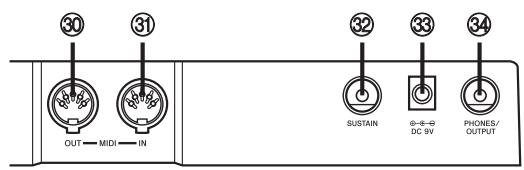
Rear Panel
MIDI OUT terminal
③ MIDI IN terminal
SUSTAIN jack terminal
③ DC 9V terminal
34 PHONES/OUTPUT terminal
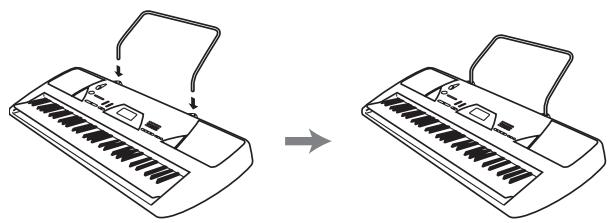
*Attachment of the Score Stand
Insert both ends of the music stand provided with the keyboard into the two holes on the top surface.
Using the Display
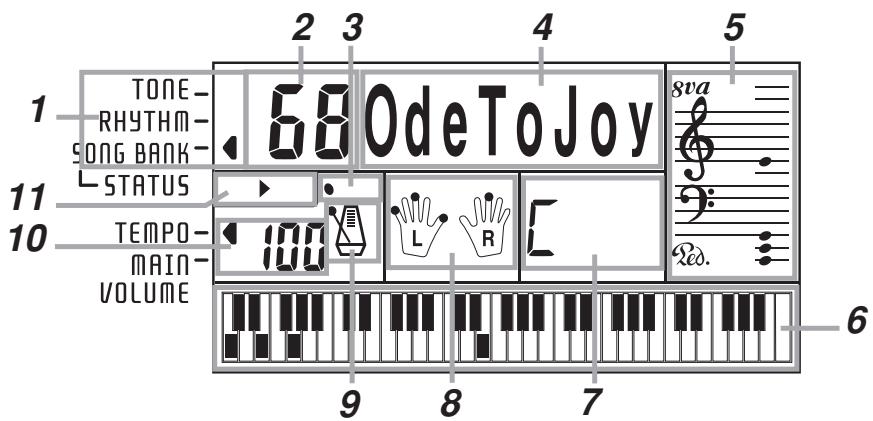
- This is how the display appears while the Song Bank is in use.
- An indicator appears next to the type of setting you are currently performing (TONE, RHYTHM, SONG BANK).
- Tone number, rhythm number, song number, keyboard settings value
- Rhythm, auto-accompanyment, Song Bank tune beats
- Tone name, rhythm name, song name, mode name, keyboard settings name
- Musical staff representation of notes and chords you play on the keyboard. A pedal indicator (_ ) appears when the keyboard's pedal is depressed. An octave indicator (8va) appears when you play notes in the range from C#6 to C7 to indicate that their actual notation is one octave higher than that shown on display.
- Uses a graphic keyboard to show notes and chords played on the keyboard or played during Song Bank tune playback
- Auto-accompanyment, Song Bank, chord book chord names
- Dots indicate fingerings during Song Bank playback. "L" and "R" indicate left-hand and right-hand parts.
- Rhythm, auto-accompaniment, Song Bank tune tempo
- Rhythm, auto-accompanyment, Song Bank tune tempo; volume setting
- Song Bank controller indicators
NOTE
- Display examples shown in this User's Guide are intended for illustrative purposes only. The actual text and values that appear on the display may differ from the examples shown in this User's Guide.
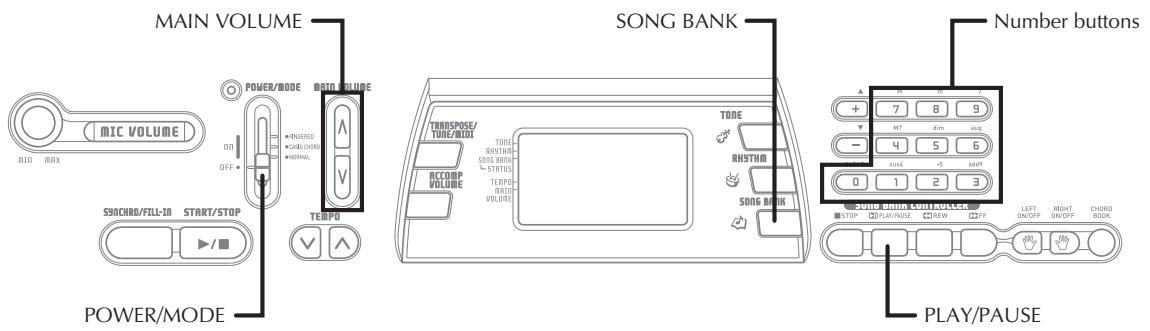
A selection of 100 Song Bank tunes comes built-in for your listening pleasure or play along fun. A simple operation cuts out the melody part or accompaniment part of the tune, allowing you to play along on the keyboard. See "Using the Song Bank" on page E-22 for details on playing along with Song Bank tunes.
Playing Back a Song Bank Tune
To play back a Song Bank tune
1 Set the POWER/MODE switch to NORMAL.
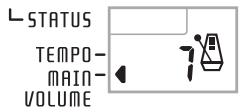
Use the MAIN VOLUME buttons to lower the keyboard volume to a relatively low level.
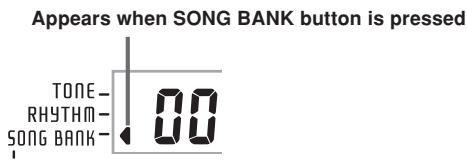
Press the SONG BANK button to enter the Song Bank Mode.
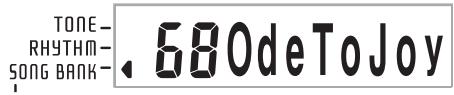
Use the Song Bank list to find the tune you want to play back, and then use the number buttons to input the tune's two-digit number.
Example: To select "68 ODE TO JOY", input 6 and then 8.
Press the PLAY/PAUSE button to start play of the tune.
- The tune plays in an endless loop, re-starting after it reaches the end.
- The display shows the keyboard keys (on the graphic keyboard), fingerings (with the fingering indicators), musical notes (on the staff), and chord names.
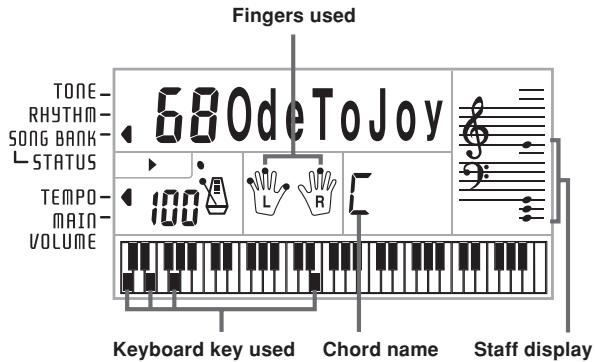
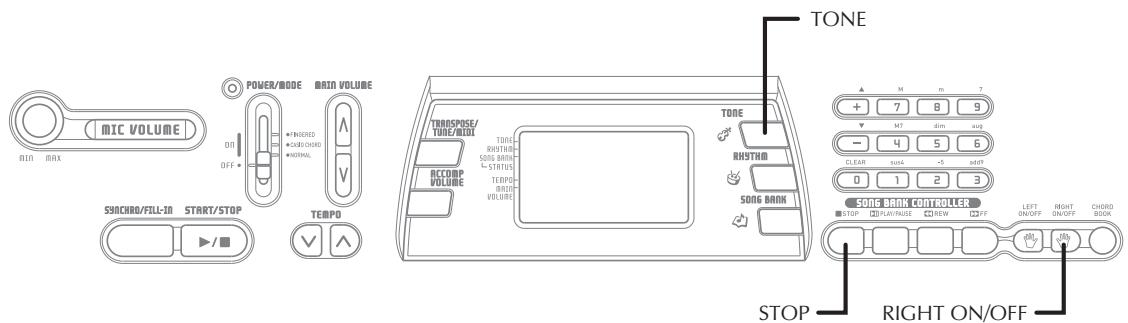
Press the RIGHT ON/OFF button to turn off the right-hand melody part and try playing along on the keyboard.
- The display's graphic keyboard and fingering indicators show you the melody notes to play.
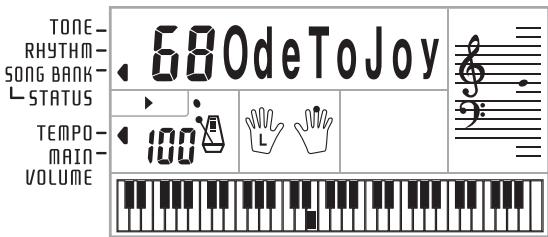
7 Press the RIGHT ON/OFF button again to turn the melody part back on.
- You can also turn the accompaniment part on and off by pressing the LEFT ON/OFF button.
Press the STOP button to stop playback of the Song Bank tune.
Press the TONE button to exit the Song Bank Mode and return to the tone and rhythm selection screen.
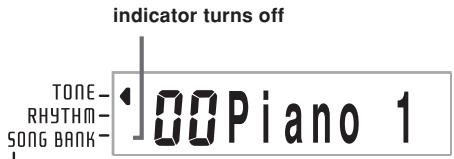
NOTE
- You can also perform the following operations during play of a Song Bank tune.
- Pause: Press the PLAY/PAUSE button.
- Fast Forward: Press the FF (fast forward) button.
- Rewind: Press the REW (rewind) button.
This keyboard can be powered by current from a standard household wall outlet (using the specified AC adaptor) or by batteries. Always make sure you turn the keyboard off whenever you are not using it.
Using batteries
Always make sure you turn off the keyboard before loading or replacing batteries.
To load batteries
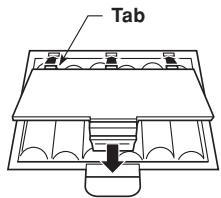
1 Remove the battery compartment cover.
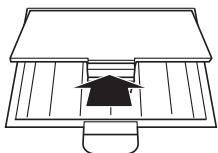
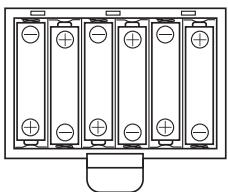
2 Load 6 AA-size batteries into the battery compartment.
- Make sure that the positive (+) and negative (-) ends are facing correctly.
3 Insert the tabs on the battery compartment cover into the holes provided and close the cover.
The keyboard may not function correctly if you load or replace batteries with power turned on. If this happens, turning the keyboard off and then back on again should return functions back to normal.
Important Battery Information
The following shows the approximate battery life.
Alkaline batteries 4 hours*
Manganese batteries 2 hours*
- The above value is standard battery life at normal temperature, with the keyboard volume at medium setting. Temperature extremes or playing at very loud volume settings can shorten battery life.
Any of the following symptoms indicate low battery power. Replace batteries as soon as possible whenever any of the following occurs.
- Dim power indicator
- Instrument does not turn on
- Display that is flickering, dim, or difficult to read
- Abnormally low speaker/headphone volume
Distortion of sound output - Occasional interruption of sound when playing at high volume
- Sudden power failure when playing at high volume
- Flickering or dimming of the display when playing at high volume
- Continued sound output even after you release a key
- A tone that is totally different from the one that is selected
- Abnormal rhythm pattern and Song Bank play
- Loss of power, sound distortion, or low volume when playing from a connected computer or MIDI device
- Abnormally low microphone volume
Distortion of microphone input - Dim power supply indicator when a microphone is used
- Sudden power failure when using the microphone
WARNING
Misuse of batteries can cause them to leak, resulting in damage to nearby objects, or to explode, creating the risk of fire and personal injury. Always make sure you observe the following precautions.
- Never try to take batteries apart or allow them to become shorted.
- Never expose batteries to heat or dispose of them by incineration.
- Never mix old batteries with new ones.
- Never mix batteries of different types.
- Do not charge the batteries.
- Make sure the positive (+) and negative (-) ends of the batteries are facing correctly.
CAUTION
Misuse of batteries can cause them to leak resulting in damage to nearby objects, or to explode, creating the risk of fire and personal injury. Always make sure you observe the following precautions.
- Use only batteries that are specified for use with this product.
- Remove batteries from the product if you do not plan to use it for a long time.

Using the AC Adaptor
Make sure that you use only the AC adaptor specified for this keyboard.
Specified AC Adaptor: AD-5
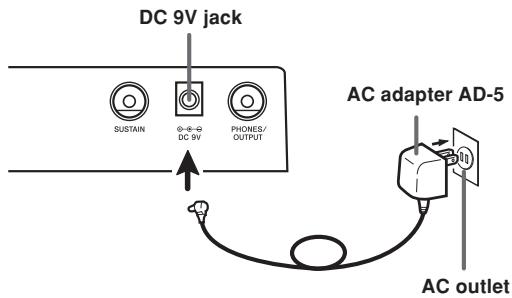
[Rear Panel]
Also note the following important warnings and precautions when using the AC adaptor.

WARNING
Misuse of the AC adaptor creates the risk of fire and electric shock. Always make sure you observe the following precautions.
- Be sure to use only the AC adaptor that is specified for this product.
- Use only a power source whose voltage is within the rating marked on the AC adaptor.
- Do not overload electrical outlets and extension cords.
- Never place heavy objects on the cord or subject it to heat.
- Never try to modify the cord or subject it to excessive bending.
- Never twist or stretch the cord.
- Should the electric cord or plug become damaged, contact your original retailer or authorized CASIO Service Provider.
- Never touch the AC adaptor while your hands are wet. Doing so creates the risk of electric shock.
- Use the AC adaptor where it will not be splashed with water. Water creates the risk of fire and electric shock.
- Do not place a vase or any other container filled with liquid on top of the AC adaptor. Water creates the risk of fire and electric shock.

CAUTION
Misuse of the AC adaptor creates the risk of fire and electric shock. Always make sure you observe the following precautions.
- Do not locate the electric cord near a stove or other sources of heat.
- Never pull on the cord when unplugging from the electrical outlet. Always grasp the AC adaptor when unplugging.
- Insert the AC adaptor into the wall outlet as far as it will go.
- Unplug the AC adaptor from the wall outlet during lightening storms or before leaving on a trip or other long-term absence.
- At least once a year, unplug the AC adaptor from the wall outlet and wipe away any dust that is built up in the area around the prongs of the plug.
IMPORTANT!
- Make sure that the keyboard is turned off before connecting or disconnecting the AC adaptor.
- Using the AC adaptor for a long time can cause it to become warm to touch. This is normal and does not indicate malfunction.
Auto Power Off
When you are using battery power, keyboard power turns off automatically whenever you leave it on without performing any operation for about 6 minutes. When this happens, use the POWER/MODE switch to turn power back on.
NOTE
- Auto Power Off is disabled (it does not function) when you are using the AC adaptor to power the keyboard.
To disable Auto Power Off
Hold down the TONE button while turning on the keyboard to disable Auto Power Off.
NOTE
- When Auto Power Off is disabled, the keyboard does not turn off automatically no matter how long it is left with no operation being performed.
- Auto Power Off is automatically enabled whenever you turn on keyboard power.
Settings
All keyboard settings are returned to their initial defaults whenever keyboard power is turned back on after being turned off by operation of the POWER/MODE switch or Auto Power Off.
Phones/Output Terminal
Before connecting phones or other external equipment, be sure to first turn down the volume settings of the keyboard and the connected equipment. You can then adjust volume to the desired level after connections are complete.
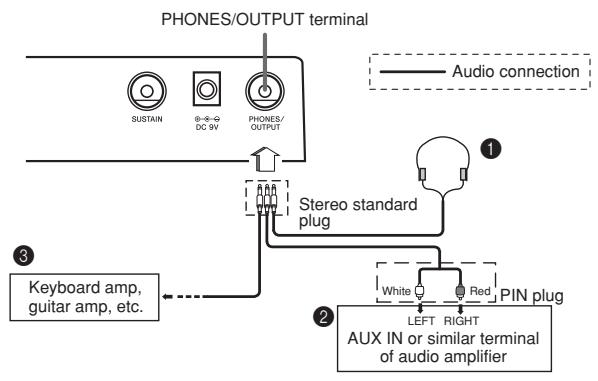
[Rear Panel]
Connecting Phones (Figure 1)
Connecting phones cuts off output from the keyboard's built-in speakers, so you can play even late at night without disturbing anyone.
Audio Equipment (Figure 2)
Connect the keyboard to a audio equipment using a commercially available connecting cord with a standard plug on one end and two PIN plugs on the other end. Note that the standard plug you connect to the keyboard must be a stereo plug, otherwise you will be able to output only one of stereo channels. In this configuration, you normally set the input selector of the audio equipment to the terminal (usually marked AUX IN or something similar) where the cord from the keyboard is connected. See the user documentation that comes with your audio equipment for full details.
Musical Instrument Amplifier (Figure 3)
Use a commercially available connecting cord* to connect the keyboard to a musical instrument amplifier.
- Be sure to use a connecting cord that has a stereo standard plug on the end you connect to the keyboard, and a connector that provides dual channel (left and right) input to the amplifier to which you are connecting. The wrong type of connector at either end can cause one of the stereo channels to be lost.
When connected to a musical instrument amplifier, set the volume of the keyboard to a relatively low level and make output volume adjustments using the amplifier's controls.
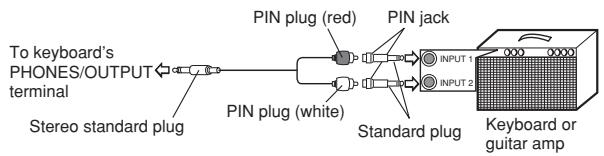
[Connection Example]
NOTE:
- You can also connect the keyboard's MIDI terminal to a computer or sequencer. See "MIDI" on page E-30 for details.
Sustain jack Terminal
You can connect an optional sustain pedal (SP-3 or SP-20) to the SUSTAIN jack terminal to enable the capabilities described below.
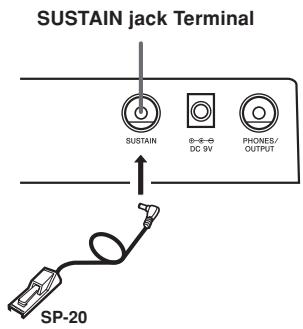
Sustain Pedal
- With piano tones, depressing the pedal causes notes to linger, much like a piano's damper pedal.
- With organ tones, depressing the pedal causes notes to continue to sound until the pedal is released.
Accessories and Options
Use only the accessories and options specified for this keyboard. Use of non-authorized items creates the danger of fire, electrical shock, and personal injury.
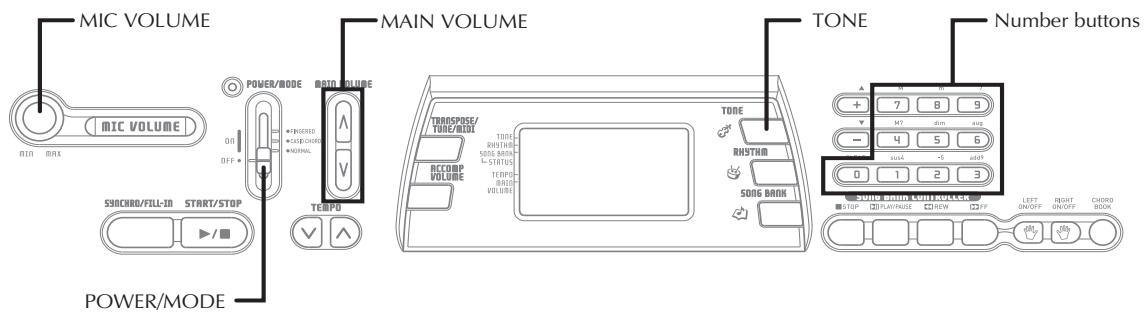
This section provides information on performing basic keyboard operations.
Playing the Keyboard
To play the keyboard
1 Set the POWER/MODE switch to NORMAL.
Use the MAIN VOLUME buttons to lower the keyboard volume.
- It's always a good idea to set the keyboard volume at a relatively low level before playing.
- Pressing [] or [] causes the current volume setting to appear on the display. Press [] or [] again to change the setting.
3 Play something on the keyboard.
Selecting a Tone
This keyboard comes with 100 built-in tones. Use the following procedure to select the tone you want to use.
To select a tone
1 Find the tone you want to use in the TONE List and note its tone number.
- Not all of the available tones are shown on the tone list printed on the keyboard console. For a complete list, see the "Tone List" on page A-1.
Press the TONE button.
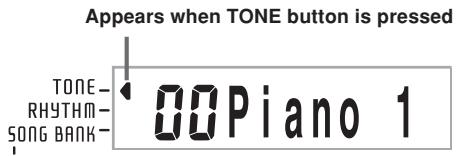
3 Use the number buttons to input the two digit tone number for the tone you want to select. Example: To select "26 WOOD BASS", input 2 and then 6.

- Now notes played on the keyboard will be played using an acoustical wood bass sound.
NOTE
- Always input both digits for the tone number, including a leading zero (if any). If you input one digit and stop, the display will automatically clear your input after a few seconds.
- You can also increment the displayed tone number by pressing [+ ] and decrement it by pressing [-] .
Sound effect tones such as 77 VEHICLE sound best when you keep a keyboard key depressed.
Combination tones
The following describes the two types of combination tones that are available.
Layered Tones (Tone Numbers: 80 through 89)
Example: 80 STR PIANO
This tone layers a strings tone with a piano tone so they both sound when a keyboard key is pressed.
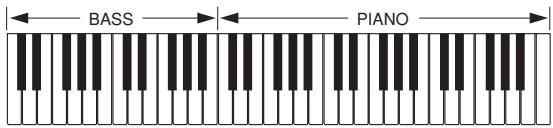
Split Tones (Tone Numbers: 90 through 96)
Example: 90 BASS/PIANO
This tone splits the keyboard so one range is assigned a bass tone and another range is assigned a piano tone.
Percussion sounds
Example: 99 PERCUSSION
This tone assigns various percussion sounds to the keyboard. See the "Percussion Instrument List" on page A-6 for full details.
Sound Effect Tones
With sound effect tones 77 through 79, the type of sound produced depends on the octave where the key you press is located. When 78 PHONE is selected available sound types are PUSH TONE 1, PUSH TONE 2, RING 1, RING 2, and BUSY SIGNAL.
Polyphony
The term polyphony refers to the maximum number of notes you can play at the same time. The keyboard has 12-note polyphony, which includes the notes you play as well as the rhythms and auto-accompanyiment patterns that are played by the keyboard. This means that when a rhythm or auto-accompanyiment pattern is being played by the keyboard, the number of notes (polyphony) available for keyboard play is reduced. Also note that some of the tones offer only 6-note polyphony.
NOTE
- When rhythm or auto accompaniment is playing, the number of sounds simultaneously played is reduced.
Digital Sampling
A number of the tones that are available with this keyboard have been recorded and processed using a technique called digital sampling. To ensure a high level of tonal quality, samples are taken in the low, mid, and high ranges and then combined to provide you with sounds that are amazingly close to the originals. You may notice very slight differences in volume or sound quality for some tones when you play them at different positions on the keyboard. This is an unavoidable result of multiple sampling, and it is not a sign of malfunction.
Using the Microphone Jack
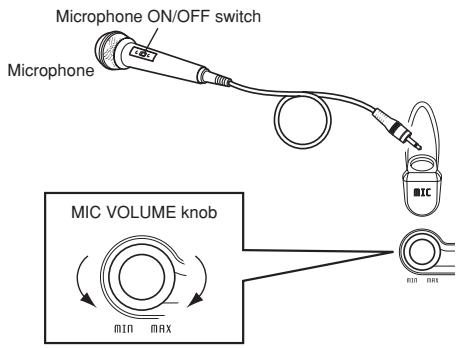
Connecting a commercially available microphone to the MIC IN jack makes it possible to sing along with the keyboard's built-in tunes or with output from a MIDI device. When connecting a microphone, be sure to first adjust the MIC VOLUME to a relatively low setting, and then adjust to the level you want after connecting.

Set the MIC VOLUME knob setting so it is on the "MIN" side.

Turn on the microphone's ON/OFF switch.

Use the MIC VOLUME knob to adjust microphone volume to the level you want.
IMPORTANT!
- Be sure to use the microphone's ON/OFF switch to turn off the microphone and to disconnect the microphone from the keyboard whenever you are not using it.
Recommended Microphone Type
- Dynamic microphone (standard plug)
IMPORTANT!
- Be sure to disconnect the microphone from the keyboard whenever you are not using it.
Howling (Feedback Noise)
Any of the following conditions can cause howling (feedback noise).
- Covering the head of the microphone with your hand
- Positioning the microphone too near to a speaker
Should howling occur, try grasping the microphone further away from the head, and move away from any nearby speaker.
Static Noise
Fluorescent lighting can cause static noise in the microphone signal. When this happens, move away from the lighting you suspect may be causing the static.
This keyboard automatically plays bass and chord parts in accordance with the chords you finger. The bass and chord parts are played using sounds and tones that are automatically selected to select the rhythm you are using. All of this means that you get full, realistic accompaniments for the melody notes you play with your right hand, creating the mood of an one-person ensemble.
Selecting a Rhythm
This keyboard provides you with 100 exciting rhythms that you can select using the following procedure.
To select a rhythm
1 Find the rhythm you want to use in the RHYTHM List and note its rhythm number.
- Not all of the available rhythms are shown on the rhythm list printed on the keyboard console. For a complete list, see the "Rhythm List" on page A-7.
Press the RHYTHM button.
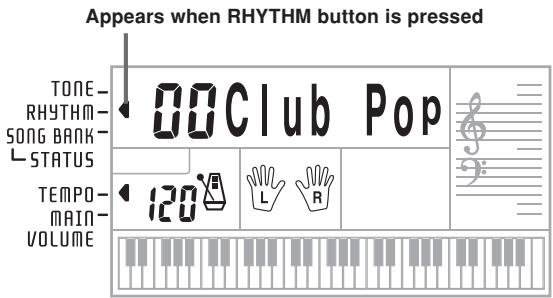
3 Use the number buttons to input the two digit rhythm number for the rhythm you want to select. Example: To select "64 WALTZ", input 6 and then 4.
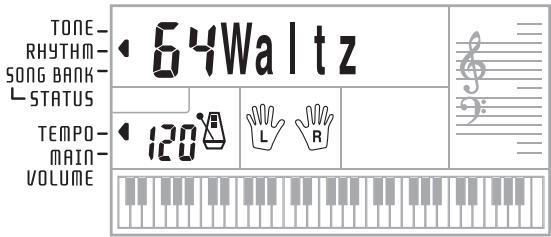
NOTE
- "00 CLUB POP" is the initial default rhythm setting whenever you turn on keyboard power.
- You can also increment the displayed rhythm number by pressing [+] and decrement it by pressing [-] .
Playing a Rhythm
Use the following procedure to start and stop rhythm play.
To play a rhythm
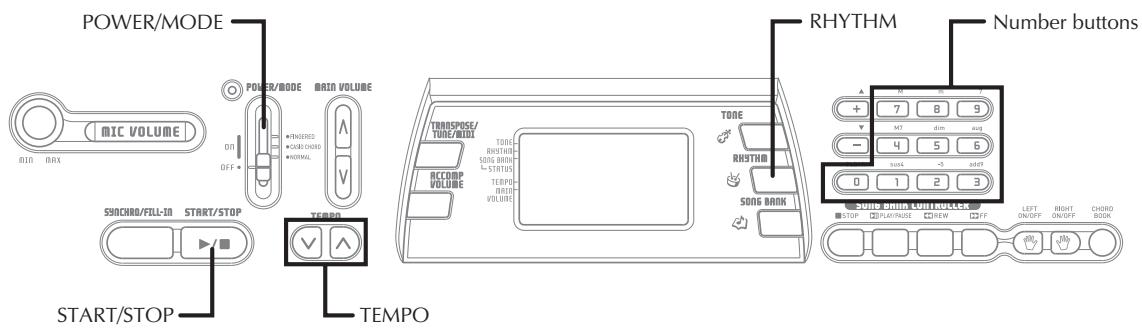
1 Set the POWER/MODE switch to NORMAL.
Press the START/STOP button to start play of the currently selected rhythm.
3 To stop rhythm play, press the START/STOP button again.
NOTE
- All of the keyboard keys are melody keys while the POWER/MODE switch is set to NORMAL.
Adjusting the Tempo
You can adjust the tempo of rhythm play within a range of 20 to 255 beats per minute. The tempo setting is applied to Auto Accompaniment chord play, and song bank operations.
To adjust the tempo
Use the TEMPO buttons ( /) to adjust the tempo.
: Increases the tempo value.
: Decreases the tempo value.
Example: Hold down the button until the tempo value 110 is on the display.
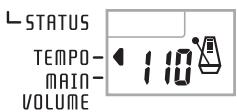
NOTE
- Pressing both TEMPO buttons (▲ and ) at the same time resets the tempo to the default value of the currently selected rhythm.
About the Graphic Metronome
The graphic metronome appears on the display along with the tempo value and beat of a rhythm or built-in tune. The graphic metronome helps you keep in time as you play along with a rhythm or built-in tune.
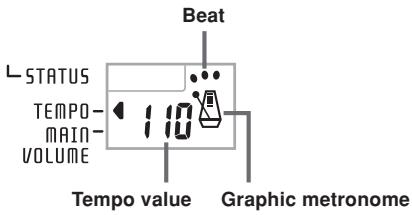
Using Auto Accompaniment
The following procedure describes how to use the keyboard's Auto Accompaniment feature. Before starting, you should first select the rhythm you want to use and set the tempo of the rhythm to the value you want.
To use Auto Accompaniment
1 Set the POWER/MODE switch to CASIO CHORD or FINGERED.
Press the START/STOP button to start play of the currently selected rhythm.
3 Play a chord.
- The actual procedure you should use to play a chord depends on the current POWER/MODE switch position. Refer to the following pages for details on chord play.
CASIO CHORD......This page
FINGERED Page E-20
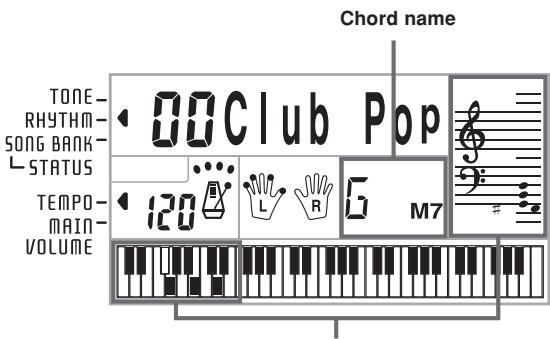
Basic fingering of current chord
(May be different from chord actually being played on the keyboard.)
4 To stop Auto Accompaniment play, press the START/STOP button again.
CASIO CHORD
This method of chord play makes it possible for anyone to easily play chords, regardless of previous musical knowledge and experience. The following describes the CASIO CHORD "Accompaniment keyboard" and "Melody keyboard", and tells you how to play CASIO CHORDs.
CASIO CHORD Accompaniment Keyboard and Melody Keyboard
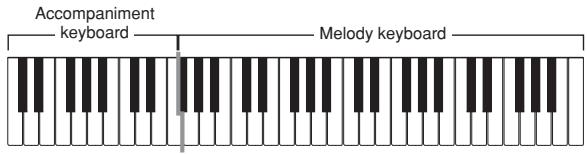
NOTE
- The accompaniment keyboard can be used for playing chords only.
No sound will be produced if you try playing single melody notes on the accompaniment keyboard.
Chord Types
CASIO CHORD accompaniment lets you play four types of chords with minimal fingering.
| Chord types | Example |
| Major chords Major chord names are marked above the keys of the accompaniment keyboard. Note that the chord produced when you press an accompaniment keyboard does not change octave, regardless of which key you use to play it. | C Major (C) C major (C) C major (C) C major (C) C major (C) C major (C) C major (C) C major (C) C major (C) C major (C) C major (C) C major (C) C major (C) C major (C) C major (C) C major (C) C major (C) C major (C) C major (C) C major (C) C major (C) C minor (C) C minor (C) C minor (C) C minor (C) C minor (C) C minor (C) C minor (C) C minor (C) C minor (C) C minor (C) C minor (C) C minor (C) C minor (C) C minor (C) C minor (C) C minor (C) C minor (C) C minor (C) C minor (C) C minor (C) C major (C) C major (C) C major (C) C major (C) C major (C) C major (C) C major (C) C major (C) C major (C) C major (C) C major (C) C major (C) C major (C) C major (C) C major (C) C major (C) C major (C) C major (C) C major (C) C Major (C) C Major (C) C Major (C) C Major (C) C Major (C) C Major (C) C Major (C) C Major (C) C Major (C) C Major (C) C Major (C) C Major (C) C Major (C) C Major (C) C Major (C) C Major (C) C Major (C) C Major (C) C Major (C) C Major (C) C major (C) C major (C) C major (C) C major (C) C major (C) C major (C) C major (C) C major (C) C major (C) C major (C) C major (C) C major (C) C major (C) C major (C) C major (C) C major (C) C major (C) C major (C) C major (C) |
| Minor chords (m) To play a minor chord, keep the major chord key depressed and press any other accompaniment keyboard key located to the right of the major chord key. | C minor (Cm) C minor (Cm) C minor (Cm) C minor (Cm) C minor (Cm) C minor (Cm) C minor (Cm) C minor (Cm) C minor (Cm) C minor (Cm) C minor (Cm) C minor (Cm) C minor (Cm) C minor (Cm) C minor (Cm) C minor (Cm) C minor (Cm) C minor (c) C minor (c) C minor (c) C minor (c) C minor (c) C minor (c) C minor (c) C minor (c) C minor (c) C minor (c) C minor (c) C minor (c) C minor (c) C minor (c) C minor (c) C minor (c) C minor (c) C minor (c) C minor (c) C minor (c) C minor (e) C minor (e) C minor (e) C minor (e) C minor (e) C minor (e) C minor (e) C minor (e) C minor (e) C minor (e) C minor (e) C minor (e) C minor (e) C minor (e) C minor (e) C minor (e) C minor (e) C minor (e) C minor (e) C minor (e) C minor (c) C minor (c) C minor (c) C minor (c) C minor (c) C minor (c) C minor (c) C minor (c) C minor (c) C minor (c) C minor (c) C minor (c) C minor (c) C minor (c) C minor (c) C minor (c) C minor (c) C minor (c) C minor (c) C minor (d) C minor (d) C minor (d) C minor (d) C minor (d) C minor (d) C minor (d) C minor (d) C minor (d) C minor (d) C minor (d) C minor (d) C minor (d) C minor (d) C minor (d) C minor (d) C minor (d) C minor (d) C minor (d) C minor (d) C minor (c) C minor (c) C minor (c) C minor (c) C minor (c) C minor (c) C minor (c) C minor (c) C minor (c) C minor (c) C minor (c) C minor (c) C minor (c) C minor (c) C minor (c) C minor (c) C minor (c) C minor (c) C minor (c) C minor (b) C minor (b) C minor (b) C minor (b) C minor (b) C minor (b) C minor (b) C minor (b) C minor (b) C minor (b) C minor (b) C minor (b) C minor (b) C minor (b) C minor (b) C minor (b) C minor (b) C minor (b) C minor (b) C minor (b) C minor (c) C minor (c) C minor (c) C minor (c) C minor (c) C minor (c) C minor (c) C minor (c) C minor (c) C minor (c) C minor (c) C minor (c) C minor (c) C minor (c) C minor (c) C minor (c) C minor (c) C minor (c) C minor (c) C minor (a) C minor (a) C minor (a) C minor (a) C minor (a) C minor (a) C minor (a) C minor (a) C minor (a) C minor (a) C minor (a) C minor (a) C minor (a) C minor (a) C minor (a) C minor (a) C minor (a) C minor (a) C minor (a) C minor (a) C minor (c) C minor (c) C minor (c) C minor (c) C minor (c) C minor (c) C minor (c) C minor (c) C minor (c) C minor (c) C minor (c) C minor (c) C minor (c) C minor (c) C minor (c) C minor (c) C minor (c) C minor (c) C minor (c) C minor (r) C minor (r) C minor (r) C minor (r) C minor (r) C minor (r) C minor (r) C minor (r) C minor (r) C minor (r) C minor (r) C minor (r) C minor (r) C minor (r) C minor (r) C minor (r) C minor (r) C minor (r) C minor (r) C minor (r) C minor (c) C minor (c) C minor (c) C minor (c) C minor (c) C minor (c) C minor (c) C minor (c) C minor (c) C minor (c) C minor (c) C minor (c) C minor (c) C minor (c) C minor (c) C minor (c) C minor (c) C minor (c) C minor (c) C minor (s) C minor (s) C minor (s) C minor (s) C minor (s) C minor (s) C minor (s) C minor (s) C minor (s) C minor (s) C minor (s) C minor (s) C minor (s) C minor (s) C minor (s) C minor (s) C minor (s) C minor (s) C minor (s) C minor (s) C minor (c) C minor (c) C minor (c) C minor (c) C minor (c) C minor (c) C minor (c) C minor (c) C minor (c) C minor (c) C minor (c) C minor (c) C minor (c) C minor (c) C minor (c) C minor (c) C minor (c) C minor (c) C minor (c) C minor (t) C minor (t) C minor (t) C minor (t) C minor (t) C minor (t) C minor (t) C minor (t) C minor (t) C minor (t) C minor (t) C minor (t) C minor (t) C minor (t) C minor (t) C minor (t) C minor (t) C minor (t) C minor (t) C minor (t) C minor (c) C minor (c) C minor (c) C minor (c) C minor (c) C minor (c) C minor (c) C minor (c) C minor (c) C minor (c) C minor (c) C minor (c) C minor (c) C minor (c) C minor (c) C minor (c) C minor (c) C minor (c) C minor (c) C minor (f) C minor (f) C minor (f) C minor (f) C minor (f) C minor (f) C minor (f) C minor (f) C minor (f) C minor (f) C minor (f) C minor (f) C minor (f) C minor (f) C minor (f) C minor (f) C minor (f) C minor (f) C minor (f) C minor (f) C minor (c) C minor (c) C minor (c) C minor (c) C minor (c) C minor (c) C minor (c) C minor (c) C minor (c) C minor (c) C minor (c) C minor (c) C minor (c) C minor (c) C minor (c) C minor (c) C minor (c) C minor (c) C minor (c) C minor (g) C minor (g) C minor (g) C minor (g) C minor (g) C minor (g) C minor (g) C minor (g) C minor (g) C minor (g) C minor (g) C minor (g) C minor (g) C minor (g) C minor (g) C minor (g) C minor (g) C minor (g) C minor (g) C minor (g) C minor (c) C minor (c) C minor (c) C minor (c) C minor (c) C minor (c) C minor (c) C minor (c) C minor (c) C minor (c) C minor (c) C minor (c) C minor (c) C minor (c) C minor (c) C minor (c) C minor (c) C minor (c) C minor (c) C minor (n) C minor (n) C minor (n) C minor (n) C minor (n) C minor (n) C minor (n) C minor (n) C minor (n) C minor (n) C minor (n) C minor (n) C minor (n) C minor (n) C minor (n) C minor (n) C minor (n) C minor (n) C minor (n) C minor (n) C minor (n) C minor (n) C minor (n) C minor (n) C minor (n) C minor (n) C minor (n) C minor (n) C minor (n) C minor (n) C minor (n) C minor (n) C minor (n) C minor (n) C minor (n) |
NOTE
- It makes no difference whether you press black or white keys to the right of a major chord key when playing minor and seventh chords.
FINGERED
FINGERED provides you with a total of 15 different chord types. The following describes the FINGERED "Accompaniment keyboard" and "Melody keyboard", and tells you how to play a C-root chord using FINGERED.
FINGERED Accompaniment Keyboard and Melody Keyboard
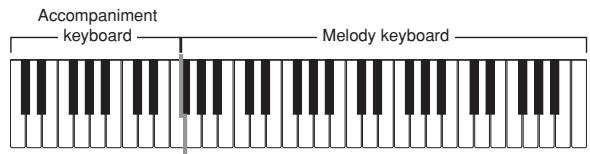
NOTE
- The accompaniment keyboard can be used for playing chords only. No sound will be produced if you try playing single melody notes on the accompaniment keyboard.
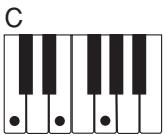
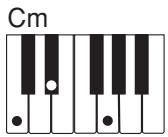
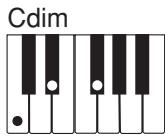
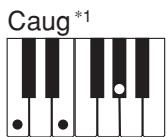
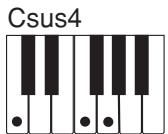
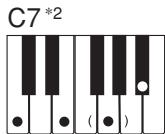
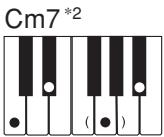
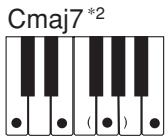
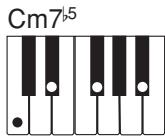
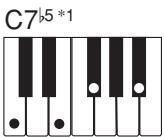
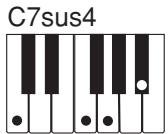
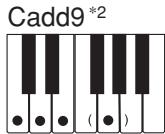
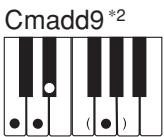
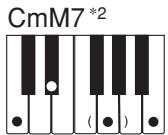
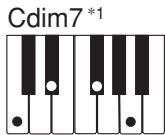
See the "Fingered Chord Chart" on page A-4 for details on playing chords with other roots.
1: Inverted fingerings cannot be used. The lowest note is the root.
2: The same chord can be played without pressing the 5th G.
NOTE
Except for the chords specified in note*1 above, inverted fingerings (i.e. playing E-G-C or G-C-E instead of C-E-G) will produce the same chords as the standard fingering.
Except for the exception specified in note*2 above, all of the keys that make up a chord must be pressed. Failure to press even a single key will not play the desired FINGERED chord.
Using a Fill-in Pattern
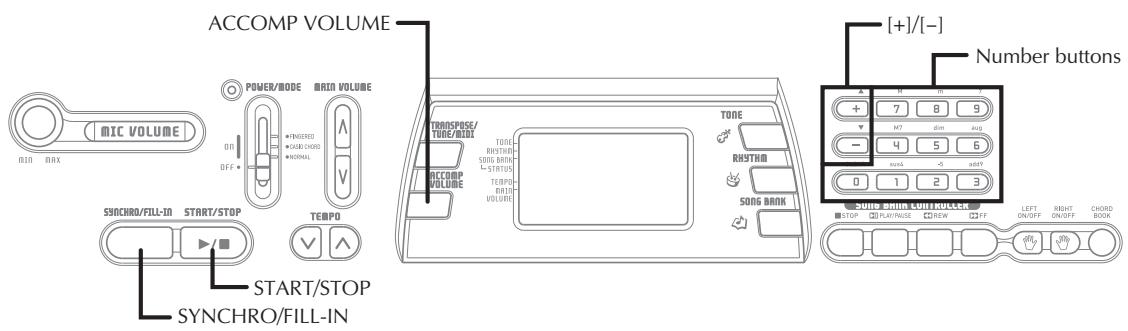
Fill-in patterns let you momentarily change the rhythm pattern to add some interesting variation to your performances.
The following procedure describes how to use the Fill-in feature.
To insert a fill-in
Press the START/STOP button to start rhythm play.
Press the SYNCHRO/FILL-IN button to insert a fill-in pattern for the rhythm you are using.
Synchro Starting Accompaniment with Rhythm Play
You can set up the keyboard to start rhythm play at the same time you play the accompaniment on the keyboard.
The following procedure describes how to use synchro start. Before starting, you should first select the rhythm you want to use, set the tempo, and use the POWER/MODE switch to select the chord play method you want to use (CASIO CHORD, FINGERED).
To use synchro start
Press the SYNCHRO/FILL-IN button to put the keyboard into synchro start standby.
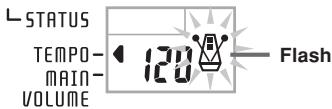
2 Play a chord on the accompaniment keyboard and the rhythm pattern starts to play automatically.
NOTE
- If the POWER/MODE switch is set to NORMAL, only the rhythm plays (without a chord) when you play on the accompaniment keyboard.
- To cancel synchro start standby, press the SYNCHRO/FILL-IN button one more time.
Adjusting the Accompaniment Volume
You can adjust the volume of the accompaniment parts as a value in the range of 0 (minimum) to 9.
Press the ACCOMP VOLUME button.
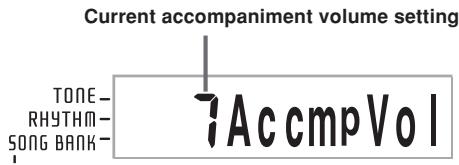
Use the number buttons or the [+]/[-] buttons to change the current volume setting value. Example: 5

NOTE
- The current accompaniment volume value that appears in Step 1 automatically clears from the display if you do not input anything within about five seconds.
- Pressing [+] and [-] buttons at the same time automatically sets an accompaniment volume of 7.
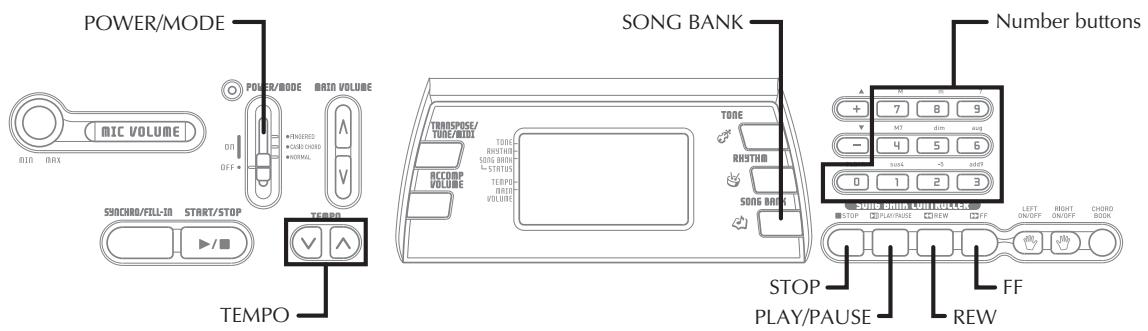
A selection of 100 Song Bank tunes comes built-in for your listening enjoyment or play along fun. You can turn off the left-hand or right-hand part to practice with the remaining part, and the display even shows you what keys to press and which fingers you should use.
Playing Back a Song Bank Tune
To play back a Song Bank tune
1 Set the POWER/MODE switch to NORMAL, FINGERED, or CASIO CHORD.
2 Adjust the main volume and accomp volume.
Press the SONG BANK button to enter the Song Bank Mode.
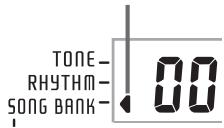
Appears when SONG BANK button is pressed
Use the Song Bank list to find the tune you want to play back, and then use the number buttons to input the tune's two-digit number.
Example: To select "50 ALOHA OE", input 5 and then 0.
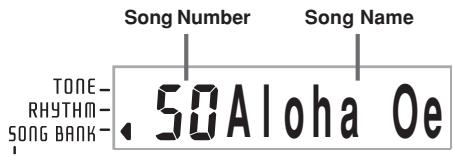
NOTE
- "00 MY HEART WILL GO ON ("TITANIC" THEORY)" is the initial default Song Bank tune setting whenever you turn on keyboard power.
- You can also increment the displayed tune number by pressing [+ ] and decrement is by pressing [-] .
- Before advancing to the next step, which actually starts playback, you can adjust the tempo (page E-19), select a tone (page E-16) for the melody part, or turn off the left-hand or right-hand part (page E-24).
Press the PLAY/PAUSE button to start play of the tune.
6 Press the STOP button to stop playback of the Song Bank tune.
To pause Song Bank tune play
While a Song Bank tune is playing, press the PLAY/ PAUSE button to pause it.
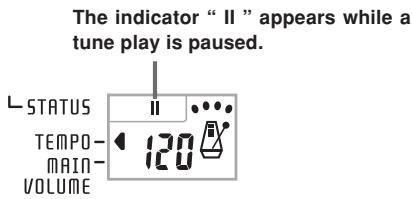
To resume play, press PLAY/PAUSE again.
To fast reverse during playback
While playback is in progress, hold down the REW button.
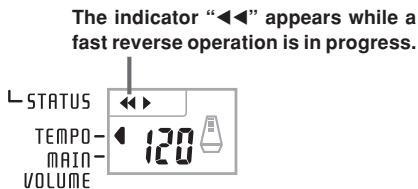
- Beeps sound during fast reverse to give you an idea of where you are located in the tune.
1 beep: indicates a change to anther measure.
2 beeps: indicates the beginning of the tune.
To resume normal playback, release the REW button.
To fast forward during playback
While playback is in progress, hold down the FF button.
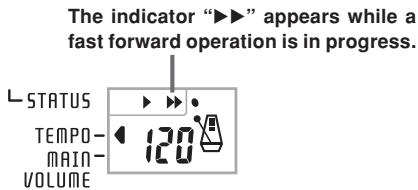
- Beeps sound during fast forward to give you an idea of where you are located in the tune.
1 beep: indicates a change to anther measure.
3 beeps: indicates the ending of the tune.
To resume normal playback, release the FF button.
NOTE
Each time you select a new Song Bank tune, the tone, tempo, and rhythm that is programmed for the tune are automatically selected. You can change a tune's tone and tempo during playback, but you cannot change the rhythm.
- You can also adjust the accompaniment volume (page E-21) for tunes 00 through 80.
Song Bank Mode Display
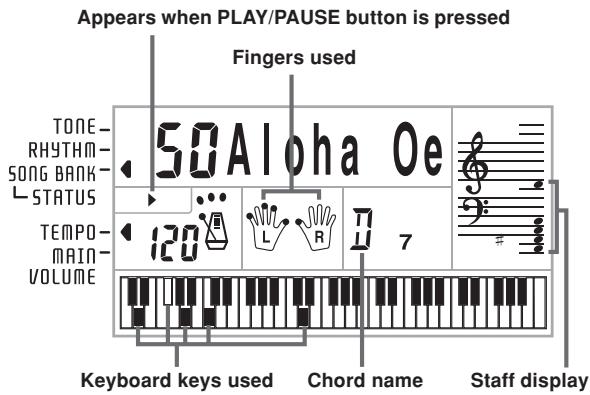
In the Song Bank Mode, the display shows a variety of information about the tune being played.
[Playback Display]
![CASIO CTK-700 - [Playback Display] - 1](/content/2025/01/129452/images/3d07bde2aadaa2187621292fe65a15b08a3037362709ab742c3fdd772292812c.jpg)
NOTE
- Chord names are not displayed for Songs 81 through 99.
Adjusting the Tempo of a Song Bank Tune
To change the tempo of a Song Bank tune
The tempo can be set within a range of 20 to 255 beats per minute. The tempo setting can be adjusted while the tune is stopped, playing back, or paused.
Use the TEMPO buttons [ / ] to adjust the tempo.
: each press increases the value
: each press decreases the value
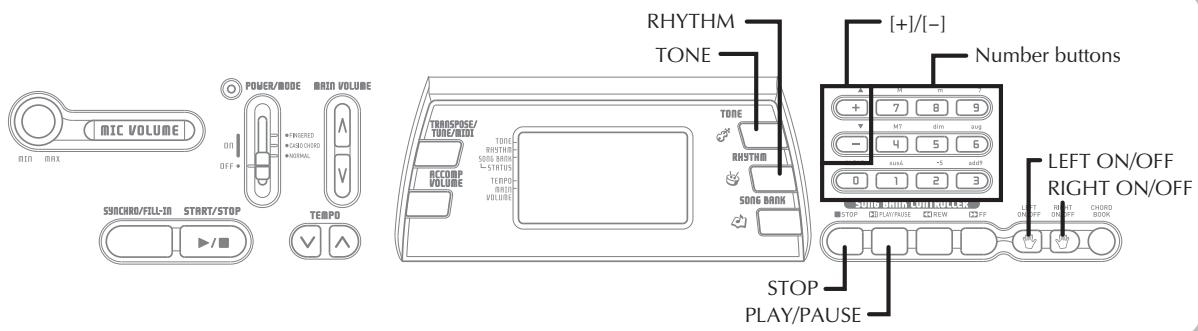
NOTE
- Pressing both the [] and [] TEMPO buttons at the same time returns the tempo setting to the preset value for the currently selected tune.
- Song Bank tunes 81 through 99 are arranged so their tempos change part way through the tunes. If you use the above procedure to change the tempo setting while one of these tunes is playing, however, the tempo you set is used for the entire tune without any change part way through.
Changing the Tone of a Song Bank Tune's Melody
You can select any one of the keyboard's 100 tones to be used to play the melody part of a Song Bank tune. The tone setting can be changed while the tune is stopped or playing back.

While a song is playing back, press the TONE button.
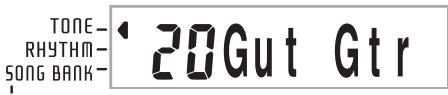

Find the tone you want in the Tone List, and then use the number buttons or the [+] and [-] buttons to specify the tone number.
Example: To select "30 VIOLIN", input 3 and then 0.

NOTE
- Pressing both the [+] and [-] buttons at the same time selects "00 PIANO 1".
- With two-hand tunes (81 to 99), you can select tones for both the left hand part and right hand part.
- To return a Song Bank tune to its original settings, simply select that tune again.
Playing Along with a Song Bank Tune
Each Song Bank tune has a left-hand (accompaniment) part and a right-hand (melody) part. You can turn off the left-hand part or right-hand part of a Song Bank tune and play along with the remaining part on the keyboard.
| Tune Numbers | 00 to 80 | 81 to 99 |
| Accompaniment Type | Auto-accompaniment | Piano Solo |
| Left-hand Part | Auto-accompaniment (percussion, bass, chords) | Left-hand notes |
| Right-hand Part | Melody | Right-hand notes |
To play along with a Song Bank tune

Perform steps 1 through 4 under "To play back a Song Bank tune" on page E-22 to select the song you want to play along with.

Press the RIGHT ON/OFF or LEFT ON/OFF button for the part you want to turn off.
- Press the RIGHT ON/OFF button to turn off the right hand (melody) part, or the LEFT ON/OFF button to turn off the left hand (accompaniment) part.
- The on/off status of each part is indicated by letters (L and R) that appear inside the hand graphics on the display. A part is turned on when its letter is displayed, and turned off when its letter is not displayed.
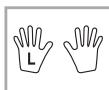
Press the PLAY/PAUSE button to start play of the Song Bank Tune.
- Only the part (melody or accompaniment) that is turned on is played, so you can play the other part on the keyboard.
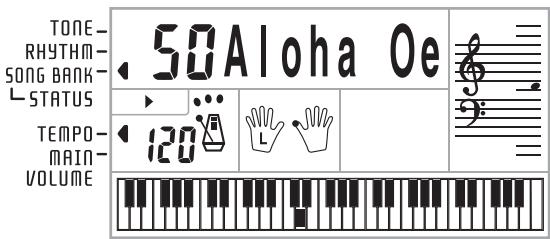
- The keys you should press are indicated on the display's graphic keyboard.
- You can press the RIGHT ON/OFF and LEFT ON/OFF buttons to turn parts on and off while playback is in progress.
4 To end playback, press the STOP button.
Auto-accompany Tunes (Tune Numbers 00 to 80)
During playback of these tunes in the Song Bank Mode, the chord specification method for the left hand is always FINGERED for these tunes, regardless of the POWER/MODE switch setting.
Two-hand Tunes (Tune Numbers 81 to 99)
During playback of these tunes in the Song Bank Mode, the entire keyboard functions as a melody, regardless of the POWER/MODE switch setting.
NOTE
- With two-hand tunes (81 to 99), you cannot turn off both the left-hand and right-hand parts at the same time. Turning off a part causes the other part to turn on automatically.
- The selected Song Bank tune continues to repeat until you stop playback by pressing the STOP button.
- The accompaniment volume setting (page E-21) affects auto-accompanyiment tunes (00 to 80) only.
- Chord names are not displayed during playback of two-hand tunes (81 to 99).
- Turning off both the left-hand and right-hand parts of the auto-accompanyment tunes (00 to 80) results in obligato accompaniment being played.
Applause Sound
Whenever you turn off the left hand or right hand part of a Song Bank tune and play it back, an applause sound is produced when the tune reaches the end.
To turn off the applause sound
Press the STOP button and the LEFT ON/OFF or RIGHT ON/OFF button at the same time.

- Pressing the STOP button and the LEFT ON/OFF or RIGHT ON/OFF button at the same time again turns the applause sound back on.
Playing Back All Song Bank Tunes in Succession
1 Use the TONE or RHYTHM button to change to any mode other than the Song Bank Mode.
- Make sure a dot is not on the display next to the SONG BANK indicator.
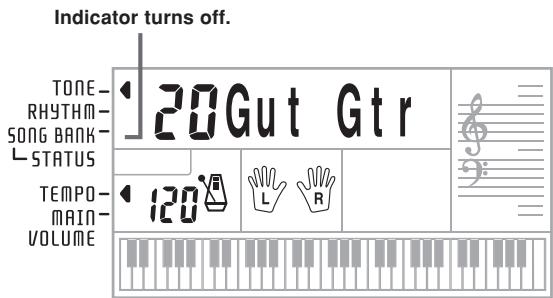
Press the PLAY/PAUSE button to start playback of the Song Bank tunes starting from tune 00.
3 To stop Song Bank tune playback, press the STOP button.
- Pausing playback automatically cancels consecutive playback of all Song Bank tunes. Re-starting playback causes repeat playback of the current tune only.
The Chord Book feature of this keyboard makes it possible for you to look up information about chords quickly and easily. Simply input the name of the chord and the keyboard keys you should press, the fingers you should use, and the notes that make up the chord appear on the display along with the chord name.
What is a chord?
A chord is made up of a root note, upon which is stacked a number of other notes. A variety of different chords can be created by changing the notes stacked onto a root.
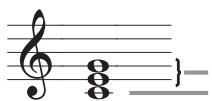
Stacked notes Root
Chord Names
Chords are named using upper-case letters from A through G, which indicate the root note of the chord. If the root note is a sharp or flat, the chord itself is sharp or flat. A chord name may also be followed by a degree number or other symbols that indicate certain characteristics about the chord.
| C Root | Sharp F# Root | Flat B# Root | Minor Am Root | Sharp Diminished C# root |
| Seventh G7-Degree Root | Major seventh FM7 Root | Degree | Sus fourth ESUS4 Root | |
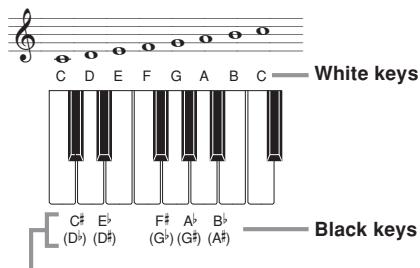
Sharps and flats can be referred to using either of the names shown here. The names in the upper row of this illustration are used by this keyboard, because they are the names that are most commonly used in musical notation.
Inverted Forms
There are a number of different ways to play the same chord. A form that is different from the basic form but still produces the same chord is called an "inverted form."
All of the following are C chords.

Looking Up a Chord Using the Chord Book
Press the CHORD BOOK button to enter the Chord Book mode.
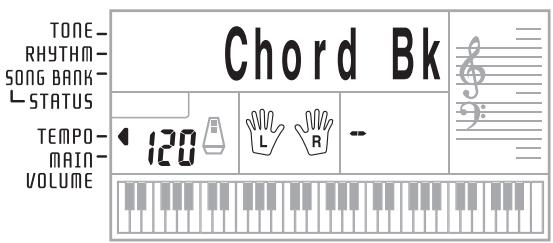
Press the CLEAR button.
- This step is necessary to clear any previously input chord name.
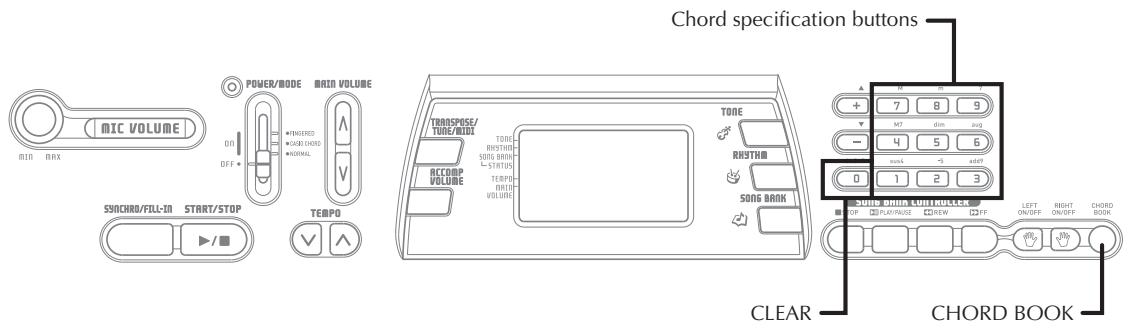
3 If the chord name you plan to input is a non-major chord, use the chord specification buttons to specify the chord type.
- Chord types are indicated by the small letters above the chord specifications buttons.
- Non-major chords include minor, seventh, sustained, etc. chords.
- See page E-28 for details on the chord specification buttons.
- Skip step 3 if you want to input a major chord name.
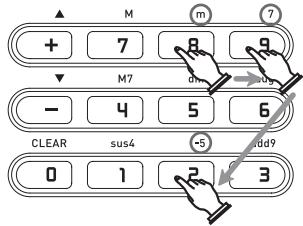
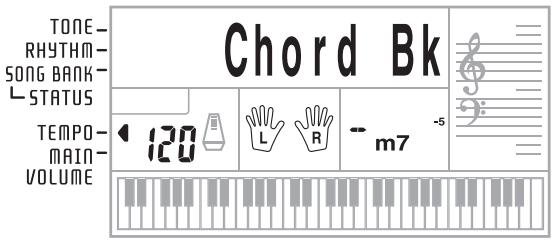
Press the accompaniment keyboard key that corresponds to the root note of the chord.
- A dash appears in place of the chord name if the chord cannot be recognized by the keyboard.
- To specify F^ , for example, press the F^ key.
- The key you press is indicated on the graphic keyboard and the corresponding chord sounds.
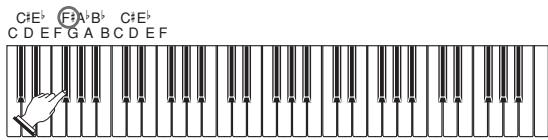
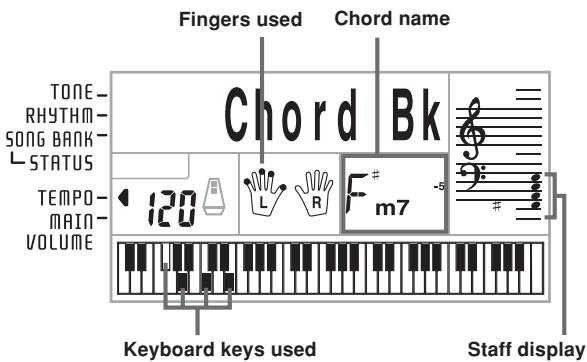
Check to make sure that the chord name on the display is the one you want. If it isn't, repeat the above from step 2.
If the chord is correct, you can see its fingering on the graphic keyboard. Try playing the chord on the keyboard.
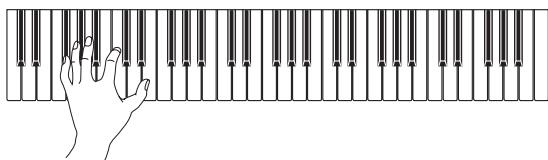
NOTE
- The fingering that appears on the display is one standard fingering. You can also use other fingerings to match the size of your hands or to make it easier to progress from or to neighboring chords.
- You can also use the [+] and [-] buttons to change the displayed chord name.
- The tone used to sound chords you play on the accompaniment keyboard while using the Chord Book is the same tone used by the accompaniment part of the rhythm that was selected before you entered the Chord Book mode. Depending on the rhythm that was selected, some of the notes that make up a chord may be omitted when you play the chord on the accompaniment keyboard in the Chord Book Mode. This is due to the internal chord conversion function, arrangements, and polyphony limitations. Because of this, you should always play the chords indicated on the display on the melody keyboard (the range that does not have chord names printed above the keys).
Chord Name Modifier Keys
| Chord Type | Symbol and Name | Reference | Modifier Key |
| major | C (C major) | ||
| minor | Cm (C minor) | +7 8 9 +4 5 6 +2 3 0 1 2 3 | |
| aug | Caug (C augmened) | C+5 | +7 8 9 +4 5 6 +2 3 0 1 2 3 |
| sus 4 | Csus4 (C sustained forth) | +7 8 9 +4 5 6 +2 3 0 1 2 3 | |
| dim | Cdim (C diminished) | C° | +7 8 9 +4 5 6 +2 3 0 1 2 3 |
| 7th | C7 (C seventh) | +7 8 9 +4 5 6 +2 3 0 1 2 3 | |
| M7 | CM7 (C major seventh) | Cmaj7 CΔ7 | +7 8 9 +4 5 6 +2 3 0 1 2 3 |
| minor 7 | Cm7 (C minor seventh) | +7 8 9 +4 5 6 +2 3 0 1 2 3 | |
| minor M7 | CmM7 (C minor Major seventh) | +7 8 9 +4 5 6 +2 3 0 1 2 3 | |
| minor 7-5 | Cm7-5 (C minor seventh flat five) | C° | +7 8 9 +4 5 6 +2 3 0 1 2 3 |
| Chord Type | Symbol and Name | Reference | Modifier Key |
| 7sus 4 | C7sus4 (C seventh sus fourth) | +78+45+3 | |
| add 9 | Cadd9 (C add ninth) | +78+45+3 | |
| m add 9 | Cm add9 (C minor add ninth) | +78-45+3 | |
| 7th-5 | Cs7-5 (C seventh flat five) | C7*5 | +78+45+3 |
| dim7 | Cdim7 (C diminished seventh) | +78+45+3 |
NOTE
- Since the chord fingerings that appear on the display are selected to allow chord play within the accompaniment keyboard, inverted chord forms (page E-26) are often suggested. Inverted chord forms are useful to help you learn how to play chord variations that make it possible to move from one chord to another with minimal hand movement. These forms come in handy when using FINGERED Auto Accompaniment play.
- While a chord name is on the display, you can press keys on the accompaniment keyboard to find out the fingerings of the same chord with a different root.
- You can also scroll through chord names using the [+] and [-] buttons.
- Chord fingerings that appear on the display are formed using only the keys within the range of the accompaniment keyboard (leftmost 18 keys). Chords that cannot be formed using the keys within this range are not displayed.
Transposing the Keyboard
Transpose lets you raise and lower the overall key of the keyboard in semitone units. If you want to play an accompaniment for a vocalist who sings in a key that's different from the keyboard, for example, simply use transpose to change the key of the keyboard.
To transpose the keyboard
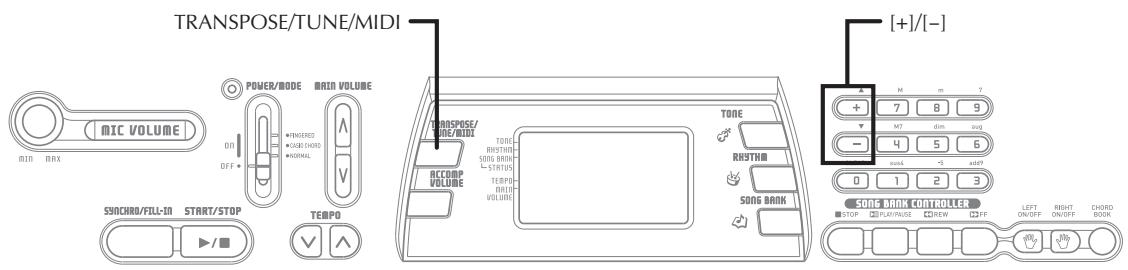
Press the TRANSPOSE/TUNE/MIDI button until the transpose screen appears on the display.

Use [+] and [-] to change the transpose setting of the keyboard.
Example: To transpose the keyboard five semitones upwards.
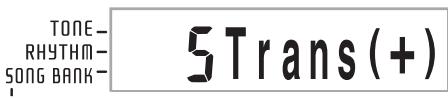
NOTE
- The keyboard can be transposed within a range of -6 to +5 .
- The default transpose setting is "0" when keyboard power is turned on.
- If you leave the transpose screen on the display for about five seconds without doing anything, the screen is automatically cleared.
- The transpose setting also affects Auto Accompaniment.
- Playing back a Song Bank tune automatically returns the transpose setting to its standard default of "0".
- The allowable pitch range you can transpose within depends on the tone you are using. If a transpose operation causes a note to be outside of the pitch range for the tone being used, the keyboard automatically plays the same note in the nearest octave that falls within the pitch range of the tone you are using.
Tuning the Keyboard
The tuning feature lets you fine tune the keyboard to match the tuning of another musical instrument.
To tune the keyboard
Press the TRANSPOSE/TUNE/MIDI button twice to display the tuning screen.

Use [+] and [-] to change the tuning setting of the keyboard.
Example: To lower the tuning by 20.
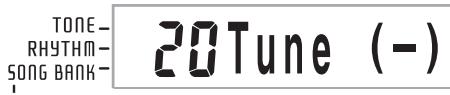
NOTE
- The keyboard can be tuned within a range of -50 cents to +50 cents.
*100 cents is equivalent to one semitone. - The default tuning setting is "00" when keyboard power is turned on.
- If you leave the tuning screen on the display for about five seconds without doing anything, the screen is automatically cleared.
- The tuning setting also affects Auto Accompaniment.
- Playing back a Song Bank tune automatically returns the tuning setting to its standard default of "00".
What is MIDI?
The letters MIDI stand for Musical Instrument Digital Interface, which is the name of a worldwide standard for digital signals and connectors that makes it possible to exchange musical data between musical instruments and computers (machines) produced by different manufacturers.
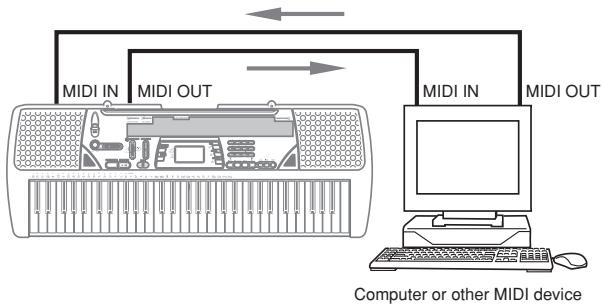
MIDI Connections
General MIDI
General MIDI standardizes MIDI data for all sound source types, regardless of manufacturer. General MIDI specifies such factors as tone numbering, drum sounds, and available MIDI channels for all sound sources. This standard makes it possible for all MIDI equipment to reproduce the same nuances when playing General MIDI data, regardless of the manufacturer of the sound source.
Though the sound source of this keyboard is not General MIDI compatible, you can still connect the keyboard to a computer or other MIDI equipment to playback General MIDI data that is widely available in stores, over computer networks, and from other sources.
NOTE
- General MIDI data made up of a large number of parts may not play correctly on this keyboard.
- You will have most success playing back General MIDI data that has few parts and is made up of data on channels 1, 2, 3, 4, and 10.
Messages
There is a wide variety of messages defined under the MIDI standard, and this section details the particular messages that can be sent and received by this keyboard.
NOTE ON/OFF
This message sends data when a key is pressed (NOTE ON) or released (NOTE OFF).
A NOTE ON/OFF message include a note number (to indicate note whose key is being pressed or released) and velocity (keyboard pressure as a value from 1 to 127).
NOTE ON velocity is always used to determine the relative volume of the note. This keyboard does not receive NOTE OFF velocity data.
Whenever you press or release a key on this keyboard, the corresponding NOTE ON or NOTE OFF message is sent by constant velocity from the MIDI OUT terminal.
NOTE
- The pitch of a note depends on the tone that is being used, as shown in the Note Table on page A-2. Whenever this keyboard receives a note number that is outside its range for that tone, the same tone in the nearest available octave is substituted.
PROGRAM CHANGE
This is the tone selection message. PROGRAM CHANGE can contain tone data within the range of 0 to 127.
A PROGRAM CHANGE message (0 to 99) is sent out through this keyboard's MIDI OUT terminal whenever you manually change its tone number. Receipt of a PROGRAM CHANGE message from an external machine changes the tone setting of this keyboard (this page).
This keyboard can send tone data within the range of 00 to 99 and receive tone data within the range of 0 to 127.
PITCH BEND
This message carries pitch bend information for smoothly sliding the pitch upwards or downwards during keyboard play. This keyboard does not send pitch bend data, but is can receive such data.
CONTROL CHANGE
This message adds effects such as vibrato and volume changes applied during keyboard play.
CONTROL CHANGE data includes a control number (to identify the effect type) and a control value (to specify the on/off status and depth of the effect).
The following is a list of data that can be received using CONTROL CHANGE.
| Effect | Control Number |
| VOLUME | 7 |
| HOLD1* | 64 |
| MODULATION | 1 |
- Pressing the foot pedal causes the sustain effect (HOLD1) to be sent (control number 64).
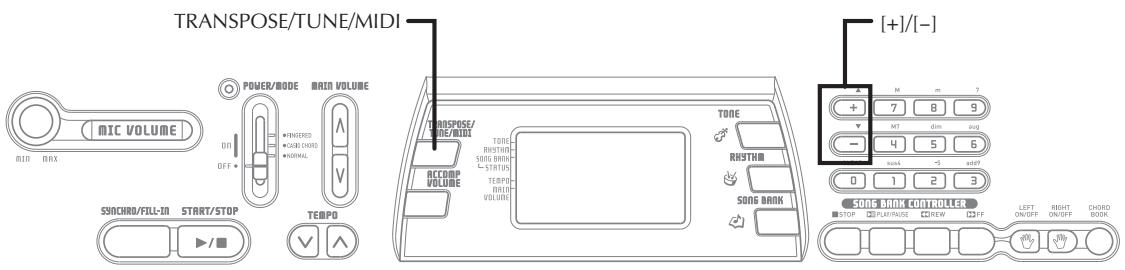
Changing MIDI Settings
This keyboard lets you change the settings of two MIDI parameters: TONE MAP and KEYBOARD CHANNEL.
To change MIDI parameters
Press the TRANSPOSE/TUNE/MIDI button either three or four times to select the parameter you want.
Press the TRANSPOSE/TUNE/MIDI button three times: KEYBOARD CHANNEL.
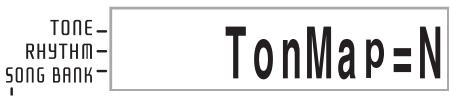
Press the TRANSPOSE/TUNE/MIDI button four times: TONE MAP.
Example: To select the TONE MAP parameter.
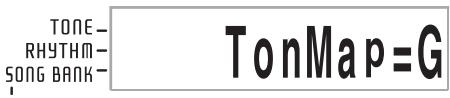
Use [+] and [-] to change the setting of the parameter.
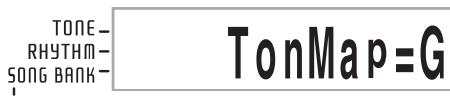
Example: To change the TONE MAP parameter value to "G" (GM).
- If you accidentally go past parameter you want, keep pressing the TRANSPOSE/TUNE/MIDI button until parameter you want reappears on the display.
- If you leave the parameter selection screen on the display for about five seconds without doing anything, the parameter selection screen is automatically cleared.
Parameters and Their Displays
KEYBOARD CHANNEL (Basic Channel) (Default: 01)
This parameter specifies the keyboard MIDI message send channel.

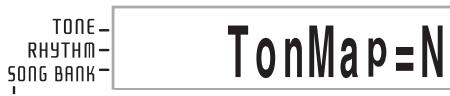
TONE MAP G/N (Default: N)
N: This setting specifies the normal tone map, which allows receipt of a program change value in the range of 0 to 99. Only tones that correspond to the 100 built-in tones of this keyboard can be played, and tone numbers outside this range are ignored.
G: This setting specifies the General MIDI tone map, which allows receipt of a program change value in the range of 0 to 127. Each of the 128 General MIDI tones is automatically assigned to one of the keyboard's 100 built-in tones as shown on page A-2. Select this setting when you want to listen to General MIDI data from a computer or other external equipment.
NOTE
- Playing a Song Bank tune causes all MIDI parameters to revert to their default settings.
- Song Bank data cannot be sent as MIDI data.
- MIDI messages cannot be received while the keyboard is in the Song Bank Mode.
| Problem | Possible Cause | Action | See page |
| No keyboard Sound | 1. Power supply problem.2. Power is not turned on.3. Volume setting is too low.4. The POWER/MODE switch is in the CASIO CHORD or FINGERED position. | 1. Correctly attach the AC adaptor, make sure that batteries poles (+/-) are facing correctly, and check to make sure that batteries are not dead.2. Set the POWER/MODE switch to the NORMAL position.3. Use the MAIN VOLUME buttons to increase volume.4. Normal play is not possible on the accompaniment keyboard while the POWER/MODE switch is set to CASIO CHORD or FINGERED. Change the POWER/MODE switch setting to NORMAL. | Pages E-13, 14Page E-16Page E-16Page E-16 |
| Any of the following symptoms while using battery power. | Low battery power | Replace the batteries with a set of new ones or use the AC adaptor. | Pages E-13, 14 |
| • Dim power indicator• Instrument does not turn on• Display that is flickering, dim, or difficult to read• Abnormally low speaker/headphone volume• Distortion of sound output• Occasional interruption of sound when playing at high volume• Sudden power failure when playing at high volume• Flickering or dimming of the display when playing at high volume• Continued sound output even after you release a key | • A tone that is totally different from the one that is selected• Abnormal rhythm pattern and Song Bank play• Loss of power, sound distortion, or low volume when playing from a connected computer or MIDI device• Abnormally low microphone volume• Distortion of microphone input• Dim power supply indicator when a microphone is used• Sudden power failure when using the microphone | ||
| Auto Accompaniment does not sound. | Auto accompaniment volume is set to 0. | Use the ACCOMP VOLUME button to increase the volume. | Page E-21 |
| The key or tuning does not match when playing along with another instrument. | The tuning or transpose parameter is set to a value other than 0 or 00. | Change the transpose or tuning parameter value to 0 or 00. | Page E-29 |
| Missing Song Bank tune. | 1. Left-hand or right-hand part is turned off.2. Accompaniment volume is set to 0. | 1. Check the display to see if the indicator for one of the parts is not displayed. If so, press the part's button (LEFT ON/OFF, RIGHT ON/OFF) to turn it on.2. Adjust accompaniment volume. | Page E-24Page E-21 |
| No sound is produced when playing MIDI data from a computer. | MIDI cables are not connected properly. | Connect MIDI cables properly. | Page E-30 |
| The bass notes of General MIDI data being played back by a computer are one octave too low. | TONE MAP is turned “N”. | Change TONE MAP parameter to “G”. | Page E-31 |
| Playing on the keyboard produces an unnatural sound when connected to a computer. | The computer's MIDI THRU function is turned on. | Turn off the MIDI THRU function on the computer or turn off LOCAL CONTROL on the keyboard. | See the documentation that comes with your computer or sequencer. |
| Static noise when a microphone is connected. | 1. Use of a microphone that is a different from the type that is recommended.2. Use of the microphone in the vicinity of fluorescent lighting. | 1. Use a recommended type microphone.2. Move the microphone away from source of the static. | Page E-17Page E-17 |
| No microphone sound | 1. Microphone volume setting is too low.2. Microphone on/off switch is set to OFF. | 1. Increase the microphone volume setting.2. Change the microphone on/off switch setting to ON. | Page E-17Page E-17 |
| Model: | CTK-496/CTK-700 |
| Keyboard: | 61 standard-size keys, 5 octaves |
| Tones: | 100 |
| Polyphony: | 12 notes maximum (6 for certain tones) |
| Auto Accompaniment | |
| Rhythm Patterns: | 100 |
| Tempo: | Variable (236 steps, ↓ = 20 to 255) |
| Chords: | 2 fingering methods (CASIO CHORD, FINGERED) |
| Rhythm Controller: | START/STOP, SYNCHRO/FILL-IN |
| Accomp Volume: | 0 to 9 (10 steps) |
| Song Bank | |
| Tunes: | 100 |
| Controllers: | PLAY/PAUSE, STOP, REW, FF, LEFT ON/OFF (ACCOMP), RIGHT ON/OFF (MELODY) |
| Display | |
| Name display: | TONE, RHYTHM, SONG BANK name/number, keyboard settings name/value |
| Tempo: | Tempo value, metronome, synchro standby, beat indicator, volume setting |
| Chord: | Chord name, Chord form |
| Fingering: | Fingering indicators, parts |
| Song Bank Status: | PLAY, PAUSE, REW, FF |
| Staff: | 5 octaves with sharp and flat indications, pedal symbol, octave symbol |
| Keyboard: | 5 octaves |
| MIDI: | 5 multi-timbre receive |
| Other Functions | |
| Transpose: | 12 steps (-6 semitones to +5 semitones) |
| Tuning: | Variable (A4 = approximately 440Hz ±50 cents) |
| Volume: | 0 to 9 (10 steps) |
| Terminals | |
| MIDI Terminals: | IN, OUT |
| Sustain Terminal: | Standard jack |
| Phones/Output Terminal: | Stereo standard jack (Output is monaural.) |
| Output Impedance: 78Ω | |
| Output Voltage: 4V (RMS) MAX | |
| 9V DC | |
| Standard jack (with microphone volume knob) | |
| Input impedance: 40kΩ | |
| Input sensitivity: 10mV | |
| Power Supply: | |
| Batteries: | Dual power supply system |
| Battery Life: | 6 AA-size batteries |
| AC Adaptor: | Approximately 4 hours continuous operation on alkaline batteries |
| Approximately 2 hours continuous operation on manganese batteries | |
| AD-5 | |
| Auto Power Off: | Turns power off approximately 6 minutes after last key operation. Enabled under battery power only, can be disabled manually. |
| Speaker Output: | 2.0W + 2.0W |
| Power Consumption: | 9V ... 7.7W |
| Dimensions: | 95.6 x 35.4 x 13.2 cm (3711/16x1315/16x53/16inch) |
| Weight: | Approximately 3.8kg (8.4lbs) (without batteries) |
Tone List
Lista de sonidos
| PIANO | |
| 00 | PIANO 1 |
| 01 | PIANO 2 |
| 02 | HONKY-TONK |
| 03 | STUDIO PIANO |
| 04 | ELEC PIANO 1 |
| 05 | ELEC PIANO 2 |
| 06 | ELEC PIANO 3 |
| 07 | ELEC PIANO 4 |
| 08 | HARPSICHORD |
| 09 | CLAVELECTRO |
| ORGAN | |
| 10 | ELEC ORGAN 1 |
| 11 | ELEC ORGAN 2 |
| 12 | ELEC ORGAN 3 |
| 13 | ELEC ORGAN 4 |
| 14 | CHURCH ORGAN |
| 15 | PIPE ORGAN |
| 16 | REED ORGAN |
| 17 | ACCORDION |
| 18 | BANDONEON |
| 19 | HARMONICA |
| GUITAR/BASS | |
| 20 | GUT GUITAR |
| 21 | ACOUS GUITAR |
| 22 | JAZZ GUITAR |
| 23 | ELEC GUITAR |
| 24 | MUTE GUITAR |
| 25 | DIST GUITAR |
| 26 | WOOD BASS |
| 27 | ELEC BASS |
| 28 | SLAP BASS |
| 29 | BANJO |
| STRINGS/ENSEMBLE | |
| 30 | VIOLIN |
| 31 | CELLO |
| 32 | HARP |
| 33 | STRINGS 1 |
| 34 | STRINGS 2 |
| 35 | STRINGS 3 |
| 36 | SYNTH-STR 1 |
| 37 | SYNTH-STR 2 |
| 38 | CHOIR |
| 39 | VOICE OOH |
| BRASS | |
| 40 | TRUMPET |
| 41 | TUBA |
| 42 | BRASS ENS |
| 43 | FR.HORN 1 |
| 44 | FR.HORN 2 |
| 45 | BRASS 1 |
| 46 | BRASS 2 |
| 47 | SYN-BRASS 1 |
| 48 | SYN-BRASS 2 |
| 49 | SYN-BRASS 3 |
| REED/PIPE | |
| 50 | SOPRANO SAX |
| 51 | ALTO SAX |
| 52 | TENOR SAX |
| 53 | OBOE |
| 54 | CLARINET |
| 55 | PICCOLO |
| 56 | FLUTE |
| 57 | RECORDER |
| 58 | PAN FLUTE |
| 59 | WHISTLE |
| SYNTH-SOUND I | |
| 60 | SYN-LEAD 1 |
| 61 | SYN-LEAD 2 |
| 62 | SYN-LEAD 3 |
| 63 | SYN-CALLIOPE |
| 64 | SYN-PAD 1 |
| 65 | SYN-PAD 2 |
| 66 | SYN-PAD 3 |
| 67 | GLASS HMCA |
| 68 | COUNTRY FARM |
| 69 | SYN-BASS |
| SYNTH-SOUND II | |
| 70 | PEARL DROP |
| 71 | COSMIC SOUND |
| 72 | SOUNDTRACK |
| 73 | SPACE PAD |
| 74 | VOICE BASS |
| 75 | APPLAUSE |
| 76 | SYNTH-SFX |
| 77 | VEHICLE |
| 78 | PHONE |
| 79 | FUNNY |
| LAYER | |
| 80 | STR PIANO |
| 81 | STR E.PIANO |
| 82 | CHOIR E.P |
| 83 | CHOIR ORGAN |
| 84 | STR GUITAR |
| 85 | STR HARP |
| 86 | BRASS STR |
| 87 | VIB PAD |
| 88 | 12 STR GTR |
| 89 | CHOIR STR |
| SPLIT/PERCUSSION | |
| 90 | BASS/PIANO |
| 91 | BASS/E.PIANO |
| 92 | BASS/VIB |
| 93 | BASS/GUT GTR |
| 94 | V.BASS/OOH |
| 95 | STR/PIANO |
| 96 | STR/TRUMPET |
| 97 | VIBRAPHONE |
| 98 | MARIMBA |
| 99 | PERCUSSION |
Note Table
Tabla de notas
| (1) | (2) | (3) | (4) |
| 00 | 12 | A | 000 |
| 01 | 12 | A | 001 |
| 02 | 6 | A | 003 |
| 03 | 6 | A | 002 |
| 04 | 12 | A | 004 |
| 05 | 12 | A | 005 |
| 06 | 6 | A | 008 |
| 07 | 6 | A | 009 |
| 08 | 12 | A | 006 |
| 09 | 12 | A | 007 |
| (1) | (2) | (3) | (4) |
| 10 | 12 | A | 016 |
| 11 | 12 | A | 017 |
| 12 | 12 | A | 018 |
| 13 | 6 | A | 015 |
| 14 | 12 | A | 019 |
| 15 | 6 | A | 104 |
| 16 | 12 | A | 020 |
| 17 | 6 | A | 021 |
| 18 | 12 | A | 023 |
| 19 | 12 | A | 022 |
| (1) | (2) | (3) | (4) |
| 20 | 12 | A | 024 |
| 21 | 12 | A | 025 |
| 22 | 12 | A | 026 |
| 23 | 12 | A | 027 |
| 24 | 12 | A | 028 |
| 25 | 12 | A | 029, 030, 031, 084 |
| 26 | 12 | B | 032 |
| 27 | 12 | B | 033, 034, 035 |
| 28 | 12 | B | 036, 037 |
| 29 | 12 | A | 105 |
| (1) | (2) | (3) | (4) |
| 30 | 12 | A | 040, 041 |
| 31 | 12 | B | 042, 043 |
| 32 | 12 | A | 045, 046, 047 |
| 33 | 12 | A | 048, 055 |
| 34 | 12 | A | 049 |
| 35 | 6 | A | 044 |
| 36 | 12 | A | 050 |
| 37 | 6 | A | 051 |
| 38 | 12 | A | 091, 052 |
| 39 | 12 | A | 053 |
| (1) | (2) | (3) | (4) |
| 40 | 12 | A | 056 |
| 41 | 12 | B | 058 |
| 42 | 6 | A | 057 |
| 43 | 12 | B | 060 |
| 44 | 6 | B | 059 |
| 45 | 12 | B | 061 |
| 46 | 6 | B | 069 |
| 47 | 12 | B | 062 |
| 48 | 6 | B | 063, 083 |
| 49 | 6 | B | 070 |
| (1) | (2) | (3) | (4) |
| 50 | 12 | A | 064 |
| 51 | 12 | A | 065 |
| 52 | 12 | A | 066, 067 |
| 53 | 12 | A | 068 |
| 54 | 12 | A | 071 |
| 55 | 12 | C | 072 |
| 56 | 12 | A | 073 |
| 57 | 12 | A | 074, 079 |
| 58 | 12 | A | 075, 076, 077 |
| 59 | 12 | A | 078 |
| (1) | (2) | (3) | (4) |
| 60 | 12 | A | 087 |
| 61 | 6 | A | 081, 086 |
| 62 | 12 | A | 080 |
| 63 | 6 | A | 082 |
| 64 | 6 | A | 089 |
| 65 | 6 | A | 090 |
| 66 | 6 | A | 095 |
| 67 | 6 | A | 092, 093, 098 |
| 68 | 6 | A | 054, 085, 094 |
| 69 | 12 | B | 038 |
| (1) | (2) | (3) | (4) |
| 70 | 6 | A | 096 |
| 71 | 6 | A | 103 |
| 72 | 6 | A | 097 |
| 73 | 6 | A | 101 |
| 74 | 12 | B | 039 |
| 75 | 12 | D | 126, 127 |
| 76 | 6 | A | 102 |
| 77 | 6 | D | 125 |
| 78 | 12 | D | 124 |
| 79 | 6 | D | 123 |
| (1) | (2) | (3) | (4) |
| 80 | 6 | A | 106 |
| 81 | 6 | A | 088, 107 |
| 82 | 6 | A | 108 |
| 83 | 6 | A | 109 |
| 84 | 6 | A | 099, 110 |
| 85 | 6 | A | 111 |
| 86 | 6 | B | 112 |
| 87 | 6 | A | 113 |
| 88 | 6 | A | 114 |
| 89 | 6 | A | 115 |
| (1) | (2) | (3) | (4) |
| 90 | 12 | E | 100, 116 |
| 91 | 6 | E | 117 |
| 92 | 12 | E | 118 |
| 93 | 12 | E | 119 |
| 94 | 12 | E | 120 |
| 95 | 12 | E | 121 |
| 96 | 12 | E | 122 |
| 97 | 12 | A | 010, 011, 014 |
| 98 | 12 | A | 012, 013 |
| 99 | 12 | D |
(1): Tone number
(2): Maximum polyphony
(3): Range type
(4): Corresponding General MIDI Number
......Range of keyboard play
Gama deexecution de teclado

......Playable range
(using transpose or MIDI receive)
Gama executable
Range in which same note is played in nearest octave as a of transpose and MIDI data re operation.
Fingered Chord Chart
Cuadros de acordes Fingered
This table shows the left-hand fingerings (including inverted forms) for a number of often-used chords. These fingering indications also appear on the keyboard's display. Chords marked with asterisk (*) cannot be played in the Fingered Mode on this keyboard.
| Chord Root | M | m | 7 | m7 | dim7 | M7 | m7-5 | dim |
| C | [5,3,1] | [5,3,1] | [5,3,2,1] | [5,3,2,1] | [5,3,2,1] | [5,3,2,1] | [5,3,2,1] | [5,3,2] |
| C# (D#) | [5,3,1] | [5,3,1] | [5,3,2,1] | [5,3,2,1] | [5,3,2,1] | [5,3,2,1] | [5,3,2,1] | [5,3,2] |
| D | [5,3,1] | [5,3,1] | [5,3,2,1] | [5,3,2,1] | [5,3,2,1] | [5,3,2,1] | [5,3,2,1] | [5,3,2] |
| E# (D#) | [5,3,1] | [5,3,1] | [5,3,2,1] | [5,3,2,1] | [5,3,2,1] | [5,3,2,1] | [5,3,2,1] | [5,3,2] |
| E | [5,3,1] | [5,3,1] | [5,3,2,1] | [5,3,2,1] | [5,3,2,1] | [5,3,2,1] | [5,3,2,1] | [5,3,2] |
| F | [5,3,1] | [5,3,1] | [5,3,2,1] | [5,3,2,1] | [5,3,2,1] | [5,3,2,1] | [5,3,2,1] | [5,3,2] |
| F# (G#) | [5,3,1] | [5,3,1] | [5,3,2,1] | [5,3,2,1] | [5,3,2,1] | [5,3,2,1] | [5,3,2,1] | [5,3,2] |
| G | [5,3,1] | [5,3,1] | [5,3,2,1] | [5,3,2,1] | [5,3,2,1] | [5,4,2,1] | [5,3,2,1] | [5,3,2] |
| A# (G#) | [5,3,1] | [5,3,1] | [5,4,2,1] | [5,4,2,1] | [5,3,2,1] | [5,4,2,1] | [5,4,2,1] | [5,3,2] |
| A | [5,3,1] | [5,3,1] | [5,4,2,1] | [5,4,2,1] | * | [5,4,2,1] | [5,4,2,1] | [5,3,2] |
| B# (A#) | [5,3,1] | [5,3,1] | [5,4,2,1] | [5,4,2,1] | * | [5,4,2,1] | [5,4,2,1] | [5,3,2] |
| B | [5,2,1] | [5,2,1] | [5,3,2,1] | [5,3,2,1] | * | [5,3,2,1] | [5,4,2,1] | [5,3,2] |
| ChordRootType | aug | sus4 | 7 sus4 | m add9 | m M7 | 7-5 | add9 |
| C | [5,3,1] | [5,2,1] | [5,3,2,1] | [4,3,2,1] | [5,3,2,1] | [5,3,2,1] | [4,3,2,1] |
| [5,3,1] | [5,2,1] | [5,3,2,1] | [4,3,2,1] | [5,3,2,1] | [5,3,2,1] | [4,3,2,1] | |
| D | [5,3,1] | [5,2,1] | [5,3,2,1] | [4,3,2,1] | [5,3,2,1] | [5,3,2,1] | [4,3,2,1] |
| [5,3,1] | [5,2,1] | [5,3,2,1] | [4, 3,2,1] | [5,3,2,1] | [5,3,2,1] | [4,3,2,1] | |
| E(D#) | [5,3,1] | [5,2,1] | [5,3,2,1] | [4,3,2,1] | [5,3,2,1] | [5,3,2,1] | [4,3,2,1] |
| [5,3,1] | [5,2,1] | [5,3,2,1] | [4,5,2,1] | [5,3,2,1] | [5,3,2,1] | [4,3,2,1] | |
| F | [5,3,1] | [5,2,1] | [5,3,2,1] | [4,3,2,1] | [5,3,2,1] | [5,3,2,1] | [4,3,2,1] |
| [5,3,1] | [5,2,1] | [5,3,2,1] | [4,4,2,1] | [5,3,2,1] | [5,3,2,1] | [4,3,2,1] | |
| G | [5,3,1] | [5,2,1] | [5,3,2,1] | [4,3,2,1] | [5,4,2,1] | [5,3,2,1] | [4,3,2,1] |
| [5,3,1] | [5,2,1] | [5,4,2,1] | [4,3,2,1] | [5,4,2,1] | [5,4,2,1] | [4,3,2,1] | |
| A | [5,3,1] | [5,2,1] | [5,4,2,1] | [4,3,2,1] | [5,4,2,1] | [5,4,2,1] | [4,3,2,1] |
| [5,3,1] | [5,2,1] | [5,4,2,1] | [4,3,2,1] | [5,4,2,1] | [5,4,2,1] | [4,3,2,1] | |
| B(A#) | * | [5,2,1] | [5,3,2,1] | [5,3,2,1] | [5,3,2,1] | [4,3,2,1] | [5,3,2,1] |
| * | [5,2,1] | [5,3,2,1] | [5,3,2,1] | [5,3,2,1] | [4,3,2,1] | [5,3,2,1] |
Percussion Instrument List
| Function ... | Transmitted | Recognized | Remarks | |
| Basic Channel | Default Changed | 1 | 1-4, 10 | |
| 1-16 | 1-4, 10 | |||
| Mode | Default Messages Altered | Mode 3 X | Mode 3 X | |
| ********** | ********** | |||
| Note Number | True voice | 36-96 | 0-127 | *1: Depends on tone |
| ********** | 36-96 *1 | *1: Depende en el sonido | ||
| Velocity | Note ON Note OFF | O 9nH V = 75,100 *2 X 9nH V = 0 | O 9nH V = 1-127 X 9nH V = 0,8nH V = *3 | *3 = no relation *3 = sin relacion |
| After Touch | Key's Ch's | X X | X X | |
| Pitch Bender | X | O | ||
| Control Change | 1 6, 38 7 10 11 | X X X X X | O X O X X | Modulation Data entry Volume Pan Expression |
| 64100, 101120121 | O X X X | O X X X | Hold1 RPN LSB, MSB All sound off Reset all controller |
| Program Change :True # | O 0-99********** | O 0-127 *4********** | |
| System Exclusive | X | X | |
| System : Song Pos Common : Song Sel : Tune | X X X | X X X | |
| System : Clock Real Time : Commands | X X | X X | |
| Aux : Local ON/OFF Messages : Active Sense : Reset | X X X | X O O | |
| Remarks | *2 V(Velocity)=100 when note on data when the main volume value of this unit is 9 to 2, and V=75 when the main volume value is 1 or 0. *2 V (Velocity) = 100 cuando datos de activación denota cuando el valor de volumen principal de estaunidad es 9 a 2, y V = 75 cuando el valor de volumen principal es 1 o 0. *4 Depends on GM tone map setting (page E-31). *4 Depende en el ajuste del mapa de sonidos GM (págrina S-31). | ||
Mode 1: OMNI ON, POLY Mode 2: OMNI ON, MONO O: Yes Mode 3: OMNI OFF, POLY Mode 4: OMNI OFF, MONO X: No

This recycle mark indicates that the packaging conforms to the environmental protection legislation in Germany.
- FCC WARNING
- Important!
- Symbols
- DANGER
- WARNING
- CAUTION
- Symbol Examples
- Alkaline Batteries
- Smoke, Strange Odor, Overheating
- AC Adaptor
- Batteries
- Do not incinerate the product.
- Water and Foreign Matter
- Disassembly and Modification
- Dropping and Impact
- Plastic Bags
- Keep off of the product and stand.*
- Location
- Relocating the Product
- Cleaning
- Connectors
- Display Screen
- Sound Volume
- Heavy Objects
- Correct Stand* Assembly
- tones
- rhythms
- Auto Accompaniment
- 100-tune Song Bank
- Musical Information System
- MIDI compatibility
- Care of your keyboard
- Avoid heat, humidity or direct sunlight.
- Do not use near a TV or radio.
- Do not use lacquer, thinner or similar chemicals for cleaning.
- Avoid use in areas subjected to temperature extremes.
- NOTE
- Safety Precautions. E-1
- Introduction E-5
- Care of your keyboard . . . . . E-5
- Contents. E-6
- General Guide. E-8
- Song Bank Quick
- Reference E-11
- Power Supply E-13
- Connections E-15
- Basic Operations. E-16
- Auto Accompaniment ...... E-18
- Using the Song Bank......E-22
- Using the Chord Book .... E-26
- Keyboard Settings E-29
- MIDI E-30
- Troubleshooting E-32
- Specifications E-33
- Appendix A-1
- MIDI Implementation Chart
- *Attachment of the Score Stand
- Using the Display
- Playing Back a Song Bank Tune
- To play back a Song Bank tune
- Using batteries
- To load batteries
- Remove the battery compartment cover.
- Load 6 AA-size batteries into the battery compartment.
- Insert the tabs on the battery compartment cover into the holes provided and close the cover.
- Important Battery Information
- The following shows the approximate battery life.
- Alkaline batteries 4 hours*
- Manganese batteries 2 hours*
- Any of the following symptoms indicate low battery power. Replace batteries as soon as possible whenever any of the following occurs.
- Using the AC Adaptor
- Specified AC Adaptor: AD-5
- Auto Power Off
- To disable Auto Power Off
- Settings
- Phones/Output Terminal
- Connecting Phones (Figure 1)
- Audio Equipment (Figure 2)
- Musical Instrument Amplifier (Figure 3)
- NOTE:
- Sustain jack Terminal
- Sustain Pedal
- Accessories and Options
- Playing the Keyboard
- To play the keyboard
- Selecting a Tone
- To select a tone
- Combination tones
- Layered Tones (Tone Numbers: 80 through 89)
- Split Tones (Tone Numbers: 90 through 96)
- Percussion sounds
- Sound Effect Tones
- Polyphony
- Digital Sampling
- Using the Microphone Jack
- Recommended Microphone Type
- Howling (Feedback Noise)
- Static Noise
- Selecting a Rhythm
- To select a rhythm
- Playing a Rhythm
- To play a rhythm
- Adjusting the Tempo
- To adjust the tempo
- About the Graphic Metronome
- Using Auto Accompaniment
- To use Auto Accompaniment
- Play a chord.
- CASIO CHORD
- CASIO CHORD Accompaniment Keyboard and Melody Keyboard
- Chord Types
- FINGERED
- FINGERED Accompaniment Keyboard and Melody Keyboard
- Using a Fill-in Pattern
- To insert a fill-in
- Synchro Starting Accompaniment with Rhythm Play
- To use synchro start
- Adjusting the Accompaniment Volume
- To pause Song Bank tune play
- To fast reverse during playback
- To fast forward during playback
- Song Bank Mode Display
- [Playback Display]
- Adjusting the Tempo of a Song Bank Tune
- To change the tempo of a Song Bank tune
- Changing the Tone of a Song Bank Tune's Melody
- Playing Along with a Song Bank Tune
- To play along with a Song Bank tune
- Auto-accompany Tunes (Tune Numbers 00 to 80)
- Two-hand Tunes (Tune Numbers 81 to 99)
- Applause Sound
- To turn off the applause sound
- Playing Back All Song Bank Tunes in Succession
- What is a chord?
- Chord Names
- Inverted Forms
- Looking Up a Chord Using the Chord Book
- Transposing the Keyboard
- To transpose the keyboard
- Tuning the Keyboard
- To tune the keyboard
- What is MIDI?
- General MIDI
- Messages
- NOTE ON/OFF
- PROGRAM CHANGE
- PITCH BEND
- CONTROL CHANGE
- Changing MIDI Settings
- To change MIDI parameters
- Parameters and Their Displays
- Tone List
- Lista de sonidos
- Note Table
- Tabla de notas
- Fingered Chord Chart
- Cuadros de acordes Fingered
- Percussion Instrument List
Brand : CASIO
Model : CTK-700
Category : Electronic keyboard