Serie 6 TDS 6041 - Iron BOSCH - Free user manual and instructions

Find the device manual for free Serie 6 TDS 6041 BOSCH in PDF.

BOSCH Serie 6 TDS 6041 - Iron
📄 166 pages English EN Download 💬 AI Question 10 questions ⚙️ Specs
Notice BOSCH Serie 6 TDS 6041 - page 14
Pick your language and provide your email: we'll send you a specifically translated version.
Product type Steam iron with steam station
Brand Bosch
Model Series 6 TDS 6041
Dimensions (L x W x H) 400 x 275 x 190 mm
Weight 5.2 kg
Power supply 220-240 V ~ 50/60 Hz
Power 2400 W
Steam pressure 4.1 bar
Water tank capacity 1.4 L
Continuous steam output 120 g/min
Boost steam output 200 g/min
Soleplate Ceramic (Ceramium)
Main functions Automatic shut-off, anti-drip, variable steam, anti-calc system
Maintenance and cleaning Descaling every 2-3 months, clean soleplate with damp cloth
Safety Automatic shut-off after 8 minutes of inactivity, central locking
Spare parts and repairability Removable water tank, replaceable soleplate, available at Bosch Service
General information High-end steam station for efficient ironing

Frequently Asked Questions - Serie 6 TDS 6041 BOSCH

How to descale my Bosch Series 6 TDS 6041 steam station?
Use the built-in descaling function: fill the water tank with diluted white vinegar (1:1) or a descaling product, then start the cycle according to the manual. Rinse with clean water.
What to do if steam does not come out?
Check that the water tank is full and the station is powered on. If the problem persists, descaling may be necessary or the pipes may be clogged.
How to adjust the steam output?
Turn the steam selector on the station to adjust the continuous output. For a boost, press the powerful steam button.
What is the automatic shut-off function?
If the iron remains still for more than 8 minutes on its soleplate or more than 30 seconds on the heel, it automatically turns off for safety.
How to clean the soleplate?
Wait for the soleplate to cool, then clean with a soft damp cloth. Never use abrasive products. The ceramic surface is easy to clean.
Is tap water compatible?
Yes, but if your water is very hard, use demineralized water. The anti-calc system reduces scaling, but regular descaling is recommended.
Why does water drip on clothes?
Activate the anti-drip function (if available) by lowering the temperature. Also check that the soleplate is not too cold for steam.
How to store the station after use?
Wait for the appliance to cool, empty the water tank, then wind the cable and hose. Use the central locking for safe storage.
Where to find spare parts?
Contact Bosch customer service or visit the Bosch Home Professional website. Parts such as the tank or soleplate are available under specific references.
What is the warranty for this iron?
The legal warranty is 2 years. Register your product on the Bosch website for a possible extension. Keep the receipt as proof of purchase.

User questions about Serie 6 TDS 6041 BOSCH

0 question about this device. Answer the ones you know or ask your own.

Ask a new question about this device

Your email remains private: it is only used to notify you if someone answers your question.

No questions yet. Be the first to ask one.

Download the instructions for your Iron in PDF format for free! Find your manual Serie 6 TDS 6041 - BOSCH and take your electronic device back in hand. On this page are published all the documents necessary for the use of your device. Serie 6 TDS 6041 by BOSCH.

USER MANUAL Serie 6 TDS 6041 BOSCH

Register your new Bosch now: www.bosch-home.com/welcome

Bosch electric iron with black handle and white body, no visible text or symbols on device body

Stack of gray fabric or garment pieces with button designs, no visible text or symbols

Serie 16 (TDS60..)

EasyComfort

BOSCH Serie 6 TDS 6041 - 3

BOSCH

15 14 16 13* 12 11 10 max 9 8 7 6 BOSCH Temp EcoGelchem

BOSCH Serie 16 EasyComfort i-Temp Eco 3 Calc'nClean 4 3 2 1

Diagram of a small boat hull with a marked point and dimension label (17*), no text or symbols present.

Index
DEUTSCH6
ENGLISH14
FRANÇAISE22
ITALIANO30
NEDERLANDS38
DANSK46
NORSK54
SVENSKA62
SUOMI70
ESPAÑOL78
PORTUGUÊS86
ΕΛΛΗΝΙΚΑ 94
TÜRKÇE102
POLSKI110
MAGYAR118
ΥΚΡΑΪΗСЬКА126
ΡΥССКИЙ134
ROMÂN142
العربية157
ҚАЗАҚ 158

Line drawing of a car being charged with a plug, showing the handle and engine (no text or symbols)

Line drawing of a steam iron with a 2x sound wave indicator (no text or symbols on the diagram itself)

Line drawing of a hand ironing an iron with a brush, emitting steam (no text or symbols)

Diagram showing a hand using a steam iron to lift a machine, labeled with parts 1 and 2.

2x

5" 15 cm

Eco Calc'nClean

3x Eolar Jill Cain Clean D

3x Cash Clean

Diagram showing a hand pressing a button with an electrical symbol and a close-up of the switch being inserted.

2h

300 ml

Line drawing of a washing machine with circular arrows indicating rotation (no text or symbols)

BOSCH Serie 6 TDS 6041 - 20

1. Descaling

2" Calc'nClean

2x Calc'nClean

Line drawing of a pair of steam iron on a table (no text or symbols)

5" =2"

Illustration of a hand using an iron on a surface with directional arrows indicating motion (no text or symbols)

Diagram illustrating a chemical experiment with labeled steps and a cross symbol indicating removal or rejection.

Line drawing of a respirator device with attached tubing and control panel (no text or symbols)

General safety instructions

☐ During use, the decalcifying or rinsing aperture of the boiler is under pressure and must not be opened. ☐ The appliance must not be left unattended while it is connected to the supply mains. ☐ Remove the plug from the socket before filling the appliance with water or before pouring out the remaining water after use. ☐ The appliance must be used and placed on a stable surface. ☐ When placing the iron on its stand or on its heel, make sure that the surface on which the stand or heel is placed is stable. ☐ The appliance should not be used if it has been dropped, if there are visible signs of damage or if it is leaking water. It must be checked by an authorised Technical Service Centre before it can be used again. ☐ With the aim of avoiding dangerous situations, any work or repair that the appliance may need, e.g. replacing a faulty mains cable, must only be carried out by qualified personnel from an Authorised Technical Service Centre. ☐ This appliance can be used by children aged from 8 years and above and persons with reduced physical, sensory or mental capabilities or lack of experience and knowledge if they have been given supervision or instruction concerning use of the appliance in a safe way and understand the hazards involved. Children shall not play with the appliance. Cleaning and user maintenance shall not be made by children without supervision. - Keep the appliance and its cord out of reach of children under 8 years of age when it is turned on or cooling down. ☐ This appliance is designed only for household use up to 2000m above sea level. ☐ CAUTION. Hot surface. Surface is liable to get hot during use.

Important notices

  • Carefully read through the operating instructions for the appliance and safeguard them for future reference.
  • This appliance has been designed exclusively for normal household use in home environment.
  • This appliance must be used only for the purposes for which it was designed, i.e. as an iron. Any other use will be considered improper and consequently dangerous. The manufacturer will not be held responsible for any damage arising from misuse or improper use.
  • This appliance is to be connected and used in accordance with the information stated on its characteristics plate.
  • This appliance must be connected to an earthed socket. If it is absolutely necessary to use an extension cable, make sure that it is suitable for 16A and has a socket with an earth connection.
  • The appliance must never be placed directly under the tap to fill the water tank.
  • The electrical plug must not be removed from the socket by pulling the cable.
  • Never immerse the iron in water or any other fluid.
  • Do not leave the appliance exposed to weather conditions (rain, sun, frost, etc.)
  • This appliance reaches high temperatures and produces steam during use, this could cause scalds or burns if not used properly.
  • Do not allow the power cable to come into contact with the soleplate when it is hot.

Advice on disposal

Our goods come in optimised packaging. This basically consists in using non-contaminating materials which should be handed over to the local waste disposal service as secondary raw materials. Your local town council can give you information about how to dispose of obsolete appliances.
BOSCH Serie 6 TDS 6041 - Advice on disposal - 1

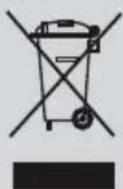
This appliance is labelled in accordance with European Directive 2012/19/EU concerning used electrical and electronic appliances (waste electrical and electronic equipment - WEEE).

The guideline determines the framework for the return and recycling of used appliances as applicable throughout the EU.

Description

BOSCH Serie 6 TDS 6041 - Description - 1

  1. "on / off" button with indicator light
  2. "Calc'nClean" descaling button with indicator light
  3. "Water tank empty" button with indicator light
  4. Energy saving "Eco" button with indicator light
  5. Steam hose
  6. Mains cable
  7. Mains cable and steam hose storage holder
  8. Boiler cap / "Calc'nClean" scale collector *
  9. Water tank
  10. Level mark for maximum filling
  11. Filling lid
  12. Iron pad
  13. Iron lock system "SecureLock" *
  14. Steam release button
  15. Iron indicator light
  16. Soleplate
  17. "Calc'nClean" container *

Introduction

BOSCH Serie 6 TDS 6041 - Introduction - 1

EasyComfort for simple, fast and safe ironing.

Discover the new way of ironing with EasyComfort – no more changing the temperature of the iron and tedious pre-sorting! Now all ironable materials, from ultra fine delicates to extra thick fabrics, are creasefree in a flash with a single temperature setting. Which means more time to do other things.

Using your appliance

max

3x Eco Clean'nClean

Diagram showing a hand inserting a plug into a car's side panel, with an arrow indicating the process (no text or symbols present)

2x

BOSCH Serie 6 TDS 6041 - Using your appliance - 5

1. Filling the water tank

This appliance has been designed to use normal tap water.

Important: Do not use additives! The addition of other liquids, such as perfume, vinegar, starch, condensation water from tumble dryers or air conditioning systems, or chemicals will damage the appliance. Any damage caused by the use of the aforementioned products will make the guarantee void!

1 Open the filling lid (11). 2 Fill the water tank (9). Never fill beyond the level "max" (10) for maximum filling! 3 Close the filling lid. 4 Refill the water tank when the indicator light (3) comes on. Three beeps will be heard. Important: Once refilled, press button (3).

Tip: To prolong the optimum steam function, you may mix tap water with distilled water 1:1. If the tap water in your area is very hard, mix tap water with distilled water 1:2.

BOSCH Serie 6 TDS 6041 - Filling the water tank - 1

2. Heating

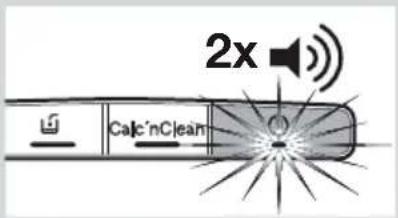
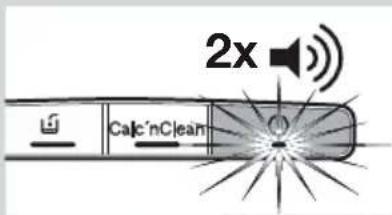
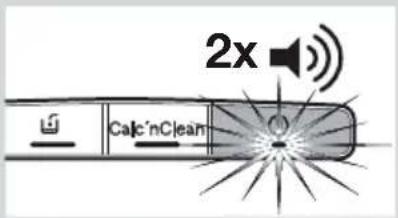
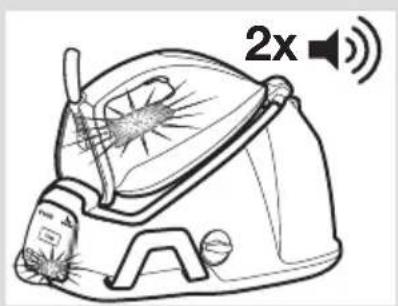
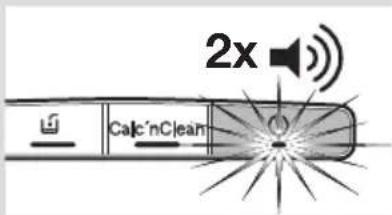
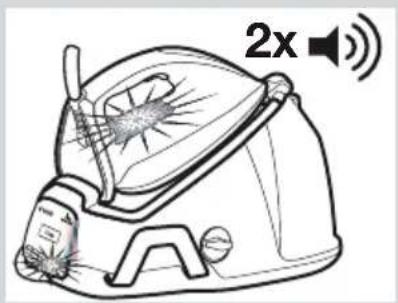
1 If your steam station is equipped with an iron lock system (13*), release the iron by pressing the 🔒 button. 2 Unwind the steam hose (5) and the mains cable (6). Plug mains cable into an earthed socket. 3 Press the button (1) to switch the appliance on. Indicator lights (1, 15) will flash indicating that the appliance is heating up. 4 When the iron is ready to use, the indicator lights (1, 15) will remain permanently lit. Two beeps will be heard.

BOSCH Serie 6 TDS 6041 - Heating - 1

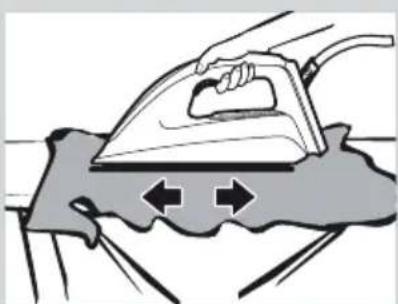
3. Ironing

1 Press the steam release button (14) for ironing with steam.

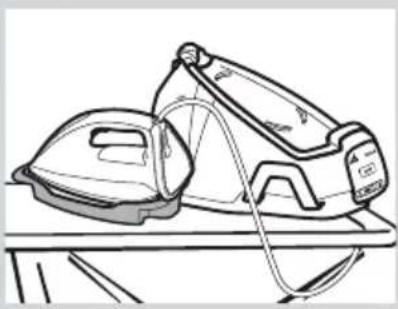
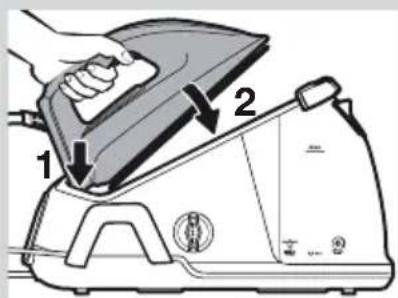
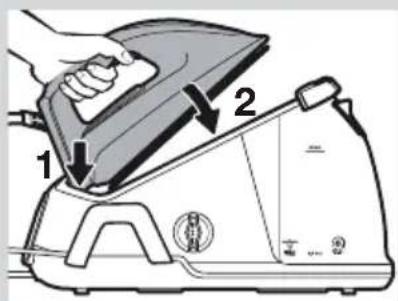
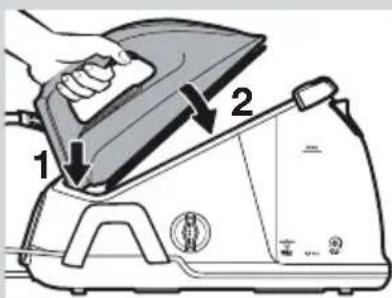
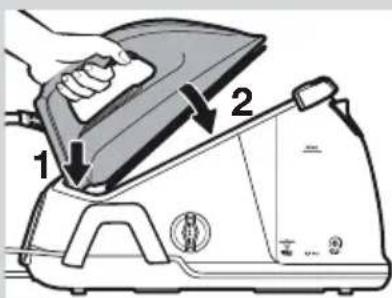
Important: When placing the iron on the pad, be sure to first insert the heel in the upper side of the control panel, as shown in the figure.

Tip: For better ironing results, iron the last strokes without pressing the steam release button (14) to dry the garment.

BOSCH Serie 6 TDS 6041 - Ironing - 1

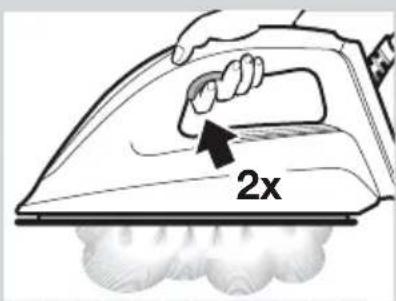
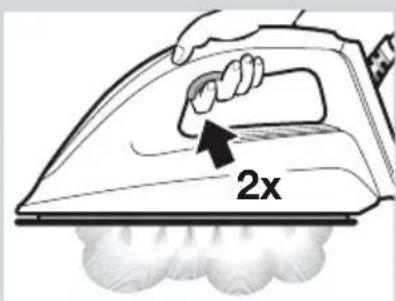
"PulseSteam" function

This appliance has a special function for tackling difficult creases.

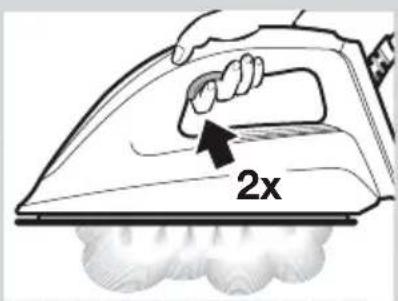
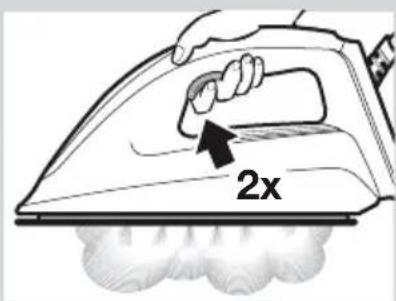
1 Press the steam release button (14) two times in quick succession (double-click). Powerful shots of steam will be released.

BOSCH Serie 6 TDS 6041 - "PulseSteam" function - 1

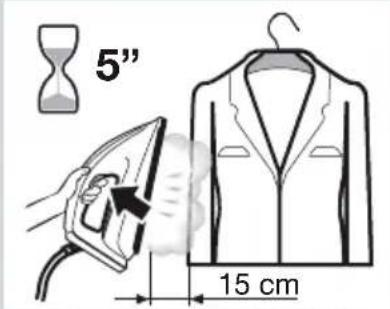
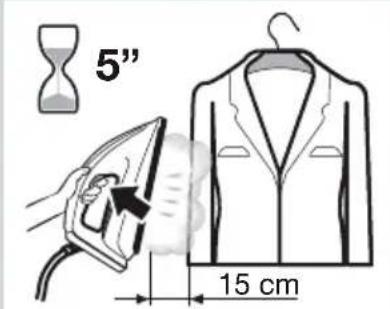
Vertical steam

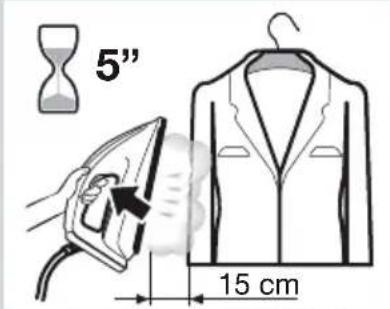
Can be used to remove creases from hanging clothes, curtains, etc.

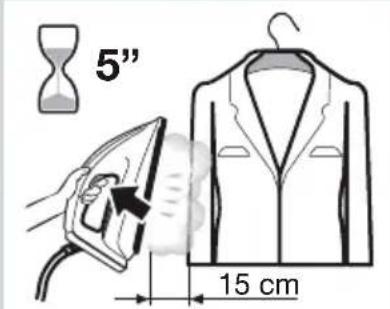
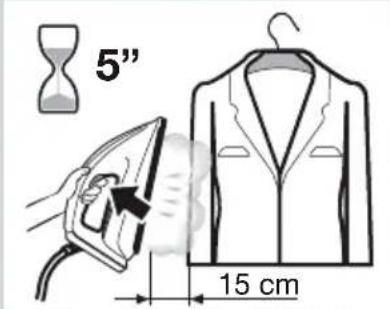
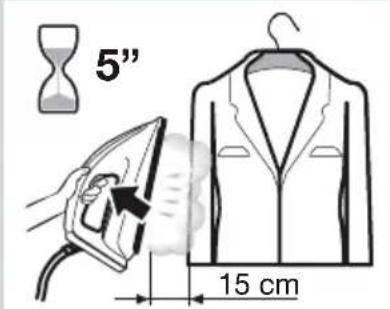
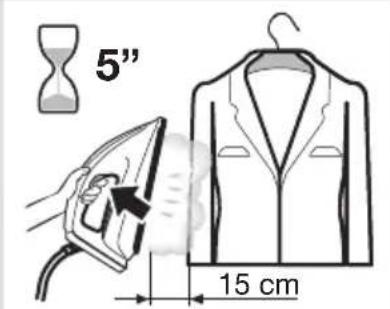
1 Hold the iron in an upright position 15 cm away from the garment to be steamed. 2 Press the steam release button (14) repeatedly with pauses of at least 5 seconds.

Warning! : never point the steam jet at garments being worn, or at people or animals.

BOSCH Serie 6 TDS 6041 - Vertical steam - 1

4. Energy saving

If the energy saving setting is selected, you can save energy and water and still achieve good results when ironing most of your garments.

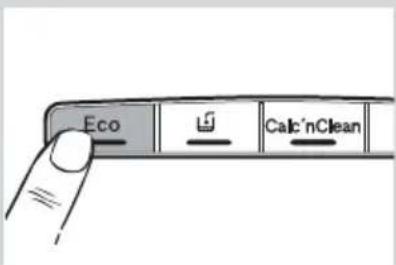
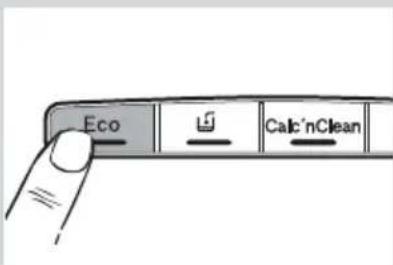
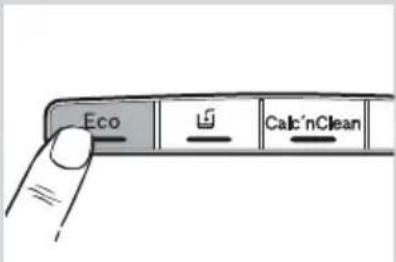
1 Press the energy saving button "Eco" (4). The indicator light will come on. 2 To switch back to the normal energy setting, press the "Eco" button again. It is advisable to use the normal energy setting to get optimum results on thick and very wrinkled fabrics.

Line drawing of a hand using an iron on a steam iron (no text or symbols)

Diagram showing a hand using a steam iron to press down a component, labeled with parts 1 and 2.

2x

5" 15 cm

Eco Calc'nClean

3x Eolar Jill Cacar Green Clean

BOSCH Serie 6 TDS 6041 - Energy saving - 7

5. Auto switch off

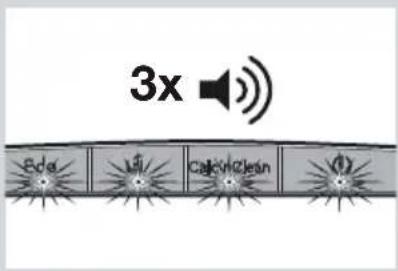
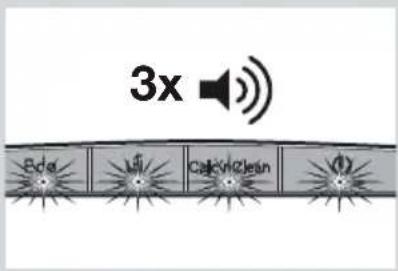
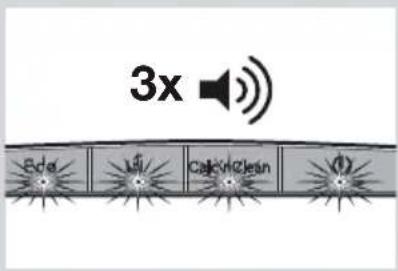
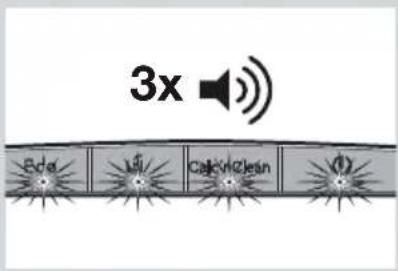
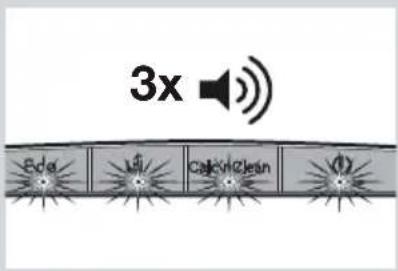
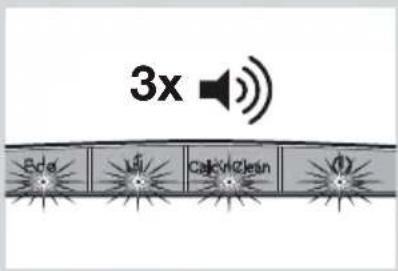
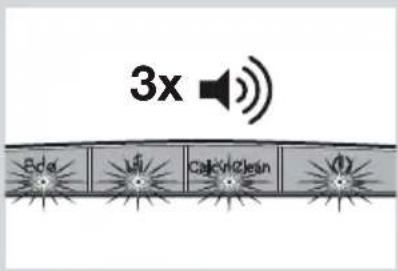
For your safety and to save energy, the appliance switches off automatically when it has not been used for 8 minutes. Three beeps will be heard, and all indicator lights (1, 2, 3, 4) will flash.

1 To switch the steam station back on, press the steam release button (14) again.

BOSCH Serie 6 TDS 6041 - Auto switch off - 1

Cleaning & Maintenance

3x Color Clean

Diagram showing a hand pressing a button on a left panel and then adjusting a switch with an arrow indicating the change.

2h

300 ml

Line drawing of a portable air conditioner with scroll wheel and directional arrows indicating motion (no text or symbols)

BOSCH Serie 6 TDS 6041 - Cleaning & Maintenance - 6

1. Descaling process

Important: to keep your appliance in good condition for a long time, you should carry out the descaling process after a period of use. The “Calc'nClean” indicator light (2) will flash and three beeps will be heard, indicating that the process should be performed.

Descaling the boiler

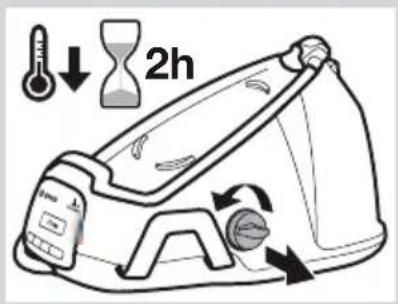
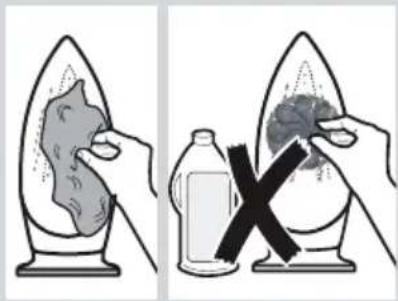
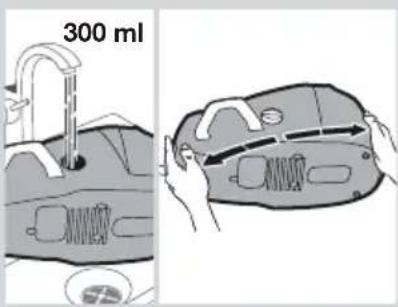
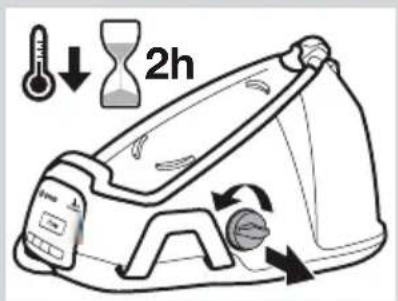
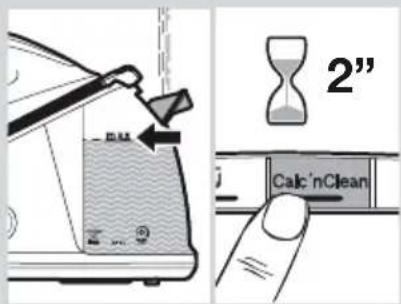
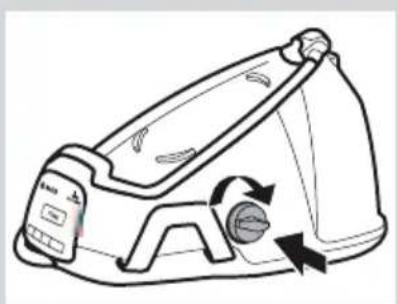
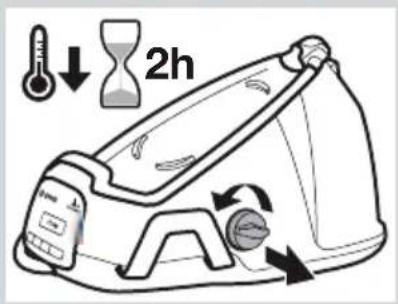
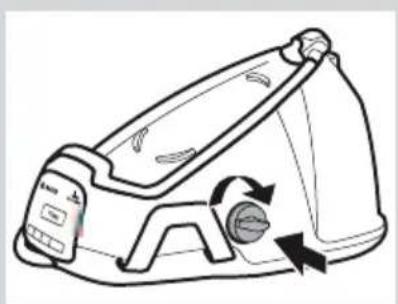
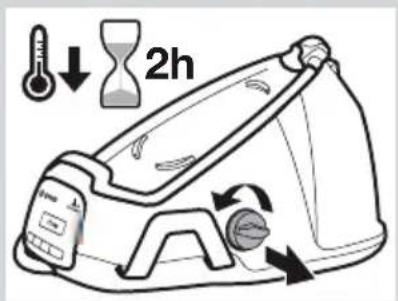
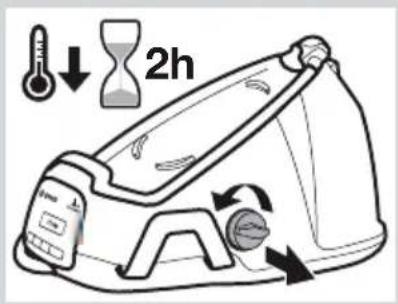
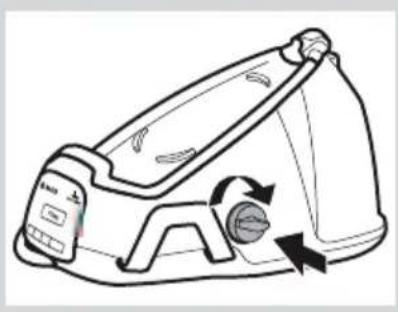
1 Press the button (1) to switch the appliance off. Unplug the appliance and let it cool down for at least 2 hours. 2 Empty the water tank. 3 Remove the iron from the pad (12). 4 Unscrew and remove the boiler cap (8) and take it out. Empty the boiler completely. 5 Fill the boiler with approximately 300 ml of tap water. Close the boiler cap and shake the base unit for a few moments. Then, empty it completely.

Important: To obtain the best result, we recommend that this operation be performed twice. Before re-closing, make sure no water remains in the boiler.

6 If your appliance is equipped with scale collector (8*), it must be washed (see the "Descaling the scale collector" section). 7 Replace and tighten up the cap.

Descaling the limescale collector *

1 Place the limescale collector under the water tap. 2 Wash it up until limescale residues are removed.

Descaling the iron

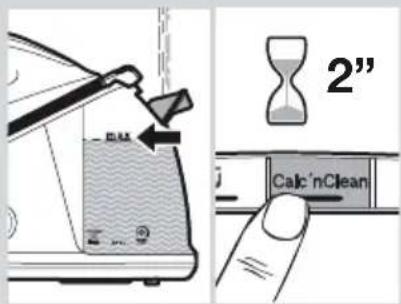
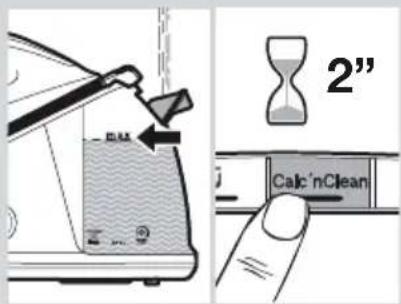
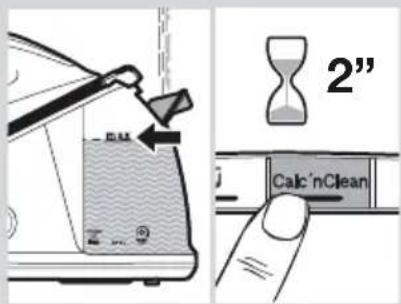
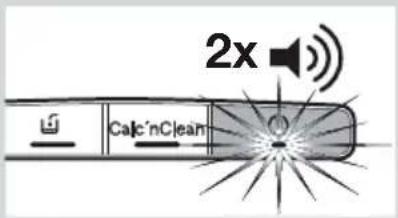
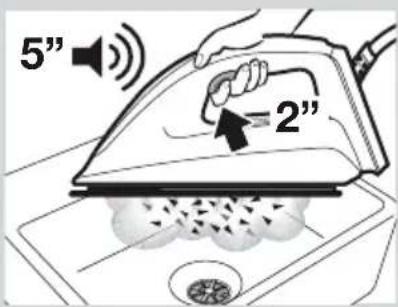
1 Fill the tank (9) with tap water. 2 Plug in the mains cable (6) and press the button (1) to switch the appliance on. 3 Press the descaling button (2) for 2 seconds. Its indicator light will remain permanently lit. 4 Wait until the indicator light (1) stops flashing and remains lit permanently. Two beeps will be heard.

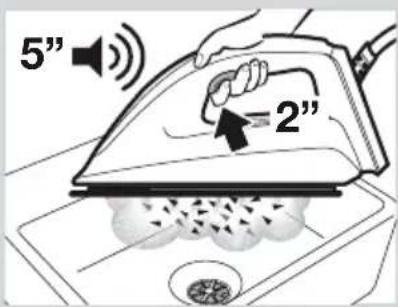
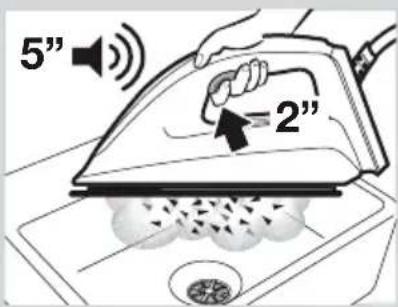
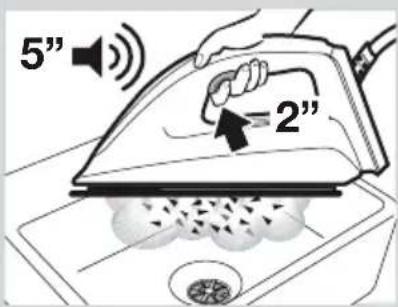
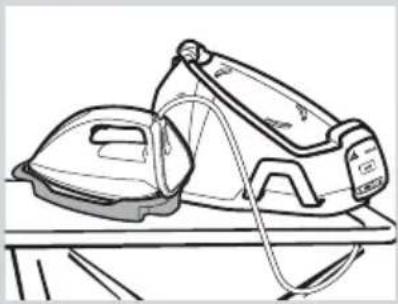
5 Hold the iron in a horizontal position over an empty sink to collect the water. If your appliance is equipped with a "Calc'nClean" container (17*), place the iron on it.

6 Press the steam release button (14) for 2 seconds. The descaling process will start automatically. Warning: boiling water and steam will be released through the soleplate, carrying limescale and/or deposits that may be inside. During the process, a beep will be heard every 5 seconds.

7 After approximately 3 minutes, the iron will stop releasing steam. A long beep will be heard, indicating that descaling process has finished. The appliance will switch off automatically.

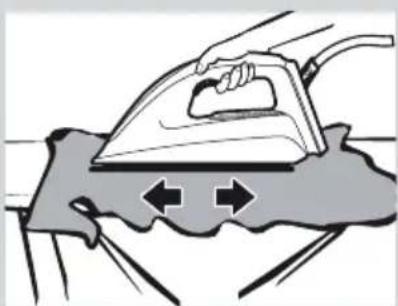
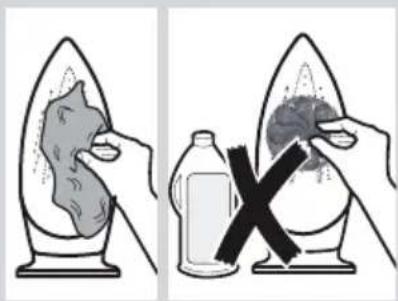
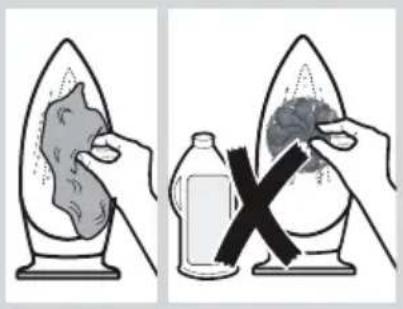
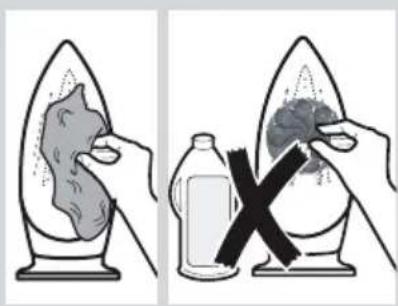
8 To clean the soleplate (16), immediately rub off any residue by running the hot iron over a wet cotton cloth.

Illustration of a hand using a tool to clean or store floor near a sink (no text or symbols)

2" Calc'nClean

2x Calc'nClean

Line drawing of a pair of steam irons on a table (no text or symbols)

5" 2"

Illustration of a hand using a steam iron to clean or wear a surface, with directional arrows indicating motion (no text or symbols)

Diagram illustrating a chemical experiment with labeled components and a cross symbol indicating removal or rejection.

BOSCH Serie 6 TDS 6041 - Descaling the iron - 8

2. Cleaning the appliance

Regularly clean your appliance for properly maintenance. Attention! Burn risk!

1 If the appliance is only slightly soiled, wipe it with a damp cotton cloth only, and then dry it. 2 To keep the soleplate smooth, you should avoid contact with hard metal objects. Never use a scouring pad, or chemicals to clean the soleplate.

BOSCH Serie 6 TDS 6041 - Cleaning the appliance - 1

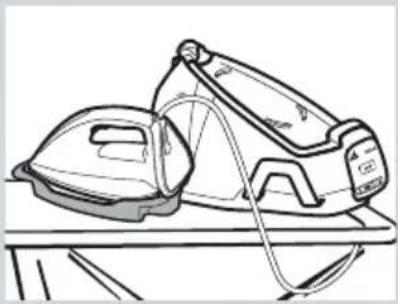
Storing the appliance

a b

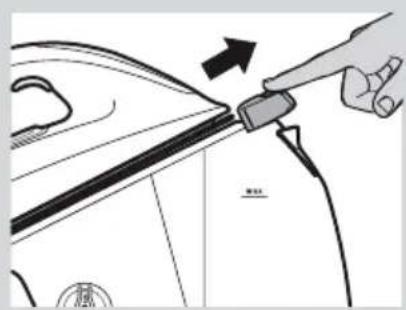
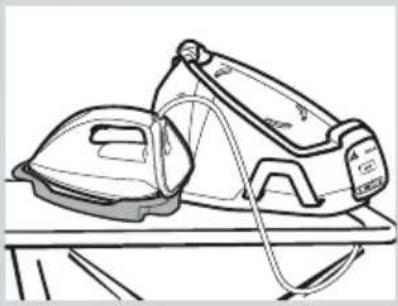
1 Unplug the appliance and let it cool down. Empty the water tank (9). 2 Place the iron on the steam station, standing on the pad (12). If your steam station is equipped with iron lock system (13*), fix the iron to it. First insert the heel and then block the tip moving the lock system against the iron. 3 Store the steam hose (5) and the mains cable (6) on the storage holder (7).

Line drawing of a medical or fitness device with attached tubing and a central display (no text or symbols)

BOSCH Serie 6 TDS 6041 - Storing the appliance - 3

Trouble shooting

Problem Possible causes Solution

The iron begins to smoke when switched on.

  1. During first use: certain components on the appliance have been lightly greased at the factory and may produce a small amount of smoke when initially heated.
  2. During subsequent use: the soleplate may be soiled.
  3. This is completely normal and will stop after a short while.
  4. Clean the soleplate according to the cleaning instructions in this manual.
Problem Possible causes Solution
Water flows through the holes on the soleplate.1. The water is condensing inside the tubes because steam is being used for the first time or has not been used for a long time.1. Point the iron away from the ironing area and press the steam release button until steam is produced.
Dirt comes out through the soleplate.1. There is a build up of limescale or minerals in the boiler and iron.2. Chemical products or additives have been used.1. Carry out a cleaning cycle (see the “Descaling process” section).2. Never add products to the water (see the “Filling the water tank” section).Clean the soleplate with a damp cloth.
The “Calc'nClean” indicator light (2) does not turn off.1. The iron descaling process has been stopped before being completed.1. Restart and complete the iron descaling process.
The appliance makes a pumping sound.1. Water is being pumped into the steam tank.2. The sound does not stop.1. This is normal.2. If the sound does not stop, do not use the steam station and contact an authorised technical service centre.
Loss of pressure during ironing.1. The steam release button has been activated for too long a period of time, meaning it has been pressed too frequently.1. Use the steam release button at intervals.
Water spots appear on the garment during ironing.1. May be caused by steam condensed on the ironing board.1. Wipe the textile cover of the ironing board, and iron any water drops to dry them.
The hose gets hot during use.1. This is normal. It is caused by the steam passing through the hose during steam ironing.1. Place the hose on the opposite side so that you do not touch the hose during ironing.
Water leakage from the boiler.1. Boiler cap (8) is loose. 1. Tighten the cap.

If the above tips do not solve the problem, get in touch with our customer service.

You can download this manual from the Bosch local homepages.
Line drawing of a steaming machine with sound waves and a 2x speed indicator (no text or symbols on the device itself)

Line drawing of a hand using an iron on a steam iron, with a magnifying glass resting below (no text or symbols)

Diagram showing a hand using a power iron to lift a surface, labeled with parts 1 and 2.

2x

5" 15 cm

Eco Check Calculate Clean

3x Eolar Jill Cafar Green

Diagram showing a hand pressing a button on a power switch and then adjusting a plug with an arrow indicating the process.

2h

300 ml

Line drawing of a steam iron shaver with rotating buttons and a handle (no text or symbols)

Illustration of a hand using a tool to clean or store floor near a faucet (no text or symbols)

2" Calc'nClean

2x Calc'nClean

Line drawing of a pair of steam iron on a table (no text or symbols)

5" =2"

Illustration of a hand using a steam iron to press down a surface with directional arrows (no text or symbols)

Diagram illustrating a chemical experiment with labeled steps: adding liquid to a leaf, reducing it, and removing a bottle into a container.

Illustration of a lifebuoy device with attached tubing and a black checkmark (no text or symbols)

Line drawing of a car being charged with a tool, showing the arrow and partial view (no text or symbols)

Line drawing of a steam iron with a 2x sound wave indicator (no text or symbols on the diagram itself)

Line drawing of a hand using an iron to press down on a surface, with no text or symbols present.

Diagram showing a hand using a steam iron to lift a surface, labeled with parts 1 and 2.

2x

5" (15 cm)

Eco Check Calculate Clean

3x Solar Fire Calcining Clean

3x Color Clean

Diagram showing a hand pressing a button with an electrical symbol and a close-up of the right-hand rule to press a plug into a socket.

2h

300 ml

Line drawing of a portable air conditioner with scroll wheel and cooling mechanism (no text or symbols)

Illustration of a hand using a tool to clean or store floor near a faucet (no text or symbols)

2" Calc'nClean

2x Calc'nClean

Line drawing of a pair of steam irons on a table (no text or symbols)

5" = 2"

Illustration of a hand using an iron on a surface with directional arrows indicating motion (no text or symbols)

Diagram illustrating a chemical experiment with labeled steps: adding liquid to a leaf, reducing it, and using a bottle to remove a leaf.

Line drawing of a respirator device with attached straps and a black checkmark (no text or symbols)

Line drawing of a device emitting sound waves, no text or symbols present

BOSCH Serie 6 TDS 6041 - Problem Possible causes Solution - 42

1. Fill the water tank

1 2

2x

5" 15 cm

Eco Check Calculate Clean

3x Radio Fire Clean

BOSCH Serie 6 TDS 6041 - Fill the water tank - 6

5. Automatic shut-off

Diagram showing a hand pressing a button with an electrical symbol and a close-up of the button being inserted, indicating a switch or trigger.

2h

300 ml

Line drawing of a portable air conditioner with scroll wheel and rotary button (no text or symbols)

BOSCH Serie 6 TDS 6041 - Automatic shut-off - 5

1. Descaling process
2" Calc'nClean

2x Calc'nClean

Line drawing of a pair of steam iron holders on a table (no text or symbols)

5" =2"

Illustration of a hand using an iron on a surface with directional arrows indicating motion (no text or symbols)

Diagram illustrating a chemical experiment with labeled steps: adding a substance to form a flask, and using a bottle to remove a leaf.

Illustration of a lifebuoy device with attached belt and belt switch (no text or symbols)

Line drawing of a steam iron with a 2x sound wave indicator (no text or symbols on the diagram itself)

Line drawing of a hand using an iron on a steam iron, with a magnifying glass resting below (no text or symbols)

1 2

2x

5" 15 cm

Eco Check'nClean

3x Solar Water Clean

BOSCH Serie 6 TDS 6041 - Descaling process - 15

5. Automatic shut-off

Diagram showing a hand pressing a button with an 'OK' button and a close-up of the button being inserted, indicating action or control.

2h

300 ml

Line drawing of a washing machine with circular arrows indicating rotation (no text or symbols)

BOSCH Serie 6 TDS 6041 - Automatic shut-off - 5

1. Descaling

2" Calc'nClean

2x Calc'nClean

Line drawing of a pair of steam iron on a table (no text or symbols)

5" =2"

Illustration of a hand using an iron on a surface with directional arrows indicating motion (no text or symbols)

Diagram illustrating a chemical experiment with labeled steps: adding a substance to a flask, and using a bottle to remove a mixture.

Line drawing of a lifebuoy device with straps and a control panel (no text or symbols)

Line drawing of a steaming machine with sound waves and a 2x speed indicator (no text or symbols on the device itself)

BOSCH Serie 6 TDS 6041 - Descaling - 9

1. Filling the water tank

Vertical steam ironing

Diagram showing a hand using a steam iron to lift a bag, labeled with parts 1 and 2.

2x

5" 15 cm

Eco Check Clean

3x Eolar Jill Cafin/Clean

BOSCH Serie 6 TDS 6041 - Vertical steam ironing - 6

5. Automatic shut-off
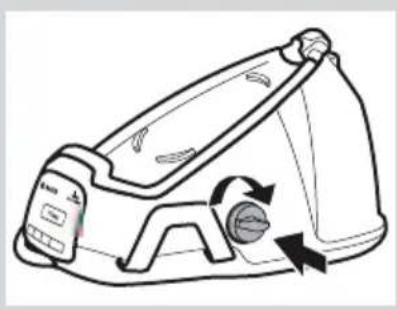
Diagram showing a hand pressing a button with an electrical symbol and a close-up of the right-hand rule to adjust the button.

2h

300 ml

Line drawing of a portable air conditioner with scroll wheel and directional arrows indicating motion (no text or symbols)

Illustration of a hand using a tool to clean or wash the surface of a faucet (no text or symbols)

2" Calc'nClean

2x Calc'nClean

Line drawing of a pair of steam irons on a table (no text or symbols)

5" =2"

Illustration of a hand using an iron on a surface with two arrows indicating direction (no text or symbols)

Diagram illustrating a chemical experiment with labeled steps: adding liquid to a leaf, reducing water, and removing a substance.

Illustration of a medical or fitness device with attached tubing and a checkmark (no text or symbols)

Diagram showing a hand inserting a plug into a car's side panel, with an arrow indicating the process (no text or symbols present)

Line drawing of a steam iron with a 2x sound wave indicator (no text or symbols on the diagram itself)

Line drawing of a hand using an iron to press down a surface, with a magnifying glass resting on the base (no text or symbols)

Diagram showing a hand using a steam iron to press down a component, labeled with parts 1 and 2.

2x

5" 15 cm

Eco Check Calculate Clean

3x Eolar Jill Cabin/Clean

3x Color Clean

Diagram showing a hand pressing a button with an electrical symbol and a close-up of the right-hand rule to adjust a switch.

2h

300 ml

Line drawing of a washing machine with circular arrows indicating rotation (no text or symbols)

BOSCH Serie 6 TDS 6041 - Automatic shut-off - 26

1. Descaling system

2" Calc'nClean

2x Calc'nClean

Line drawing of a pair of steam iron on a table (no text or symbols)

5" 2"

Illustration of a hand using an iron on a surface with directional arrows indicating motion (no text or symbols)

Diagram illustrating a chemical experiment with labeled steps: adding liquid to a leaf, reducing water, and removing a substance.

Illustration of a medical or surgical device with tubing and a checkmark (no text or symbols)

Line drawing of a steam iron with a 2x sound wave indicator (no text or symbols on the diagram itself)

Line drawing of a hand using an iron to press down a surface, with no text or symbols present.

Diagram showing a hand using a steam iron to lift a machine, labeled with parts 1 and 2.

2x

5" 15 cm

Eco Check Calculate Clean

3x Eolar Jill CalcineClean D

3x Cash Clean

Diagram showing a hand pressing a button with an 'OK' button and a close-up of the action being pushed by a pencil.

2h

300 ml

Line drawing of a washing machine with circular arrows indicating rotation and adjustment (no text or symbols)

BOSCH Serie 6 TDS 6041 - Descaling system - 20

1. Descaling

2" Calc'nClean

2x Calc'nClean

Line drawing of a pair of steam irons on a table (no text or symbols)

5" =2"

Illustration of a hand using an iron on a surface with directional arrows indicating motion (no text or symbols)

Diagram illustrating a chemical experiment with labeled steps: adding liquid to a leaf, reducing water, and removing a substance via an X mark.

Illustration of a lifebuoy device with attached straps and a checkmark (no text or symbols)

Line drawing of a steam iron with a speaker emitting sound waves (no text or symbols)

Line drawing of a hand ironing an iron with a cloth underneath (no text or symbols)

SPANISH

Diagram showing a hand using a power iron to lift a surface, labeled with parts 1 and 2.

2x

5" 15 cm

Eco Calc'nClean

3x Eda Lil Cakin Clean

3x Cabin Clean

Diagram showing a hand pressing a button on a screen while holding a plug, with an arrow indicating the action.

2h

300 ml

Line drawing of a portable air conditioner with scroll wheel and directional arrows indicating motion (no text or symbols)

Illustration of a hand using a tool to lift or adjust a wall-mounted object, no text or symbols present

2" Calc'nClean

2x Calc'nClean

Line drawing of a pair of steam iron on a table (no text or symbols)

5" =2"

Illustration of a hand using an iron on a surface with directional arrows indicating motion (no text or symbols)

Diagram illustrating a chemical experiment with labeled components and a cross symbol indicating reaction or inhibition.

Line drawing of a respirator device with attached tubing and belt (no text or symbols)

2x

Line drawing of a hand using an iron on a surface, with a magnifying glass resting below (no text or symbols)

Diagram showing a hand using a steam iron to lift a machine, labeled with parts 1 and 2.

2x

5" 15 cm

Eco Check Calc'nClean

3x Eolar Lil Cabin/Clean

3x Cash Clean

Diagram showing a hand pressing a button with an electrical symbol and a close-up of the next step to press a plug.

2h

300 ml

Line drawing of a washing machine with directional arrows indicating motion (no text or symbols)

Line drawing of a hand using a tool to lift or lift a faucet (no text or symbols)

2" Calc'nClean

2x Calc'nClean

Line drawing of a pair of steam iron on a table (no text or symbols)

5" =2"

Illustration of a hand using an iron on a surface with directional arrows indicating motion (no text or symbols)

Diagram illustrating a chemical experiment with labeled components and a cross symbol indicating removal or rejection.

Illustration of a respirator device with attached tubing and a control panel (no text or symbols)

2x

Line drawing of a hand using an iron to press down a surface, with a magnifying glass resting on the base (no text or symbols)

Diagram showing a hand using a power iron to lift a surface, labeled with parts 1 and 2.

2x

5" 15 cm

Eco Check Calculate Clean

3x Eda Ji Cacin Clean

3x Cabin Clean

Diagram showing a hand pressing a button on a power switch and then adjusting a plug with an arrow indicating the process.

2h

300 ml

Line drawing of a washing machine with circular arrows indicating rotation and adjustment (no text or symbols)

Illustration of a hand using a tool to lift a faucet (no text or symbols)

2" Calc'nClean

2x Calc'nClean

Line drawing of a steam iron on a wooden stand (no text or symbols)

5" =2"

Illustration of a hand using an iron on a surface with directional arrows indicating motion (no text or symbols)

Diagram illustrating a chemical experiment with labeled components: a solid substance being added to a liquid and a reaction with a black X mark.

Illustration of a lifebuoy device with attached straps and a black checkmark (no text or symbols)

2x

Line drawing of a hand using an iron to press down a surface, with a magnifying glass resting on the base (no text or symbols)

Diagram showing a hand using a steam iron to lift a machine, labeled with parts 1 and 2.

2x

5" 15 cm

Eco Check Calculate Clean

3x Solar Life Calving Clean Dial

BOSCH Serie 6 TDS 6041 - Descaling - 75

5. Automatic shut-off

Diagram showing a hand pressing a button next to a magnified view of the button with an arrow indicating rotation.

2h

300 ml

Line drawing of a portable air conditioner with scroll wheel and rotary button (no text or symbols)

Illustration of a hand using a tool to lift or lift a faucet (no text or symbols present)

2" Calc'nClean

2x Calc'nClean

Line drawing of a pair of steam iron on a table (no text or symbols)

5" = 2"

Illustration of a hand using an iron on a surface with directional arrows indicating motion (no text or symbols)

Diagram illustrating a chemical experiment with labeled components and a cross symbol indicating removal or rejection.

Illustration of a respirator device with attached tubing and a control panel (no text or symbols)

Line drawing of a steam iron with sound waves, no text or symbols present

Line drawing of a hand using an iron to press down a surface, with a magnifying glass arrow indicating the motion (no text or symbols)

1 2

2x

5" 15 cm

Eco Check Calculate Clean

3x Eolar Jill Calcium Clean

3x Color Clean

Diagram showing a hand pressing a button with an electrical symbol and a close-up of the next button being inserted.

2h

300 ml

Line drawing of a washing machine with directional arrows indicating motion (no text or symbols)

BOSCH Serie 6 TDS 6041 - Automatic shut-off - 25

1. Removing scale

2" Calc'nClean

2x Calc'nClean

Line drawing of a pair of steam irons on a table (no text or symbols)

5" =2"

Illustration of a hand using an iron on a surface with directional arrows indicating motion (no text or symbols)

Diagram illustrating a chemical experiment with labeled steps and a cross symbol indicating removal or rejection.

Illustration of a respirator device with attached tubing and a checkmark (no text or symbols)

2x

Illustration of a hand using a steam iron to press down a surface, with no text or symbols present.

Diagram showing a hand using a steam iron to lift a machine, labeled with parts 1 and 2.

2x

5" 15 cm

Eco Check Calculate Clean

3x Eolar Life Calving Clean Dial

3x Color Clean

Diagram showing a hand pressing a button with an electrical symbol and a close-up of the next step to press a plug.

2h

300 ml

Line drawing of a portable air conditioner with scroll wheel and rotary button (no text or symbols)

BOSCH Serie 6 TDS 6041 - Removing scale - 20

1. Descaling

2" Calc'nClean

2x Calc'nClean

Line drawing of a steam iron on a table, no text or symbols present

5" =2"

Illustration of a hand ironing an iron on a surface with two arrows indicating direction (no text or symbols)

Diagram illustrating a chemical experiment with labeled components and a cross symbol indicating removal or rejection.

Illustration of a medical or fitness device with attached straps and a control panel (no text or symbols)

Line drawing of a steam iron with a speaker emitting sound waves (no text or symbols)

Line drawing of a hand using an iron to press down a surface, with a magnifying glass resting on the base (no text or symbols)

Diagram showing a hand using a steam iron to lift a machine, labeled with parts 1 and 2.

2x

5" 15 cm

Eco Edit Calc'nClean

3x Eolar Lil Cabin/Clean

3x Color Clean

Diagram showing a hand pressing a button with an electrical symbol and a close-up of the next step to press a plug.

2h

300 ml

Line drawing of a steam iron with directional arrows indicating motion (no text or symbols)

Line drawing of a hand using a tool to clean or wash the surface of a faucet (no text or symbols)

2" Calc'nClean

2x Calc'nClean

Line drawing of a steam iron on a table, no text or symbols present

5" 2"

Illustration of a hand using an iron on a surface with directional arrows indicating motion (no text or symbols)

Diagram illustrating a chemical experiment with labeled components and a cross symbol indicating removal or rejection.

BOSCH Serie 6 TDS 6041 - Descaling - 27

2. Cleaning the iron

2x

Illustration of a hand using an iron to press down a surface, with a magnifying glass resting on the base (no text or symbols)

1 2

2x

5" 15 cm

Eco Check Calculate Clean

3x Eolar Lil Cabin/Clean

3x Cable Clean

Diagram showing a hand pressing a button with an electrical symbol and a close-up of the switch being inserted.

2h

300 ml

Line drawing of a portable air conditioner with circular arrows indicating rotation and sound waves (no text or symbols).

Illustration of a hand using a tool to lift or adjust a sink (no text or symbols present).

2" Calc'nClean

2x Calc'nClean

Line drawing of a pair of steam irons on a table (no text or symbols).

5" = 2"

Illustration of a hand using an iron on a surface with directional arrows indicating motion (no text or symbols).

Diagram illustrating a chemical experiment with labeled steps: adding liquid to a leaf, removing a bottle, and using a microscope to remove the tissue.

BOSCH Serie 6 TDS 6041 - Cleaning the iron - 20

2. Cleaning the iron

2x

Illustration of a hand using an iron on a steam, with a magnifying glass highlighting the iron (no text or symbols present).

1 2

2x

5" 15 cm

Eco Check Calculate Clean

3x Eolar Life Calving Clean Dial

BOSCH Serie 6 TDS 6041 - Cleaning the iron - 8

5. Automatic stop

Diagram showing a hand pressing a button with an electrical symbol and a close-up of the switch being inserted.

2h

300 ml

Line drawing of a portable air conditioner with scroll wheel and directional arrows indicating motion (no text or symbols)

BOSCH Serie 6 TDS 6041 - Automatic stop - 5

1. Decalcification process

2" Calc'nClean

2x Calc'nClean

Line drawing of a steam iron on a wooden table (no text or symbols)

5" = 2"

Illustration of a hand using an iron on a surface with directional arrows indicating motion (no text or symbols)

Diagram illustrating a chemical experiment with labeled steps: adding granular material to form a flask, and using a plastic bottle to remove granular material.

Illustration of a lifebuoy device with attached straps and a checkmark (no text or symbols)

BOSCH Serie 6 TDS 6041 - Decalcification process - 8

BOSCH Serie 6 TDS 6041 - Decalcification process - 9

Illustration of a lifebuoy device with attached belt and belt switch (no text or symbols).

Line drawing of a hand using a tool to adjust or install a wall-mounted component (no text or symbols).

2" Calc'nClean

2x Calc'nClean

Line drawing of a pair of steam irons on a table (no text or symbols).

5" 2"

Illustration of a hand using an iron on a surface with directional arrows indicating motion (no text or symbols).

Cleaning and maintenance

3x Cash Clean

Diagram showing a hand pressing a button with an electrical symbol and a close-up of the right-hand rule to adjust the switch.

6

7

2h

300 ml

Line drawing of a portable air conditioner with scroll wheel and rotary button (no text or symbols).

Line drawing of a hand using an iron to press down a surface, with steam rising (no text or symbols).

1 2

2x

5" 15 cm

Eco Calc'nClean

.3. Total

Line drawing of a car's side panel being connected to a plug, with an arrow indicating the process (no text or symbols present)

2x

Line drawing of a car being charged with a tool, showing the arrow pointing to the contact area (no text or symbols present)

Line drawing of a steam iron with a 2x sound wave indicator (no text or symbols on the diagram itself)

BOSCH Serie 6 TDS 6041 - Cleaning and maintenance - 15

1. Filling the water tank

1 2

2x

5" 15 cm

Eco Calc'nClean

3x Edea Ji CalcivClean

BOSCH Serie 6 TDS 6041 - Filling the water tank - 6

5. Auto shut-off

Diagram showing a hand pressing a button with an electrical symbol and a close-up of the right-hand rule to adjust the button.

2h

300 ml

Line drawing of a washing machine with circular arrows indicating rotation and clockwise motion (no text or symbols)

Line drawing of a hand using a tool to clean or wash the surface of a faucet (no text or symbols)

2" Calc'nClean

2x Calc'nClean

Line drawing of a pair of steam iron on a table (no text or symbols)

5" =2"

Illustration of a hand using an iron on a surface with directional arrows indicating motion (no text or symbols)

Diagram illustrating a chemical experiment with labeled steps: adding liquid to a leaf, reducing it, and removing a bottle into a container.

Line drawing of a lifebuoy device with attached grip and belt (no text or symbols)

Manual assistant
Powered by Anthropic
Waiting for your message
Product information

Brand : BOSCH

Model : Serie 6 TDS 6041

Category : Iron