
GO MIC DIRECT - Microphone SAMSON - Free user manual and instructions
Find the device manual for free GO MIC DIRECT SAMSON in PDF.


| Brand | Samson |
| Model | GO MIC DIRECT |
| Product Type | USB Condenser Microphone |
| Capsule | Electret Condenser |
| Polar Pattern | Cardioid |
| Frequency Response | 20 Hz – 20 kHz |
| Sample Rate | 44.1 kHz / 48 kHz |
| Resolution | 16 bits |
| Connectivity | USB 2.0 (Micro-USB type) |
| Power Supply | USB bus (5 V, max 100 mA) |
| Dimensions (L x W x H) | 90 x 40 x 30 mm |
| Weight | 150 g |
| Main Features | 3.5mm headphone jack for monitoring, volume/mix knob, integrated adjustable stand, plug-and-play compatibility |
| Compatibility | Windows, macOS, Chrome OS – no driver installation required |
| Cable | 1.2 m, built into microphone |
| Care and Cleaning | Wipe with a soft dry cloth, avoid moisture and dust |
| Safety | Do not expose to extreme temperatures, do not open, use only with standard USB ports |
| Spare Parts and Repairability | Not user-repairable – no replaceable components |
Frequently Asked Questions - GO MIC DIRECT SAMSON
User questions about GO MIC DIRECT SAMSON
0 question about this device. Answer the ones you know or ask your own.
Ask a new question about this device
Download the instructions for your Microphone in PDF format for free! Find your manual GO MIC DIRECT - SAMSON and take your electronic device back in hand. On this page are published all the documents necessary for the use of your device. GO MIC DIRECT by SAMSON.
USER MANUAL GO MIC DIRECT SAMSON
Congratulations on your purchase of the Samson Go Mic Direct portable USB microphone. The Go Mic Direct represents the culmination of Samson's history of building world-class microphones, and is a product of Samson's position on the leading edge of digital microphone technology.
Go Mic Direct offers convenient plug-and-play operation, as its ultra-compact design plugs directly into your computer's USB port. In addition, Go Mic Direct is compatible with iPads and iPhones (4S and later) using Apple's Lightning USB Camera Adapter or Camera Connection Kit (30-pin), making it a great tool for mobile podcasts, popular speech to text software and field recording.
The Go Mic Direct is the ideal computer-based solution for capturing stunning audio on-the-go. Perfect for podcasting, recording music and sound for YouTube videos, Go Mic Direct's range of functionality also compliments Skype, FaceTime and voice recognition software applications.
Samson's Sound Deck audio software (available as a free download from www.samsontech.com) expands the functionality of the Go Mic
Direct by enabling digital noise reduction which eliminates unwanted background noise such as an air conditioner or computer fan buzz. This paves the way for high quality VoIP communication.
Whether you're staying in touch with your family, recording a podcast, or your latest song idea, the Go Mic Direct is the simplest and most comprehensive solution for high-quality recording. Just plug it in and start creating!
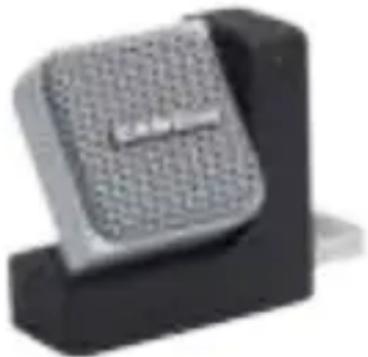
natural_image
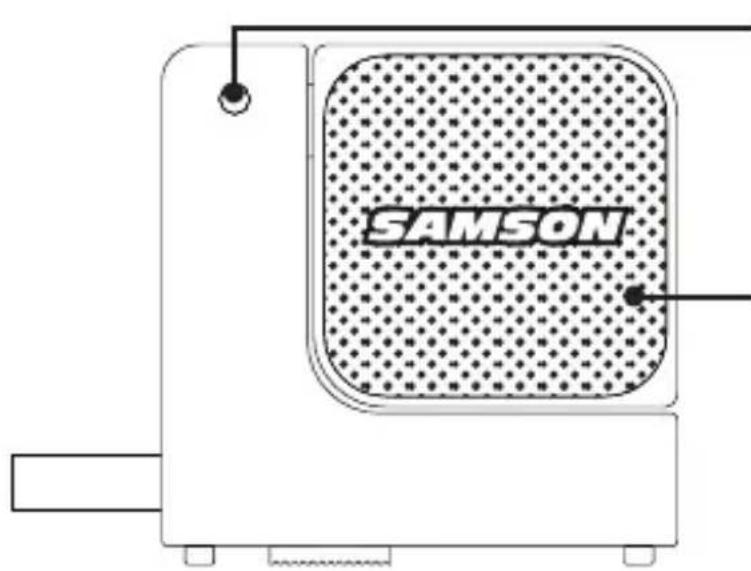
Close-up of a black electronic component with a textured surface and a small protrusion (no visible text or symbols)Microphone Call Outs

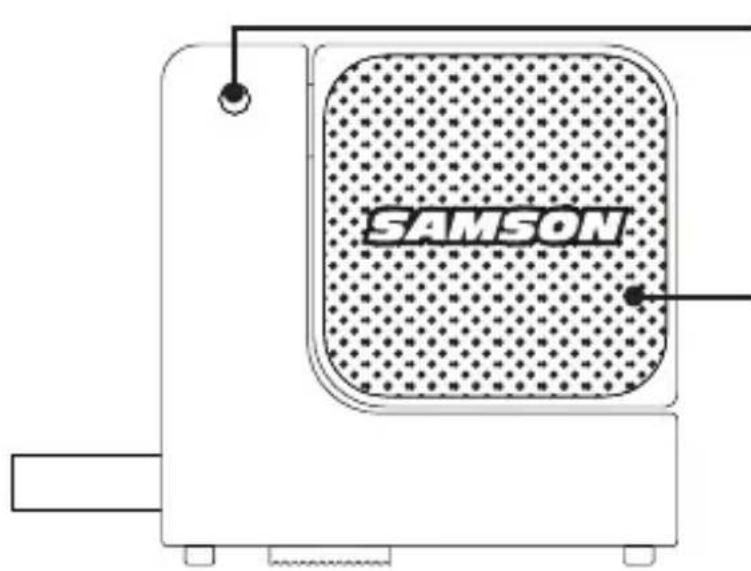
Status Light
Two-color LED illuminates green to indicate power and flashes red when the input signal is clipping.
Microphones
Two studio quality microphone capsules, one facing each direction, for 360° audio capture.

USB Connector
Retractable USB connector for interfacing with your PC or Mac.
Slide and Lock Mechanism
Push then slide to extend or retract the USB connector. The USB connector safely locks away when it's not in use.

Features
- Ultra-compact design connects directly via USB and won't block surrounding ports
- Dual microphone capsules allow the microphone to pick up sounds plugged into either side of a computer keyboard
- Compatible with most any Mac or PC based Digital Audio Workstation.
- Unique design with integral USB connector makes the microphone extremely portable and ideal for most recording solutions, especially mobile laptop recording.
- Samson's free Sound Deck noise reduction software enhances the microphone's performance for clear audio reproduction making it ideal for voice recordings, conferences, or VoIP.
- Computer controlled Input Gain with Peak LED makes it easy to set the proper level and get a clean signal.
- The on-board, high quality AD converters with 16 Bit, 48K sampling rate provide high quality recording.
- Ideal for Skype, FaceTime, voice recognition software, podcasting, sound for YouTube videos, and recording music
- On the road, in the office or in a fixed installation, the solid construction makes the microphone a reliable audio tool, day in and day out
- Carry case included
Quick Start

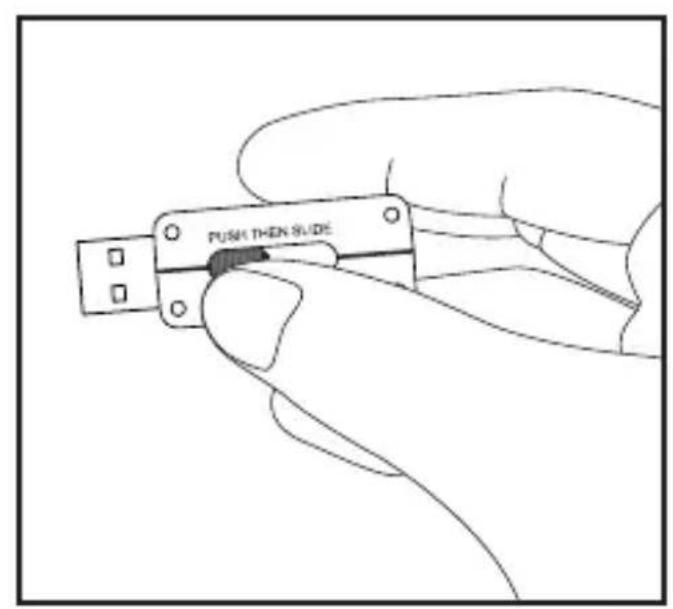
Press and slide the button on the bottom of the Go Mic Direct to extend the USB connector. The USB connector will lock in place when fully extended.

Quick Start
natural_image
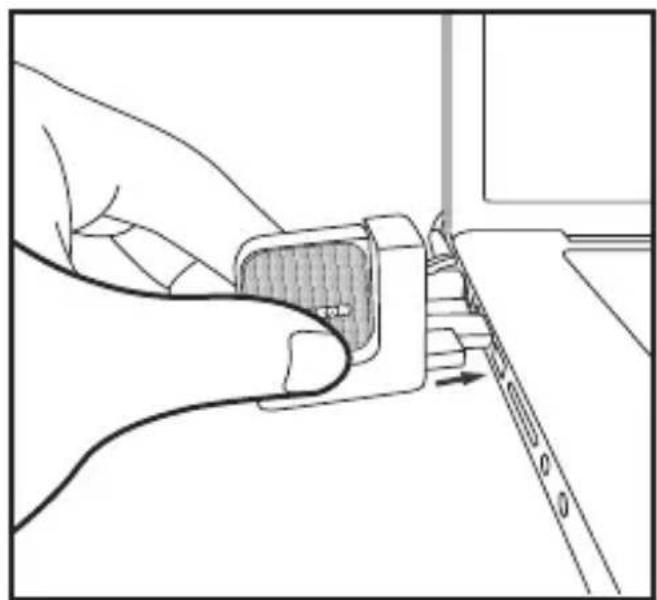
Line drawing of a hand inserting a component into a device (no text or symbols)Plug the microphone into an available USB port on your computer. The Go Mic Direct is designed to work with USB ports on the left or right side of the keyboard.

natural_image
Technical line drawing of a mechanical component with a meshed insert and directional arrows indicating motion (no text or symbols)For optimal performance, rotate the microphone so that it faces the sound source.
Samson Sound Deck Software
Samson's Sound Deck computer software expands the operation of the Go Mic Direct by providing proprietary digital noise reduction algorithms. Sound Deck software works with Windows and Mac OSX operating systems and can be downloaded at www.samsontech.com/gomicdirect.
The Digital Noise Reduction algorithm enhances speech applications by reducing ambient noise in your environment such as computer fans and air conditioners. Continuous and repetitive noise is effectively removed from the microphone input, providing cleaner audio for speech recognition, videoconferencing, gaming, and voice over internet communication.

Computer Setup
Installing the Go Mic Direct is a simple procedure that takes just a few minutes. Simply connect the included USB cable and begin recording. The following sections of this manual provide detailed instructions on setting up your Go Mic Direct in Windows or MAC OS.
Windows
- The first time you plug the Go Mic Direct into a USB port, Windows will install the universal USB drivers for that port.
- To set the Go Mic Direct as your default input/recording device, or to change its settings, open the Control Panel, Hardware & Sound settings, then click SOUND. Under Recording tab, you can select the Samson Go Mic Direct from the list of devices and press the Set Default button to set it as the default audio input device.
- To set the gain of the microphone, click the Properties button, and then select the Levels tab. Slide the control until the desired level is reached. If you find that the microphone's red clip LED is lighting frequently, turn this control down until the LED no longer flashes red.
- Download and install the Samson Sound Deck software from www.samsontech.com/gomicdirect
Computer Setup
- Launch the Sound Deck software (found in the Windows task bar) to turn on the noise reduction filters.
Apple MAC OSX
- To start using the Samson Go Mic Direct, simply plug it in. The LED will illuminate to indicate it is receiving USB power. The MAC will recognize the USB audio device and automatically install a universal driver.
- To select the Go Mic Direct as the computer's audio input, open System Preferences from the dock or the main Apple Menu.
- Next, open the Sound preferences, choose the Input tab and select Go Mic Direct. To set the gain of the microphone, adjust the Input volume slider at the bottom of the Sound dialog box. The Input Level meter will show the recording level.
- Download and install the Samson Sound Deck software from www.samsontech.com/gomicdirect
- In the Control Panel, click on the Samson Sound Deck icon to launch the software and turn on the noise reduction filters.

natural_image
Exterior view of a modern office building (no signage)

Specifications
Polar Pattern. . . . . . . . . Omni-directional
Capsule . . . . . . . . . . . Two, 10mm condenser capsule
Frequency Response ..... 20Hz - 20kHz
Software Filter Algorithm . . . Digital Noise Reduction
Sample Rate . . . . . . . . . 44.1/48kHz
Bit Rate ..... 16bit
Power Requirements ..... 5V 50mA
Dimensions . . . . . . . . 1.7" x 0.74" x 1.7 (42mm x 19mm x 42mm)
Weight. . . . . . . . . . . . . 1.03oz (29.3g)
At Samson, we are continually improving our products, therefore specifications and images are subject to change without notice.
If you want to dispose this product, do not mix it with general household waste. There is a separate collection system for used electronic products in accordance with legislation that requires proper treatment, recovery and recycling.
Private household in the 28 member states of the EU, in Switzerland and Norway may return their used electronic products free of charge to designated collection facilities or to a retailer (if you purchase a similar new one).
For Countries not mentioned above, please contact your local authorities for a correct method of disposal.
By doing so you will ensure that your disposed product undergoes the necessary treatment, recovery and recycling and thus prevent potential negative effects on the environment and human health.
THIS DEVICE COMPLIES WITH PART 15 OF THE FCC RULES CLASS B. OPERATION IS SUBJECT TO THE FOLLOWING TWO CONDITIONS:
(1) THIS DEVICE MUST NOT CAUSE HARMFUL INTERFERENCE, AND
(2) THIS DEVICE MUST ACCEPT ANY INTERFERENCE RECEIVED INCLUDING INTERFERENCE THAT MAY CAUSE UNDESIRED OPERATION. SUITABLE FOR HOME OR OFFICE USE.

Introduction
natural_image
Close-up of a black and gray electronic component with a textured surface (no visible text or symbols)Points essentiels du microphone
Voyant d'état
natural_image
Line drawing of a hand inserting a component into a device (no text or symbols)natural_image
Technical line drawing of a mechanical component with a meshed insert and directional arrows indicating motion (no text or symbols)natural_image
Exterior view of a modern office building (no signage)
EN F. DE ES
natural_image
Close-up of a black and gray electronic component with textured surface (no visible text or symbols)Mikrofon Anschlüsse
Status Licht
natural_image
Line drawing of a hand holding a small device with a ruler inserted, no text or symbols presentnatural_image
Technical line drawing of a mechanical component with a meshed inset and directional arrows indicating motion (no text or symbols)natural_image
Exterior view of a modern office building (no signage)

Spezifikationen
Richtcharakteristik ..... Omnidirektional Kapsel ..... Zwei, 10mm Kondensator Kapsel Frequenzgang ..... 20Hz - 20kHz Software Filter Algorithmus .. Digitale Geräuschreduzierung Sample Rate ..... 44.1/48kHz Bit Rate ..... 16 bit Erforderlich Stromversorgung . 5V, 50mA Abmessungen ..... 1.7" x 0.74" x 1.7 (42mm x 19mm x 42mm) Gewicht ..... 1.03oz (29.3g)
natural_image
Close-up of a black electronic component with a textured surface and a small protrusion (no visible text or symbols)natural_image
Line drawing of a hand holding a small object with a ruler inserted, no text or symbols presentnatural_image
Technical line drawing of a mechanical component with a meshed inset and directional arrows indicating motion (no text or symbols)EN F DE ES
Especificaciones
natural_image
Close-up of a black electronic component with a textured surface and a small protrusion (no visible text or symbols)natural_image
Line drawing of a hand holding a small object with a ruler inserted, no text or symbols presentnatural_image
Technical line drawing of a mechanical component with a meshed inset and directional arrows indicating motion (no text or symbols)

Specifiche
v4.1 Copyright 2014, Samson Technologies Corp.
Brand : SAMSON
Model : GO MIC DIRECT
Category : Microphone