
ZDF 222 - Dishwasher ZANUSSI - Free user manual and instructions
Find the device manual for free ZDF 222 ZANUSSI in PDF.


| Brand | Zanussi |
| Model | ZDF 222 |
| Product type | Built-in dishwasher |
| Dimensions (H x W x D) | 82 cm x 60 cm x 57 cm |
| Net weight | 45 kg |
| Power supply | 220-240 V, 50 Hz, 10 A |
| Energy consumption (cycle) | 0.92 kWh |
| Capacity | 13 place settings |
| Number of programs | 6 programs |
| Main functions | Delayed start, Half load, Intensive cleaning, Boost dry |
| Energy class | E (former A+ class) |
| Noise level | 49 dB(A) |
| Drying type | Condensation drying |
| Tub material | Stainless steel |
| Basket type | Lower basket with folding tines, height-adjustable upper basket |
| Maintenance and cleaning | Regular cleaning of filters and spray arms recommended |
| Safety | Child safety, anti-overflow protection |
| Spare parts and repairability | Parts available through Zanussi after-sales service |
| General information | User manual and instructions available free of charge |
Frequently Asked Questions - ZDF 222 ZANUSSI
User questions about ZDF 222 ZANUSSI
0 question about this device. Answer the ones you know or ask your own.
Ask a new question about this device
Download the instructions for your Dishwasher in PDF format for free! Find your manual ZDF 222 - ZANUSSI and take your electronic device back in hand. On this page are published all the documents necessary for the use of your device. ZDF 222 by ZANUSSI.
USER MANUAL ZDF 222 ZANUSSI
natural_image
Line drawing of a mechanical device with a circular component inserted into the chamber (no text or symbols)1
natural_image
Technical line drawing of a mechanical component with two views (top and side), no text or symbols present.2
natural_image
Technical line drawing of a mechanical assembly with a circular component inserted into a housing (no text or symbols)1

natural_image
Mechanical assembly diagram showing a gear and motor components with a rotating arrow (no text or labels)2

natural_image
Illustration of a bucket pouring liquid from a container into a bulb (no text or symbols)3
4
natural_image
Illustration of a hand cleaning a wall with a container and wet pavement (no text or symbols)5
natural_image
Mechanical assembly diagram showing a rotating component with a gear and housing (no text or symbols)6
natural_image
Line drawing of a cabinet interior with an inset showing a small object inside (no text or symbols)1

natural_image
Hand holding a rotary switch with a dial and scroll icon (no text or symbols visible)2

3
natural_image
Illustration of a hand cleaning a surface with a smartphone and a small object (no text or symbols)4
natural_image
Illustration of a vintage air conditioner unit with a dial and control panel (no text or symbols)natural_image
Line drawing of a basket filled with sliced vegetables, no text or symbols present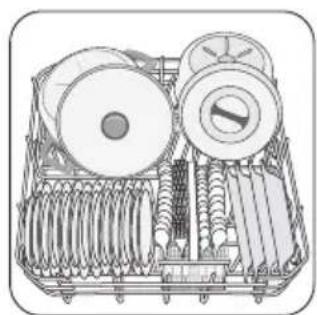
natural_image
Technical line drawing of a mechanical device with rollers and springs (no text or symbols)natural_image
Illustration of a food kit with cutlery and fork (no text or symbols)
1 2
natural_image
Line drawing of a multi-tiered storage unit with circular components and mesh frame (no text or symbols)1

natural_image
Line drawing of a mechanical rack with cylindrical components and a large cylindrical component (no text or symbols)2
natural_image
Diagram of a mechanical device with internal components and upward arrows indicating motion (no text or symbols)1
natural_image
Line drawing of a cabinet or storage unit with an inset close-up showing a rectangular component (no text or symbols)1

natural_image
Illustration of a hand using a tool to press down an electronic device with a curved arrow indicating motion (no text or symbols present)2

3
natural_image
Illustration of a handheld electronic device with a switch and battery (no text or symbols)6
natural_image
Line drawing of a mechanical device with an inset showing a component (no text or symbols)1

2
3
natural_image
Illustration of a hand holding a tablet with footprints, labeled 'A' (no text or symbols on the diagram itself)4
natural_image
Illustration of a hand using a tool to cut or mark a patterned object on a tray, labeled A and D (no text or symbols beyond labels)5
6
natural_image
Simple line drawing of a mechanical device with a circular component and an arrow indicating motion (no text or symbols)2

natural_image
Simple line drawing of a table with a box and an arrow indicating direction (no text or symbols)3

natural_image
Simple line drawing of a wooden table with a curved arrow indicating rotation (no text or symbols)4
natural_image
Line drawing of a kitchen sink with faucet and pipe (no text or symbols)1

2
3

4
| Safety information | 17 |
| Control panel | 18 |
| Washing programmes | 19 |
| Use of the appliance | 20 |
| Setting the water softener | 20 |
| Use of dishwasher salt | 21 |
| Use of rinse aid | 22 |
| Loading cutlery and dishes | 23 |
| Use of detergent | 24 |
| Setting and starting a washing programme _ _ _ 25 | |
| Care and cleaning _ _ _ _ _ _ _ _ _ _ _ _ _ _ _ _ _ _ _ _ _ _ _ _ _ _ _ _ _ _ _ _ _ _ _ _ _ _ _ _ _ _ _ _ _ _ _ _ _ _ _ _ _ _ _ _ _ _ _ _ _ _ _ _ _ _ _ _ _ _ _ _ _ _ _ _ _ _ _ _ _ _ _ _ _ _ _ _ _ _ _ _ _ _ _ _ _ _ _ _ | |
| What to do if... _ _ _ _ _ _ _ _ _ _ _ _ _ _ _ _ _ _ _ _ _ _ _ _ _ _ _ _ _ _ _ _ _ _ _ _ _ _ _ _ _ _ _ _ _ _ _ _ _ _ _ _ _ _ _ _ _ _ _ _ _ _ _ _ _ _ _ _ _ _ _ _ _ _ _ _ _ _ _ _ _ _ _ _ _ _ _ _ _ _ _ _ _ _ _ _ _ _ _ | |
| Technical data _ _ _ _ _ _ _ _ _ _ _ _ _ _ _ _ _ _ _ _ _ _ _ _ _ _ _ _ _ _ _ _ _ _ _ _ _ _ _ _ _ _ _ _ _ _ _ _ _ _ _ _ _ _ _ _ _ _ _ _ _ _ _ _ _ _ _ _ _ _ _ _ _ _ _ _ _ _ _ _ _ _ _ _ _ _ _ _ _ _ _ _ _ _ _ _ _ _ _ . | |
| Environment concerns _ _ _ _ _ _ _ _ _ _ _ _ _ _ _ _ _ _ _ _ _ _ _ _ _ _ _ _ _ _ _ _ _ _ _ _ _ _ _ _ _ _ _ _ _ _ _ _ _ _ _ _ _ _ _ _ _ _ _ _ _ _ _ _ _ _ _ _ _ _ _ _ _ _ _ _ _ _ _ _ _ _ _ _ _ _ | |
| Installation _ _ _ _ _ _ _ _ _ _ _ _ _ _ _ _ _ _ _ _ _ _ _ _ _ _ _ _ _ _ _ _ _ _ _ _ _ _ _ _ _ _ _ _ _ _ _ _ _ _ _ _ _ _ _ _ _ _ _ _ _ _ _ _ | |
| Water connection _ _ _ _ _ _ _ _ _ _ _ _ _ _ _ _ _ _ _ _ _ _ _ _ _ _ _ _ _ _ _ _ _ _ _ _ _ _ _ _ _ _ _ _ _ _ _ _ _ | |
| Electrical connection _ _ _ _ _ _ _ _ _ _ _ _ _ _ _ _ _ _ _ _ _ _ _ _ _ _ _ _ _ _ _ _ _ _ _ _ _ _ _ _ _ _ _ _ | |
Subject to change without notice

Safety information
For your safety and correct operation of the appliance, read this manual carefully before installation and use. Always keep these instructions with the appliance even if you move or sell it. Users must fully know the operation and safety features of the appliance.
Correct use
- The appliance is designed exclusively for domestic use.
- Only use the appliance to clean household utensils that are applicable for dishwashers.
- Do not put solvents in the appliance. Risk of explosion.
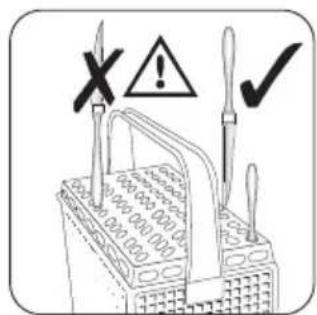
- Put the knives and all items with sharp points in the cutlery basket with their points down. If not, put in a horizontal position in the upper basket.
- Use only branded products for dishwashers (detergent, salt, rinse aid).
- If you open the door while the appliance is in operation, hot steam can escape. Risk of skin burns.
- Do not remove dishes from the dishwasher before the end of the washing programme.
- When the washing programme is completed, disconnect the mains plug from the mains socket and close the water tap.
- Only an authorised service engineer can repair this appliance. Use only original spare parts.
- Do not do repairs yourself to prevent injury and damage to the appliance. Always contact your local Service Force Centre.
General safety
- Persons (including children) with reduced physical sensory, mental capabilities or lack of experience and
knowledge must not use the appliance. They must have supervision or instruction for the operation of the appliance by a person responsible for their safety.
- Obey the safety instructions from the manufacturer of the dishwasher detergent to prevent burns to eyes, mouth and throat.
- Do not drink the water from the dishwasher. Detergent residues can stay in your appliance.
- Always close the door when you do not use the appliance to prevent injury and not to stumble over the open door.
- Do not sit or stand on the open door.
Child safety
- Only adults can use this appliance. Children must get supervision to make sure that they do not play with the appliance.
- Keep all the packaging away from children. There is a risk of suffocation.
- Keep all detergents in a safe area. Do not let children touch the detergents.
- Keep children away from the appliance when the door is open.
Installation
- Make sure that the appliance is not damaged because of transport. Do not connect a damaged appliance. If necessary, contact the supplier.
- Remove all packaging before first use.
- A qualified and competent person must do the electrical installation.
-
A qualified and competent person must do the plumbing installation.
-
Do not change the specifications or modify this product. Risk of injury and damage to the appliance.
-
Do not use the appliance:
-
if the mains cable or water hoses are damaged,
- if the control panel, worktop or plinth area are damaged, that you can get access to the inner side of the appliance.
Contact your local Service Force Centre.
- Do not drill into the sides of the appliance to prevent damage to hydraulic and electrical components.

Warning! Carefully obey the instructions for electrical and water connections.
Control panel
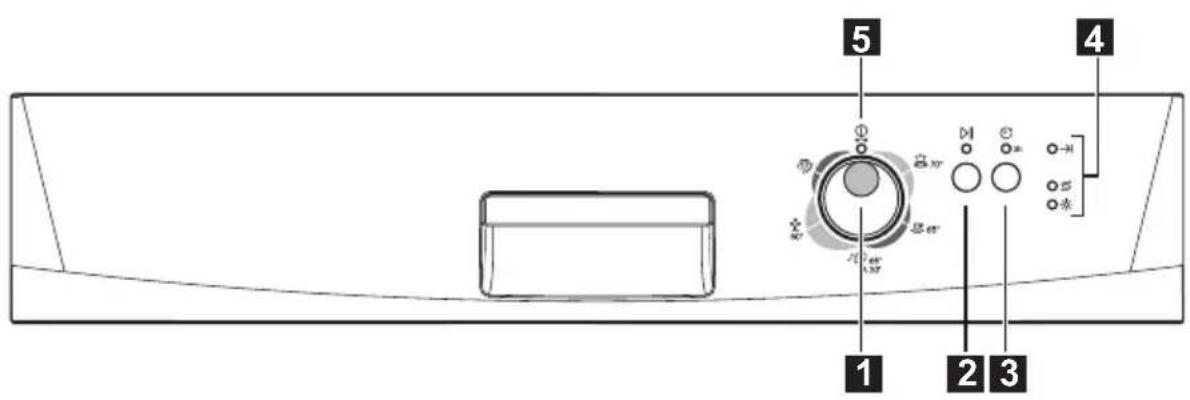
1 Programme knob
2 Start/cancel button
3 Delay start button
4 indicator lights
5 Dn/off indicator light
| Indicator lights | ||
| End | →I | The indicator light comes on when the washing programme is completed. Auxiliary functions:Level of the water softener.An alarm if the appliance has a malfunction. |
| Salt 1) | S | The indicator light comes on when it is necessary to fill the salt container. Refer to the chapter 'Use of dishwasher salt'.After you fill the container, the salt indicator light can continue to stay on for some hours. This does not have an unwanted effect on the operation of the appliance. |
| Rinse aid 1) | ※ | The indicator light comes on when it is necessary to fill the rinse aid. Refer to the chapter 'Use of rinse aid'. |
1) The indicator light is off while a washing programme operates.
Delay start button
Use the delay start button to delay the start of the washing programme with an interval of 3 hours. Refer to the chapter 'Setting and starting a washing programme'.
Programme knob and on/off indicator light
- To set a washing programme, turn the programme knob clockwise or anticlockwise. The programme
marker on the programme knob must agree with one of the washing programmes on the control panel.
- The on/off indicator light comes on (position ON).
- To set the appliance to the off position, turn the programme knob until the programme marker agrees with the on/off indicator light.
- The on/off indicator light goes off (position OFF).
Washing programmes
Washing programmes
| Programme | Degree of soil | Type of load | Programme description |
 | Heavy soil | Crockery, cutlery, pots and pans | PrewashMain wash up to 70°C2 intermediate rinsesFinal rinseDrying |
 | Normal soil | Crockery, cutlery, pots and pans | PrewashMain wash up to 65°C2 intermediate rinsesFinal rinseDrying |
 | Normal or light soil | Crockery and cutlery | Main wash up to 65°CFinal rinse |
 | Normal soil | Crockery and cutlery | PrewashMain wash up to 50°C1 intermediate rinseFinal rinseDrying |
 | Any | Partial load (to be completed later in the day) | 1 cold rinse (to avoid food scraps from sticking).This programme does not require the use of detergent). |
1) This is the perfect daily programme to clean a not fully load. Ideal for a family of 4 persons who only want to load breakfast and dinner crockery and cutlery.
2) Test programme for test institutes. Please refer to separate leaflet supplied, for test data.
Consumption values
| Programme Programme duration (in minutes) | Energy consumption (in kWh) | Water consumption (in litres) | |
 | 85-95 1,8-2,0 22-25 | ||
 | 105-115 1,5-1,7 23-25 | ||
 | 30 0,9 9 | ||
| (HOZH) | 130-140 1,0-1,2 14-16 | ||
| (CTTY) | 12 0,1 5 | ||
The pressure and temperature of the water, the variations of power supply and the quantity of dishes can change these values.
Use of the appliance
Refer to the following instructions for each step of procedure:
- Make a check if the water softener level is correct for the water hardness in your area. If necessary set the water softener.
- Fill the salt container with dishwasher salt.
- Fill the rinse aid dispenser with rinse aid.
-
Load cutlery and dishes into the dishwasher.
-
Set the correct washing programme for the type of load and soil.
- Fill the detergent dispenser with the correct quantity of detergent.
- Start the washing programme.
i If you use detergent tablets, refer to the chapter 'Use of detergent'.
Setting the water softener
The water softener removes minerals and salts from the water supply. Minerals and salts can have bad effect on the operation of the appliance.
Water hardness is measured in equivalent scales:
- German degrees (dH°).
-
French degrees (°TH).
-
mmol/l (millimol per litre - international unit for the hardness of water).
- Clarke.
Adjust the water softener to the water hardness in your area. If necessary, contact your local water authority.
| Water hardness Water hardness setting°dH °TH mmol/l Clarke manually electronically | |||||
| 51 - 70 | 91 - 125 | 9,1 - 12,5 | 64 - 88 | 2 | 10 |
| 43 - 50 | 76 - 90 | 7,6 - 9,0 | 53 - 63 | 2 | 9 |
| 37 - 42 | 65 - 75 | 6,5 - 7,5 | 46 - 52 | 2 | 8 |
| 29 - 36 | 51 - 64 | 5,1 - 6,4 | 36 - 45 | 2 | 7 |
| 23 - 28 | 40 - 50 | 4,0 - 5,0 | 28 - 35 | 2 | 6 |
| 19 - 22 | 33 - 39 | 3,3 - 3,9 | 23 - 27 | 2 | 5 |
| 15 - 18 | 26 - 32 | 2,6 - 3,2 | 18 - 22 | 1 | 4 |
| 11 - 14 | 19 - 25 | 1,9 - 2,5 | 13 - 17 | 1 | 3 |
| 4 - 10 | 7 - 18 | 0,7 - 1,8 | 5 - 12 | 1 | 2 |
| < 4 | < 7 | < 0,7 | < 5 | 1^1) | 1^1) |
1) No use of salt required.
You must set the water softener manually and electronically.
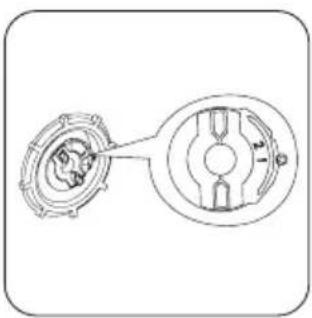
Manual adjustment
The appliance is set at the factory at position 2.

natural_image
Line drawing of a mechanical device with a circular component inserted into the chamber (no text or symbols)1

natural_image
Technical line drawing of a mechanical component with two views (top and side), no text or symbols present.2
Set switch to position 1 or 2.
Electronic adjustment
The water softener is set at the factory at level 5.
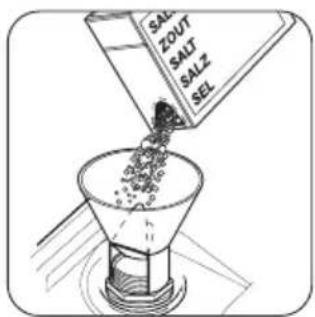
Use of dishwasher salt
Caution! Only use dishwashers salt. Types of salt that are not applicable for dishwashers cause damage to the water softener.
-
Press and hold the start/cancel button. Turn the programme knob clockwise until the programme marker agrees with the first washing programme on the control panel.
-
Release the start/cancel button when the on/off indicator light and the start/cancel indicator light start to flash.
- At the same time, the end indicator light flashes to show the level of the water softener.
Example:
5 flashes, pause, 5 flashes, pause, etc... = level 5
- Press the start/cancel button one time to increase the water softener level by one step.
The end indicator light shows the new level.
- Turn the programme knob to the off position to save the operation.
natural_image
Technical line drawing of a mechanical assembly with a circular component and layered base (no text or symbols)1

natural_image
Mechanical assembly diagram showing a gear and motor components with a rotating arrow (no text or symbols)2

natural_image
Illustration of a water dispenser pouring liquid from a container (no text or symbols)3

4
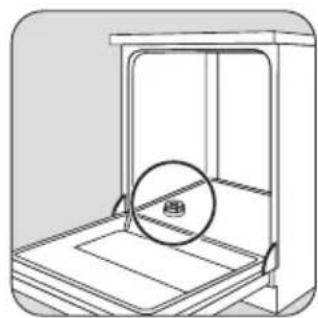
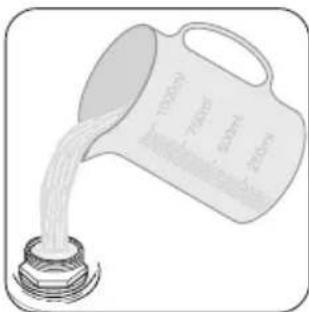
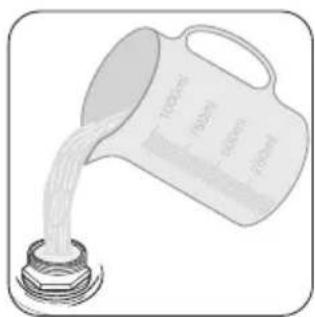
Fill the salt container with 1 litre of water (only the first operation).
natural_image
Illustration of a hand cleaning a wall with a container and wet pavement (no text or symbols)5

natural_image
Mechanical assembly diagram showing a rotating component with a gear and shaft (no text or symbols)6
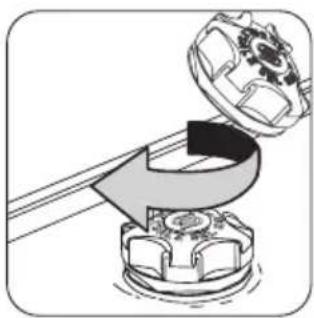
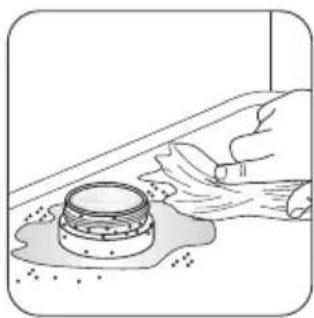
i It is normal that water overflows from the salt container when you fill it with salt.
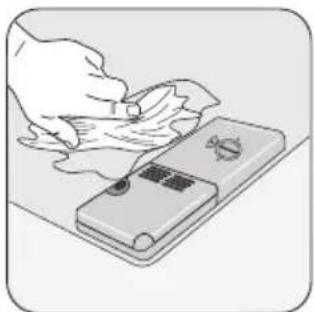
i Make sure that there is no grain of salt outer of the salt compartment. Salt which stays on the tank for a while drills the tank. It is recommended to start a washing programme immediately after you fill the salt container. This prevents of corrosion because of spilled salt.
When you set electronically the water softener to level 1, the salt indicator light does not stay on.
Use of rinse aid
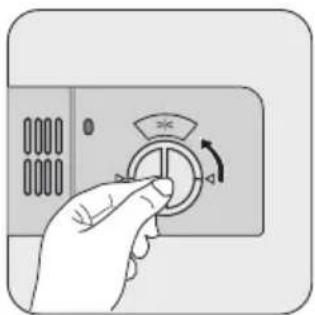
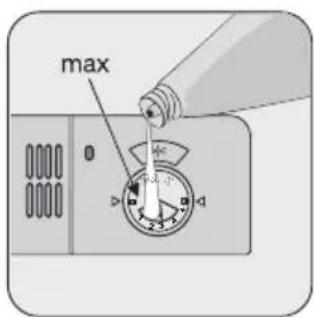
Caution! Only use branded rinse aid for dishwashers.
Do these steps to fill the rinse aid dispenser:

natural_image
Line drawing of a 3D cabinet or rack with an inset showing a small object inside (no text or symbols)1
natural_image
Hand holding a rotary switch with a dial and scroll icon (no text or symbols)2

3

natural_image
Illustration of a hand cleaning a surface with a tool on a device (no text or symbols visible)4
Caution! Do not fill the rinse aid dispenser with other products (e.g. dishwasher cleaning agent, liquid detergent). There is a risk of damage to the appliance.
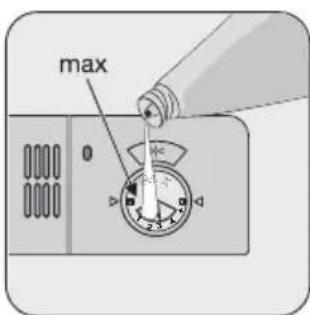
Adjusting the dosage of rinse aid

The rinse aid dial is set at the factory at position 3. To increase or decrease the dosage refer to 'What to do if...'
Helpful hints and tips
Caution! Only use the appliance for household utensils that are applicable for dishwashers.
Do not use the appliance to clean objects that can absorb water (sponges, household cloths, etc.).
- Before you load cutlery and dishes, do these steps:
- Remove all food remainings and debris.
- Make burnt, remaining food in pans soft.
- While you load cutlery and dishes, do these steps:
- Load hollow items (e.g. cups, glasses and pans) with the opening down.
- Make sure that water does not collect in the container or in a deep base.
- Make sure that cutlery and dishes do not lie inside one another.
- Make sure that cutlery and dishes do not cover other cutlery and dishes.
- Make sure that glasses do not touch other glasses.
- Put small objects in the cutlery basket.
- Plastic items and pans with non-stick coatings can keep water droplets. Plastic items do not dry as well as porcelain and steel items.
- Put light items in the upper basket. Make sure that the items do not move.
Caution! Make sure that the spray arms can move freely before you start a washing programme.
Warning! Always close the door after you load or unload the appliance. An open door can be dangerous.

natural_image
Line drawing of a basket filled with leafy greens and leaves, no text or symbols present1

natural_image
Technical illustration of a mechanical device with multiple rollers and springs (no text or symbols)2
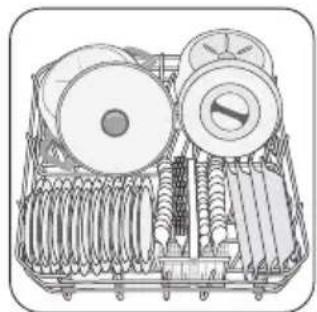
Arrange service dishes and large lids around the edge of the lower basket.

natural_image
Illustration of a toolbox containing various kitchen utensils (flowers, cutlery, fork) with a downward arrow indicating a reduction or inspection point (no text or symbols present)1

2
Use the cutlery grid. If the dimensions of the cutlery prevent use of the cutlery grid, remove it.
natural_image
Illustration of a basket filled with circular objects, no text or symbols present1

natural_image
Line drawing of a rack-mounted dish with multiple plates (no text or symbols)2
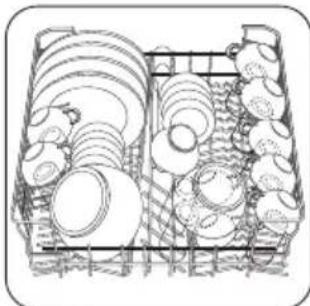
Arrange the items to let water touch all surfaces.
For longer items fold the cup racks up.
i Prevent to put plates in the first three sections in the front part of the upper basket. Make sure the plates tilt forward.
Adjustment of the height of the upper basket If you put large plates in the lower basket, first move the upper basket to the upper position.
Maximum height of the dishes
upper basket lower basket
Upper position 20 cm 31 cm
Lower position 24 cm 27 cm
Do these steps to move the upper basket to the upper position:
- Pull the basket out until it stops.
- Carefully lift the two sides until the mechanism is engaged and the basket is stable.

natural_image
Diagram of a mechanical or electrical component with two upward arrows indicating direction (no text or symbols present)1
Do these steps to move the upper basket to the lower position:
- Pull the basket out until it stops.
- Carefully lift the two sides upwards.
- Hold the mechanism and let it fall back down slowly.

Caution!
- Do not lift or lower the basket on one side only.
- If the basket is in the upper position, do not put cups on the cup racks.
Use of detergent
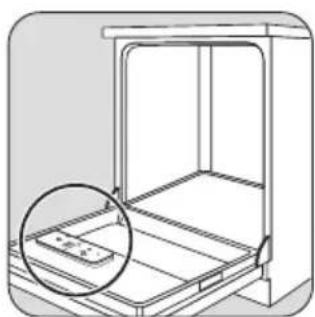
Only use detergents (powder, liquid or tablet) that are applicable for dishwashers.
Follow the data on the packaging:
- Dosage recommended by the manufacturer.
• Storage recommendations.
Do not use more than the correct quantity of detergent to save an environment.
natural_image
Line drawing of a cabinet or storage unit with an inset showing a tray and a magnified view (no text or symbols)1

natural_image
Illustration of a hand pressing down on a smartphone screen with a curved arrow indicating motion (no text or symbols)2

3
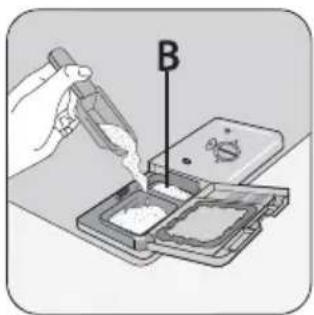
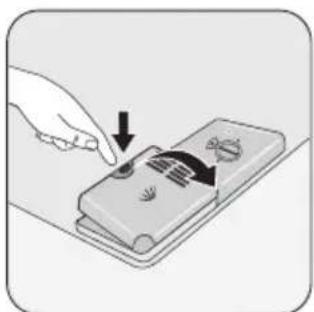
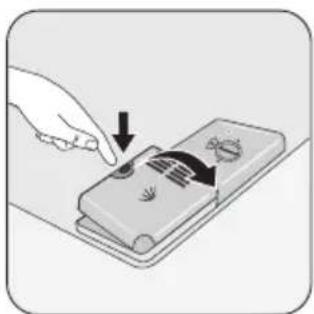
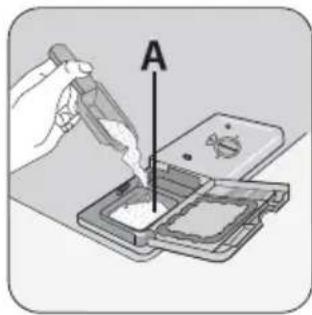
Fill the detergent dispenser (A) with detergent.
4
If you use a washing programme with prewash phase, put more detergent in the prewash detergent compartment (B).

5

natural_image
Illustration of a handheld electronic device with a switch and bulb (no text or symbols)6
Use of detergent tablets
Put the detergent tablet in the detergent dispenser (A).
Detergent tablets contain:
- detergent
- rinse aid
- other cleaning agents.
Do these steps to use detergent tablets:
- Make sure that the detergent tablets are applicable for your water hardness. Refer to the instructions from the manufacturer.
- Set the lowest levels of water hardness and rinse aid dosage.
Setting and starting a washing programme
Do these steps to set and start a washing programme:
- Close the door.
- Turn the programme knob to set the washing programme. Refer to the chapter 'Washing programmes'.
- The on/off indicator light comes on.
- Press the start/cancel button.
– The washing programme starts automatically. - The start/cancel indicator light comes on.
When the washing programme operates, you cannot change the programme. Cancel the washing programme.
Warning! Only interrupt or cancel a washing programme if necessary.
Caution! Open the door carefully. Hot steam can come free.
Cancelling a washing programme
- Press and hold the start/cancel button for approximately 5 seconds.
- The start/cancel indicator light goes off.
i It is not necessary to fill the salt container and the rinse aid dispenser.
Do these steps when the drying results are not satisfactory:
- Fill the rinse aid dispenser with rinse aid.
- Set the rinse aid dosage to position 2.
Do these steps to use the detergent powder again:
- Fill the salt container and the rinse aid dispenser.
- Set the water softener to the highest level.
- Do a washing programme without dishes.
- Adjust the water softener. Refer to the chapter 'Setting the water softener'.
- Adjust the rinse aid dosage.
i Different brands of detergent dissolve in different times. Some detergent tablets do not have the best cleaning results during short washing programmes. Use long washing programmes when you use detergent tablets to fully remove the detergent.
The washing programme is cancelled.
At this time you can do these steps:
- Switch off the appliance.
- Set a new washing programme.
Fill the detergent dispenser with detergent before you set a new washing programme.
Interrupting a washing programme
Open the door.
- The programme stops.
Close the door. - The programme continues from the point of interruption.
Setting and starting a washing programme with delay start
- Set a washing programme.
- Press the delay start button.
- The delay start indicator light comes on.
- Press the start/cancel button.
- The countdown of the delay start starts.
When the countdown is completed, the washing programme automatically starts.
- The delay start indicator light goes off.
Do not open the door during the countdown to prevent interruption of the countdown. When you close the door again, the countdown continues from the point of interruption.
Cancelling a delay start:
- Press and hold the start/cancel button for approximately 5 seconds.
- The start/cancel indicator light and delay start indicator light go off.
- Press the start/cancel button to start the washing programme.
Care and cleaning

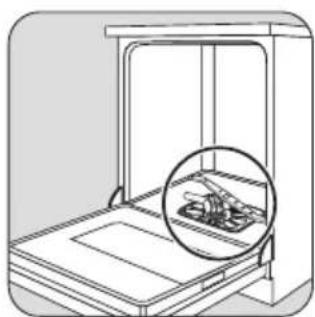
Warning! Switch the appliance off before you clean the filters.
Cleaning the filters
Important! Do not use the appliance without the filters. Make sure that the installation of the filters is correct. Incorrect installation will cause unsatisfactory washing results and damage to the appliance.
natural_image
Line drawing of a laboratory apparatus with an inset showing a magnified view of internal components (no text or symbols)1

2
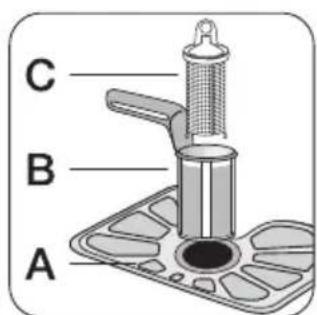
Fully clean the filters A, B and C below running water.
End of the washing programme
Switch off the appliance in these conditions:
• The appliance stops automatically.
• The end indicator light comes on.
For better drying results, keep the door ajar for some minutes before you remove the dishes.
Let the dishes cool down before you remove them from the appliance. Hot dishes are easily damaged.
Removing the load
- First remove items from the lower basket, then from the upper basket.
- There can be water on the sides and door of the appliance. Stainless steel becomes cool more quickly than the dishes.
3
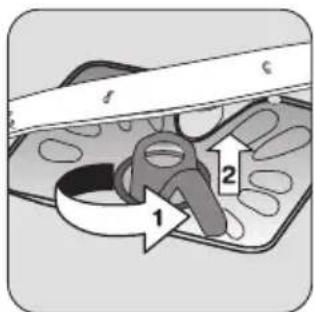
To remove filters B and C, turn the handle approximately 1/4 anticlockwise.
natural_image
Illustration of a hand interacting with a tray containing abstract shapes (no text or symbols)4
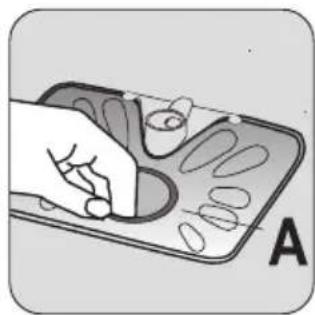
Remove the flat filter A from the bottom of the appliance.

natural_image
Illustration of a hand using a stylus to cut or mark a patterned object, labeled A and D (no text or symbols on the diagram itself)5
Put the flat filter A in the bottom of the appliance. Install the flat filter correctly under the two guides D.

6
Put the filter system in position. To lock the filter system, turn the handle clockwise until it locks in position.
Important! Do not remove the spray arms.
If the holes in the spray arms become clogged, remove remaining parts of soil with a cocktail stick.
External cleaning
Clean the external surfaces of the appliance and control panel with a damp soft cloth. Only use neutral detergents. Do not use abrasive products, scouring pads or solvents (acetone, trichloroethylene etc...).
What to do if...
The appliance does not start or stops during operation.
Frost precautions
Caution! Do not install the appliance where the temperature is below 0 °C. The manufacturer is not responsible for damage because of frost.
If not possible, empty the appliance and close the door. Disconnect the water inlet hose and remove water from the water inlet hose.
If there is a fault, first try to find a solution to the problem yourself. If you cannot find a solution to the problem yourself, contact the Service Force Centre.
| Fault code and malfunction Possible cause and solution | |
| continuous flash of the start/cancel indicator light1 flash of the end indicator lightThe dishwasher does not fill with water | The water tap is blocked or furred with limescale.Clean the water tap.The water tap is closed.Open the water tap.The filter in the water inlet hose is blocked.Clean the filter.The connection of the water inlet hose is not correct. The hose can be kinked or squashed.Make sure that the connection is correct. |
| continuous flash of the start/cancel indicator light2 flashes of the end indicator lightThe dishwasher will not drain | There is a blockage in the sink spigot.Clean the sink spigot.The connection of the water drain hose is not correct. The hose can be kinked or squashed.Make sure that the connection is correct. |
| continuous flash of the start/cancel indicator light3 flashes of the end indicator lightThe anti-flood device operates | Close the water tap and contact your local Service Force Centre. |
| The programme does not start • The appliance door is not closed.Close the door.Mains plug is not connected in.Put in the mains.The fuse has blown out in the household fuse box.Replace the fuse.Delay start is set.Cancel the delay start to start the programme immediately. | |
After the check, switch on the appliance. The programme continues from the point of interruption. If the malfunction shows again, contact your Service Force Centre.
These data are necessary to help you quickly and correctly:
- Model (Mod.)
- Product number (PNC)
- Serial number (S.N.)
For these data, refer to the rating plate.
Write the necessary data here:
Model description : ......
Product number : ......
Serial number : ......
| The cleaning results are not satisfactory | |
| The dishes are not clean | · The selected washing programme is not applicable for the type of load and soil. · The baskets are loaded incorrectly so that water cannot reach all surfaces. · Spray arms do not turn freely because of incorrect arrangement of the load. · The filters are dirty or not correctly installed. · The quantity of detergent is too little or missing. |
| Limescales particles on the dishes | · The salt container is empty. · The water softener is adjusted on a wrong level. · The salt container cap is not closed correctly. |
| The dishes are wet and dull · No rinse aid has been used. | |
| There are streaks, milky spots or a bluish coating on glasses and dishes | · Decrease the rinse aid dosage. |
| Dry water drop signs on glasses and dishes | · Increase rinse aid dosage. · The detergent can be the cause. |
Technical data
| Dimensions Width cm 60 | ||
| Height cm 85 | ||
| Depth cm 61 | ||
| Electrical connection - Voltage - Overall power - Fuse | Information on the electrical connection is given on the rating plate on the inner edge of the dishwasher door. | |
| Water supply pressure Minimum 0,5 bar (0,05 MPa) | ||
| Maximum 8 bar (0,8 MPa) | ||
| Capacity Place settings 12 | ||
Environment concerns
The symbol ☒ on the product or on its packaging indicates that this product may not be treated as household waste. Instead it should be taken to the appropriate collection point for the recycling of electrical and electronic equipment. By ensuring this product is
disposed of correctly, you will help prevent potential negative consequences for the environment and human health, which could otherwise be caused by inappropriate waste handling of this product. For more detailed information about recycling of this product, please
contact your local council, your household waste disposal service or the shop where you purchased the product.
The packaging materials are environmentally friendly and can be recycled. The plastic components are identified by markings, e.g. >PE<, >PS<, etc. Discard the packaging materials in the applicable container at the community waste disposal facilities.

Warning! To discard the appliance, follow the procedure:
- Pull the mains plug out of the socket.
- Cut off the mains cable and mains plug and discard them.
- Discard the door catch. This prevents the children to close themselves inside the appliance and endanger their lives.
Installation

Warning! Make sure that mains plug is disconnected from the mains socket during llation.
Fitting under a counter
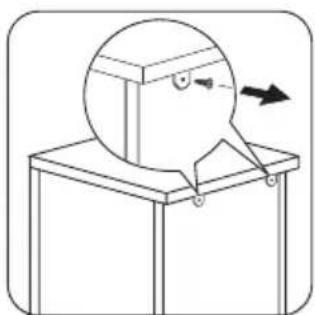
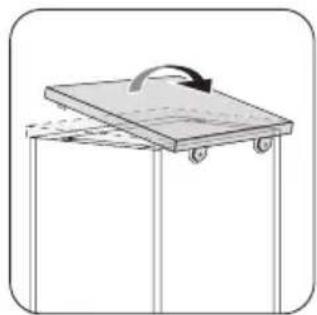
Put the appliance adjacent to a water tap and a water drain. Remove the appliance worktop to install it under a sink unit or a kitchen worktop. Make sure that the dimensions of the recess agree with the given dimensions.

1
natural_image
Simple line drawing of a cartoon character inside a box with an arrow indicating direction (no text or symbols)2

natural_image
Simple line drawing of a table with a box and an arrow indicating direction (no text or symbols)3
natural_image
Simple line drawing of a wooden table with a curved arrow indicating rotation (no text or symbols)4
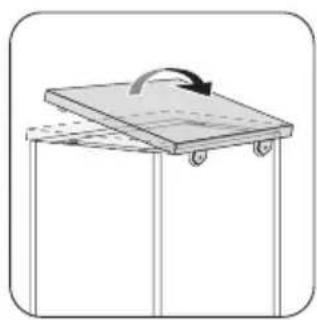
Install the appliance worktop to the appliance if you want to use the dishwasher as a freestanding appliance. The plinth on freestanding appliance is not adjustable.
Adjusting the level of the appliance
Make sure that the appliance is level to close and seal the door correctly. If the level of the appliance is correct, the door does not catch on the sides of the cabinet. If the door does not close correctly, loosen or tighten the adjustable feet until the appliance is level.
Water connection
Water inlet hose
Connected the appliance to a hot (max. 60°) or cold water supply.
If the hot water comes from alternative sources of energy that are more environmentally friendly (e.g. solar or photovoltaic panels and aeolian), use a hot water supply to decrease energy consumption.
Connect the inlet hose to a water tap with an external thread of 3/4".

Caution! Do not use connection hoses from an old appliance.
The water pressure must be in the limits (refer to the chapter 'Technical data'). Make sure that the local water authority gives you the average mains pressure in your area.
Make sure that there are no kinks in the water inlet hose and that the water inlet hose is not squashed or entangled. Turn the inlet hose to the left or the right to suit the installation. Fit the locknut correctly to prevent water leaks.

Caution! Do not connect the appliance to new pipes or pipes that are not used for a long time. Let the water run for some minutes, then connect the inlet hose.
Drain hose

natural_image
Line drawing of a kitchen sink with faucet and piping (no text or symbols)1

2
Connect the water drain hose to the sink spigot.

3

4
Electrical connection
Warning! The manufacturer is not responsible if you do not follow these safety precautions.
Ground the appliance according to safety precautions. Make sure that the rated voltage and type of power on the rating plate agree with the voltage and the power of the local power supply.
Always use a correctly installed shockproof socket. Do not use multi-way plugs, connectors and extension cables. There is a risk of fire.
The internal diameter must not be smaller than the diameter of the hose.
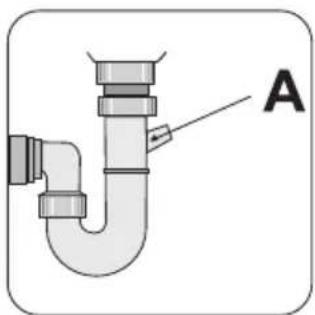
If you connect the water drain hose to a trap spigot under the sink, remove the plastic membrane (A). If you do not remove the membrane, remaining food can cause a blockage in the drain hose spigot.

Caution! Make sure that the water couplings are tight to prevent water leakage.
Do not replace the mains cable yourself. Contact the Service Force Centre.
Make sure that the mains plug is accessible after installation.
Do not pull the mains cable to disconnect the appliance. Always pull the mains plug.
Sommaire
natural_image
Line drawing of a mechanical device with a circular component inserted into the frame (no text or symbols)1

natural_image
Technical line drawing of a mechanical component with two views (top and side), no text or symbols present.2
natural_image
Technical line drawing of a mechanical assembly with a circular component and layered base (no text or symbols)1

natural_image
Mechanical assembly diagram showing a gear and motor components with a rotating arrow (no text or symbols)2

natural_image
Illustration of a water dispenser pouring liquid from a container (no text or symbols)3

4
natural_image
Illustration of a hand cleaning a wall with a container and wet pavement (no text or symbols)5

natural_image
Mechanical assembly diagram showing a rotating component with a gear and housing (no text or symbols)6
natural_image
Line drawing of a cabinet interior with an inset showing a small object inside (no text or symbols)1

natural_image
Hand holding a rotary switch with a dial and scroll (no text or symbols visible)2
3

natural_image
Illustration of a hand cleaning a surface with a handheld device (no text or symbols visible)4

natural_image
Illustration of a control panel with a dial and directional arrows (no text or symbols)natural_image
Line drawing of a person sitting in a chair with rows of chairs and chairs, no text or symbols present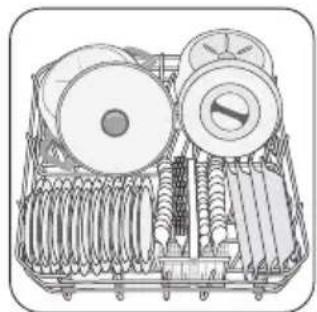
natural_image
Technical line drawing of a mechanical device with rollers and springs (no text or symbols)1
natural_image
Illustration of a battery tray with cutlery and fork (no text or symbols)
1
2
natural_image
Line drawing of a multi-tiered storage unit with circular components and mesh structure (no text or symbols)1
natural_image
Line drawing of a mechanical rack with cylindrical components and a large cylindrical component (no text or symbols)2
natural_image
Diagram of a mechanical device with internal components and upward arrows indicating motion (no text or symbols)1
natural_image
Line drawing of a cabinet interior with an inset showing a small rectangular component (no text or symbols)1
natural_image
Illustration of a hand pressing down on a device with arrows indicating motion (no text or symbols)2

3
natural_image
Illustration of a smartphone with a curved arrow and battery symbol on the screen (no text or labels)6
natural_image
Line drawing of a mechanical device with an inset showing internal components (no text or symbols)1

2
3
natural_image
Illustration of a hand holding a tablet with abstract shapes on the screen (no text or symbols)4
natural_image
Illustration of a hand using a tool to cut or mark a patterned object, labeled A and D (no text or symbols on the diagram itself)5
6
natural_image
Simple line drawing of a cartoon character inside a box with an arrow indicating motion (no text or symbols)2
natural_image
Simple line drawing of a rectangular frame with a downward arrow indicating rotation or movement (no text or symbols)3
natural_image
Simple line drawing of a wooden crate with a rotating arrow indicating rotation (no text or symbols)4
natural_image
Line drawing of a kitchen sink with faucet and piping (no text or symbols)1

2
3
4
natural_image
Line drawing of a 3D printer with a circular component inserted into the frame (no text or symbols)1

natural_image
Technical line drawing of a mechanical component with two views (top and side), no text or symbols present.2
natural_image
Line drawing of a mechanical device with a circular component on top, no text or symbols present1

natural_image
Mechanical assembly diagram showing a gear being processed into a housing (no text or symbols)2
natural_image
Illustration of a cup pouring liquid from a container into a container (no text or symbols)3

4
natural_image
Illustration of a hand cleaning a wall with a container and wet pavement (no text or symbols)5

natural_image
Mechanical assembly diagram showing a rotating component with a gear-like top and a curved arrow indicating motion (no text or symbols)6
natural_image
Line drawing of a 3D printer cabinet with an inset showing a small object inside (no text or symbols)1

natural_image
Hand holding a rotary switch with a dial and arrow, no visible text or symbols2
natural_image
Illustration of a hand cleaning a small object on a surface, with no visible text or symbols.4
natural_image
Illustration of a vintage air conditioner unit with a dial and control panel (no text or symbols)natural_image
Line drawing of a container with layered materials and a small pile of food items (no text or symbols)natural_image
Illustration of a mechanical device with multiple rollers and springs (no text or symbols)2

natural_image
Illustration of a toolbox containing cutlery and utensils, with a downward arrow indicating a reduction or action (no text or symbols present)1 2

2
natural_image
Line drawing of a multi-tiered storage unit with circular components and mesh grids (no text or symbols)1
natural_image
Line drawing of a mechanical device with cylindrical components and a multi-tiered plate (no text or symbols)2
natural_image
Diagram of a mechanical or electrical component with concentric circles and arrows indicating upward motion (no text or symbols)1
natural_image
Diagram of a storage cabinet with an inset showing a tray and lid (no text or symbols)1
natural_image
Illustration of a hand pressing down on a smartphone screen with a magnified view showing the screen (no text or symbols)2
3
natural_image
Illustration of a smartphone with a curved screen and a small icon, no text or symbols present.6
natural_image
Line drawing of a mechanical device with an inset showing a component (no text or symbols)1

2
3
natural_image
Illustration of a hand holding a tablet with abstract shapes on the screen (no text or symbols)4
natural_image
Illustration of a hand using a pen to cut or mark a patterned object on a tray, labeled A and D (no text or symbols beyond labels)5
6
natural_image
Simple line drawing of a box with a circular object and an arrow, no text or symbols present2

natural_image
Simple line drawing of a table with a hanging object and an arrow indicating direction (no text or symbols)3

natural_image
Simple line drawing of a wooden table with wheels and an arrow indicating rotation (no text or symbols)4
natural_image
Line drawing of a kitchen sink with faucet and pipe (no text or symbols)1

2
natural_image
Line drawing of a mechanical device with a circular component inserted into the chamber (no text or symbols)1

natural_image
Technical line drawing of a mechanical component with two views (top and side), no text or symbols present.2
natural_image
Technical line drawing of a mechanical assembly with a circular component inserted into a housing (no text or symbols)1

natural_image
Diagram showing a mechanical assembly with a gear and a hand holding a component, no text or symbols present.2
natural_image
Illustration of a bucket pouring liquid from a container into a bulb (no text or symbols)3

4
natural_image
Illustration of a hand cleaning a wall with a container and wet pavement (no text or symbols)5

natural_image
Mechanical assembly diagram showing a rotating component with a gear and housing (no text or symbols)6
natural_image
Line drawing of a cabinet interior with an inset showing a small object inside (no text or symbols)1

natural_image
Hand holding a rotary switch with a dial and scroll icon (no text or symbols visible)2

3

natural_image
Illustration of a hand cleaning a surface with a smartphone and a small object (no text or symbols)4
natural_image
Illustration of a control panel with a dial and directional arrows (no text or symbols)natural_image
Line drawing of a person sitting in a chair with rows of chairs and chairs, no text or symbols present1
natural_image
Technical line drawing of a mechanical device with rollers and springs (no text or symbols)2
natural_image
Illustration of a battery tray with cutlery and fork (no text or symbols)1
2
natural_image
Line drawing of a basket filled with various circular objects, no text or symbols present1
natural_image
Line drawing of a mechanical device with cylindrical components and a multi-layered housing (no text or symbols)2
natural_image
Line drawing of a storage cabinet with an inset showing a tray and lid (no text or symbols)1

natural_image
Illustration of a hand pressing down on a device with arrows indicating motion (no text or symbols)2
natural_image
Diagram of a mechanical device with internal components and upward arrows indicating motion (no text or symbols)1
natural_image
Illustration of a handheld electronic device with a switch and resistor (no text or symbols)6
natural_image
Line drawing of a laptop with an inset showing a close-up of the screen (no text or symbols)1
2
3
natural_image
Illustration of a hand pressing down on a dental mold with multiple teeth (no text or symbols)4
natural_image
Illustration of a hand using a computer to interact with a device labeled A and D (no text or symbols on the diagram itself)5
6
natural_image
Simple line drawing of a mechanical device with a circular component and an arrow indicating direction (no text or symbols)2

natural_image
Simple line drawing of a rectangular frame with a downward arrow indicating rotation (no text or symbols)3

natural_image
Simple line drawing of a wooden table with wheels and an arrow indicating rotation (no text or symbols)4
natural_image
Line drawing of a kitchen sink with faucet and pipe (no text or symbols)1

2
3

4
- Safety information
- Correct use
- General safety
- Child safety
- Installation
- Control panel
- Delay start button
- Programme knob and on/off indicator light
- Washing programmes
- Use of the appliance
- Setting the water softener
- Manual adjustment
- Use of dishwasher salt
- Use of rinse aid
- Adjusting the dosage of rinse aid
- Helpful hints and tips
- Maximum height of the dishes
- upper basket lower basket
- Caution!
- Use of detergent
- Use of detergent tablets
- Setting and starting a washing programme
- Cancelling a washing programme
- Do these steps when the drying results are not satisfactory:
- Interrupting a washing programme
- Setting and starting a washing programme with delay start
- Cancelling a delay start:
- Care and cleaning
- Cleaning the filters
- End of the washing programme
- Removing the load
- External cleaning
- What to do if...
- Frost precautions
- Environment concerns
- Fitting under a counter
- Adjusting the level of the appliance
- Water connection
- Water inlet hose
- Drain hose
- Electrical connection
- Sommaire
Brand : ZANUSSI
Model : ZDF 222
Category : Dishwasher