
Essence HD2575 - Toaster PHILIPS - Free user manual and instructions
Find the device manual for free Essence HD2575 PHILIPS in PDF.


| Product type | Toaster |
| Brand | Philips |
| Model | Essence HD2575 |
| Number of slots | 2 |
| Power supply | 220-240 V, 50/60 Hz |
| Power | 900 W |
| Dimensions (W x D x H) | 30 x 18 x 21 cm |
| Weight | 1.5 kg |
| Main functions | Browning setting (7 levels), automatic shut-off, extra-high lift, defrost function, reheat, cancel |
| Housing material | Robust plastic with chrome finish |
| Cord storage | Yes, cord wrap under base |
| Care and cleaning | Clean with a damp cloth, empty crumb tray regularly |
| Safety | Automatic shut-off if jammed, non-slip base |
| Spare parts and repairability | Removable crumb tray, parts available on Philips website |
| Warranty | 2 years |
| User manual | Manual included, free download |
Frequently Asked Questions - Essence HD2575 PHILIPS
User questions about Essence HD2575 PHILIPS
0 question about this device. Answer the ones you know or ask your own.
Ask a new question about this device
Download the instructions for your Toaster in PDF format for free! Find your manual Essence HD2575 - PHILIPS and take your electronic device back in hand. On this page are published all the documents necessary for the use of your device. Essence HD2575 by PHILIPS.
USER MANUAL Essence HD2575 PHILIPS
natural_image
Close-up of a Philips Edison Esterice electric stove with control knobs and a flat-screen stand (no visible text or symbols on the device itself)
natural_image
Solid light pink background with no visible text, symbols, or patternsENGLISH 4
FRANÇAIS 9
DEUTSCH 14
NEDERLANDS 19
ITALIANO 24
ESPAÑOL 29
PORTUGUÊS 34
DANSK 39
NORSK 44
SVENSKA 49
SUOMI 54
ΕΓΓΥΗΣΗ 59
TÜRKÇE 64
Toasting bread

natural_image
Illustration of hands connecting a plug to a socket with a red arrow indicating direction (no text or symbols)1 Put the appliance in a safe place and put the plug in the wall socket. You can adjust the length of the cord by winding part of it around the brackets in the base of the appliance.
natural_image
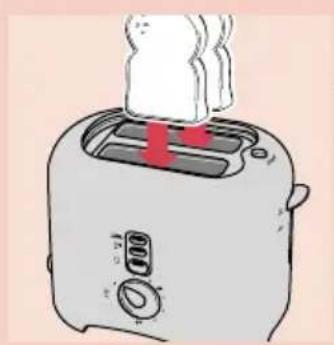
Illustration of a toaster with steam rising from its chimney (no text or symbols)2 Put one or two slices of bread in the toaster. Bread may burn. Therefore, toasters must not be used near or below curtains or other combustible material. Never leave the appliance unattended.
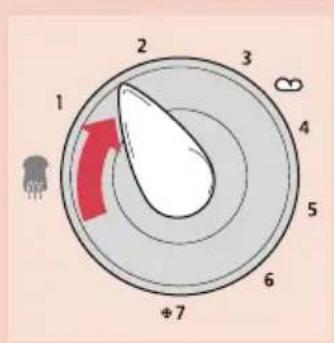
3 select the desired browning setting. Select a low setting (1-2) for lightly toasted bread and a high setting (5-7) for a dark browning result.

4 Push the toasting lever down to switch the appliance on. The toasting lever will only stay down if the appliance has been connected to the mains.
Keep an eye on the toaster when you are using it.
The appliance will get hot when it is being used. Do not touch the metal parts.
- The appliance will switch off automatically. You can stop the toasting process and pop the bread up at any time by pressing the STOP button.
- To remove smaller items, you can push the toasting lever slightly further upwards (until it will not go any further).
- If the bread gets stuck in the appliance: remove the plug from the wall socket and carefully remove the bread from the toaster. Do not use metal objects to do this and avoid touching the metal parts of the toaster.
Making toasted sandwiches
IMPORTANT - Never make toasted sandwiches without using the sandwich holders. If you do, you will damage the appliance and the appliance will be difficult to clean.
If you are going to make only one toasted sandwich, do not put anything else in the other slot.
The time necessary to make a toasted sandwich differs greatly from the time necessary to toast a slice of bread.

WARNING - Never place empty holders in the slots when the appliance is switched on. Always use the slot that is nearest to you when you are preparing only one toasted sandwich.
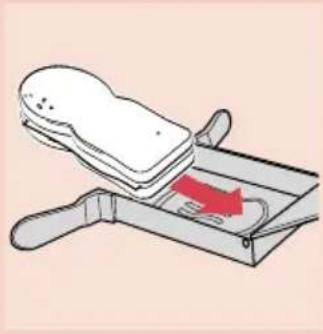
1 to open the sandwich holder, push the slides towards the centre of the sandwich holder as indicated by the arrows.

natural_image
Illustration of a knife being cut with a red arrow indicating motion (no text or symbols)2 Put the sandwich holder down and leave the lid wide open.
3 prepare a sandwich and put it in the sandwich holder. You can use different types of bread and different ingredients, such as cheese, ham and tomatoes.

natural_image
Illustration of a toaster with a cloth cover and a red arrow indicating temperature (no text or symbols)4 Close the lid and put the sandwich holder in the toaster. The locking mechanism will automatically adjust itself to the thickness of the sandwich.
A groove in the sandwich holder will prevent any juice from leaking into the toaster.
You can prepare two toasted sandwiches at the same time by putting a sandwich holder in each slot.

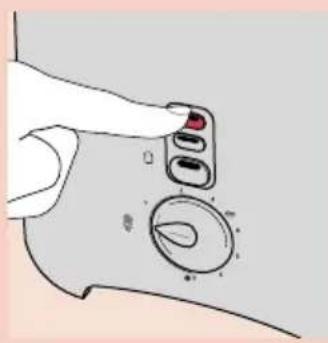
5 elect the desired browning setting, push the toasting lever down to switch the appliance on and press button ☐☐
Between e.g. 4 to 7 is recommended.
6 Remove the sandwich holder when the appliance has switched itself off.
Only touch the handles of the sandwich holder; the holder itself is very hot.
7 ut the holder on a breadboard and remove the toasted sandwich with a wooden spatula.
Toasting frozen bread

Types HD 2570 and HD 2572:
1 follow the instructions in Toasting bread and set the browning control to position 7 ✦ before you push the toasting lever down.

Types HD 2574 and HD 2575:
2 follow the instructions in Toasting bread, push the toasting leverdown and press button ☐*☐*
Reheating toasted bread

1 Follow the instructions in Toasting bread and set the browning control to setting 🎨You will hear a click.
Heating up rolls or croissants

natural_image
Illustration of a toaster with a red downward arrow indicating cooling effect (no text or symbols)Only types HD 2572 and HD 2574
1 Mount the warming rack firmly onto the toaster. Never put the rolls to be heated up directly on the toaster without the warming rack to avoid damaging the toaster.

natural_image
Illustration of a toaster with two round buns on top (no text or symbols)2 Put the rolls or croissants in the centre of the rack.
Do not heat up more than 2 items at a time.
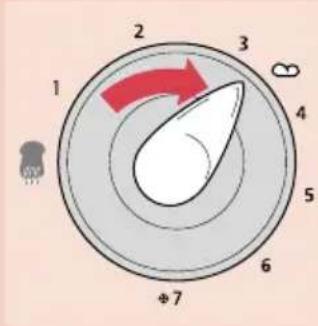
Type HD 2572:
1 et the browning control between setting 1 and ☐, yet not higher than ☐.
2 Push the toasting lever down to switch the appliance on.
Type HD 2574:
- push the toasting lever down to switch the appliance on and press button 📄, 🐃, 🐃, 🐃
You do not need to set the browning control to a particular position.
If you want to heat the rolls or croissants on both sides, turn them after the appliance has switched itself off and switch the appliance back on again.
Toasting on one side (only type HD 2575)
natural_image
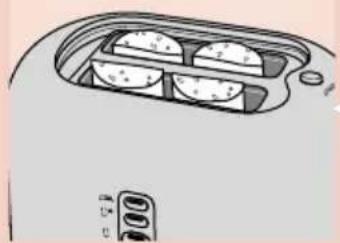
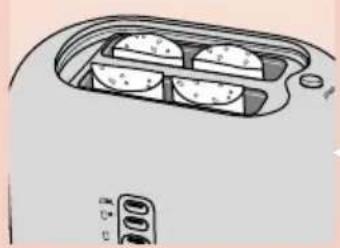
Illustration of a toaster oven with four circular food compartments (no text or symbols)Ideal for baguettes and rolls.
1 Cut part of a baguette (max. 13 cm) lengthwise.
2 Put the halved parts in the toaster with the side to be toasted facing the middle heater of the toaster.
3 follow the instructions in 'Toasting bread' and press button
You can also use this function in combination with the setting for toasting frozen bread.

Cleaning
Cleaning the sandwich holder:
1 Remove all bread crumbs and remove any molten cheese with a wooden spatula.
2 Clean the sandwich holder by washing it in hot soapy water (or in the dishwasher) and dry it thoroughly.
Cleaning the appliance:
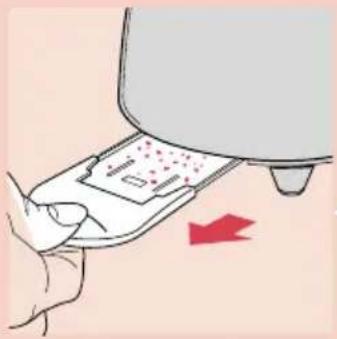
natural_image
Illustration of a hand using a kitchen appliance to press or<|rotate_right|>, with a red arrow indicating the process (no text or symbols present)1 Unplug the appliance.
2 Clean the appliance with a moist cloth. Never immerse the appliance in water.
3 Remove crumbs from the appliance by sliding the crumb tray out of the appliance. Do not hold the appliance upside down and do not shake it to remove the crumbs.
4 You can store the cord by winding it around the brackets in the base of the appliance.

natural_image
Illustration of a hand holding a cable inserted into a device (no text or symbols visible)Mains cord replacement
If the mains cord of this appliance is damaged, it must only be replaced by Philips or a service centre authorised by Philips, as replacement requires special tools and parts.
See the world-wide guarantee leaflet for telephone numbers of the Philips Helpline.
natural_image
Illustration of hands connecting a plug to a mechanical component with a red arrow indicating direction (no text or symbols)natural_image
Illustration of a toaster with steam rising from its chimney (no text or symbols)natural_image
Illustration of a hand using a knife to lift a piece of bread into a tray (no text or symbols)natural_image
Illustration of a toaster with a bag placed on top, showing a red arrow indicating motion (no text or symbols)natural_image
Illustration of a hand pressing a button on a curved surface with a circular inset showing a leaf (no text or symbols)natural_image
Illustration of a toaster with a red downward arrow indicating cooling effect (no text or symbols)natural_image
Illustration of a toaster with two round buns on top (no text or symbols)

natural_image
Illustration of a hand holding a control knob on a curved surface, with no visible text or symbolsnatural_image
Illustration of a toaster oven with four round food items on the side (no text or symbols visible)
natural_image
Illustration of a hand pressing down on a device with a red arrow indicating motion (no text or symbols)natural_image
Illustration of a hand holding a cord connected to a portable electric cooker (no text or symbols visible)natural_image
Illustration of hands connecting a plug to a socket with a red arrow indicating direction (no text or symbols)natural_image
Illustration of a toaster with steam rising from its chimney (no text or symbols)natural_image
Illustration of a griddle being cut with a red arrow indicating the cutting process (no text or symbols present)natural_image
Illustration of a toaster with a knife inserted into the top pan, showing a red arrow indicating cooling effect (no text or symbols)natural_image
Illustration of a toaster with a red downward arrow indicating cooling effect (no text or symbols)natural_image
Illustration of a toaster with two round buns on top (no text or symbols)natural_image
Illustration of a microwave oven with four circular food compartments (no text or symbols)natural_image
Illustration of a hand pressing down on a device with a red arrow indicating motion (no text or symbols)
natural_image
Line drawing of a hand inserting a cable into a device with a handle (no text or symbols)natural_image
Illustration of hands connecting a cable to a wall socket with a red arrow indicating direction (no text or symbols)natural_image
Illustration of a toaster with steam rising from its chimney (no text or symbols)natural_image
Illustration of a hand using a tray to lift a bag, with a red arrow indicating the motion (no text or symbols)natural_image
Illustration of a toaster with a bag labeled '800' inserted, showing blade blades and a red arrow indicating motion (no text or symbols beyond label)natural_image
Illustration of a hand inserting a small device into a circular component (no text or symbols)Types HD 2574 en HD 2575:
natural_image
Illustration of a toaster with a red downward arrow indicating cooling effect (no text or symbols)Types HD 2572 en HD 2574
natural_image
Illustration of a toaster with two round buns on top (no text or symbols)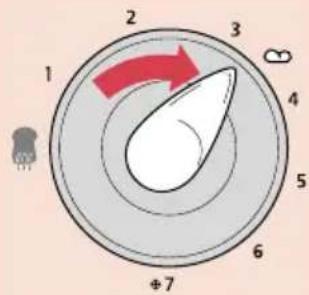

natural_image
Illustration of a hand holding a control knob with a red button, pointing to a circular dial (no text or symbols present)natural_image
Illustration of a microwave oven with four circular cavities and a digital display (no text or symbols)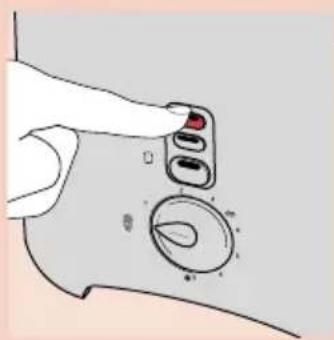
natural_image
Illustration of a hand pressing down on a device with a red arrow indicating motion (no text or symbols)
natural_image
Illustration of a hand holding a microphone with a cable inserted, showing internal components (no text or symbols)Snoer vervangen
natural_image
Illustration of hands connecting a plug to a wall socket with a red arrow indicating direction (no text or symbols)natural_image
Illustration of a toaster with a steaming top and red lid (no text or symbols)natural_image
Illustration of hands operating a portable stove with red arrows indicating motion (no text or symbols)natural_image
Illustration of a sandwich being placed on a tray with a red arrow indicating the motion (no text or symbols)Mod. HD 2574 e HD 2575:
natural_image
Illustration of a toaster with a red downward arrow indicating cooling effect (no text or symbols)solo mod. HD2572 e HD2574.
natural_image
Illustration of a toaster with two buns on top (no text or symbols)natural_image
Illustration of a toaster oven with four food items inside (no text or symbols)Pulizia
natural_image
Illustration of a hand pressing down on a kitchen appliance with a red arrow indicating motion (no text or symbols)
natural_image
Illustration of a hand holding a device with a cable inserted, showing internal components (no text or symbols)natural_image
Illustration of hands connecting a cable to a mechanical component with a red arrow indicating direction (no text or symbols)natural_image
Illustration of a toaster with steam rising from its chimney (no text or symbols)natural_image
Illustration of a knife pressing down on a tray with a red arrow indicating motion (no text or symbols)natural_image
Illustration of a toaster with a paper bag placed on top, showing a red arrow indicating compression (no text or symbols)natural_image
Illustration of a hand pressing a button on a curved surface with a circular inset showing a leaf-like shape (no text or symbols)Modelos HD 2570 y HD 2572 :
natural_image
Illustration of a toaster with a red downward arrow indicating cooling effect (no text or symbols)natural_image
Illustration of a toaster with two round buns on top (no text or symbols)

natural_image
Illustration of a hand holding a control knob with a red button, pointing to a circular dial (no text or symbols present)natural_image
Illustration of a microwave oven with four circular cavities and a digital display (no text or symbols)
natural_image
Illustration of a hand pressing down on a device with a red arrow indicating motion (no text or symbols)natural_image
Illustration of a hand holding a cord connected to a device with a handle (no text or symbols visible)natural_image
Illustration of hands connecting a plug to a socket with a red arrow indicating direction (no text or symbols)natural_image
Illustration of a toaster with steam rising from its chimney (no text or symbols)natural_image
Illustration of a sandwich being placed on a tray with a red arrow indicating the motion (no text or symbols)natural_image
Illustration of a toaster with a cloth cover and red indicator light (no text or symbols)Modelos HD 2574 e HD 2575:
Reaquecer as torradas

natural_image
Illustration of a toaster with a red downward arrow indicating cooling effect (no text or symbols)Apenas nos modelos HD 2572 e HD 2574.
natural_image
Illustration of a toaster with two buns on top (no text or symbols)Torrar de um só lado (apenas no modelo HD 2575)
natural_image
Illustration of a toaster oven with four food items inside (no text or symbols)Ideal para baguettes e cacetes.
natural_image
Illustration of a hand holding a device with a knob and dial (no text or symbols)Limpeza
natural_image
Illustration of a hand pressing down on a kitchen appliance with a red arrow indicating motion (no text or symbols)natural_image
Illustration of a hand holding a cable inserted into a device (no text or symbols visible)natural_image
Illustration of hands connecting a cable to a mechanical component with a red arrow indicating direction (no text or symbols)natural_image
Illustration of a toaster with steam rising from its chimney (no text or symbols)1 sandwichholderen åbnes ved at skubbe de to knapper ind mod midten i pilens retning.
natural_image
Illustration of a hand operating a tray with a red arrow indicating direction (no text or symbols)natural_image
Illustration of a toaster with a paper lid and red indicator light (no text or symbols)natural_image
Illustration of a toaster with a red downward arrow indicating cooling effect (no text or symbols)Kun type HD 2572 og HD 2574
natural_image
Illustration of a toaster with two round buns on top (no text or symbols)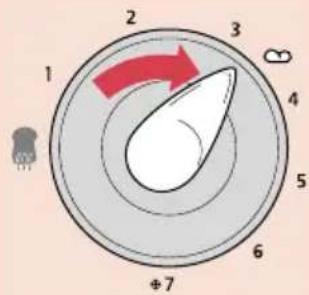
natural_image
Illustration of a hand holding a control knob on a curved surface, with no visible text or symbolsnatural_image
Illustration of a toaster oven with four slots and a digital display (no text or symbols)
natural_image
Illustration of a hand pressing down on a device with a red arrow indicating motion (no text or symbols)natural_image
Illustration of a hand holding a cord connected to a device with a handle (no text or symbols visible)natural_image
Illustration of hands connecting a cable to a mechanical component with a red arrow indicating direction (no text or symbols)natural_image
Illustration of a toaster with a steaming top and red lid (no text or symbols)natural_image
Illustration of a sandwich being placed on a griddle with a red arrow indicating the process (no text or symbols)natural_image
Illustration of a toaster with a bag placed on top, showing a red indicator light (no text or symbols)natural_image
Illustration of a toaster with a red downward arrow indicating cooling effect (no text or symbols)Bare for HD 2572 OG HD2574.
natural_image
Illustration of a toaster with two round buns on top (no text or symbols)natural_image
Illustration of a microwave oven with four circular compartments and a control knob (no text or symbols)Ideelt for baguetter og boller.
1 Del opp baguettene i stykker til maks.13cm.
2 egg de delte stykkene i risteren med sidene som skal ristes mot midten av brødristeren.
natural_image
Illustration of a hand using a kitchen appliance to press or<|rotate_right|>, with a red arrow indicating the process (no text or symbols present)natural_image
Illustration of a hand holding a cable inserted into a device (no text or symbols visible)natural_image
Illustration of hands connecting a cable to a mechanical component with a red arrow indicating direction (no text or symbols)natural_image
Illustration of a toaster with a steaming cup and red lid (no text or symbols)natural_image
Illustration of a griddle being cut with a red arrow indicating the cutting process (no text or symbols present)natural_image
Illustration of a toaster with a paper lid and red indicator light (no text or symbols)natural_image
Illustration of a hand pressing a button on a curved surface with a circular inset showing a leaf (no text or symbols)natural_image
Illustration of a toaster with a red downward arrow indicating cooling effect (no text or symbols)natural_image
Illustration of a toaster with two round buns on top (no text or symbols)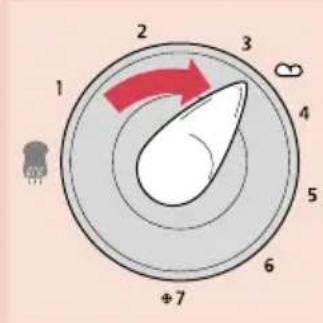

natural_image
Illustration of a hand holding a remote control with a circular dial and pointer (no text or symbols)natural_image
Illustration of a toaster oven with three food items inside (no text or symbols)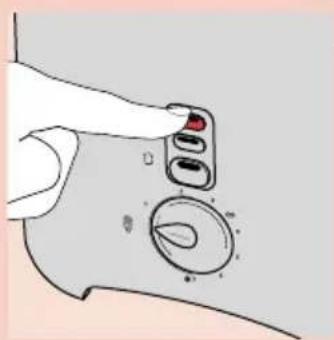
Rengöring
natural_image
Illustration of a hand pressing down on a device with a red arrow indicating motion (no text or symbols)natural_image
Illustration of a hand holding a cord connected to a portable electric stove (no text or symbols visible)natural_image
Illustration of hands connecting a component into a housing (no text or symbols)natural_image
Illustration of a toaster with a steaming top and red lid (no text or symbols)natural_image
Illustration of a knife pressing down on a tray with a red arrow indicating motion (no text or symbols)natural_image
Illustration of a toaster with a paper sheet being placed on top, showing a red arrow indicating cooling (no text or symbols present)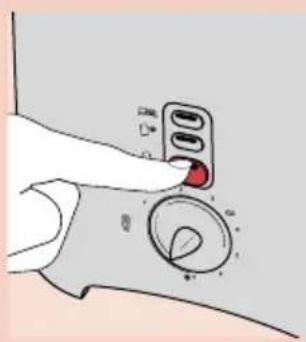
natural_image
Illustration of a toaster with a red downward arrow indicating compression or cooling (no text or symbols present)Vain mallit HD 2572 ja HD 2574.
natural_image
Illustration of a toaster with two round buns on top (no text or symbols)Malli HD 2574:
natural_image
Illustration of a microwave oven with three circular cavities (no text or symbols)(vain malli HD 2575)
natural_image
Illustration of a hand holding a control knob on a curved surface, with no visible text or symbolsnatural_image
Illustration of a hand pressing down on a device with a red arrow indicating compression (no text or symbols present)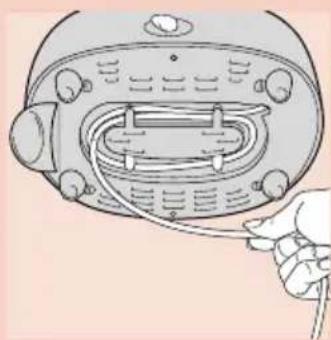
natural_image
Line drawing of a hand inserting a cable into a device with a handle (no text or symbols)Liitosjohdon vaihto
natural_image
Illustration of hands connecting a plug to a wall socket with a red arrow indicating direction (no text or symbols)natural_image
Illustration of a toaster with steam rising from the top (no text or symbols)natural_image
Illustration of a knife pressing into a tray with a red arrow indicating motion (no text or symbols)natural_image
Illustration of a toaster with a paper bag placed on top, showing a red arrow pointing to the lid (no text or symbols present)natural_image
Illustration of a toaster with a red downward arrow indicating cooling effect (no text or symbols)natural_image
Illustration of a toaster with two round buns on top (no text or symbols)

natural_image
Illustration of a hand holding a device with a circular dial and pointer, no text or symbols presentnatural_image
Illustration of a toaster oven with four food items inside (no text or symbols)
natural_image
Illustration of a hand holding a small electronic device with a red arrow indicating motion (no text or symbols)natural_image
Illustration of a hand holding a portable radio with cable (no text or symbols)natural_image
Illustration of hands connecting a cable to a wall-mounted component with a red arrow indicating direction (no text or symbols)natural_image
Illustration of a toaster with a steaming top and red lid (no text or symbols)natural_image
Illustration of a sandwich being cut with a red arrow indicating the cutting edge (no text or symbols present)natural_image
Illustration of a toaster with a bag labeled '333' inserted into the top pan, showing red liquid inside (no text or symbols on the device itself)HD 2574 ve HD 2575 tipleri:
natural_image
Illustration of a toaster with a red downward arrow indicating compression or cooling (no text or symbols present)natural_image
Illustration of a toaster with two round buns on top (no text or symbols)natural_image
Illustration of a microwave oven with four circular food compartments (no text or symbols)natural_image
Illustration of a hand using a kitchen appliance to press or<|rotate_right|>, with a red arrow indicating the process (no text or symbols present)
natural_image
Illustration of a hand inserting a cable into a device with a handle (no text or symbols)

- Toasting bread
- Making toasted sandwiches
- Toasting frozen bread
- Reheating toasted bread
- Heating up rolls or croissants
- Type HD 2572:
- Type HD 2574:
- Toasting on one side (only type HD 2575)
- Cleaning
- Mains cord replacement
- Snoer vervangen
- Pulizia
- Reaquecer as torradas
- Torrar de um só lado (apenas no modelo HD 2575)
- Limpeza
- Bare for HD 2572 OG HD2574.
- Rengöring
- Liitosjohdon vaihto
Brand : PHILIPS
Model : Essence HD2575
Category : Toaster