
CAU-438 - Car radio DENVER - Free user manual and instructions
Find the device manual for free CAU-438 DENVER in PDF.


| Product type | Car radio |
| Brand | Denver |
| Model | CAU-438 |
| Dimensions (W x H x D) | 180 x 50 x 160 mm (double DIN) |
| Weight | Approximately 0.8 kg |
| Power supply | 12 V DC (vehicle) |
| Main functions | FM/AM radio, USB, SD, Bluetooth, AUX, hands-free calling |
| Output power | 4 x 50 W max |
| Display | 3.5-inch color LCD display |
| Ports | Front USB, SD, 3.5 mm AUX |
| Connectivity | Bluetooth 5.0, hands-free calling, audio streaming |
| Radio tuner | FM (87.5-108 MHz) / AM (531-1620 kHz), RDS |
| Supported audio formats | MP3, WMA, WAV, FLAC |
| Steering wheel control input | Yes (compatible depending on adapter) |
| Remote control | Included (wired or infrared depending on version) |
| Maintenance and cleaning | Clean with a soft, dry cloth. Avoid solvents. |
| Safety | Disconnect the battery before installation. Use protective fuses. |
| Spare parts and repairability | Contact Denver after-sales service. Repairability index N/A. |
| General information | 2-year warranty. Made in China. |
Frequently Asked Questions - CAU-438 DENVER
User questions about CAU-438 DENVER
0 question about this device. Answer the ones you know or ask your own.
Ask a new question about this device
Download the instructions for your Car radio in PDF format for free! Find your manual CAU-438 - DENVER and take your electronic device back in hand. On this page are published all the documents necessary for the use of your device. CAU-438 by DENVER.
USER MANUAL CAU-438 DENVER
Dutch.... Page 09\~12
Finnish.... Page 13\~16
French...... Page 17\~20
German...... Page 21\~24
Italian.... Page 25\~28
Polish.... Page 29\~32
Portuguese...... Page 33\~36
Spanish...... Page 37\~40
Swedish...... Page 41\~44
DENVER®
CAU-438
DAN
***IMPORTANT*** Please make sure the yellow wire is connected to the permanent live feed (+12V) of the vehicle battery for the preset memory's Disconnect negative battery terminal from battery before starting installation. Consult the vehicle owner's manual for proper instructions.


- Install the Radio using the Din-Front Mount or Din-Rear Mount Method.
- The Radio is equipped with ISO connector. ISO connector is the universal connector for the connection of car radio.
- Make sure that you have a good chassis ground. Good ground connections will eliminate most electrical noise problems.
- Please seek professional advice if you are in experienced installing this type of product.
WORKING WITH THE UNIT
- USB Flashdrive & SD Card
Simply plug your USB Flashdrive or SD Card (or both) into the USB socket/Card slot. The contents will be played automatically. These can be removed at any time.
2.Aux-in Jack
The front Aux-in Jack can be used for connecting additional audio devices (i.e.MP3 players/lpods) to the unit The Aux-in cable (supplied with the unit) can be used for this connection. Simply connect one end into the Aux-in Jack and the other to your MP3/lpod.
3.Radio
Press the MODE button to select RADIO mode. You can press and hold the seek up/down button to search for your favorite stations, or you can press and hold the APS button to automatically scan the strongest stations and save them as presets. When it is on RDS mode, press PTY button to select suitable mode.
Hereby, Inter Sales A/S, declares that this product CAU-438 is in compliance with the essential requirements and other relevant provisions of Directive 1999/5/EC. A copy of the Declaration of conformity may be obtained at: Inter Sales A/S
Stavneagervej 22,
DK-8250 Egaa
Denmark
ALL RIGHTS RESERVED, COPYRIGHT DENVER ELECTRONICS A/S
DENVER®
www.denver-electronics.com


Electric and electronic equipment and included batteries contains materials, components and substances that can be hazardous to your health and the environment, if the waste material (discarded electric and electronic equipment and batteries) is not handled correctly.
Electric and electronic equipment and batteries is marked with the crossed out trash can symbol, seen below. This symbol signifies that electric and electronic equipment and batteries should not be disposed of with other household waste, but should be disposed of separately.
As the end user it is important that you submit your used batteries to the appropriate and designated facility. In this manner you make sure that the batteries are recycled in accordance with legislature and will not harm the environment.
All cities have established collection points, where electric and electronic equipment and batteries can either be submitted free of charge at recycling stations and other collection sites, or be collected from the households. Additional information is available at the technical department of your city.
Imported by:
DENVER ELECTRONICS A/S
Stavneagervej 22
DK-8250 Egaa
Denmark
www.facebook.com/denverelectronics
DENVER®
CAU-438
NED

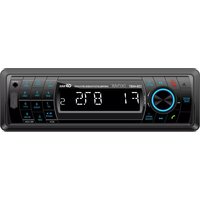
Brand : DENVER
Model : CAU-438
Category : Car radio