
KCA-IP500 - Computer and peripheral cables KENWOOD - Free user manual and instructions
Find the device manual for free KCA-IP500 KENWOOD in PDF.


| Product type | Car radio connection cable |
| Brand | Kenwood |
| Model | KCA-IP500 |
| Cable length | 1.2 meters |
| Weight | 50 grams |
| Connectors | USB-A male to Kenwood proprietary connector |
| Power supply | None (passive cable) |
| Main functions | Allows connection of an iPod/iPhone to a Kenwood car radio for audio playback and control |
| Compatibility | iPod, iPhone, iPad with 30-pin connector |
| Care and cleaning | Wipe with a soft, dry cloth. Do not use solvents. |
| Safety | Do not excessively bend or twist the cable. Protect from moisture. |
| Spare parts | Not available separately (non-removable cable) |
| Repairability | Not repairable, replace the entire cable |
| Operating temperature | -10°C to +50°C |
| Warranty | 2 years |
Frequently Asked Questions - KCA-IP500 KENWOOD
User questions about KCA-IP500 KENWOOD
0 question about this device. Answer the ones you know or ask your own.
Ask a new question about this device
Download the instructions for your Computer and peripheral cables in PDF format for free! Find your manual KCA-IP500 - KENWOOD and take your electronic device back in hand. On this page are published all the documents necessary for the use of your device. KCA-IP500 by KENWOOD.
USER MANUAL KCA-IP500 KENWOOD
What You Need to Get Started 3
Controllable iPod
Connectable Control unit
Characters may not be displayed on Control unit
Cautions for Usage
Connection and Setup 4
Playing a Song in iPod 6
Playing a song
Forward search/reverse search for song selection
Pausing a song
Selecting a Song 7
About displayed items
Selecting Browsing (Music menu) Item
Selecting a title (title of Playlist or Album, for example)
Selecting a song
Direct searching
Setting Up iPod for Playing 9
Shuffling and playing all your songs
Shuffling and playing songs by title
Repeating a song
Troubleshooting Guide 10
Specifications
11
Controllable iPod
You can control the following types of iPod with Dock connector from a Control unit via KCA-iP500.
Controllable iPod Software Version
iPod with Dock connector (3rd generation) iPod software ver.2.2
iPod with Click Wheel (4th generation) iPod software ver.3.0.2
If your iPod software version is older than those mentioned above, you must update the software version.
To view the iPod software version, press the [MENU] button on iPod, then select "Settings" in the menu to open the "Settings" screen and select "About". The iPod software version will be displayed on the "Version" row in the "About" screen.
You can download the latest iPod Updater from the Apple Web site.
Connectable Control unit
Kenwood Control units released in 2003 and later, having CD changer connecting option, are supported.
It should be noted that a display problem and may occur in some of the above Kenwood Control units. For more details, access the following URL:
http://www.kenwood.com/i/kca-ip500/index.html
Characters may not be displayed on Control unit
Only characters conforming to the ISO8859-1 character set can be displayed on Control unit via KCA-iP500. Other characters will be displayed as "?" or spaces.
Displayable character types and number of characters may vary depending on the Control unit model.
- Entire title name may not be displayed even on Control unit with the character scrolling function.
- When connected to the Control unit without the CD TEXT (disc title) display function, selected Browsing item cannot be viewed in the display area. In this case, slide the "1" of the "SELECT SWITCH" on the front panel of conversion box to up position (switching to the "Browsing item selection disabled") (page 5).
Cautions for Usage
- Sound distortion may result when connecting iPod to KCA-iP500 with its EQ (equalizer) function enabled.
- When iPod is disconnected from KCA-iP500, the iPod settings on Shuffle and Repeat may have changed and differ from those set before connecting it to KCA-iP500. Reset the settings as necessary.
- When "KENWOOD" is displayed on the iPod screen, while iPod is connected to or immediately after disconnected from KCA-iP500, you cannot operate the iPod.
- "All" cannot be selected for Repeat option. (Only songs in the current title can be repeated.)
- Remove all the accessories such as headphones from iPod before connecting to KCA-iP500. When iPod is connected to KCA-iP500 with its accessories connected, you cannot control iPod.
- Do not leave iPod in a car. iPod may be damaged due to direct sunlight, high temperature, etc.
iPod (commercially available)
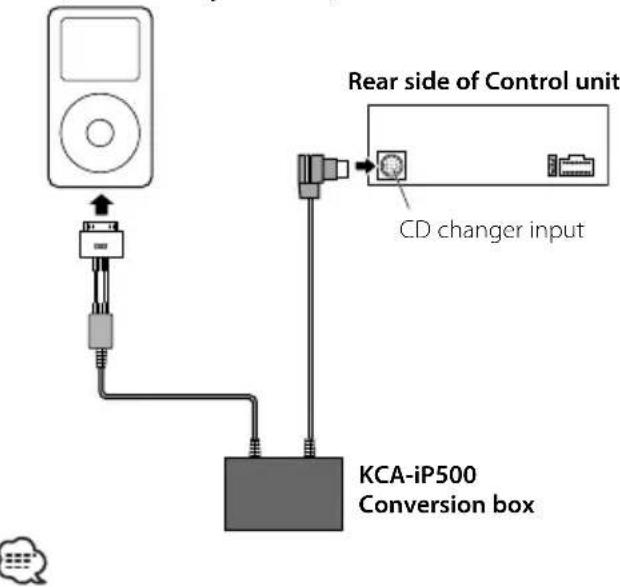
- For instructions on how to connect KCA-iP500 to Control unit, see the Instruction Manual for Control unit.
Included parts for installation
- Double-stick tape (45mm X 45mm) ....1
Power supply function
KCA-iP500 supplies power to the connected iPod and charges its battery while playing music. However, the Control unit must be turned on.
Installation
• Install iPod in an appropriate location such as the glove compartment.


- Avoid placing iPod where it could fall. The iPod may interfere with driving operation of the vehicle resulting in an accident.
- Avoid installing the conversion box where it may get wet.
- Secure the cables with commercially available cable clamps as necessary.
Setting Browsing item selection
When connecting KCA-iP500 to Control unit without the CD TEXT (disc title) display function, it is recommended that you slide the "1" of the "SELECT SWITCH" on the front panel of conversion box to the up position. Selected Browsing (page 7) item cannot be viewed on Control unit without the disc title display function.
When you slide the "1" of the "SELECT SWITCH" to up position (switching to the "Browsing item selection disabled"), Browsing item is locked on to "Playlist" and selection is disabled.
Title number 1 in Playlist in this unit corresponds to the "Songs" in Browsing (Music menu) items.
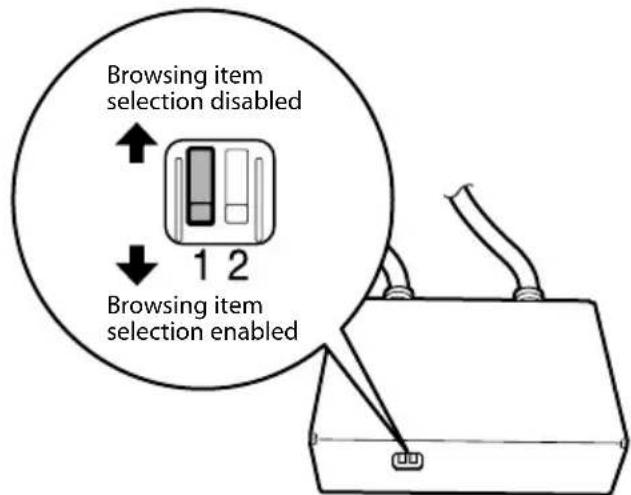

- Set the "SELECT SWITCH" before connecting KCA-iP500 to Control unit. If KCA-iP500 is already connected, press the reset button on Control unit.
- For more details, access the following URL: http://www.kenwood.com/i/kca-ip500/index.html
Setting Title Number Display Mode
When connecting KCA-iP500 to the following Control units, it is recommended that you slide the "2" of the "SELECT SWITCH" on the front panel of the conversion box to the up position:
Models subject to recommended setting change:
KVT-915DVD, KVT-925DVD, KVT-935DVD, KVT-945DVD, KVT-965DVD, KVT-815DVD, KVT-715DVD, KVT-725DVD, KVT-725DVD-B, KVT-735DVD, KVT-745DVD, KVT-765DVD, DDX7015, DDX7025, DDX7035, DDX7045, DDX7065, DDX6017, XXV-05V (As of January, 2005)
Sliding the "2" of the "SELECT SWITCH" on the front panel of conversion box to up position allows the title number (page 7) to be displayed with two digits (99).
When the "2" of the "SELECT SWITCH" on the front panel is set to down position, the title number is displayed with one digit (9).
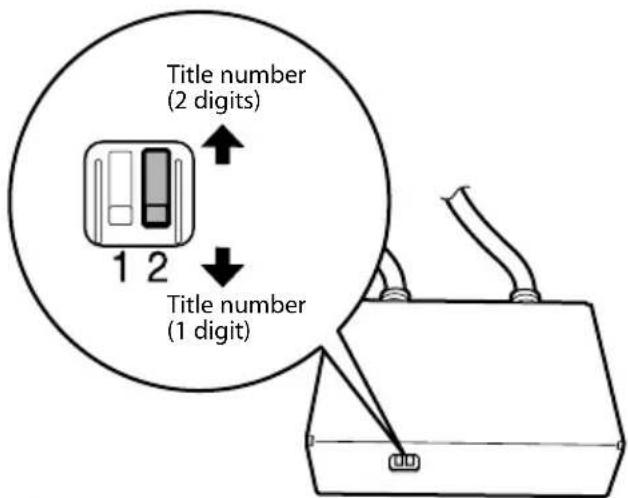

- For more details, access the following URL: http://www.kenwood.com/i/kca-ip500/index.html
Playing a song
1 Connect iPod to KCA-iP500
See instruction on page 4.

- iPod and Control unit may either be turned on or off when they are connected.
2 Play a song
Select "EXT MEDIA" or "*MEDIA" source on Control unit.
See the Instruction Manual for Control unit for how to select a source.

- Songs in the selected title (title of Playlist or album, for example) will be played repeatedly.
About resume function
After connecting your iPod to KCA-iP500, the first song played will be the song you played last with your iPod.
"RESUMING" is displayed at this time, since the title number and title name cannot be displayed correctly. When you select Browsing item or title, the first song is automatically set to the song of "track number 1, title number 1 in Playlist", and the correct title number and name are displayed.
Forward search/reverse search for song selection
Press and hold [|◄◄◄] or [►►◄] button on Control unit.
Operation differs depending on the type of Control unit used. See the Instruction Manual for fast-forwarding or reversing the play of CD.
Pausing a song
Press [▶II] button on Control unit.
Pausing function may not be available with some types of Control unit without [▶■] button.
About displayed items
Control unit displays the following items corresponding to the music menu items of iPod.

① Browsing (Music menu) items:
Displayed in the first part of the disc title display area.

② Title names:
Displayed in the second part of the disc title display area.
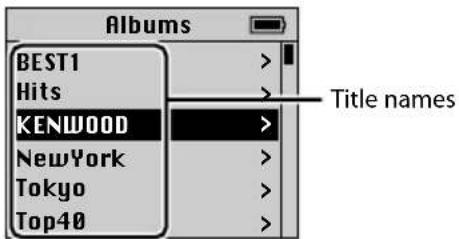
③ Title number:
Displayed in the disc number display area. Titles in the list are numbered in order and the title number displayed corresponds to the selected title.
④ Song name:
Displayed in the track title display area.

⑤ No. of song:
Displayed in the track number display area. Song names in the list are numbered in order and the song's number displayed corresponds to the selected song.

- Displayed items and their locations vary by types of Control unit used for control.
If you play a song with the track number 123 using a Control Unit capable of displaying a track number in two (2) digits, the first digit "1" is truncated and only "23" is displayed on the Control Unit. - iPod screen in this document is shown for reference purpose. The actual iPod display may vary by model types.
Selecting Browsing (Music menu) Item
Press [SCAN] button on Control unit.
Operation differs depending on the type of Control unit used. See the Instruction Manual for the Scan play of CD.
Pressing [SCAN] button selects Browsing item in the order shown below:
| Browsing items Display |
| Playlists PLY |
| Artists ART |
| Albums ALB |
| Genres GEN |

- Upon selection of any Browsing item, the first song in the selected item will start playing.
Selecting a title (title of Playlist or Album, for example)
Press [FM] or [AM] button on Control unit.
Operation differs depending on the type of Control unit used. See the Instruction Manual for the Disc Search of CD.
Pressing [FM] button changes the title to the next one and [AM] button the previous one.

- When any title is selected, the first song in the selected title will start playing.
- Title number 1 in Playlist corresponds to the "Songs" in Browsing (Music menu) items.
Selecting a song
Press [◀◀] or [▶▶] button on Control unit.
Operation differs depending on the type of Control unit used. See the Instruction Manual for the Track search of CD.
Pressing [I◄◄] button plays the previous song, and [►►] button plays the next song.
Direct searching
You can select a title or song quickly by directly entering the number of title or track on the remote control for Control unit.
1 Enter the number of a title or track using number keys on the remote for Control unit.
2 If you search for a title Press [FM] or [AM] button on the remote control for Control unit.
If you search for a track Press [◀◀] or [▶▶] button on the remote control for Control unit.

- Direct searching function is limited, or some track numbers may not be specified on some types of Control unit. See the Instruction Manual for Control unit.
Shuffling and playing all your songs
You can set your iPod to play songs in random order.
1 Play a title number 1 in Playlist
See
2 Turn on the shuffling function
Press [RDM] button on Control unit.
Operation differs depending on the type of Control unit used. See the Instruction Manual for the Random play of CD.
3 Start shuffling
Press [▶▶] button on Control unit.
Operation differs depending on the type of Control unit used. See the Instruction Manual for skipping to the next song on a CD.

- During the shuffled playback, title numbers are displayed in the order determined by shuffling.
Shuffling and playing songs by title
You can set your iPod to play songs by title (tile of Playlist or album, for example) in which currently playing song is included, in random order.
1 Play a song in the title you want to shuffle
See
2 Turn on the shuffling function
Press [RDM] button on Control unit.
Operation differs depending on the type of Control unit used. See the Instruction Manual for the Random play of CD.
3 Start shuffling
Press [▶▶] button on Control unit.
Operation differs depending on the type of Control unit used. See the Instruction Manual for skipping to the next song on a CD.

- During the shuffled playback, title numbers are displayed in the order determined by shuffling.
Repeating a song
You can set your iPod to repeat the currently playing song.
1 Play a song you want to repeat
See
2 Start repeating
Press [REP] button on Control unit.
Operation differs depending on the type of Control unit used. See the Instruction Manual for the Track repeat play of CD.
Use this guide for troubleshooting, when you have difficulty in operating the unit or you cannot play a song with an error message displayed on Control unit.
? Currently selected Browsing (Music menu) item cannot be identified or not displayed.
√ Control unit does not support a CD TEXT (disc title) display function.
Slide the "1" of "SELECT SWITCH" to up position to lock on to "Playlists" (page 5). Next, press the reset button on Control unit.
? Browsing (Music menu) items cannot be selected.
√ The "1" of "SELECT SWITCH" is set to up position.
Slide the "1" of "SELECT SWITCH" to down position (page 5). Next, press the reset button on Control unit.
? Setting of the "SELECT SWITCH" is not enabled.
√ The "SELECT SWITCH" might be set with KCA-iP500 connected to Control unit.
Press the reset button on Control unit.
? Songs cannot be selected.
√ If a resume function is enabled, a song of "track number 1, title number 1 in Playlist" is automatically played when you try to select a song.
You can select a song after a song of "track number 1, title number 1 in Playlist" is played.
? "LOAD"/ "Reading" is continuously displayed on Control unit.
√ Communication failure occurs between KCA-iP500 and iPod.
■ Disconnect iPod from KCA-iP500, make sure "KENWOOD" is not displayed on iPod, then reconnect.
If "LOAD"/ "Reading" is still displayed, reset iPod.
? iPod becomes inoperative after being disconnected from KCA-iP500.
√ Communication failure occurs between KCA-iP500 and iPod.
Reset iPod.
? Playback stops.
√ An external unit such as headphones has been disconnected from iPod.
Disconnect iPod from KCA-iP500, make sure "KENWOOD" is not displayed on iPod, then reconnect iPod. Before reconnecting iPod, be sure to disconnect all external units from iPod.
Messages
"RESUMING"
: Resume function is enabled. See
"EJECT"
: iPod is not connected. Make sure that iPod is securely connected.
"NO DISC"
: A song corresponding to currently selected Browsing (Music menu) item or title (title of Playlist or album, for example) does not exist. Select other Browsing item or title.
"ERROR 18"/ "E-18"
: Software version of the connected iPod is not supported by KCA-iP500. See
"ERROR 60"/ "E-60"
: Communication failure occurs between KCA-iP500 and iPod. Disconnect iPod from KCA-iP500, make sure "KENWOOD" is not displayed on iPod, then reconnect iPod. If "ERROR 60"/ "E-60" is still displayed, reset iPod.
Specifications subject to change without notice.
General
Cable Length
iPod I/F to Conversion box: 2.5 m
Conversion box to Control unit: 1.0 m
Operating voltage (11 - 16V allowable)
: 14.4 V
Current consumption (When Recharging)
: 0.8 A
Installation Size (W x H x D)
: 80 x 58 x 23 mm
3-1/8 × 2-5/16 × 7/8 inch
Weight
: 360 g (0.8 lbs)
- Adhésif double face (45mm X 45mm) ....1
* This device complies with part 15 of the FCC Rules. Operation is subject to the condition that this device does not cause harmful interference.
Apple and iPod are trademarks of Apple Computer, Inc., registered in the U.S. and other countries.
- What You Need to Get Started 3
- Connection and Setup 4
- Playing a Song in iPod 6
- Selecting a Song 7
- Setting Up iPod for Playing 9
- Troubleshooting Guide 10
- Specifications
- Controllable iPod
- Controllable iPod Software Version
- Connectable Control unit
- Characters may not be displayed on Control unit
- Cautions for Usage
- Included parts for installation
- Power supply function
- Installation
- Setting Browsing item selection
- Setting Title Number Display Mode
- Models subject to recommended setting change:
- Playing a song
- Connect iPod to KCA-iP500
- Play a song
- About resume function
- Forward search/reverse search for song selection
- Pausing a song
- About displayed items
- Selecting Browsing (Music menu) Item
- Selecting a title (title of Playlist or Album, for example)
- Selecting a song
- Direct searching
- Shuffling and playing all your songs
- Shuffling and playing songs by title
- Repeating a song
- ? Currently selected Browsing (Music menu) item cannot be identified or not displayed.
- ? Browsing (Music menu) items cannot be selected.
- ? Setting of the "SELECT SWITCH" is not enabled.
- ? Songs cannot be selected.
- ? "LOAD"/ "Reading" is continuously displayed on Control unit.
- ? iPod becomes inoperative after being disconnected from KCA-iP500.
- ? Playback stops.
- Messages
- "RESUMING"
- "EJECT"
- "NO DISC"
- "ERROR 18"/ "E-18"
- "ERROR 60"/ "E-60"
- General
Brand : KENWOOD
Model : KCA-IP500
Category : Computer and peripheral cables