
CMS 65 - Loudspeaker FOCAL - Free user manual and instructions
Find the device manual for free CMS 65 FOCAL in PDF.


| Product type | Active 2-way monitoring speaker |
| Brand | Focal |
| Model | CMS 65 |
| Category | Speaker / Studio monitor |
| Dimensions (W x H x D) | 210 x 340 x 280 mm |
| Weight | 8.5 kg per speaker |
| Power supply | Mains 100-240 V, 50/60 Hz |
| Amplifier power | 2 x 80 W RMS (bi-amplification) |
| Frequency response | 40 Hz – 20 kHz (± 3 dB) |
| Woofer | 6.5 inch (16.5 cm) polyglass |
| Tweeter | 1 inch (2.5 cm) inverted dome aluminum/magnesium |
| Audio inputs | XLR balanced, TRS 6.35mm balanced, RCA unbalanced |
| Controls | Input level, high frequency (HF) correction, low frequency (LF) correction |
| Correction filters | Bass shelving, treble shelving |
| Built-in protection | Against thermal overload and short circuits |
| Power indicator | Front LED (on = active) |
| Enclosure material | MDF with black vinyl finish |
| Maintenance and cleaning | Dust with a soft cloth; avoid solvents |
| Operating temperature | 0 °C to 35 °C |
| Included accessories | Power cable, user manual, damping pads |
Frequently Asked Questions - CMS 65 FOCAL
User questions about CMS 65 FOCAL
0 question about this device. Answer the ones you know or ask your own.
Ask a new question about this device
Download the instructions for your Loudspeaker in PDF format for free! Find your manual CMS 65 - FOCAL and take your electronic device back in hand. On this page are published all the documents necessary for the use of your device. CMS 65 by FOCAL.
USER MANUAL CMS 65 FOCAL
natural_image
Line drawing of four Focal speakers with different speaker designs (no text or symbols)
Français page 22
中文41頁
CE
An example of this equipment has been tested and found to comply with the following European directives and international standards: Electromagnetic compatibility EN 55103, EN 61000. Electrical safety EN 60065.
Caution!
Risk of electric shock
Do not open
Do not expose to rain or moisture

Important safety information
- Read these instructions.
- Keep these instructions.
- Heed all warnings.
- Follow all instructions.
-
Do not use this apparatus near water.
-
Clean only with dry cloth.
-
Do not block any ventilation openings. Install in accordance with the manufacturer's instructions.
-
Do not install near any heat sources such as radiators, heat registers, stoves, or other apparatus (including amplifiers) that produce heat.
-
Do not defeat the safety purpose of the polarized or grounding-type plug. A polarized plug has two blades with one wider than the other. A grounding type plug has two blades and a third grounding prong. The wide blade or the third prong are provided for your safety. If the provided plug does not fit into your outlet, consult an electrician for replacement of the obsolete outlet.
-
Protect the power cord from being walked on or pinched particularly at plugs, convenience receptacles, and the point where they exit from the apparatus.
-
Only use attachments/accessories specified by the manufacturer.
-
Use only with the cart, stand, tripod, bracket, or table specified by the manufacturer, or sold with the apparatus. When a cart is used use caution when moving the cart/apparatus combination to avoid injury from tip-over.
-
Unplug this apparatus during lightning storms or when unused for long periods of time.
-
Refer all servicing to qualified service personnel. Servicing is required when the apparatus has been damaged in any way, such as power-supply cord or plug is damaged, liquid has been spilled or objects have fallen into the apparatus, the apparatus has been exposed to rain or moisture, does not operate normally, or has been dropped.
-
WARNING: To reduce the risk of fire or electric shock, this apparatus should not be exposed to rain or moisture and objects filled with liquids, such as vases, should not be placed on this apparatus.
-
To completely disconnect this equipment from the mains, disconnect the power supply cord plug from the receptacle.
-
The mains plug of the power supply cord shall remain readily operable.

The lightning flash with arrowhead symbol within an equilateral triangle, is intended to alert the user to the presence of uninsulated "dangerous voltage" within the product's enclosure that may be of sufficient magnitude to constitute a risk of electric shock to persons.

The exclamation point within an equilateral triangle is intended to alert the user to the presence of important operating and maintenance (servicing) instructions in the literature accompanying the product.
The CMS loudspeakers constitute a professional monitoring system and we thank you for choosing Focal. Those products have been designed to combine perfect soundstage, high precision and extended frequency response, in a compact size, suitable for near field monitoring.
CMS 40, CMS 50 and CMS 65 Packaging content
The loudspeaker is supplied with the following elements (apart from this manual):
- 1 power cord
- 4 rubber feet
- 2 adjustable spikes
- 1 rubber table stand
• 1 phase plug (tweeter)
• 1 protection grille for the tweeter with phase plug (we advise you to remove it before listening to the speakers.)
• 1 protection grille for the woofer (we advise you to remove it before listening to the speakers.) - 1 hook to remove the tweeter and woofer grilles
- 1 guarantee card
Please check that none of these items is missing, and remove all accessories from the box.
To remove the loudspeaker from its box without damage, open the end flaps fully and bend them right back. Then remove the upper cushion and lift the loudspeaker out gently. Inspect the speaker for signs of any possible damage. In the unlikely event of this having occurred, please inform the carrier and supplier. It is a good practice to keep the packaging in case of future transportation.
Preliminary recommendations
We would like to give a word of warning about the high sound pressure levels that can be generated by these loudspeakers, especially in a 5.1 configuration. Because of their low levels of distortion, and the minimal fatigue incurred by the user, it is not always obvious to realize the actual sound pressure level while working. Please bear in mind that exposure to excessive levels over a sustained period of time may lead to permanent hearing loss.
Warranty
These products are guaranteed against defects in components and workmanship only, for a period of 2 years. During the warranty period, Focal will, at their discretion, either repair or replace products which prove to be defective, provided that the product is returned, shipping prepaid, to an authorized Focal service facility.
Defects caused by unauthorized modifications, accident, negligence or any misuse are not covered by this warranty. For further information, please contact your dealer or the distributor in your country.

natural_image
Technical line drawing of two electronic speaker modules (no text or symbols visible)
natural_image
Technical line drawing of two FOTAL audio equipment units, one front view and one side view (no text or symbols)
natural_image
Technical line drawing of two speaker units, one with a CD and the other showing internal components (no text or symbols)CMS 40
The CMS 40 is an active 2-way near field professional monitoring loudspeaker(2 internal amplifiers), composed of a 4" (10cm) Focal woofer/midrange speaker with a Polyglass cone loaded in a large laminar port and of a Focal inverted dome tweeter in aluminum/magnesium (fig. A).
CMS 50
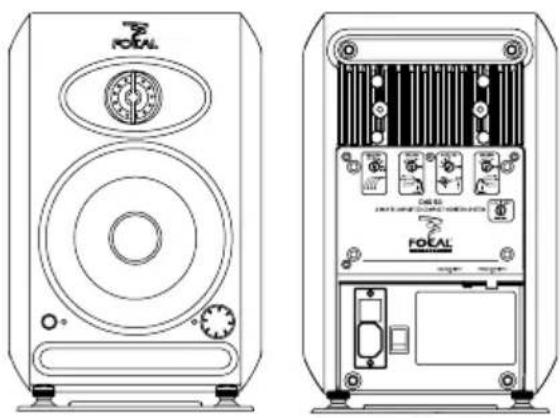
The CMS 50 is an active 2-way near field professional monitoring loudspeaker (2 internal amplifiers), composed of a 5" (13cm) Focal woofer/midrange speaker with a Polyglass cone loaded in a large laminar port and of a Focal inverted dome tweeter in aluminum/magnesium (fig. B).
CMS 65
The CMS 65 is an active 2-way near field professional monitoring loudspeaker (2 internal amplifiers), composed of a 6.5" (16.5cm) Focal woofer/midrange speaker with a Polyglass cone loaded in a large laminar port and of a Focal inverted dome tweeter in aluminum/magnesium (fig. C).
Installation
Mains voltage
After having unpacked the unit, first check that the operating voltage is correctly set (see location on rear panel). If it is not, adjust the selector to the appropriate position. Also check and if necessary replace the fuse, which rating depends on the operating voltage (please refer to technical specifications).
Your products must be earthed using the power cord supplied. Audio input connections
The audio signal input is to connect, up to your own choice, whether to the XLR inlet or RCA inlet.
The XLR inlet permits the connection of a source with symmetrical signal and uses standard wiring instructions: Pin 1 = Ground (shield)
Pin 2 = In phase voltage ("hot")
Pin 3= Out-of-phase voltage ("cold").
The RCA inlet permits the connection of a source with asymmetrical signal. It's common to link the out-of-phase voltage (Pin 3) to the ground (Pin 1). This connection is generally made at wire level.
Tweeter phase plug
The CMS speakers are delivered with grilles for woofer and tweeter. In order to optimize the sound stage precision, we advise you to remove the grilles thanks to the hook included in the packaging. Then, install the phase plug on the tweeter in the vertical position by gently push on the suburbs of the phase plug (see below).

natural_image
Line drawing of a microwave oven with front panel and side buttons (no text or symbols)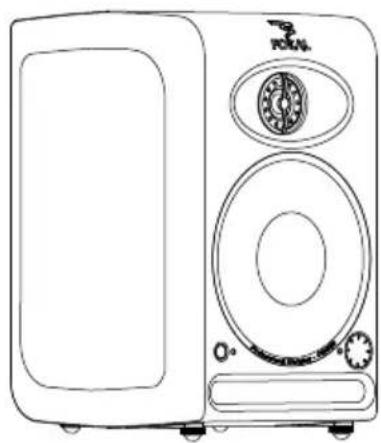
natural_image
Line drawing of a vintage megaphone with front panel and side buttons (no text or symbols)Positioning
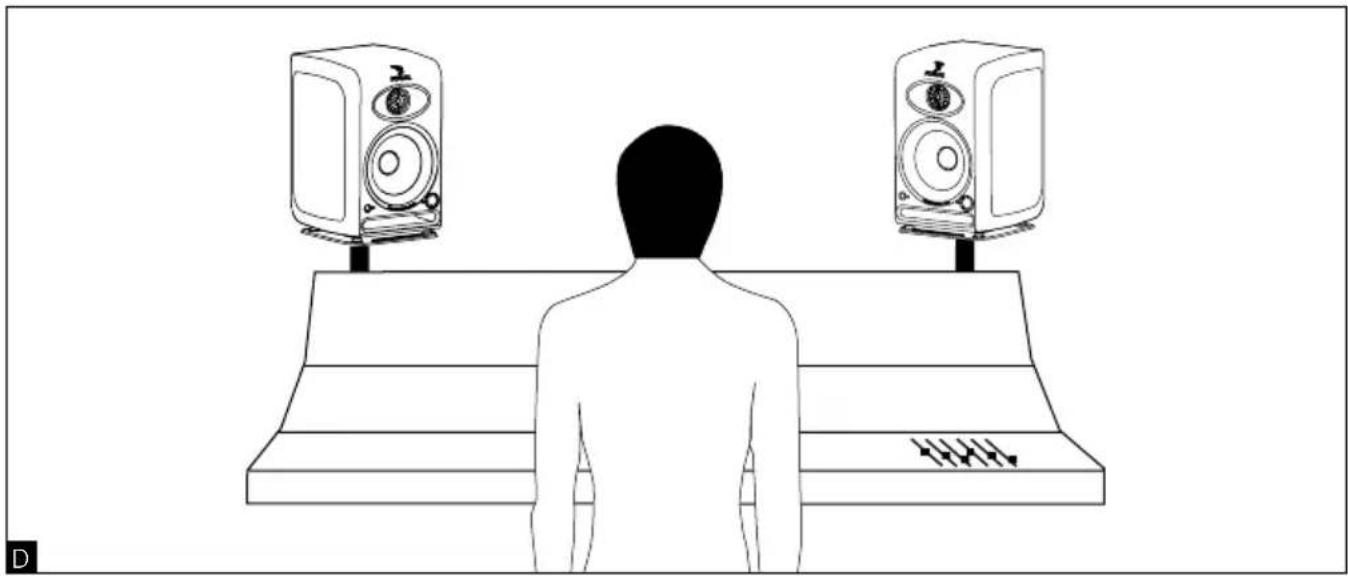
The CMS loudspeakers are near field monitoring loudspeakers and should be positioned at a distance between 40cm and 3 meters from the listener, pointing towards the listening position. They can be sitting on the console top, hung or even placed on appropriate stands. In any way, it is recommended that the tweeter is at a height from the floor approximately equivalent to that of the listener's ears. If required, it can make sense to place the speakers upside down so that the previous rule is better fulfilled.
The CMS loudspeakers could be placed vertically or horizontally depending on the environment, preferably pointing towards the listener (fig. D, E, F).
Once the position is defined, you have 2 kinds of feet (4 rubber feet and 2 adjustable spikes) to optimize the loudspeaker positioning (fig. G, H). The adjustment of the spike height permits to control the height of the soundstage. The gap and the right/left positioning of each loudspeaker permit to control the width, the centering and the global coherence of the soundstage (left/center/right), at the source of your recording precision.
Running in
As in all brand new loudspeaker, the drivers need some run-in period: the CMS transducers are mechanical elements demanding a little time to settle and adapt to the climatic environment. This period will vary, depending on the working conditions and may take up to a few weeks. Avoid pushing the speakers very hard during their first hours of use, but to accelerate the run-in process, it is good practice to operate the speakers at moderate levels for 20 hours or so, with programs having significant low frequency content. Only once the transducers have come to stabilize will you get the optimum performance.
CMS 40, CMS 50 and CMS 65 controls
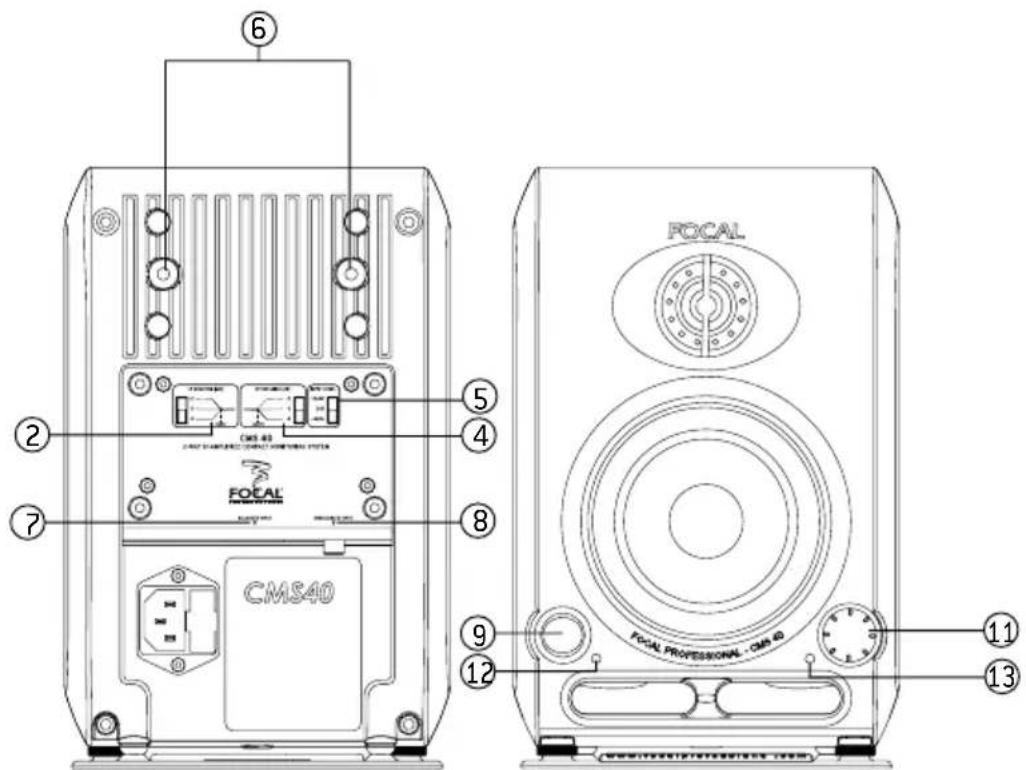
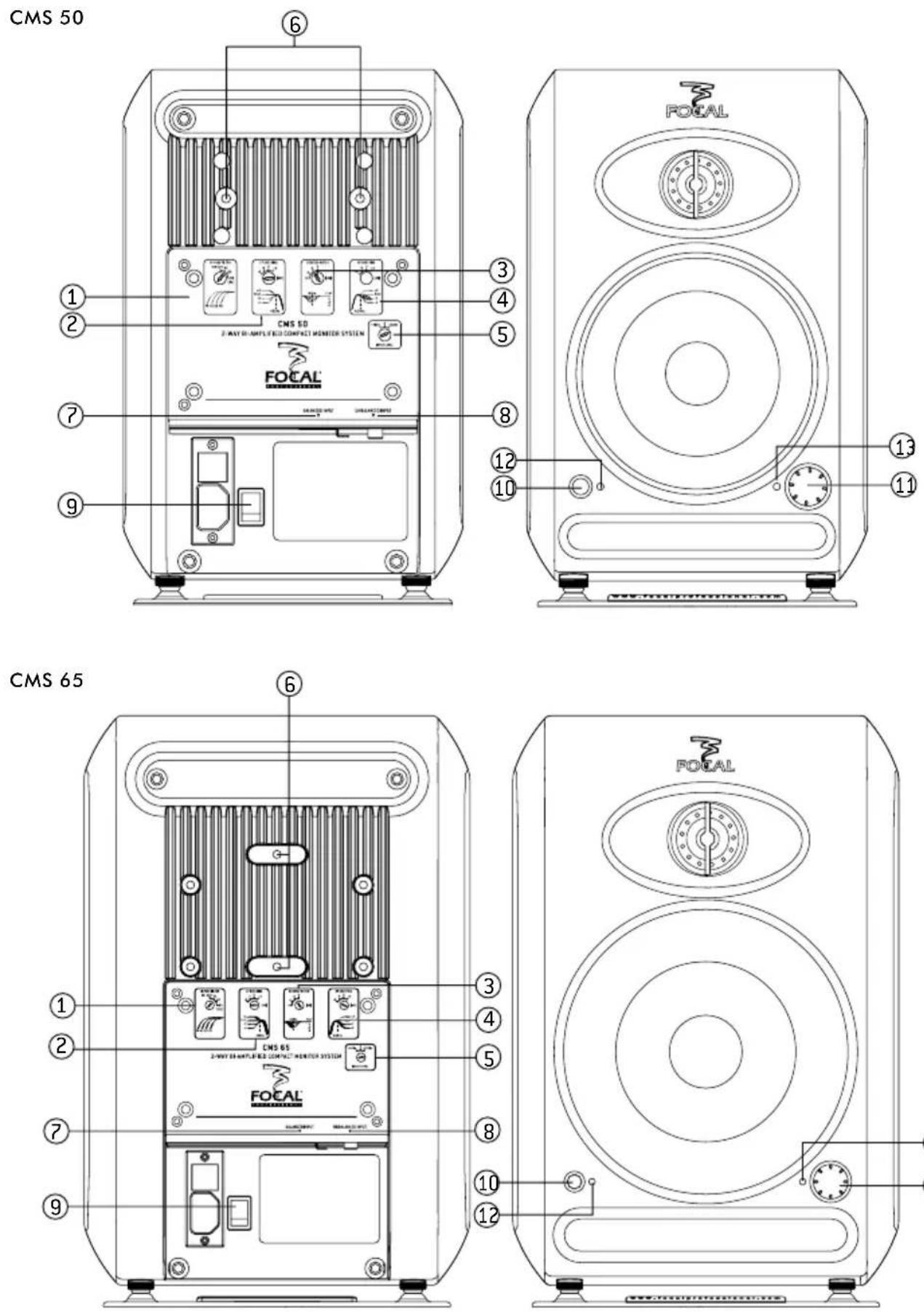
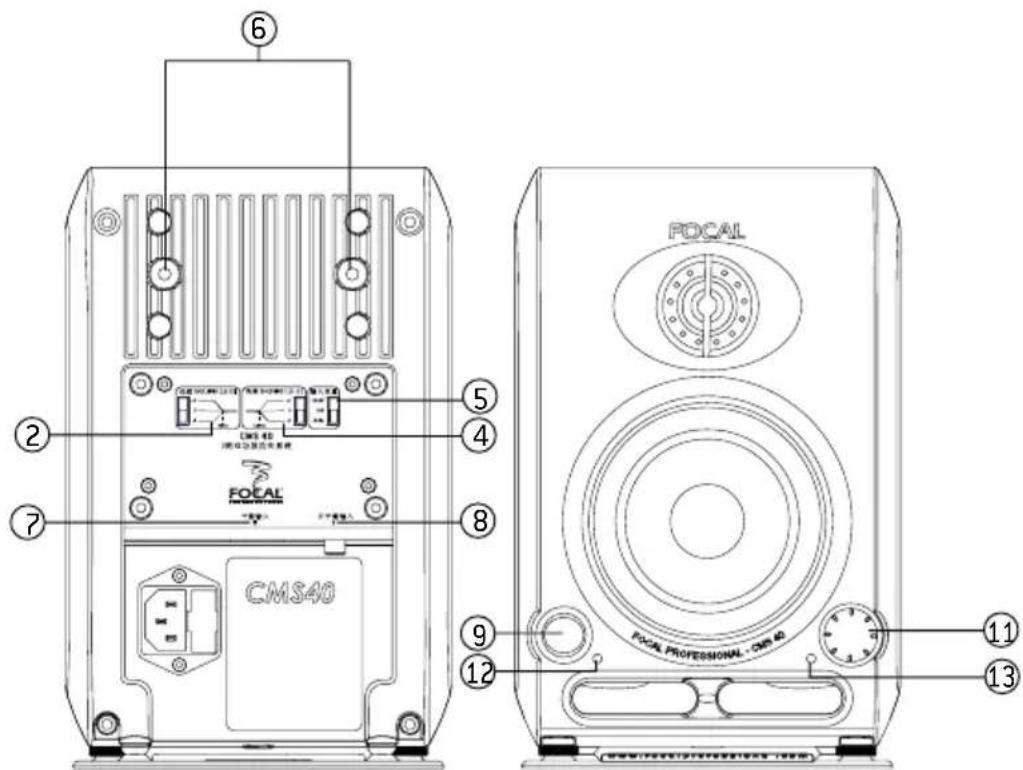
① HI-PASS FILTER (CMS 50 and CMS 65)
The HI-PASS FILTER rotative switch permits to activate or not the 12dB/octave high-pass filter. We advise you to set the rotative switch on FULL RANGE (deactivate the high-pass filter) in the case of a use in stereo configuration (2.0). We advise you to use the positions 45, 60 or 90Hz in the case of a use of the system with one or several subwoofers.
② LF SHELVING
The LF SHELVING rotative switch permits to activate or not a correction of the sound level under 450Hz. We advise you to set the LF SHELVING rotative switch on +2dB when the premises acoustics naturally softens that frequency range. We advise you to set the LF SHELVING rotative switch on FLAT when the premises acoustics is neutral. We advise you to set the LF SHELVING rotative switch on -2, -4, or -6dB when the loudspeakers are placed next to a wall or an angle.
③ DESKTOP NOTCH
(CMS 50 and CMS 65)
The DESKTOP NOTCH rotative switch permits to activate or not a correction of the sound level at a central frequency of 160Hz for a Q factor of 2. We advise you to set the rotative switch on -2, -4 or -6dB when the loudspeakers are positioned on a table, a console or any other support that creates reflections.

line
| Hz | dB (Line 1) | dB (Line 2) | dB (Line 3) | | --- | ----------- | ----------- | ----------- | | 50 | 28 | 28 | 28 | | 100 | 26 | 27 | 27 | | 150 | 24 | 25 | 25 | | 200 | 23 | 24 | 24 | | 250 | 24 | 25 | 25 | | 300 | 26 | 27 | 27 | | 350 | 27 | 28 | 28 | | 400 | 28 | 29 | 29 | | 450 | 28 | 29 | 29 | | 500 | 28 | 29 | 29 |④ HF SHELVING
The HF SHELVING rotative switch permits to activate or not a correction of the sound level from 4.5 kHz. We advise you to set it on:
- +2dB when the premises acoustics naturally softens this frequency range (mat environment).
- FLAT when the premises acoustics is neutral.
- -2 or -4dB when the premises acoustics naturally increases this frequency range (brilliant environment)
⑤ INPUT LEVEL
The INPUT LEVEL rotative switch function is to make the output sensitivity of the mixing console, or any other source, correspond to the input sensitivity of the loudspeakers. The available sensitivities are +4dBu, 0, -10dBv. The +4dBu position corresponds to the professional standard. The -10dBv corresponds to the general public standard. The 0 position is an intermediate position.
⑥ FIXING POINTS
The fixing points are made to ensure the link between the loudspeaker and a fixing support (stand, wall fixing, ceiling fixing, ...). Please refer to page 11 to know the compatible fixations (non-exhaustive list).
The thread type are BSW 3/8" for the bottom fixing point of CMS 40 and CMS 50.
The thread type are M6 for the CMS 40, CMS 50 and CMS 65 rear fixing points are M6.
⑦ BALANCED INPUT
The XLR inlet permits the connection of a source of balanced signal and follows standard wiring instructions.
Pin 1 = ground (shielding)
Pin 2 = In phase voltage (hot)
Pin 3 = Out-of-phase voltage (cold)
⑧ UNBALANCED INPUT
The RCA inlet permits the connection of a source of unbalanced signal. It is common to link the out-of-phase voltage (Pin 3) to the ground (Pin 1). This connection is generally made on the wires.
⑨ ON/OFF Switch
The ON/OFF switch permits to put the internal amplifiers ON or OFF.
⑩ ON/STANDBY Switch (CMS 50 and CMS 65)
The ON/Standby switch permits to activate or to put the CMS loudspeaker in Mute. The LED is green when the loudspeaker is activated. The LED is red when the loudspeaker is in Standby.
⑪ VOLUME
The level rotative switch permits to adjust the level of the CMS loudspeaker. In position 0 (complete counterclockwise rotation), the loudspeaker is in Standby. In position 1 (complete counterclockwise rotation + 1 notch), the softening is of -66dB. The last notch (complete clockwise rotation), corresponds to 0dB.
12 LED
The LED is red when the loudspeaker is in standby. The LED is green when the loudspeaker is activated.
⑬ CLIP INDICATOR
The clip indicator permits to control the audio signal quality. When the LED is lit up, the clip is activated. It means that the signal is saturated and does not permit to work in good conditions. You must avoid activating the clip. To do so, you must reduce the input signal level in the CMS loudspeaker and/or reduce the loudspeaker sound level 11.
natural_image
Line drawing of a person standing on a bench facing two speakers, no text or symbols present
natural_image
Silhouette of a person standing on a bench facing two speakers with sound equipment (no text or symbols visible)
natural_image
Line drawing of a person standing on a bench facing two speakers, no text or symbols present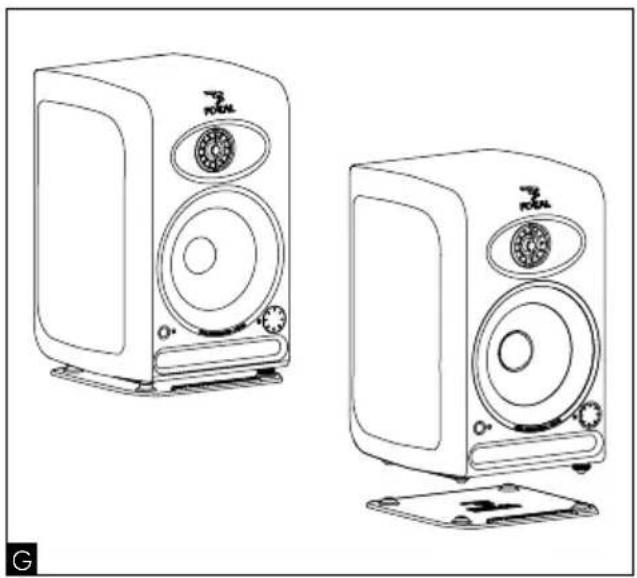
natural_image
Line drawing of two compact audio speakers with speaker heads and front-mounted stands (no text or symbols)
natural_image
Line drawing of a speaker with visible sound waves and buttons (no text or symbols)CMS Description
CMS 40

Fixing Accessories
| Description Brand Reference CMS | 40 | CMS 50 | CMS 65 | ||
| Stand (950-1430mm / 37-3/8" - 56-5/16") K&M 26740 x x x | |||||
| Table stand (micro stand 355-580mm / 14"- 22-13/16") | K&M 23300 x x - | ||||
| Wall fixing (rotating/distance from wall 105mm/4-1/8") | K&M 24470 x x - | ||||
| Wall fixing (rotating/distance from wall 105mm/4-1/8") | K&M 24471 - - x |
| System CMS 40 | ||
| • Frequency response (+/- 3dB) | 60Hz - 28kHz | |
| • Maximum SPL | 97dB SPL (peak @ 1 m) | |
| Electronic section | ||
| • Input - Type/Impedance | - Connector | Balanced 10 kOhms / Unbalanced 47 kOhmsXLR/RCA |
| • LF amplifier stage | 25W rms, class AB | |
| • HF amplifier stage | 25W rms, class AB | |
| • Power supply - Mains voltage | 220-230V [0.5A fuse rating]120V [0.8A fuse rating]100V [1A fuse rating]IEC inlet and detachable power cord | |
| - Connection | ||
| • User controls - Sensitivity | Ajustable, +4dBu / 0 / -10dBVAjustable, -66 dB / 0dB | |
| - Volume | ||
| - LF shelving (0 - 450 Hz) | ||
| - HF shelving (4,5 kHz - 20 kHz) | ||
| - Power ON / OFF | Ajustable, 0 / -2 / +2dB | |
| Ajustable, 0 / -2 / +2dB | ||
| Power ON / OFF switch | ||
| • Indicators | Power ON/OFF LEDAudio clip LED | |
| Transducers | ||
| • Woofer | 4" Focal drive unit, Polyglass cone | |
| • Tweeter | Aluminium/Magnesium inverted dome Focal tweeter | |
| • Shielding | Integral by compensation magnet | |
| Cabinet | ||
| • Construction | Reinforced and damped die cast aluminum cabinet | |
| • Finish | Black powder coating | |
| • Dimensions with 4 rubber spikes (HxWxD) | 238x156x155mm [ 9^3/8" × 6^1/8" × 6^1/8" ] | |
| • Dimensions with rubber table stand (HxWxD) | 243.2x156x155mm [ 9^3/16" × 6^1/8" × 6^1/8" ] | |
| • Weight | 5.5kg (11 lb) | |
| System CMS 50 | ||
| • Frequency response (+/- 3dB) | 55Hz - 28kHz | |
| • Maximum SPL | 105dB SPL (peak @ 1 m) | |
| Electronic section | ||
| • Input - Type/Impedance | - Connector | Balanced 20 kOhms / Unbalanced 47 kOhmsXLR / RCA |
| • LF amplifier stage | 80W rms, class AB | |
| • HF amplifier stage | 50W rms, class AB | |
| • Power supply - Mains voltage | 220-230V [1.6A fuse rating]120V [3.15A fuse rating]100V [4A fuse rating]IEC inlet and detachable power cord | |
| - Connection | ||
| • User controls - Sensitivity | Ajustable, +4dBu / 0 / -10dBVAjustable, -66 dB / 0dB | |
| - Volume | Ajustable, inactive / 45 / 60 / 90 Hz (12dB /oct.) | |
| - High-pass filter | Ajustable, 0 / -4 / -2 / +2dB | |
| - LF shelving (0 - 450 Hz) | Ajustable, 0 / -4 / -2 / +2dB | |
| - HF shelving (4,5 kHz - 20 kHz) | Ajustable, 0 / -2 / -4 / -6dB | |
| - Desktop notch at 160 Hz(factor Q = 2) | Power ON / OFF switch, mains voltage selectorStandby / ON switch | |
| - Power ON / OFF-Standby / ON | ||
| • Indicators | Power ON/OFF LEDAudio clip LED | |
| Transducers | ||
| • Woofer | 5" Focal drive unit, Polyglass cone | |
| • Tweeter | Aluminium/Magnesium inverted dome Focal tweeter | |
| • Shielding | Integral by compensation magnet | |
| Cabinet | ||
| • Construction | Reinforced and damped die cast aluminum cabinet | |
| • Finish | Black powder coating | |
| • Dimensions with 4 rubber spikes (HxWxD) | 289.5x190x201mm (11.4"x7.5"x7.9") | |
| • Dimensions with rubber table stand (HxWxD) | 299.2x190x201mm (11.8"x7.5"x7.9") | |
| • Weight | 7,7kg (17 lb) | |
| System CMS 65 | ||
| • Frequency response (+/- 3dB) | 45Hz - 28kHz | |
| • Maximum SPL | 108dB SPL (peak @ 1 m) | |
| Electronic section | ||
| • Input - Type/Impedance | - Connector | Balanced 20 kOhms / Unbalanced 47 kOhmsXLR / RCA |
| • LF amplifier stage | 100W rms, class AB | |
| • HF amplifier stage | 60W rms, class AB | |
| • Power supply - Mains voltage | - Connection | 220-230 V (1.6 A fuse rating)120 V (3.15 A fuse rating)100 V (4 A fuse rating)IEC inlet and detachable power cord |
| • User controls - Sensibility | - Volume- High pass filter- LF shelving (0 - 450 Hz)- HF shelving (4,5 kHz - 20 kHz)- Power ON / OFF | Ajustable, +4 dBu / 0 / -10dBVAjustable, -66 dB / 0dBAjustable, inactive / 45 / 60 / 90 Hz (12dB / oct.)Ajustable, 0 / -2 / +2dBAjustable, 0 / -2 / +2dBPower ON / OFF switch |
| • Indicators | Power ON/OFF LEDAudio clip LED | |
| Transducers | ||
| • Woofer | 6.5" Focal drive unit, Polyglass cone | |
| • Tweeter | Aluminium/Magnesium inverted dome Focal tweeter | |
| • Shielding | Integral by compensation magnet | |
| Cabinet | ||
| • Construction | Reinforced and damped die cast aluminum cabinet | |
| • Finish | Black powder coating | |
| • Dimensions with 4 rubber spikes (HxWxD) | 358.5 x 241 x 231mm (14.1"x9.5"x9.1") | |
| • Dimensions with rubber table stand (HxWxD) | 368.5 x 241 x 231mm (14.5"x9.5"x9.1") | |
| • Weight | 10.5kg (23.1 lb) | |
CMS SUB packaging content
The CMS SUB is supplied with the following elements (apart from this manual)
- 1 power cord
- 1 guarantee card
• 1 protection grille for the subwoofer (we advise you to remove it before listening to the CMS SUB).
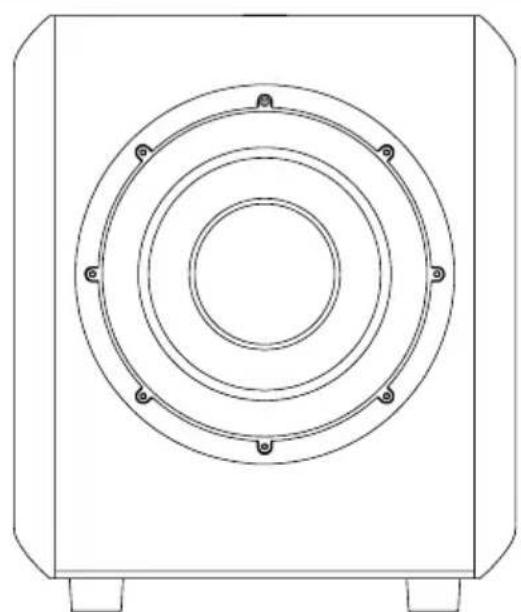
The CMS SUB is an active subwoofer (1 internal amplifier) designed for Professional monitoring systems. It uses a 11" drive unit equipped with a "Polyglass" cone, and loaded by a large cross-section laminar port.

natural_image
Technical line drawing of a circular mechanical component with mounting feet (no text or symbols)
The CMS SUB may be used :
- for bass or sub-bass enhancement in stereo + sub setups (2.1 or 2.2). The rear panel of the CMS SUB allows for the connection of a traditional stereo source (Left In / Right In).
- as a LFE channel (Low Frequency Effects) in a multi-channel installation (5.1, 5.2, 6.1...), via a dedicated input of the rear panel.
Audio connections: CMS SUB (fig. J)
Stereo + Sub setup (2.1 or 2.2):
Left IN: this input is intended to receive the signal coming from the left channel of your source (mixing console, or other...).
Right IN: this input is intended to receive the signal coming from the right channel of your source (mixing console, or other...).
Left OUT: this output is intended to connect to the left main loudspeaker of your system. The signal supplied by this output is not internally processed. You have to engage the high pass filter on the CMS monitors to ensure perfect coupling and to avoid overlapping.
Right OUT: this output is intended to connect to the right main loudspeaker of your system. The signal supplied by this output is not internally processed. You have to engage the high pass filter on the CMS monitors to ensure perfect coupling and to avoid overlapping.
Multichannel configuration:
LFE: this input is intended to feed your CMS SUB in a multichannel application (5.1, 5.2, 6.1, ...): this channel is dedicated to low frequencies only.
Optimal positioning of the CMS SUB may vary depending on the surface, the shape and acoustic properties of the listening room.
You are advised to try various locations so to choose the one giving the best possible and most level sound balance. As a rule of thumb the optimal location will often be in a corner of the room.
CMS subwoofer controls
① LEVEL
This adjustment allows to set the sound level of the subwoofer relative to that of the main loudspeakers. It should also be optimised taking into account the actual location of the subwoofer and its acoustic consequences: for example in an angle the 6 dB acoustic gain should be compensated by an equivalent attenuation to maintain the overall balance of the system.
② MUTE
This switch will turn out the output signal of the subwoofer channel (making it silent does not require to switch the power off).
③ LO PASS
This potentiometer adjusts the cut-off frequency of the low pass filter on the subwoofer channel, thus setting the upper frequency range to be reproduced by the CMS Sub. The goal is to achieve the smoothest frequency response of the whole system: sub + monitors.
④ POLARITY
This switch inverts the signal polarity on the subwoofer channel (ie 180° phase shift).
⑤ PHASE
This potentiomer provides some fine adjustment of the phase on the subwoofer channel. Combined with the polarity switch it can be used to compensate for the spacing between the sub and the main speakers, so to get a coherent soundfield through a proper time alignment of the different sources.
⑥ SUB BYPASS
This input allows for plugging in a control footswitch (not supplied) via a 14 " jack connector.
Turning it active will mute the subwoofer channel. This facility allows for instantaneous comparison between the 2.1 configuration (with sub) and the traditional stereo setup (without sub) with the same system.
⑦ POWER INDICATOR
Power "LED" indicator
(fig. J)

| System CMS SUB | |
| • Frequency response (+/- 3dB) | 30Hz - 250Hz |
| • Maximum SPL | 113dB SPL [peak @ 1 m] |
| Electronic section | |
| • Input - Type/Impedance- Connector- Sensitivity | Left, Right, LFEElectronically balanced / 10kOhmsFemale 3 pins XLRVariable |
| • Output (to satellites) - Connector | Left, RightMale 3 pins XLR in parallel on inputs |
| • Amplifier - 300 W rms, BASHtechnology | |
| • Internal processing and functions - Subwoofer section | Left + Right mono summationLFE + lo-passed mono sum24dB/octave variable lo-pass filterPhase adjustmentPolarity |
| • User controls | Sub level (sensitivity) adjustmentLo-pass frequency adjustmentPhase adjustmentPolarity switchMuteExternal Mute (controlled by external footswitch) |
| • Indicators (LED's) | Power onMuteExternal Mute |
| • Power supply - Mains voltage- Connection | 230V (T1.6AL fuse rating) or 115V (T3.15AL fuse rating)IEC inlet and detachable power cord |
| Transducers | |
| • Subwoofer | Polyglass, high excursion Focal, 270mm (11") drive unit |
| Cabinet | |
| • Construction | 22mm MDF panels with internal braces |
| • Finish | Dark grey vinyl |
| • Dimensions (HxWxD) | 435,5mm x 366mm x 440mm (17.1" x 14.4"x 17.3") |
| • Weight | 23kg (50.7lb) |

GB
Your Focal-JMlab product was developed and manufactured with high-quality materials and components which can be recycled and/or re-used. This symbol indicates that electrical and electronic equipment must be disposed of separately from normal garbage at the end of its operational lifetime. Please dispose of this product by bringing it to your local collection point or recycling centre for such equipment. This will help to protect the environment in which we all live.
natural_image
Technical line drawing of a CD45 audio amplifier front and side view (no text or symbols)A
natural_image
Technical line drawing of a two-tiered speaker device (left) and its internal circuit board (right), showing front and side views with no visible text or symbols.B

natural_image
Technical line drawing of a two-tiered speaker and audio equipment (no text or symbols visible)C
CMS 40
natural_image
Line drawing of a vintage microwave oven with speaker and control panel (no text or symbols)
natural_image
Line drawing of a vintage multi-camera speaker with front panel and buttons (no text or symbols)Positionnement
Pin 1 = masse (blindage)
Pin 2 = point chaud (signal en phase)
Pin 3 = point froid (signal hors phase)
⑧ UNBALANCED INPUT
natural_image
Line drawing of a person standing on a bench facing two speakers, no text or symbols present
natural_image
Line drawing of a person standing on a bench facing two speakers with sound equipment (no text or symbols)
natural_image
Silhouette of a person standing on a stage facing two speakers, no text or symbols present
natural_image
Line drawing of two compact audio devices with speaker stands and buttons, no text or symbols present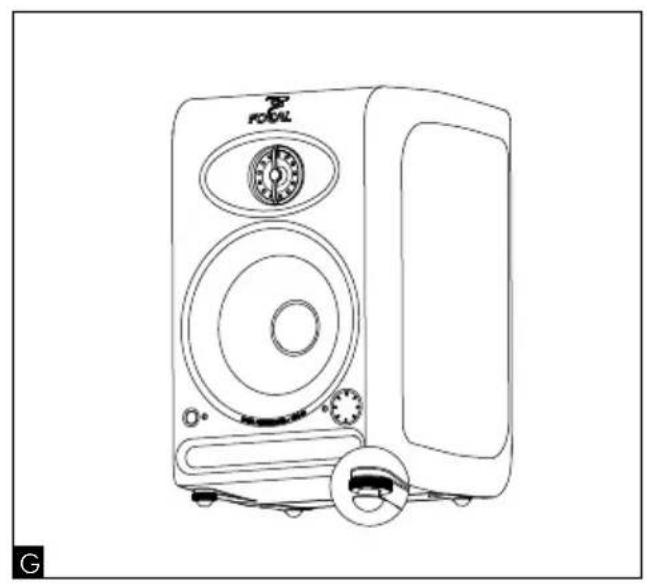
natural_image
Line drawing of a portable electronic device with speaker grille and control panel (no text or symbols)CMS Description
CMS 40

Fixations
| Description Marque Référence CMS 40 CMS 50 CMS | 65 | ||||
| Pied (950-1430 mm) K&M 26740 x x x | |||||
| Pied de table(pied micro 355-580 mm) | K&M 23300 x x - | ||||
| Fixation murale(orientable / déport mural 105 mm) | K&M 24470 x x - | ||||
| Fixation murale(orientable / déport mural 105 mm) | K&M 24471 - - x |
natural_image
Technical line drawing of a circular mechanical component with mounting feet (no text or symbols)
Electrical safety (电力安全)
EN 60065

natural_image
Technical line drawing of two electronic speaker units, one front and one side, with no visible text or symbols.
natural_image
Technical line drawing of two Focal speakers, one front view and one side view showing internal components (no text or symbols)
natural_image
Technical line drawing of a two-tiered speaker and audio equipment (no text or symbols visible)CMS 40
natural_image
Line drawing of a vintage microwave oven with front panel and control knobs (no text or symbols)
natural_image
Line drawing of a microwave oven with front panel and control knobs (no text or symbols)正确位置:
natural_image
Line drawing of a person standing on a bench facing two speakers, no text or symbols presentD

natural_image
Line drawing of a person standing on a bench facing two speakers, no text or symbols presentE

natural_image
Line drawing of a person standing on a stage facing two speakers, with motion arrows indicating sound or vibration (no text or symbols)F

natural_image
Line drawing of two compact audio speakers with speaker covers and buttons, no text or symbols present
natural_image
Line drawing of a portable electronic speaker with front panel and buttons (no text or symbols)CMS 40

设备附件
| 种类 品牌 参数 | CMS40 | CMS50 | CMS65 | ||
| 支架(c950-1430mm/37-3/8” - 56-5/16”) | K&M26740xxx | ||||
| 桌面支架(话筒架355-580mm / 14” - 22-13/16”) | K&M23300xx- | ||||
| 墙体安装(rotating/distance from wall 105mm/4-1/8”) | K&M24470xx- | ||||
| 墙体安装(rotating/distance from wall 105mm/4-1/8”) | K&M24471--x |
natural_image
Technical line drawing of a circular mechanical component with mounting feet (no text or symbols)H
CMS SUB可用于:
□ Post production Broadcast □
International guarantee
Now it's possible to register on line : www.focal.com/warranty
In order to validate the Focal guarantee, please return this page within 10 days to the following address:
Retailer or distributor name:
Company or owner name: ____
Technical manager:
Your complete address:
Retail price:
Occupation:
□ Audio studio Mastering □
□ Post production Broadcast □
☐ Other (please specify): ____
Installation details:
Exploitation details: Mac□PC
Used as: □ nearfield midfield□
Used for: □ stereo multichannel
Mixing desk brand : ____
"Direct to disk" software:
In case of replacement, what were your previous acoustic speakers? ____
Explain in a few words why you chose Focal...
Your comments:


- Caution!
- Important safety information
- CMS 40, CMS 50 and CMS 65 Packaging content
- Preliminary recommendations
- Warranty
- CMS 40
- CMS 50
- CMS 65
- Installation
- Mains voltage
- Tweeter phase plug
- Positioning
- Running in
- ① HI-PASS FILTER (CMS 50 and CMS 65)
- ② LF SHELVING
- ③ DESKTOP NOTCH
- (CMS 50 and CMS 65)
- ④ HF SHELVING
- ⑤ INPUT LEVEL
- ⑥ FIXING POINTS
- ⑦ BALANCED INPUT
- ⑧ UNBALANCED INPUT
- ⑨ ON/OFF Switch
- ⑩ ON/STANDBY Switch (CMS 50 and CMS 65)
- ⑪ VOLUME
- LED
- ⑬ CLIP INDICATOR
- CMS SUB packaging content
- Multichannel configuration:
- CMS subwoofer controls
- ① LEVEL
- ② MUTE
- ③ LO PASS
- ④ POLARITY
- ⑤ PHASE
- ⑥ SUB BYPASS
- ⑦ POWER INDICATOR
- Positionnement
- 正确位置:
- H
- CMS SUB可用于:
- International guarantee
- In order to validate the Focal guarantee, please return this page within 10 days to the following address:
- Occupation:
- Installation details:
Brand : FOCAL
Model : CMS 65
Category : Loudspeaker