
CA6400I-X - Range hood REX - Free user manual and instructions
Find the device manual for free CA6400I-X REX in PDF.

 FR
FR
 BG
BG
 CS
CS
 DA
DA
 DE
DE
 EL
EL
 EN
EN
 ES
ES
 ET
ET
 FI
FI
 HU
HU
 IT
IT
 KK
KK
 LT
LT
 LV
LV
 MK
MK
 NL
NL
 NO
NO
 PL
PL
 PT
PT
 RO
RO
 RU
RU
 SK
SK
 SL
SL
 SQ
SQ
 SR
SR
 SV
SV
 TR
TR
 UK
UK
| Product type | Wall-mounted cooker hood |
| Brand | Rex |
| Model | CA6400I-X |
| Width | 60 cm (estimate) |
| Depth | 50 cm (estimate) |
| Height | 70 cm (estimate) |
| Net weight | 15 kg (estimate) |
| Power supply | 220-240 V ~ 50 Hz |
| Motor power | 200 W (estimate) |
| Max airflow | 600 m³/h (estimate) |
| Number of speeds | 3 speeds |
| Lighting | LED or halogen bulbs (2 x 20 W max) |
| Filter type | Washable metal grease filter and activated charcoal filter (optional) |
| Max noise level | 65 dB(A) (estimate) |
| Special features | Touch or button control, integrated timer |
| Installation | External evacuation or air recirculation |
| Grease filter maintenance | Wash every month in dishwasher or by hand |
| Charcoal filter replacement | Every 3 to 6 months depending on use |
| External cleaning | Soft cloth and non-abrasive detergent |
| Safety | Automatic shutdown, motor thermal protection |
| Spare parts available | Filters, bulbs, control, motor |
| Repairability | Repairability index not communicated, standard parts |
Frequently Asked Questions - CA6400I-X REX
User questions about CA6400I-X REX
0 question about this device. Answer the ones you know or ask your own.
Ask a new question about this device
Download the instructions for your Range hood in PDF format for free! Find your manual CA6400I-X - REX and take your electronic device back in hand. On this page are published all the documents necessary for the use of your device. CA6400I-X by REX.
USER MANUAL CA6400I-X REX
WE'RE THINKING OF YOU
Thank you for purchasing an Electrolux appliance. You've chosen a product that brings with it decades of professional experience and innovation. Ingenious and stylish, it has been designed with you in mind. So whenever you use it, you can be safe in the knowledge that you'll get great results every time. Welcome to Electrolux.
Visit our website to:

Get usage advice, brochures, trouble shooter, service information: www.electrolux.com

Register your product for better service: www.electrolux.com/productregistration

Buy Accessories, Consumables and Original spare parts for your appliance: www.electrolux.com/shop
ENVIRONMENT CONCERNS
Recycle the materials with the symbol. Put the packaging in applicable containers to recycle it. Help protect the environment and human health and to recycle waste of electrical and electronic appliances. Do not dispose appliances marked with the symbol with the household waste. Return the product to your local recycling facility or contact your municipal office department for household waste or the shop where you purchased this product.
CUSTOMER CARE AND SERVICE
We recommend the use of original spare parts.
When contacting Service, ensure that you have the following data available.
The information can be found on the rating plate. Model, PNC, Serial Number.

Warning / Caution-Safety information.

General information and tips

Environmental information.
Subject to change without notice.

SAFETY INSTRUCTIONS
Caution! Closely follow the instructions set out in this manual. All responsibility, for any eventual inconveniences, damages or fires caused by not complying with the instructions in this manual, is declined. The extractor hood has been designed exclusively for domestic use.
Caution! Do not connect the appliance to the mains until the installation is fully complete.
Before any cleaning or maintenance operation, disconnect hood from the mains by removing the plug or disconnecting the mains electrical supply.
Always wear work gloves for all installation and maintenance operations. The appliance is not intended for use by children or persons with impaired physical, sensorial or mental faculties, or if lacking in experience or knowledge, unless they are under supervision or have been trained in the use of the appliance by a person responsible for their safety. This appliance is designed to be operated by adults, children should be monitored to ensure that they do not play with the appliance. This appliance is designed to be operated by adults. Children should not be allowed to tamper with the controls or play with the appliance. Never use the hood without effectively mounted grating! The hood must NEVER be used as a support surface unless specifically indicated. The premises where the appliance is installed must be sufficiently ventilated, when the kitchen hood is used together with other gas combustion devices or other fuels. The ducting system for this appliance must not be connected to any existing ventilation system which is being used for any other purpose such as discharging exhaust fumes from appliances burning gas or other fuels. The flaming of foods beneath the hood itself is severely prohibited. The use of exposed flames is detrimental to the filters and may cause a fire risk, and must therefore be avoided in all circumstances. Any frying must be done with care in order to make sure that the oil does not overheat and ignite.
Caution! Accessible parts of the hood may become hot when used with cooking appliance.
With regards to the technical and safety measures to be adopted for fume discharging it is important to closely follow the regulations provided by the local authorities. The hood must be regularly cleaned on both the inside and outside (AT LEAST ONCE A MONTH).
This must be completed in accordance with the maintenance instructions provided in this manual). Failure to follow the instructions provided in this user guide regarding the cleaning of the hood and filters will lead to the risk of fires. Do not use or leave the hood without the lamp correctly mounted due to the possible risk of electric shocks. We will not accept any responsibility for any faults, damage or fires caused to the appliance as a result of the non-observance of the instructions included in this manual.

Warning! Failure to install the screws or fixing device in accordance with these instructions may result in electrical hazards.
2. USE
The hood serves to aspirate the fumes and vapors resulting from cooking.
The attached installation manual indicates the version to be used depending on the model you have, the suction version with
external evacuation or filtering with internal recirculation
3. INSTALLATION
The mains power supply must correspond to the rating indicated on the plate situated inside the hood. If provided with a plug connect the hood to a socket in compliance with current regulations and positioned in an accessible area, after installation. If it not fitted with a plug (direct mains connection) or if the plug is not located in an accessible area, after installation, apply a double pole switch in accordance with standards which assures the complete disconnection of the mains under conditions relating to over-current category III in accordance with installation instructions.

Before re-connecting the suit to the mains supply and the efficient function, always at the mains cable is correctly d.
The minimum distance between the supporting surface for the cooking equipment on the hob and the lowest part of the range hood must be not less than 50cm from electric cookers and 50cm from gas or mixed cookers. If the instructions for installation for the gas hob specify a greater distance, this must be adhered to.
4. MAINTENANCE
ATTENTION! Before performing any maintenance operation, isolate the hood from the electrical supply by switching off at the connector and removing the connector fuse. Or if the appliance has been connected through a plug and socket, then the plug must be removed from the socket. The cooker hood should be cleaned regularly (at least with the same frequency with which you carry out maintenance of the fat filters) internally and externally. Clean using the cloth dampened with neutral liquid detergent. Do not use abrasive products. DO NOT USE ALCOHOL!
Warning! Failure to carry out the basic cleaning recommendations of the cooker hood and replacement of the filters may cause fire risks. Therefore, we recommend observing these instructions. The manufacturer declines all responsibility for any damage to the motor or any fire damage linked to inappropriate maintenance or failure to observe the above safety recommendations.
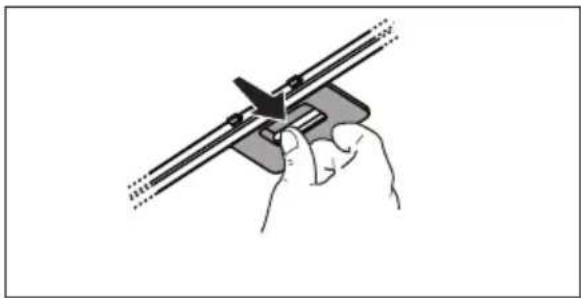
4.1 Grease filter - The grease filter must be cleaned once a month using non aggressive detergents, either by hand or in the dishwasher, which must be set to a low temperature and a short cycle. When washed in a dishwasher, the grease filter may discolour slightly, but this does not affect its filtering capacity.
natural_image
Hand holding a mechanical clamp or bracket with a tool, no text or symbols visible4.2 Washable activated charcoal filter
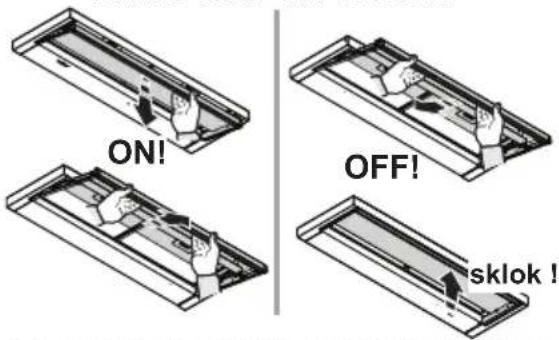
The saturation of the charcoal filter occurs after more or less prolonged use, depending on the type of cooking and the regularity of cleaning of the grease filter. In any case it is necessary to replace the cartridge at least every four mounths. The charcoal filter may NOT be washed or regenerated.

natural_image
Three-panel illustration showing mechanical assembly steps: wheel rolling, padlock rotation, and lock mechanism (no text or symbols)5. CONTROLS
Use the high suction speed in cases of concentrated kitchen vapours. It is recommended that the cooker hood suction is switched on for 5 minutes prior to cooking and to leave in operation during cooking and for another 15 minutes approximately after terminating cooking.
The speed control is on the front of the hood.

1 ON/OFF lights
2 ON/OFF motors
Minimum suction power
3 Medium suction power
4 Maximum suction power
6. LIGHTING
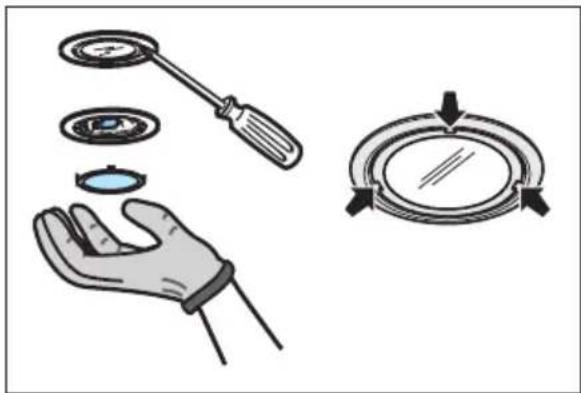
Disconnect the hood from the electricity. Warning! Prior to touching the light bulbs ensure they are cooled down. Replace with a new 12 Volt, 20 Watt (Maximum) halogen light made for a G-4 base SUITABLE FOR USE IN OPEN LUMINAIRES. Follow package directions and do not touch new light with bare hands.
natural_image
Illustration of a hand holding a screwdriver, a close-up of a circular component, and a circular dial with arrows indicating direction (no text or symbols)WIR DENKEN AN SIE
www.electrolux.com/productregistration

natural_image
Illustration of a hand holding a mechanical clamp or bracket with a tool, no text or symbols presentnatural_image
Three-step diagram showing mechanical assembly with pulleys and lock mechanism (no text or symbols)5. BEDIENELEMENTE
natural_image
Illustration of a hand holding a circular component with a screwdriver and a compass-like dial, alongside a separate view of the dial (no text or symbols)NOUS PENSONS À VOUS
natural_image
Illustration of a hand holding a mechanical clamp or bracket with a tool, no text or symbols presentnatural_image
Three-step diagram showing a mechanical component being turned into a lock, with no visible text or symbols.5. COMMANDES
natural_image
Illustration of a hand holding a circular component with a screwdriver and a compass-like dial (no text or symbols)WE DENKEN AAN U
natural_image
Hand holding a mechanical clamp or bracket with a pointed tool, no text or symbols visible4.2 Wasbaar koolstofffilter
natural_image
Three-panel illustration showing mechanical assembly steps: rolling wheel, moving gear, and locking mechanism (no text or symbols)5. BEDIENINGSELEMENTEN
natural_image
Illustration of a hand holding a circular component with a screwdriver and a compass-like dial (no text or symbols)1 ON/OFF lichten
2 ON/OFF motoren
Zuigkracht laagste
natural_image
Hand holding a mechanical clamp or bracket with a pointed tool, no text or symbols visiblenatural_image
Three-panel illustration showing mechanical components with rotating parts and directional arrows, no text or symbols present.5. MANDOS
natural_image
Illustration of a hand holding a circular component with a screwdriver, and a circular dial indicator (no text or symbols)www.electrolux.com/productregistration

natural_image
Hand holding a mechanical clamp or bracket with a tool, no visible text or symbolsnatural_image
Three-step diagram showing a mechanical device with rotating components and directional arrows, no text or symbols present.5. COMANDOS
natural_image
Illustration of a hand holding a circular component with a screwdriver, and a compass-like dial with arrows indicating direction (no text or symbols)www.electrolux.com/productregistration

natural_image
Illustration of a hand holding a mechanical clamp or bracket with a tool, no text or symbols presentnatural_image
Three-step diagram showing mechanical assembly with pulleys and a lock mechanism (no text or symbols)5. COMANDI
natural_image
Illustration of a hand holding a circular component with a screwdriver and a compass-like dial (no text or symbols)WE'RE THINKING OF YOU
www.electrolux.com/productregistration

natural_image
Illustration of a hand holding a mechanical clamp or bracket with a tool, no text or symbols presentnatural_image
Three-panel illustration showing mechanical components with rotating parts and directional arrows, no text or symbols present.5. KOMMANDON
natural_image
Illustration of a hand holding a circular component with a screwdriver, and a compass-like view showing the same object (no text or symbols present)natural_image
Hand holding a mechanical clamp or bracket with a tool, no visible text or symbolsnatural_image
Three-panel illustration showing mechanical components with rotating parts and directional arrows, no text or symbols present.5. KONTROLLER
natural_image
Illustration of a hand holding a circular component with a screwdriver, and a compass-like view showing the same object (no text or symbols present)1 Lys ON/OFF
2 Motorer ON/OFF
Sugestyrke: minimal
3 Sugestyrke: middels
4 Sugestyrke: maksimal
WE'RE THINKING OF YOU
www.electrolux.com/productregistration

natural_image
Hand holding a mechanical clamp or bracket with a tool, no visible text or symbolsnatural_image
Three-step diagram showing mechanical assembly with pulleys and a lock mechanism (no text or symbols)5. OHJAIMET
natural_image
Illustration of a hand holding a circular component with a screwdriver and a compass-like dial (no text or symbols)natural_image
Hand holding a mechanical clamp or bracket with a pointed tool, no text or symbols visiblenatural_image
Three-panel illustration showing a mechanical device with rotating wheels and a lock mechanism (no text or symbols)5. BETJENING
natural_image
Illustration of a hand holding a circular device with a screwdriver and a compass-like dial (no text or symbols)МЫ ДУМАЕМ О ВАС
natural_image
Hand holding a mechanical clamp or bracket with a tool, no visible text or symbolsnatural_image
Three-step diagram showing a mechanical device with rotating parts and a lock mechanism (no text or symbols)natural_image
Illustration of a hand holding a circular component with a screwdriver and a compass-like dial (no text or symbols)natural_image
Illustration of a hand holding a mechanical clamp or bracket with a tool, no text or symbols presentnatural_image
Three-step diagram showing mechanical assembly with rotating disks and a lock mechanism (no text or symbols)5. JUHIKUD
natural_image
Illustration of a hand holding a circular component with a screwdriver and a compass-like dial (no text or symbols)www.electrolux.com/productregistration

natural_image
Hand holding a mechanical clamp or bracket with a tool, no visible text or symbolsnatural_image
Three-panel illustration showing mechanical components with arrows indicating motion, no text or symbols present.5. VADĪBAS ELEMENTI
natural_image
Illustration of a hand holding a circular component with a screwdriver and a compass-like dial (no text or symbols)natural_image
Hand holding a mechanical clamp or bracket with a pointed tool, no text or symbols visible4.2 Plaunamas aktyviosios anglies filtras
natural_image
Three-step diagram showing mechanical assembly with pulleys and lock mechanism (no text or symbols)5. VALDYMAS
natural_image
Illustration of a hand holding a circular component with a screwdriver and a compass-like dial (no text or symbols)www.electrolux.com/productregistration

natural_image
Illustration of a hand holding a tool with a bracket and arrow, no text or symbols presentnatural_image
Three-panel illustration showing mechanical components with rotating parts and directional arrows, no text or symbols present.natural_image
Illustration of a hand holding a circular component with a screwdriver and a compass-like dial (no text or symbols)natural_image
Hand holding a mechanical clamp or bracket with a tool, no visible text or symbolsnatural_image
Three-step diagram showing mechanical assembly with rotating parts and directional arrows (no text or symbols)5. KEZELŐSZERVEK
natural_image
Illustration of a hand holding a screwdriver, a close-up of a circular component, and a circular dial with arrows indicating rotation (no text or symbols)natural_image
Hand holding a mechanical clamp or bracket with a pointed tool, no text or symbols visiblenatural_image
Three-step diagram showing a mechanical device with rotating wheels and a lock mechanism, no text or symbols present.5. PŘÍKAZY
natural_image
Illustration of a hand holding a circular component with a screwdriver, and a compass-like dial with arrows indicating direction (no text or symbols)MYSLÍME NA VÁS
1. ⚠️ BEZPEČNOSTNÉ POKYNY
natural_image
Illustration of a hand holding a metal tool with a triangular blade (no text or symbols)natural_image
Three-step diagram showing mechanical assembly with rotating parts and directional arrows (no text or symbols)5. OVLÁDAČE
natural_image
Illustration of a hand holding a circular component with a screwdriver and a compass-like dial (no text or symbols)www.electrolux.com/productregistration

natural_image
Hand holding a mechanical clamp or bracket with a tool, no visible text or symbols4.2 Filtru cu carbon activ lavabil
natural_image
Three-step diagram showing a car rolling down with a tire, and two views of the wheel being pulled by a lock (no text or symbols present)5. COMENZI
natural_image
Illustration of a hand holding a circular component with a screwdriver, and a circular dial indicator (no text or symbols)www.electrolux.com/productregistration

natural_image
Illustration of a hand holding a mechanical clamp or bracket with a tool, no text or symbols presentnatural_image
Three-step diagram showing a mechanical device with rotating parts and a lock mechanism (no text or symbols)5. STEROWANIE
natural_image
Illustration of a hand holding a circular component with a screwdriver and a compass-like dial (no text or symbols)www.electrolux.com/productregistration

Kupovinu dodatne opreme, potrošnog materijala i originalnih rezervnih dijelova za vaš uređaj:
www.electrolux.com/shop
BRIGA ZA OKOLIŠ
Reciklirajte materijale sa simbolom . Ambalažu za recikliranje odložite u prikladne spremnike.
Pomozite u zaštiti okoliša i ljudskog zdravlja, kao i u recikliranju otpada od električnih i elektroničkih uređaja. Uređaje označene simbolom ne bacajte zajedno s kućnim otpadom. Proizvod odnesite na lokalno reciklažno mjesto ili kontaktiraje nadležnu službu.
BRIGA O KUPCIMA I SERVIS
natural_image
Illustration of a hand holding a mechanical component with a tool, no text or symbols presentnatural_image
Three-step diagram showing mechanical assembly with rotating components and lock mechanism (no text or symbols)5. NAREDBI
Upotrebljavajte veću brzinu u slučaju velikog prisustva pare u kuhinji.
Savjetujemo da uključite usisavanje 5 minuta prije nego što počnete s kuhanjem i da ostavite da djeluje nakon što ste završili s kuhanjem za još otprilike 15 minuti.
Komande se nalaze na prednjoj strani kuhinjske nape:

6. RASVJETA
natural_image
Illustration of a hand holding a circular component with a screwdriver, and a compass-like view showing the same object (no text or symbols present)1 ON/OFF svjetla
2 ON/OFF motori
Jačina isisavanja minimalna
3 Jačina isisavanja srednja
4 Jačina isisavanja maksimalna
MISLIMO NA VAS
natural_image
Hand holding a mechanical clamp or bracket with a tool, no visible text or symbols4.2 Pralni filter z aktivnim ogljem
natural_image
Three-panel illustration showing mechanical components with rotating parts and directional arrows, no text or symbols present.5. UPRAVLJALNI GUMBI
natural_image
Illustration of a hand holding a circular component with a screwdriver and a compass-like dial (no text or symbols)natural_image
Illustration of a hand using a tool to cut or adjust a mechanical component (no text or symbols visible)natural_image
Three-step diagram showing mechanical assembly with rotating parts and lock mechanism (no text or symbols)5. XEIPISTHPIA
natural_image
Illustration of a hand holding a circular component with a screwdriver and a compass-like dial, alongside a magnified view of the dial (no text or symbols)SİZİ DÜŞÜNÜR
natural_image
Hand holding a mechanical clamp or bracket with a tool, no visible text or symbolsnatural_image
Three-step diagram showing a mechanical device with rotating parts and directional arrows, no text or symbols present.5. KONTROLLER
natural_image
Illustration of a hand holding a circular component with a screwdriver, and a circular dial with arrows indicating rotation (no text or symbols)natural_image
Hand holding a mechanical tool with a triangular component inserted, no visible text or symbolsnatural_image
Three-step diagram showing a mechanical device with rotating parts and directional arrows, no text or symbols present.5. УПРАВЛЕНИЯ
natural_image
Illustration of a hand holding a circular component with a screwdriver, and a circular dial indicator (no text or symbols)natural_image
Hand holding a mechanical tool with a triangular component, no visible text or symbolsnatural_image
Three-step diagram showing mechanical assembly with rotating components and directional arrows (no text or symbols)natural_image
Illustration of a hand holding a circular component with a screwdriver, and a circular dial indicator (no text or symbols)www.electrolux.com/productregistration

natural_image
Hand holding a mechanical tool with a triangular component, no visible text or symbolsnatural_image
Three-step diagram showing mechanical assembly with pulleys and lock mechanism (no text or symbols)5. КОНТРОЛИ
natural_image
Illustration of a hand holding a screwdriver, a magnifying glass with arrows indicating rotation (no text or symbols)www.electrolux.com/productregistration

natural_image
Hand holding a mechanical clamp or bracket with a tool, no visible text or symbolsnatural_image
Three-step diagram showing a mechanical device with rotating parts and directional arrows, no text or symbols present.5. KOMANDIMET
natural_image
Illustration of a hand holding a circular component with a screwdriver, and a circular dial indicator (no text or symbols)natural_image
Hand holding a mechanical clamp or bracket with a tool, no visible text or symbolsnatural_image
Three-step diagram showing mechanical assembly with pulleys and rotating parts, no text or symbols present5. КОМАНДЕ
natural_image
Illustration of a hand holding a circular device with a screwdriver and a compass-like dial, alongside a separate view of the dial (no text or symbols present)1 ON/OFF светла
2 ON/OFF мотори
natural_image
Illustration of a hand holding a circular component with a screwdriver, and a circular dial indicator (no text or symbols)CA6400IS-X - CA9400IS-X
CA6600IS-X - CA9600IS-X
EFP60565OX - EFP90565OX
EFP90540OX - EFP60540OX
CA6400I-X - CA9400I-X

natural_image
Two technical diagrams showing a hand pressing a component on a rectangular panel, with no visible text or symbols.1

2

3

4

الأضواء ON/OFF 1
المحركات ON/OFF 2
natural_image
Three-panel illustration showing a mechanical device with rotating parts and directional arrows, no text or symbols present.natural_image
Illustration of a hand using a cutting tool to cut a metal sheet (no text or symbols visible)www.electrolux.com/productregistration

natural_image
Abstract geometric composition with two overlapping white circles on a gray background (no text or symbols)

- WE'RE THINKING OF YOU
- Visit our website to:
- ENVIRONMENT CONCERNS
- CUSTOMER CARE AND SERVICE
- SAFETY INSTRUCTIONS
- USE
- INSTALLATION
- MAINTENANCE
- Washable activated charcoal filter
- CONTROLS
- LIGHTING
- WIR DENKEN AN SIE
- BEDIENELEMENTE
- NOUS PENSONS À VOUS
- COMMANDES
- WE DENKEN AAN U
- Wasbaar koolstofffilter
- BEDIENINGSELEMENTEN
- MANDOS
- COMANDOS
- COMANDI
- KOMMANDON
- KONTROLLER
- OHJAIMET
- BETJENING
- МЫ ДУМАЕМ О ВАС
- JUHIKUD
- VADĪBAS ELEMENTI
- Plaunamas aktyviosios anglies filtras
- VALDYMAS
- KEZELŐSZERVEK
- PŘÍKAZY
- MYSLÍME NA VÁS
- ⚠️ BEZPEČNOSTNÉ POKYNY
- OVLÁDAČE
- Filtru cu carbon activ lavabil
- COMENZI
- STEROWANIE
- BRIGA ZA OKOLIŠ
- BRIGA O KUPCIMA I SERVIS
- NAREDBI
- RASVJETA
- MISLIMO NA VAS
- Pralni filter z aktivnim ogljem
- UPRAVLJALNI GUMBI
- XEIPISTHPIA
- SİZİ DÜŞÜNÜR
- УПРАВЛЕНИЯ
- КОНТРОЛИ
- KOMANDIMET
- КОМАНДЕ
Brand : REX
Model : CA6400I-X
Category : Range hood