
CDC1350FD - Voice recorder SALORA - Free user manual and instructions
Find the device manual for free CDC1350FD SALORA in PDF.


| Product Type | Voice Recorder |
| Brand | Salora |
| Model | CDC1350FD |
| Recording Format | MP3 / WAV |
| Internal Storage Capacity | 8 GB |
| Battery Life | Up to 20 hours of recording |
| Power Supply | 2 AAA batteries (not included) |
| Dimensions | 110 x 40 x 15 mm |
| Weight | 60 g (with batteries) |
| Display | Backlit LCD |
| Microphone | Built-in omnidirectional microphone |
| Speaker | Built-in speaker |
| Connectivity | USB 2.0 port, 3.5 mm headphone jack |
| Main Functions | Voice recording, playback, pause, delete, low battery indicator |
| Care and Cleaning | Clean with a soft, dry cloth. Do not use solvents. |
| Safety | Keep out of reach of children. Do not expose to moisture. |
| Spare Parts and Repairability | User-replaceable batteries. Spare parts available from the manufacturer. |
Frequently Asked Questions - CDC1350FD SALORA
User questions about CDC1350FD SALORA
0 question about this device. Answer the ones you know or ask your own.
Ask a new question about this device
Download the instructions for your Voice recorder in PDF format for free! Find your manual CDC1350FD - SALORA and take your electronic device back in hand. On this page are published all the documents necessary for the use of your device. CDC1350FD by SALORA.
USER MANUAL CDC1350FD SALORA
natural_image
Black Salora mobile camera with Full HD Car DVR lens, displayed against a blue gradient background (no text or symbols on device body)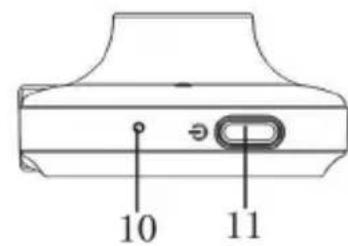




Presentation of the device



| 1. Start up indicator 2. Status indicator 3. Power indicator light | |
| 4. Camera 5. Speaker 6. OK Button | |
| 7. UP button 8. DOWN button 9. Menu button | |
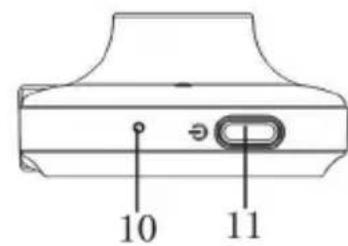
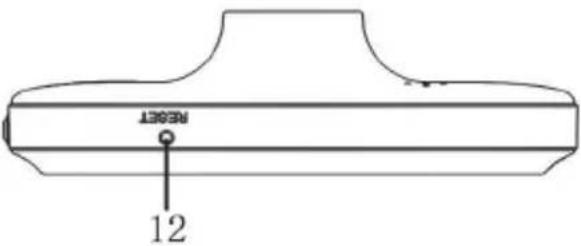
| 10. Microphone 11. Power button 12. Reset button | |
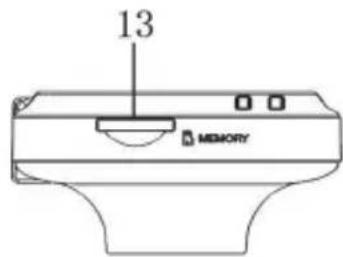
| 13. TF card slot 14. Power port 15. Bracket connection |
Functions of the keys and indicators
1. Start up indicator
This indicator will flash, when the device is turned on.
2. Status indicator
When the device is in Record Mode and is in progress of recording, this indicator will be lit.
3. Power indicator
When the device starts up, the light will be on.
4. Camera
The camera is supplied with a 170^ lens.
5. Speaker
Audio will be heard from the speaker during playback of a video or when a key has been pressed.
6. OK button
In Video mode, press this button to start or stop video recording.
In Menu setting, press this button to confirm the selected setting.
7. UP button
In Menu settings, press this button to go up.
In Playback mode, press this button to choose the last file.
8. DOWN button
In Menu settings, press this button to go down.
In Playback mode, press this button to choose the next file.
9. MENU button
In Stand-by status, press this button to enter the menu settings.
In Video mode, press this button to protect the current video file, this file cannot be overwritten during loop recording, when it is protected.
10. Microphone
Recording of sounds and voices during recording.
11. Power button
Press this button to power on or power off the device.
12. Reset button
With this button you can reset the device.
13. TF slot
In this slot you can insert your memory card
14. Power port
To connect the car charger to the device.
15. Bracket connection
To connect the bracket to the device.
Explanation of special functions:
- G-sensor
Depending on the sensibility value you have set: high/middle/low, the car will make a video file when an impact has been detected, this file will be protected and cannot be overwritten during loop recording.
- File protection function
During recording, you can press the M button to protect the current file, this file cannot be overwritten during loop recording.
- Mode switch
This device is supplied with two mode, video mode and Playback mode.
To switch between the two modes, enter menu settings and select mode menu.
Product specifications
| Features HD Camera, HD Video | |
| g-sensor Built-in (In case of collision, video file will be saved and cannot be overwritten) | |
| LCD Screen Size 2.7LTPS (16:9) | |
| Lens 170° wide angle lens | |
| Language Russian, Japanese, English, Simplified Chinese, Traditional Chinese, Korean, Dutch, etc... | |
| File Format AVI. | |
| Recording resolution Max 1080p | |
| Recording video Format M-JPEG | |
| Continuous loop recording Seamless loop recording, no leakage of seconds | |
| G-sensor Supported | |
| Memory card TF (max 32GB) | |
| Video format PAL/NTSC | |
| Current frequency 50HZ/60HZ | |
| Power interface | 5V 1A |
| Battery | Built-in 200 mAh |


Brand : SALORA
Model : CDC1350FD
Category : Voice recorder