
BT2000SW - Loudspeaker LEXIBOOK - Free user manual and instructions
Find the device manual for free BT2000SW LEXIBOOK in PDF.


| Product type | Portable Bluetooth speaker |
| Brand | Lexibook |
| Model | BT2000SW |
| Dimensions (approx.) | 20 x 10 x 10 cm |
| Weight | 500 g |
| Power supply | Rechargeable lithium-ion battery (via micro-USB cable) |
| Battery life | Approximately 6 hours |
| Connectivity | Bluetooth 5.0, AUX 3.5 mm port, microSD card reader |
| FM radio | Yes, with built-in antenna |
| Main functions | Bluetooth playback, FM radio, auxiliary input, microSD playback, hands-free |
| Controls | Touch buttons and volume wheel |
| Care and cleaning | Wipe with a soft, dry cloth. Do not use abrasive products. |
| Safety | Do not expose to water or moisture. Avoid extreme temperatures. |
| Spare parts and repairability | Not available separately. Contact Lexibook customer service. |
| Package contents | Speaker, micro-USB cable, user manual |
Frequently Asked Questions - BT2000SW LEXIBOOK
User questions about BT2000SW LEXIBOOK
0 question about this device. Answer the ones you know or ask your own.
Ask a new question about this device
Download the instructions for your Loudspeaker in PDF format for free! Find your manual BT2000SW - LEXIBOOK and take your electronic device back in hand. On this page are published all the documents necessary for the use of your device. BT2000SW by LEXIBOOK.
USER MANUAL BT2000SW LEXIBOOK
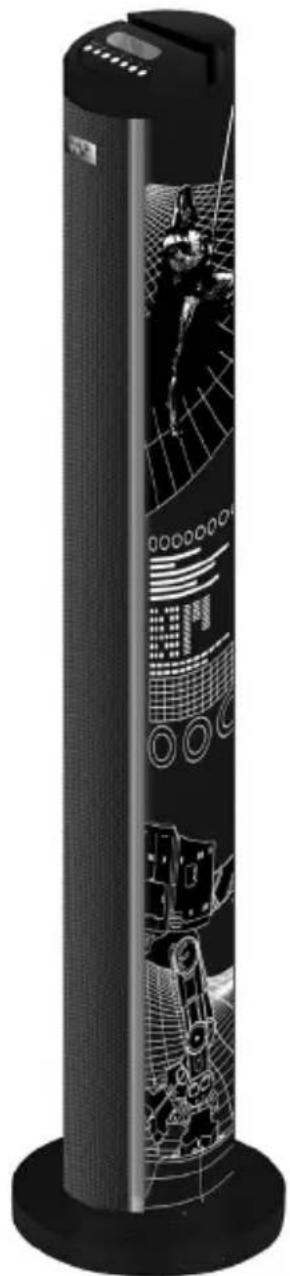
Tour de son Bluetooth® Star Wars Star Wars Bluetooth® Sound Tower
natural_image
Black cylindrical device with abstract digital patterns and a central figure, no visible text or symbolsLEXIBOOK
BT2000SW
MESURES DE SECURITE
natural_image
Black triangular warning sign with a lightning bolt symbol (no text)MISE EN GARDE
RISQUE D'ÉLECTROCUTION
NE PAS OUVRIR

natural_image
Black triangular warning symbol with exclamation mark (no text or numbers)MISE EN GARDE : AFIN DE RÉDUIRE LES RISQUES D'ÉLECTROCUTION, NE PAS ENLEVER LE COUVERCLE (NI L'ARRIÈRE). NE CONTIENT AUCUNE PIÈCE POUVANT ÊTRE RÉPARÉE NI REMPLACÉE PAR L'UTILISATEUR. CONFIER TOUTE RÉPARATION À UN TECHNICIEN QUALIFIÉ.
EMPLACEMENT DES TOUCHES

Haut

© 2015 Bluetooth SIG, Inc.
Appairage
natural_image
Black triangular warning sign with white lightning bolt symbol (no text)CAUTION
RISK OF ELECTRIC SHOCK
DO NOT OPEN

natural_image
Black triangular warning symbol with exclamation mark (no text or numbers)CAUTION: TO REDUCE THE RISK OF ELECTRIC SHOCK, DO NOT REMOVE COVER (OR BACK). NO USER-SERVICEABLE PARTS INSIDE. REFER SERVICING TO QUALIFIED SERVICE PERSONNEL.
DANGEROUS VOLTAGE:
The lightning flash with arrowhead symbol within an equilateral triangle is intended to alert the user to the presence of uninsulated dangerous voltage within the product's enclosure that may be of sufficient magnitude to constitute a risk of electric shock to persons.

ATTENTION :
The exclamation point within an equilateral triangle is intended to alert the user to the presence of important operating and maintenance (servicing) instructions in the literature accompanying the appliance.
WARNING:
- To reduce the risk of fire or electric shock, do not expose this appliance to rain or moisture.
- The apparatus shall not be exposed to dripping or splashing and that no objects filled with liquids, such as vases, shall be placed on the apparatus.
- The mains plug is used as the disconnect device, the disconnect device shall remain readily operable.
- In order to disconnect the apparatus from the mains completely, the mains plug should be disconnected from the mains socket outlet completely.
SURGE PROTECTORS:
It is recommended to use a surge protector for AC connection. Lightning and power surges ARE NOT covered under warranty for this product.
SAFETY INSTRUCTIONS
PLEASE READ BEFORE OPERATING THIS EQUIPMENT.
Before using the unit, be sure to read all operating instructions carefully. Please note that these are general precautions and may not pertain to your unit.
- Read these instructions.
- Keep these instructions.
- Heed all warnings.
- Follow all instructions.
-
Do not use this product near water and moisture, for example: near a bathtub, washbowl, kitchen sink or laundry tub; in a wet basement; or near a swimming pool. No objects such as vases should be placed on the unit.
-
Unplug this product from the wall outlet before cleaning. Do not use liquid cleaners or aerosol cleaners. It may damage the screen. Use a dry cloth for cleaning only.
-
Slots and openings in the cabinet and in the back or bottom are provided for ventilation, to ensure reliable operation of the product and to protect it from overheating. These openings must not be blocked or covered. The openings should never be blocked by placing the product on a bed, sofa, rug or other similar surface. This product should never be placed near or over a radiator or heat source. This product should not be placed in a built-in installation such as a bookcase or rack unless proper ventilation is provided or the manufacturer's instructions have been adhered to.
-
Minimum distances 10 cm around the apparatus for sufficient ventilations.
-
Do not install near any heat sources such as radiators, heat registers, stoves, or other apparatus (including amplifiers) that produce heat.
-
Do not defeat the safety purpose of the polarized or grounding type plug. A polarized plug has two blades with one wider than the other. A grounding type plug has two blades and a third grounding prong. The wide blade or the third prong is provided for your safety. If the provided plug does not fit into your outlet, consult an electrician for replacement of the obsolete outlet.
-
Protect the power cord from being walked on or pinched particularly at plugs, convenience receptacles, and the point where they exit from the apparatus.
-
Only use attachments/accessories specified by the manufacturer.
-
Unplug this apparatus during lightning storms or when unused for long periods of time.
-
Refer all servicing to qualified service personnel. Servicing is required when the apparatus has been damaged in any way, such as power-supply cord or plug is damaged, liquid has been spilled or objects have fallen into the apparatus; and/or the apparatus has been exposed to rain or moisture and does not operate normally, or has been dropped.
-
This product should be operated only from the type of power source indicated on the marking label. If you are not sure of the type of power supply to your home, consult your appliance dealer or local power company. For products intended to operate from battery power, or other sources, refer to the operating instructions.
-
Do not overload wall outlets and extension cords as this can result in a risk of fire or electric shock. Use only power source as indicated.
- Never push objects of any kind into this product through openings as they may touch dangerous voltage points or short out parts that could result in fire or electric shock. Never spill or spray any type of liquid on the product.
- Do not attempt to service this product yourself as opening or removing covers may expose you to dangerous voltage or other hazards. Refer all servicing to qualified service personnel.
- Upon completion of any service or repairs to this product, ask the service technician to perform safety checks to determine that the product is in proper operating condition.
- Batteries shall not be exposed to excessive heat such as sunshine, fire or the like.
- Attention should be drawn to the environmental aspects of battery disposal.
- Use the apparatus in moderate climates. (Work temperature 0°C\~ +40°C)
- The socket-outlet shall be installed near the equipment and must be easily accessible.
- The mains plug is used as disconnect device and it should remain readily accessible during intended use.
- In order to disconnect the apparatus from the mains completely, the mains plug should be disconnected from the main socket outlet completely.
- The apparatus shall not be exposed to dripping or splashing and no object filled with liquids, such as vases, shall be placed on the apparatus.
- At full power, listening to a music player for prolonged periods can damage the user's hearing.
UNPACKING THE DEVICE
When unpacking, ensure that the following elements are included:
1 x Speaker Body
1 x Speaker Base
1 x Screw
1 x Screw washer
1 x 3.5 mm Line-in Cable
1 x Remote Control
1 x Instruction Manual
WARNING: All packaging materials, such as tape, plastic sheets, wire ties and tags are not part of this product and should be discarded.
POWER SOURCES
The Star Wars Bluetooth® Sound Tower operates on AC 110-240V \~ 50/60Hz.
AC operation
- Check that the unit is switched off.
- Insert the plug into any convenient AC 110-240V \~ 50/60Hz power outlet.

NOTE:
- The socket-outlet shall be installed near the equipment and shall be easily accessible.
WARNING: Malfunction or loss of memory may be caused by strong frequency interference or electrostatic discharge. Should any abnormal function occur, unplug the unit from the mains socket and plug it back in.
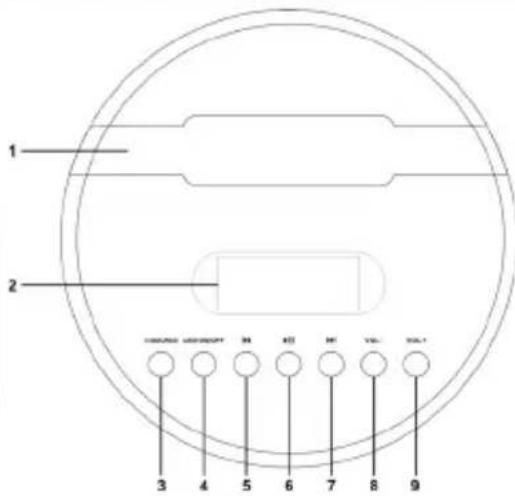
LOCATION OF CONTROLS
HS179N3


flowchart
graph TD
    A["STANDBY"] --> B["MP3"]
    B --> C["AUX"]
    C --> D["FM"]
    D --> E["FF/II"]
    E --> F["LED SCAN"]
    F --> G["CH-"]
    G --> H["BASS+"]
    H --> I["TREB+"]
    I --> J["VOL+"]
    J --> K["BASS-"]
    K --> L["TREB-"]
    L --> M["VOL-"]
    N["3"] --> O["6"]
    P["9"] --> Q["12"]
    R["17"] --> S["18"]
Top
- Groove for holding tablets, smartphones, MP3 and other audio devices
- LED display
- Power/Source Button
- LED ON/OFF Button
- Skip Backward
- Play/Pause/Pairing
- Skip Forward
- Volume –
- Volume +
Back
- USB port (for playback)
- SD port (for playback)
- FM antenna
- AUX-in
- 5V, 1A (USB port for charging)
Remote control
- Power/Standby
- MP3 mode
- Mute
- Aux In
- FM radio
- Bluetooth®
- Skip Backward
8.Play/Pause - Skip Forward
- LÉD/Scan
Press to turn the LED lamps on/off In FM mode, long press to scan the FM radio stations.
- CH-
- CH+
- Bass+
- Bass-
- Treb+
- Treb-
- Volume+
- Volume-
SETTING UP THE UNIT
- Take out the speaker body and speaker base carefully from the box.
- Take out the screw and the screw washer.
- Align the hole on the speaker base and the speaker body.
- Screw the base into the body by hands with the screw.
- Place the speaker so it's standing on the floor.
Setting up the remote
- Slide out the battery holder from the remote control case.
- Place one 3V -GR2025 (Lithium) battery into the battery holder, observing the polar marking. If the battery is placed incorrectly, the remote control will not work. Dispose of the old battery properly. Do not leave it lying around where a child or pet could play with or swallow it.
- Battery may explode or leak if it is mistreated. Do not attempt to recharge it or disassemble it. Do not dispose of the old battery in a fire.
- Insert the battery holder into the battery compartment.

Using the remote control to operate the product
Aim the remote control directly at remote control sensor (IR) on the front panel. Don't put any objects between the remote control and the system while operating the unit.
Non-rechargeable batteries are not to be recharged. Rechargeable batteries are to be removed from the product before being charged. Rechargeable batteries are only to be charged under adult supervision. Different types of batteries or new and used batteries are not to be mixed. Only batteries of the same or equivalent type as recommended are to be used. Batteries are to be inserted with the correct polarity. Exhausted batteries are to be removed from the product. The supply terminals are not to be short circuited. Do not throw batteries into a fire. Remove the batteries if you are not going to use the game for a long period of time.
WARNING: Malfunction or loss of memory may be ca used by strong frequency interference or electrostatic discharge. Should any abnormal function occur, remove the batteries and insert them again, or unplug the unit from the mains socket and re-plug it again.
TURNING THE UNIT ON AND OFF
Press POWER/SOURCE to turn the speaker on; press and hold for about 3 seconds to turn the speaker off.
When the speaker is powered on, press this button to switch between FM mode, USB mode, Aux in mode and Bluetooth® mode.
Note: When turning on the unit, you will hear a "lightsaber™" sound and the LED lamps will light up from the bottom to the top; this process will repeat when turning off the unit.
UNIT FUNCTIONS
VOLUME
-
Press VOL- (8) to decrease the volume.
-
Press VOL+ (9) to increase the volume.
CAUTION: Too high volume can damage your hearing. For this reason, please turn the volume down.
Play/Pause/Pairing
-
Press ▶ (6) to start playing audio files from your paired device.
-
Press this button again to pause.
-
Press ▶ and hold to activate Bluetooth ® pairing.
PREVIOUS/ NEXT
- Press|◀◀ (5) to go back to previous track.
Press and hold to rewind content under USB/SD mode only.
- Press ▶▶| (7) to play next track.
Press and hold to fast forward content under USB/SD mode only.
NOTE : Some music players do not fully support Bluetooth® audio controls. Play/pause, previous and next buttons on the Bluetooth® sound tower may not respond.
The music player may also turn off. To get the best control experience in the said player, use the on-screen track controls of your music player rather than those on the sound tower.
LED lamps
Press LED ON/OFF (4) to turn the LED lamps on/off.
Note: When the LED lamps are turning on, the red light will lighten from the bottom to the top; and when the LED lamps are turning off, the red light will die out from the top to the bottom.
BLUETOOTH® SET UP
The Bluetooth® word mark and logos are registered trademarks owned by Bluetooth SIG, Inc. and any use of such marks by Lexibook® is under license. Other trademarks and trade names are those of their respective owners.
© 2015 Bluetooth SIG, Inc.
Pairing
- Power on the unit, press POWER/SOURCE (3) to switch to the Bluetooth® mode. The LED display will indicate “>bt”.
- Activate Bluetooth® in your smartphone/tablet, search for the unit "BT2000SW" and select (please refer to the instruction manual of your device on how to active this function).
- Once the unit is found, enter password "0000" to connect with smartphone/tablet (some devices may not need password).
- If your smartphone/tablet cannot find the unit or cannot pair, please power on the unit again and repeat the above steps.
- The sound tower automatically finds the last device it was paired with. If the unit cannot auto connect the previous paired device, please re-activate Bluetooth® in your smartphone/tablet and repeat the above steps to finish the connection.
Notes:
- The Bluetooth® tower only connects to one device at a time.
- Make sure the effective distance between the Bluetooth® device and the tower speaker is within 10m.
- Interference may occur during playback when using the Bluetooth® function near other wireless devices. If playback through Bluetooth® is problematic, move the Bluetooth® speaker and the playback device to a different location, or use the 3.5mm AUX IN jack instead of the Bluetooth® function.
AUX IN SETUP
- Connect the 3.5 mm cable to the Aux-in jack (13). Connect the other end of the
3.5 mm cable to an MP3 player or another audio device. - Press the "POWER/SOURCE" button to turn the unit on.
- Press the "POWER/SOURCE" button on the top panel or the "Aux in" button on the remote (4) to switch to Aux-in mode.
- Use the controls on the connected device to begin playing audio routed through the unit.
OTHER FUNCTIONS
DC 5V 1A USB port for charging
The USB port for charging (14) can charge all devices with the same power range (5V, 1A). Before charging, make sure the power supply is proper for your device.
USB port for playing MP3
Power on the unit and insert a USB Flash Drive (8GB max) into the USB Port (10), ensuring the plug is fully and properly inserted.
If the tower do not play music from the USB automatically, press "MP3" button (2) on the remote.
SD port for playing MP3
Insert an SD or MMC memory card into the SD port (11). Make sure it is inserted in the right way.
If the tower do not play music from the SD card automatically, press "MP3" button on the remote.
FM radio
Playing the radio
- Power on the unit and ensure the FM Antenna (12) has been fully extended.
- Press "POWER/SOURCE" to adjust to "FM" mode or press "FM" button (5) on the remote control.
- Press |◀◀ and ▶▶| to select the desired FM radio station or press and hold to the scan the radio stations; it will automatically stop at the nearest strong signal station.


Programming FM radio presets
- Press and hold "LED/SCAN" button on the remote (10) to search and save stations in the memory (up to 20 stations). "P01" will blink, then the preset station frequency number will be displayed.
- To play the preset Radio Stations, press the "CH-" (11) or "CH+" (12) buttons on the remote.
TROUBLESHOOTING GUIDE
| SYMPTOM | SOLUTION |
| No power. | Make sure AC power plug is connected to the wall socket outlet properly and it has power. |
| No sound. | Check that the volume control is NOT at minimum. |
| Check that it is NOT set to mute. | |
| Make sure that the correct mode has been selected. Press POWER/SOURCE button repeatedly until desired mode is reached. | |
| Sound distortion | Make sure the sound volume is not too high. Press VOL- button to reduce the volume. |
| Bluetooth® reception failure. | Make sure the external device is not too far from the Bluetooth® tower. |
| Make sure both player and tower are set on Bluetooth® mode. |
SPECIFICATIONS
| Power Supply AC 110-240V~50/60Hz | |
| Speaker Units 2 x 3.5" main speakers1 x 4" sub-woofer speaker | speakers |
| Power output 2 x 15W + 1 x 30W, 60RMS | |
| Bluetooth® 2.1 EDR | |
| Effective distance within 10 meters | |
| Working temperature 0°~+40° | |
| LED display 2 x LED lamps | |
CONFORMITY DECLARATION
We, Lexibook® S.A.
Declare under our sole responsibility that the following product:
Kind of product: Star Wars Bluetooth® Sound Tower
Type designation: BT2000SW
Is in compliance with the following standards:
EN 55013:2013
EN 55020:2007+A11:2011
EN 61000-3-2:2006+A1:2009+A2:2009
EN 61000-3-3:2013
EN 301489-1 V1.9.2
EN 301489-17 V2.2.1
EN 300328 V1.8.1
EN 62479:2010
EN 60065:2002+A1:2006+A11:2008+A2:2010+A12:2011

We hereby declare that the above mentioned product is in compliance with the EMC Directive (2004/108/EC), with the Low Voltage Directive (2006/95/EC) and with the R&TTE Directive (1999/5/EC) of the European Commission.

Yiu Wai Man
Product Development Manager
08/06/2015 (Hong Kong)
C€2522

MAINTENANCE
To prevent fire or shock hazard, disconnect your unit from the power source when cleaning. The finish on your unit may be cleaned with a dust cloth and cared for as other furniture. Use a soft, clean cloth moistened with plain, lukewarm water to clean the exterior of the unit. Use caution when cleaning and wiping the plastic parts. Mild soap and a damp cloth may be used on the front panel.
WARRANTY
This product is covered by our 2-years warranty.
For any claim under the warranty or after sale service, please contact your distributor and present a valid proof of purchase. Our warranty covers any manufacturing material and workmanship defect, with the exception of any deterioration arising from the non-observance of the instruction manual or from any careless action implemented on this item (such as dismantling, exposition to heat and humidity, etc.). It is recommended to keep the packaging for any further reference.
In a bid to keep improving our services, we could implement modification on the colours and the details of the product shown on the packaging.
NOTE: Please keep this instruction manual, it contains important information.
Reference: BT2000SW
Designed and developed in Europe – Made in China
© LEXIBOOK®
© & ™ Lucasfilm Ltd.
United Kingdom & Ireland
For any further information, please call Helpline: 0808 1003015
www.lexibook.com

This product is not a toy.
Environmental Protection
Unwanted electrical appliances can be recycled and should not be discarded along with regular household waste! Please actively support the conservation of resources and help protect the environment by returning this appliance to a collection centre (if available).

natural_image
Black triangular warning sign with white lightning bolt symbol (no text)PRECAUCIÓN
RIESGO DE DESCARGA
ELÉCTRICA NO ABRIR

natural_image
Black triangular warning symbol with exclamation mark (no text or numbers)- Canal-
- Canal+
- Graves+
- Graves-
- Agudos+
- Agudos-
- Volumen+
- Volumen-
© 2015 Bluetooth SIG, Inc.
Emparejamiento
08/06/2015 (Hong Kong)
C€2522
MANTENIMIENTO
natural_image
Black triangular warning sign with a lightning bolt symbol (no text)CUIDADO
RISCO DE CHOQUE
ELÉCTRICO NÃO ABRIR

natural_image
Black triangular warning symbol with exclamation mark (no text or numbers)CUIDADO: PARA REDUZIR O RISCO DE CHOQUE ELÉCTRICO, NÃO RETIRE A COBERTURA DIANTEIRA OU TRASEIRA. NÃO EXISTEM PEÇAS QUE POSSAM SER REPARADAS PELO UTILIZADOR NO INTERIOR. A REPARAÇÃO DEVERÁ SER FEITA POR PESSOAL QUALIFICADO.
© 2015 Bluetooth SIG, Inc.
Emparelhamento
natural_image
Black triangular warning sign with a lightning bolt symbol (no text)PERICOLO DI SCOSSA ELETTRICA NON APRIRE
ATTENZION

natural_image
Black triangular warning symbol with exclamation mark (no text or numbers)ATTENZIONE: PER RIDURRE IL RISCHIO DI SCOSSA ELETTRICA: NON RIMUOVERE IL COPERCHIO (O LA PARTE POSTERIORE). ALL'INTERNO NON SONO PRESENTI PARTI SOSTITUIBILI DALL'UTENTE. PER EVENTUALI MANUTENZIONI, RIVOLGERSI A PERSONALE DI ASSISTENZA QUALIFICATO.


© 2015 Bluetooth SIG, Inc.
Appaiamento
08/06/2015 (Hong Kong)
C€2522

MANUTENZIONE
natural_image
Black triangular warning sign with white lightning bolt symbol (no text)natural_image
Black triangular warning symbol with exclamation mark (no text or numbers)© 2015 Bluetooth SIG, Inc.
Verbindungsaufbau
natural_image
Black triangular warning sign with white lightning bolt symbol (no text)CAUTION
RISK OF ELECTRIC SHOCK
DO NOT OPEN

natural_image
Black triangular warning symbol with exclamation mark (no text or numbers)LET OP: OM HET RISICO VAN EEN ELEKTRISCHE SCHOK TE VERMINDEREN, VERWIJDER DE BEHUIZING (ACHTERKANT) NIET. IN HET APPARAAT ZITTEN GEEN ONDERDELEN DIE DOOR DE GEBRUIKER GEREPAREERD ZOUDEN KUNNEN WORDEN. LAAT REPARATIES UITVOEREN DOOR GEKWALIFICEERD PERSONEEL.

© 2015 Bluetooth SIG, Inc.
Koppeling
Type benaming: BT2000SW
08/06/2015 (Hong Kong)
C€2522

ONDERHOUD
natural_image
Black triangular warning sign with white lightning bolt symbol (no text)ADVARSEL
FARE FOR ELEKTRISK ST∅DMA
IKKE ÅBNES

natural_image
Black triangular warning symbol with exclamation mark (no text or numbers)ADVARSEL: FOR AT FORMINDSKE RISIKOEN FOR ELEKTRISK ST∅D, MÅ LÅG (OG BAGSIDE) IKKE FJERNES. INDEHOLDER INGEN DELE, SOM BRUGEREN SELV KAN REPARERE. OVERLAD VEDLIGEHOLDELSE TIL KVALIFICEREDE FAGFOLK.

FARLIG SPÆNDING:
BEMAERK:
© 2015 Bluetooth SIG, Inc.
Parring
08/06/2015 (Hong Kong)
C€2522


VEDLIGEHOLDELSE
natural_image
Black triangular warning sign with a white lightning bolt symbol (no text)RISK FÖR ELEKTRISKA STÖTAR FÄR INTE ÖPPNAS
WARNING!

natural_image
Black triangular warning symbol with exclamation mark (no text or numbers)WARNING! FÖR ATT MINSKA RISKEN FÖR ELEKTRISKA STÖTAR, TA INTE BORT HÖLJET (ELLER BAKSIDAN). INGA INTERNA DELAR KAN SERVAS AV ANVÄNDAREN.
ÖVERLÅT SERVICE TILL KVALIFICERAD SERVICEPERSONAL.
SVENSKA

FARLIG SPÄNNING!
OBS!
© 2015 Bluetooth SIG, Inc.
Parning
08/06/2015 (Hong Kong)
CE2522


UNDERHÅLL
IM Code: BT2000SW_IM1225


YOUR OPINION MATTERS / VOTRE AVIS COMPTE

- Tour de son Bluetooth® Star Wars Star Wars Bluetooth® Sound Tower
- MESURES DE SECURITE
- EMPLACEMENT DES TOUCHES
- Haut
- Appairage
- DANGEROUS VOLTAGE:
- ATTENTION :
- WARNING:
- SURGE PROTECTORS:
- SAFETY INSTRUCTIONS
- PLEASE READ BEFORE OPERATING THIS EQUIPMENT.
- UNPACKING THE DEVICE
- POWER SOURCES
- AC operation
- NOTE:
- LOCATION OF CONTROLS
- Top
- Back
- Remote control
- SETTING UP THE UNIT
- Setting up the remote
- Using the remote control to operate the product
- TURNING THE UNIT ON AND OFF
- UNIT FUNCTIONS
- VOLUME
- Play/Pause/Pairing
- PREVIOUS/ NEXT
- LED lamps
- BLUETOOTH® SET UP
- Pairing
- Notes:
- AUX IN SETUP
- OTHER FUNCTIONS
- DC 5V 1A USB port for charging
- USB port for playing MP3
- SD port for playing MP3
- FM radio
- Playing the radio
- Programming FM radio presets
- CONFORMITY DECLARATION
- MAINTENANCE
- WARRANTY
- Environmental Protection
- Emparejamiento
- MANTENIMIENTO
- Emparelhamento
- Appaiamento
- MANUTENZIONE
- Verbindungsaufbau
- Koppeling
- ONDERHOUD
- FARLIG SPÆNDING:
- BEMAERK:
- Parring
- VEDLIGEHOLDELSE
- FARLIG SPÄNNING!
- OBS!
- Parning
- UNDERHÅLL
- YOUR OPINION MATTERS / VOTRE AVIS COMPTE
Brand : LEXIBOOK
Model : BT2000SW
Category : Loudspeaker