
FO 88 C.1 IX - Built-in oven HOTPOINT - Free user manual and instructions
Find the device manual for free FO 88 C.1 IX HOTPOINT in PDF.



| Product Type | Built-in Oven |
| Brand | HOTPOINT |
| Model | FO 88 C.1 IX |
| External Dimensions (W x H x D) | 595 x 595 x 545 mm |
| Niche Dimensions (W x H x D) | 567 x 595 x 545 mm |
| Usable Volume | 56 liters |
| Power Supply | 230 V ~ 50 Hz, 2800 W |
| Number of Cooking Functions | 8 |
| Cooking Functions | Traditional, Pastry, Fast Cooking, Multi-cooking, Pizza, Grill, Gratin, Forced Air |
| Cooking Types | Static, Fan-assisted, Grill, Pizza, Pastry, Convection |
| Electronic Programmer | Yes, with timer and delayed programming |
| Display | Interactive screen with temperature, time, and function indicators |
| Child Safety | Control Lock |
| Cooling System | Automatic cooling fan |
| Interior Lighting | 25 W bulb, E14 base, resistant to 300 °C |
| Oven Door | Removable for cleaning, hinges with levers |
| Recommended Cleaning | Warm water and mild detergent, avoid abrasive products and steam |
| Supplied Accessories | Grid, drip tray (baking tray), shelf supports |
| Approximate Weight | 30 kg |
| Repairability Index | Spare parts available via approved after-sales service |
Frequently Asked Questions - FO 88 C.1 IX HOTPOINT
User questions about FO 88 C.1 IX HOTPOINT
0 question about this device. Answer the ones you know or ask your own.
Ask a new question about this device
Download the instructions for your Built-in oven in PDF format for free! Find your manual FO 88 C.1 IX - HOTPOINT and take your electronic device back in hand. On this page are published all the documents necessary for the use of your device. FO 88 C.1 IX by HOTPOINT.
USER MANUAL FO 88 C.1 IX HOTPOINT
Thermostat knob "C": 50%, 75%, 100%.
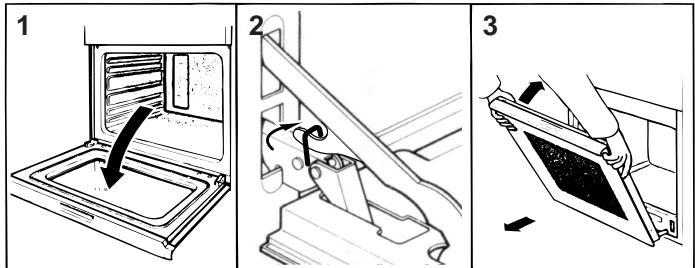
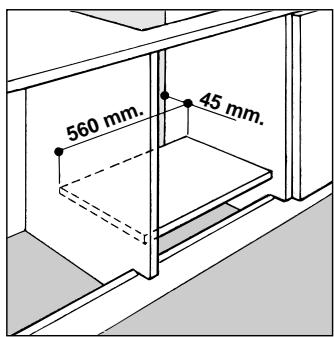
Fig. A
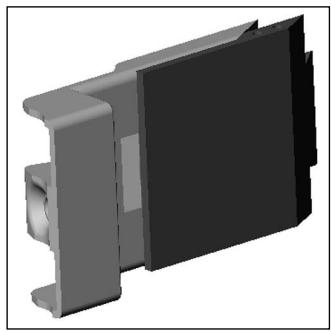
Fig. B
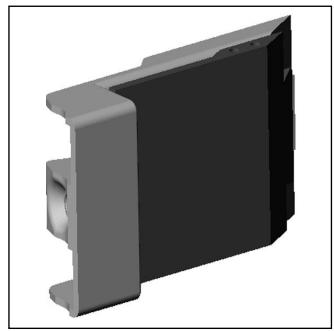
Fig. C
Ariston has come up with a small recipe book, which is practical, full of helpful tips and easy to use, to help you rediscover the delights of cooking.
It contains a wide variety of handy tips to keep in mind to try out new dishes effortlessly: in fact, thanks to the practical interactive display panel which informs you at all times as to the oven operation, your recipes are cooked automatically and therefore perfectly.
Congratulations on choosing an Ariston appliance, which you will find is dependable and easy to use. We recommend that you read the instructions in this owner's manual carefully before use for the best performance and to extend the life of your appliance, as it will provide you with all the instructions you require to ensure its safe installation, use and maintenance. Always keep this owner's manual close to hand since you may need to refer to it in the future. Thank you.
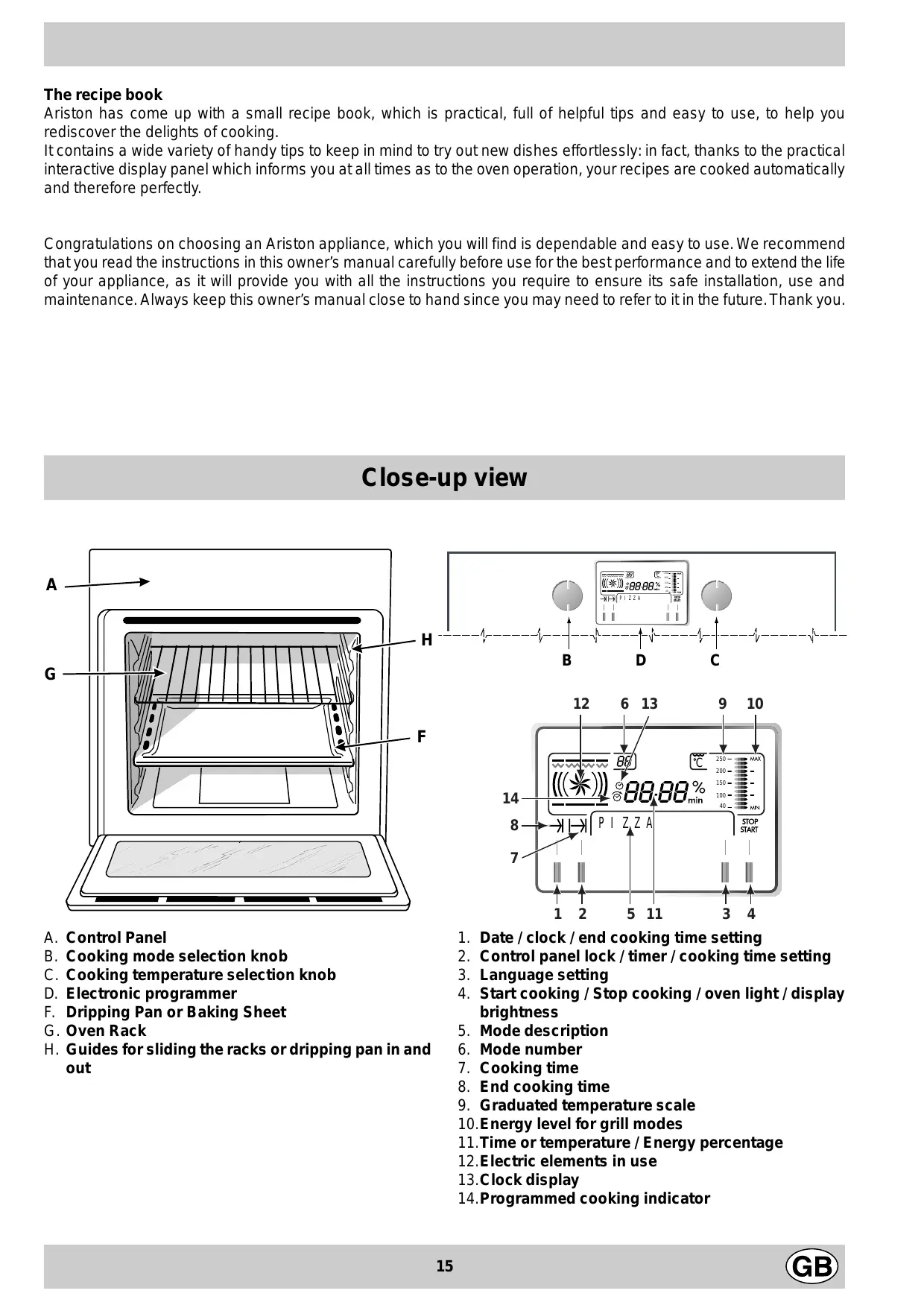
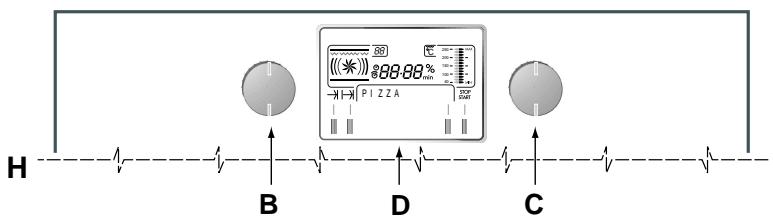
Close-up view
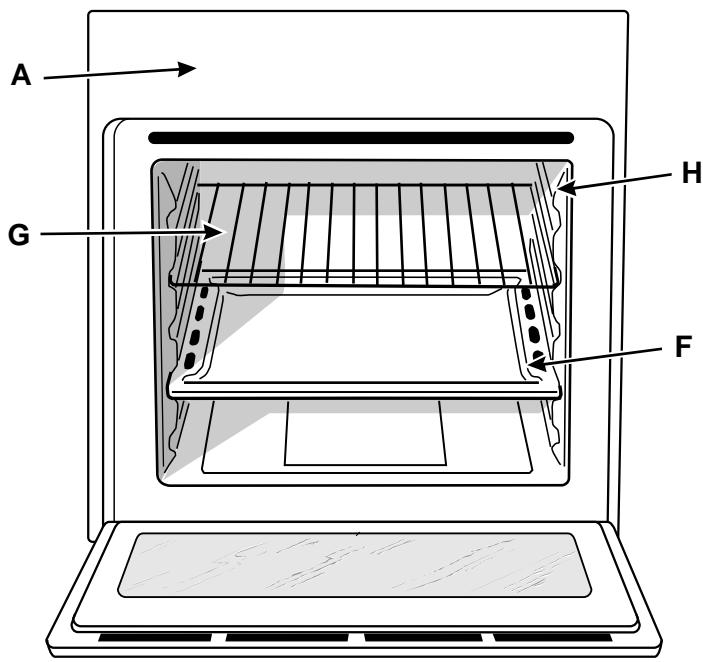
A. Control Panel B. Cooking mode selection knob C. Cooking temperature selection knob D. Electronic programmer F. Dripping Pan or Baking Sheet G. Oven Rack H. Guides for sliding the racks or dripping pan in and out
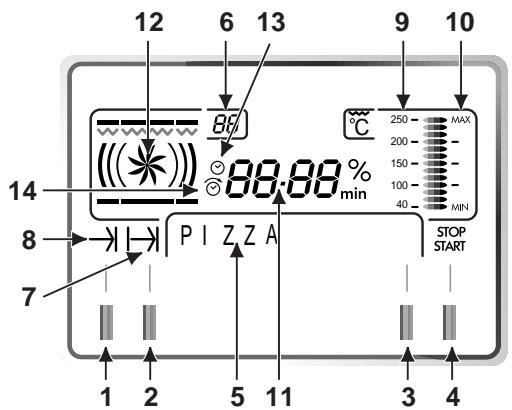
- Date / clock / end cooking time setting
- Control panel lock / timer / cooking time setting
- Language setting
- Start cooking / Stop cooking / oven light / display brightness
- Mode description
- Mode number
- Cooking time
- End cooking time
- Graduated temperature scale
- Energy level for grill modes
- Time or temperature / Energy percentage
- Electric elements in use
- Clock display
- Programmed cooking indicator
The 7 Cuochi oven combines the advantages of traditional convection ovens with those of the more modern fan assisted models in a single appliance.
It is an extremely versatile appliance that allows you to choose easily and safely between 7 different cooking modes. The various features offered by the oven are selected by means of selector knob "B" situated on the control panel.
Setting the clock
The clock can only be set if the oven is turned off.
After the appliance has been connected to the power supply, or following a power failure, the clock displays a flashing 12:00 or the last time memorised.
Any adjustments to the time setting can be made by pressing button 1 and resetting the clock using knob "C", which you can modify until the scrolling writing disappears completely from the display.
Setting the date
To update the date, keep button 1 pressed until the word "YEAR" is indicated on the display.
Update the year by turning knob "C" and then press button 1 to set the month, again using knob "C". Press button 1 again to set the day using knob "C". Press button 1 to memorise the date set.
Timer Feature
The timer can only operate when the oven is turned off.
Please remember that the timer does not control the starting or stopping of the oven, it merely sounds a buzzer when the time is up and can be interrupted at any time just by pressing a button.
To set the timer, press button 2, and then make the necessary adjustment using knob "C".
Press button 4 to start the timer.
At all times during the timer operation, you may:
- adjust its duration using knob "C";
- stop the countdown by pressing button 4 for approximately 3 seconds or turning knob "B" anti-clockwise;
- enable/disable the control panel lock, by pressing button 2 for at least 3 seconds (see the paragraph entitled "Locking and Unlocking the Control Panel").
Selecting the language
Press button 3 for a few seconds with the oven turned off. The languages available appear in sequence on the display panel. Press button 3 again to select the desired language.
Selecting the display panel brightness
Keep button 4 pressed until the word "BRIGHTNESS" is indicated on the display.
Turn knob "C" clockwise/anticlockwise to increase/decrease the brightness of the display panel. A few seconds after this selection, the oven will be ready for further instructions.
Locking and Unlocking the Control Panel
This option enables the user to lock all the buttons and knobs. We especially advise you to use this option if there are children present. To enable the control panel lock, press button 2 for a few seconds. The word "LOCKED" is indicated on the display. To restore the usual commands to the appliance, just press button 2 again for a few seconds. The word "UNLOCKED" will be indicated on the display.
The oven light
When the oven is turned off, you can turn the light on and off by pressing button 4. It is automatically turned off as soon as cooking starts. Nonetheless, you can turn it back on by pressing button 4 again. When the oven is turned off, the light turns off automatically 10 minutes after the last instructions were entered onto the control panel.
Cooling ventilation
In order to reduce the external temperature of the oven, this appliance has been equipped with a cooling fan. During cooking, the fan is always on and a normal flow of air can be heard exiting between the oven door and the control panel.
If there is a hob above the oven, the cooling fan may switch itself on automatically to protect the electronic components, even if the appliance has been switched off.
Note: When cooking is done, the fan stays on until the oven cools down sufficiently.
How To Use Your Oven
Turn knob "B" clockwise to choose from the 7 default cooking modes or among the pre-entered recipes available (see Ariston recipe book).
For each cooking mode, the display will indicate the following:
• the cooking mode name (or that of the recipe); • the cooking mode number (or that of the recipe); • the default temperature; • the heat sources;
Should the recommended temperature not be to your liking, you can always adjust it using knob "C".
Each cooking mode is also associated with a recommended cooking time, which you can modify, from one minute to 10 hours, by pressing button 2 and then turning knob "C" to set it to the desired value. The cooking time can be adjusted until the scrolling wording disappears completely from the display panel.
The selected cooking time does not include the time required for preheating the oven.
To start cooking, press the cooking start button 4.
With the exception of the “Fast cooking” and “Grill” modes, the oven will now begin the pre-heating stage, during which you may still:
- change the temperature by turning knob "C";
- change the cooking time by pressing button 2 and then turning knob "C";
- enable/disable the control panel lock, by pressing button 2 for at least 3 seconds (see the paragraph entitled "Locking and Unlocking the Control Panel");
- stop cooking and turn the oven off by turning knob "B" anti-clockwise.
Note: pre-heating is performed automatically by the appliance, which sets the pre-heating time according to the temperature selected by the user. The display panel will feature how long the oven will take to preheat before cooking starts.
Once the temperature set has been reached, the oven starts the cooking stage in itself, during which you may
still:
- change the temperature by turning knob "C"; if you increase it by more than 25°C, the oven returns to the pre-heating mode;
- change the cooking time by pressing button 2 and then turning knob "C";
- enable/disable the control panel lock, by pressing button 2 for at least 3 seconds (see the paragraph entitled "Locking and Unlocking the Control Panel");
- stop cooking and turn the oven off by turning knob "B" anti-clockwise.
Once cooking is done, the wording "END-READY" will come up on the display, and a buzzer will sound, which will stop after 1 minute, after you press a button or after you turn one of the two knobs.
Notice: The first time you use your appliance, we recommend that you set the thermostat to the highest setting and leave the oven on for about half an hour with nothing in it, with the oven door shut. Then, open the oven door and let the room air. The odour that is often detected during this initial use is due to the evaporation of substances used to protect the oven during storage and until it is installed.
Notice: Place the dripping pan provided on the bottom shelf of the oven to prevent any sauce and/or grease from dripping onto the bottom of the oven only when grilling food or when using the rotisserie (only available on certain models). For all other types of cooking, never use the bottom shelf and never place anything on the bottom of the oven when it is in operation because this could damage the enamel. Always place your cookware (dishes, aluminium foil, etc.) on the grid provided with the appliance inserted especially along the oven guides.
Notice: the appliance is fitted with a diagnosis system which detects any malfunctions. The user is informed of the latter by messages such as:
- "F nn" (nn = a number comprising two digits): in these cases, you need to call for technical assistance as the oven is faulty;
- "W nn" (nn = number comprising two digits): in these cases, it is best to call for technical assistance as the oven has detected a malfunction, although it continues to operate.
Cooking mode description
The cooking modes are selected by turning knob "B".
Traditional

Position of thermostat knob "C": between 40°C and 250°C. The heating elements at both the top and the bottom of the oven will come on. The heat is thus distributed uniformly from the top and from the bottom. This is the classic, traditional type of oven which has been perfected, with exceptional heat distribution and reduced energy consumption. The convection oven is still unequalled when it comes to cooking dishes made up of several ingredients, e.g. cabbage with ribs, local stockfish recipes, tender veal with rice, etc. Excellent results are achieved when preparing meat-based dishes as well (braised meats, stew, goulash, wild game, ham etc.) which need to cook slowly and require basting or the addition of liquid. It nonetheless remains the best system for cooking pastries as well as fruit and cooking using covered dishes for oven baking. When cooking in convection mode, use only one rack, as the temperature would not be distributed evenly on several racks. Using the different rack heights available, you can balance the amount of heat between the top and the bottom of the oven. Select from among the various rack heights based on whether the dish needs more or less heat from the top.
Baking (<<*)
Position of thermostat knob "C": between 40°C and 250°C. The rear heating element and the fan come on, guaranteeing delicate heat distributed uniformly throughout the oven.
This mode is ideal for baking and cooking delicate foods - especially cakes that need to rise - and for the preparation of certain tartlets on 3 shelves at the same time. Here are a few examples: cream puffs, sweet and savoury biscuits, savoury puffs, Swiss rolls and small portions of vegetables au gratin, etc.
"Fast cooking" Mode

Position of thermostat knob "C": between 40°C and 250°C. All the heating elements are activated alternately, and the fan comes on, guaranteeing constant heat distributed uniformly throughout the oven.
This mode is especially recommended for cooking pre-packed food quickly (as pre-heating is not necessary), such as for example: frozen or pre-cooked food) as well as for a few “home-made” dishes.
The best results when cooking using the “Fast cooking” mode are obtained if you use one cooking rack only (the second from the bottom), please see the table entitled “Practical Cooking Advice”.
Multi-cooking Mode

Position of thermostat knob "C": between 40°C and 250°C. All the heating elements are activated alternately and the fan comes on. Since the heat remains constant and uniform throughout the oven, the air cooks and browns food uniformly over its entire surface. With this mode, you can also cook various dishes at the same time, as long as their respective cooking temperatures are the same. A maximum of 2 racks can be used at the same time, following the instructions in the section entitled: "Cooking On More Than One Rack".
This cooking mode is particularly recommended for dishes requiring a gratin finish or for those requiring considerably prolonged cooking times, such as for example: lasagne, pasta bakes, roast chicken and potatoes, etc... Moreover, the excellent heat distribution makes it possible to use lower temperatures when cooking roasts. This results in less loss of juices, meat which is more tender and a decrease in the loss of weight for the roast. The Multi-cooking mode is especially suited for cooking fish, which can be prepared with the addition of a limited amount of condiments, thus maintaining their flavour and appearance. Excellent results can be attained when cooking vegetable-based side dishes like courgettes, aubergines,
peppers, etc.
Desserts: this mode is also perfect for baking leavened cakes.
The “Multi-cooking” mode can also be used to thaw red or white meat and bread, by setting the temperature to 80°C. To thaw more delicate foods, set the thermostat to 60°C.
Pizza Mode
Position of thermostat knob "C": between 40°C and 250°C. All the heating elements are activated alternately and the fan comes on.
The pizza mode is ideal for foods requiring high temperatures to cook, such as pizzas and large roasts. Only use one dripping pan or rack at a time. However, if more than one is used, these must be switched halfway through the cooking process.
Grill
Position of thermostat knob "C": 50%, 75%, 100%.
The top central heating element comes on.
The extremely high and direct temperature of the grill makes it possible to brown the surface of meats and roasts while locking in the juices to keep them tender. The grill is also highly recommended for dishes that require a high temperature on the surface: beef steaks, veal, rib steak, filets, hamburgers etc.
Always leave the oven door ajar during cooking.
Some grilling examples are included in the “Practical Cooking Advice” paragraph.
Note: turn knob “C” and the display will indicate the 3 different energy percentages which represent the minimum (50%), medium (75%) and maximum setting (100%) respectively.
Gratin
Position of thermostat knob "C": between 40°C and 200°C. The top central heating element and the fan come on.
This combination of features increases the effectiveness of the unidirectional thermal radiation of the heating elements through forced circulation of the air throughout the oven. This helps prevent food from burning on the surface, allowing the heat to penetrate right into the food. Excellent results are achieved with kebabs made with meats and vegetables, sausages, ribs, lamb chops, chicken in a spicy sauce, quail, pork chops, etc.
All cooking using the “Gratin” must be done with the oven door shut.
This mode is also ideal for cooking fish steaks, like sword-fish, tuna, grouper, stuffed cuttlefish etc.
Ventilated oven ( (米) )
Position of thermostat knob "C": between 40°C and 210°C. The circular heating element and the fan come on, providing "delicate" heat which is ideal for baking recipes with a low liquid content, such as shortbread biscuits, jam tarts and savoury biscuits (shortcrust pastry). We recommend the use of the second oven rack from the bottom. Preheat the oven first.
Burn-free system (only on certain models)
When using the rotisserie, remember that the oven is fitted with a special system which allows the food to continue to rotate even when cooking is complete: this will prevent the thermal inertia of the oven from affecting in any way the quality of the food cooked in rotisserie mode.
When the set cooking time is up, press any of the buttons to silence the buzzer that the appliance sounds while the spit continues to turn.
To complete this post-cooking phase, just turn knob "B" anti-clockwise until the word "OFF" is displayed or wait for the oven to cool down.
Programming the cooking mode
To programme the cooking mode, follow the instructions below:
- Select the cooking mode by turning knob "B", and the temperature by turning knob "C".
- Set the cooking time by pressing button 2. The recommended cooking time comes up on the display, and you can adjust the same by turning knob "C". Please remember that the time entered does not include the necessary pre-heating stage.
- Set the end cooking time by pressing button 1. The display panel will feature the end cooking time obtained by adding the current time to the previously selected cooking time, as well as the time necessary for the oven to preheat (automatically calculated by the appliance according to the cooking mode selected). Turn knob "C" until the display panel features the time you want the food to be ready.
After these selection procedures, the display panel will feature the time at which preheating will commence (where foreseen), and that at which cooking will be over. The latter can be altered up until the cooking mode and temperature reappear on the display panel. Any incorrect data can be corrected simply by repeating the above-stated instructions.
- Press button 4 to activate the programming.
To modify the settings made, press button 4 for approximately 3 seconds and repeat the above procedures.
To cancel a cooking schedule already programmed. To cancel any programme which has been entered, turn knob "B" anticlockwise until the word "OFF" appears on the display panel.
How to Keep Your Oven in Shape
Before cleaning your oven, or performing maintenance, disconnect it from the power supply.
To extend the life of your oven, it must be cleaned frequently, keeping in mind that:
- Do not use steam equipment to clean the appliance.
- The enamelled or stainless steel parts should be washed with lukewarm water without using any abrasive powders or corrosive substances which could ruin them. Stainless steel could get stained. If these stains are difficult to remove, use special products available on the market. After cleaning, it is advisable to rinse thoroughly and dry.
- The inside of the oven should preferably be cleaned immediately after use, when it is still warm, with hot water and soap. The soap should be rinsed away and the interior dried thoroughly. Avoid using abrasive detergents (for example, cleaning powders, etc.) and abrasive sponges for dishes or acids (such as limescale-remover, etc.) as these could damage the enamel. If the grease spots and dirt are particularly tough to remove, use a special product for oven cleaning, following the instructions provided on the packet.
- If you use your oven for an extended period of time, condensation may form. Dry it using a soft cloth.
- There is a rubber seal surrounding the oven opening which guarantees its perfect functioning. Check the condition of this seal on a regular basis. If necessary, clean it and avoid using abrasive products or objects to do so. Should it become damaged, please contact your nearest After-sales Service Centre. We recommend you avoid using the oven until it has been repaired.
- Never line the oven bottom with aluminium foil, as the consequent accumulation of heat could compromise the cooking and even damage the enamel.
- Clean the glass door using non-abrasive products or sponges and dry it with a soft cloth.
How to remove the oven door
For a more thorough clean, you can remove the oven door. Proceed as follows:
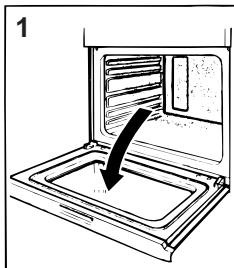
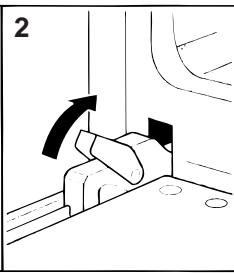
- Open the door fully.
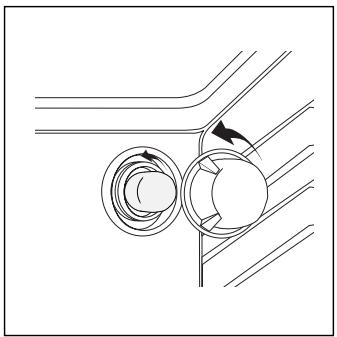
- Lift up and turn the small levers situated on the two hinges.
- Grip the door on the two external sides, shut it slowly but not completely.
- Pull the door towards you, pulling it out of its seat. Reassemble the door by following the above procedures backwards.
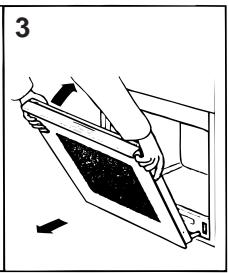
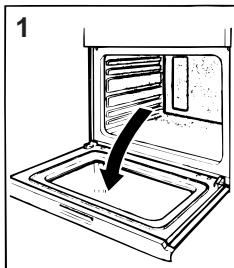
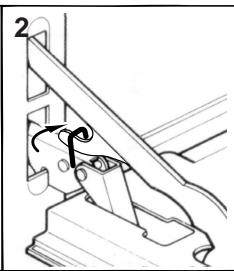
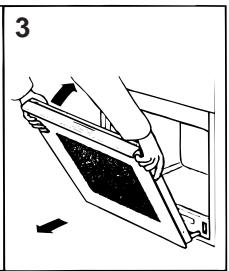
Replacing the Oven Lamp
- Disconnect the oven from the power supply by means of the omnipolar switch used to connect the appliance to the electrical mains; or unplug the appliance if the plug is accessible. - Remove the glass cover of the lamp-holder. - Remove the lamp and replace with a lamp resistant to high temperatures (300°C) with the following characteristics:
- Voltage: 230/240 V
- Wattage 25W
- Type E14
Replace the glass cover and reconnect the oven to the mains power supply.
Practical Cooking Advice
The oven offers a wide range of alternatives which allow you to cook any type of food in the best possible way. With time you will learn to make the best use of this versatile cooking appliance and the following directions are only a guideline which may be varied according to your own personal experience.
Cooking on More Than One Rack
When cooking delicate food on more than one rack, use the “Pastry” mode, which allows you to cook on 3 racks at the same time (the 1st, 3rd and 5th from the bottom). Some examples are included in the “Practical Cooking Advice” table.
When cooking other food on several racks, use the
"Multi-cooking" mode, keeping the following suggestions in mind:
- The oven is fitted with 5 racks. During fan assisted cooking, use two of the three central racks; the lowest and highest racks receive the hot air directly and therefore delicate foodstuffs could be burnt on these racks.
- As a general rule, use the 2nd and 4th rack from the bottom, placing the foodstuffs that require greater heat on the 2nd rack from the bottom. For example, when cooking meat roasts together with other food, place the roast on the 2nd rack from the bottom and the more delicate food on the 4th rack from the bottom.
- When cooking food that requires differing times and temperatures, set a temperature that is somewhere between the two temperatures required, place the more delicate food on the 4th rack from the bottom and take the food requiring less time out of the oven first.
- Use the dripping pan on the lower rack and the grid on the upper;
Using the "Fast Cooking" Mode
Functional, fast and practical for those of you who use pre-packed products (such as for example: frozen or pre-cooked food) along with other food items. You will find useful suggestions in the “Practical Cooking Advice” table.
Using the Grill
The “7 Cuochi” oven offers you several different grilling modes.
Use the “grill” mode, with the oven door ajar, placing the food under the centre of the grill (situated on the 3rd or 4th rack from the bottom).
To catch any fat and/or grease that may drip from the rack, place the dripping pan provided on the first rack from the bottom.
When using this mode, we recommend you set the thermostat to the highest setting. Lower temperatures can also be set, simply by setting the thermostat knob to the temperature required.
To ensure maximum grilling efficiency in your oven, we recommend you wait at least 2 minutes after turning on the grill before placing your dish inside it.
Note: To help you keep the grilling time under control, the oven will sound a buzzer every 3 minutes. This may come in handy when toasting bread, for example.
In models fitted with a rotisserie, you can use the spit kit provided when using the "grill" mode. In this case, cook with the oven door shut, placing the spit kit on the third oven rack from the bottom and the dripping pan on the bottom rack to collect any sauce and/or dripping fat.
The “Gratin” setting, only with the oven door shut, is extremely useful for grilling foods rapidly, as the distribution of heat makes it possible not only to brown the surface, but also to cook the bottom part.
Moreover, it can also be used for browning foods at the end of the cooking process, such as adding that gratin finish to pasta bakes, for example.
When using this mode, place the grid on the 2nd or 3rd oven rack from the bottom (see cooking table) then, to prevent fat and grease from dripping onto the bottom of the oven and thus smoke from forming, place a dripping-pan on the 1st rack from the bottom.
Important: always cook in “Gratin” mode with the oven door shut. This will allow you both to obtain excellent results and to save on energy (approximately 10%).
When using this mode, we advise you to set the temperature to 200°C, as it is the most efficient way to use the grill, which is based on the use of infrared rays. However, this does not mean you cannot use lower temperatures, simply by adjusting the thermostat knob to the desired temperature.
Therefore the best results when using the grill modes are obtained by placing the grid on the lower racks (see cooking table) then, to prevent fat and grease from dripping onto the bottom of the oven and smoke from forming, place a dripping-pan on the 1st oven rack from the bottom.
Baking Cakes
When baking cakes, always place them in a preheated oven. Do not open the oven door during baking to prevent the cake from dropping. In general:
Pastry is too dry
Increase the temperature by 10°C and reduce the cooking time.
Pastry dropped
Use less liquid or lower the temperature by 10°C.
Pastry is too dark on top
Place it on a lower rack, lower the temperature, and increase the cooking time.
Cooked well on the inside but sticky on the outside
Use less liquid, lower the temperature, and increase the cooking time.
The pastry sticks to the pan
Grease the pan well and sprinkle it with a dusting of flour or use greaseproof paper.
| I used more than one level (in the function "ventilated oven") and they are not all at the same cooking point |
| Use a lower temperature setting. It is not necessary to remove the food from all the racks at the same time. |
Cooking Pizza
For best results when cooking pizza, use the “Pizza Mode”:
- Use a light aluminium pizza pan, placing it on the rack supplied with the oven. If the dripping pan is used, this will extend the cooking time, making it difficult to get a crispy crust;
- Do not open the oven door frequently while the pizza is cooking;
- If the pizza has a lot of toppings (three or four), we recommend you add the mozzarella cheese on top halfway through the cooking process.
- If cooking on more than one rack (up to 2), we advise you to use the Multi-cooking Mode (※) as the (※) Pizza Mode would heat the bottom rack more than the others.
Cooking Fish and Meat
When cooking white meat, fowl and fish, use temperature settings from 180 °C to 200 °C.
For red meat that should be well done on the outside while tender and juicy in the inside, it is a good idea to start with a high temperature setting (200°C-220°C) for a short time, then turn the oven down afterwards.
In general, the larger the roast, the lower the temperature setting. Place the meat on the centre of the grid and place the dripping pan beneath it to catch the fat.
Make sure that the grid is inserted so that it is in the centre of the oven. If you would like to increase the amount of heat from below, use the low rack heights. For savoury roasts (especially duck and wild game), dress the meat with lard or bacon on the top.
| Setting made | Type of food | Weight (in kg) | Position of the rack from the oven bottom | Preheating time (min.) | Thermostat setting | Cooking time (min.) |
| 1 Traditional | Duck | 1 | 3 | 15 | 200 | 65-75 |
| Roast veal or beef | 1 | 3 | 15 | 200 | 70-75 | |
| Pork roast | 1 | 3 | 15 | 200 | 70-80 | |
| Biscuits (short pastry) | - | 3 | 15 | 180 | 15-20 | |
| Tarts | 1 | 3 | 15 | 180 | 30-35 | |
| 2 Pastry | Tarts | 0.5 | 3 | 15 | 180 | 20-30 |
| Fruit cakes | 1 | 2/3 | 15 | 180 | 40-45 | |
| Plum cake | 0.7 | 3 | 15 | 180 | 40-50 | |
| Sponge cake | 0.5 | 3 | 15 | 160 | 25-30 | |
| Stuffed pancakes (on 2 racks) | 1.2 | 2-4 | 15 | 200 | 30-35 | |
| Small cakes (on 2 racks) | 0.6 | 2-4 | 15 | 190 | 20-25 | |
| Cheese puffs (on 2 racks) | 0.4 | 2-4 | 15 | 210 | 15-20 | |
| Cream puffs (on 3 racks) | 0.7 | 1-3-5 | 15 | 180 | 20-25 | |
| Biscuits (on 3 racks) | 0.7 | 1-3-5 | 15 | 180 | 20-25 | |
| Meringues (on 3 racks) | 0.5 | 1-3-5 | 15 | 90 | 180 | |
| 3 Fast cooking | Frozen food | |||||
| Pizza | 0.3 | 2 | - | Max | 15-18 | |
| Courgette and prawn pie | 0.4 | 2 | - | 200 | 25 | |
| Country style spinach pie | 0.5 | 2 | - | 220 | 30-35 | |
| Turnovers | 0.3 | 2 | - | 200 | 20-25 | |
| Lasagne | 0.5 | 2 | - | 200 | 35 | |
| Golden Rolls | 0.4 | 2 | - | 180 | 25-30 | |
| Chicken morsels | 0.4 | 2 | - | 220 | 15-20 | |
| Pre-cooked food | ||||||
| Golden chicken wings | 0.4 | 2 | - | 200 | 20-25 | |
| Fresh Food | ||||||
| Biscuits (short pastry) | 0.3 | 2 | - | 200 | 15-18 | |
| Plum cake | 0.6 | 2 | - | 180 | 45 | |
| Cheese puffs | 0.2 | 2 | - | 210 | 10-12 | |
| 4 Multi-cooking | Pizza (on 2 racks) | 1 | 2-4 | 12 | 230 | 15-20 |
| Lasagne | 1 | 3 | 10 | 180 | 30-35 | |
| Lamb | 1 | 2 | 10 | 180 | 40-45 | |
| Roast chicken + potatoes | 1+1 | 2-4 | 15 | 200 | 60-70 | |
| Mackerel | 1 | 2 | 10 | 180 | 30-35 | |
| Plum cake | 1 | 2 | 10 | 170 | 40-50 | |
| Cream puffs (on 2 racks) | 0.5 | 2-4 | 10 | 190 | 20-25 | |
| Biscuits (on 2 racks) | 0.5 | 2-4 | 10 | 180 | 10-15 | |
| Sponge cake (on 1 rack) | 0.5 | 2 | 10 | 170 | 15-20 | |
| Sponge cake (on 2 racks) | 1.0 | 2-4 | 10 | 170 | 20-25 | |
| Savoury pies | 1.5 | 3 | 15 | 200 | 25-30 | |
| 5 Pizza | Pizza | 0.5 | 3 | 10 | 220 | 15-20 |
| Roast veal or beef | 1 | 2 | 10 | 220 | 25-30 | |
| Chicken | 1 | 2/3 | 10 | 180 | 60-70 | |
| 6 Grill | Soles and cuttlefish | 0.7 | 4 | - | 100% | 10-12 |
| Squid and prawn kebabs | 0.6 | 4 | - | 100% | 8-10 | |
| Cuttlefish | 0.6 | 4 | - | 100% | 10-15 | |
| Cod filet | 0.8 | 4 | - | 100% | 10-15 | |
| Grilled vegetables | 0.4 | 3/4 | - | 100% | 15-20 | |
| Veal steak | 0.8 | 4 | - | 100% | 15-20 | |
| Sausages | 0.6 | 4 | - | 100% | 15-20 | |
| Hamburgers | 0.6 | 4 | - | 100% | 10-12 | |
| Mackerels | 1 | 4 | - | 100% | 15-20 | |
| Toasted sandwiches (or toast) | n.° 4-6 | 4 | - | 100% | 3-5 | |
| 7 Gratin | Grilled chicken | 1.5 | 2 | 12 | 200 | 55-60 |
| Cuttlefish | 1.5 | 2 | 12 | 200 | 30-35 | |
| 8 Ventilated | Shortbread biscuits | 0.5 | 2 | 10 | 190 | 10-15 |
| Jam tart | 0.5 | 2 | 10 | 190 | 15-25 | |
| Savoury biscuits | 0.5 | 2 | 10 | 190 | 10-15 |
N.B.: cooking times are approximate and may vary according to personal taste. When cooking using the grill or gratin, the dripping pan must always be placed on the 1st oven rack from the bottom.
To maintain the efficiency and safety of this appliance, we recommend that you do the following:
• only call the Service Centres authorised by the manufacturer • always use original spare parts
- When handling the appliance, we recommend you always use the purpose provided handles recessed into the sides of the oven to prevent harming people or damaging the appliance itself.
- This appliance is designed for non-professional, household use and its functions must not be changed.
- These instructions are only valid for the countries whose symbols appear on the manual and the serial number plate.
- The electrical system of this appliance can only be used safely when it is correctly connected to an efficient earthing system in compliance with current safety standards.
- When the appliance is in use, the heating elements and some parts of the oven door become extremely hot. Make sure you don't touch them and keep children well away.
The following items are potentially dangerous, and therefore appropriate measures must be taken to prevent children and the disabled from coming into contact with them:
- Controls and the appliance in general;
- Packaging (bags, polystyrene, nails, etc.);
- The appliance itself, immediately after use of the oven or grill due to the heat generated;
- The appliance itself, when no longer in use (potentially dangerous parts must be made safe).
Avoid the following:
- Touching the appliance with wet parts of the body;
- Using the appliance when barefoot;
- Pulling on the appliance or the supply cable to unplug it from the electrical outlet;
- Improper or dangerous operations;
- Obstructing the ventilation or heat dissipation slots;
- Allowing power supply cables of small appliances to come into contact with the hot parts of the appliance;
- Exposing the appliance to atmospheric agents such as rain, or sunlight;
- Using the oven for storage purposes;
- Using flammable liquids near the appliance;
- Using adapters, multiple sockets and/or extension leads;
- Attempting to install or repair the appliance without the assistance of qualified personnel.
Qualified personnel must be contacted in the following cases:
- Installation (following the manufacturer's instructions);
- When in doubt about operating the appliance;
- Replacing the electrical socket when it is not compatible with the appliance plug.
Service Centres authorised by the manufacturer must be contacted in the following cases:
- If in doubt about the soundness of the appliance after removing it from its packaging;
- If the power supply cable has been damaged or needs to be replaced;
- If the appliance breaks down or functions poorly; ask for original spare parts.
It is a good idea to do the following:
- Only use the appliance to cook food and nothing else;
- Check the soundness of the appliance after it has been unpacked;
- Disconnect the appliance from the electrical mains if it is not functioning properly and before cleaning or performing maintenance;
- When left unused, unplug the appliance from the electricity mains and turn off the gas tap (if foreseen);
- Use oven gloves to place cookware in the oven or when removing it;
- Always grip the oven door handle in the centre as the extremities of the same may be hot due to any hot air leaks;
- Make sure the knobs are in the “•”/“o” position when the appliance is not in use.
- Cut the power supply cable after disconnecting it from the mains when you decide not to use the appliance any longer.
- The manufacturer may not be held responsible for any damage due to: incorrect installation, improper, incorrect and irrational use.
The appliance must be installed only by a qualified person in compliance with the instructions provided.
The manufacturer declines all responsibility for improper installation which may harm persons and animals and damage property.
Important: The power supply to the appliance must be cut off before any adjustments or maintenance work is done on it.
Installation of Built-in Ovens
In order to ensure that the built-in appliance functions properly, the cabinet containing it must be appropriate. The figure below gives the dimensions of the cut-out for installation under the counter or in a wall cabinet unit.
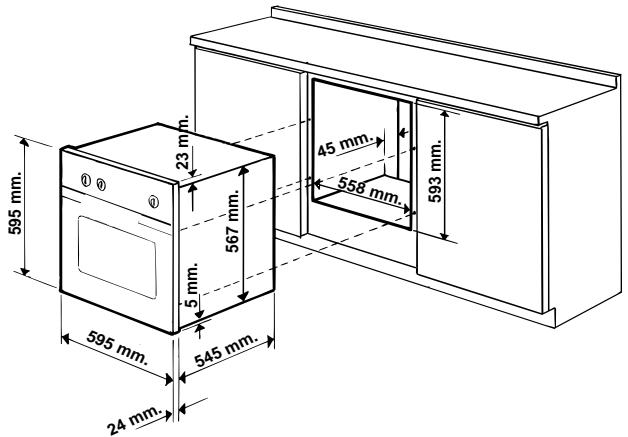
N.B.: Installation in compliance with the consumption declaration
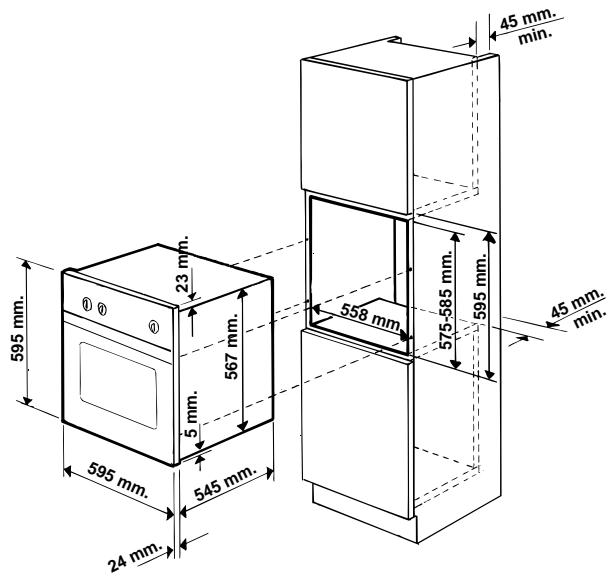
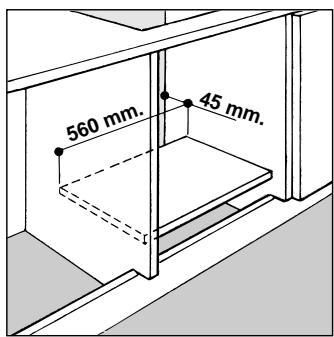
In order to ensure adequate ventilation, the back panel of the cabinet unit must be removed. Installing the oven so that it rests on two strips of wood is preferable. If the oven rests on a continuous, flat surface, there must be an aperture of at least 45 x 560 mm.

The panels of the adjacent cabinets must be made of heat-resistant material. In particular, cabinets with a veneer exterior must be assembled with glues which can withstand temperatures of up to 100 °C.
In compliance with current safety standards, contact with the electrical parts of the oven must not be possible once it has been installed.
All parts which ensure the safe operation of the appliance must be removable only with the aid of a tool.
For the correct centring of your appliance, position the 4 tabs on the sides of the oven in correspondence with the 4 holes on the perimeter of the frame. In particular, if the cabinet side panel:
- is 20 mm thick: the removable part of the tab must be removed (Fig. A);
- is 18 mm thick: use the first groove, which is factory-set (Fig. B); • is 16 mm thick: use the second groove (Fig.C)
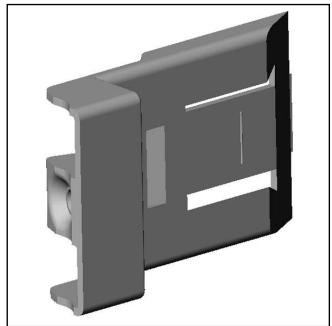
Fig. A
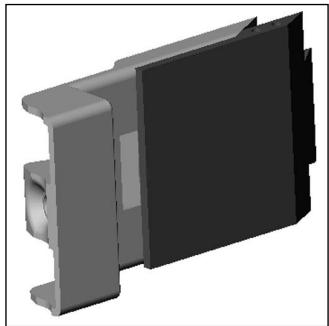
Fig. B
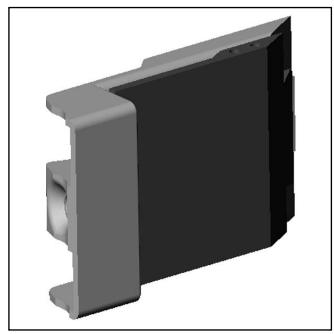
Fig. C
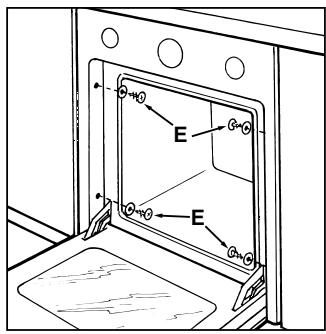
To fasten the oven to the cabinet, open the door of the oven and attach it by inserting the 4 wooden screws into the 4 holes located on the perimeter of the frame.
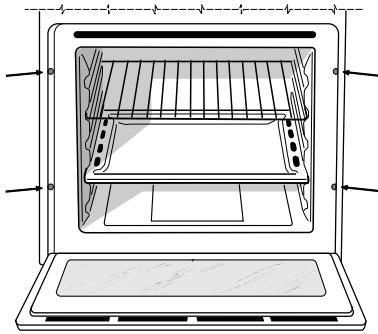
Fastening the oven to the cabinet (only on models FC...)
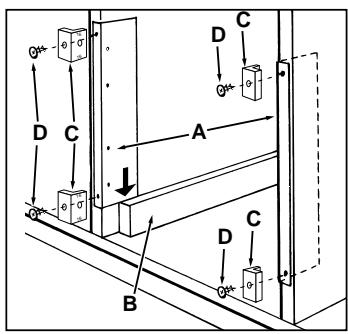
- Place brackets "A" up against the oven support "B".
- Place the tabs "C" up against brackets "A". In particular, if the cabinet side panel:
- is 16 mm thick: mount the tab so that the number 16 it features is facing you;
- is 18 mm thick: mount the tab so that the part without any wording is facing you; • is 20 mm thick: do not mount the tab.
- Fasten the brackets and tabs on the oven cabinet side panel using screws "D".
- Fasten the oven to the cabinet using the screws and plastic washers "E".
Electrical Connection
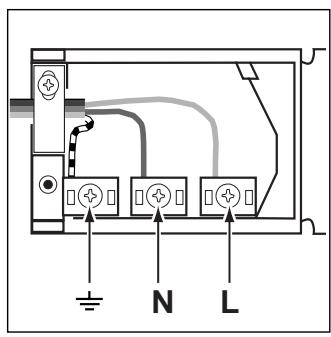
Those ovens equipped with a three-pole power supply cable are designed to operate with an alternating current with the voltage and frequency indicated on the data plate (located on the appliance) and in the instruction manual. The wire for earthing the appliance is yellow-green in colour.
Fitting on a Power Supply Cable
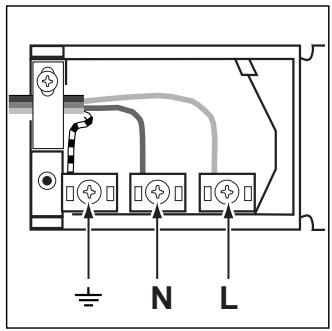
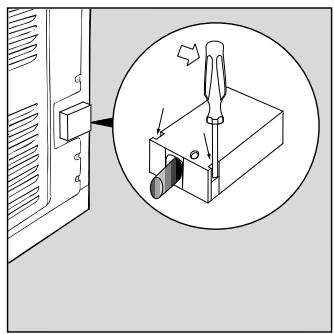
Opening the terminal board:
- Using a screwdriver, prise on the side tabs of the terminal board cover; • Pull open the cover of the terminal board.
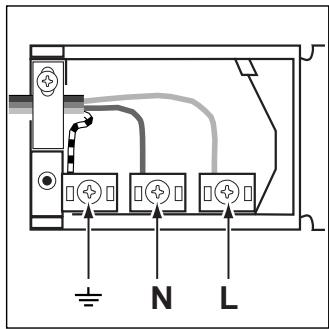
To install the cable, proceed as follows:
- Remove the wire clamp screw and the three contact screws L-N-÷
- Fasten the wires beneath the screwheads using the following colour scheme: Blue (N) Brown (L) Yellow-Green
- Fasten the supply cable in place with the clamp and close the cover of the terminal board.
Connecting the supply cable to the mains
Install a standardised plug corresponding to the load indicated on the data plate. When connecting the cable directly to the mains, install an omnipolar circuit-breaker with a minimum contact opening of 3 mm between the appliance and the mains. The omnipolar circuit breaker should be sized according to the load and should comply with current regulations (the earth wire should not be interrupted by the circuit breaker).
The supply cable should be positioned so that it does not reach a temperature of more than 50°C with respect to the room temperature, anywhere along its length.
Before making the connection, check that:
- The electrical safety of this appliance can only be guaranteed if the cooker is correctly and efficiently earthed, in compliance with regulations on electrical safety. Always ensure that the earthing is efficient; if you have any doubts call in a qualified technician to check the system. The manufacturer declines all responsibility for damage resulting from a system which has not been earthed.
- Before plugging the appliance into the mains, check that the specifications indicated on the date plate (on the appliance and/or packaging) correspond to those of the electrical mains system of your home.
- Check that the electrical capacity of the system and sockets will support the maximum power of the appliance, as indicated on the data plate. If you have any doubts, call in a qualified technician.
- If the socket and appliance plug are not compatible, have the socket replaced with a suitable model by a qualified technician. The latter, in particular, will also have to ensure that the cross section of the socket cables are suitable for the power absorbed by the appliance. The use of adapters, multiple sockets and/or extensions, is not recommended. If their use cannot be avoided, remember to use only single or multiple adapters and extensions which comply with current safety regulations. In these cases, never exceed the maximum current capacity indicated on the single adapter or extension and the maximum power indicated on the multiple adapter. The plug and socket must be easily accessible.
Inner dimensions of the oven:
Width 43.5 cm
Depth 40 cm
Height 32 cm
Inner Volume of the Oven:
56 litres
ENERGY LABEL
Directive 2002/40/EC on the label of electric ovens
Norm EN 50304
Energy consumption for Natural convection
heating mode: —— Convection
Declared energy consumption for Forced convection Class
heating mode: Ventilated
Voltage and Frequency of Power Supply:
230V ~ 50Hz 2800W

This appliance conforms with the following European Economic Community directives:
- 73/23/EEC of 19/02/73 (Low Voltage) and subsequent modifications;
- 89/336/EEC of 03/05/89 (Electromagnetic Compatibility) and subsequent modifications;
- 93/68/EEC of 22/07/93 and subsequent modifications.
- 2002/96/EC
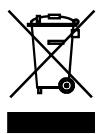
The European Directive 2002/96/EC on Waste Electrical and Electronic Equipment (WEEE), requires that old household electrical appliances must not be disposed of in the normal unsorted municipal waste stream. Old appliances must be collected separately in order to optimise the recovery and recycling of the materials they contain and reduce the impact on human health and the environment. The crossed out “wheeled bin” symbol on the product reminds you of your obligation, that when you dispose of the appliance it must be separately collected. Consumers should contact their local authority or retailer for information concerning the correct disposal of their old appliance.
Recipes
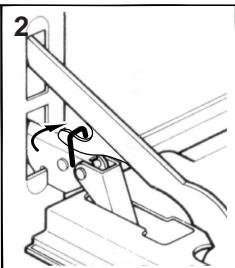
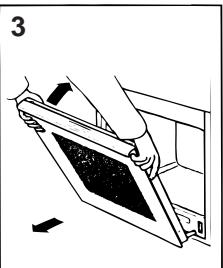
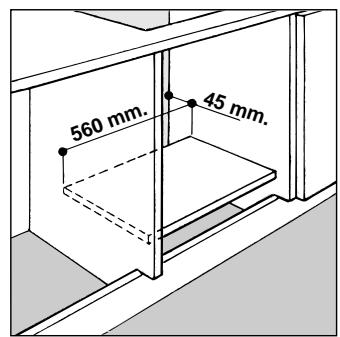
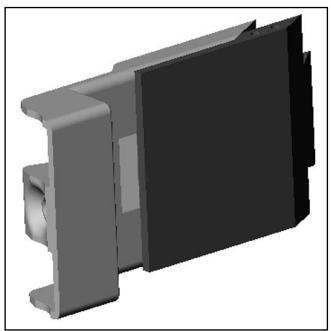
Fig. A Fig. B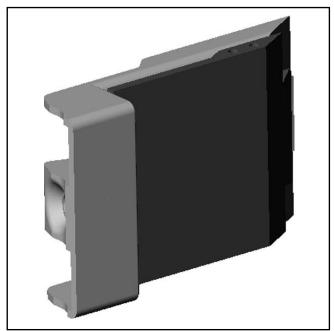
Fig. C
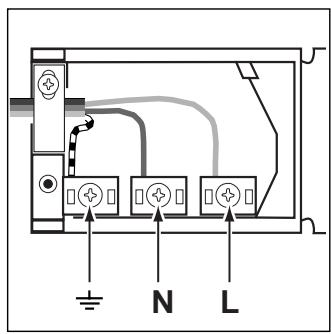
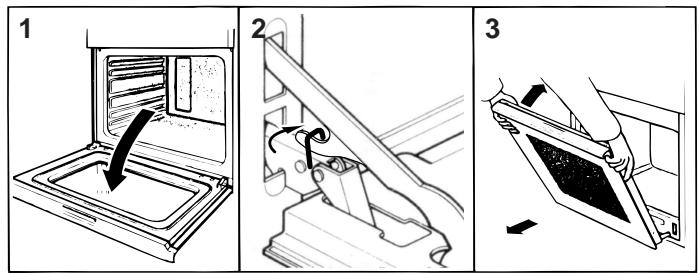
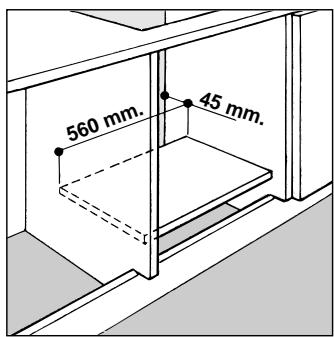
Fig. A
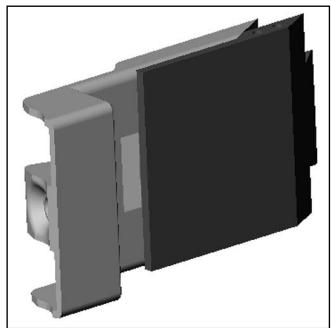
Fig. B
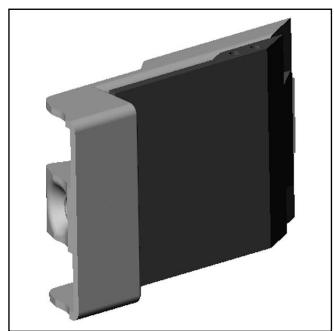
Fig. C
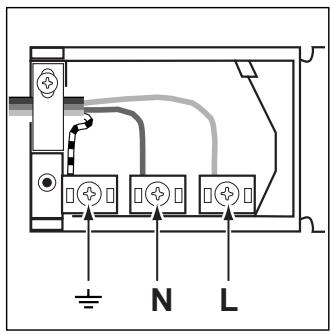
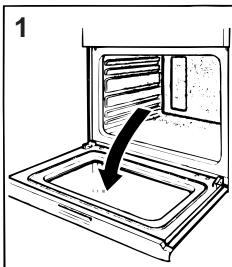
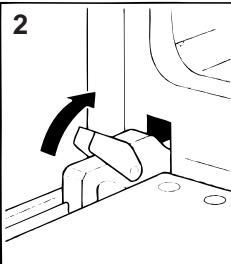
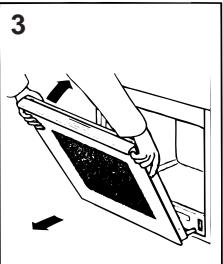
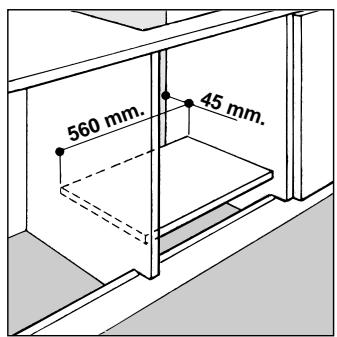
Fig. A
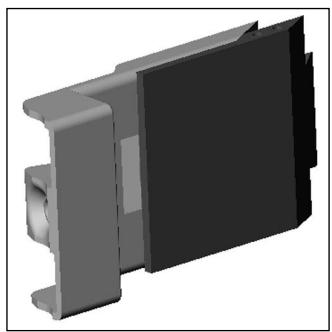
Fig. B
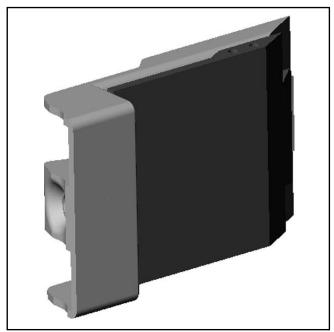
Fig. C
Electrical connection

- CLOSE-UP VIEW
- SETTING THE CLOCK
- SETTING THE DATE
- TIMER FEATURE
- SELECTING THE LANGUAGE
- SELECTING THE DISPLAY PANEL BRIGHTNESS
- LOCKING AND UNLOCKING THE CONTROL PANEL
- THE OVEN LIGHT
- COOLING VENTILATION
- HOW TO USE YOUR OVEN
- COOKING MODE DESCRIPTION
- TRADITIONAL
- BAKING (
- FAST COOKING" MODE
- MULTI-COOKING MODE
- PIZZA MODE
- GRILL
- GRATIN
- VENTILATED OVEN ( (米) )
- PROGRAMMING THE COOKING MODE
- HOW TO KEEP YOUR OVEN IN SHAPE
- TO EXTEND THE LIFE OF YOUR OVEN, IT MUST BE CLEANED FREQUENTLY, KEEPING IN MIND THAT
- HOW TO REMOVE THE OVEN DOOR
- REPLACING THE OVEN LAMP
- PRACTICAL COOKING ADVICE
- COOKING ON MORE THAN ONE RACK
- USING THE "FAST COOKING" MODE
- USING THE GRILL
- BAKING CAKES
- PASTRY IS TOO DRY
- PASTRY DROPPED
- PASTRY IS TOO DARK ON TOP
- COOKED WELL ON THE INSIDE BUT STICKY ON THE OUTSIDE
- THE PASTRY STICKS TO THE PAN
- COOKING PIZZA
- COOKING FISH AND MEAT
- THE FOLLOWING ITEMS ARE POTENTIALLY DANGEROUS, AND THEREFORE APPROPRIATE MEASURES MUST BE TAKEN TO PREVENT CHILDREN AND THE DISABLED FROM COMING INTO CONTACT WITH THEM
- AVOID THE FOLLOWING
- QUALIFIED PERSONNEL MUST BE CONTACTED IN THE FOLLOWING CASES
- SERVICE CENTRES AUTHORISED BY THE MANUFACTURER MUST BE CONTACTED IN THE FOLLOWING CASES
- IT IS A GOOD IDEA TO DO THE FOLLOWING
- INSTALLATION OF BUILT-IN OVENS
- FASTENING THE OVEN TO THE CABINET (ONLY ON MODELS FC...)
- ELECTRICAL CONNECTION
- FITTING ON A POWER SUPPLY CABLE
- CONNECTING THE SUPPLY CABLE TO THE MAINS
- ENERGY LABEL
- THIS APPLIANCE CONFORMS WITH THE FOLLOWING EUROPEAN ECONOMIC COMMUNITY DIRECTIVES
- RECIPES
Brand : HOTPOINT
Model : FO 88 C.1 IX
Category : Built-in oven